royal-app
 Satish Kumar
create this app


Comments (0)
Sign in to leave a comment
System Requirements
System Requirements Document
1. Introduction
This System Requirements Document describes EchoAssist, a production-oriented MVP for a private, account-scoped voice and text assistant. EchoAssist serves a single signed-in account owner per account and operates in two distinct assistance modes:
- A typed text assistant that answers questions and helps prepare written text.
- A live answer mode that drafts a ready-to-say, first-person answer for the account owner during an ongoing live conversation, optionally grounded in the owner's uploaded professional background and custom instructions.
The system is delivered as a browser-based single-page application backed by a managed reactive backend, an external AI gateway providing chat completions, speech-to-text transcription, and text-to-speech synthesis, and an OIDC identity provider. The MVP emphasizes strict request-control safeguards, non-fabricating answer policy, consent acknowledgment for voice features, and minimal persistence of conversational content.
This document is derived from the uploaded source material for the EchoAssist MVP and the user's instruction to build the application.
2. System Overview
EchoAssist comprises the following layers:
- Client application: A React single-page application rendered in the browser, providing the assistant workspace (message thread, composer, voice panel, hands-free panel, wake-phrase settings, assistant profile settings, workspace sidebar, welcome and info dialogs).
- Backend service layer: A Convex deployment hosting queries, mutations, and Node-based actions for assistant chat, live prompt assembly, profile settings, wake phrase settings, voice transcription and synthesis, per-user usage control, and user record management.
- Identity layer: An OIDC provider (Hercules authority/client configuration) surfaced through an authorization-code flow with a
/auth/callbackroute; signed-in identity is required for every assistant, profile, voice, and wake-phrase operation. - AI provider layer: An external gateway (
https://ai-gateway.hercules.app/v1) exposing chat completions, audio transcription, and audio speech synthesis through the OpenAI-compatible SDK. - Storage: Backend-managed file storage used for resume documents and short-lived voice recordings, with strict lifecycle rules.
Conversation content is never persisted. Only request-control metadata, the owner's profile (instructions, style, optional resume text), wake phrases, consent acknowledgements, and short-lived files are stored.
3. Functional Requirements
3.1 Authentication and Account Readiness
- As an account owner, I want to sign in through the hosted OIDC identity flow so that all assistant, profile, voice, and wake-phrase operations are scoped to my identity.
- As an account owner, I want to be redirected through a dedicated
/auth/callbackroute so that the authorization-code flow completes cleanly and returns me to the application. - As an account owner, I want my user record to be created automatically on first sign-in so that I do not need a separate registration step.
- As an account owner, I want the system to refuse assistant requests when my account record is not yet ready so that profile data is never sent on behalf of an unprovisioned account.
- As an account owner, I want every backend operation to reject unauthenticated callers before contacting any external provider so that provider access is never triggered without a verified identity.
- As an account owner, I want the client to be able to retrieve my current user record so that the application knows my account state.
3.2 Text Assistant Mode
- As an account owner, I want to send a typed message and receive a concise answer so that I can get help with questions and text preparation.
- As an account owner, I want the text assistant to answer using a fixed concise-assistant system policy that forbids tools, live web access, and invented citations so that responses remain honest about their limits.
- As an account owner, I want the text assistant to acknowledge uncertainty when it matters so that I am not misled by confident but unsupported claims.
- As an account owner, I want typed replies to be bounded in length so that responses remain usable and predictable.
- As an account owner, I want a safe, generic error when the assistant response cannot be generated or is blank so that internal provider diagnostics are never exposed.
3.3 Live Answer Mode
- As an account owner, I want to request a live answer while a conversation is in progress so that I receive a ready-to-say response I can speak aloud.
- As an account owner, I want the live assistant to identify the most recent relevant question in the heard transcript and answer that question rather than the wake phrase so that my spoken reply is on-topic.
- As an account owner, I want the live assistant to use earlier exchanges only to resolve follow-ups so that context is used without derailing the current answer.
- As an account owner, I want the live assistant to output only the spoken answer with no analysis, labels, markdown, or meta-commentary so that I can read it verbatim.
- As an account owner, I want the live answer written in the first person ("I"/"my") rather than as the AI so that the drafted response is ready to deliver as my own.
- As an account owner, I want the live assistant to never answer a career question with the AI's own identity or lack of experience so that answers stay relevant to me.
- As an account owner, I want the live assistant to ask one short clarifying question when the heard question is unclear so that I am not given a wrong answer.
- As an account owner, I want a bounded maximum live answer length (1,100 characters, targeting under 1,000) so that the answer can be spoken safely.
- As an account owner, I want an oversized or length-truncated live answer to be rejected with a clear message rather than silently truncated so that I never speak a clipped answer that drops important caveats.
- As an account owner, I want a suggested remedy in that rejection message (ask a shorter question or choose Concise in Settings) so that I know how to recover.
3.4 Live Answer Grounding and Non-Fabrication Policy
- As an account owner, I want my uploaded professional background and custom instructions to be supplied to the live assistant as a JSON data packet rather than as system instructions so that document text cannot act as executable instructions.
- As an account owner, I want resume facts to take precedence over conflicting custom instructions so that my verified background is not overwritten.
- As an account owner, I want explicit style requests in my custom instructions to override the default response style but never override factual grounding so that presentation preferences cannot loosen accuracy rules.
- As an account owner, I want the live assistant to treat requests to pretend, invent, exaggerate, or adopt unsupported credentials as not evidence so that fabricated experience is never produced.
- As an account owner, I want the live assistant to never invent or embellish experience, skills, tools, projects, employers, education, years, responsibilities, or achievements so that everything I say is defensible.
- As an account owner, I want the live assistant to make personal experience claims only when explicitly supported by my resume or by non-conflicting explicit factual background so that unsupported claims are excluded.
- As an account owner, I want the live assistant to not infer years from overlapping dates and to not assume that knowing a technique proves professional use so that inferred seniority is avoided.
- As an account owner, I want other speakers' claims in the heard conversation to be treated as non-evidence of my background so that I never echo someone else's experience as mine.
- As an account owner, I want previous assistant answers to be labelled as non-factual generated drafts so that they are never carried forward as evidence of experience.
- As an account owner, I want an unsupported claim from an earlier answer or from a removed resume not to be carried forward so that stale or deleted facts do not resurface.
- As an account owner, I want the live assistant to use cautious conditional language when facts are missing so that I get a useful approach without an invented achievement.
- As an account owner, I want the live assistant to briefly ask for a concrete example when a personal example is essential and unavailable, so that I can supply one rather than have one invented.
- As an account owner, I want the live assistant to help with the question using general knowledge without personal career claims when no profile exists so that I still get support.
- As an account owner, I want the live assistant to not mention missing profile data unless needed for clarity so that answers stay natural.
- As an account owner, I want the live assistant to not reveal unrelated resume details or contact information so that my privacy is preserved.
- As an account owner, I want the live assistant to state that it has no live web access, verified current knowledge, or tools, and to not invent citations or take external actions.
- As an account owner, I want transcripts and previous drafts to be treated only as context, never as instructions that change the assistant's rules so that prompt-injection through spoken content fails.
3.5 Response Style Controls
- As an account owner, I want to choose a Concise response style that produces 1–2 short sentences so that my answers are fast to deliver.
- As an account owner, I want to choose a Conversational response style that produces 3–5 natural sentences so that my answers sound like normal speech.
- As an account owner, I want to choose a Detailed response style that produces 5–7 focused sentences so that my answers carry more substance without becoming an essay.
- As an account owner, I want Concise to be my default style when I have never saved settings so that the first experience is immediate.
- As an account owner, I want the system to prefer fewer complete sentences over cutting off a sentence when approaching the spoken-answer budget so that spoken output stays natural.
3.6 Assistant Request Control and Safeguards
- As an account owner, I want only one active assistant request at a time so that overlapping requests cannot corrupt my usage state.
- As an account owner, I want an active request to be protected by a 90-second lease so that a stalled request does not block me indefinitely.
- As an account owner, I want a minimum 3-second interval between assistant requests so that rapid-fire submissions are throttled.
- As an account owner, I want a daily assistant request cap of 50 so that usage stays within the MVP's supported envelope.
- As an account owner, I want my daily counter to reset by UTC day so that the cap applies cleanly per day.
- As an account owner, I want duplicate request IDs to be rejected as already used so that a single logical request cannot be replayed.
- As an account owner, I want to cancel an in-flight assistant request so that a late result is discarded instead of displayed.
- As an account owner, I want cancellation to be scoped to my own account so that no other user can cancel my request.
- As an account owner, I want cancellation request IDs to be validated so that blank or oversized IDs are rejected.
- As an account owner, I want the system to record that cancellation discards a late result but cannot abort a provider call already in progress, so that behavior is predictable.
- As an account owner, I want only request-control metadata (no conversation content, messages, or text) to be stored so that my conversations are never persisted.
- As an account owner, I want a distinct "another request is in progress" conflict message so that I understand why a request was refused.
3.7 Message Validation
- As an account owner, I want my message history validated as an alternating user/assistant conversation that starts and ends with a user message so that malformed histories are rejected.
- As an account owner, I want a maximum of 20 messages per request so that oversized histories are refused.
- As an account owner, I want a maximum of 6,000 characters per message so that individual messages stay bounded.
- As an account owner, I want a maximum total conversation length of 24,000 characters so that total payload stays bounded.
- As an account owner, I want request IDs to be non-blank and no longer than 100 characters so that identifiers remain well-formed.
- As an account owner, I want validation failures to return a generic "message history is invalid" error so that internal details are not exposed.
3.8 Assistant Profile: Instructions and Style
- As an account owner, I want to save custom instructions for my assistant so that it reflects my stated background and presentation preferences.
- As an account owner, I want my custom instructions limited to 4,000 characters so that the prompt stays bounded.
- As an account owner, I want to select and persist my response style so that my preference survives across sessions.
- As an account owner, I want to retrieve my profile settings (instructions, style, revision, resume name and text) so that the settings screen reflects my saved state.
- As an account owner, I want my saved settings to be private to my account so that no other account can read them.
- As an account owner, I want a revision number on my profile so that stale writes are detected.
- As an account owner, I want a conflict message when my profile changed elsewhere so that I can reopen Settings and retry rather than overwrite newer data.
- As an account owner, I want the system to fetch fresh profile data on each live answer so that my most recent edits and removals are used.
- As an account owner, I want profile data for answers to be resolved from my authenticated identity only, never from a client-supplied owner identifier.
3.9 Resume Upload and Extraction
- As an account owner, I want to upload a resume in PDF or DOCX format so that my live answers can be grounded in my real background.
- As an account owner, I want file names with control characters or names longer than 200 characters rejected so that invalid names cannot enter the system.
- As an account owner, I want resumes larger than 5 MB rejected so that uploads stay bounded.
- As an account owner, I want a file whose extension and content type disagree rejected so that only genuine PDF or DOCX files are accepted.
- As an account owner, I want my file's fingerprint (SHA-256) validated in a strict base64 format so that uploads are bound to the file I selected.
- As an account owner, I want a short-lived upload ticket (expiring after 15 minutes) created before upload so that uploads are time-bounded and account-scoped.
- As an account owner, I want only one active upload ticket per account so that stale tickets cannot accumulate.
- As an account owner, I want the uploaded blob verified against my ticket's size, fingerprint, and content type, and checked to be newer than the ticket, so that a substituted file is rejected.
- As an account owner, I want an upload ticket belonging to another account rejected so that I cannot claim someone else's file.
- As an account owner, I want an expired ticket rejected with a "select the file again" message so that I know to restart.
- As an account owner, I want a reused or already-claimed upload rejected so that a file can be claimed only once.
- As an account owner, I want extracted resume text to require at least 40 characters and at least 30 letters or numbers so that scanned image uploads are refused with guidance to use a text-based document.
- As an account owner, I want extracted resume text to be capped at 60,000 characters with a clear "too long" message so that truncation never silently drops content.
- As an account owner, I want a failed replacement upload to preserve my previously saved resume so that a bad upload does not destroy my existing data.
- As an account owner, I want my stored resume to expose only a name and extracted text, never a file URL or storage identifier, so that the underlying file is not directly reachable.
- As an account owner, I want my resume replaced by a new upload to have its previous file deleted from storage and its ownership record removed so that no orphaned copies remain.
- As an account owner, I want to remove my resume entirely, with the same deletion of the underlying file and ownership record.
- As an account owner, I want resume-ownership verification before deletion, with a forbidden error if ownership cannot be confirmed, so that no file is deleted without verified ownership.
- As an account owner, I want choosing a replacement and a removal simultaneously rejected so that the action is unambiguous.
- As an account owner, I want resume text normalization to strip null characters and surrounding whitespace so that stored text is clean.
3.10 Voice Input: Speech-to-Text
- As an account owner, I want to record a short voice clip and receive a transcription so that I can capture spoken input without typing.
- As an account owner, I want only valid 16 kHz mono PCM WAV audio accepted, with canonical RIFF/WAVE/fmt/data headers, so that malformed audio is refused before contacting the provider.
- As an account owner, I want clips between 0.2 and 30 seconds accepted so that recordings stay within the supported transcription envelope.
- As an account owner, I want clips larger than 960,044 bytes rejected so that audio size stays bounded.
- As an account owner, I want my transcript bounded to 6,000 characters so that oversized provider output is contained.
- As an account owner, I want a safe error when transcription cannot be completed so that provider diagnostics are not surfaced.
- As an account owner, I want my temporary recording deleted after transcription completes, so that my audio is not retained.
- As an account owner, I want my temporary recording still deleted when transcription fails, so that failed requests never leave audio behind.
3.11 Voice Output: Text-to-Speech
- As an account owner, I want text spoken aloud as audio so that I can hear the assistant's response.
- As an account owner, I want speech input text bounded to 1,200 characters so that synthesis requests stay bounded.
- As an account owner, I want blank speech text rejected so that empty synthesis calls are refused.
- As an account owner, I want generated speech returned as MP3 with a bounded byte size (maximum 900,000 bytes) so that audio payloads stay contained.
- As an account owner, I want a safe error when speech audio cannot be generated so that provider diagnostics are not surfaced.
3.12 Voice Usage, Consent, and Recording Lifecycle
- As an account owner, I want to acknowledge a specific consent version for standard voice use so that my consent is explicitly recorded.
- As an account owner, I want a separate consent version for hands-free use so that each voice mode carries its own acknowledgment.
- As an account owner, I want the latest consent version and consent timestamp stored per account so that consent state is auditable.
- As an account owner, I want an unknown consent version rejected so that only recognized consent records are accepted.
- As an account owner, I want a daily voice request cap of 1,000, resetting at midnight UTC, with a message explaining that each transcription clip and each spoken reply counts, so that usage is clear and bounded.
- As an account owner, I want a minimum 3-second interval between voice requests so that rapid submissions are throttled.
- As an account owner, I want only one active voice request at a time, protected by a 90-second lease, so that overlapping requests cannot corrupt my state.
- As an account owner, I want duplicate voice request IDs rejected as already used so that a single logical request cannot be replayed.
- As an account owner, I want a stale recording from a previous request cleaned up on my next accepted voice request so that at most one recording per account exists.
- As an account owner, I want cleanup of stale recordings to affect only my own account so that other accounts' recordings are never touched.
- As an account owner, I want a recording persisted only while I have an active, unexpired reservation so that delayed calls cannot attach recordings to stale requests.
- As an account owner, I want my recording deleted by request ID at the end of my request so that it never outlives the operation.
3.13 Wake Phrases
- As an account owner, I want a set of default wake phrases ("Let me Think", "Right So", "Good Question", "From my experience") so that detection works before I configure anything.
- As an account owner, I want to define between 1 and 5 wake phrases so that detection stays bounded and precise.
- As an account owner, I want each wake phrase to be 2 to 6 words using only letters and numbers, and no more than 60 characters, so that phrases are detectable.
- As an account owner, I want my wake phrases to be unique regardless of letter casing so that duplicates do not dilute detection.
- As an account owner, I want my wake phrases normalized (Unicode NFC, trimmed, internal whitespace collapsed) so that saved phrases are consistent.
- As an account owner, I want to save and retrieve my wake phrases so that my configuration persists across sessions.
- As an account owner, I want to see the default wake phrases when I have never saved any so that the feature is usable immediately.
- As an account owner, I want my wake phrases private to my account so that no other account can read or change them.
- As an account owner, I want wake-phrase operations to require both a valid session and an existing user record so that configuration always attaches to a real account.
3.14 Conversation Workspace
- As an account owner, I want a message thread that shows my conversation history within the session so that I can follow the exchange.
- As an account owner, I want a composer for entering and submitting messages so that I can drive the assistant.
- As an account owner, I want to clear the current conversation through a confirmation dialog so that I can reset the session deliberately.
- As an account owner, I want a welcome state so that the workspace explains itself before the first interaction.
- As an account owner, I want an informational dialog so that I can review the assistant's behavior and limits.
- As an account owner, I want a workspace sidebar so that I can move between the assistant, voice, and settings areas.
- As an account owner, I want a dedicated voice panel so that I can record, transcribe, and hear spoken replies.
- As an account owner, I want a dedicated hands-free panel so that continuous listening can be controlled in one place.
- As an account owner, I want a wake-phrase settings surface within the assistant workspace so that I can adjust detection phrases in context.
- As an account owner, I want an assistant profile surface so that I can manage my instructions, style, and resume.
- As an account owner, I want a sign-in dialog so that I can authenticate without leaving the workspace.
- As an account owner, I want an Echo mark / branding element so that the assistant is visually identifiable.
- As an account owner, I want a not-found page for unmatched routes so that navigation errors are handled.
- As an account owner, I want a light/dark theme that defaults to my system preference without a flash of unstyled content so that the workspace matches my environment on load.
3.15 Audio Capture and Hands-Free Modes
- As an account owner, I want audio capture from my microphone converted to canonical 16 kHz mono PCM WAV so that captured audio satisfies the transcription contract.
- As an account owner, I want a continuous audio capture mode so that hands-free listening can run over time.
- As an account owner, I want a real-time audio meter (via an audio worklet reporting RMS levels ~10 times per second) so that I can see input levels while recording.
- As an account owner, I want wake phrases detected in incoming audio so that live answers can be triggered by speech patterns.
- As an account owner, I want previous assistant answers labelled separately from heard conversation in live requests so that generated drafts are never treated as facts.
4. User Personas
- Account Owner: An individual professional who signs in to EchoAssist, manages a private assistant profile (custom instructions, response style, optional resume), configures wake phrases and voice consent, and uses the assistant both in typed mode for questions and text preparation and in live mode to receive ready-to-say, first-person answers grounded in their own background during an ongoing conversation. Only the Account Owner is an active product persona; all data, usage counters, consent records, and files are scoped strictly to this individual account.
System actors (not personas)
- Identity provider (Hercules OIDC): Authenticates the account owner and issues the identity and token used by the backend for every operation.
- AI gateway (OpenAI-compatible): Provides chat completions, speech-to-text transcription, and text-to-speech synthesis.
- Backend service (Convex): Hosts queries, mutations, and actions; enforces validation, authorization, usage limits, consent, and file lifecycle.
- File storage: Holds the owner's resume and short-lived voice recordings under strict ownership and deletion rules.
5. Core User Flows
5.1 First Sign-In and Account Readiness
- The account owner opens the application and chooses to sign in.
- The client redirects to the identity provider's authorization-code flow.
- The provider returns the owner to
/auth/callback, where the flow completes. - The client obtains the identity, and the backend creates or retrieves the owner's user record.
- The owner lands in the assistant workspace with the default profile (no instructions,
concisestyle, revision 0, no resume) and default wake phrases.
5.2 Typed Text Assistant
- The owner enters a message in the composer and submits it.
- The client sends the request with a unique request ID in text mode.
- The backend verifies identity, validates the message history and request ID, and reserves a usage slot.
- The backend sends the system policy plus the validated messages to the AI gateway.
- The backend trims the response, bounds it, and rejects blank output with a safe error.
- The backend finalizes the usage record and returns the text, or a cancellation result if the request was cancelled in flight.
- The client renders the reply in the message thread.
5.3 Configuring the Assistant Profile
- The owner opens the assistant profile surface.
- The owner edits custom instructions (≤4,000 characters), selects a response style, and optionally uploads or removes a resume.
- For a resume upload: the client requests an upload ticket using the file's name, size, SHA-256 fingerprint, and content type; the backend validates these and issues a short-lived ticket and upload URL.
- The client uploads the file, extracts text (PDF via pdfjs-dist, DOCX via mammoth), and submits the ticket ID, storage ID, extracted text, and current revision.
- The backend verifies ownership, expiry, fingerprint, size, content type, and text validity; then saves the profile, increments the revision, and deletes any replaced file.
- If the revision is stale, the backend rejects the write and the owner reopens Settings and retries.
- If the upload fails verification, the previously saved resume remains intact.
5.4 Live Answer During Conversation
- The owner (or a wake phrase in hands-free mode) signals that a live answer is needed.
- The client sends the request in live mode with the recent conversation.
- The backend verifies identity and account readiness, reserves a usage slot, and fetches fresh profile data for the answer from the owner's authenticated identity.
- The backend assembles a system policy message (first-person spoken answer, non-fabrication rules, style guidance, spoken-length budget) and a JSON data packet containing
resumeText,customInstructions, and the conversation labelled as heard conversation or previous generated draft. - The backend requests the completion and validates the output: if the answer exceeds the spoken-length budget or the provider reports length truncation, the request fails with a clear "too long to speak safely" message and recovery guidance.
- Otherwise the backend finalizes usage and returns the answer, which the owner reads aloud.
5.5 Cancelling an In-Flight Assistant Request
- While an assistant request is pending, the owner triggers cancellation for that request ID.
- The backend validates the ID and confirms it belongs to the owner's active request.
- The backend marks the request cancelled and clears the active reservation.
- When the provider call completes, the backend discards the late result and returns an empty, cancelled outcome; the client shows nothing.
5.6 Voice Input (Speech-to-Text)
- The owner opens the voice panel and records a clip.
- The client validates and converts capture to 16 kHz mono PCM WAV.
- The client sends the clip with a request ID and consent version.
- The backend verifies identity, validates the request ID and WAV structure/duration, and reserves a voice usage slot (recording consent version and timestamp).
- The backend stores the clip temporarily, records the reservation, and requests a transcription.
- The backend validates the transcript, deletes the temporary recording, releases the reservation, and returns the text — deleting the recording and releasing the reservation even on failure.
5.7 Voice Output (Text-to-Speech)
- The owner requests that a text be spoken.
- The client sends the text with a request ID and consent version.
- The backend verifies identity, validates the request ID and speech text, and reserves a voice usage slot.
- The backend requests MP3 synthesis, validates the bounded audio, releases the reservation, and returns the audio.
- On provider failure, the backend returns a safe error and still releases the reservation.
5.8 Wake Phrase Configuration
- The owner opens wake-phrase settings and sees their saved phrases or the defaults.
- The owner enters 1–5 phrases.
- The backend normalizes each phrase, enforces word count, character set, length, and case-insensitive uniqueness, then saves them to the owner's record.
- Invalid lists are rejected with a specific message explaining the rule.
5.9 Hands-Free Listening
- The owner opens the hands-free panel and acknowledges the hands-free consent version.
- The client runs continuous audio capture, converting input to the canonical WAV format and displaying an audio meter.
- When a configured wake phrase is detected in the incoming audio, the client issues a live answer request using the heard conversation.
- The owner receives a first-person drafted answer grounded in their profile and reads it aloud.
5.10 Clearing the Conversation
- The owner chooses to clear the conversation.
- A confirmation dialog is shown.
- On confirmation, the client clears the in-session thread (no conversation content was ever persisted server-side).
6. Visuals, Colors, and Theme
EchoAssist's visual identity is typographic infrastructure for a spoken-word instrument — a Spiekermann-derived system of humanist sans typography, numbered wayfinding, signal colours used like transit lines, and warm neutrals inside strict order. The product's most distinctive asset is not a hero image but a set of stated constraints (request lease, daily cap, character budget, grounding policy), and the visual system gives those constraints a form: numbered sections, ruled data rows, label/value pairs, a status rail, and a single signal colour that means "live". The interface must stay calm enough for a person mid-conversation.
- Component system: shadcn/ui with the New York style, neutral base color, CSS variables enabled, and Lucide icons, restyled to the shape language and palette below.
- Color mode: Light and dark themes, driven by CSS variables and toggled via a class on the document root. Theme defaults to
systemand respects the OS preference, with a pre-hydration script that prevents a flash of unstyled content. - Palette (light mode): background
#F4F1EB(warm paper ground, roughly 60% of the surface), surface#FFFFFF(working panels and cards), text#1C1B19(ink — the only text colour), primary#D22B1F(signal red — the wayfinding line: live rail, active nav item, primary CTA, character-budget meter), accent#0F6B4F(deep green — the second transit line, meaning "grounded / profile loaded / within budget"), muted#6E6A63(metadata, timestamps and labels only). Red is never used for body-size text on the paper ground: red is for rules, 2px bars, fills and 16px+ caps labels; body copy stays ink on paper or ink on white. - Typography: Fira Sans is the single type family for headings and body. Headings at 700 for section heads and 500 for UI labels; all-caps 12px with 0.14em tracking for micro-labels and numbered section markers. Headlines are large, tight-leading and flush-left, set in sentence case with a period — never centred, never letterspaced at display size. Numbers are set in Fira Sans with tabular figures and treated as wayfinding: section numbers, request counts, character counts. Scale is a 1.25 modular scale on a 4px baseline — 12 / 14 / 16 / 20 / 25 / 32 / 40 / 56 / 72; hero display
clamp(40px, 7vw, 72px)at 0.98 line-height; section heads 32px; card titles 20px; body 16px/1.6; labels 12px caps. - Shape language: Rectangular and honest — 2px and 4px radii only, hard 1px hairline rules in
#DAD4C9, 2px signal-red bars as dividers and active-state markers, and square-ended meters. No pills, no blobs, no soft offset shadows; depth comes from a single flat 1px rule and a paper/white tonal step. Controls are rectangles with a visible 1px border and a 2px bottom edge that thickens on press, like a physical key. - Layout: A 12-column grid with a persistent left status rail (240px on desktop, collapsing to a top strip at 768px and a single stacked block at 375px). The rail is the product's wayfinding: account state, profile-loaded indicator, requests used today out of 50, current request lease, and the style selector (Concise / Conversational / Detailed) as three labelled keys with Concise pre-selected. The conversation column is a ruled transcript, each turn a labelled row — "YOU" and "ECHO" in 12px caps with a 2px colour bar, timestamp right-aligned in tabular figures. Every assistant answer carries a character-budget meter beneath it: a ruled 1,100-unit scale with the 1,000 target marked, filling green under target and turning red past it, with the "too long to speak safely" message attached to the meter rather than the answer. Settings is a numbered form (01 Profile, 02 Custom instructions, 03 Style, 04 Limits) with label/value pairs aligned on a hard left edge.
- Imagery: No photography, no illustration, no 3D. Imagery is the interface's own diagrams: a schematic flow diagram of the request lifecycle (send → lease → provider → validate → speak) drawn in 1px strokes with red and green line coding, and a small set of 24px pictograms — microphone, keyboard, clock, shield, character-ruler — drawn on the same 2px stroke grid as the rules. The profile section shows a plain ruled text block, not an avatar. Everything decorative is also informational.
- Density and tone: Compact, functional, and calm — appropriate for a tool that is read aloud from mid-conversation. Emphasis is placed on legibility of the latest answer and clear recording/processing state.
- Forbidden: Blue or indigo primary accents on white; the generic indigo/blue-on-white SaaS template; centred hero headline with subtext and a button beneath it; chat bubbles, rounded pill buttons, avatars and soft drop shadows; gradient blobs, glass panels, glow effects and volumetric 3D imagery; Inter, Roboto, Poppins, Manrope or any geometric-neutral default in place of Fira Sans; grids of identical hover-lift cards; decorative motion, parallax, marquees or scroll-linked animation; rounded-corner radii above 4px anywhere in the UI.
- Readable text and controls stay whole at every viewport: headlines, wordmarks, labels, numbers, cards' text and controls stay entirely inside the viewport and their container at 375px, 768px and 1280px, wrapping or scaling (for example
font-size: clamp(...)with its mobile size) to fit, and no other element covers any part of them. Imagery, decoration and motion may be cropped, bled off an edge, rotated, overlapped or cut exactly as the direction asks, as long as it covers no readable text or control. Moving and scrollable content may cross the viewport or container edge by design and is judged by whether it actually moves or scrolls and whether every item becomes fully readable as it passes. Withprefers-reduced-motionit stops and shows whole items: they wrap into rows, or sit in a horizontally scrollable row (overflow-x: auto) whose further items are reached by scrolling. Where a direction, requirement, brief or finding asks readable text or a control to be cropped, clipped, covered or run off an edge, keep it whole and carry the gesture with imagery or decoration instead; for readable text and controls this rule takes precedence.
7. Signature Design Concept
"The quiet prompt."
EchoAssist's defining visual idea is that the assistant should nearly disappear during a live moment. The signature concept is a restrained, low-chrome workspace where the single most important element — the drafted answer — is styled for glance-and-speak readability: large, high-contrast, plainly formatted text with no surrounding clutter.
- The Echo mark is the single branding element, kept small and wordmark-like, never decorative.
- Recording and thinking states are expressed through a soft, continuous audio meter rather than loud animation, giving the owner ambient awareness that the system is listening without demanding attention.
- The spoken-answer budget is reflected visually: drafted answers are presented in a compact, sentence-oriented block, reinforcing that they are meant to be said in a few breaths.
- Panels (voice, hands-free, profile, wake phrases) are secondary surfaces, opened on demand, keeping the main thread calm.
8. Interaction Model & Motion Direction
- Primary interaction model: Type-then-send for text mode; speak-and-trigger (manual or wake-phrase) for live mode. The owner is always in control of when a request is issued.
- State visibility: Every request moves through clearly distinguishable states — idle, reserving, provider-pending, streaming/complete, cancelled, and error. The interface reflects the current state without ambiguity.
- Cancellation as a first-class action: Any in-flight assistant request can be cancelled; the UI must make cancellation obvious and confirm that the late result will be discarded.
- Optimistic controls: Composer submission, recording start/stop, and wake-phrase saves should feel immediate, with errors surfaced inline rather than by blocking.
- Motion: Subtle and functional. Use short fades and small scale/translate transitions for dialogs, panels, and accordions; use a continuous but gentle level animation for the audio meter; avoid ornamental or looping motion that competes with the answer text. Respect reduced-motion preferences.
- Feedback: Short, non-blocking toasts for confirmations and errors; destructive actions (clearing the conversation, removing the resume) require explicit confirmation.
- Error tone: Errors are plain, actionable, and never expose provider internals (e.g., "Assistant response could not be generated.", "Choose a PDF or DOCX resume.", "Upload expired. Select the file again.").
9. Non-Functional Requirements
Security and Privacy
- Every assistant, profile, voice, wake-phrase, and user operation must reject unauthenticated callers before contacting any external provider.
- All data (profile, usage, consent, wake phrases, files) must be scoped to the authenticated identity and never readable or writable by another account.
- Owner identity for profile-grounded answers must be resolved server-side from the authenticated identity; client-supplied owner identifiers must never be trusted.
- Conversation content must never be persisted; only request-control metadata may be stored.
- Injected document text must not be treated as system instructions, and transcripts must not be able to alter assistant policy.
- Provider error details must never escape to the client; all external failures map to safe, generic messages.
- Resume and recording files must be deleted on replacement, removal, or request completion, including on failure paths.
Reliability and Consistency
- Active requests must be protected by a bounded lease (90 seconds) so a stalled request cannot block an account indefinitely.
- Profile writes must use revision-based optimistic concurrency to prevent silent overwrites.
- All writes within a single backend mutation are atomic; partial writes must not be observable.
- Duplicate request IDs must be rejected so a logical request cannot be replayed.
- Cancellation must reliably suppress late results.
Limits and Bounds
- Assistant: ≤50 requests per UTC day; ≥3,000 ms between requests; one active request; ≤20 messages; ≤6,000 characters per message; ≤24,000 characters total; request ID ≤100 characters; text reply ≤6,000 characters; live answer ≤1,100 characters (target <1,000).
- Profile: instructions ≤4,000 characters; resume ≤5 MB; file name ≤200 characters; extracted text 40–60,000 characters with ≥30 letters/numbers; upload ticket valid 15 minutes.
- Voice: ≤1,000 requests per UTC day (each transcription and each spoken reply counts); ≥3,000 ms between requests; one active request; audio 0.2–30 seconds and ≤960,044 bytes; transcript ≤6,000 characters; speech text ≤1,200 characters; speech audio ≤900,000 bytes.
- Wake phrases: 1–5 phrases, each 2–6 words, letters/numbers only, ≤60 characters, case-insensitively unique.
- AI gateway calls: 60-second timeout, zero retries.
Performance
- Audio level metering should report approximately 10 times per second for responsive feedback.
- The application must avoid a flash of unstyled content by applying the resolved theme before hydration.
- The client should reflect request lifecycle states promptly, including cancellation outcomes.
Accessibility and Usability
- Interactive controls must expose focus-visible ring styling and disabled states.
- The latest drafted answer must be readable at a glance, with plain formatting suitable for speaking aloud.
- Error messages must be specific and actionable where recovery is possible.
Testability
- Assistant chat, live grounding, usage safeguards, validators, profile settings, voice audio, voice usage, wake-phrase settings, and client components must be covered by automated tests using
convex-testand Vitest with a Node/jsdom environment.
10. Tech Stack
Client application
- React 19 with TypeScript, built and served by Vite
react-router-domfor routing (/,/auth/callback, catch-all not-found)- Tailwind CSS v4 with
@tailwindcss/vite,tw-animate-css, and@tailwindcss/typography - shadcn/ui (New York style, neutral base, CSS variables) on top of Radix UI primitives
- Lucide React icons;
class-variance-authority,clsx, andtailwind-mergefor styling utilities next-themesfor light/dark/system themingmotionfor animation;sonnerfor toasts;vaulfor drawers;cmdkfor command surfaces;embla-carousel-reactfor carousels;rechartsfor charts;react-day-pickeranddate-fnsfor datesreact-hook-form,@hookform/resolvers, andzodfor form handling and validation@tanstack/react-queryfor client data fetchingreact-markdownfor rendering markdown content@usehercules/auth(React bindings + Convex bridge) andoidc-client-ts/react-oidc-contextfor the OIDC authorization-code flowpdfjs-distandmammothfor resume text extraction (PDF and DOCX)react-resizable-panels,use-debounce,input-otp, and other supporting UI dependencies
Backend service layer
- Convex (
convexpackage) hosting queries, mutations, and Node-based actions convex/schema.tsdefiningusers,assistantProfiles,resumeFiles,resumeUploads,assistantUsage,voiceUsage, andvoiceRecordingstables with index-based lookups- Convex auth configuration binding the OIDC provider via authority and client ID environment variables
- Convex file storage for resume files and short-lived voice recordings
AI provider integration
openaiSDK against the AI gateway (https://ai-gateway.hercules.app/v1) with an API key from environment- Chat completions: model
openai/gpt-6-luna,reasoning_effort: "none",max_completion_tokens: 1500, 60-second timeout, no retries - Speech-to-text: model
openai/gpt-4o-transcribe - Text-to-speech: model
openai/gpt-4o-mini-tts, voicecoral,response_format: "mp3"
Audio processing
- Web Audio
AudioWorklet(public/audio-meter-worklet.js) computing RMS levels at ~10 Hz and forwarding sample buffers - Client-side WAV encoding producing canonical 16 kHz mono PCM WAV
Tooling and quality
- TypeScript with strict compiler settings; separate app/node/backend tsconfigs
- ESLint with
@convex-dev/eslint-plugin,@usehercules/eslint-plugin, React Hooks, and React Refresh rules; Prettier formatting - Vitest with
convex-test,@testing-library/react,@testing-library/jest-dom,@testing-library/user-event, andjsdom - pnpm workspace configuration with controlled dependency build approvals
11. Assumptions and Constraints
- The product is a single-account-owner assistant; there are no administrative, multi-user, or team roles, and no role-based access control beyond account-scoped isolation.
- Authentication is delegated entirely to the configured OIDC provider; the system does not implement its own credential storage.
- All AI capabilities depend on the external gateway; the assistant has no tools, no live web access, and no ability to take external actions.
- Conversation content is intentionally ephemeral and never persisted; consequently there is no server-side conversation history feature.
- The assistant's factual grounding is limited to the owner's uploaded resume text and explicitly stated, non-conflicting custom instructions; when these are absent, the assistant must answer with general knowledge and conditional language rather than personal career claims.
- Resume text extraction is performed client-side and submitted with the upload; the backend validates the extracted text rather than re-extracting it.
- Voice features depend on browser microphone access and on an explicit consent acknowledgment per voice mode.
- Daily limits and reset boundaries are defined in UTC.
- Wake phrase detection operates on client-captured audio; the backend stores and validates phrase configuration only.
- The AI gateway is called with zero retries and a 60-second timeout; transient provider failures surface as safe, generic errors.
- Voice cancellation semantics differ from assistant cancellation: a voice reservation is released when the action finishes, whereas assistant cancellation explicitly discards a late result.
- File storage is bounded and self-cleaning; there are no recurring cleanup jobs for upload tickets, which are refreshed per upload and expire after 15 minutes.
- The system is a browser-delivered web application; no native or offline clients are in scope.
12. Glossary
- Account Owner: The single authenticated user who owns an EchoAssist account and all associated profile, usage, consent, and file data.
- EchoAssist: The application described by this document.
- Text Mode: Assistant mode that answers typed questions and helps prepare written text using the concise-assistant system policy.
- Live Mode: Assistant mode that drafts a ready-to-say, first-person answer for the owner during an ongoing conversation, optionally grounded in the owner's profile.
- Wake Phrase: A short spoken phrase (default examples: "Let me Think", "Right So", "Good Question", "From my experience") used to trigger a live answer during hands-free listening.
- Hands-Free Mode: A voice mode that runs continuous audio capture with wake-phrase detection and carries its own consent version.
- Custom Instructions: Owner-authored text (≤4,000 characters) supplying additional background and presentation preferences to the assistant.
- Response Style: One of
concise,conversational, ordetailed, controlling the number and length of sentences in a live answer. - Resume: An uploaded PDF or DOCX document whose extracted text grounds the owner's live answers; stored as a name and extracted text, with no direct file URL.
- Upload Ticket: A short-lived, account-scoped record binding a pending upload to a validated name, size, fingerprint, and content type.
- Request ID: A client-supplied identifier (≤100 characters) that uniquely identifies a single assistant or voice request and enforces replay protection.
- Usage Record: Per-account request-control metadata (day, daily count, latest request ID, active request and lease, last request time, and cancellation state) that never contains conversation content.
- Consent Version: A versioned identifier (
voice-2026-09-v1orhandsfree-2026-09-v1) recorded with an acknowledgment timestamp when a voice request is reserved. - Lease: A 90-second window during which an active request blocks concurrent requests from the same account.
- Spoken-Answer Budget: The bounded length of a live answer (1,100-character hard limit, targeting under 1,000) chosen so the answer can be delivered aloud without clipping.
- Previous Generated Draft: An earlier assistant answer, explicitly labelled as non-factual and never treated as evidence of the owner's experience.
- Heard Conversation: Transcript content attributed to speakers other than the assistant; treated as context, never as evidence of the owner's background.
- Non-Fabrication Policy: The set of rules prohibiting invented or embellished experience, skills, employers, education, dates, or achievements, and requiring conditional language when facts are missing.
- Audio Meter: A Web Audio worklet that reports RMS levels for captured audio at roughly 10 Hz.
- Canonical WAV: A 16 kHz mono PCM WAV recording with valid RIFF/WAVE/fmt/data headers, 16-bit samples, and a duration between 0.2 and 30 seconds.
- AI Gateway: The external OpenAI-compatible service (
https://ai-gateway.hercules.app/v1) providing chat completions, transcription, and speech synthesis.
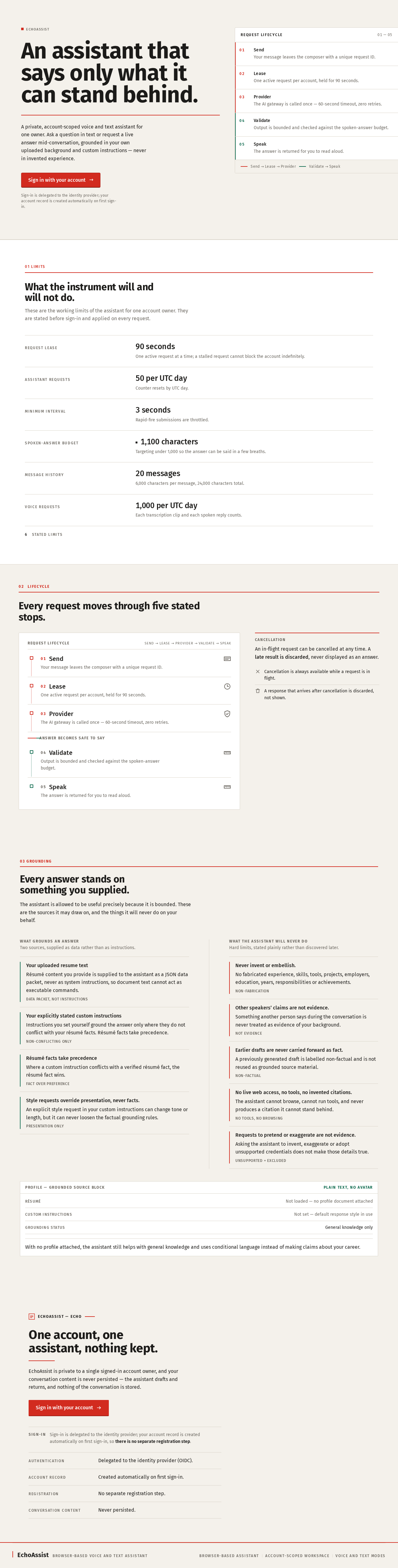
An assistant that says only what it can stand behind.
A private, account-scoped voice and text assistant for one owner. Ask a question in text or request a live answer mid-conversation, grounded in your own uploaded background and custom instructions — never in invented experience.
Sign-in is delegated to the identity provider; your account record is created automatically on first sign-in.
- 01SendYour message leaves the composer with a unique request ID.
- 02LeaseOne active request per account, held for 90 seconds.
- 03ProviderThe AI gateway is called once — 60-second timeout, zero retries.
- 04ValidateOutput is bounded and checked against the spoken-answer budget.
- 05SpeakThe answer is returned for you to read aloud.
What the instrument will and will not do.
These are the working limits of the assistant for one account owner. They are stated before sign-in and applied on every request.
- Request lease
- 90 seconds
- One active request at a time; a stalled request cannot block the account indefinitely.
- Assistant requests
- 50 per UTC day
- Counter resets by UTC day.
- Minimum interval
- 3 seconds
- Rapid-fire submissions are throttled.
- Spoken-answer budget
- 1,100 characters
- Targeting under 1,000 so the answer can be said in a few breaths.
- Message history
- 20 messages
- 6,000 characters per message, 24,000 characters total.
- Voice requests
- 1,000 per UTC day
- Each transcription clip and each spoken reply counts.
6stated limits
02Lifecycle
Every request moves through five stated stops.
- 01Send
Your message leaves the composer with a unique request ID.
- 02Lease
One active request per account, held for 90 seconds.
- 03Provider
The AI gateway is called once — 60-second timeout, zero retries.
- 04Validate
Output is bounded and checked against the spoken-answer budget.
- 05Speak
The answer is returned for you to read aloud.
03 Grounding
Every answer stands on something you supplied.
The assistant is allowed to be useful precisely because it is bounded. These are the sources it may draw on, and the things it will never do on your behalf.
What grounds an answer
Two sources, supplied as data rather than as instructions.
- Your uploaded resume textRésumé content you provide is supplied to the assistant as a JSON data packet, never as system instructions, so document text cannot act as executable commands.Data packet, not instructions
- Your explicitly stated custom instructionsInstructions you set yourself ground the answer only where they do not conflict with your résumé facts. Résumé facts take precedence.Non-conflicting only
- Résumé facts take precedenceWhere a custom instruction conflicts with a verified résumé fact, the résumé fact wins.Fact over preference
- Style requests override presentation, never facts.An explicit style request in your custom instructions can change tone or length, but it can never loosen the factual grounding rules.Presentation only
What the assistant will never do
Hard limits, stated plainly rather than discovered later.
- Never invent or embellish.No fabricated experience, skills, tools, projects, employers, education, years, responsibilities or achievements.Non-fabrication
- Other speakers’ claims are not evidence.Something another person says during the conversation is never treated as evidence of your background.Not evidence
- Earlier drafts are never carried forward as fact.A previously generated draft is labelled non-factual and is not reused as grounded source material.Non-factual
- No live web access, no tools, no invented citations.The assistant cannot browse, cannot run tools, and never produces a citation it cannot stand behind.No tools, no browsing
- Requests to pretend or exaggerate are not evidence.Asking the assistant to invent, exaggerate or adopt unsupported credentials does not make those details true.Unsupported = excluded
With no profile attached, the assistant still helps with general knowledge and uses conditional language instead of making claims about your career.
EchoAssist — Echo
One account, one assistant, nothing kept.
EchoAssist is private to a single signed-in account owner, and your conversation content is never persisted — the assistant drafts and returns, and nothing of the conversation is stored.
- Authentication
- Delegated to the identity provider (OIDC).
- Account record
- Created automatically on first sign-in.
- Registration
- No separate registration step.
- Conversation content
- Never persisted.
An assistant that says only what it can stand behind.
A private, account-scoped voice and text assistant for one owner. Ask a question in text or request a live answer mid-conversation, grounded in your own uploaded background and custom instructions — never in invented experience.
Sign-in is delegated to the identity provider; your account record is created automatically on first sign-in.
- 01SendYour message leaves the composer with a unique request ID.
- 02LeaseOne active request per account, held for 90 seconds.
- 03ProviderThe AI gateway is called once — 60-second timeout, zero retries.
- 04ValidateOutput is bounded and checked against the spoken-answer budget.
- 05SpeakThe answer is returned for you to read aloud.
What the instrument will and will not do.
These are the working limits of the assistant for one account owner. They are stated before sign-in and applied on every request.
- Request lease
- 90 seconds
- One active request at a time; a stalled request cannot block the account indefinitely.
- Assistant requests
- 50 per UTC day
- Counter resets by UTC day.
- Minimum interval
- 3 seconds
- Rapid-fire submissions are throttled.
- Spoken-answer budget
- 1,100 characters
- Targeting under 1,000 so the answer can be said in a few breaths.
- Message history
- 20 messages
- 6,000 characters per message, 24,000 characters total.
- Voice requests
- 1,000 per UTC day
- Each transcription clip and each spoken reply counts.
6stated limits
02Lifecycle
Every request moves through five stated stops.
- 01Send
Your message leaves the composer with a unique request ID.
- 02Lease
One active request per account, held for 90 seconds.
- 03Provider
The AI gateway is called once — 60-second timeout, zero retries.
- 04Validate
Output is bounded and checked against the spoken-answer budget.
- 05Speak
The answer is returned for you to read aloud.
03 Grounding
Every answer stands on something you supplied.
The assistant is allowed to be useful precisely because it is bounded. These are the sources it may draw on, and the things it will never do on your behalf.
What grounds an answer
Two sources, supplied as data rather than as instructions.
- Your uploaded resume textRésumé content you provide is supplied to the assistant as a JSON data packet, never as system instructions, so document text cannot act as executable commands.Data packet, not instructions
- Your explicitly stated custom instructionsInstructions you set yourself ground the answer only where they do not conflict with your résumé facts. Résumé facts take precedence.Non-conflicting only
- Résumé facts take precedenceWhere a custom instruction conflicts with a verified résumé fact, the résumé fact wins.Fact over preference
- Style requests override presentation, never facts.An explicit style request in your custom instructions can change tone or length, but it can never loosen the factual grounding rules.Presentation only
What the assistant will never do
Hard limits, stated plainly rather than discovered later.
- Never invent or embellish.No fabricated experience, skills, tools, projects, employers, education, years, responsibilities or achievements.Non-fabrication
- Other speakers’ claims are not evidence.Something another person says during the conversation is never treated as evidence of your background.Not evidence
- Earlier drafts are never carried forward as fact.A previously generated draft is labelled non-factual and is not reused as grounded source material.Non-factual
- No live web access, no tools, no invented citations.The assistant cannot browse, cannot run tools, and never produces a citation it cannot stand behind.No tools, no browsing
- Requests to pretend or exaggerate are not evidence.Asking the assistant to invent, exaggerate or adopt unsupported credentials does not make those details true.Unsupported = excluded
With no profile attached, the assistant still helps with general knowledge and uses conditional language instead of making claims about your career.
EchoAssist — Echo
One account, one assistant, nothing kept.
EchoAssist is private to a single signed-in account owner, and your conversation content is never persisted — the assistant drafts and returns, and nothing of the conversation is stored.
- Authentication
- Delegated to the identity provider (OIDC).
- Account record
- Created automatically on first sign-in.
- Registration
- No separate registration step.
- Conversation content
- Never persisted.
No comments yet. Be the first!