roblox-roleplay

byTom Cruise

Help me to build a roblox roleplay inspired by social/lifestyle, games with customizable houses, vehicles, jobs, character, customization, interactive location, and a city map. The roblox script for the core system, create the game's icon, UI artwork with animation, signs promotional visuals.

LandingCity Map
Landing

Comments (0)

No comments yet. Be the first!

System Requirements

System Requirements Document for roblox-roleplay

1. Introduction

roblox-roleplay is a Roblox social/lifestyle roleplay game in which players live a persistent city life: they explore a city map and interactive locations, customize their character, customize their house, own and use vehicles, and take on jobs. The product intent is a bright, toy-box city diorama that a young, mobile-first player audience (roughly 9–17 and their returning friends) can explore, customize, and show off — "you get to live here" in one glance, with real city, character, house, vehicle, and job surfaces underneath.

The project also delivers the production assets that make the game presentable: the Roblox script for the core system, the game's icon, UI artwork with animation, and signs and promotional visuals.

This document is the System Requirements Document for roblox-roleplay. It covers the player-facing game surfaces, the creator-facing asset and script deliverables, the delivery boundary between the Roblox experience and the companion web surfaces, and the visual and interaction direction for those surfaces.

Audience: the Game Creator (who builds and maintains the experience and its assets) and the Player (who lives in the city). The web surfaces described here present and operate the same accepted game state; they do not add gameplay beyond what is specified.

Page 1 of 34

2. System Overview

roblox-roleplay is delivered as a Roblox experience whose core system is a Roblox script, accompanied by a first-party web application that presents the city, the player's character, house, vehicles, and jobs, and that hosts the anonymous entry and identity verification surfaces. The web application is a React frontend served against a shared FastAPI backend with MariaDB for application-owned persistent data.

Current actors are the Player (explores the city map and interactive locations, customizes character and house, owns and drives vehicles, takes on jobs) and the Game Creator (builds and maintains the core system script, the game icon, animated UI artwork, and signs/promotional visuals). The Player's durable state — character appearance, house customization, owned vehicles, and job progress — persists across sessions and is bound to the verified Roblox identity.

Current delivery includes: an anonymous Landing surface; a Login surface where a player verifies their Roblox identity; and protected City Map, Character, House, Vehicles, and Jobs surfaces. The Game Creator's deliverables (core system script, icon, animated UI artwork, signs, promotional visuals) are produced as part of the current build and are reflected in the visual and interaction requirements of this document.

Removed from scope

  • None. No concept from the authoritative requirement thread was removed or replaced.
Page 2 of 34

2a. Product Interpretation and Delivery Boundary

The product is a Roblox roleplay city, not a generic dashboard. The Roblox experience is the world; the web application is the first-party surface where a player enters, verifies identity, and manages the durable parts of their city life (map navigation, character, house, vehicles, jobs) with the same toy-box visual language as the game.

Access is split cleanly. Landing and Login are anonymously reachable. Every other surface — City Map, Character, House, Vehicles, Jobs — requires a verified Roblox identity, because each one reads or writes durable player-specific state (appearance, home layout, owned vehicles, job progress). A protected surface never owns the interaction that establishes access to itself; identity is established on Login before those surfaces open.

The Game Creator's work is current, not future: the core system Roblox script, the game icon, the animated UI artwork, and the signs/promotional visuals are deliverables of this build. They are produced as assets and script, and they inform the visual system described in Sections 6–8. No separate creator console, asset-management module, or publishing workflow is part of this product.

Nothing in this document introduces social feeds, chat systems, trading, currency economies beyond what job and vehicle ownership imply, or account-management features beyond identity verification.

2b. Source Content Inventory

Not applicable — no reference directive with content_source was supplied.

2c. Page Content and Component Coverage

Page 3 of 34

Landing

Page 4 of 34
  • Purpose and access: Anonymous public entry. Explains the Roblox roleplay city, its social/lifestyle focus, and what players can do before entering protected play.
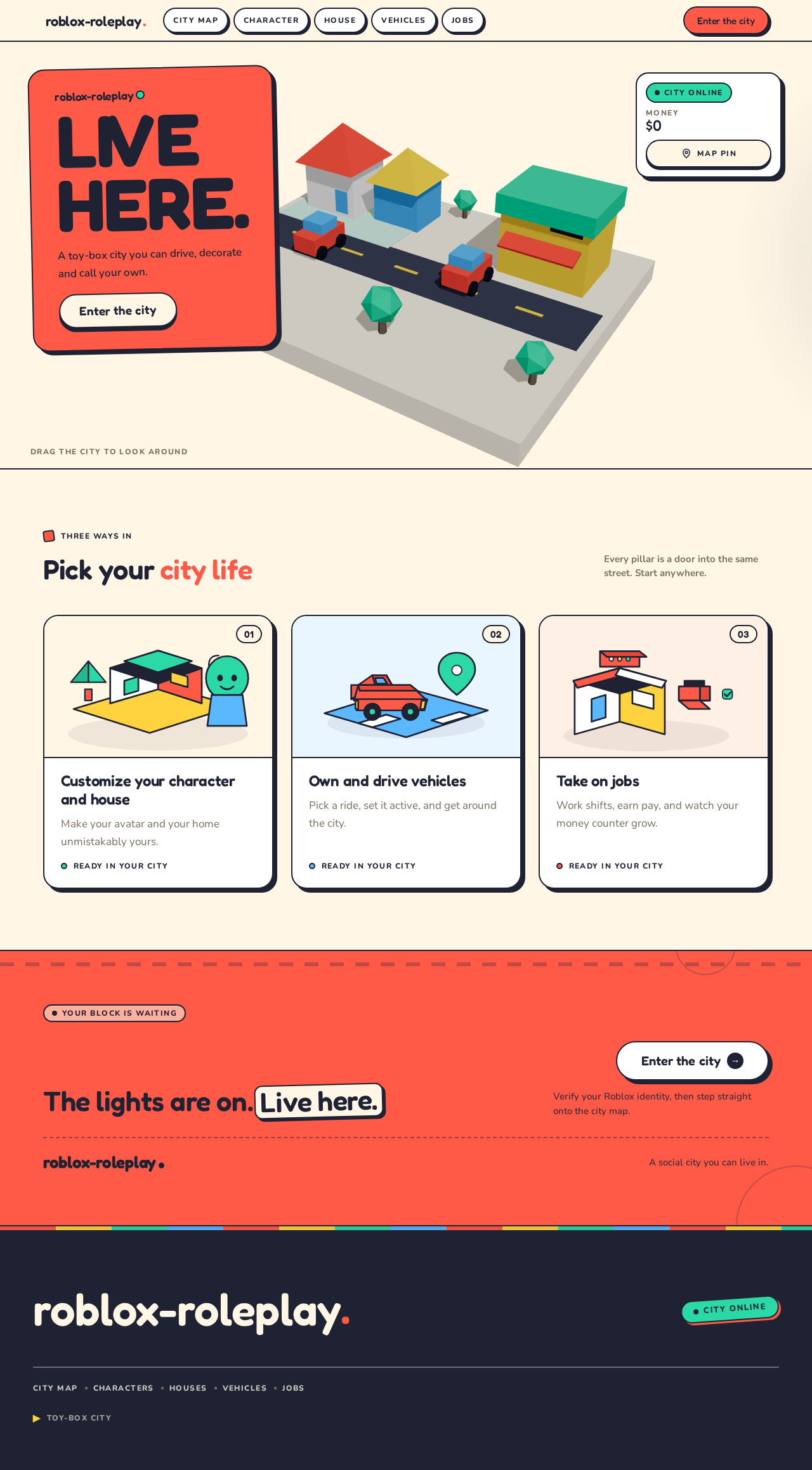
  • Information and state: Product name and wordmark; the headline "LIVE HERE." as a two-line left-aligned display block on a flat coral plate; a one-line statement of the city promise; a floating HUD showing a mint "City online" chip, a money counter, and a map-pin toggle; a toy-box row of three cards summarizing the city's pillars (customize your character and house, own and drive vehicles, take on jobs); a footer with the primary entry action repeated.
  • Primary actions: "Enter the city" pill CTA (routes to Login when identity is not yet verified, otherwise to City Map); map-pin toggle (toggles the HUD's map-pin state only).
  • Supporting actions: Card press-down interaction (visual only, no navigation beyond the pillar it describes); keyboard focus traversal across CTA, HUD controls, and cards.
  • Domain entities: City (name, online status), Player summary (money counter display), pillar cards (character/house, vehicles, jobs).
  • Component responsibilities: WebGL hero stage rendering one crafted low-poly city block (corner shop, two houses, road with parked car and bus stop) in three-quarter isometric view, orbitable by drag and auto-rotating 4°/s at rest; coral headline plate overlapping the block's upper-left sky; floating HUD; toy-box card row with 2px ink border, hard 6px offset shadow, and isometric illustration per card.
  • States: Loading — hero stage shows a static isometric still until the WebGL scene is ready; empty — not applicable (content is fixed); success — hero orbits, HUD chips render, CTA is focusable and pressable; error — if WebGL is unavailable, the static isometric still remains with all text and the CTA fully usable; recovery — reduced-motion preference pauses auto-rotation and the drifting cloud-shadow and presents the static still with the same controls.
Page 5 of 34

Login

  • Purpose and access: Anonymous identity-access surface. A returning player verifies their Roblox identity to resume their persistent character, house, vehicles, and job progress.
  • Information and state: Short explanation of why verification is needed (to resume your city life); the Roblox identity verification control; a status line for verification in progress, success, or failure; a link back to Landing.
  • Primary actions: Verify Roblox identity (initiates verification and, on success, continues to City Map).
  • Supporting actions: Return to Landing; retry verification after a failure.
  • Domain entities: Player identity (Roblox identity reference), verification attempt (status).
  • Component responsibilities: Verification control with clear pending/success/failure states; on success, the player's durable state (character, house, vehicles, jobs) is bound to that identity and the session continues to City Map.
  • States: Loading — verification control disabled with a pending indicator while verification runs; empty — first-time player with no prior state proceeds to City Map with fresh defaults; success — confirmation and automatic continuation to City Map; error — verification failure message with a retry action and a path back to Landing; recovery — retry re-runs verification without losing the player's place.
Page 6 of 34

City Map

  • Purpose and access: Protected. Owns navigating the city map and reaching interactive locations — the central play context of the roleplay world.
  • Information and state: A genuine interactive tiled city map with colour-coded zone pins (lemon homes, sky jobs, coral social spots); a legend rail on the left on desktop that becomes a bottom sheet on mobile; the selected location's name, zone, and description; the player's current money counter and identity chip in the HUD.
  • Primary actions: Select a zone pin to view a location; travel to the selected interactive location; open the legend to filter or identify zones.
  • Supporting actions: Toggle the map-pin HUD control; keyboard and scroll navigation of the map; open the bottom sheet on mobile.
  • Domain entities: City map (tiles, zones), location (name, zone, description, interactive status), zone (lemon homes, sky jobs, coral social spots), player position.
  • Component responsibilities: Tiled map renderer with pannable/zoomable surface; pin layer with bounce-on-hover pins; legend rail / bottom sheet; location detail panel; HUD.
  • States: Loading — map tiles and pins show a skeleton with the legend rail present; empty — a zone with no locations shows an explicit "no locations in this zone" message; success — pins render, selection highlights the active pin in coral, travel completes and the location detail confirms arrival; error — tile or location load failure shows a retry control on the affected region without blocking the rest of the map; recovery — retry reloads only the failed region; keyboard and scroll remain usable throughout.
Page 7 of 34

Character

  • Purpose and access: Protected. Owns recurring character appearance customization with durable personalized state.
  • Information and state: A workbench split — a live preview stage with the character on a turntable on one side, a scrollable parts tray on the other; the currently equipped parts per category; a persistent save bar; a mint "Saved" stamp that thumps in when state persists.
  • Primary actions: Select a part from the tray to preview it on the character; save the appearance.
  • Supporting actions: Rotate the preview turntable; scroll the parts tray; revert unsaved changes.
  • Domain entities: Character appearance (equipped parts by category), part (category, name, preview), save state.
  • Component responsibilities: Turntable preview stage; parts tray with category grouping; save bar with save action and dirty-state indicator; "Saved" stamp.
  • States: Loading — preview stage and tray show skeletons; empty — a category with no owned parts shows an explicit empty message and the save bar remains disabled until a change exists; success — selection previews immediately, save persists and the mint "Saved" stamp thumps in; error — save failure keeps the dirty state, shows an error on the save bar, and offers retry; recovery — retry re-attempts the same save; unsaved changes survive a failed save.
Page 8 of 34

House

  • Purpose and access: Protected. Owns recurring house customization with durable personalized state.
  • Information and state: A workbench split — a live preview stage of the house shell on one side, a scrollable parts tray on the other; the currently placed parts; a persistent save bar; a mint "Saved" stamp.
  • Primary actions: Select a part from the tray to preview it on the house; save the house layout.
  • Supporting actions: Rotate the preview; scroll the parts tray; revert unsaved changes.
  • Domain entities: House layout (placed parts), part (category, name, preview), save state.
  • Component responsibilities: House preview stage; parts tray with category grouping; save bar with save action and dirty-state indicator; "Saved" stamp.
  • States: Loading — preview stage and tray show skeletons; empty — a category with no owned parts shows an explicit empty message and the save bar remains disabled until a change exists; success — selection previews immediately, save persists and the mint "Saved" stamp thumps in; error — save failure keeps the dirty state, shows an error on the save bar, and offers retry; recovery — retry re-attempts the same save; unsaved changes survive a failed save.
Page 9 of 34

Vehicles

  • Purpose and access: Protected. Owns acquiring and using vehicles — a distinct durable player-owned domain.
  • Information and state: The player's owned vehicles with name, isometric illustration, and status; an acquisition area for vehicles not yet owned; the currently active vehicle; the money counter.
  • Primary actions: Acquire a vehicle; set a vehicle as active for use.
  • Supporting actions: Browse the vehicle list; view a vehicle's detail.
  • Domain entities: Vehicle (name, illustration, owned status, active status), player garage, money balance.
  • Component responsibilities: Garage list with toy-box cards; acquisition panel; active-vehicle indicator; money counter.
  • States: Loading — garage list shows skeleton cards; empty — a player with no vehicles sees an explicit empty garage with the acquisition area prominent; success — acquisition adds the vehicle to the garage and the active indicator updates; error — acquisition failure (including insufficient money) shows a clear message and leaves the garage unchanged; recovery — the player can retry or choose a different vehicle.
Page 10 of 34

Jobs

  • Purpose and access: Protected. Owns browsing, taking on, and completing job work for progress — a distinct recurring player responsibility.
  • Information and state: Available jobs with name, description, and pay; the player's current job assignment and its progress; completed-job history with mint job-complete stamps; the money counter.
  • Primary actions: Take on a job; complete the current job's work to earn progress and pay.
  • Supporting actions: Browse available jobs; review completed-job history.
  • Domain entities: Job (name, description, pay), job assignment (status, progress), completion record (job, stamp, pay earned), money balance.
  • Component responsibilities: Job list; assignment panel with progress; completion stamp; history list.
  • States: Loading — job list and assignment panel show skeletons; empty — no available jobs shows an explicit message; no current assignment shows the job list as the primary action; success — taking on a job sets the assignment, completing it awards pay, records the completion, and stamps it mint; error — completion or pay-award failure shows an error on the assignment panel and preserves progress; recovery — retry completion without losing the assignment.
Page 11 of 34

3. Functional Requirements

FR-1 — Build a Roblox roleplay game inspired by social/lifestyle games (explicit) As a Game Creator, I should build a Roblox roleplay game inspired by social/lifestyle games, so that players have a social city life experience to enter.

  • Trigger/input: the Game Creator builds the experience on Roblox.
  • Observable result: a playable Roblox roleplay experience with the city, character, house, vehicle, and job surfaces described below.
  • Access: creator-side build work; no player access state.
  • Failure/recovery: build or publish failure is corrected by the Game Creator and re-published.
  • Continuation: the published experience is the world the Player enters from Landing.

FR-2 — Players can customize their character (explicit) As a Player, I should customize my character's appearance, so that my avatar reflects my identity in the city.

  • Trigger/input: the Player opens Character and selects parts from the parts tray.
  • Observable result: the preview updates immediately; saving persists the appearance and the mint "Saved" stamp thumps in.
  • Access: verified Roblox identity required.
  • Failure/recovery: a failed save keeps the dirty state, shows an error on the save bar, and offers retry.
  • Continuation: the saved appearance is restored on the Player's next visit.
Page 12 of 34

FR-3 — Players can customize their house (explicit) As a Player, I should customize my house, so that my home in the city is mine.

  • Trigger/input: the Player opens House and selects parts from the parts tray.
  • Observable result: the house preview updates immediately; saving persists the layout and the mint "Saved" stamp thumps in.
  • Access: verified Roblox identity required.
  • Failure/recovery: a failed save keeps the dirty state, shows an error on the save bar, and offers retry.
  • Continuation: the saved layout is restored on the Player's next visit.

FR-4 — Players can own and use vehicles (explicit) As a Player, I should own and use vehicles, so that I can get around the city in my own ride.

  • Trigger/input: the Player opens Vehicles, acquires a vehicle, and sets it active.
  • Observable result: the vehicle appears in the garage and the active indicator updates; the active vehicle is the one used in the city.
  • Access: verified Roblox identity required.
  • Failure/recovery: acquisition failure (including insufficient money) shows a clear message and leaves the garage unchanged; the Player can retry or choose another vehicle.
  • Continuation: owned vehicles and the active selection persist across sessions.
Page 13 of 34

FR-5 — Players can take on jobs (explicit) As a Player, I should take on jobs, so that I earn progress and pay in the city.

  • Trigger/input: the Player opens Jobs, takes on an available job, and completes its work.
  • Observable result: the assignment is set, completion awards pay, records the completion with a mint stamp, and updates the money counter.
  • Access: verified Roblox identity required.
  • Failure/recovery: completion or pay-award failure shows an error on the assignment panel and preserves progress; retry completes without losing the assignment.
  • Continuation: job progress and history persist across sessions.

FR-6 — The game includes interactive locations (explicit) As a Player, I should reach and interact with locations in the city, so that the world feels alive and worth exploring.

  • Trigger/input: the Player selects a location on City Map and travels to it.
  • Observable result: the location detail confirms arrival and the location's interactive content is available.
  • Access: verified Roblox identity required.
  • Failure/recovery: a location load failure shows a retry control on the affected region without blocking the rest of the map.
  • Continuation: the Player returns to the map and selects another location.
Page 14 of 34

FR-7 — The game includes a city map (explicit) As a Player, I should navigate the city map, so that I can find homes, jobs, and social spots.

  • Trigger/input: the Player opens City Map and selects zone pins or the legend.
  • Observable result: the selected pin highlights in coral, the location detail shows the location's name, zone, and description, and the legend identifies zones (lemon homes, sky jobs, coral social spots).
  • Access: verified Roblox identity required.
  • Failure/recovery: tile or location load failure shows a retry control on the affected region; keyboard and scroll remain usable.
  • Continuation: the map remains the hub for reaching every other location.

FR-8 — Provide the Roblox script for the core system (explicit) As a Game Creator, I should provide the Roblox script for the core system, so that the game's core behavior runs in the Roblox experience.

  • Trigger/input: the Game Creator authors and deploys the core system script.
  • Observable result: the core system script is present and drives the game's core behavior.
  • Access: creator-side deliverable.
  • Failure/recovery: script errors are corrected and redeployed by the Game Creator.
  • Continuation: the deployed script supports the durable player state and interactions described in FR-2 through FR-7.
Page 15 of 34

FR-9 — Create the game's icon (explicit) As a Game Creator, I should create the game's icon, so that the game is recognizable and presentable.

  • Trigger/input: the Game Creator produces the icon asset.
  • Observable result: a game icon exists in the toy-box visual language (low-poly city motif, coral/mint/cream palette, chunky geometry).
  • Access: creator-side deliverable.
  • Failure/recovery: the icon is revised until it reads clearly at small sizes.
  • Continuation: the icon is used as the game's identifying artwork.

FR-10 — Create UI artwork with animation (explicit) As a Game Creator, I should create UI artwork with animation, so that the game's interface feels playful and alive.

  • Trigger/input: the Game Creator produces animated UI artwork.
  • Observable result: animated UI artwork exists and follows the motion direction (press-down 3px, card snap-in with overshoot, pin bounce, drifting cloud-shadow) with a reduced-motion fallback.
  • Access: creator-side deliverable.
  • Failure/recovery: animation that breaks under reduced motion is corrected to a static arrangement.
  • Continuation: the artwork is applied across the game's UI surfaces.
Page 16 of 34

FR-11 — Create signs and promotional visuals (explicit) As a Game Creator, I should create signs and promotional visuals, so that the city reads as a real place and the game can be promoted.

  • Trigger/input: the Game Creator produces signage (shop signs, bus-stop plates) and promotional visuals.
  • Observable result: hand-set signage in the toy geometry appears in the city, and promotional visuals exist in the same visual language.
  • Access: creator-side deliverable.
  • Failure/recovery: visuals that fight the toy palette are revised.
  • Continuation: signage is placed in the city and promotional visuals are available for promotion.

FR-12 — Player verifies their Roblox identity before accessing protected persistent state (required_inference) As a Player, I should verify my Roblox identity before accessing my city, character, house, vehicles, and jobs, so that my persistent state is bound to me and resumes when I return.

  • Trigger/input: the Player selects "Enter the city" on Landing without a verified identity, or opens a protected surface without one.
  • Observable result: Login verifies the identity and continues to City Map; the Player's durable state is bound to that identity.
  • Access: Login is anonymously reachable; protected surfaces open only after verification.
  • Failure/recovery: verification failure shows a message with retry and a path back to Landing.
  • Continuation: after verification the Player resumes their character, house, vehicles, and job progress.
Page 17 of 34

FR-13 — Core system Roblox script supports durable player state and interactions (required_inference) As a Player, I should have my character, house, vehicles, and job progress persist and my interactions work, so that my city life continues across sessions.

  • Trigger/input: the Player saves character or house changes, acquires a vehicle, or completes a job.
  • Observable result: the change is persisted against the verified identity and restored on return.
  • Access: verified Roblox identity required.
  • Failure/recovery: a persistence failure surfaces on the affected surface with retry and preserves unsaved changes.
  • Continuation: the restored state is what the Player sees on their next visit.

FR-14 — Game icon, animated UI artwork, and signs/promotional visuals are produced for the game (required_inference) As a Game Creator, I should have the icon, animated UI artwork, and signs/promotional visuals produced and applied, so that the game is presentable and consistent.

  • Trigger/input: the Game Creator applies the produced assets.
  • Observable result: the icon, animated UI artwork, and signage/promotional visuals are present and consistent with the toy-box visual system.
  • Access: creator-side deliverable.
  • Failure/recovery: inconsistent assets are revised to match the visual system.
  • Continuation: the assets remain the game's presentation layer.

4. User Personas

Page 18 of 34

Player

  • Product context: A young, mobile-first player (roughly 9–17 and their returning friends) who expects a world they can explore, customize, and show off. They arrive at Landing curious, then verify their Roblox identity to enter the city.
  • Primary goal: A persistent, personalized city life — a character and house that are theirs, vehicles they own and drive, jobs that earn progress, and a city map full of places to reach.
  • Distinct accepted responsibilities: Customizing character appearance (FR-2); customizing the house (FR-3); acquiring and using vehicles (FR-4); taking on and completing jobs (FR-5); reaching and interacting with locations (FR-6); navigating the city map (FR-7); verifying identity to resume persistent state (FR-12).
  • Relevant inputs or decisions: Which parts to equip on character and house; which vehicle to acquire and set active; which job to take on and when to complete it; which location to travel to; whether to save or revert changes.
  • Interactions with other accepted participants: The Player is the sole human participant in the city lifecycles; the Game Creator's deliverables (icon, UI artwork, signage, core script) shape what the Player sees and how the world behaves, but the Game Creator does not act inside the Player's journeys.
  • Observable success: Saved character and house with the mint "Saved" stamp; an owned, active vehicle; completed jobs with mint stamps and an updated money counter; arrival at interactive locations; and all of it restored on return.
Page 19 of 34

Game Creator

  • Product context: The builder and maintainer of the Roblox roleplay experience. They work on the Roblox platform and produce both the core system script and the presentation assets.
  • Primary goal: A playable, presentable game with consistent branding assets.
  • Distinct accepted responsibilities: Building the Roblox roleplay game (FR-1); providing the core system Roblox script (FR-8); creating the game icon (FR-9); creating UI artwork with animation (FR-10); creating signs and promotional visuals (FR-11); ensuring the produced assets are applied consistently (FR-14); ensuring the core script supports durable player state and interactions (FR-13).
  • Relevant inputs or decisions: The visual system (palette, typography, shape language, motion) and the accepted gameplay surfaces; what the icon, UI artwork, signage, and promotional visuals look like; how the core script persists and restores player state.
  • Interactions with other accepted participants: The Game Creator's deliverables are what the Player experiences; the Game Creator does not participate in the Player's in-city journeys.
  • Observable success: A published, playable experience; an icon that reads at small sizes; animated UI artwork with a reduced-motion fallback; signage placed in the city; promotional visuals in the same language; and player state that persists and restores correctly.

5. Core User Flows

Page 20 of 34

Flow A — First visit and entry (Player)

  1. The Player opens Landing anonymously. The hero shows the low-poly city block with the "LIVE HERE." headline on its coral plate, the floating HUD ("City online", money counter, map-pin toggle), and the three pillar cards.
  2. The Player presses "Enter the city". Because no identity is verified, the app routes to Login.
  3. On Login, the Player verifies their Roblox identity. The verification control shows a pending state, then success.
  4. On success, the Player's durable state is bound to that identity and the app continues to City Map. A first-time player arrives with fresh defaults.
  5. Failure/recovery: if verification fails, Login shows the failure with a retry action and a path back to Landing; retry re-runs verification without losing the Player's place.
  6. Continuation: the Player is now in the city and can open Character, House, Vehicles, or Jobs, or travel from the map.
Page 21 of 34

Flow B — Navigating the city map and reaching a location (Player)

  1. From City Map, the Player pans and zooms the tiled map. Pins are colour-coded by zone: lemon homes, sky jobs, coral social spots. The legend rail sits on the left on desktop and becomes a bottom sheet on mobile.
  2. The Player hovers a pin — it bounces once — and selects it. The pin highlights in coral and the location detail shows the location's name, zone, and description.
  3. The Player travels to the location. The detail confirms arrival and the location's interactive content is available.
  4. Failure/recovery: if a tile or location fails to load, a retry control appears on the affected region only; the rest of the map stays usable, and keyboard and scroll navigation continue to work.
  5. Continuation: the Player returns to the map and selects another location, or opens Character, House, Vehicles, or Jobs.

Flow C — Customizing the character (Player)

  1. The Player opens Character. The workbench split shows the turntable preview stage and the scrollable parts tray.
  2. The Player selects a part from the tray. The preview updates immediately on the turntable.
  3. The Player saves from the persistent save bar. The save persists and the mint "Saved" stamp thumps in.
  4. Failure/recovery: if the save fails, the dirty state remains, the save bar shows an error, and the Player retries the same save; unsaved changes survive the failure.
  5. Continuation: the saved appearance is restored on the Player's next visit.
Page 22 of 34

Flow D — Customizing the house (Player)

  1. The Player opens House. The workbench split shows the house shell preview stage and the scrollable parts tray.
  2. The Player selects a part from the tray. The house preview updates immediately.
  3. The Player saves from the persistent save bar. The layout persists and the mint "Saved" stamp thumps in.
  4. Failure/recovery: if the save fails, the dirty state remains, the save bar shows an error, and the Player retries; unsaved changes survive the failure.
  5. Continuation: the saved layout is restored on the Player's next visit.

Flow E — Acquiring and using a vehicle (Player)

  1. The Player opens Vehicles. The garage lists owned vehicles with isometric illustrations and status; the acquisition area shows vehicles not yet owned; the money counter is visible.
  2. The Player acquires a vehicle. On success it appears in the garage and the active indicator updates.
  3. The Player sets the vehicle active. The active vehicle is the one used in the city.
  4. Failure/recovery: if acquisition fails (including insufficient money), a clear message appears and the garage is unchanged; the Player retries or chooses another vehicle.
  5. Continuation: owned vehicles and the active selection persist across sessions.
Page 23 of 34

Flow F — Taking on and completing a job (Player)

  1. The Player opens Jobs. Available jobs show name, description, and pay; the current assignment and its progress are shown; completed-job history shows mint stamps; the money counter is visible.
  2. The Player takes on a job. The assignment panel sets the current job and its progress.
  3. The Player completes the job's work. Pay is awarded, the completion is recorded with a mint stamp, and the money counter updates.
  4. Failure/recovery: if completion or pay award fails, the assignment panel shows an error and progress is preserved; retry completes without losing the assignment.
  5. Continuation: job progress and history persist across sessions.

Flow G — Producing the game's script and assets (Game Creator)

  1. The Game Creator builds the Roblox roleplay experience and authors the core system Roblox script (FR-1, FR-8), ensuring it supports durable player state and interactions (FR-13).
  2. The Game Creator produces the game icon (FR-9) in the toy-box visual language, checking it reads at small sizes.
  3. The Game Creator produces UI artwork with animation (FR-10) following the motion direction, with a reduced-motion fallback.
  4. The Game Creator produces signs and promotional visuals (FR-11) — shop signs, bus-stop plates, promotional artwork — in the same toy geometry.
  5. The Game Creator applies the assets consistently across the game (FR-14).
  6. Failure/recovery: script errors are corrected and redeployed; assets that fight the toy palette or break under reduced motion are revised.
  7. Continuation: the published experience is the world the Player enters from Landing.
Page 24 of 34

6. Visuals Colors and Theme

The creative direction is authoritative: Playable world after Bruno Simon — a toy-box city you can drive, tour, and live in. Muse: Bruno Simon. Headline: "LIVE HERE."

Mode: Light mode only.

Colour tokens (exact hex by role):

  • Background (ground everywhere, never pure white): #FFF6E6 warm cream
  • Surface (cards): #FFFFFF
  • Text (all readable text): #1E2233 ink
  • Primary (CTAs, active map pin, wordmark dot): #FF5A47 coral
  • Accent (owned / saved / ready states, job-complete stamps): #2BD9A6 mint
  • Muted (captions, metadata): #7C6F63
  • Zone colours (city map only, small sticker accents): #FFD23F lemon (homes), #5BB8FF sky (jobs); coral #FF5A47 for social spots
  • Contrast: ink on cream ≈ 13:1; white on coral ≈ 3.6:1 — coral is used for large or bold text only, and body copy on coral chips switches to ink.
Page 25 of 34

Typography:

  • Headings: Fredoka SemiBold at 600–700, tracking −0.01em, sentence case with occasional all-caps micro-labels in Nunito ExtraBold at 0.12em tracking.
  • Body: Nunito.
  • Numbers (money, level, house value): Fredoka Medium with tabular spacing in Nunito Numerals where available.
  • Scale (1.333 modular): display clamp(48px, 9vw, 128px); h1 clamp(36px, 5.5vw, 72px); h2 clamp(26px, 3.4vw, 44px); h3 24px; body 17px with 1.65 line-height; label 12px uppercase 0.12em. Mobile floor: 48px display, 17px body; nothing readable below 15px.

Shape language: Chunky toy geometry — 20–28px radii on cards and buttons, fully pill CTAs, 2px ink outlines, hard 6px offset shadows in ink or coral (no soft blur), sticker badges rotated −4° to 6°, low-poly isometric shapes (house, car, tree, pin) built from flat facets. Section edges are straight and ruled or a single soft wave; no glass, no gradient blobs.

Layout: Full-bleed world-first layout. Hero is a playable low-poly city block with a floating HUD; below it, wide 12-column bands with 96px vertical rhythm on desktop and 48px on mobile. Cards are a 3-up toy-box row on desktop, 1-up on mobile, each with an isometric illustration. City Map uses a real interactive tiled map with a legend rail on the left (desktop) or a bottom sheet (mobile). Character, House, and Vehicles use a workbench split: a big preview stage on one side, a scrollable parts tray on the other, with a persistent save bar.

Imagery: Low-poly 3D dioramas rendered in flat facets with soft shadows — a city block, a customizable house shell, three vehicles, a character avatar on a turntable — plus sticker-style vector badges and hand-set signage (shop signs, bus-stop plates) in the same toy geometry. No stock photography, no gradients, no photoreal renders.

Page 26 of 34

Avoid: Glassmorphism, frosted panels, gradient blobs; blue–indigo primary or any #2563EB-family accent on white; Inter, Roboto, Poppins, system-ui or any neutral template sans; a grid of identical hover-lift cards; photoreal or dark moody renders; centred headline + subtext + button SaaS hero; bouncy motion that breaks under prefers-reduced-motion; presenting or linking to the planning document anywhere on the page.

Page 27 of 34

7. Signature Design Concept

"LIVE HERE." — a city block you can orbit.

The public entry is a full-bleed cream stage holding one crafted low-poly city block in three-quarter isometric view — a corner shop, two houses, a road with a parked car and a bus stop — rendered in WebGL, gently orbitable by drag and auto-rotating 4° per second at rest. The oversized Fredoka headline "LIVE HERE." sits as a two-line, left-aligned display block clamp(48px → 128px) overlapping the block's upper-left sky area on a flat coral plate, with the primary pill CTA "Enter the city" pinned beneath it. A minimal HUD floats top-right: a mint "City online" chip, a money counter, and a map-pin toggle. No centred headline, no subtext stack, no gradient — the world is the dominant element and the type is a physical sign in front of it.

The signature moves carry through the product: the hero is a real orbitable low-poly city block, not a static illustration; the toy-box card treatment (2px ink border, hard 6px offset shadow, isometric illustration, press-down 3px that collapses the shadow) applies to the pillar cards and the garage; City Map is a genuine tiled map with colour-coded zone pins and a legend rail that becomes a bottom sheet on mobile; Character and House use the workbench split with a live preview on the turntable beside a parts tray and a persistent mint "Saved" stamp that thumps in when state persists.

Readable text and controls stay whole at every viewport: headlines, wordmarks, labels, numbers, card text, and controls stay entirely inside the viewport and their container at 375px, 768px, and 1280px, wrapping or scaling to fit, and no other element covers any part of them. Imagery, decoration, and motion may be cropped, bled, rotated, overlapped, or cut as the direction asks, as long as they cover no readable text or control.

Page 28 of 34

8. Interaction Model & Motion Direction

Interaction Model: Animated Motion Tempo: expressive Hero Dimensionality: webgl

Landing Hero Motion Brief

  • Focal subject: one crafted low-poly city block in three-quarter isometric view — corner shop, two houses, a road with a parked car and a bus stop — on a cream stage.
  • Input → transformation → outcome thesis: drag orbits the block and rest auto-rotation resumes at 4°/s; the coral "LIVE HERE." plate and the HUD stay fixed in front of the world; pressing "Enter the city" routes to Login (or City Map when already verified). The world is the page; the type is a physical sign in front of it.
  • Motion vocabulary: gentle follow on the hero orbit; buttons press down 3px into their shadow; cards snap in with a short overshoot cubic-bezier(.2,1.4,.4,1) at 260ms; map pins bounce once on hover; a slow drifting cloud-shadow crosses the hero every 14s.
  • Composed first frame: cream ground, the city block in three-quarter isometric view, the two-line "LIVE HERE." display block on its coral plate overlapping the upper-left sky, the "Enter the city" pill pinned beneath it, and the floating HUD top-right with the mint "City online" chip, money counter, and map-pin toggle.
  • Reduced-motion state: all decorative loops pause and the hero falls back to a static isometric still; the map remains fully usable with keyboard and scroll; every readable text and control remains whole and usable.

Landing Hero 3D Scene Brief — DIRECTION-DERIVED

Page 29 of 34

One crafted real-time low-poly city block — corner shop, two houses, road, parked car, bus stop — built from flat facets with soft shadows, in three-quarter isometric view on a cream stage. The scene shows the product's defining state: a city you can live in. It is orbitable by drag, auto-rotates 4°/s at rest, and carries a slow drifting cloud-shadow every 14s. The coral "LIVE HERE." plate and the floating HUD are composed in front of the scene, never covering readable text or controls. Under prefers-reduced-motion the scene renders as a static isometric still with the same controls.

Page 30 of 34

9. Non-Functional Requirements

  • Platform (explicit): Target platform is Roblox; the core system is delivered as a Roblox script. The web application presents and operates the same accepted game state and does not replace the Roblox experience.
  • Visual assets (explicit): The build must produce the game icon, animated UI artwork, signs, and promotional visuals.
  • Identity and persistence (required_inference): Durable player state (character appearance, house layout, owned vehicles, job progress) is bound to the verified Roblox identity and restored on return. Protected surfaces require verification; Landing and Login are anonymous.
  • Accessibility (direction): All readable text and controls stay whole at 375px, 768px, and 1280px; nothing readable drops below 15px; prefers-reduced-motion yields a usable static arrangement with keyboard and scroll navigation intact.
  • Contrast (direction): Ink on cream ≈ 13:1; white on coral ≈ 3.6:1, so coral carries large or bold text only and body copy on coral chips switches to ink.
  • Performance (required_inference): The hero WebGL scene must degrade to a static isometric still when WebGL is unavailable, without blocking the CTA or HUD.
  • Data integrity (required_inference): Save, acquisition, and job-completion operations are atomic per action; a failure leaves prior persisted state unchanged and preserves unsaved changes for retry.
Page 31 of 34

10. Tech Stack

  • Game platform (explicit): Roblox; the core system is a Roblox script (Luau) deployed to the experience.
  • Frontend: React application UI (provisioned scaffold), with a WebGL/R3F hero scene for the Landing city block.
  • Backend: shared FastAPI process for application APIs and domain modules (provisioned scaffold), extended with routes and modules for identity verification, character, house, vehicles, jobs, and city map data.
  • Database: MariaDB for application-owned persistent data (provisioned scaffold) — player identity binding, character appearance, house layout, owned vehicles, job assignments and history.
  • Assets: game icon, animated UI artwork, signage, and promotional visuals produced as part of the build and applied across the game and web surfaces.
Page 32 of 34

11. Assumptions and Constraints

  • Assumption (narrow): Roblox identity verification is performed through Roblox's identity mechanism; the web application binds the verified identity to durable state rather than issuing its own credentials.
  • Assumption (narrow): The money counter reflects pay earned from completed jobs and is spent on vehicle acquisition; no other economy is specified.
  • Assumption (narrow): Parts trays for Character and House contain the parts available to the player; the source does not specify an acquisition flow for parts, so none is added.
  • Constraint (explicit): Target platform is Roblox; the core system is a Roblox script.
  • Constraint (explicit): The build produces the game icon, animated UI artwork, signs, and promotional visuals.
  • Constraint (direction): The generic indigo/blue-on-white SaaS template is forbidden; the palette, fonts, surfaces, tone, and layout in Sections 6–8 are binding.
  • Constraint (direction): Readable text and controls stay whole at every viewport; imagery and motion may be cropped or overlapped but never cover readable text or controls.
  • Boundary: No social feed, chat, trading, or account-management features beyond identity verification are in scope.
Page 33 of 34

12. Glossary

  • Roblox experience: The published Roblox game world the Player enters.
  • Core system script: The Roblox (Luau) script that drives the game's core behavior and supports durable player state and interactions.
  • City Map: The interactive tiled map with colour-coded zone pins and a legend rail / bottom sheet.
  • Zone: A colour-coded region of the city map — lemon homes, sky jobs, coral social spots.
  • Interactive location: A place on the city map the Player can travel to and interact with.
  • Workbench split: The Character/House/Vehicles layout with a preview stage on one side and a scrollable parts tray on the other, plus a persistent save bar.
  • "Saved" stamp: The mint stamp that thumps in when character or house state persists.
  • Job-complete stamp: The mint stamp recorded when a job is completed.
  • Toy-box treatment: 2px ink border, hard 6px offset shadow, isometric illustration, and press-down 3px interaction.
  • HUD: The floating Landing overlay with the "City online" chip, money counter, and map-pin toggle.
  • Verified Roblox identity: The identity established on Login that binds the Player's durable state.
Page 34 of 34
Live
Landing design preview
Landing: Review public entry
City Map: Review map and zones
Character: Review character workbench
House: Review house workbench
Vehicles: Review garage and acquisition
Jobs: Review job list and progress
Login: Review identity verification
Landing: Apply icon and signage
Landing: Apply animated UI artwork
Landing: Verify reduced-motion fallback
Landing: Publish experience
Live
Landing design preview
Landing: Review public entry
City Map: Review map and zones
Character: Review character workbench
House: Review house workbench
Vehicles: Review garage and acquisition
Jobs: Review job list and progress
Login: Review identity verification
Landing: Apply icon and signage
Landing: Apply animated UI artwork
Landing: Verify reduced-motion fallback
Landing: Publish experience