road-safety
 Naresh Gangwar
Create an App name TRAJYX.TRAJYX is an AI-powered predictive road safety and traffic intelligence platform that analyzes CCTV footage to detect and track vehicles, identify traffic violations, analyze vehicle trajectories, detect near-miss situations, and predict potential collision risks. It generates dynamic risk zones and heatmaps, while its connected mobile app uses real-time GPS to alert drivers about upcoming high-risk areas through notifications, beeps, and voice warnings—helping prevent accidents before they happen.


Comments (0)
Sign in to leave a comment
System Requirements
System Requirements Document for road-safety
1. Introduction
TRAJYX is an AI-powered predictive road safety and traffic intelligence platform. It analyzes CCTV footage to detect and track vehicles, identify traffic violations, analyze vehicle trajectories, detect near-miss situations, and predict potential collision risks. From that analysis it generates dynamic risk zones and heatmaps, computes risk scores and road-segment risk, and exposes the results through a database/API consumed by a web application and a connected mobile application. The mobile app uses real-time GPS to alert drivers about upcoming high-risk areas through notifications, beeps, and voice warnings — helping prevent accidents before they happen.
The product intent is not a generic AI demo. TRAJYX must read as a proper real-world problem solver and a SaaS-level platform: a mission-critical operations instrument for traffic-safety professionals, paired with a driver-facing warning app used behind the wheel. The audience is professional, technical, and accountable — traffic-safety analysts and operators, platform administrators and model/data stewards, and drivers. They need to trust numbers at a glance, in dark control rooms and in daylight through a windscreen.
The UI and design must be mind-blowing, easy to use, and carry many wow factors, while remaining a calibrated instrument rather than a dashboard template.
2. System Overview
TRAJYX is delivered as two connected client surfaces over one shared risk pipeline:
- A web application providing Map, Analytics, Events, Reports, CCTV, and Models views, plus a revisitable Analysis Jobs workspace, for traffic-safety analysts/operators and platform administrators/model & data stewards.
- A connected mobile application providing a Trip workspace (live GPS, road matching, risk query, direction + distance) and an Alerts experience (notifications, beeps, voice warnings) for drivers.
Both clients consume the same risk data produced by the backend pipeline and exposed through the database/API.
Pipeline (accepted architecture). CCTV/video → upload + verify → video storage → analysis job created → YOLO detection → tracking/ID → trajectory → (safety violations) and (future trajectory → ML model → TTC/path) → risk engine → risk score → road segment risk → risk zone → database/API → web app and mobile app.
Mobile flow (accepted architecture). GPS/trip → road matching → risk query → direction + distance → alert engine → notification and beep/voice → driver.
Actors. Three accepted human personas: Traffic Safety Analyst / Operator; Driver (Mobile App User); Platform Administrator / Model & Data Steward. Backend execution (video storage, analysis jobs, model processing, risk persistence, API delivery, GPS risk queries, alert delivery) is a system actor, not a persona.
Exclusions and boundaries. No light mode, no blue/indigo-on-white SaaS template look, no decorative use of the amber signal colour, no bouncy/springy/particle motion. Risk colour is reserved strictly for risk states. No adjacent account-management capabilities beyond first-use identity establishment and returning verification. No capabilities beyond those accepted in the requirement thread.
2a. Product Interpretation and Delivery Boundary
TRAJYX is a first-party, application-owned SaaS platform. The web and mobile clients are custom-built first-party surfaces; the risk pipeline, storage, API, and alert delivery are backend execution owned by the platform. CCTV footage is supplied by the operator through upload and verification; TRAJYX does not own the physical camera network in this scope.
Access is application-owned. Anonymous visitors can reach the Landing page and the identity-access surfaces (Login, Sign Up). All operational web views (Map, Analytics, Events, Reports, CCTV, Models, Analysis Jobs) and all driver mobile views (Trip, Alerts) are protected and require established identity. First-use identity establishment is self-service through Sign Up; returning users verify through Login. Role assignment and authorization distinguish the Traffic Safety Analyst / Operator, the Driver (Mobile App User), and the Platform Administrator / Model & Data Steward, and govern which protected views each may reach.
Current scope covers the full accepted pipeline, both client surfaces, and the identity/authorization boundary. Nothing in this document commits to future capabilities; any future horizon is explicitly labeled as such and kept out of current pages and acceptance.
2b. Source Content Inventory
Not applicable — no reference directive declares content_source.
2c. Page Content and Component Coverage
The page inventory is the accepted final page contract: Landing, Login, Sign Up, Map, Analytics, Events, Reports, CCTV, Models, Analysis Jobs, Trip, Alerts.
Landing
- Information/state: Anonymous public entry. Explains TRAJYX, its predictive road-safety purpose, target users, and core web and mobile outcomes. Presents the oversized instrument risk dial as the dominant element, the pipeline as a vertical instrument spine, and a live segment-risk ticker.
- Primary actions: Enter the platform via Login; begin self-service enrollment via Sign Up; request a pilot (compact amber CTA cut into the gold hairline rule).
- Supporting actions: Read the pipeline spine node-by-node; hover the ticker to pause it.
- Domain entities: Risk score, road segment risk, risk zone, pipeline stage, CCTV frame with detection overlay.
- Component responsibilities: Hero risk dial (conic-gradient bezel, counting risk number, topographic contour lines); CCTV frame backdrop with gold bounding boxes, tabular vehicle IDs, trajectory polylines, and TTC halo; stacked headline block; gold hairline rule with CTA; bottom-edge live risk ticker; pipeline instrument spine with numbered live status dots.
- States: Loading — dial bezel and contour lines render first, number counts up over 900ms. Empty — not applicable (static public content). Success — dial settles at its value, ticker scrolls real segment values. Error — if live ticker data is unavailable, the ticker shows a static labeled state rather than failing silently. Recovery — reduced-motion users see final values immediately and the ticker wraps into readable rows.
Login
- Information/state: Returning verification surface for analysts, administrators, and drivers. Anonymous access.
- Primary actions: Submit credentials to verify identity and reach protected workflows.
- Supporting actions: Navigate to Sign Up for first-use enrollment.
- Domain entities: Identity, role (Traffic Safety Analyst / Operator, Driver (Mobile App User), Platform Administrator / Model & Data Steward).
- Component responsibilities: Credential entry form; verification submit control; link to Sign Up; error region.
- States: Loading — submit control shows an in-progress state. Empty — initial form. Success — identity verified, routed to the appropriate protected surface for the role. Error — invalid credentials show a clear, non-revealing message and allow retry. Recovery — retry without losing entered context; route to Sign Up if the user has no identity.
Sign Up
- Information/state: Self-service first-use enrollment for independently starting users. Anonymous access.
- Primary actions: Establish a new identity and its role.
- Supporting actions: Navigate to Login for returning users.
- Domain entities: Identity, role.
- Component responsibilities: Enrollment form; role selection consistent with the accepted role set; submit control; link to Login; error region.
- States: Loading — submit control shows an in-progress state. Empty — initial form. Success — identity established and the user proceeds to the appropriate protected surface. Error — invalid or incomplete input shows a specific message and preserves entered values. Recovery — correct and resubmit; route to Login if an identity already exists.
Map
- Information/state: Role-restricted web view for geographic risk zones and heatmaps. Shows dynamic risk zones and heatmaps generated from risk data.
- Primary actions: Inspect risk zones and heatmap overlays geographically; select a zone or segment to read its risk.
- Supporting actions: Toggle heatmap and zone layers; read segment risk values.
- Domain entities: Risk zone, road segment risk, risk score, heatmap layer, geographic position.
- Component responsibilities: Dark map canvas with luminous risk rings; heatmap layer control; zone selection and detail readout; risk-as-ring gauges; ruled label/value rows.
- States: Loading — map canvas and layer controls render, risk overlays load. Empty — no risk zones for the current extent shows an explicit empty state. Success — zones and heatmaps render with risk rings and values. Error — overlay load failure shows a retryable error without losing map position. Recovery — retry reloads overlays; the map remains usable.
Analytics
- Information/state: Role-restricted web view for risk scores, road-segment intelligence, trajectory analysis, and platform analytics.
- Primary actions: Review risk scores and road-segment risk; examine trajectory analysis; read platform analytics.
- Supporting actions: Filter and compare segments; read tabular rows and gauge values.
- Domain entities: Risk score, road segment risk, trajectory, TTC, analytics series.
- Component responsibilities: Risk-as-ring gauges; tabular data rows with hairline dividers; trajectory analysis panels; section rules with micro captions.
- States: Loading — panels render with gauge bezels, values count up. Empty — no data for the selected scope shows an explicit empty state. Success — gauges and tables show final values. Error — data fetch failure shows a retryable error. Recovery — retry restores panels; reduced-motion users see final values immediately.
Events
- Information/state: Role-restricted web view for traffic violations, near misses, detected events, and trajectory findings.
- Primary actions: Review detected violations and near-miss events; inspect trajectory findings; open an event's detail.
- Supporting actions: Filter events; read event metadata.
- Domain entities: Traffic violation, near-miss event, detected event, trajectory finding, vehicle ID, TTC.
- Component responsibilities: Event list with ruled rows; event detail with CCTV frame and detection overlay; risk-state colouring reserved for risk/near-miss states.
- States: Loading — list skeleton with hairline rows. Empty — no events for the filter shows an explicit empty state. Success — events listed with detail available. Error — fetch failure shows a retryable error. Recovery — retry restores the list; filters are preserved.
Reports
- Information/state: Role-restricted web view for generating and reviewing safety reports.
- Primary actions: Generate a safety report; review existing reports.
- Supporting actions: Select report scope; read report contents.
- Domain entities: Report, risk score, road segment risk, risk zone, violation, near-miss event.
- Component responsibilities: Report generation controls; report list; report reader; section rules with micro captions.
- States: Loading — generation shows progress. Empty — no reports yet shows an explicit empty state with a generate action. Success — report generated and readable. Error — generation failure shows a retryable error. Recovery — retry regenerates; existing reports remain accessible.
CCTV
- Information/state: Role-restricted web view for CCTV sources, footage upload and verification, and source-related pipeline work.
- Primary actions: Upload footage; verify uploaded footage; manage CCTV sources.
- Supporting actions: Read source status; inspect footage with detection overlay.
- Domain entities: CCTV source, video, upload, verification, detection overlay.
- Component responsibilities: Upload control; verification step; source list with status; footage preview with gold bounding boxes, tabular vehicle IDs, trajectory polylines, TTC halos, and a single gold scanline sweep on load.
- States: Loading — upload and verification show progress. Empty — no sources or footage shows an explicit empty state with an upload action. Success — footage verified and stored, ready for an analysis job. Error — upload or verification failure shows a specific, retryable error. Recovery — retry the upload or verification; verified footage is never lost.
Models
- Information/state: Role-restricted web view for managing and reviewing YOLO, tracking, trajectory, and risk models.
- Primary actions: Review model state; manage the detection, tracking, trajectory, and risk models.
- Supporting actions: Read model metadata and status.
- Domain entities: YOLO detection model, tracking model, trajectory model, risk model, model status.
- Component responsibilities: Model list with ruled rows and status dots; model detail; section rules with micro captions.
- States: Loading — model list renders with status dots. Empty — no models registered shows an explicit empty state. Success — models listed with reviewable detail. Error — fetch or update failure shows a retryable error. Recovery — retry restores state; no partial model change is left ambiguous.
Analysis Jobs
- Information/state: Role-restricted, revisitable processing workspace for stored footage, created analysis jobs, detection, tracking, and pipeline status.
- Primary actions: Create an analysis job for verified, stored footage; monitor job progress through YOLO detection, tracking/ID, and trajectory; revisit a job.
- Supporting actions: Read per-stage status; inspect job output.
- Domain entities: Analysis job, stored video, pipeline stage, detection, tracking ID, trajectory.
- Component responsibilities: Job list; job detail rendered as the vertical instrument spine with numbered nodes and live status dots; ruled label/value rows per stage.
- States: Loading — spine renders with pending status dots. Empty — no jobs shows an explicit empty state with a create action. Success — job progresses through stages to completion with visible status. Error — a failed stage shows a specific, retryable error on that node. Recovery — retry the failed stage; completed stages are preserved.
Trip
- Information/state: Role-restricted mobile trip workspace for live GPS tracking, road context, and upcoming-risk direction and distance.
- Primary actions: Start a trip and share real-time GPS; view the matched road and the direction and distance to upcoming high-risk areas.
- Supporting actions: Read current road context; end the trip.
- Domain entities: GPS position, trip, matched road, risk query result, direction, distance, risk zone.
- Component responsibilities: Live GPS indicator; road-matching readout; upcoming-risk direction and distance display; risk-as-ring gauge; thumb-reachable alert bar.
- States: Loading — GPS acquisition and road matching show progress. Empty — no matched road or no upcoming risk shows an explicit state. Success — matched road and upcoming-risk direction/distance are shown. Error — GPS or risk-query failure shows a clear, non-blocking state. Recovery — retry acquisition or query; the trip continues.
Alerts
- Information/state: Role-restricted mobile warning experience for notifications, beeps, and voice alerts generated for approaching risk zones.
- Primary actions: Receive and acknowledge notifications, beeps, and voice warnings before reaching a risk zone.
- Supporting actions: Review the alert's risk context.
- Domain entities: Alert, risk zone, risk score, notification, beep, voice warning.
- Component responsibilities: Alert banner in the signal colour; notification delivery; beep and voice warning playback; thumb-reachable alert bar.
- States: Loading — alert engine evaluates upcoming risk. Empty — no active alerts shows a calm state. Success — alert delivered as notification, beep, and voice warning with risk context. Error — delivery failure shows a clear state and falls back to the remaining channels. Recovery — the alert engine re-evaluates and re-delivers; the driver is never left without a warning channel.
3. Functional Requirements
FR-1 — Platform identity and purpose (explicit) As a visitor, I should understand that TRAJYX is an AI-powered predictive road safety and traffic intelligence platform that analyzes CCTV footage, so that I can judge whether it solves my road-safety problem.
- Trigger/input: anonymous visit to Landing.
- Observable result: TRAJYX's predictive road-safety purpose, target users, and core web and mobile outcomes are explained.
- Access state: anonymous.
- Failure/recovery: not applicable (static content).
- Continuation: proceed to Login or Sign Up.
FR-2 — CCTV footage analysis (explicit) As a Traffic Safety Analyst / Operator, I should upload CCTV footage and have it verified and stored, so that it can be analyzed.
- Trigger/input: footage upload on CCTV.
- Observable result: footage is verified and stored, ready for an analysis job.
- Access state: role-restricted, authenticated.
- Failure/recovery: upload or verification failure shows a specific, retryable error; verified footage is never lost.
- Continuation: create an analysis job on Analysis Jobs.
FR-3 — Vehicle detection and tracking (explicit) As a Traffic Safety Analyst / Operator, I should have YOLO detection and tracking/ID run over stored footage, so that each vehicle is detected and tracked.
- Trigger/input: analysis job created for stored footage.
- Observable result: detections and tracking IDs are produced and visible per job stage.
- Access state: role-restricted, authenticated.
- Failure/recovery: a failed detection or tracking stage shows a specific, retryable error on that node; completed stages are preserved.
- Continuation: trajectory analysis proceeds.
FR-4 — Trajectory analysis (explicit) As a Traffic Safety Analyst / Operator, I should have vehicle trajectories analyzed, so that movement paths are available for safety and prediction.
- Trigger/input: completed tracking/ID stage.
- Observable result: trajectories are produced and reviewable.
- Access state: role-restricted, authenticated.
- Failure/recovery: trajectory stage failure is retryable on its node.
- Continuation: safety violations and future trajectory are derived.
FR-5 — Traffic violation identification (explicit) As a Traffic Safety Analyst / Operator, I should have traffic violations identified from analyzed footage, so that violations are reviewable.
- Trigger/input: completed trajectory analysis.
- Observable result: traffic violations are identified and listed on Events.
- Access state: role-restricted, authenticated.
- Failure/recovery: fetch failure on Events shows a retryable error with filters preserved.
- Continuation: review violation detail and include it in reports.
FR-6 — Near-miss detection (explicit) As a Traffic Safety Analyst / Operator, I should have near-miss situations detected, so that close calls are surfaced before they become collisions.
- Trigger/input: completed trajectory analysis and future-trajectory computation.
- Observable result: near-miss events are detected and listed on Events with risk-state colouring.
- Access state: role-restricted, authenticated.
- Failure/recovery: fetch failure shows a retryable error.
- Continuation: review near-miss detail and include it in reports.
FR-7 — Collision-risk prediction (explicit) As a Traffic Safety Analyst / Operator, I should have potential collision risks predicted via the ML model producing TTC/path, so that risk is anticipated rather than observed after the fact.
- Trigger/input: future trajectory fed to the ML model.
- Observable result: TTC/path outputs are produced and feed the risk engine.
- Access state: role-restricted, authenticated.
- Failure/recovery: model-stage failure is retryable on its node.
- Continuation: risk engine computes risk score.
FR-8 — Risk engine, risk score, and road-segment risk (explicit) As a Traffic Safety Analyst / Operator, I should have the risk engine compute a risk score and road-segment risk from safety violations and future trajectory, so that each road segment carries a trustworthy risk number.
- Trigger/input: safety violations and TTC/path outputs.
- Observable result: risk score and road-segment risk are computed and persisted.
- Access state: role-restricted, authenticated.
- Failure/recovery: computation failure is retryable; prior persisted risk remains available.
- Continuation: risk zones are generated.
FR-9 — Dynamic risk zones and heatmaps (explicit) As a Traffic Safety Analyst / Operator, I should have dynamic risk zones and heatmaps generated, so that I can see where risk concentrates geographically.
- Trigger/input: computed road-segment risk.
- Observable result: risk zones and heatmaps render on Map as luminous rings over a dark map.
- Access state: role-restricted, authenticated.
- Failure/recovery: overlay load failure shows a retryable error without losing map position.
- Continuation: inspect a zone or segment and include it in reports.
FR-10 — Database/API delivery to both clients (explicit) As a Platform Administrator / Model & Data Steward, I should have risk data exposed through the database/API consumed by the web app and mobile app, so that both clients stay consistent.
- Trigger/input: persisted risk score, road-segment risk, and risk zone.
- Observable result: the API serves risk data to the web and mobile clients.
- Access state: system execution; authenticated clients consume it.
- Failure/recovery: API failure surfaces as a retryable error in the consuming view.
- Continuation: clients render current risk.
FR-11 — Web Map view (explicit) As a Traffic Safety Analyst / Operator, I should use the Map view to see risk zones and heatmaps geographically, so that I can locate high-risk areas.
- Trigger/input: opening Map.
- Observable result: risk zones and heatmaps render with risk rings and values.
- Access state: role-restricted, authenticated.
- Failure/recovery: overlay failure is retryable; the map remains usable.
- Continuation: select a zone and read its risk.
FR-12 — Web Analytics view (explicit) As a Traffic Safety Analyst / Operator, I should use the Analytics view for risk scores, road-segment intelligence, trajectory analysis, and platform analytics, so that I can reason about risk quantitatively.
- Trigger/input: opening Analytics.
- Observable result: gauges and tabular rows show risk scores, segment risk, and trajectory analysis.
- Access state: role-restricted, authenticated.
- Failure/recovery: fetch failure shows a retryable error.
- Continuation: compare segments and carry findings into reports.
FR-13 — Web Events view (explicit) As a Traffic Safety Analyst / Operator, I should use the Events view for traffic violations, near misses, detected events, and trajectory findings, so that I can review what happened.
- Trigger/input: opening Events.
- Observable result: events are listed with detail available.
- Access state: role-restricted, authenticated.
- Failure/recovery: fetch failure is retryable with filters preserved.
- Continuation: open an event's detail.
FR-14 — Web Reports view (explicit) As a Traffic Safety Analyst / Operator, I should use the Reports view to generate and review safety reports, so that findings can be communicated.
- Trigger/input: opening Reports and selecting a scope.
- Observable result: a safety report is generated and readable.
- Access state: role-restricted, authenticated.
- Failure/recovery: generation failure is retryable; existing reports remain accessible.
- Continuation: review or regenerate the report.
FR-15 — Web CCTV view (explicit) As a Traffic Safety Analyst / Operator, I should use the CCTV view for CCTV sources, footage upload and verification, and source-related pipeline work, so that footage enters the pipeline correctly.
- Trigger/input: opening CCTV and uploading footage.
- Observable result: footage is verified and stored; sources show status.
- Access state: role-restricted, authenticated.
- Failure/recovery: upload or verification failure is retryable.
- Continuation: create an analysis job.
FR-16 — Web Models view (explicit) As a Platform Administrator / Model & Data Steward, I should use the Models view to manage and review YOLO, tracking, trajectory, and risk models, so that the pipeline's models stay correct.
- Trigger/input: opening Models.
- Observable result: models are listed with reviewable detail and status.
- Access state: role-restricted, authenticated.
- Failure/recovery: fetch or update failure is retryable; no partial model change is left ambiguous.
- Continuation: return to Analysis Jobs to observe pipeline behavior.
FR-17 — Analysis Jobs workspace (required_inference) As a Traffic Safety Analyst / Operator, I should create and revisit analysis jobs for stored footage and monitor detection, tracking, and pipeline status, so that processing is observable and resumable.
- Trigger/input: verified, stored footage.
- Observable result: a job progresses through numbered pipeline stages with live status dots.
- Access state: role-restricted, authenticated.
- Failure/recovery: a failed stage is retryable on its node; completed stages are preserved.
- Continuation: review job output on Events and Analytics.
FR-18 — Mobile GPS trip and road matching (explicit) As a Driver (Mobile App User), I should run the mobile app during a trip and share real-time GPS so the app matches the road, so that risk can be queried for the road I am actually on.
- Trigger/input: starting a trip on Trip.
- Observable result: live GPS is tracked and the road is matched.
- Access state: role-restricted, authenticated.
- Failure/recovery: GPS acquisition or matching failure shows a clear, non-blocking state; the trip continues.
- Continuation: risk query for the matched segment.
FR-19 — Mobile risk query with direction and distance (explicit) As a Driver (Mobile App User), I should have the app query risk for the matched road segment and compute direction and distance to upcoming high-risk areas, so that I know what is ahead and how far.
- Trigger/input: matched road from live GPS.
- Observable result: direction and distance to upcoming high-risk areas are displayed.
- Access state: role-restricted, authenticated.
- Failure/recovery: risk-query failure shows a clear, non-blocking state and retries.
- Continuation: the alert engine evaluates whether to warn.
FR-20 — Mobile alert engine and driver warnings (explicit) As a Driver (Mobile App User), I should receive notifications, beeps, and voice warnings before reaching a risk zone, so that I can avoid the predicted hazard in time.
- Trigger/input: alert engine evaluation of upcoming risk.
- Observable result: an alert is delivered as notification, beep, and voice warning with risk context.
- Access state: role-restricted, authenticated.
- Failure/recovery: delivery failure on one channel falls back to the remaining channels; the driver is never left without a warning channel.
- Continuation: acknowledge the alert and continue the trip.
FR-21 — Self-service enrollment (required_inference) As a new user, I should establish my identity and role through Sign Up, so that I can reach the protected workflows I need.
- Trigger/input: first use with no identity.
- Observable result: identity and role are established and the user proceeds to the appropriate protected surface.
- Access state: anonymous entry.
- Failure/recovery: invalid or incomplete input shows a specific message and preserves entered values; existing identities are routed to Login.
- Continuation: use the protected web or mobile workflows.
FR-22 — Returning verification (required_inference) As a returning user, I should verify my identity through Login, so that I can resume my durable operational or trip workflows.
- Trigger/input: returning visit.
- Observable result: identity verified and routed to the appropriate protected surface for the role.
- Access state: anonymous entry.
- Failure/recovery: invalid credentials show a clear, non-revealing message and allow retry without losing entered context.
- Continuation: resume the protected workflow.
FR-23 — Role assignment and authorization (required_inference) As a Platform Administrator / Model & Data Steward, I should have roles assigned and enforced for Traffic Safety Analyst / Operator, Driver (Mobile App User), and Platform Administrator / Model & Data Steward, so that each participant reaches only the protected views their role governs.
- Trigger/input: identity established or verified.
- Observable result: role-appropriate protected views are reachable; others are not.
- Access state: authenticated, role-restricted.
- Failure/recovery: an unauthorized attempt is refused without exposing protected state.
- Continuation: the user proceeds within their role's views.
FR-24 — Backend execution (required_inference) As the platform, I should execute video storage, analysis jobs, model processing, risk persistence, API delivery, GPS risk queries, and alert delivery, so that both clients receive consistent, current risk data.
- Trigger/input: client and pipeline actions.
- Observable result: stored footage, completed jobs, persisted risk, served API responses, answered GPS risk queries, and delivered alerts.
- Access state: system execution; no human interaction.
- Failure/recovery: failures surface as retryable errors in the owning human-facing view.
- Continuation: clients render current state.
FR-25 — SaaS-grade, real-world problem solver (explicit) As a user, I should experience TRAJYX as a proper real-world problem solver and a SaaS-level platform, not a generic AI-built app, so that I trust it for accountable road-safety work.
- Trigger/input: any use of the platform.
- Observable result: the product reads as a calibrated, mission-critical instrument with coherent, complete workflows.
- Access state: all surfaces.
- Failure/recovery: not applicable (product-quality constraint).
- Continuation: sustained professional use.
FR-26 — Mind-blowing, easy-to-use UI with wow factors (explicit) As a user, I should experience a mind-blowing, easy-to-use UI with many wow factors, so that the platform is both striking and effortless to operate.
- Trigger/input: any use of the platform.
- Observable result: the instrument aesthetic, risk dial, pipeline spine, risk-as-ring gauges, detection overlays, and live ticker deliver the wow factors while remaining easy to use.
- Access state: all surfaces.
- Failure/recovery: not applicable (product-quality constraint).
- Continuation: sustained professional use.
4. User Personas
Traffic Safety Analyst / Operator
Product context. Works in the web application, in dark control rooms, on the operational side of the pipeline. Uploads CCTV video, verifies it, and monitors the analysis pipeline from YOLO detection through tracking, trajectory, and risk scoring.
Primary goal. Succeeds when every uploaded video is analyzed and its violations, trajectories, and risk zones are reviewable and reportable.
Distinct accepted responsibilities. Uploads and verifies footage on CCTV; creates and revisits analysis jobs on Analysis Jobs; reviews detected safety violations, near-miss events, road-segment risk scores, risk zones, and heatmaps on Events, Map, and Analytics; produces reports on Reports.
Relevant inputs or decisions. Which footage to upload and verify; whether a job's stage output is acceptable; which events, segments, and zones matter; what scope a report should cover.
Interactions with other accepted participants. Depends on the Platform Administrator / Model & Data Steward for correct, available models and pipeline health; produces the risk data that the Driver (Mobile App User) ultimately receives as warnings.
Observable success. Violations, trajectories, and risk zones are reviewable and reportable for every uploaded video.
Driver (Mobile App User)
Product context. Uses the connected mobile app behind the wheel, in daylight through a windscreen, with minimal attention available for the screen.
Primary goal. Succeeds when warnings arrive in time and with enough context to avoid the predicted hazard.
Distinct accepted responsibilities. Starts a trip and shares real-time GPS on Trip; reads the matched road and the direction and distance to upcoming high-risk areas; receives and acknowledges notifications, beeps, and voice warnings on Alerts.
Relevant inputs or decisions. When to start and end a trip; how to respond to an alert.
Interactions with other accepted participants. Consumes risk produced by the Traffic Safety Analyst / Operator's pipeline work and kept accurate by the Platform Administrator / Model & Data Steward; never interacts with the web views.
Observable success. Warnings arrive before the risk zone with usable direction and distance context.
Platform Administrator / Model & Data Steward
Product context. Works across the web application and the backend, accountable for the pipeline's reliability and the consistency of the risk data both clients consume.
Primary goal. Succeeds when the pipeline runs reliably and the risk data consumed by the web and mobile apps stays consistent.
Distinct accepted responsibilities. Maintains CCTV sources, video storage, and analysis jobs; manages and reviews the detection, trajectory, and risk models on Models; keeps the risk engine's outputs and the database/API feeding both web and mobile clients accurate and available; assigns and enforces roles.
Relevant inputs or decisions. Model state and changes; pipeline stage failures; API availability; role assignment.
Interactions with other accepted participants. Enables the Traffic Safety Analyst / Operator's pipeline work and the Driver (Mobile App User)'s warnings by keeping models, storage, and API healthy.
Observable success. Pipeline runs reliably; risk data stays consistent across web and mobile.
5. Core User Flows
Flow A — Analyst: footage to reviewable risk (Traffic Safety Analyst / Operator)
- The analyst verifies identity on Login (or establishes it on Sign Up on first use) and reaches the role-restricted web views.
- On CCTV, the analyst uploads CCTV footage. The upload is verified and the footage is stored.
- On Analysis Jobs, the analyst creates an analysis job for the stored footage. The job appears as the vertical instrument spine with numbered nodes and live status dots.
- The pipeline runs: YOLO detection → tracking/ID → trajectory. Each node's status dot updates as its stage completes.
- From trajectory, safety violations are identified and future trajectory is computed through the ML model producing TTC/path.
- The risk engine computes a risk score and road-segment risk, then generates risk zones.
- On Events, the analyst reviews the identified traffic violations, near-miss events, detected events, and trajectory findings, opening an event's detail with its CCTV frame and detection overlay.
- On Map, the analyst inspects the dynamic risk zones and heatmaps as luminous rings over the dark map, selecting a zone to read its risk.
- On Analytics, the analyst reviews risk scores, road-segment intelligence, and trajectory analysis as gauges and tabular rows.
- On Reports, the analyst generates a safety report for the chosen scope and reviews it.
- Failure/recovery: if a pipeline stage fails, the analyst retries that node on Analysis Jobs; completed stages are preserved. If an overlay or fetch fails on Map, Events, or Analytics, the analyst retries and the view remains usable with filters and map position preserved.
- Continuation: the analyst returns to Analysis Jobs to process the next stored footage, or to Reports to extend the current report.
Flow B — Administrator: keeping the pipeline and risk data sound (Platform Administrator / Model & Data Steward)
- The administrator verifies identity on Login and reaches the role-restricted web views.
- On Models, the administrator reviews and manages the YOLO, tracking, trajectory, and risk models, reading each model's status and detail.
- On CCTV, the administrator maintains CCTV sources and confirms footage storage and verification behavior.
- On Analysis Jobs, the administrator monitors job progress through detection, tracking, and pipeline status, and inspects a failed node.
- On Analytics and Events, the administrator confirms that the risk engine's outputs and the events derived from them are consistent with what the models produce.
- The administrator confirms that the database/API is serving risk data consistently to both the web app and the mobile app.
- The administrator assigns and enforces roles for Traffic Safety Analyst / Operator, Driver (Mobile App User), and Platform Administrator / Model & Data Steward, so each participant reaches only the protected views their role governs.
- Failure/recovery: if a model update or fetch fails, the administrator retries; no partial model change is left ambiguous. If the API is failing, the consuming views surface a retryable error and the administrator restores availability.
- Continuation: the administrator returns to Models or Analysis Jobs to keep the pipeline running reliably.
Flow C — Driver: trip to warning (Driver (Mobile App User))
- The driver verifies identity on Login (or establishes it on Sign Up on first use) and reaches the role-restricted mobile views.
- On Trip, the driver starts a trip. The app tracks live GPS and matches the road.
- The app queries risk for the matched road segment and computes the direction and distance to upcoming high-risk areas, which the driver reads on Trip.
- The alert engine evaluates the upcoming risk. When a risk zone is approaching, an alert is delivered on Alerts as a notification, a beep, and a voice warning, with the risk context.
- The driver acknowledges the alert and continues the trip, with the warning arriving before the risk zone.
- Failure/recovery: if GPS acquisition or road matching fails, Trip shows a clear, non-blocking state and the driver retries while the trip continues. If the risk query fails, it retries without blocking the trip. If one alert channel fails, the remaining channels still deliver the warning.
- Continuation: the driver continues the trip, receiving further warnings as new high-risk areas approach, and ends the trip on Trip.
Flow D — Anonymous visitor: understanding TRAJYX and entering (any persona)
- The visitor arrives at Landing anonymously and sees the oversized instrument risk dial with its counting risk score, the CCTV frame with detection overlay behind it, the stacked headline, and the live segment-risk ticker.
- The visitor reads the pipeline rendered as a vertical instrument spine, from CCTV through to the driver.
- The visitor chooses Sign Up to establish an identity and role, or Login to verify an existing identity.
- Failure/recovery: on Sign Up, invalid or incomplete input shows a specific message and preserves entered values; an existing identity is routed to Login. On Login, invalid credentials show a clear, non-revealing message and allow retry without losing entered context.
- Continuation: the visitor proceeds to the protected web or mobile views appropriate to their role.
6. Visuals Colors and Theme
Muse and headline. Precision instrumentation after MARQ by Garmin. TRAJYX is literally an instrument: it reads the road with sensors, computes a risk number, and warns a human before impact. The identity is dark-ground instrumentation — calibrated, accountable, command-room serious with a life-or-death edge — never a dashboard template and never a blue-on-white SaaS look.
Colour tokens (dark mode, default ground).
| Role | Token | Hex |
|---|---|---|
| Page background | background | #0B0E11 |
| Panel surface | surface | #161A1F |
| Panel hairline | hairline | #2A3138 |
| Body text | text | #EDEAE4 |
| Metadata / axis labels only | muted | #7C8794 |
| Instrument accent (bezel rings, needle sweeps, active nav, focus rings, wordmark rule) | primary | #C9A227 |
| Signal colour — risk only | accent | #FF5A1F |
Risk ramp (heatmaps and risk states). #1F6F5C calm → #C9A227 caution → #FF5A1F elevated → #B3200F critical.
Colour rules. Never blue. Never a white or near-white ground. Amber #FF5A1F is reserved strictly for risk: elevated/critical risk scores, near-miss events, alert banners, and the driver-warning state — never decorative. #7C8794 is for metadata and axis labels only, never body copy.
Typography. Headings and all numerals: Saira Condensed, uppercase, tracking +0.04em on labels and +0.01em on display, weights 500/600/700. Body: Barlow 400/500 at 16–18px with 1.65 line-height. Numbers are the hero: risk scores, TTC values, and vehicle IDs are set in Saira Condensed 600 at 2–3× surrounding size, tabular figures, gold or amber depending on state. No rounded, geometric-friendly, or neutral-plain fonts anywhere.
Type scale (1.333 modular). display clamp(44px, 7vw, 112px); h1 clamp(34px, 4.4vw, 64px); h2 clamp(26px, 3vw, 40px); h3 24px; body 17px; label 12px uppercase; micro 11px uppercase tracking +0.12em. Mobile floor: display 44px, h1 34px, body 16px.
Shape language. Instrument geometry: circular bezels and gauge rings (conic-gradient progress arcs with a 1px champagne stroke); ruled data rows with hairline dividers; chamfered corners at 4px radius — never pill, never 24px softness; a bevelled 1px top highlight on dark panels to imply brushed metal. Risk is drawn as a ring, never a bar. Diagonal topographic contour lines at 6% opacity as section texture. Buttons are compact rounded rectangles with a 1px gold border on hover and an instant 80ms press state.
Layout. A 12-column control-room grid on #0B0E11. Left rail is a fixed 64px icon column (map, analytics, events, reports, CCTV, models) with a gold active tick. Content is dense but ordered: aligned label/value pairs, tabular rows, no floating cards. Section transitions are horizontal gold rules with a micro caption (e.g. 'PIPELINE / 04 — YOLO DETECTION'). The pipeline is rendered as a vertical instrument spine with numbered nodes, each a live status dot. Mobile screens mirror the same grid at one column, 16px gutters, with a thumb-reachable alert bar.
Imagery style. Macro instrument and road material photography: CCTV stills treated with a faint gold detection overlay (bounding boxes, ID tags, trajectory polylines, TTC halos), topographic contour maps, asphalt and lane-marking textures, macro bezel and glass reflections. Heatmaps are generated from real risk data as luminous rings over a dark map. No stock people, no clip art, no 3D blobs.
Readable-content rule. Headlines, wordmarks, labels, numbers, item images, cards, and controls stay entirely inside the viewport and their container at 375px, 768px, and 1280px, wrapping or scaling (e.g. clamp(...) with its mobile size) to fit; no other element covers any part of them. Crops, bleeds, and off-edge placement are for decoration only. Moving content (the ticker) may cross the edge by design, but every item becomes fully readable as it passes; under prefers-reduced-motion it stops and wraps into readable rows.
7. Signature Design Concept
The live risk dial as the public entry. The Landing hero is a full-bleed dark titanium field whose dominant element is a single oversized live risk dial: a 520px circular bezel on desktop (280px on mobile) rendered in CSS conic-gradient, its champagne arc sweeping to a risk score of 78 while the number counts up in Saira Condensed, ringed by 1px topographic contour lines. Behind it, at 22% opacity, sits a CCTV frame of a junction with drawn detection boxes, ID tags, and two crossing trajectory polylines that converge toward an amber TTC halo. To the left, a 9-column stacked headline in Saira Condensed uppercase — 'PREDICT THE CRASH / BEFORE IT HAPPENS' at clamp(44px, 7vw, 112px) — is set flush-left, with a single gold hairline rule and a compact amber CTA cut into the rule ('REQUEST A PILOT'). A thin live ticker across the bottom edge scrolls real segment risk values ('SEG-1142 · RISK 78 · ELEVATED'), pausing on hover and wrapping into rows under reduced motion.
The concept recomposes only accepted content, states, and controls: the risk score, the road-segment risk, the risk zone, the CCTV detection overlay, and the pipeline. It introduces no new behaviour, page, or destination. The same instrument vocabulary — risk as a ring, never a bar; the pipeline as a numbered spine; detection overlays on CCTV imagery — repeats consistently across the web and mobile surfaces so the whole platform reads as one calibrated machine.
8. Interaction Model & Motion Direction
Interaction Model: Animated Motion Tempo: restrained Hero Dimensionality: layered_2d
Landing Hero Motion Brief.
- Focal subject: the oversized live risk dial, with the CCTV junction frame and its detection overlay behind it.
- Input → transformation → outcome thesis: on load, the dial's champagne arc sweeps from zero to a risk score of 78 while the number counts up over 900ms; the CCTV frame's detection boxes, ID tags, and two crossing trajectory polylines resolve toward an amber TTC halo; the outcome is a single, legible statement of what TRAJYX does — read the road, compute the risk, warn before impact.
- Motion vocabulary: needle sweeps on gauge entry (600ms
cubic-bezier(0.2,0.7,0.2,1)); numbers counting up to their value over 900ms; a single slow 12s rotate on the live radar ring; instant 80ms state changes on controls; scroll reveals one panel at a time with a 12px rise and fade. No bounce, no particles, no gradient drift. - Composed first frame: dark titanium ground; the dial bezel and topographic contour lines drawn first; the CCTV frame at 22% opacity behind; the flush-left stacked headline, gold hairline rule, and amber CTA already in place; the bottom-edge ticker already scrolling.
- Reduced-motion state:
prefers-reduced-motionstops the sweeps and the counts, showing final values immediately; the radar ring stops rotating; the ticker stops and wraps into readable rows.
9. Non-Functional Requirements
NFR-1 — SaaS-grade quality (explicit) The product must be a SaaS-level project that solves a real-world problem, not a generic AI-built app. Rationale: explicit hard constraint in the authoritative user evidence.
NFR-2 — Mind-blowing, easy-to-use UI with wow factors (explicit) The UI and design must be mind-blowing, easy to use, and include many wow factors. Rationale: explicit hard constraint in the authoritative user evidence.
NFR-3 — Dark instrument ground (explicit, from creative direction)
Dark mode is the default and only ground: #0B0E11 page, #161A1F panels with a 1px #2A3138 hairline. No light mode, no frosted glass, no pastel gradients. Rationale: the dark instrument ground makes luminous risk overlays and CCTV frames read with real authority.
NFR-4 — Risk colour discipline (explicit, from creative direction)
Amber #FF5A1F is reserved strictly for risk: elevated/critical risk scores, near-miss events, alert banners, and the driver-warning state. It is never used decoratively. Rationale: the signal colour must remain unambiguous in a life-or-death context.
NFR-5 — Typography discipline (explicit, from creative direction) Headings and numerals use Saira Condensed; body uses Barlow. Inter, Roboto, Arial, Helvetica, Open Sans, Lato, Poppins, and system-ui are forbidden for any heading or body text. Rationale: the instrument identity depends on condensed technical numerals and a distinct body face.
NFR-6 — Readable content at every viewport (explicit, from creative direction)
Headlines, wordmarks, labels, numbers, item images, cards, and controls stay entirely inside the viewport and their container at 375px, 768px, and 1280px. Only decoration may bleed. Moving content may cross the edge by design but every item becomes fully readable as it passes, and under prefers-reduced-motion it stops and shows whole items. Rationale: professional users must read numbers at a glance without cropping.
NFR-7 — Restrained instrumentation motion (explicit, from creative direction)
Motion is restrained: needle sweeps, counting values, one slow 12s radar rotation, instant 80ms control states, and one-panel-at-a-time scroll reveals. No bounce, no springy motion, no particles. prefers-reduced-motion stops sweeps and counts and shows final values immediately. Rationale: the instrument never performs.
NFR-8 — Backend integration (explicit, from planning scope) The platform requires backend integration for video storage, analysis jobs, model processing, risk persistence, API delivery, GPS risk queries, and alert delivery. Rationale: both clients consume the same risk data produced by the pipeline.
NFR-9 — Identity and authorization (required_inference) Application-owned identity is required: anonymous entry for Landing, Login, and Sign Up; protected, role-restricted access for Map, Analytics, Events, Reports, CCTV, Models, Analysis Jobs, Trip, and Alerts. Role assignment distinguishes Traffic Safety Analyst / Operator, Driver (Mobile App User), and Platform Administrator / Model & Data Steward. Rationale: durable operational and trip workflows must remain bound to the correct participant.
NFR-10 — Alert reliability (explicit) Driver warnings must be delivered as notifications, beeps, and voice warnings; if one channel fails, the remaining channels still deliver the warning. Rationale: the driver must never be left without a warning channel before a risk zone.
10. Tech Stack
- Web application: React.
- Mobile application: React Native.
- Backend: Python / FastAPI.
- Storage: appropriate storage for video, analysis jobs, risk scores, road-segment risk, and risk zones.
- Containerization: Docker / docker-compose.
- Orchestration: Kubernetes only when deployment requires it.
- Detection and modeling: YOLO detection, tracking/ID, trajectory analysis, and an ML model producing TTC/path, feeding the risk engine.
11. Assumptions and Constraints
Assumptions.
- A-1 (required_inference): Self-service enrollment on Sign Up is the first-use path because no invitation or provisioning boundary is established in the source.
- A-2 (required_inference): Returning verification on Login is required before protected web or mobile workflows.
- A-3 (required_inference): Role assignment and authorization distinguish the three accepted personas and govern which protected views each may reach.
- A-4 (required_inference): Backend execution covers video storage, analysis jobs, model processing, risk persistence, API delivery, GPS risk queries, and alert delivery.
- A-5 (required_inference): Analysis Jobs is a revisitable processing workspace because job progress through detection, tracking, and pipeline status must be observable and resumable.
- A-6 (required_inference): Trip and Alerts are the mobile workspaces because live GPS, road matching, risk query, direction and distance, and the alert engine form a distinct driver lifecycle.
Constraints.
- C-1 (explicit): The product must be a SaaS-level project that solves a real-world problem, not a generic AI-built app.
- C-2 (explicit): The UI and design must be mind-blowing, easy to use, and include many wow factors.
- C-3 (explicit, from creative direction): No blue/indigo primaries on white or near-white grounds; no
#0057FF,#2563EB,#4F46E5, or#7C3AEDfamily anywhere. - C-4 (explicit, from creative direction): No Inter, Roboto, Arial, Helvetica, Open Sans, Lato, Poppins, or system-ui for any heading or body text.
- C-5 (explicit, from creative direction): No generic SaaS hero (centred headline, subtext, blue button, gradient blob); no grid of identical hover-lift cards with soft 24px radii and pastel shadows.
- C-6 (explicit, from creative direction): Amber
#FF5A1Fis never used decoratively — it is reserved for risk, near-miss, and alert states only. - C-7 (explicit, from creative direction): No light mode, frosted glass panels, pastel gradients, or playful rounded illustration.
- C-8 (explicit, from creative direction): No cropping of headlines, numbers, vehicle IDs, images, or controls at 375px/768px/1280px — only decoration may bleed.
- C-9 (explicit, from creative direction): No bouncy, springy, or particle-based motion; the instrument never performs.
- C-10 (explicit): The generic indigo/blue-on-white SaaS template is forbidden for this project.
Future horizon. No future requirements are accepted in the current source. Nothing in this document commits to capabilities beyond the accepted pipeline, the two client surfaces, and the identity/authorization boundary.
12. Glossary
- TRAJYX — The AI-powered predictive road safety and traffic intelligence platform defined in this document.
- CCTV footage — Video supplied by the operator, uploaded and verified before entering the pipeline.
- Upload + verify — The step in which footage is uploaded and verified before storage.
- Video storage — The persisted store for verified footage.
- Analysis job — A created unit of processing that runs stored footage through the pipeline stages.
- YOLO detection — The object-detection stage that finds vehicles in footage.
- Tracking / ID — The stage that assigns and maintains identities for detected vehicles across frames.
- Trajectory — The analyzed movement path of a tracked vehicle.
- Safety violations — Traffic violations identified from analyzed footage.
- Future trajectory — The predicted continuation of a vehicle's path.
- ML model — The model that produces TTC/path from future trajectory.
- TTC / path — Time-to-collision and predicted path outputs from the ML model.
- Risk engine — The component that computes risk from safety violations and future trajectory.
- Risk score — The computed risk number for a road segment.
- Road segment risk — The risk score attributed to a specific road segment.
- Risk zone — A geographic area of concentrated risk generated from road-segment risk.
- Heatmap — A luminous risk overlay rendered over the dark map from real risk data.
- Database/API — The persistence and delivery layer that serves risk data to the web and mobile apps.
- Road matching — The mobile step that maps live GPS to a road segment.
- Risk query — The mobile query for risk on the matched road segment.
- Direction + distance — The computed bearing and range from the driver to an upcoming high-risk area.
- Alert engine — The mobile component that evaluates upcoming risk and decides when to warn.
- Notification / beep / voice warning — The three accepted driver alert channels.
- Traffic Safety Analyst / Operator — The persona who uploads and verifies footage, monitors the pipeline, reviews violations, near misses, risk zones, and heatmaps, and produces reports.
- Driver (Mobile App User) — The persona who runs the mobile app during trips and receives warnings.
- Platform Administrator / Model & Data Steward — The persona who maintains CCTV sources, storage, analysis jobs, and models, and keeps risk data consistent across clients.
- Instrument spine — The vertical, numbered rendering of the pipeline with live status dots.
- Risk ring — The circular gauge used to represent every risk score, segment, and zone.
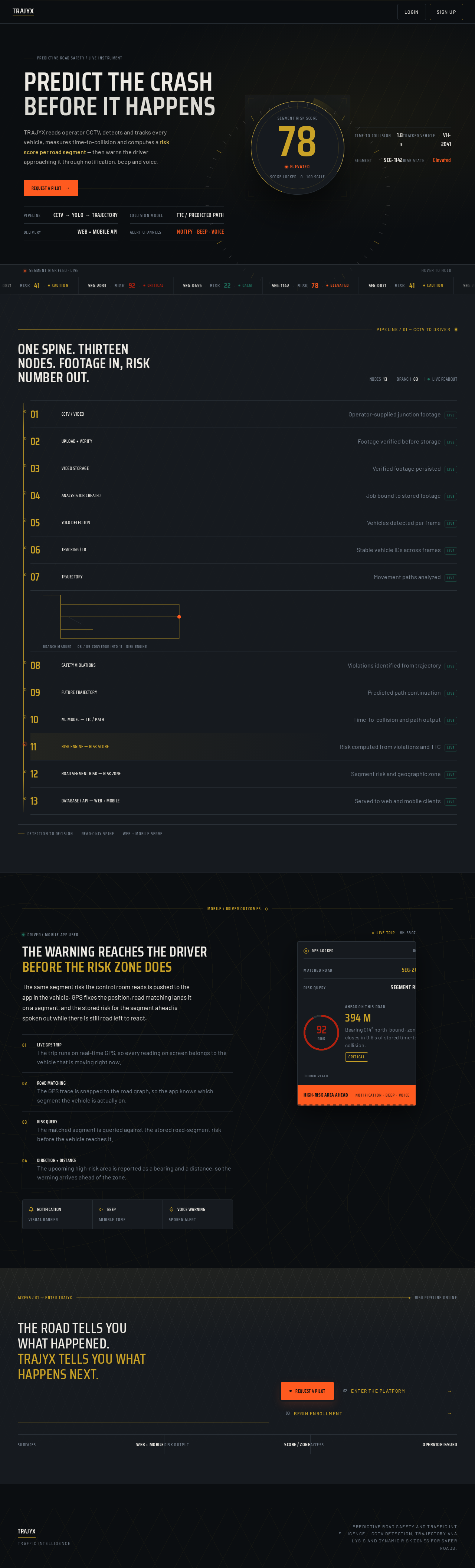
Predictive Road Safety / Live Instrument
Predict the crashBefore it happens
TRAJYX reads operator CCTV, detects and tracks every vehicle, measures time-to-collision and computes a risk score per road segment — then warns the driver approaching it through notification, beep and voice.
- Pipeline
- CCTV → YOLO → Trajectory
- Collision model
- TTC / Predicted Path
- Delivery
- Web + Mobile API
- Alert channels
- Notify · Beep · Voice
- Time to collision
- 1.8 s
- Tracked vehicle
- VH-2041
- Segment
- SEG-1142
- Risk state
- Elevated
- SEG-1142RISK 78ELEVATED
- SEG-0871RISK 41CAUTION
- SEG-2033RISK 92CRITICAL
- SEG-0455RISK 22CALM
One spine. Thirteen nodes. Footage in, risk number out.
- 01CCTV / VIDEOOperator-supplied junction footagelive
- 02UPLOAD + VERIFYFootage verified before storagelive
- 03VIDEO STORAGEVerified footage persistedlive
- 04ANALYSIS JOB CREATEDJob bound to stored footagelive
- 05YOLO DETECTIONVehicles detected per framelive
- 06TRACKING / IDStable vehicle IDs across frameslive
- 07TRAJECTORYMovement paths analyzedlive
- 08SAFETY VIOLATIONSViolations identified from trajectorylive
- 09FUTURE TRAJECTORYPredicted path continuationlive
- 10ML MODEL — TTC / PATHTime-to-collision and path outputlive
- 11RISK ENGINE — RISK SCORERisk computed from violations and TTClive
- 12ROAD SEGMENT RISK — RISK ZONESegment risk and geographic zonelive
- 13DATABASE / API — WEB + MOBILEServed to web and mobile clientslive
Driver / Mobile App User
The warning reaches the driver
before the risk zone does
The same segment risk the control room reads is pushed to the app in the vehicle. GPS fixes the position, road matching lands it on a segment, and the stored risk for the segment ahead is spoken out while there is still road left to react.
- 01Live GPS Trip
The trip runs on real-time GPS, so every reading on screen belongs to the vehicle that is moving right now.
- 02Road Matching
The GPS trace is snapped to the road graph, so the app knows which segment the vehicle is actually on.
- 03Risk Query
The matched segment is queried against the stored road-segment risk before the vehicle reaches it.
- 04Direction + Distance
The upcoming high-risk area is reported as a bearing and a distance, so the warning arrives ahead of the zone.
Ahead on this road
416 M
Bearing 014° north-bound · zone closes in 0.9 s of stored time-to-collision.
CriticalThe road tells you what happened.
TRAJYX tells you what happens next.
Predictive Road Safety / Live Instrument
Predict the crashBefore it happens
TRAJYX reads operator CCTV, detects and tracks every vehicle, measures time-to-collision and computes a risk score per road segment — then warns the driver approaching it through notification, beep and voice.
- Pipeline
- CCTV → YOLO → Trajectory
- Collision model
- TTC / Predicted Path
- Delivery
- Web + Mobile API
- Alert channels
- Notify · Beep · Voice
- Time to collision
- 1.8 s
- Tracked vehicle
- VH-2041
- Segment
- SEG-1142
- Risk state
- Elevated
- SEG-1142RISK 78ELEVATED
- SEG-0871RISK 41CAUTION
- SEG-2033RISK 92CRITICAL
- SEG-0455RISK 22CALM
One spine. Thirteen nodes. Footage in, risk number out.
- 01CCTV / VIDEOOperator-supplied junction footagelive
- 02UPLOAD + VERIFYFootage verified before storagelive
- 03VIDEO STORAGEVerified footage persistedlive
- 04ANALYSIS JOB CREATEDJob bound to stored footagelive
- 05YOLO DETECTIONVehicles detected per framelive
- 06TRACKING / IDStable vehicle IDs across frameslive
- 07TRAJECTORYMovement paths analyzedlive
- 08SAFETY VIOLATIONSViolations identified from trajectorylive
- 09FUTURE TRAJECTORYPredicted path continuationlive
- 10ML MODEL — TTC / PATHTime-to-collision and path outputlive
- 11RISK ENGINE — RISK SCORERisk computed from violations and TTClive
- 12ROAD SEGMENT RISK — RISK ZONESegment risk and geographic zonelive
- 13DATABASE / API — WEB + MOBILEServed to web and mobile clientslive
Driver / Mobile App User
The warning reaches the driver
before the risk zone does
The same segment risk the control room reads is pushed to the app in the vehicle. GPS fixes the position, road matching lands it on a segment, and the stored risk for the segment ahead is spoken out while there is still road left to react.
- 01Live GPS Trip
The trip runs on real-time GPS, so every reading on screen belongs to the vehicle that is moving right now.
- 02Road Matching
The GPS trace is snapped to the road graph, so the app knows which segment the vehicle is actually on.
- 03Risk Query
The matched segment is queried against the stored road-segment risk before the vehicle reaches it.
- 04Direction + Distance
The upcoming high-risk area is reported as a bearing and a distance, so the warning arrives ahead of the zone.
Ahead on this road
416 M
Bearing 014° north-bound · zone closes in 0.9 s of stored time-to-collision.
Critical
No comments yet. Be the first!