rising-html
 ABDELKHALEQ EL BOUHAILI
as html

Comments (0)
Sign in to leave a comment
System Requirements
System Requirements Document for rising-html
1. Introduction
1.1 Build a Complete Professional View Game Page — DinoVerse Studio
Act as a Senior Full-Stack Developer, Product Designer, and UI/UX Specialist.
Your task is to design and implement a complete, production-ready View Game Page for the DinoVerse Studio website.
This must be a fully functional game details experience, not a static mockup or a simple game information page.
The design should feel like a premium gaming platform, combining the best UX ideas from Steam, Epic Games Store, PlayStation, and modern independent game studio websites, while maintaining DinoVerse's own visual identity.
The requested output format is HTML. The project name is rising-html.
2. System Overview
rising-html delivers a complete, production-ready View Game Page for the DinoVerse Studio website, output as HTML. It is a fully functional game-details experience, not a static mockup or a simple information page, and should feel like a premium gaming platform — drawing UX inspiration from Steam, Epic Games Store, PlayStation, and modern independent studio sites while keeping DinoVerse's own visual identity. The page is fully integrated into the existing DinoVerse site, visually consistent with it, fully responsive, functional wherever backend support exists, SEO-optimized, fast and accessible, reusable and maintainable, and free of broken links and console errors.
2.1 Actors
- Player / visitor — browses the game hero (artwork, title, tagline, status, genre tags, platform icons, studio information, release date, rating when available) and interacts with the community and discussion section around the game.
- Developer / studio — represented on the page through developer/studio information and a developer profile component; the existing game publishing workflow supplies the published game data.
- Search engines and AI-powered search systems — consume the page's structured data for discoverability.
2.2 Capabilities and Page Coverage
The page is composed of reusable components: GameHero, GameActions, GameSectionNavigation, GameMediaGallery, GameOverview, GameFeatures, GamePlatforms, GameRequirements, GamePatchNotes, GameReviews, GameCommunity, RelatedGames, DeveloperProfile, GameMetadata, GameLoadingSkeleton, and GameNotFound. The hero presents cover or featured artwork, title, short tagline or description, status (Released, Coming Soon, In Development, Early Access), genre tags, platform compatibility icons, developer/studio information, release date, and rating when available. A community and discussion section lets users interact around the game. A related-games section surfaces games sharing genre, platform, game category, or developer.
2.3 Discoverability
Every game page is optimized for search engines and AI-powered search systems, including Schema.org structured data: VideoGame where applicable, BreadcrumbList, and Organization or developer references where appropriate.
2.4 Technical Architecture and Data Integration
The implementation builds on the existing game database schema, Supabase integration, existing game listing and detail routes, storage and image URL conventions, authentication, the existing design system, UI components, icon and animation libraries, and the existing game publishing workflow. Server components handle data fetching where appropriate; client components are used only for interactive functionality, with proper TypeScript types and clean separation of responsibilities.
2.5 Boundaries
This work covers the View Game Page only; it does not define a global page inventory or a complete persona catalog. Details not established by this evidence — including specific field-level data contracts, exact status transition rules, and quantitative performance targets — remain to be specified in their assigned chapters rather than assumed here.
3. Functional Requirements
3.1 Build a Complete Professional View Game Page — DinoVerse Studio / Page Header / Game Hero
Build an immersive hero section containing:
-
Game cover or featured artwork.
-
Game title.
-
Short tagline or description.
-
Game status (Released, Coming Soon, In Development, Early Access).
-
Genre tags.
-
Platform compatibility icons.
-
Developer / Studio information.
-
Release date.
-
Game rating when available.
-
Primary action buttons depending on game availability.
Primary actions:
-
Play Now / Play Game (for playable browser games).
-
Download Game (if downloads are available).
-
View on Store (when an external store link exists).
-
Watch Trailer.
-
Add to Wishlist.
-
Share Game.
The hero must adapt automatically to the available game information.
Do not display buttons that have no valid destination or supported functionality.
3.2 Build a Complete Professional View Game Page — DinoVerse Studio / Game Media Gallery
Create a premium media gallery.
Features:
-
Main featured screenshot or trailer.
-
Screenshot thumbnails.
-
Video trailer thumbnails.
-
Click to open a full-screen lightbox.
-
Next / Previous navigation.
-
Keyboard navigation.
-
Video playback controls.
-
Image zoom where appropriate.
-
Smooth transitions between media.
-
Support different image aspect ratios.
-
Mobile-friendly swipe navigation.
The gallery should support:
-
Screenshots.
-
Gameplay videos.
-
Trailers.
-
Promotional artwork.
Use existing media URLs and database relationships.
3.3 Build a Complete Professional View Game Page — DinoVerse Studio / Game Information & Overview
Create a dedicated overview section.
Display:
-
Full game description.
-
Short description.
-
Game genre.
-
Game mode (Single Player, Multiplayer, Co-op).
-
Supported platforms.
-
Game engine (Unity, Unreal Engine, Godot, etc.).
-
Release date.
-
Development status.
-
Developer.
-
Publisher, if available.
-
Languages.
-
Age rating, if available.
-
Game features.
Support formatted descriptions where the existing content system allows it.
3.4 Build a Complete Professional View Game Page — DinoVerse Studio / Gameplay Features
Create a visually attractive section highlighting the game's main features.
Examples:
-
Gameplay mechanics.
-
Unique abilities.
-
Game modes.
-
Multiplayer features.
-
Progression systems.
-
Exploration.
-
Challenges.
-
Achievements.
Each feature may include:
-
Icon.
-
Title.
-
Short description.
-
Optional image.
Only display features that exist in the game's actual data.
3.5 Build a Complete Professional View Game Page — DinoVerse Studio / Platforms & Compatibility
Create a dedicated platform compatibility section.
Use beautiful recognizable platform icons.
Possible platforms:
-
Windows PC.
-
macOS.
-
Linux.
-
Android.
-
iOS.
-
WebGL / Browser.
-
PlayStation.
-
Xbox.
-
Nintendo Switch.
-
VR / Virtual Reality.
-
Steam Deck.
Include:
- Supported platforms.
Include:
- Minimum requirements.
Include:
- Recommended requirements.
Include:
- Controller support.
Include:
- Keyboard and mouse support.
Include:
-
Touch controls.
-
VR compatibility.
Do not display unsupported platforms or invent compatibility information.
Platform icons should use a consistent icon library or suitable official brand icons.
3.6 Build a Complete Professional View Game Page — DinoVerse Studio / System Requirements
Create an elegant system requirements section.
For PC games, support:
Minimum requirements:
-
Operating System.
-
Processor.
-
Memory (RAM).
-
Graphics.
-
DirectX.
-
Storage.
-
Additional requirements.
Recommended requirements:
-
Memory (RAM).
-
Graphics.
-
DirectX.
-
Storage.
Include a Minimum / Recommended switch or segmented control.
If requirements are unavailable, hide this section instead of showing fake information.
3.7 Build a Complete Professional View Game Page — DinoVerse Studio / Game Updates & Version History
Create a professional update timeline.
Display:
-
Current version.
-
Latest update date.
-
Version number.
-
Release title.
-
Update category.
-
New features.
-
Improvements.
-
Bug fixes.
-
Known issues, if published.
Design this section as a polished chronological timeline rather than a generic table.
Support:
-
Expand / collapse individual releases.
-
Show more updates.
-
Version labels.
-
Release dates.
-
Optional media attachments.
The content must come from published game patch notes.
Temporary placeholder history must never be presented as real published updates.
3.8 Build a Complete Professional View Game Page — DinoVerse Studio / Reviews & Ratings
Build a complete review section.
Features:
-
Overall rating.
-
Rating distribution.
-
Written reviews.
-
User rating submission.
-
Review sorting.
-
Review pagination or Load More.
Review sorting:
-
Most Helpful.
-
Newest.
-
Highest Rated.
-
Lowest Rated.
-
Helpful / Not Helpful voting.
-
Verified player indicators when supported.
3.9 Build a Complete Professional View Game Page — DinoVerse Studio / Community & Discussion
Create a community section where users can interact around the game.
Potential functionality:
-
Game discussions.
-
Questions and answers.
-
User comments.
-
Replies.
-
Reactions.
-
Report inappropriate content.
-
Moderation controls.
Respect existing permissions and authentication rules.
If a community backend does not exist, build the frontend integration points cleanly without pretending that data is being saved.
3.10 Build a Complete Professional View Game Page — DinoVerse Studio / Related Games
Create a beautiful related-games section.
Display games sharing:
-
Genre.
-
Platform.
-
Game category.
-
Developer.
-
Similar gameplay characteristics.
Each game preview should include:
-
Cover image.
-
Title.
-
Genre.
-
Status.
-
Short description.
Cards must link to their actual View Game pages.
Do not include the current game in its own recommendations.
3.11 Build a Complete Professional View Game Page — DinoVerse Studio / Developer / Studio Information
Create a developer information section.
Display:
-
Studio logo.
-
Studio name.
-
Short studio description.
-
Developer profile link.
-
Other games from the developer.
-
Official website and social links when available.
Keep this section compact and visually elegant.
3.12 Build a Complete Professional View Game Page — DinoVerse Studio / Wishlist & Sharing
Implement functional interactions.
Wishlist:
-
Add / Remove from Wishlist.
-
Persistent state for authenticated users.
-
Appropriate feedback.
-
Authentication handling.
-
Prevent duplicate entries.
Implement functional interactions.
Sharing:
-
Copy game URL.
-
Native share API when supported.
-
Social sharing links where appropriate.
-
Attractive share interaction.
3.13 Build a Complete Professional View Game Page — DinoVerse Studio / SEO & Discoverability
Implement:
-
Dynamic page title.
-
Dynamic meta description.
-
Canonical URL.
-
Open Graph metadata.
-
Twitter/X card metadata.
-
Dynamic social preview image.
Implement:
-
Semantic HTML structure.
-
Breadcrumb navigation.
-
Descriptive image alt text.
Implement:
- Structured data using appropriate Schema.org types.
Use:
-
VideoGame schema when applicable.
-
BreadcrumbList schema.
-
Organization or developer references where appropriate.
3.14 Build a Complete Professional View Game Page — DinoVerse Studio / Navigation & Page Layout
Organize the page into clear sections.
Suggested navigation:
-
Overview
-
Media
-
Features
-
Platforms
-
Requirements
-
Updates
-
Reviews
-
Community
Implement a sticky section navigation that:
-
Highlights the active section.
-
Smoothly scrolls to the selected section.
-
Works correctly on mobile.
-
Does not overlap the main navigation.
-
Accounts for sticky header height.
Add breadcrumb navigation:
Home / Games / Game Title.
3.15 Build a Complete Professional View Game Page — DinoVerse Studio / Loading, Empty & Error States
Create polished states for:
-
Loading game information.
-
Missing game artwork.
-
Empty media gallery.
-
No reviews.
-
No updates.
-
No related games.
-
Game not found (404).
-
Unavailable external links.
-
Network errors.
Use skeleton loaders where appropriate.
3.16 Build a Complete Professional View Game Page — DinoVerse Studio / Responsive Design
Desktop:
-
Immersive hero layout.
-
Main content with a balanced information sidebar where appropriate.
-
Large media gallery.
-
Sticky navigation.
Tablet:
-
Adapted two-column layout.
-
Properly sized gallery.
-
Comfortable navigation.
Mobile:
-
Stacked layout.
-
Swipeable media gallery.
-
Compact hero.
-
Touch-friendly buttons.
-
Horizontally scrollable section navigation.
-
No horizontal overflow.
-
Optimized metadata and requirements layouts.
3.17 Build a Complete Professional View Game Page — DinoVerse Studio / Final Quality Requirements
Do not stop after creating the hero section.
Implement the entire View Game experience, including all supported interactions and responsive states.
3.18 Build a Complete Professional View Game Page — DinoVerse Studio / Final Verification
After implementation:
-
Test the page using a real existing game.
-
Test a game with missing optional information.
-
Test a game with screenshots and videos.
-
Test a game with no reviews or updates.
-
Test mobile, tablet, and desktop layouts.
-
Test all buttons and navigation.
-
Verify Supabase queries and relationships.
-
Verify SEO metadata and structured data.
-
Check for console errors.
-
Verify that existing website functionality remains unaffected.
4. User Personas
The evidence establishes one human role: the authenticated player interacting with the DinoVerse Studio game page. No other human roles, and no closed persona count, are established by this batch.
| Role | Responsibilities | Inputs | Decisions | Observable success | Access |
|---|---|---|---|---|---|
| Authenticated player | Manages a personal wishlist for the game; shares the game page | Game page content, wishlist controls, sharing controls | Whether to add or remove the game from the wishlist; whether to share | Wishlist state persists across sessions; feedback confirms each action; no duplicate wishlist entries; unauthenticated attempts are handled | Signed-in account required for persistent wishlist; sharing available from the game page |
Journey — wishlist: The player opens the game page, chooses Add to Wishlist, and receives confirmation; the entry persists for their account and cannot be duplicated. On return, the player may remove the game, again with feedback and persisted state. If not authenticated, the page handles the request rather than silently failing.
Journey — sharing: The player uses the page's sharing interaction to distribute the game page.
Supporting actors: the authentication mechanism that gates persistent wishlist state, and the wishlist store that enforces persistence and duplicate prevention. These are systems, not personas.
5. Core User Flows
5.1 Evaluate a game and launch it
Actor: Player (visitor or authenticated). Trigger: Player opens a game's View Game page from a related-games card, search, or direct URL.
- Page loads with skeleton loaders; breadcrumb shows Home / Games / Game Title.
- Hero renders and adapts to available data, showing only the actions the game supports: Play Now / Play Game, Download Game, View on Store, Watch Trailer, Add to Wishlist, Share Game.
- Player scans Overview (full and short description, genre, game mode), then Features and Platforms via section navigation.
- Player opens Media and selects a screenshot or trailer thumbnail; the lightbox opens full-screen with Next/Previous, keyboard and mobile swipe navigation, zoom, and video playback controls.
- Player switches System Requirements between Minimum and Recommended.
- Player selects Play Now, Download Game, or View on Store.
Branches: If requirements are unavailable, the Requirements section is hidden rather than filled with placeholder data. If an external link is unavailable, the action is disabled with feedback. If the game is not found, a 404 state replaces the page. Network errors show a recoverable error state.
Result: Player reaches the game or store, or leaves with enough information to decide.
5.2 Review version history
Actor: Player. Trigger: Player wants to know what changed recently.
- Player navigates to Updates.
- Timeline shows current version, latest update date, and releases in chronological order with version number, release title, category, new features, improvements, bug fixes, and known issues where published.
- Player expands or collapses a release, optionally views attached media, and uses Show more updates to load older entries.
Branches: If no published patch notes exist, the section shows an empty state; placeholder history is never presented as real updates.
Result: Player understands the game's current state and recent changes.
5.3 Rate and review a game
Actor: Player. Trigger: Player has played the game and wants to share an opinion.
- Player opens Reviews and sees overall rating, rating distribution, and written reviews.
- Player sorts by Most Helpful, Newest, Highest Rated, or Lowest Rated, and pages through results or uses Load More.
- Player votes Helpful / Not Helpful on existing reviews.
- Player submits a rating and written review.
Branches: If no reviews exist, an empty state with the submission prompt is shown. Authentication is required for submission; unauthenticated players are prompted to sign in and returned to the page.
Result: Review appears in the list and the rating distribution updates.
5.4 Manage wishlist
Actor: Player. Trigger: Player selects Add to Wishlist in the hero or Wishlist section.
- Authenticated player selects Add to Wishlist; the state persists and the button becomes Remove from Wishlist with confirmation feedback.
- Selecting Remove from Wishlist clears the entry with feedback.
Branches: Unauthenticated players are routed through authentication handling and returned to the game. Duplicate entries are prevented.
Result: Wishlist reflects the player's intent across sessions.
5.5 Share a game
Actor: Player. Trigger: Player selects Share Game.
- Share interaction opens with Copy game URL, native share API when supported, and social sharing links where appropriate.
- Player copies the URL or completes a share; confirmation feedback is shown.
Branches: If the native share API is unsupported, copy and social links remain available.
Result: Game URL is distributed.
5.6 Discover related games and the studio
Actor: Player. Trigger: Player finishes reviewing the current game.
- Player scrolls to Related Games, which lists games sharing genre, platform, category, developer, or similar gameplay characteristics; each card shows cover image, title, genre, status, and short description.
- Player selects a card and lands on that game's View Game page.
- Alternatively, player opens Developer / Studio Information (logo, name, description, profile link, other games) and follows the developer profile link or another game.
Branches: The current game is excluded from its own recommendations. If no related games exist, an empty state is shown.
Result: Player continues discovery on another game or studio page.
5.7 Navigate the page
Actor: Player. Trigger: Player wants a specific section.
- Player uses section navigation (Overview, Media, Features, Platforms, Requirements, Updates, Reviews, Community) or the breadcrumb to move within or out of the page.
- Section anchors scroll to the target; breadcrumb links return to Home or Games.
Result: Player reaches the desired content without losing context.
5.8 Cross-flow conditions
- All flows work on mobile, tablet, and desktop layouts.
- Loading, empty, error, and 404 states are handled per flow; skeleton loaders appear while game information loads.
- Missing optional information (artwork, media, reviews, updates, related games, requirements, external links) hides or replaces the affected section with an appropriate state rather than fabricated content.
- Existing website functionality remains unaffected by these flows.
6. Visuals Colors and Theme
[Design proposal; unspecified choices are defaults.]
6.1 Visual Identity & Theme
The View Game page is a premium destination for discovering and exploring games published by DinoVerse Studio — a magazine spread about one title rather than a storefront grid. The muse is Tobias van Schneider: editorial minimalism with swagger. The interface is light-first and white-led, with dark full-bleed bands allowed where they deepen the gaming experience.
Palette (light mode)
| Role | Token |
|---|---|
| Page ground | #FBFAF7 warm off-white |
| Surface (media frames, sticky section bar) | #FFFFFF |
| Ink / text / dark-section ground | #0E0F0D |
| Primary signal | #21C65B DinoVerse green |
| Muted metadata | #6B6E68 |
DinoVerse green is rationed to one signal per context: status pill, active section-nav underline, wishlist-on state, primary CTA fill, rating bar. Dark sections use #0E0F0D ground with #FBFAF7 text and green kept to a single element each. No blue, no gradients.
Typography — Headings: Anton, all-caps, tracking −0.01em, leading 0.9. Body and UI: Instrument Sans (600 sub-heads and labels, 400 body at 17px/1.6, 500 uppercase metadata at 0.12em letterspacing). Five sizes only: display title clamp(56px, 11vw, 176px); section opener clamp(34px, 5vw, 64px); sub-head 28/22; body 17/16; meta 13/12 uppercase.
Shape language — 0px radius on all media and photo blocks; 2px radius on buttons and pills only. Hairline 1px rules in #0E0F0D at 12% opacity separate editorial rows; no drop-shadowed cards. Status and genre tags are flat outlined pills, never filled chips. A 3px underline marks the active section-nav item.
Layout — Asymmetric 12-column editorial grid, 1280px max width, 24px gutters. Two-column body: 8-column narrative (gallery, overview, features, updates, reviews, related) and a 4-column sticky information rail rendered as a ruled list (label left, value right, 1px separators) — status, platforms, release date, developer, then wishlist and share. Game information and overview use elegant metadata layouts rather than a collection of information cards. Dark full-bleed bands punctuate the white ground twice: System Requirements and the studio block.
Imagery — Real DinoVerse game assets only, from the existing database and its media URLs and relationships; never unrelated placeholders or invented game information. Key art is cropped hard and bled to the edge; screenshots are full-bleed editorial plates with a monochrome hover dim; video thumbnails carry a green play glyph. The game art is the only image on the page.
Responsive — Desktop: immersive hero, balanced information sidebar, large gallery, sticky navigation. Tablet: adapted two-column layout, properly sized gallery, comfortable navigation. Mobile: stacked layout, compact hero, swipeable gallery, touch-friendly buttons, horizontally scrollable section navigation, no horizontal overflow, optimized metadata and requirements layouts. Headlines, labels, numbers and controls stay whole inside the viewport and their containers at 375px, 768px and 1280px; imagery may bleed and crop instead.
Accessibility — Screen reader labels, accessible modal behavior, correct color contrast; ink-on-off-white and off-white-on-ink pairings carry body text, green is reserved for accents and large numerals.
Defaults (labeled): the exact hex values, font families and scale above are the creative direction's tokens; the brief itself specifies only white/light primary, dark sections where they help, and selective #21c65b.
6.2 Build a Complete Professional View Game Page — DinoVerse Studio / Design Direction & Visual Identity
Create a polished, modern, immersive gaming experience.
Design requirements:
-
Clean, modern, premium gaming aesthetic.
-
White/light interface as the primary design direction.
-
Dark sections are allowed where they improve the gaming experience.
-
Use DinoVerse brand green (#21c65b) selectively for highlights and interactive elements.
-
Strong typography and excellent visual hierarchy.
-
Beautiful spacing, rounded corners, subtle borders, and sophisticated shadows.
-
Smooth transitions and micro-interactions.
-
Fully responsive on desktop, tablet, and mobile.
-
Avoid excessive cards, unnecessary borders, and generic dashboard styling.
-
Avoid oversized empty spaces.
6.3 Build a Complete Professional View Game Page — DinoVerse Studio / Game Information & Overview
Use elegant metadata layouts rather than a large collection of boring information cards.
6.4 Build a Complete Professional View Game Page — DinoVerse Studio / Final Verification
The final page should feel like a premium destination for discovering and exploring games published by DinoVerse Studio.
7. Signature Design Concept
[Design proposal; unspecified choices are defaults.]
Headline idea: One game, full bleed. The page behaves like a curated gallery wall for a single title — oversized Anton type, sharp-cornered media, and one green signal guiding the eye.
Hero (public entry) — A full-bleed ink #0E0F0D plate, 88vh on desktop and auto on mobile, split asymmetrically. The game's cover or featured key art bleeds off the right edge at 55% width with a hard vertical crop and a subtle left-to-right ink scrim. The left 45% carries, in order: a single uppercase meta line of status pill (Released, Coming Soon, In Development, Early Access) and genre tags; the game title in Anton stacked flush-left across nine columns at up to 176px; a short tagline or description in Instrument Sans; a horizontal action row — green Download Game (when downloads are available), ink-outlined Watch Trailer, ghost Wishlist and Share, plus View on Store when an external store link exists; a large rating numeral beside a green bar when a rating exists; and platform icons with release date and developer/studio information along the bottom rule. Nothing is centred. The hero adapts automatically to available game information — absent fields collapse rather than render empty.
Signature moves
- Sticky section navigation — a white hairline bar with uppercase Instrument Sans labels, a 3px green underline that wipes between active items, smooth scroll to the selected section, offset for the sticky header height, no overlap with the main navigation, and horizontal scroll on mobile.
- Editorial media gallery — one large sharp-cornered plate with a green play glyph on video, thumbnail strip of screenshots and trailer thumbnails below, full-screen lightbox with next/previous, keyboard navigation, swipe, image zoom, video playback controls, mixed aspect ratios, and a monochrome-dim hover on every frame; supports screenshots, gameplay videos, trailers and promotional artwork.
- Ruled information rail — sticks beside the narrative as label/value rows with 1px separators instead of a card.
- Dark System Requirements band — a two-state segmented control (Minimum / Recommended) as two half-width ink cells where the active cell flips to green text; covers OS, processor, memory, graphics, DirectX, storage and additional requirements; the section hides entirely when requirements are unavailable.
- Chronological update timeline — version labels, release dates, expand/collapse, show-more, optional media, and known issues, drawn only from published patch notes; temporary placeholder history is never presented as real updates.
Supporting sections — Gameplay features (icon, title, short description, optional image; only features present in actual data), platform compatibility with recognizable consistent icons and no invented platforms, related games (cover, title, genre, status, short description; linking to real View Game pages and excluding the current game), and a compact studio block with official website and social links.
States — Polished loading skeletons, missing artwork, empty gallery, no reviews, no updates, no related games, 404 game-not-found, unavailable external links, and network errors.
Avoid — rounded SaaS cards with hover-lift shadows, blue or indigo, centred headline-plus-gradient-blob heroes, Inter/Roboto/Poppins/system-ui, filled colourful genre chips, dashboard stat tiles, bouncy or looping decorative animation.
8. Interaction Model & Motion Direction
[Design proposal; unspecified choices are defaults.]
Interaction Model: Animated Motion Tempo: restrained Hero Dimensionality: flat
8.1 Landing Hero Motion Brief
Focal subject: the game's real key art, bled off the right edge of the ink plate.
Thesis: on load, the ink plate settles and the key art resolves from a slight scale with a scrim wipe → the Anton title and meta line reveal in sequence (translateY 12px + opacity, 400–600ms) → the action row and rating bar arrive last, leaving a composed first frame: art dominant right, oversized type flush-left, one green CTA.
Motion vocabulary: slow 400–600ms crossfades and type reveals; 200ms underline wipe on section nav; spring-free scale(0.98) press on buttons; a single green fill sweep on wishlist toggle; subtle scroll-based reveals (translateY 12px + opacity) for section openers; gallery crossfades and hover effects on screenshots; expand/collapse animations on the update timeline; loading transitions. No bounces, no marquees, no looping decoration.
Composed first frame: status pill and genre tags in one uppercase meta line, title stacked across nine columns, two-line tagline, action row, rating numeral beside the green bar, platform icons and release date on the bottom rule.
Reduced motion: prefers-reduced-motion disables all transforms and reveals, leaving instant state changes; the horizontally scrollable section navigation and gallery remain usable by scrolling so every item can be brought fully into view.
Performance: lightweight animations using the project's existing animation libraries; no excessive motion that affects performance.
8.2 Build a Complete Professional View Game Page — DinoVerse Studio / Animations & Micro-interactions
Add carefully designed animations:
-
Hero artwork entrance.
-
Gallery transitions.
-
Hover effects on screenshots.
-
Button interaction feedback.
-
Smooth section navigation.
-
Expand / collapse animations.
-
Subtle scroll-based reveals.
-
Wishlist animation.
-
Loading transitions.
9. Non-Functional Requirements
9.1 Build a Complete Professional View Game Page — DinoVerse Studio / Reviews & Ratings
Important:
-
Prevent duplicate reviews where applicable.
-
Validate user input.
-
Protect against spam.
-
Do not invent ratings or reviews.
-
If authentication is required, integrate with the existing authentication system.
9.2 Build a Complete Professional View Game Page — DinoVerse Studio / SEO & Discoverability
This is extremely important.
Every game page must be optimized for search engines and AI-powered search systems.
Ensure pages are server-rendered or otherwise properly discoverable by search engines using the existing Next.js architecture.
9.3 Build a Complete Professional View Game Page — DinoVerse Studio / Loading, Empty & Error States
Never leave broken images, empty sections, or non-functional buttons.
9.4 Build a Complete Professional View Game Page — DinoVerse Studio / Animations & Micro-interactions
Prefer lightweight animations using the project's existing animation libraries.
Respect prefers-reduced-motion.
Avoid excessive animation that affects performance.
9.5 Build a Complete Professional View Game Page — DinoVerse Studio / Performance & Accessibility
Requirements:
-
Optimize images with Next.js image optimization.
-
Lazy-load below-the-fold media.
-
Avoid unnecessary client-side JavaScript.
-
Avoid unnecessary database requests.
-
Prevent layout shifts.
-
Use semantic HTML.
-
Accessible buttons and links.
-
Keyboard navigation.
-
Proper focus states.
-
Screen reader labels.
-
Accessible modal behavior.
-
Correct color contrast.
9.6 Build a Complete Professional View Game Page — DinoVerse Studio / Final Quality Requirements
The final result must be:
-
Fully integrated into the existing DinoVerse website.
-
Visually consistent with the current website.
-
Fully responsive.
-
Functional wherever backend support exists.
-
SEO optimized.
-
Fast and accessible.
-
Reusable and maintainable.
-
Free from broken links and console errors.
10. Tech Stack
10.1 Build a Complete Professional View Game Page — DinoVerse Studio / Technical Architecture & Data Integration
Before implementation, inspect the existing project.
Understand:
-
Next.js version and routing architecture.
-
Existing game database schema.
-
Supabase integration.
-
Existing game listing and detail routes.
-
Storage and image URL conventions.
-
Authentication.
-
Existing design system.
-
Existing UI components.
-
Existing icon and animation libraries.
-
Existing game publishing workflow.
Separate the implementation into reusable components.
Suggested component architecture:
-
GameHero
-
GameActions
-
GameSectionNavigation
-
GameMediaGallery
-
GameOverview
-
GameFeatures
-
GamePlatforms
-
GameRequirements
-
GamePatchNotes
-
GameReviews
-
GameCommunity
-
RelatedGames
-
DeveloperProfile
-
GameMetadata
-
GameLoadingSkeleton
-
GameNotFound
Use server components for data fetching where appropriate and client components only for interactive functionality.
Ensure proper TypeScript types and clean separation of responsibilities.
11. Assumptions and Constraints
11.1 Build a Complete Professional View Game Page — DinoVerse Studio / Design Direction & Visual Identity
-
Use real game assets from the existing database whenever available.
-
Never use unrelated placeholder imagery or randomly generated game information.
The page must look like an actual professional game publishing platform.
11.2 Build a Complete Professional View Game Page — DinoVerse Studio / SEO & Discoverability
Only publish structured data based on real game information.
11.3 Build a Complete Professional View Game Page — DinoVerse Studio / Technical Architecture & Data Integration
IMPORTANT:
Do not create a new database architecture unnecessarily.
Reuse the existing game schema and relationships.
If additional fields or tables are genuinely required:
-
Identify the missing information.
-
Explain why it is required.
-
Create a migration that preserves existing data.
-
Maintain backward compatibility.
-
Document the changes.
11.4 Build a Complete Professional View Game Page — DinoVerse Studio / Final Quality Requirements
Do not redesign unrelated website pages.
Do not modify the Studio Editor or Dashboard unless a specific integration is necessary.
Do not replace existing data with demo content.
Do not create fake functionality.
12. Glossary
Game page — The professional view page for a single game, built by DinoVerse Studio, presenting the game's information and overview alongside its platform and compatibility details.
Game Information & Overview — The section of the game page covering supported platforms, game engine, release date, development status, developer, publisher (if available), languages, age rating (if available), and game features.
Platforms & Compatibility — The section of the game page listing the platforms a game supports: Linux, Android, iOS, WebGL / Browser, PlayStation, Xbox, Nintendo Switch, VR / Virtual Reality, and Steam Deck.
Game engine — The technology a game is built with, such as Unity, Unreal Engine, or Godot.
Development status — The current stage of a game's development, as stated on its game page.
Publisher — The publishing party for a game, shown when available; distinct from the developer.
Age rating — The age classification of a game, shown when available.
WebGL / Browser — The platform category for games playable in a web browser.
VR / Virtual Reality — The virtual reality platform category.
Steam Deck — The handheld platform category listed among supported platforms.
DINOVERSE STUDIO.
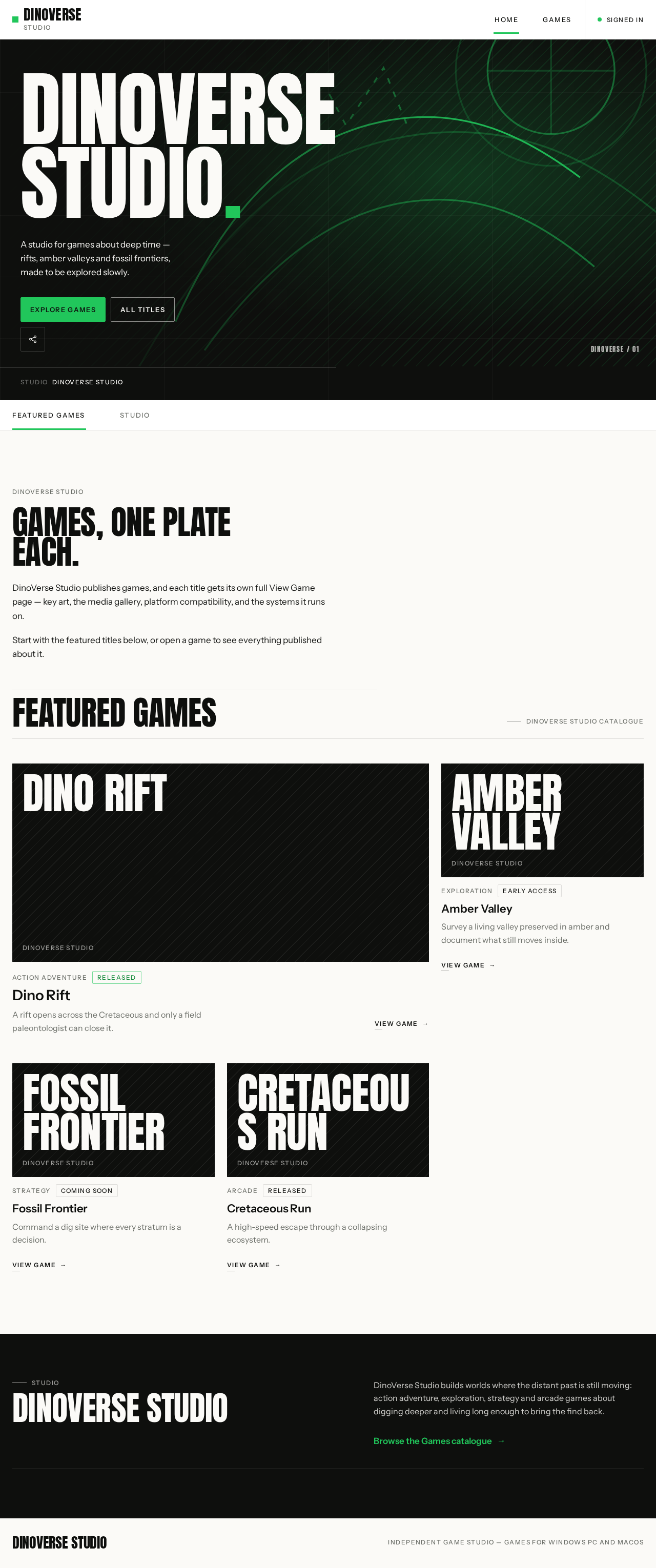
A studio for games about deep time — rifts, amber valleys and fossil frontiers, made to be explored slowly.
DinoVerse Studio
Games, one plate each.
DinoVerse Studio publishes games, and each title gets its own full View Game page — key art, the media gallery, platform compatibility, and the systems it runs on.
Start with the featured titles below, or open a game to see everything published about it.
Featured Games
DinoVerse Studio catalogue
Dino Rift
A rift opens across the Cretaceous and only a field paleontologist can close it.
View gameAmber Valley
Survey a living valley preserved in amber and document what still moves inside.
View gameFossil Frontier
Command a dig site where every stratum is a decision.
View gameCretaceous Run
A high-speed escape through a collapsing ecosystem.
View game
DinoVerse Studio
DinoVerse Studio builds worlds where the distant past is still moving: action adventure, exploration, strategy and arcade games about digging deeper and living long enough to bring the find back.
Browse the Games catalogueDINOVERSE STUDIO.
A studio for games about deep time — rifts, amber valleys and fossil frontiers, made to be explored slowly.
DinoVerse Studio
Games, one plate each.
DinoVerse Studio publishes games, and each title gets its own full View Game page — key art, the media gallery, platform compatibility, and the systems it runs on.
Start with the featured titles below, or open a game to see everything published about it.
Featured Games
DinoVerse Studio catalogue
Dino Rift
A rift opens across the Cretaceous and only a field paleontologist can close it.
View gameAmber Valley
Survey a living valley preserved in amber and document what still moves inside.
View gameFossil Frontier
Command a dig site where every stratum is a decision.
View gameCretaceous Run
A high-speed escape through a collapsing ecosystem.
View game
DinoVerse Studio
DinoVerse Studio builds worlds where the distant past is still moving: action adventure, exploration, strategy and arcade games about digging deeper and living long enough to bring the find back.
Browse the Games catalogue
No comments yet. Be the first!