retro-what
what can you do


Comments (0)
Sign in to leave a comment
System Requirements
System Requirements Document for What Can You Do
1. Introduction
What Can You Do is a trust-based social and hookup platform where users build reputation through real-life connections and vouching. The product's intent is to build a community in which trust is earned, not assumed: new users join, verify themselves with a selfie, and then must be vouched for by already vouched and verified users before they can text or post anything. Every profile carries a public ledger of how many people vouched for that user and how many people that user vouched for, so reputation is visible at a glance.
The audience is adults in Nigeria (and comparable markets) seeking to chat, meet, and hook up with people whose real-world connections have been attested by others. The platform is deliberately warm and human rather than slick: trust comes from real vouches and real in-person meetings, and the interface should read like a printed community ledger, not a growth-hacked social feed.
This document is the System Requirements Document for the project named What Can You Do (the requester also selected the working name "retro-what" during intake; the product name used throughout is What Can You Do).
1.1 Success Criteria
- A new user can create an account, complete selfie verification, and understand clearly that they cannot text or post until vouched for.
- A verified, already-vouched user can vouch for a friend they know and trust, and that vouch immediately changes both users' visible vouch counts.
- Every profile truthfully displays the number of people who vouched for the user and the number of people the user vouched for.
- A vouched user can send text messages, join chat rooms that show how many people are online, post pictures to their own profile, and place in-app voice and video calls.
- A user who met another user in person can leave an experience comment on that user's profile, and those comments read as a warm single-column letter.
- Unvouched users are reliably blocked from texting and posting, with a clear explanation of why and what to do next.
2. System Overview
2a. Product Interpretation and Delivery Boundary
What Can You Do is delivered as a first-party web application with application-owned identity. The public entry is the Landing page, which explains the trust-based community before any identity step. New users create an account and complete selfie verification on Sign Up; returning users verify identity on Login. Once inside, the working surfaces are Profile (vouch counts, profile pictures, in-person experience comments), Vouch (a verified vouching user vouches for a friend), Messages (text messaging between vouched users), Chat Rooms (rooms with a live count of people online), and Calls (in-app voice and video calls).
Access is layered by trust state, not by a general role system. Anyone can reach Landing, Sign Up, and Login anonymously. Profile, Messages, Chat Rooms, and Calls require a logged-in session. Vouch, Messages, Chat Rooms, and Calls are restricted to users who are verified and vouched for; an unvouched user who reaches those surfaces sees a blocked state explaining that they must be vouched for first, with a pointer back to their profile and the vouch counts that show their standing. Selfie verification is completed at Sign Up as part of account creation; it establishes the verified state but does not by itself grant posting or texting rights — the vouch is what unlocks those.
The current delivery is the web application plus a shared backend, a relational database, and Redis for live presence and coordination. Voice and video calling are delivered inside the app as first-party call surfaces; the underlying media transport is an implementation concern of the Calls surface and does not create a separate product destination. Nothing in this document commits to native mobile apps, payments, moderation tooling beyond the stated constraints, or any capability not named in the accepted requirements.
Removed from scope
- None. No concept from the authoritative requirement thread was explicitly removed.
2b. Source Content Inventory
Not applicable — no reference directive with content_source was supplied.
2c. Page Content and Component Coverage
Landing
- Information and state: Public explanation of the trust-based social and hookup community; the hero headline "Trust starts with one real vouch.", subline "Meet people, vouch for friends you trust, and build a profile that shows your real connections.", and call to action "Get vouched". A short explanation of how vouching works (selfie verification → vouch by a verified, already-vouched user → unlock texting and posting) and what a profile shows (people who vouched for you, people you vouched for).
- Primary action: "Get vouched" leads to Sign Up.
- Supporting actions: A link to Login for returning users.
- Domain entities: None persisted; presents the vouch-chain concept.
- Component responsibilities: Hero block with wide ink rule, Fraunces headline, rust vouch-chain illustration panel, rust block CTA; a section opener with hand-drawn rust mark and full-width ink rule introducing the vouch explanation; a ruled label/value pair block illustrating vouch counts.
- States: Loading — static content, no loading state required. Empty — not applicable. Success — page renders fully. Error — if the page fails to load, a plain retry message. Recovery — retry reloads the page.
Sign Up
- Information and state: Account creation form (the fields the user supplies to create an account) and a selfie verification step. Clear statement that after sign-up the user is verified but not yet vouched, and therefore cannot text or post until a verified, already-vouched user vouches for them.
- Primary action: Create account and submit selfie for verification.
- Supporting actions: Return to Landing; go to Login if an account already exists.
- Domain entities: User account; selfie verification record; verification status.
- Component responsibilities: Account form; selfie capture/upload control; verification status indicator; explanatory panel about the vouch requirement and its consequence.
- States: Loading — submitting account and selfie shows progress. Empty — form fields empty with inline guidance. Success — account created, selfie verified, user lands in their Profile with an unvouched state and a clear next step. Error — invalid form input shows inline field errors; selfie verification failure explains the problem and allows retry. Recovery — retry selfie or correct fields without losing entered account details.
Login
- Information and state: Returning-user identity verification form.
- Primary action: Verify identity and enter the app.
- Supporting actions: Go to Sign Up; return to Landing.
- Domain entities: User account; session.
- Component responsibilities: Credential form; error messaging; session establishment.
- States: Loading — submission progress. Empty — empty fields with guidance. Success — user lands on their Profile. Error — incorrect credentials show a clear message without revealing which part failed. Recovery — retry; link to Sign Up if the user has no account.
Profile
- Information and state: The user's own profile or another user's profile. Shows profile pictures posted by the profile owner, the number of people who vouched for this user, the number of people this user vouched for, and in-person experience comments left by users who met the profile owner in person. For the owner, also shows their current trust state (verified, vouched or not yet vouched) and, when unvouched, a clear notice that texting and posting are locked until someone vouches for them.
- Primary action: For the owner — post a picture to the profile (available only when vouched). For a visitor — leave an experience comment (available only when the visitor and the profile owner met in person).
- Supporting actions: Open Vouch to vouch for this user (verified, already-vouched visitors only); open Messages with this user; open Calls with this user; view the vouch counts as ruled label/value rows.
- Domain entities: Profile; profile picture; vouch (incoming and outgoing counts); experience comment; trust state.
- Component responsibilities: Ruled label/value count rows; picture posting control and picture display; experience comment composer and single-column letter-style comment list; trust-state notice; links to Vouch, Messages, and Calls.
- States: Loading — skeleton of counts and pictures. Empty — no pictures yet (owner sees the posting prompt); no experience comments yet (a quiet line inviting the first in-person comment); zero vouch counts shown truthfully as zero. Success — picture posted appears immediately; comment posted appears in the letter column. Error — picture upload failure explains and allows retry; comment submission failure preserves the typed comment for retry; attempting to post while unvouched shows the locked notice instead of the composer. Recovery — retry actions; the locked notice points to the vouch requirement.
Vouch
- Information and state: A verified, already-vouched user's surface for vouching for a friend they know and trust. Shows the friend being vouched for, the vouching user's own standing (verified and vouched), and confirmation of what a vouch means.
- Primary action: Confirm the vouch for the selected friend.
- Supporting actions: Cancel and return to the friend's Profile.
- Domain entities: Vouch record linking vouching user and vouched user; both users' vouch counts.
- Component responsibilities: Friend identity summary; confirmation control; explanation of the trust consequence; result confirmation showing updated counts.
- States: Loading — loading the friend's summary. Empty — no friend selected shows a prompt to choose from a profile. Success — vouch recorded, both counts update, confirmation shown. Error — ineligible vouching user (not verified or not vouched) sees a blocked explanation; duplicate vouch is prevented with a clear message. Recovery — return to Profile; retry when eligible.
Messages
- Information and state: Text conversations between vouched users. Shows the conversation list and the active thread.
- Primary action: Send a text message in a conversation.
- Supporting actions: Open the other user's Profile; start a call from the conversation.
- Domain entities: Conversation; message; participant.
- Component responsibilities: Conversation list; message thread; composer; locked-state panel for unvouched users.
- States: Loading — thread loading indicator. Empty — no conversations yet shows a quiet prompt to find people via profiles and chat rooms. Success — sent message appears in the thread. Error — send failure marks the message and allows retry; unvouched user sees the locked panel explaining they cannot text until vouched. Recovery — retry send; locked panel links to Profile to see vouch standing.
Chat Rooms
- Information and state: A list of chat rooms, each showing how many people are currently online in that room. Inside a room, the live online count and the room conversation.
- Primary action: Join a room and participate in its conversation.
- Supporting actions: Leave a room; open a participant's Profile.
- Domain entities: Chat room; online presence count; room message; participant.
- Component responsibilities: Room list with online counts as ruled label/value rows; room view with live count; message composer; locked-state panel for unvouched users.
- States: Loading — room list and count loading. Empty — a room with no one online shows a truthful zero; no rooms available shows a quiet message. Success — joining shows the live count and conversation; sending appears in the room. Error — presence count unavailable shows a clear "count unavailable" state rather than a false number; unvouched user sees the locked panel. Recovery — retry loading; locked panel explains the vouch requirement.
Calls
- Information and state: In-app voice and video calling with another user. Shows the callee, the chosen call type (voice or video), and call status.
- Primary action: Start a voice call or a video call.
- Supporting actions: End the call; switch between voice and video where the call supports it; open the other user's Profile.
- Domain entities: Call session; call type; participant.
- Component responsibilities: Call type selection; in-call status and controls; locked-state panel for unvouched users.
- States: Loading — connecting indicator. Empty — no active call shows the call setup. Success — connected call with controls. Error — callee unavailable or connection failure shows a clear message and allows retry; unvouched user sees the locked panel. Recovery — retry call; return to Profile or Messages.
3. Functional Requirements
Each requirement is stated as a user story with provenance, lifecycle facts, and observable acceptance.
FR-1 — Account creation with selfie verification (explicit; required_inference for the Sign Up placement) As a New user I should create an account and complete selfie verification so that I am a verified member of the community.
- Trigger/input: The user submits account details and a selfie on Sign Up.
- Observable result: An account exists with verification status set to verified; the user lands on their Profile showing the unvouched state.
- Access state: Anonymous entry on Sign Up.
- Failure/recovery: Invalid details show inline errors; a failed selfie verification explains the problem and allows retry without losing entered details.
- Continuation: The user is told they must be vouched for before they can text or post.
FR-2 — Returning identity verification (required_inference) As a returning user I should verify my identity at Login so that I can reach my protected work.
- Trigger/input: The user submits credentials on Login.
- Observable result: A session is established and the user lands on their Profile.
- Access state: Anonymous entry on Login; protected surfaces become reachable.
- Failure/recovery: Incorrect credentials show a clear message; the user can retry or go to Sign Up.
- Continuation: The user proceeds to Profile, Messages, Chat Rooms, or Calls according to their trust state.
FR-3 — Verified, already-vouched users vouch for friends (explicit) As a Verified vouching user I should vouch for a friend I know and trust so that the friend becomes a trusted member of the community.
- Trigger/input: The vouching user opens Vouch for a selected friend and confirms.
- Observable result: A vouch record links the two users; the friend's "people who vouched for me" count increases and the vouching user's "people I vouched for" count increases; both are visible on their profiles.
- Access state: Vouch is restricted to users who are both verified and already vouched for.
- Failure/recovery: A user who is not verified or not vouched sees a blocked explanation; a duplicate vouch is prevented with a clear message.
- Continuation: The vouching user returns to the friend's Profile and sees the updated counts.
FR-4 — Profile shows people who vouched for the user (explicit) As a user I should see on my profile the number of people who vouched for me so that my trust standing is visible.
- Trigger/input: Viewing any profile.
- Observable result: A ruled label/value row shows the count of people who vouched for this user, truthfully including zero.
- Access state: Profile requires login.
- Failure/recovery: If counts fail to load, a clear retry state is shown rather than a false number.
- Continuation: The user can open Vouch or Messages from the profile.
FR-5 — Profile shows people the user vouched for (explicit) As a user I should see on my profile the number of people I vouched for so that my contribution to the community is visible.
- Trigger/input: Viewing any profile.
- Observable result: A ruled label/value row shows the count of people this user vouched for, truthfully including zero.
- Access state: Profile requires login.
- Failure/recovery: Same retry behavior as FR-4.
- Continuation: Same as FR-4.
FR-6 — Text messaging between vouched users (explicit) As a Verified vouching user I should chat with other users so that I can build connections before and after meeting.
- Trigger/input: The user opens Messages, selects a conversation, and sends text.
- Observable result: The message appears in the thread for both participants.
- Access state: Messages is restricted to verified, vouched users.
- Failure/recovery: Send failure marks the message and allows retry; an unvouched user sees a locked panel explaining they cannot text until vouched.
- Continuation: The user can open the other participant's Profile or start a call.
FR-7 — In-app voice and video calls (explicit) As a Verified vouching user I should make voice calls and video calls inside the app so that I can talk face to face with people I trust.
- Trigger/input: The user starts a voice or video call from Calls or from a conversation.
- Observable result: A call session connects both participants with in-call controls.
- Access state: Calls is restricted to verified, vouched users.
- Failure/recovery: Callee unavailable or connection failure shows a clear message and allows retry; an unvouched user sees the locked panel.
- Continuation: The user ends the call and returns to Profile or Messages.
FR-8 — Chat rooms with online counts (explicit) As a Verified vouching user I should join chat rooms that show how many people are online so that I can find an active community.
- Trigger/input: The user opens Chat Rooms and joins a room.
- Observable result: Each room shows a live count of people online; joining shows the room conversation and its live count.
- Access state: Chat Rooms is restricted to verified, vouched users.
- Failure/recovery: If presence is unavailable, a clear "count unavailable" state is shown instead of a false number; an unvouched user sees the locked panel.
- Continuation: The user can leave the room or open a participant's Profile.
FR-9 — Posting pictures to one's own profile (explicit) As a Verified vouching user I should post pictures on my own profile so that people can see who I am.
- Trigger/input: The profile owner selects a picture and posts it.
- Observable result: The picture appears on the owner's profile.
- Access state: Profile requires login; posting is available only to vouched users.
- Failure/recovery: Upload failure explains and allows retry; an unvouched owner sees the locked notice instead of the posting control.
- Continuation: The picture is visible to visitors of the profile.
FR-10 — In-person experience comments (explicit) As a Met-in-person user I should comment my experience on another user's profile after we met in person so that others can see real-world feedback.
- Trigger/input: The visitor opens the other user's Profile and submits an experience comment.
- Observable result: The comment appears in the single-column letter-style comment list on that profile.
- Access state: Profile requires login; commenting is available only when the two users met in person.
- Failure/recovery: Submission failure preserves the typed comment for retry; a visitor who has not met the user in person does not see the composer.
- Continuation: The comment is visible to profile visitors.
FR-11 — Unvouched users cannot text or post (explicit) As an unvouched user I should be prevented from texting or posting until I am vouched for so that the community's trust gate is enforced.
- Trigger/input: An unvouched user attempts to send a message, post a picture, or post in a chat room.
- Observable result: The action is blocked and a clear notice explains that vouching is required and shows the user's current vouch standing.
- Access state: Applies to Messages, Chat Rooms, and profile picture posting.
- Failure/recovery: The notice points to Profile so the user can see their counts and understand what is needed.
- Continuation: Once vouched, the same actions become available.
FR-12 — Trust-based community identity (explicit) As a user I should experience a trust-based social and hookup community so that connections are grounded in real vouches and real meetings.
- Trigger/input: Any use of the product.
- Observable result: Vouch counts, verification state, and in-person comments are consistently visible and truthful across profiles.
- Access state: As described per surface.
- Failure/recovery: Inconsistent or unavailable trust data is surfaced honestly rather than fabricated.
- Continuation: The user can act on trust signals by vouching, messaging, or calling.
4. User Personas
New user
- Product context: Has just heard about What Can You Do and wants to join a community where trust is real. Creates an account on Sign Up and completes selfie verification.
- Primary goal: Become a verified, vouched-for member so they can text and post.
- Distinct accepted responsibilities: Completes selfie verification at account creation; understands and respects the gate that blocks texting and posting until vouched; monitors their own vouch counts on Profile to see progress.
- Relevant inputs or decisions: Account details, selfie, and the decision to invite a verified friend to vouch for them.
- Interactions with other accepted participants: Depends on a Verified vouching user to vouch for them; will later become a vouching user themselves.
- Observable success: Their Profile shows a verified state and, once vouched, a non-zero "people who vouched for me" count, and texting and posting become available.
Verified vouching user
- Product context: A verified member who has already been vouched for and can therefore vouch for others. Uses Messages, Chat Rooms, Calls, and posts pictures to their own Profile.
- Primary goal: Grow a trusted community by vouching for friends they know and trust, and connect with people through chat, rooms, and calls.
- Distinct accepted responsibilities: Decides whom to vouch for on Vouch; sends text messages on Messages; joins rooms and reads live online counts on Chat Rooms; places voice and video calls on Calls; posts pictures to their own Profile; leaves in-person experience comments on others' profiles.
- Relevant inputs or decisions: The judgment that a friend is known and trusted; the choice of room, conversation, or call type.
- Interactions with other accepted participants: Vouches for New users; chats and calls with other vouched users; comments on Met-in-person users' profiles.
- Observable success: Their "people I vouched for" count rises; their messages, room participation, calls, and pictures are visible and working; their profile reflects real connections.
Met-in-person user
- Product context: A vouched member who has met another user from the app in person and wants to record that real-world experience.
- Primary goal: Leave an honest experience comment on the other user's profile so the community can see real feedback.
- Distinct accepted responsibilities: Opens the other user's Profile and submits an experience comment; reads existing comments as a warm single-column letter.
- Relevant inputs or decisions: The decision to comment and the content of the experience.
- Interactions with other accepted participants: Comments on the profile of the user they met; their comment is read by other profile visitors.
- Observable success: Their comment appears on the other user's profile in the letter-style list.
5. Core User Flows
Flow 1 — New user joins and becomes verified (New user)
- The New user opens Landing and reads the trust explanation; the hero headline "Trust starts with one real vouch." and the vouch-chain illustration make the model clear.
- The New user selects "Get vouched" and arrives at Sign Up.
- The New user enters account details and submits a selfie for verification.
- On success, the account is created and verified; the New user lands on Profile, which shows the verified state, zero vouch counts, and a clear notice that texting and posting are locked until someone vouches for them.
- If selfie verification fails, the page explains the problem and allows retry without losing entered details.
- Continuation: the New user waits to be vouched for, checking Profile to see their counts.
Flow 2 — Verified vouching user vouches for a friend (Verified vouching user → New user)
- The Verified vouching user logs in at Login and lands on Profile.
- They open the friend's Profile and select Vouch.
- On Vouch, they review the friend's identity summary and confirm the vouch.
- The vouch is recorded; the friend's "people who vouched for me" count increases and the vouching user's "people I vouched for" count increases; both are visible on their profiles.
- If the vouching user is not verified or not vouched, Vouch shows a blocked explanation; a duplicate vouch is prevented with a clear message.
- Continuation: the vouching user returns to the friend's Profile and sees the updated counts.
Flow 3 — New user becomes vouched and unlocks texting and posting (New user)
- The New user logs in at Login and opens Profile.
- Their "people who vouched for me" count is now non-zero and the locked notice is replaced by available actions.
- The New user opens Messages and sends a text message; it appears in the thread.
- The New user posts a picture to their own Profile; it appears immediately.
- If they attempt to text or post before being vouched, the action is blocked with a clear notice explaining the vouch requirement and pointing to Profile.
- Continuation: the New user joins Chat Rooms and places a call from Calls.
Flow 4 — Vouched user chats and calls (Verified vouching user)
- The Verified vouching user opens Messages, selects a conversation, and sends text; the message appears in the thread.
- From the conversation they open the other user's Profile or start a call.
- On Calls they choose voice or video and start the call; the call connects with in-call controls.
- If the callee is unavailable or the connection fails, a clear message allows retry.
- Continuation: they end the call and return to Messages or Profile.
Flow 5 — Vouched user joins a chat room (Verified vouching user)
- The Verified vouching user opens Chat Rooms and sees each room's live online count as a ruled label/value row.
- They join a room; the room view shows the live count and the conversation.
- They send a message; it appears in the room.
- If presence is unavailable, the room shows "count unavailable" rather than a false number.
- Continuation: they leave the room or open a participant's Profile.
Flow 6 — Met-in-person user comments an experience (Met-in-person user → profile owner)
- The Met-in-person user logs in at Login and opens the other user's Profile.
- Because they met in person, the experience comment composer is available.
- They submit their comment; it appears in the single-column letter-style comment list on that profile.
- If submission fails, the typed comment is preserved for retry.
- Continuation: other visitors read the comment on the profile.
Flow 7 — Returning user logs in (any persona)
- The user opens Login and submits credentials.
- On success they land on Profile with their trust state and counts.
- On failure a clear message is shown; they can retry or go to Sign Up.
- Continuation: they proceed to Messages, Chat Rooms, Calls, or Vouch according to their trust state.
6. Visuals Colors and Theme
Muse and headline: Frank Chimero — warm editorial trust. The page should feel like a printed community ledger: cream ground, ink text, rust marks for primary actions and vouch counts, mustard for online counts and rules.
Mode: Light mode only.
Colour tokens (exact hex by role):
- Background:
#F4EDE1(cream ground, covers most of the page) - Surface:
#FBF6EC(panels and reading surfaces) - Text:
#211D1A(ink) - Primary:
#8C3B2B(rust — primary action, vouch counts) - Accent:
#C9A227(mustard — online counts, rules) - Muted:
#6B6357(secondary text, labels)
Typography:
- Headings: Fraunces, weight 600, tight leading, large optical size.
- Body: Literata.
- Labels: sans voice in small caps (a humanist sans paired with the serif; not Inter, Roboto, or system fonts).
- Scale: 1.333 modular — 56 / 40 / 30 / 22 / 17 / 15 px. Mobile headline 40px, desktop 96px with
clamp().
Shape language: Flat panels with 2px ink rules. Small 6px radii. Hand-drawn underline marks in rust. No glass, no soft shadow stacks.
Layout: One centred reading column of 680px. Section openers use a small illustrated mark and a rule. Profile counts sit as ruled label and value pairs.
Imagery: Warm flat spot illustrations of two people, a handshake, and a phone. Hand-drawn diagrams of the vouch chain. No stock photos.
Accessibility: Readable text and controls stay whole at 375px, 768px, and 1280px, wrapping or scaling to fit; decoration may bleed but never covers text or controls. With prefers-reduced-motion, a usable static arrangement is provided.
7. Signature Design Concept
The public entry (Landing) is a cream page with a wide ink rule at the top. A large Fraunces headline — "Trust starts with one real vouch." — spans nine columns on the left at up to 96px. A rust panel on the right holds a flat illustration of a vouch chain: a hand-drawn diagram of one verified user vouching for a new user, with ruled label/value rows showing "people who vouched for me" and "people I vouched for". The CTA sits under the headline as a rust block button reading "Get vouched". The subline "Meet people, vouch for friends you trust, and build a profile that shows your real connections." sits beneath the headline in Literata. Section openers below the hero use a hand-drawn rust mark and a full-width ink rule to introduce how vouching works. The concept recomposes only accepted content and controls — it adds no new behaviour or destination.
8. Interaction Model & Motion Direction
Interaction Model: Animated Motion Tempo: restrained Hero Dimensionality: flat
Landing Hero Motion Brief
- Focal subject: The rust vouch-chain panel — a flat illustration of one verified user vouching for a new user, with ruled count rows.
- Input → transformation → outcome thesis: On page entry, the vouch-chain illustration draws in one stroke (the hand-drawn line connecting the two figures), then the ruled count rows fade in slowly; the outcome is a composed, readable hero that shows how trust is built. No bounce, no parallax.
- Motion vocabulary: Slow fades on section entry; small illustrated marks draw in one stroke; no bounce and no parallax.
- Composed first frame: Cream ground, wide ink rule at top, Fraunces headline spanning nine columns on the left, rust vouch-chain panel on the right, rust block CTA under the headline.
- Reduced-motion state: All elements render in their final composed positions with no draw-in or fade; the illustration and counts are fully visible and static.
9. Non-Functional Requirements
- Trust data integrity (explicit): Vouch counts and experience comments must be truthful and consistent across profiles; unavailable data is shown as unavailable, never fabricated.
- Access enforcement (explicit): The block on texting and posting for unvouched users must be enforced server-side, not only in the UI, so that the trust gate cannot be bypassed.
- Identity continuity (required_inference): Sessions must persist so that a logged-in user can resume their profile, conversations, and calls; identity is application-owned.
- Live presence (explicit; Redis-backed): Chat room online counts must reflect current presence and update as users join and leave; Redis supports this shared state.
- Media handling (explicit): Profile pictures and selfie verification images must be stored and served reliably; upload failures must be recoverable.
- Call reliability (explicit): Voice and video calls must connect within the app and surface clear failure states with retry.
- Readability and accessibility (explicit design constraint): Text and controls remain whole at 375px, 768px, and 1280px; reduced-motion users get a usable static arrangement.
- Privacy of selfie verification (required_inference): Selfie images are used only for verification and are not exposed as profile pictures.
10. Tech Stack
- Frontend: React application UI.
- Backend: Shared FastAPI process for application APIs and domain modules (accounts, verification, vouching, profiles, messages, chat rooms, calls signaling).
- Database: MariaDB for application-owned persistent data (users, verification records, vouches, profile pictures metadata, experience comments, conversations, messages, chat rooms).
- Cache/coordination: Redis for live presence counts in chat rooms and shared state/coordination.
- Deployment: Docker/docker-compose with the backend, database, frontend, and Redis services; Kubernetes only if deployment requires it.
11. Assumptions and Constraints
- Hard constraint: Until a user is vouched for, the user cannot text or post anything.
- Hard constraint: Only already vouched and verified users can vouch for new users.
- Hard constraint: Only friends who are verified can vouch for friends they know and trust.
- Hard constraint: A user can comment an experience on another user's profile only if both met in person.
- Assumption: Selfie verification is completed at Sign Up as part of account creation and establishes the verified state; the vouch is what unlocks texting and posting.
- Assumption: "Met in person" is established by the users themselves; the product does not independently verify physical meetings beyond the stated constraint.
- Assumption: Voice and video calls are delivered inside the app as first-party call surfaces; the media transport is an implementation detail.
- Assumption: The product is web-first; native mobile apps are not part of the current delivery.
- Constraint: No payments, moderation tooling beyond the stated constraints, or adjacent account-management capabilities are in scope.
12. Glossary
- Vouch: An attestation by a verified, already-vouched user that they know and trust another user; it unlocks texting and posting for the vouched user.
- Vouch counts: The two numbers on a profile — people who vouched for the user, and people the user vouched for.
- Selfie verification: The identity check completed at Sign Up using a selfie.
- Verified: A user who has completed selfie verification.
- Vouched: A user who has been vouched for by a verified, already-vouched user.
- Unvouched: A verified user who has not yet been vouched for; cannot text or post.
- Chat room: A shared conversation space showing how many people are online.
- Experience comment: A comment left on a user's profile by someone who met them in person.
- Met-in-person user: A vouched user who has met another user from the app in person and can comment on that experience.
- Vouch chain: The hand-drawn diagram illustrating how trust propagates from verified, vouched users to new users.
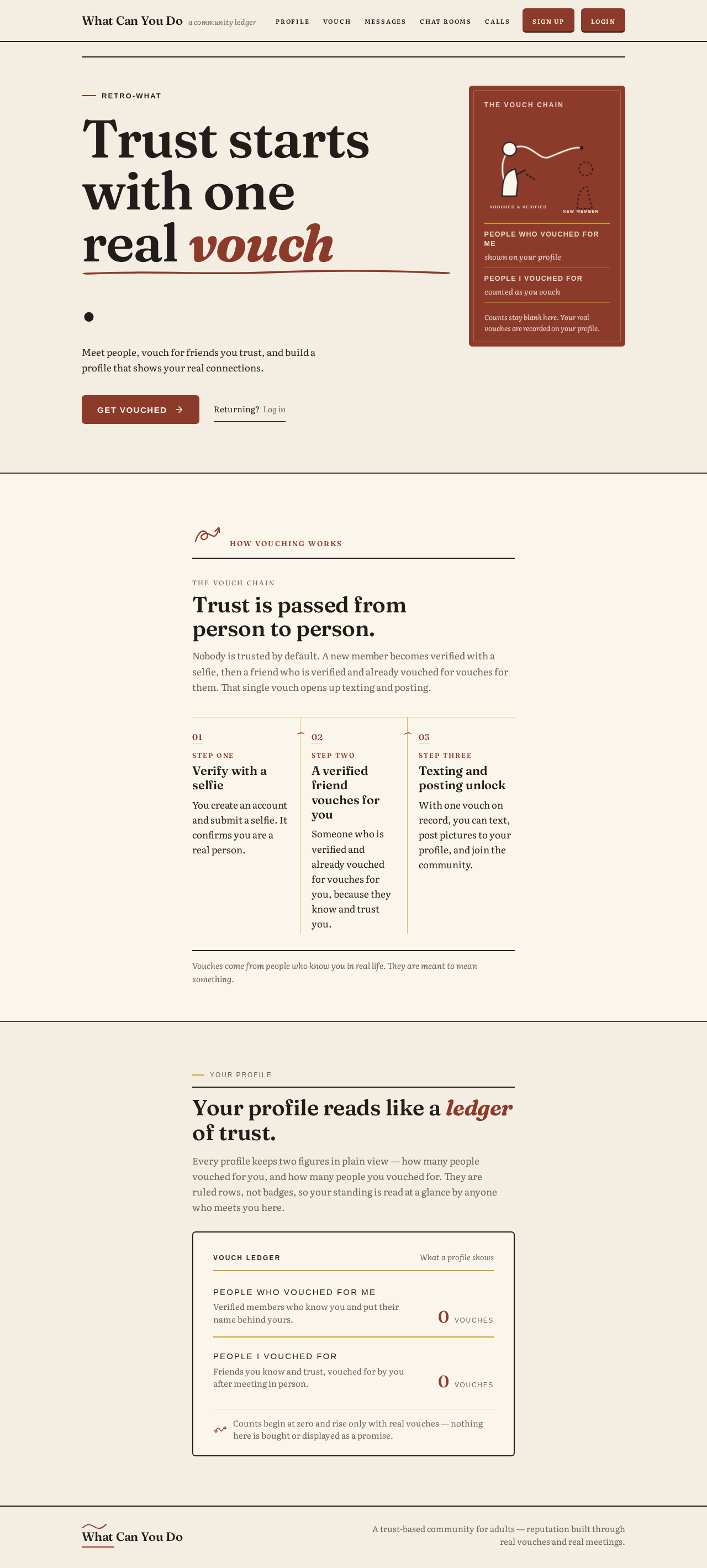
retro-what
Trust starts with one real vouch.
Meet people, vouch for friends you trust, and build a profile that shows your real connections.
The vouch chain
Trust is passed from person to person.
Nobody is trusted by default. A new member becomes verified with a selfie, then a friend who is verified and already vouched for vouches for them. That single vouch opens up texting and posting.
- Step one
Verify with a selfie
You create an account and submit a selfie. It confirms you are a real person.
- Step two
A verified friend vouches for you
Someone who is verified and already vouched for vouches for you, because they know and trust you.
- Step three
Texting and posting unlock
With one vouch on record, you can text, post pictures to your profile, and join the community.
Vouches come from people who know you in real life. They are meant to mean something.
Your profile reads like a ledger of trust.
Every profile keeps two figures in plain view — how many people vouched for you, and how many people you vouched for. They are ruled rows, not badges, so your standing is read at a glance by anyone who meets you here.
Vouch ledger
What a profile shows- People who vouched for meVerified members who know you and put their name behind yours.
- vouches
- People I vouched forFriends you know and trust, vouched for by you after meeting in person.
- vouches
retro-what
Trust starts with one real vouch.
Meet people, vouch for friends you trust, and build a profile that shows your real connections.
The vouch chain
Trust is passed from person to person.
Nobody is trusted by default. A new member becomes verified with a selfie, then a friend who is verified and already vouched for vouches for them. That single vouch opens up texting and posting.
- Step one
Verify with a selfie
You create an account and submit a selfie. It confirms you are a real person.
- Step two
A verified friend vouches for you
Someone who is verified and already vouched for vouches for you, because they know and trust you.
- Step three
Texting and posting unlock
With one vouch on record, you can text, post pictures to your profile, and join the community.
Vouches come from people who know you in real life. They are meant to mean something.
Your profile reads like a ledger of trust.
Every profile keeps two figures in plain view — how many people vouched for you, and how many people you vouched for. They are ruled rows, not badges, so your standing is read at a glance by anyone who meets you here.
Vouch ledger
What a profile shows- People who vouched for meVerified members who know you and put their name behind yours.
- vouches
- People I vouched forFriends you know and trust, vouched for by you after meeting in person.
- vouches
No comments yet. Be the first!