Page 1 of 4
retro-system System Requirements Document
1. Introduction
The retro-system is designed to be a comprehensive support ticket management system that incorporates AI analysis to evaluate and manage user tickets efficiently. This document outlines the system requirements for the retro-system, ensuring it meets the needs of its users effectively.
2. System Overview
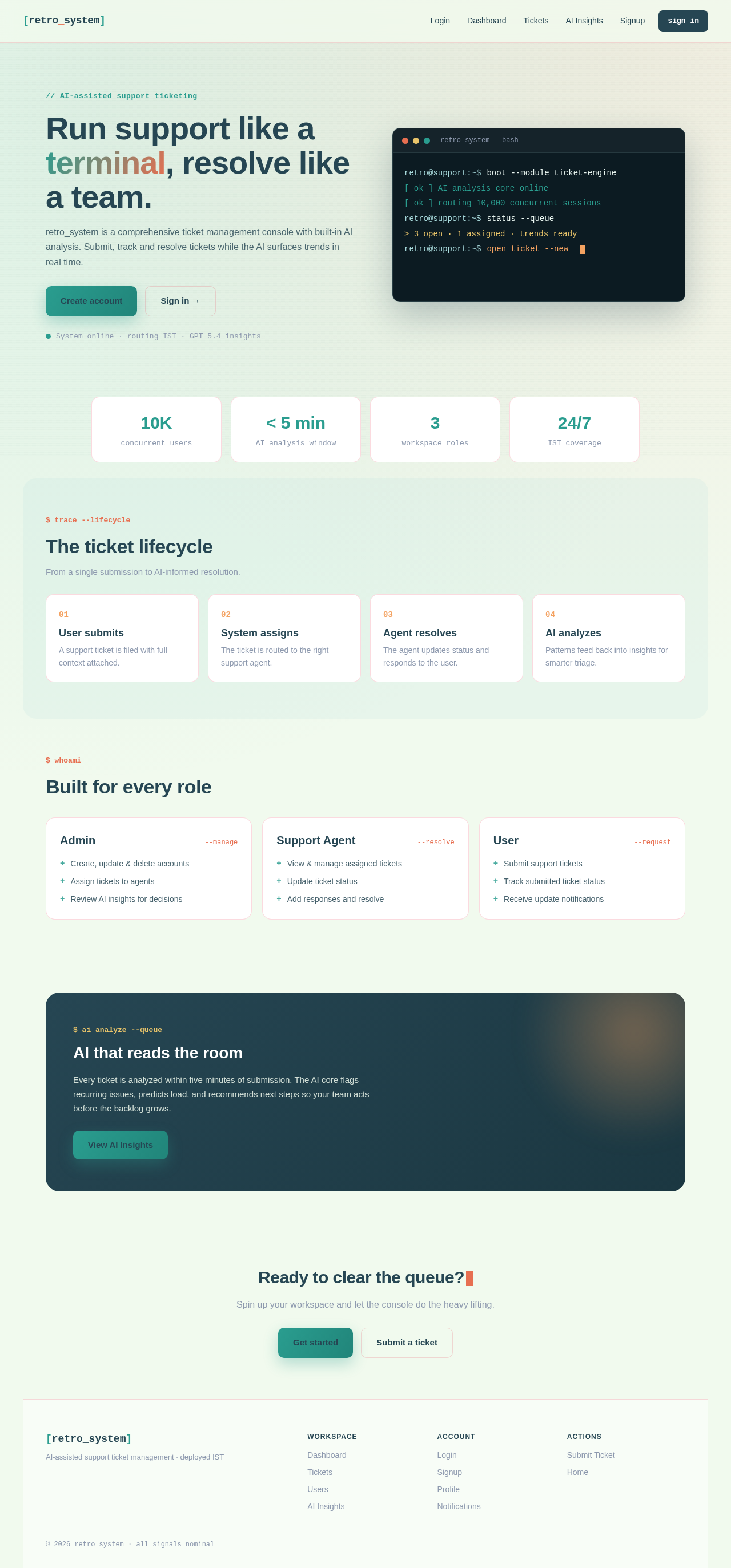
The retro-system is a support ticket management application that allows users to submit, track, and resolve support tickets. The system integrates AI analysis to provide insights and trends from the collected data, enhancing the decision-making process for support teams. The application will cater to various user roles, including administrators, support agents, and end-users, ensuring a streamlined and efficient support process.
3. Functional Requirements
- As an Admin, I should be able to create, update, and delete user accounts.
- As an Admin, I should be able to assign tickets to support agents.
- As a Support Agent, I should be able to view and manage assigned tickets.
- As a Support Agent, I should be able to update the status of a ticket.
- As a User, I should be able to submit a support ticket.
- As a User, I should be able to track the status of my submitted tickets.
- As a User, I should be able to receive notifications about ticket updates.
- As an AI System, I should be able to analyze user tickets to identify trends and patterns.
- As an AI System, I should be able to provide insights and recommendations based on ticket analysis.
Page 2 of 4
4. User Personas
- Admin: Responsible for managing user accounts and overseeing the ticket management process.
- Support Agent: Handles and resolves support tickets assigned by the admin.
- User: Submits support tickets and tracks their progress through the system.
5. Core User Flows
- User submits a support ticket -> System assigns ticket to a support agent -> Support agent resolves the ticket -> User receives notification of resolution.
- Admin creates a user account -> User logs in and submits a ticket -> AI analyzes ticket data -> Admin reviews AI insights for decision-making.
6. Visuals Colors and Theme
- primary: #2A9D8F (Teal)
- primary_light: #A8DADC (Light Teal)
- secondary: #E76F51 (Coral)
- accent: #F4A261 (Orange)
- highlight: #E9C46A (Gold)
- bg: #F1FAEE (Off White)
- surface: rgba(42, 157, 143, 0.8)
- text: #264653 (Dark Blue)
- text_muted: #8D99AE (Gray)
- border: rgba(233, 69, 96, 0.2)
Page 3 of 4
7. Signature Design Concept
The retro-system will feature a unique retro terminal aesthetic for its homepage, where content types itself like a hacker console. Users will interact with the interface through a series of command-line prompts, creating an engaging and nostalgic experience. The design will incorporate animations using framer-motion to simulate typing effects and transitions between sections. Users can click on terminal commands to navigate through different parts of the system, providing an interactive and immersive experience.
8. Interaction Model & Motion Direction
The landing page will adopt an "animated" interaction model, featuring scroll-triggered reveals and hover transitions. The retro terminal aesthetic will be enhanced with spring physics on interactive elements, providing a dynamic and engaging user experience. Internal pages will maintain a "static" interaction model to ensure clarity and ease of use for ticket management tasks.
9. Non-Functional Requirements
- The system should be able to handle up to 10,000 concurrent users.
- The AI analysis should process ticket data within 5 minutes of submission.
- The system should ensure data security and user privacy in compliance with relevant regulations.
Page 4 of 4
10. Tech Stack
- Frontend: React for Web
- Backend: Python, FastAPI
- Database: MySQL or MariaDB, using Alembic for migrations
- AI Models: GPT 5.4 for user-friendly responses
- AI Tools: Litellm for LLM Routing
- Local Orchestration: Docker, docker-compose
- Server-side Orchestration: Kubernetes
11. Assumptions and Constraints
- The system will be deployed in the Indian timezone (IST).
- Currency transactions, if any, will be handled in INR.
- The system will be accessible via modern web browsers and mobile devices.
12. Glossary
- AI: Artificial Intelligence
- LLM: Large Language Model
- IST: Indian Standard Time
- INR: Indian Rupee
- RDBMS: Relational Database Management System
- UI: User Interface
This document provides a comprehensive overview of the system requirements for the retro-system, ensuring that all functional and non-functional aspects are addressed to meet user needs effectively.



No comments yet. Be the first!