retro-students
 Mariam Soliman
Design a smart educational app called “ExamMate” that helps students accurately complete their homework and prepare for exams efficiently, especially for IGCSE and similar qualifications. The app should include the following features: Homework Answer Assistance Allow students to upload questions (text or images). Provide step-by-step solutions, not just final answers. Ensure explanations are clear, human-like, and easy to understand. Highlight key concepts used in the solution. Past Paper Recognition (IGCSE Focus) Identify if a question is from past papers. Display: Exam board (e.g., Cambridge, Edexcel) Subject and paper code Year and session (May/June, Oct/Nov) Suggest similar past paper questions for practice. Exam Selection & Personalization Let users select: Exam type (IGCSE, GCSE, A-Level, etc.) Subjects they are taking Exam boards Customize content and difficulty based on their selections. Customizable Dashboard Allow students to personalize: Study themes/colors Subjects displayed Daily goals and reminders Include a progress tracker showing strengths and weaknesses. Exam Countdown + Key Reminders Add a countdown timer for each upcoming exam. Next to the countdown, display: Important formulas Key definitions Exam tips (e.g., time management, common mistakes) Allow students to pin their own notes for quick revision. Smart Revision Mode Generate quizzes based on weak topics. Offer flashcards and quick revision summaries. Include “last-minute revision” mode for quick review before exams. Ethical AI Mode Encourage learning by prioritizing explanations over direct answers. Include a toggle for “exam practice mode” where only hints are given. User Experience Clean, modern, student-friendly interface. Fast and responsive. Mobile-first design. The app should feel like a supportive study partner—helping students understand, not just copy answers, while making exam preparation structured, personalized, and less stressful.
Comments (0)
Sign in to leave a comment
System Requirements
System Requirements Document (SRD)
Project Name: retro-students
1. Introduction
The retro-students project aims to design and develop a smart educational app called ExamMate, tailored to help students efficiently complete their homework and prepare for exams, particularly for qualifications like IGCSE, GCSE, and A-Level. The app will serve as a supportive study partner, offering personalized assistance, structured revision tools, and ethical AI-driven solutions to enhance learning outcomes.
This document outlines the system requirements for ExamMate, ensuring it aligns with the needs of students in Qatar and beyond. The app will prioritize a clean, modern, and student-friendly interface, with features designed to reduce exam stress and promote effective study habits.
2. System Overview
ExamMate is an educational application designed to provide students with:
- Homework assistance through step-by-step solutions.
- Past paper recognition and practice tools.
- Personalized dashboards for tracking progress and setting goals.
- Smart revision modes tailored to individual weaknesses.
- Ethical AI features that encourage understanding over rote memorization.
The system will leverage cutting-edge technologies, including AI models for intelligent assistance, a responsive mobile-first design, and customizable themes to ensure an engaging user experience.
Key objectives:
- Simplify exam preparation for students.
- Promote ethical learning practices.
- Provide a seamless and intuitive interface for users.
3. Functional Requirements
Homework Assistance
- As a Student, I should be able to upload questions (text or images) for assistance.
- As a Student, I should receive step-by-step solutions with clear explanations.
- As a Student, I should see key concepts highlighted in the solutions.
Past Paper Recognition
- As a Student, I should be able to identify if a question is from past papers.
- As a Student, I should see details like exam board, subject, paper code, year, and session.
- As a Student, I should receive suggestions for similar past paper questions for practice.
Exam Selection & Personalization
- As a Student, I should be able to select my exam type (IGCSE, GCSE, A-Level, etc.).
- As a Student, I should be able to choose my subjects and exam boards.
- As a Student, I should receive customized content and difficulty levels based on my selections.
Customizable Dashboard
- As a Student, I should be able to personalize study themes/colors.
- As a Student, I should be able to select which subjects are displayed on my dashboard.
- As a Student, I should be able to set daily goals and reminders.
- As a Student, I should see a progress tracker showing my strengths and weaknesses.
Exam Countdown + Key Reminders
- As a Student, I should see a countdown timer for each upcoming exam.
- As a Student, I should see important formulas, key definitions, and exam tips next to the countdown.
- As a Student, I should be able to pin my own notes for quick revision.
Smart Revision Mode
- As a Student, I should be able to generate quizzes based on my weak topics.
- As a Student, I should receive flashcards and quick revision summaries.
- As a Student, I should access a “last-minute revision” mode for quick review before exams.
Ethical AI Mode
- As a Student, I should be able to toggle “exam practice mode” where only hints are provided instead of direct answers.
- As a Student, I should receive explanations prioritized over direct answers to encourage learning.
User Experience
- As a Student, I should experience a clean, modern, and student-friendly interface.
- As a Student, I should have fast and responsive interactions.
- As a Student, I should enjoy a mobile-first design optimized for smartphones.
4. User Personas
Student
- Primary user of the app.
- Needs assistance with homework and exam preparation.
- Values clear explanations, personalized tools, and ethical learning practices.
Admin
- Manages app content and user data.
- Oversees AI model updates and ensures ethical compliance.
- Monitors system performance and user feedback.
5. Visuals Colors and Theme
Color Palette
The retro-students project will feature a unique retro-inspired color palette that balances vibrancy with professionalism:
- Background: #F5F5DC (Beige)
- Surface: #2E4057 (Deep Blue-Grey)
- Text: #1C1C1C (Charcoal Black)
- Accent: #FF6F61 (Coral Red)
- Muted Tones: #A9A9A9 (Ash Grey)
This palette reflects a blend of nostalgia and modernity, creating a welcoming and focused study environment.
6. Signature Design Concept
The ExamMate homepage will feature a retro terminal aesthetic that instantly captivates users.
Concept Details:
- Interactive Terminal Interface: The homepage mimics a vintage computer terminal with glowing green text that types itself out dynamically, welcoming the user.
- Animated Background: A subtle animation of scrolling code and retro pixel art transitions between subjects (e.g., math equations, science diagrams).
- Micro-Interactions: Hovering over menu items causes them to "blink" like an old CRT monitor.
- Gamified Navigation: Users can "type" commands (e.g., "start revision") into the terminal to navigate to different sections.
- Color Shifts: The background color subtly changes based on the time of day, creating a dynamic and immersive experience.
This bold design will make the app unforgettable, combining nostalgia with cutting-edge functionality.
7. Non-Functional Requirements
- Performance: The app must load within 3 seconds on mobile devices.
- Scalability: Support up to 1 million users simultaneously.
- Security: Ensure data encryption for all user uploads and personal information.
- Availability: Maintain 99.9% uptime.
- Localization: Default to Qatar timezone and Arabic/English language options.
8. Tech Stack
Frontend
- React for Web
- React Native for Mobile
Backend
- Python
- FastAPI
Database
- MySQL (preferred)
- Alembic for migrations
AI Models
- GPT 5.4 for user-friendly responses
- Claude 4.6 Opas for academic or coding work
- Google Nano Banana for image generation
AI Tools
- Langchain
- Litellm for LLM routing
Orchestration
- Docker for local development
- Kubernetes for server-side orchestration
9. Assumptions and Constraints
Assumptions
- Students will primarily access the app via mobile devices.
- The app will support both Arabic and English languages.
- Users will have reliable internet access.
Constraints
- Ethical AI compliance must be maintained at all times.
- The system must adhere to Qatar’s data protection regulations.
- Limited budget for initial development phase.
10. Glossary
- IGCSE: International General Certificate of Secondary Education.
- AI: Artificial Intelligence.
- Ethical AI Mode: A feature that prioritizes learning over direct answers.
- FastAPI: A modern web framework for building APIs with Python.
- Alembic: A database migration tool for SQLAlchemy.
This document serves as the foundation for the design and development of ExamMate under the retro-students project.
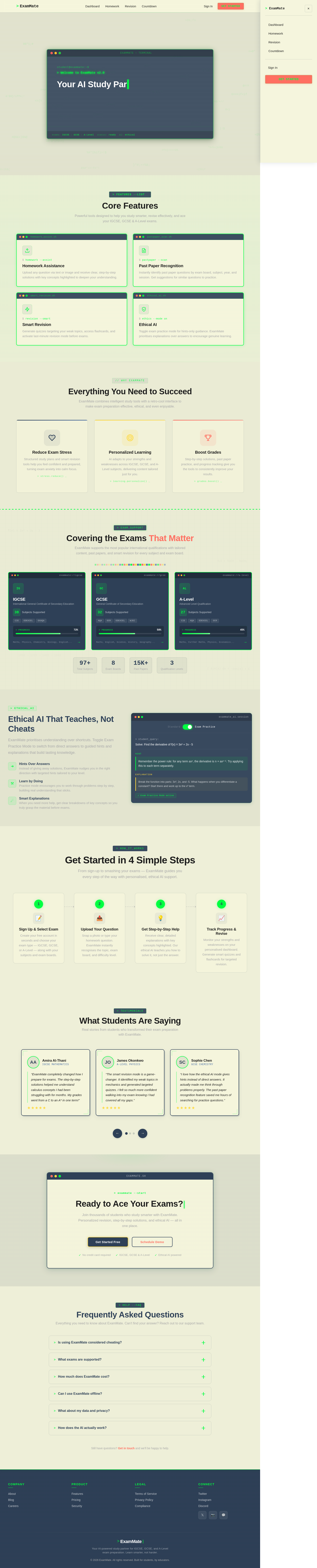
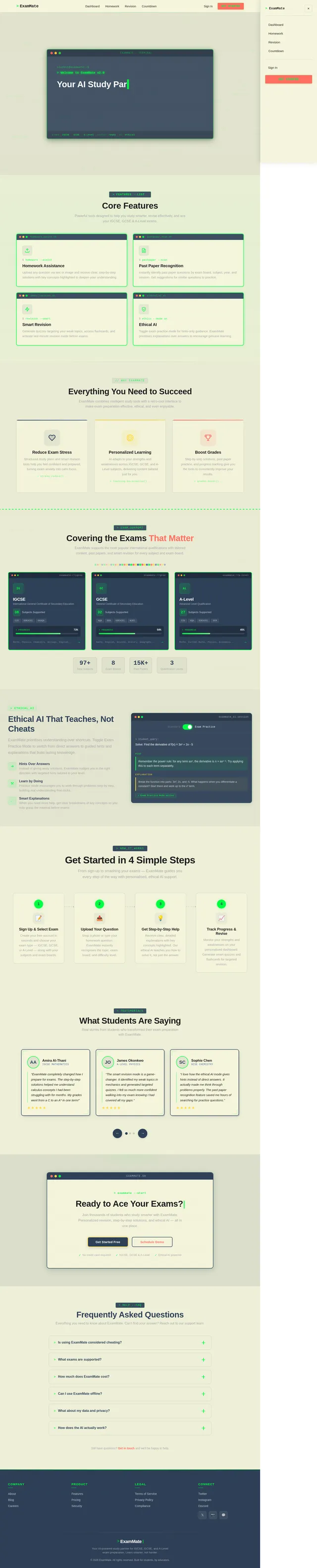
Core Features
Powerful tools designed to help you study smarter, revise effectively, and ace your IGCSE, GCSE & A-Level exams.
$ homework --assist
Homework Assistance
Upload any question via text or image and receive clear, step-by-step solutions with key concepts highlighted to deepen your understanding.
$ pastpaper --scan
Past Paper Recognition
Instantly identify past paper questions by exam board, subject, year, and session. Get suggestions for similar questions to practice.
$ revision --smart
Smart Revision
Generate quizzes targeting your weak topics, access flashcards, and activate last-minute revision mode before exams.
$ ethics --mode on
Ethical AI
Toggle exam practice mode for hints-only guidance. ExamMate prioritises explanations over answers to encourage genuine learning.
Everything You Need to Succeed
ExamMate combines intelligent study tools with a retro-cool interface to make exam preparation effective, ethical, and even enjoyable.
Reduce Exam Stress
Structured study plans and smart revision tools help you feel confident and prepared, turning exam anxiety into calm focus.
> stress.reduce() _Personalized Learning
AI adapts to your strengths and weaknesses across IGCSE, GCSE, and A-Level subjects, delivering content tailored just for you.
> learning.personalize() _Boost Grades
Step-by-step solutions, past paper practice, and progress tracking give you the tools to consistently improve your results.
> grades.boost() _Covering the Exams That Matter
ExamMate supports the most popular international qualifications with tailored content, past papers, and smart revision for every subject and exam board.
IGCSE
International General Certificate of Secondary Education
GCSE
General Certificate of Secondary Education
A-Level
Advanced Level Qualification
Ethical AI That Teaches, Not Cheats
ExamMate prioritises understanding over shortcuts. Toggle Exam Practice Mode to switch from direct answers to guided hints and explanations that build lasting knowledge.
Hints Over Answers
Instead of giving away solutions, ExamMate nudges you in the right direction with targeted hints tailored to your level.
Learn by Doing
Practice mode encourages you to work through problems step by step, building real understanding that sticks.
Smart Explanations
When you need more help, get clear breakdowns of key concepts so you truly grasp the material before exams.
> student_query:
Solve: Find the derivative of f(x) = 3x² + 2x - 5
Hint
Remember the power rule: for any term axⁿ, the derivative is n × axⁿ⁻¹. Try applying this to each term separately.
Explanation
Break the function into parts: 3x², 2x, and -5. What happens when you differentiate a constant? Start there and work up to the x² term.
Get Started in 4 Simple Steps
From sign-up to smashing your exams — ExamMate guides you every step of the way with personalised, ethical AI support.
Sign Up & Select Exam
Create your free account in seconds and choose your exam type — IGCSE, GCSE, or A-Level — along with your subjects and exam boards.
Upload Your Question
Snap a photo or type your homework question. ExamMate instantly recognises the topic, exam board, and difficulty level.
Get Step-by-Step Help
Receive clear, detailed explanations with key concepts highlighted. Our ethical AI teaches you how to solve it, not just the answer.
Track Progress & Revise
Monitor your strengths and weaknesses on your personalised dashboard. Generate smart quizzes and flashcards for targeted revision.
What Students Are Saying
Real stories from students who transformed their exam preparation with ExamMate.
Ready to Ace Your Exams?
Join thousands of students who study smarter with ExamMate. Personalized revision, step-by-step solutions, and ethical AI — all in one place.
Frequently Asked Questions
Everything you need to know about ExamMate. Can't find your answer? Reach out to our support team.
Not at all. ExamMate is designed as a learning tool, not a shortcut. Our Ethical AI Mode prioritizes explanations and hints over direct answers, helping you truly understand concepts. Think of it as a smart study buddy that guides you through problems step by step, building genuine knowledge for your exams.
ExamMate currently supports IGCSE, GCSE, and A-Level qualifications across all major exam boards including Cambridge (CIE), Edexcel, AQA, and OCR. We cover core subjects like Mathematics, Sciences, English, and Humanities, with more subjects being added regularly based on student demand.
ExamMate offers a free tier with access to basic homework help and limited past paper practice. Our Student plan includes full AI assistance, unlimited revision tools, and progress tracking. Schools and institutions can contact us for group pricing with admin dashboards and compliance features.
ExamMate requires an internet connection for AI-powered features like homework assistance and quiz generation. However, you can save flashcards, revision summaries, and pinned notes for offline access. We are working on expanded offline capabilities for future releases.
Your privacy is our top priority. All data is encrypted in transit and at rest. We comply with Qatar data protection regulations and international standards. We never share your personal information with third parties. Uploaded questions are processed securely and you can delete your data at any time from your account settings.
ExamMate uses advanced AI models fine-tuned for academic content. When you upload a question, our system identifies the subject, topic, and difficulty level, then generates a structured, step-by-step explanation. Our past paper recognition engine can match questions to specific exam boards and years, helping you practice with real exam-style content.
Still have questions? Get in touch and we'll be happy to help.
No comments yet. Be the first!