retro-shiny
 Хиополис
Але


Comments (0)
Sign in to leave a comment
System Requirements
System Requirements Document for Але
1. Introduction
This document specifies Але, a 2D visual novel for phone players. The game uses the two characters supplied in the user’s drawings—a long-haired masked character with blue and pink accents and a masked character in a blue hood—as visual anchors for a compelling, playable story. Additional characters may be created in the same hand-drawn style.
The user requested a game that can be played fully on a phone and an APK file or a link to download one. The product therefore includes a playable story, a way to obtain the Android APK, and the minimum save-and-resume behavior needed to continue play after an interruption.
Success criteria
- A player can start and play the visual novel on a phone using the supplied characters.
- Story choices produce observable story progression and outcomes.
- The player can leave and later continue from saved progress.
- An installable Android APK is made available as a file or download link.
2. System Overview
Але is a phone-oriented 2D visual novel delivered through a React application and a shared FastAPI backend, with MariaDB provisioned for persistent application data. Its current human-facing actor is the Игрок. The player discovers the game, obtains the APK, plays the story, makes choices, and resumes saved progress.
The supplied drawings are authoritative character references. The first depicts a long-haired masked character with black ink and blue and pink marks; the second depicts a masked character in a blue hood. Any added characters must follow the same visual style. The story’s specific plot, dialogue, scene sequence, and endings are not specified by the source and must be authored as game content without changing the accepted product scope.
2a. Product Interpretation and Delivery Boundary
The current delivery includes a public entry page, an APK download destination, the playable story, and a save destination. These are the exact ordered pages in the supplied page contract. They are publicly accessible; no application account or differentiated permissions are specified. Story progress is saved on the device so the player can resume after a break.
The APK must be built and made available as a file or download link. The source does not specify a hosting provider, release process, Android version range, or distribution service. The download destination must report whether the APK is available and provide the available file or link; it must not imply a successful download when one has not occurred.
The current scope is a 2D visual novel for phone play. No additional game modes, social features, account management, monetization, or online multiplayer are specified.
2c. Page Content and Component Coverage
Landing
- Information and state: Introduces the game and its hand-drawn masked-character premise. The hero uses the supplied blue-hooded character art and the title panel. It presents the entry copy:
- Headline: «Кто скрывается за маской?»
- Subline: «Выбери свой путь в 2D-истории с героями из твоих рисунков.»
- Primary action: «Начать игру»
- Primary actions: «Начать игру» opens the playable story. A download action leads to Download.
- Supporting content: The supplied character drawings are used as story art; the landing page does not alter or recolor them.
- Components: Character-art hero, torn-paper title panel, concise game introduction, and clearly tappable navigation actions.
- States: Loading must not obscure the title or controls. If the game entry cannot be opened, show a readable error and a retry or route to Download. Success continues to Story.
Download
- Information and state: Shows whether an Android APK is available and, when available, the APK file or its download link.
- Primary actions: The player selects the available APK file or link to download it.
- Components: APK availability status, download action, and concise result or failure message.
- States: While availability is being checked, show a loading state. If no APK is available or the link fails, state that clearly and provide a retry when possible. On success, confirm that the download was initiated or made available; do not claim installation or successful play without evidence. The player can return to Landing.
Story
- Information and state: Presents the 2D visual-novel scenes, character art, dialogue, and story choices. The supplied characters appear in the story; any additional characters use the same hand-drawn style. The current scene and choice outcome are observable to the player.
- Primary actions: Read the current scene and select an offered story choice to continue.
- Supporting actions: Continue through the presented story and open Saves to resume or inspect saved progress.
- Components: Scene illustration, character presentation, readable dialogue, and paper-strip choice controls with clear tap areas. Choices remain still and easy to tap.
- States: Show a loading state while a scene is prepared. If scene content cannot be loaded, show an error and allow retry without silently advancing. After a choice, show the resulting next scene or story outcome. Save progress on the device so the player can continue after leaving; if saving fails, communicate that progress may not have been retained and allow the player to retry or continue the current session.
Saves
- Information and state: Shows the player’s locally saved story progress and whether there is progress available to resume.
- Primary actions: Resume the saved story when progress exists.
- Supporting actions: Return to Story when no saved progress exists or after resuming.
- Components: Saved-progress status, resume action, and clear empty, success, and error feedback.
- States: While saved progress is being read, show a loading state. If no progress exists, explain that there is nothing to resume and offer a path to Story. On successful resume, restore the saved story position and continue in Story. If saved data cannot be read, explain the problem and offer a retry; do not claim that progress was restored when it was not.
3. Functional Requirements
-
As a Игрок, I should be able to discover the game and start playing it.
- Provenance:
required_inferencefor the Landing destination and its entry action; the game itself isexplicit. - Lifecycle: From public Landing, the player reads the game introduction and selects «Начать игру». The application opens Story and presents the first available scene.
- Acceptance: The entry action leads to playable story content. If the story cannot be opened, the player sees an error and can retry or proceed to Download.
- Provenance:
-
As a Игрок, I should be able to play a 2D visual novel with a compelling story.
- Provenance:
explicit. - Lifecycle: In Story, the player reads the presented scene and dialogue, selects an offered choice, and sees the resulting story progression or outcome. The player can continue through the story or leave and return later.
- Acceptance: Story scenes and choices are presented as 2D visual-novel content; a selected choice produces an observable story result. If scene content fails to load, the player is informed and can retry without an unannounced advance. The specific plot, choice count, and ending structure are not prescribed by the source.
- Provenance:
-
As a Игрок, I should encounter the characters from both supplied drawings in the game.
- Provenance:
explicit. - Lifecycle: During Story, the player sees the long-haired masked character with blue and pink accents and the masked character in a blue hood as story characters. Their appearance retains the supplied drawings’ black ink, paper grain, and colored marks.
- Acceptance: Both supplied characters are used in the game; their artwork is not smoothed or recolored. If character art cannot be loaded, the game communicates the failure rather than presenting unrelated substitute art.
- Provenance:
-
As a Игрок, I should be able to encounter additional characters in the same style.
- Provenance:
explicitpermission to add characters; adding them is optional. - Lifecycle: If additional characters are authored, they appear as part of Story and follow the supplied characters’ hand-drawn visual style.
- Acceptance: No additional character is required. Any added character must be stylistically consistent and must not replace either supplied character.
- Provenance:
-
As a Игрок, I should be able to obtain an APK or a link to download one for phone play.
- Provenance:
explicit. - Lifecycle: From Landing or Download, the player opens Download, checks APK availability, and selects the available file or link. The download destination reports success only to the extent that the download was initiated or made available.
- Acceptance: An APK file or download link is provided for phone play. If the APK is unavailable or the link fails, the player receives a clear status and can retry when possible.
- Provenance:
-
As a Игрок, I should be able to install and launch the game on a phone using the provided APK.
- Provenance:
required_inference, necessary to fulfill the explicit request for full phone play through an APK. - Lifecycle: The player obtains the APK from Download, installs it on a compatible phone, and launches the game. The game opens to a playable entry point.
- Acceptance: The delivered APK is an installable Android package that launches the game. The source does not specify device compatibility ranges or installation instructions.
- Provenance:
- As a Игрок, I should be able to continue my story after an interruption.
- Provenance:
required_inference, necessary for durable continuation of accepted phone play. - Lifecycle: During Story, progress is saved on the device. After leaving and returning, the player opens Saves, sees whether progress is available, and selects resume. The game restores the saved story position and returns the player to Story.
- Acceptance: Saved progress is observable and can be resumed. If no progress exists, the player is told and can start or return to Story. If saving or reading progress fails, the player is informed and can retry; the system does not claim a save or restoration that did not succeed.
- Provenance:
4. User Personas
Игрок
- Product context: A phone player who wants to play a 2D visual novel featuring the characters in the supplied drawings.
- Primary goal: Experience the story and play it fully on a phone.
- Accepted responsibilities: Discover and start the game, read scenes, choose story actions, obtain the APK, and resume saved progress after an interruption.
- Inputs and decisions: Selects the game entry action, chooses among story options presented in the game, and selects whether to resume available progress.
- Interactions with other participants: No other accepted human participant is specified. The game presents story content and reports download and save outcomes to the player.
- Observable success: The player can play the story on a phone, see the supplied characters in the game, obtain the APK, and resume saved progress.
5. Core User Flows
1. Discover and start the story
- The Игрок opens public Landing and sees the game introduction, the blue-hooded character art, and the «Начать игру» action.
- The player selects «Начать игру».
- Story opens and presents the first available 2D scene.
- If the story cannot be opened, the player sees an error and can retry or go to Download.
2. Read and choose through the story
- The Игрок opens Story and reads the current scene and dialogue.
- The player selects one of the choices presented for that scene.
- Story presents the resulting scene or outcome; the player continues reading and choosing as the story proceeds.
- The game saves progress on the device so the player can continue after leaving.
- If scene content fails to load, the player sees an error and can retry without an unannounced story advance. If saving fails, the player is told that progress may not have been retained and can retry or continue the current session.
3. Obtain the APK
- The Игрок opens Download from Landing or the game’s available download action.
- The player checks the displayed APK availability.
- If an APK is available, the player selects its file or download link.
- Download reports that the download was initiated or made available. The player can then install and launch the APK on a compatible phone.
- If no APK is available or the link fails, the player sees a clear status and can retry when possible.
4. Resume saved progress
- After leaving the game, the Игрок returns and opens Saves.
- Saves reads the locally stored progress and shows whether a saved story position exists.
- If progress exists, the player selects resume.
- The game restores the saved position and opens Story at that point.
- If no progress exists, the player is told there is nothing to resume and can go to Story. If saved data cannot be read, the player sees an error and can retry; the game does not claim restoration unless it succeeds.
6. Visuals Colors and Theme
The visual direction is “Handmade horror for a phone-sized story”, with Stefan Sagmeister as the named muse. The supplied drawings are the visual anchors: preserve their rough black ink, paper grain, blue hood and highlights, and sparse pink marks. Do not smooth or recolor the drawings.
- Palette, dark mode:
- Background:
#171719 - Surface:
#262629 - Text:
#F2EEE7 - Primary:
#08090B - Accent:
#36A9D6 - Muted:
#A8A29B - Use blue for the hood and small highlights; use pink sparingly, following the supplied art.
- Background:
- Typography: Special Elite for firm, close-set typewriter-style headings; Source Sans 3 for plain, readable body text.
- Type scale: Compact reading scale. Hero title starts at 40px on mobile and scales to 88px on desktop; body text starts at 16px.
- Shape language: Torn-paper edges, rough ink strokes, and hand-drawn lines. Keep text and controls inside clean, solid panels.
- Layout: On wide screens, place the story title beside character art. On phones, stack the art above the title and controls.
- Choice controls: Paper strips with black ink borders and clear tap areas. Thin blue and pink hand-drawn marks may connect choices to character portraits.
- Imagery: Use the two supplied drawings. Do not use stock character art, gradients, glossy panels, or text and controls over character faces.
- Responsive readability: At 375px, 768px, and 1280px, keep all readable text and controls fully within the viewport and their containers. Wrap or scale content as needed; decorative imagery may crop or bleed off edges only when it does not cover readable content.
7. Signature Design Concept
The Landing hero fills the first screen with charcoal. On phones, a large rough-edged portrait of the blue-hooded character sits above a torn-paper title panel; on wide screens, the portrait and title panel sit beside one another. The panel carries «Кто скрывается за маской?» and the subline «Выбери свой путь в 2D-истории с героями из твоих рисунков.» The «Начать игру» control is fully visible inside the panel. The supplied portrait remains unaltered, and no text or control overlaps the character’s face.
8. Interaction Model & Motion Direction
Interaction Model: Animated
Motion Tempo: restrained
Hero Dimensionality: layered_2d
Landing Hero Motion Brief
- Focal subject: The supplied blue-hooded character portrait, shown as rough hand-drawn art against charcoal.
- Input → transformation → outcome: The player opens Landing → short ink strokes reveal the portrait and torn-paper title panel → the game title and «Начать игру» action settle fully readable and ready to tap.
- Motion vocabulary: Short, restrained ink-stroke reveals and restrained scene fades. Keep story choices still and easy to tap.
- First frame: Charcoal background with the portrait and title panel composed within the viewport; the title and controls remain whole and unobscured as the reveal completes.
- Reduced motion: Present the complete static hero immediately, with no required animation. Keep all text and controls readable and usable.
9. Non-Functional Requirements
-
Phone play and APK delivery
- Provenance:
explicitfor phone play through an APK or download link;required_inferencefor an installable, launchable package. - The delivered APK must be installable and launch the game on a compatible Android phone. The source does not define a minimum Android version, device matrix, or distribution provider.
- Provenance:
-
Responsive readability
- Provenance: Creative direction.
- At 375px, 768px, and 1280px, readable text and controls must remain fully within the viewport and their containers. Decorative art may crop only when it does not obscure readable content.
-
Character-art fidelity
- Provenance:
explicituser instruction and authoritative image references. - Preserve the supplied drawings’ hand-drawn black ink, paper grain, and blue and pink marks. Do not smooth or recolor the supplied character art.
- Provenance:
-
Local progress continuity
- Provenance:
required_inference. - Story progress must be stored on the device and recoverable after the player leaves and returns. Report save or restore failures truthfully.
- Provenance:
-
Accessible motion behavior
- Provenance: Creative direction.
- Motion is restrained; choices remain still and easy to tap. Provide a usable static arrangement when reduced motion is preferred.
10. Tech Stack
- Frontend: React application UI, as provisioned.
- Backend: Shared FastAPI process for application APIs and domain modules, as provisioned. Reuse this process for any required application API; no separate service is specified.
- Database: MariaDB is provisioned for application-owned persistent data. Story progress is required to persist on the device; the source does not require syncing local saves to the database.
- Android delivery: An installable Android APK is required. The build and packaging mechanism is not specified by the source.
- Containers and deployment: Use the existing provisioned services. No additional service or deployment platform is specified.
11. Assumptions and Constraints
- Assumption — story authorship: The user requests a compelling story but does not provide a plot, dialogue, scene list, or endings. These must be authored as game content; no particular plot or ending is mandated here.
- Assumption — optional additions: New characters are permitted but not required. Any added characters must match the supplied drawings’ style.
- Constraint — phone delivery: The game must be playable on a phone through an APK file or download link.
- Constraint — supplied characters: Both characters from the supplied drawings must appear in the game and retain their visual style.
- Constraint — page and access contract: The current pages are exactly Landing, Download, Story, and Saves, in that order. Each is publicly accessible; no account or differentiated permissions are specified.
- Unspecified: APK hosting, Android compatibility range, story content details, and whether any online service is needed are not defined by the source.
12. Glossary
- 2D visual novel: A story-led game presented through illustrated scenes, dialogue, and player choices.
- APK: An Android application package that can be downloaded and installed on a compatible phone.
- Story progress: The player’s current position in the visual novel, retained on the device so play can resume after an interruption.
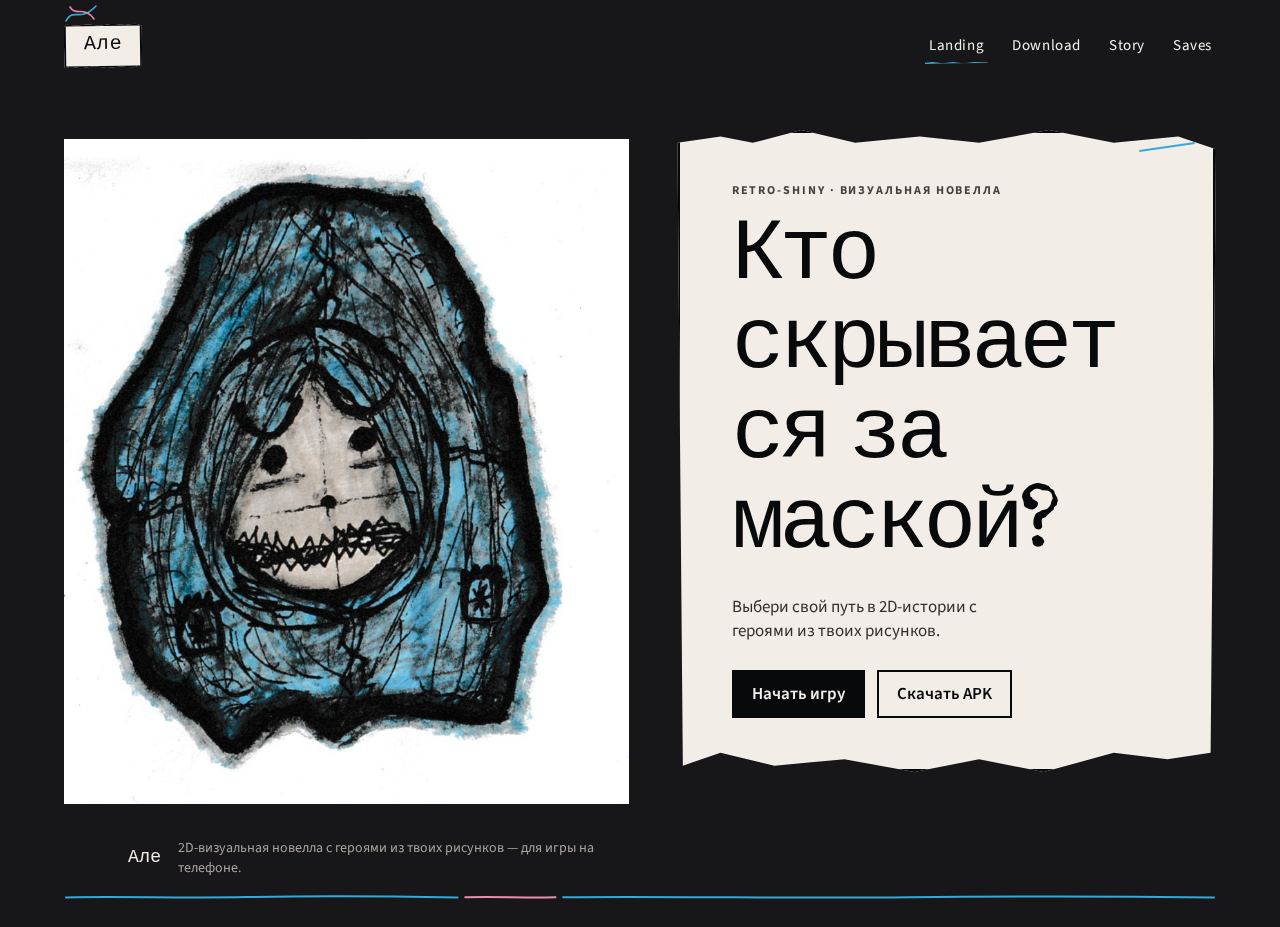

retro-shiny · визуальная новелла
Кто скрывается за маской?
Выбери свой путь в 2D-истории с героями из твоих рисунков.
retro-shiny · визуальная новелла
Кто скрывается за маской?
Выбери свой путь в 2D-истории с героями из твоих рисунков.
No comments yet. Be the first!