retro-3d
 John victor Paul
3D interactive bible thats gamified,visually stunning etc


Comments (0)
Sign in to leave a comment
System Requirements
System Requirements Document for retro-3d
1. Introduction
The project "Daily Bread" is an interactive, gamified 3D Bible experience designed for users of all ages. The product aims to provide a visually stunning and engaging digital interpretation of the Bible, leveraging modern technology to captivate and educate its audience.
2. System Overview
The "Daily Bread" application delivers an interactive 3D Bible experience that is both gamified and visually stunning. It is designed to be accessible to users of all ages, providing a unique and engaging way to explore biblical content. The application includes a series of custom pages that guide users through the experience, from initial engagement to in-depth exploration of the Bible.
2a. Product Interpretation and Delivery Boundary
The product is named "Daily Bread" and is intended for a general audience, including all age groups. It features a custom user interface with application-owned identity management to support user engagement and progress tracking. The application includes several key pages: Landing, Login, Dashboard, Bible, and Journey, each serving a distinct role in the user experience. The product adheres to the constraints of being accessible to all and maintaining the name "Daily Bread."
2b. Source Content Inventory
Not applicable as no content source directive was provided.
2c. Page Content and Component Coverage
Landing
- Purpose: Introduce "Daily Bread," its features, and its audience.
- Components:
- Overview of the interactive 3D Bible experience.
- Explanation of gamification elements.
- Introduction to the target audience.
- Call-to-action for engagement.
Login
- Purpose: Facilitate user authentication and progress restoration.
- Components:
- User login form.
- Option to recover forgotten credentials.
- Access to create a new account.
Dashboard
- Purpose: Serve as the central hub for user engagement and progress tracking.
- Components:
- Overview of user progress.
- Access to recent activities and achievements.
- Navigation to other sections of the application.
Bible
- Purpose: Provide access to interactive 3D Bible content.
- Components:
- Interactive 3D Bible navigation.
- Search functionality for specific passages or topics.
- Visual and textual content display.
Journey
- Purpose: Engage users in gamified exploration and activities.
- Components:
- Gamified activities and challenges.
- Progress tracking and rewards.
- Interactive elements to enhance learning.
3. Functional Requirements
- As a Bible Explorer, I should be able to explore the interactive 3D Bible content to engage with biblical stories and teachings in a visually stunning format. (explicit)
- As a Bible Explorer, I should be able to participate in gamified activities to enhance my learning experience and track my progress. (explicit)
- As a Bible Explorer, I should be able to log in and restore my progress to continue my journey from where I left off. (required_inference)
- As a new user, I should be able to enroll in the Daily Bread experience to start my exploration of the interactive Bible. (required_inference)
4. User Personas
- Bible Explorer: Individuals of all ages who use Daily Bread to explore and engage with the interactive Bible. They are responsible for navigating the content, participating in gamified activities, and tracking their progress.
5. Core User Flows
Bible Explorer Flow
- Landing Page: The user visits the Landing page to learn about Daily Bread and its features.
- Login: The user logs in to access their personalized Dashboard.
- Dashboard: The user views their progress and selects an activity or Bible passage to explore.
- Bible Page: The user navigates through the interactive 3D Bible content.
- Journey Page: The user engages in gamified activities and tracks their progress.
- Logout: The user logs out, ensuring their progress is saved for future sessions.
6. Visuals Colors and Theme
- Muse: Gleb Kuznetsov
- Palette:
- Background: #000022
- Surface: #0F0F3F
- Text: #FFFFFF
- Primary: #00FFFF
- Accent: #FF00FF
- Muted: #222255
- Typography:
- Headings: Space Grotesk — Bold, large uppercase, tight tracking
- Body: Orbitron
- Scale: 1.414 modular, 64/45/32/22/16
- Shape Language: Full-bleed 3D scenes, floating glass panels, radial layouts
- Layout: Radial layouts with floating elements, edge-aligned panels for navigation
- Motion: Continuous slow orbit/parallax, HUD-like data streams, light sweeps
7. Signature Design Concept
The Landing page will feature a full-bleed 3D Bible as the hero element, glowing against a dark void. Floating glass panels will provide navigation, with light sweeps as hover effects. The radial layout will enhance interaction dynamism, and continuous light particle streams will flow across the screen to create an immersive experience.
8. Interaction Model & Motion Direction
- Interaction Model: Animated
- Motion Tempo: Cinematic
- Hero Dimensionality: WebGL
- Landing Hero Motion Brief: The focal subject is a volumetric 3D Bible with glowing accents. The transformation involves slow orbiting and parallax effects, with light sweeps and particle streams enhancing the immersive experience. The first frame will showcase the Bible against a deep navy background with cyan and magenta glows. A reduced-motion state will simplify animations for accessibility.
9. Non-Functional Requirements
- Performance: The application must maintain smooth animations and interactions across devices to ensure an engaging user experience. (basic_default)
- Accessibility: The application should be accessible to users of all ages, with appropriate considerations for readability and interaction simplicity. (explicit)
10. Tech Stack
- Frontend: React, WebGL/R3F for 3D rendering
- Backend: Python/FastAPI
- Storage: Appropriate database for user data and progress tracking
- Deployment: Docker/docker-compose, Kubernetes if necessary
11. Assumptions and Constraints
- Assumption: Users will have access to devices capable of rendering 3D content smoothly.
- Constraint: The product name must be "Daily Bread" and it must be accessible to all age groups.
12. Glossary
- Bible Explorer: A user engaging with the Daily Bread application to explore the interactive 3D Bible.
- Gamification: The use of game-like elements to enhance user engagement and learning.
- WebGL/R3F: Technologies used for rendering 3D graphics in web applications.
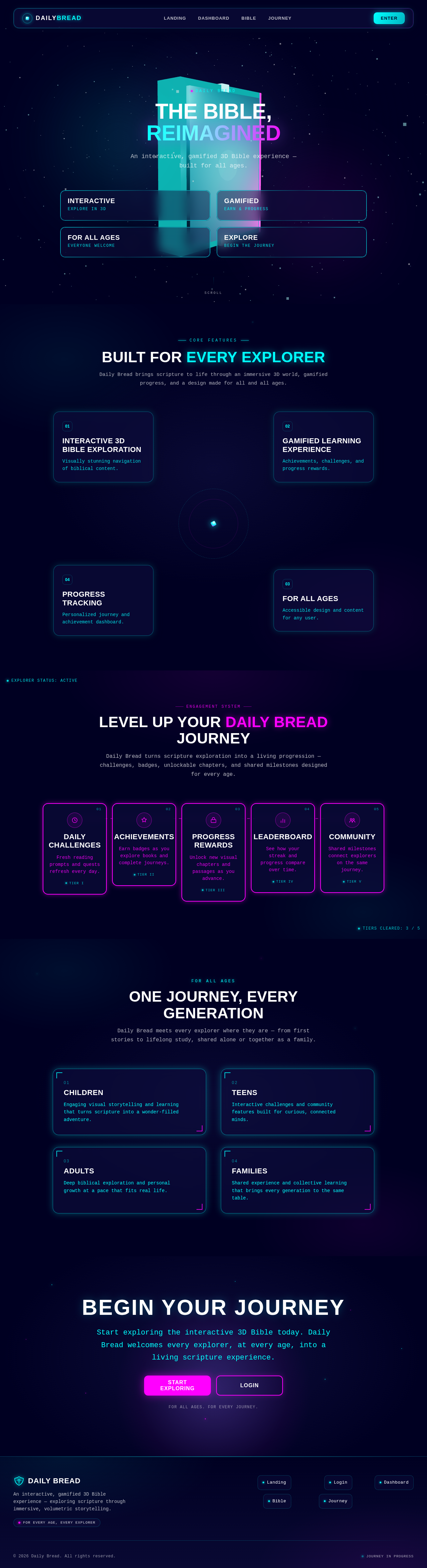
THE BIBLE,
REIMAGINED
An interactive, gamified 3D Bible experience — built for all ages.
Built For Every Explorer
Daily Bread brings scripture to life through an immersive 3D world, gamified progress, and a design made for all and all ages.
Interactive 3D Bible Exploration
Visually stunning navigation of biblical content.
Gamified Learning Experience
Achievements, challenges, and progress rewards.
For All Ages
Accessible design and content for any user.
Progress Tracking
Personalized journey and achievement dashboard.
Engagement System
Level Up Your Daily Bread Journey
Daily Bread turns scripture exploration into a living progression — challenges, badges, unlockable chapters, and shared milestones designed for every age.
Daily Challenges
Fresh reading prompts and quests refresh every day.
Tier IAchievements
Earn badges as you explore books and complete journeys.
Tier IIProgress Rewards
Unlock new visual chapters and passages as you advance.
Tier IIILeaderboard
See how your streak and progress compare over time.
Tier IVCommunity
Shared milestones connect explorers on the same journey.
Tier VOne Journey, Every Generation
Daily Bread meets every explorer where they are — from first stories to lifelong study, shared alone or together as a family.
Children
Engaging visual storytelling and learning that turns scripture into a wonder-filled adventure.
Teens
Interactive challenges and community features built for curious, connected minds.
Adults
Deep biblical exploration and personal growth at a pace that fits real life.
Families
Shared experience and collective learning that brings every generation to the same table.
Begin Your Journey
Start exploring the interactive 3D Bible today. Daily Bread welcomes every explorer, at every age, into a living scripture experience.
For all ages. For every journey.
THE BIBLE,
REIMAGINED
An interactive, gamified 3D Bible experience — built for all ages.
Built For Every Explorer
Daily Bread brings scripture to life through an immersive 3D world, gamified progress, and a design made for all and all ages.
Interactive 3D Bible Exploration
Visually stunning navigation of biblical content.
Gamified Learning Experience
Achievements, challenges, and progress rewards.
For All Ages
Accessible design and content for any user.
Progress Tracking
Personalized journey and achievement dashboard.
Engagement System
Level Up Your Daily Bread Journey
Daily Bread turns scripture exploration into a living progression — challenges, badges, unlockable chapters, and shared milestones designed for every age.
Daily Challenges
Fresh reading prompts and quests refresh every day.
Tier IAchievements
Earn badges as you explore books and complete journeys.
Tier IIProgress Rewards
Unlock new visual chapters and passages as you advance.
Tier IIILeaderboard
See how your streak and progress compare over time.
Tier IVCommunity
Shared milestones connect explorers on the same journey.
Tier VOne Journey, Every Generation
Daily Bread meets every explorer where they are — from first stories to lifelong study, shared alone or together as a family.
Children
Engaging visual storytelling and learning that turns scripture into a wonder-filled adventure.
Teens
Interactive challenges and community features built for curious, connected minds.
Adults
Deep biblical exploration and personal growth at a pace that fits real life.
Families
Shared experience and collective learning that brings every generation to the same table.
Begin Your Journey
Start exploring the interactive 3D Bible today. Daily Bread welcomes every explorer, at every age, into a living scripture experience.
For all ages. For every journey.
No comments yet. Be the first!