resume-build

byAbhishek Manakawad

Build 4 Tabs

LoginResumeJob Description
Login

Comments (0)

No comments yet. Be the first!

System Requirements

System Requirement Document
Page 1 of 9

System Requirements Document for resume-build

1. Introduction

The "resume-build" project is designed to assist job seekers in tailoring their resumes to specific job descriptions. The application provides a structured interface for users to input their resume, the target job description (JD), and their priorities. It then generates an updated resume with a match percentage indicating how well the resume aligns with the JD. The audience for this product is job seekers who need a clear and efficient tool to enhance their job application process.

2. System Overview

The resume-build application is organized into exactly four tabs, each serving a specific purpose in the resume tailoring process. The system supports a single active human persona, the Job Seeker, who interacts with the application to input data and generate an updated resume. The application requires user authentication to protect and continue the resume tailoring workflow. The system is designed to be functional, supportive, and structured, aligning with the needs of job seekers.

2a. Product Interpretation and Delivery Boundary

The product is delivered as a web application with a custom UI, organized into four distinct tabs: Resume, Job Description, Priorities, and Updated Resume. User authentication is required to access the application, ensuring that the job seeker's data is protected and can be resumed. The application does not include additional capabilities beyond the specified tab functionalities.

Page 2 of 9

2b. Source Content Inventory

Not applicable as there is no explicit content_source directive.

2c. Page Content and Component Coverage

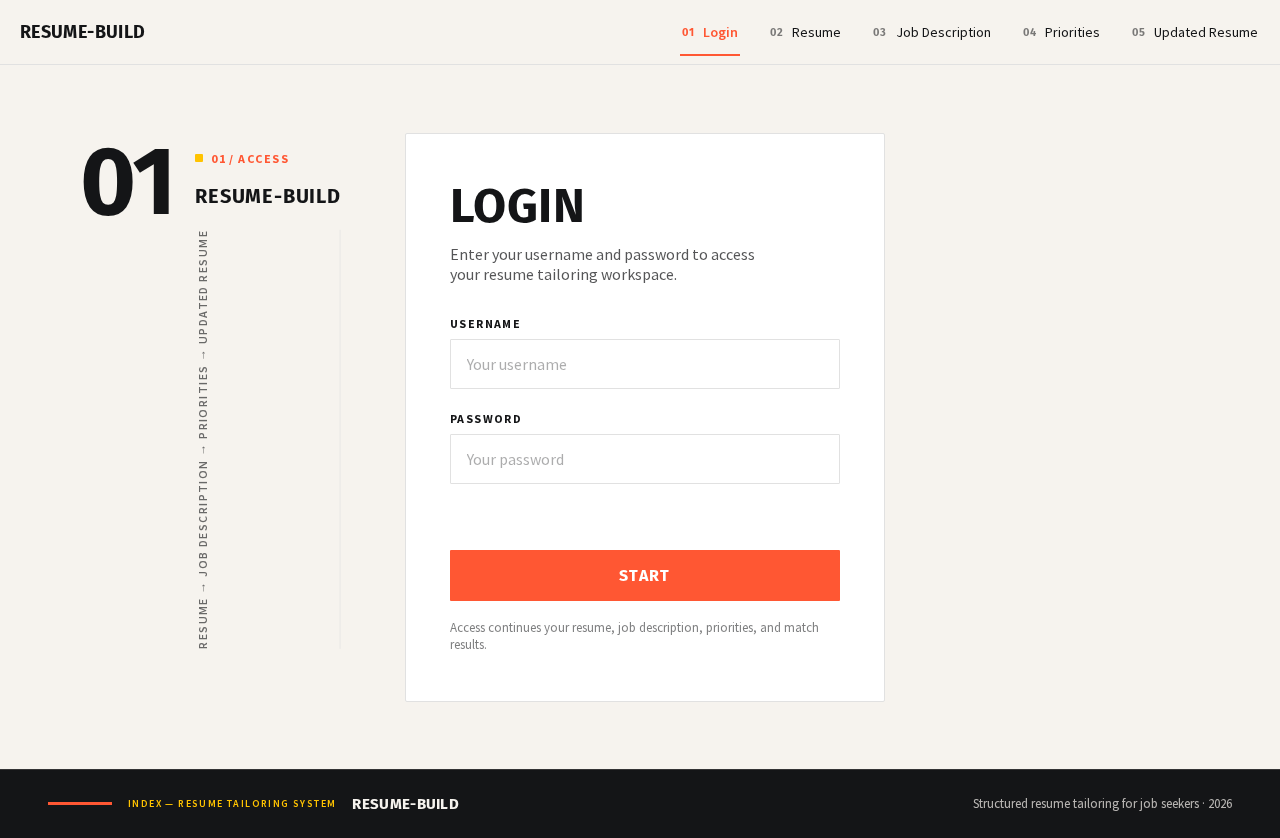
Login

  • Purpose: Allows job seekers to authenticate and access the application.
  • Components:
    • Login form: Fields for username and password.
    • Submit button: Initiates authentication.
    • Error messages: Displayed for invalid credentials.

Resume

  • Purpose: Workspace for entering resume content.
  • Components:
    • Resume input form: Text fields for resume sections (e.g., education, experience).
    • Save button: Stores the entered resume data.
    • Validation messages: Ensure required fields are completed.

Job Description

  • Purpose: Workspace for entering the target job description.
  • Components:
    • JD input form: Text area for pasting or typing the job description.
    • Save button: Stores the entered job description.
    • Validation messages: Ensure the job description is provided.
Page 3 of 9

Priorities

  • Purpose: Workspace for specifying priorities that guide resume tailoring.
  • Components:
    • Priorities input form: Fields for entering and ranking priorities.
    • Save button: Stores the entered priorities.
    • Validation messages: Ensure priorities are specified.

Updated Resume

  • Purpose: Generates the updated resume and presents its match percentage against the job description.
  • Components:
    • Generate button: Initiates resume generation and match calculation.
    • Display area: Shows the updated resume and match percentage.
    • Error messages: Displayed if generation fails.
Page 4 of 9

3. Functional Requirements

  • As a Job Seeker, I should be able to input my resume into the application.

    • Provenance: Explicit
    • Lifecycle: Initiated by accessing the Resume tab, completed by saving the resume data.
    • Observable Acceptance: Resume data is stored and retrievable.
  • As a Job Seeker, I should be able to input the target job description into the application.

    • Provenance: Explicit
    • Lifecycle: Initiated by accessing the Job Description tab, completed by saving the job description.
    • Observable Acceptance: Job description is stored and retrievable.
  • As a Job Seeker, I should be able to specify my priorities for resume tailoring.

    • Provenance: Explicit
    • Lifecycle: Initiated by accessing the Priorities tab, completed by saving the priorities.
    • Observable Acceptance: Priorities are stored and retrievable.
  • As a Job Seeker, I should be able to generate an updated resume with a match percentage to the job description.

    • Provenance: Explicit
    • Lifecycle: Initiated by accessing the Updated Resume tab, completed by generating the resume.
    • Observable Acceptance: Updated resume and match percentage are displayed.

4. User Personas

Page 5 of 9

Job Seeker

  • Product Context: Uses the application to tailor their resume for specific job applications.
  • Primary Goal: To create a resume that closely matches the job description for better job application outcomes.
  • Responsibilities:
    • Inputting resume data.
    • Providing the target job description.
    • Specifying priorities for resume tailoring.
    • Generating and reviewing the updated resume and match percentage.
  • Interactions: Engages with all four tabs to complete the resume tailoring process.
  • Observable Success: Receives a tailored resume with a high match percentage to the job description.
Page 6 of 9

5. Core User Flows

  1. Login and Access

    • Starting Context: The Job Seeker accesses the application.
    • Action: Enters login credentials and submits.
    • Result: Gains access to the application if credentials are valid.
    • Next Step: Proceeds to the Resume tab.
  2. Resume Input

    • Starting Context: The Job Seeker is logged in and on the Resume tab.
    • Action: Inputs resume data and saves.
    • Result: Resume data is stored.
    • Next Step: Moves to the Job Description tab.
  3. Job Description Input

    • Starting Context: The Job Seeker is on the Job Description tab.
    • Action: Inputs the job description and saves.
    • Result: Job description is stored.
    • Next Step: Moves to the Priorities tab.
  4. Priorities Input

    • Starting Context: The Job Seeker is on the Priorities tab.
    • Action: Inputs and ranks priorities, then saves.
    • Result: Priorities are stored.
    • Next Step: Moves to the Updated Resume tab.
  5. Generate Updated Resume

    • Starting Context: The Job Seeker is on the Updated Resume tab.
    • Action: Clicks generate to create the updated resume.
    • Result: Updated resume and match percentage are displayed.
    • Next Step: Reviews the results and decides on further actions.
Page 7 of 9

6. Visuals Colors and Theme

  • Muse: Erik Spiekermann
  • Palette:
    • Background: #F6F3EE
    • Surface: #FFFFFF
    • Text: #141517
    • Primary: #FF5733
    • Accent: #FFC300
    • Muted: #E1E1E1
  • Typography:
    • Headings: Fira Sans — Bold, uppercase, tight tracking
    • Body: Source Sans Pro
    • Scale: 1.25 modular, 48/32/24/16
  • Shape Language: Clear columns, generous margins, numbered systems, iconography with type.
  • Layout: Structured tabbed navigation with clear labels and sections; consistent spacing for readability.

7. Signature Design Concept

The public entry page features a structured tabbed navigation system with clear, numbered labels for each step. The interface uses a warm off-white background with ink text, ensuring readability and focus. The primary and accent colors are used sparingly to highlight interactive elements, guiding the user's attention effectively. The design emphasizes clarity and accessibility, with generous margins and structured columns creating an organized workspace.
Page 8 of 9

8. Interaction Model & Motion Direction

  • Interaction Model: Static
  • Motion Tempo: Restrained
  • Hero Dimensionality: Flat
  • Landing Hero Motion Brief: The interface is designed with a balanced editorial layout, featuring a structured typographic hierarchy and clear, functional tab labels. The motion is minimal, focusing on guiding user interaction through short and purposeful animations.

9. Non-Functional Requirements

  • Security: User authentication is required to access the application, ensuring data protection.
  • Usability: The interface must be intuitive and easy to navigate, with clear labels and instructions.
  • Performance: The application should quickly process inputs and generate the updated resume without noticeable delays.

10. Tech Stack

  • Frontend: React
  • Backend: Python/FastAPI
  • Storage: Appropriate database for storing user data and resume information
  • Deployment: Docker/docker-compose

11. Assumptions and Constraints

  • The application is organized into exactly four tabs, as explicitly required by the user.
  • User authentication is necessary to protect and continue the resume tailoring workflow.
  • The application does not include additional capabilities beyond the specified tab functionalities.
Page 9 of 9

12. Glossary

  • Job Seeker: The primary user of the application who inputs their resume, job description, and priorities to generate a tailored resume.
  • Resume: A document containing the job seeker's professional and educational background.
  • Job Description (JD): A document detailing the requirements and responsibilities of a job position.
  • Priorities: The job seeker's preferences or focus areas for tailoring their resume.
Preview dataChanges stay in this preview.
Login design preview
Login: Enter credentials
Login: Submit login
Resume: Input resume data
Resume: Save resume
Job Description: Input job description
Job Description: Save job description
Priorities: Input priorities
Priorities: Rank priorities
Priorities: Save priorities
Updated Resume: 1. Generate updated resume
Updated Resume: View match percentage
Updated Resume: 2. Review generation error
Preview dataChanges stay in this preview.
Login design preview
Login: Enter credentials
Login: Submit login
Resume: Input resume data
Resume: Save resume
Job Description: Input job description
Job Description: Save job description
Priorities: Input priorities
Priorities: Rank priorities
Priorities: Save priorities
Updated Resume: 1. Generate updated resume
Updated Resume: View match percentage
Updated Resume: 2. Review generation error