replydesk-ai
 Nexus Experience
Act as a senior UI/UX designer, SaaS product manager, software architect and Customer Experience/Contact Centre expert. Build a modern SaaS app called **ReplyDesk AI**, an AI-powered customer response assistant for agents, contact centres, banks, fintechs and service businesses. Users select **Issue, Channel, Customer Type and Tone**, describe what happened, then generate a professional, accurate and empathetic response. Support Email, WhatsApp, SMS, Live Chat and phone scripts. Include scenarios such as failed/pending transactions, card disputes, account restrictions, delayed transfers, refunds, complaints, SLA delays, outages and escalations. Provide 3 outputs: Recommended, More Empathetic and Concise, with Copy, Edit, Regenerate and Rewrite options. Add a **CX Quality Score** for empathy, clarity, professionalism, ownership and customer focus. Flag risky language, unsupported promises, blame and missing next steps. Include response history, templates, favourites and a **Brand Voice** feature for businesses. Use a clean, premium, mobile-first SaaS UI with Dashboard, Generate, Improve, Templates, History, Knowledge Base, Insights and Settings. Prioritise speed, simplicity, accessibility and real working functionality over visual clutter.


Comments (0)
Sign in to leave a comment
System Requirements
System Requirements Document for replydesk-ai
1. Introduction
ReplyDesk AI is a modern SaaS application designed to serve as an AI-powered customer response assistant for agents, contact centres, banks, fintechs, and service businesses. The application aims to streamline the process of generating professional, accurate, and empathetic responses across multiple communication channels, including Email, WhatsApp, SMS, Live Chat, and phone scripts. The primary audience includes customer service agents and businesses seeking to enhance their customer interaction quality and efficiency.
2. System Overview
ReplyDesk AI integrates AI-driven response generation with multi-channel support, CX quality scoring, and brand voice customization. The system prioritizes speed, simplicity, and functionality within a mobile-first SaaS UI. Users can select the issue, channel, customer type, and tone, describe the situation, and generate responses with options for editing and improving them. The system also provides a CX Quality Score and flags risky language or unsupported promises.
2a. Product Interpretation and Delivery Boundary
ReplyDesk AI is delivered as a SaaS application accessible via a web interface. It supports multiple communication channels and provides a suite of features including response generation, quality scoring, and brand voice customization. The application is designed to be mobile-first, ensuring accessibility and ease of use on various devices. Future expansions may include additional channels or enhanced AI capabilities, but these are not part of the current scope.
2b. Source Content Inventory
Not applicable as no content source directive was provided.
2c. Page Content and Component Coverage
Dashboard
- Overview: Displays key metrics and recent activity.
- CX Quality Score Visualization: Shows empathy, clarity, professionalism, ownership, and customer focus scores.
- Notifications: Alerts for flagged responses or updates.
Generate
- Input Fields: Issue, Channel, Customer Type, Tone, and Description.
- Response Generation: Options for Recommended, More Empathetic, and Concise responses.
- Actions: Copy, Edit, Regenerate, Rewrite.
Improve
- Response Editing: Tools to refine and enhance generated responses.
- Quality Feedback: Suggestions for improving CX Quality Score.
Templates
- Template Library: Predefined response templates for common scenarios.
- Customization: Options to create and save custom templates.
History
- Response Log: Record of past interactions and generated responses.
- Search and Filter: Tools to find specific responses quickly.
Knowledge Base
- Articles and Guides: Information on best practices and system usage.
- Search Functionality: Easy access to relevant information.
Insights
- Analytics: Reports on response performance and agent efficiency.
- Trends: Visualization of common issues and response effectiveness.
Settings
- User Preferences: Customization of interface and notification settings.
- Brand Voice: Configuration of tone and style guidelines for responses.
3. Functional Requirements
- As a customer service agent, I should be able to select the issue, channel, customer type, and tone, and describe the situation to generate a response. (explicit)
- As a user, I should receive three response options: Recommended, More Empathetic, and Concise, with the ability to Copy, Edit, Regenerate, and Rewrite. (explicit)
- As a business, I should be able to configure a Brand Voice to ensure responses align with our style guidelines. (explicit)
- As a user, I should see a CX Quality Score for each response, evaluating empathy, clarity, professionalism, ownership, and customer focus. (explicit)
- As a user, I should be alerted to risky language, unsupported promises, blame, and missing next steps in responses. (explicit)
- As a user, I should have access to a history of past responses and the ability to save favourites. (explicit)
- As a user, I should be able to access and customize response templates for common scenarios. (explicit)
4. User Personas
- Customer Service Agent: Responsible for generating and refining responses to customer inquiries using ReplyDesk AI.
- Business Administrator: Configures Brand Voice and oversees the quality and consistency of responses across the organization.
5. Core User Flows
Customer Service Agent Flow
- Log into the ReplyDesk AI dashboard.
- Select the "Generate" page.
- Input the issue, channel, customer type, and tone, and describe the situation.
- Generate responses and review the Recommended, More Empathetic, and Concise options.
- Use the Copy, Edit, Regenerate, or Rewrite options as needed.
- View the CX Quality Score and make improvements if necessary.
- Save the response to history or mark it as a favourite.
Business Administrator Flow
- Access the "Settings" page.
- Configure the Brand Voice settings to align with company guidelines.
- Monitor response quality through the CX Quality Score on the "Dashboard."
- Review flagged responses for risky language or unsupported promises.
- Update templates in the "Templates" section as needed.
6. Visuals Colors and Theme
- Muse: Yves Béhar
- Palette:
- Background: #F9F5EE
- Surface: #FFFFFF
- Text: #3E3E3E
- Primary: #FF6A00
- Accent: #A0D468
- Muted: #C4C4C4
- Typography:
- Headings: Karla — Bold, large size contrast, tight tracking, sentence case
- Body: Work Sans
- Scale: 1.25 modular, 48/36/24/18/16
- Shape Language: Rounded product-led heroes, soft cards, human-scale spacing
- Layout: Modular grid with soft sections, generous margins, approachable interface elements
- Motion: Breathing, slow easing transitions
- Imagery: Real-life contextual photography, soft shadows, human-centric design elements
7. Signature Design Concept
The public entry page will feature a large, rounded card displaying the AI in action, set against a warm, light background with soft shadows. Vibrant orange accents will highlight interactive elements like 'Generate' and 'Improve'. The CX Quality Score will be visualized with calming, flowing animations, and human-centric photography will be used to create a welcoming and professional atmosphere.
8. Interaction Model & Motion Direction
- Interaction Model: Static
- Motion Tempo: Restrained
- Hero Dimensionality: Layered_2d
- Landing Hero Motion Brief: The focal subject is the AI interface in use, with a transformation showing the generation of a response. The motion vocabulary includes soft easing transitions, with a composed first frame showing the input fields and response options. A reduced-motion state will be available for accessibility.
9. Non-Functional Requirements
- The system must support a mobile-first design to ensure accessibility on various devices. (explicit)
- The application should prioritize speed and simplicity to enhance user experience. (explicit)
- The UI must be clean and free from visual clutter to maintain focus on functionality. (explicit)
10. Tech Stack
- Frontend: React
- Backend: Python/FastAPI
- Storage: Appropriate cloud-based storage solution
- Deployment: Docker/docker-compose, Kubernetes (if required)
11. Assumptions and Constraints
- The application will initially support English language responses only.
- The system will not include voice recognition or speech-to-text capabilities at launch.
- Future enhancements may include additional communication channels or languages.
12. Glossary
- CX Quality Score: A metric evaluating the quality of customer interactions based on empathy, clarity, professionalism, ownership, and customer focus.
- Brand Voice: Customizable settings that define the tone and style of responses to align with a business's communication guidelines.
- Response Generation: The process of creating AI-powered responses based on user input and selected parameters.
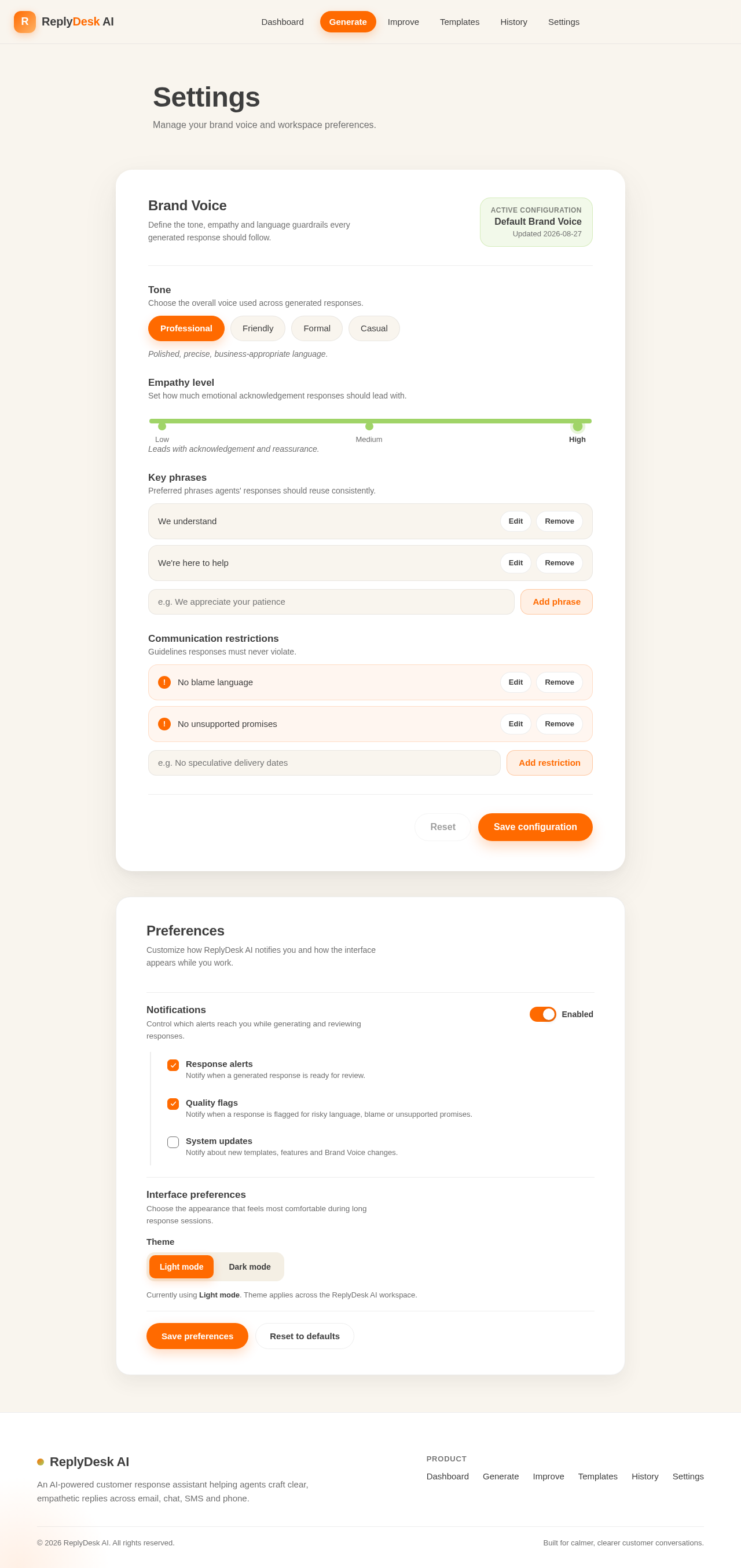
Settings
Manage your brand voice and workspace preferences.
Brand Voice
Define the tone, empathy and language guardrails every generated response should follow.
Tone
Choose the overall voice used across generated responses.
Polished, precise, business-appropriate language.
Empathy level
Set how much emotional acknowledgement responses should lead with.
Leads with acknowledgement and reassurance.
Key phrases
Preferred phrases agents' responses should reuse consistently.
- We understand
- We're here to help
Communication restrictions
Guidelines responses must never violate.
- No blame language
- No unsupported promises
Preferences
Customize how ReplyDesk AI notifies you and how the interface appears while you work.
Notifications
Control which alerts reach you while generating and reviewing responses.
Interface preferences
Choose the appearance that feels most comfortable during long response sessions.
Currently using Light mode. Theme applies across the ReplyDesk AI workspace.
Settings
Manage your brand voice and workspace preferences.
Brand Voice
Define the tone, empathy and language guardrails every generated response should follow.
Tone
Choose the overall voice used across generated responses.
Polished, precise, business-appropriate language.
Empathy level
Set how much emotional acknowledgement responses should lead with.
Leads with acknowledgement and reassurance.
Key phrases
Preferred phrases agents' responses should reuse consistently.
- We understand
- We're here to help
Communication restrictions
Guidelines responses must never violate.
- No blame language
- No unsupported promises
Preferences
Customize how ReplyDesk AI notifies you and how the interface appears while you work.
Notifications
Control which alerts reach you while generating and reviewing responses.
Interface preferences
Choose the appearance that feels most comfortable during long response sessions.
Currently using Light mode. Theme applies across the ReplyDesk AI workspace.
No comments yet. Be the first!