reiger-blue
 Peter Strauss
Reiger Blue is something new, something we all dream about.


Comments (0)
Sign in to leave a comment
System Requirements
System Requirements Document for reiger-blue
1. Introduction
Reiger Blue is a sales platform designed to emphasize traditional, human-to-human sales interactions. The intent is to create a sales experience that is personal and people-centered, reflecting the old-fashioned way of doing sales. The primary audience includes sales representatives and customers who value direct, personal interactions over automated systems.
2. System Overview
Reiger Blue is built around a people-centered sales approach, focusing on human interactions rather than impersonal sales models. The system requires both sales representatives and customers to establish application identities to access protected sales work and resume ongoing sales relationships. The platform includes a durable backend to preserve relationship context and continuity across sessions.
2a. Product Interpretation and Delivery Boundary
The delivery of Reiger Blue is focused on creating a platform that supports human-to-human sales interactions. The system requires application-owned identity for both sales representatives and customers to ensure continuity and security in sales interactions. The current scope does not define specific workflows or delivery channels beyond the established pages and personas. Future expansions may consider additional features or integrations, but the current focus remains on the core human-centric sales approach.
2b. Source Content Inventory
Not applicable as no content source directive was provided.
2c. Page Content and Component Coverage
Landing
- Purpose: Introduce Reiger Blue's people-centered sales approach.
- Components:
- Introduction to the platform's philosophy.
- Call-to-action (CTA) for learning more about the platform.
- Visuals and text emphasizing human-to-human sales.
Login
- Purpose: Allow users to establish or verify their identity.
- Components:
- Fields for username and password.
- Options for account recovery.
- Access to create a new account.
Sales
- Purpose: Workspace for sales representatives to manage sales interactions.
- Components:
- Dashboard of active sales interactions.
- Tools for managing customer relationships.
- Access to historical sales data.
Interactions
- Purpose: Facilitate ongoing sales interactions between customers and representatives.
- Components:
- Communication tools for real-time interaction.
- History of past interactions.
- Options to schedule future interactions.
3. Functional Requirements
- As a Sales Representative, I should be able to manage person-to-person sales work and return to active relationships. (Provenance: explicit)
- As a Customer, I should be able to participate in ongoing human sales interactions. (Provenance: explicit)
- As a Sales Representative or Customer, I should establish an application identity before accessing protected sales work. (Provenance: required_inference)
- As a returning user, I should verify my identity to resume ongoing sales relationships. (Provenance: required_inference)
4. User Personas
- Sales Representative: Responsible for managing sales interactions and maintaining customer relationships through direct, personal engagement.
- Customer: Engages with sales representatives to explore and purchase products/services, valuing the personal interaction and relationship.
5. Core User Flows
Sales Representative Flow
- Access Landing Page: Understand the platform's philosophy.
- Login: Establish or verify identity.
- Access Sales Page: Manage active sales interactions.
- Engage in Interactions: Use tools to communicate with customers.
Customer Flow
- Access Landing Page: Learn about the platform's approach.
- Login: Establish or verify identity.
- Access Interactions Page: Engage with sales representatives.
- Participate in Sales: Communicate and schedule interactions.
6. Visuals Colors and Theme
- Muse: Aaron Draplin
- Palette:
- Background: #F6F3EE
- Surface: #FFFFFF
- Text: #1A1A1A
- Primary: #E07A5F
- Accent: #3D405B
- Muted: #828282
- Typography:
- Headings: Alfa Slab One — Bold, all-caps
- Body: Oswald
- Scale: 1.5 modular
- Shape Language: Badge-like elements with thick lines.
- Layout: Poster-like sections with ruled panels.
- Imagery: Thick-line vector icons and halftone photos.
7. Signature Design Concept
The public entry page features a full-width headline in Alfa Slab One over a kraft paper texture, with a CTA button in the primary color. This design creates a warm, approachable feel, emphasizing the platform's commitment to traditional, human-centered sales.
8. Interaction Model & Motion Direction
- Interaction Model: Static
- Motion Tempo: Restrained
- Hero Dimensionality: Flat
- Landing Hero Motion Brief: A bold headline with a CTA button appears over a kraft paper texture, emphasizing the platform's human-centric approach with minimal animation to maintain focus on the message.
9. Non-Functional Requirements
- The system must ensure data integrity and continuity across sessions. (Provenance: required_inference)
- The platform should provide a secure and reliable login mechanism. (Provenance: required_inference)
10. Tech Stack
- Frontend: React
- Backend: Python/FastAPI
- Storage: Durable backend storage
- Deployment: Docker/docker-compose
11. Assumptions and Constraints
- The platform emphasizes human-to-human sales interactions.
- No automated sales systems are included in the current scope.
- Application identity is required for accessing sales interactions.
12. Glossary
- Sales Representative: A user responsible for managing sales interactions.
- Customer: A user engaging with sales representatives to purchase products/services.
- Application Identity: A user account required to access protected sales features.
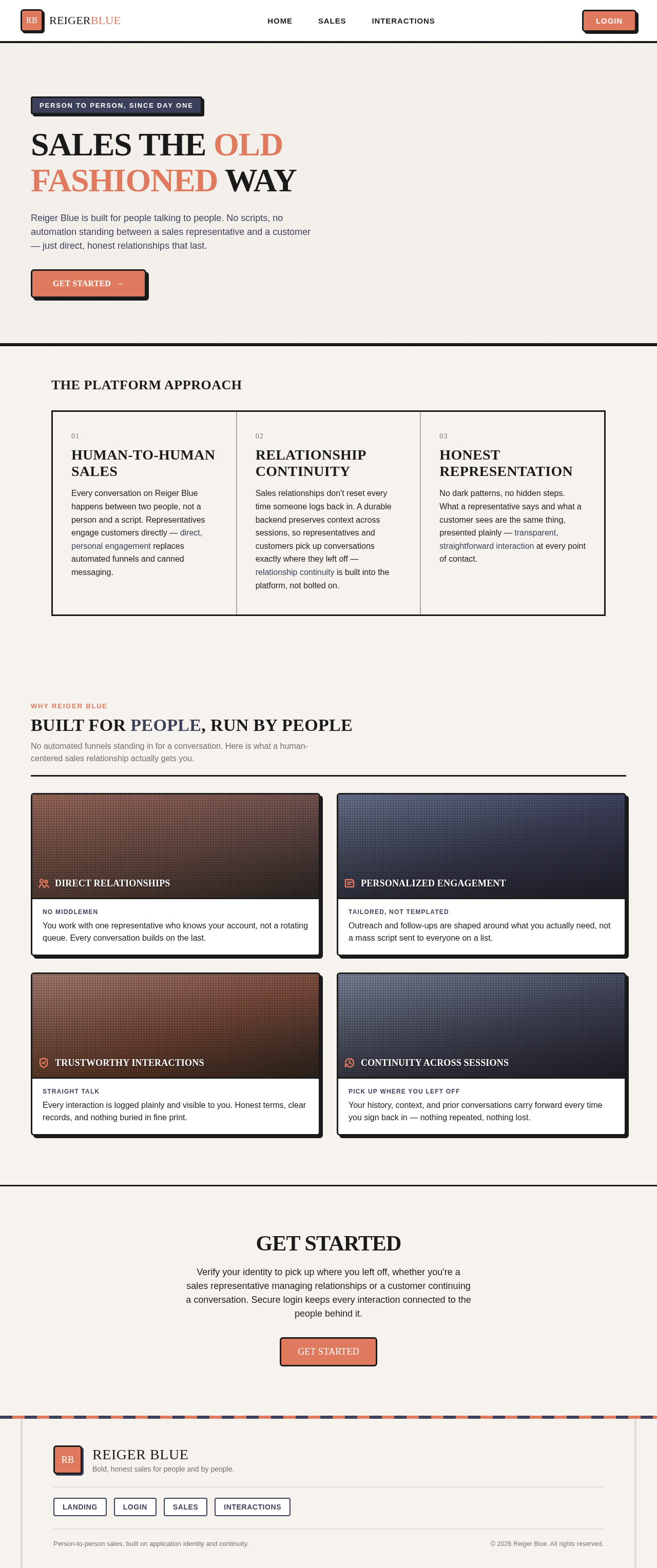
SALES THE OLD FASHIONED WAY
Reiger Blue is built for people talking to people. No scripts, no automation standing between a sales representative and a customer — just direct, honest relationships that last.
The Platform Approach
Human-to-Human Sales
Every conversation on Reiger Blue happens between two people, not a person and a script. Representatives engage customers directly — direct, personal engagement replaces automated funnels and canned messaging.
Relationship Continuity
Sales relationships don't reset every time someone logs back in. A durable backend preserves context across sessions, so representatives and customers pick up conversations exactly where they left off — relationship continuity is built into the platform, not bolted on.
Honest Representation
No dark patterns, no hidden steps. What a representative says and what a customer sees are the same thing, presented plainly — transparent, straightforward interaction at every point of contact.
Built for people, run by people
No automated funnels standing in for a conversation. Here is what a human-centered sales relationship actually gets you.
Direct Relationships
You work with one representative who knows your account, not a rotating queue. Every conversation builds on the last.
Personalized Engagement
Outreach and follow-ups are shaped around what you actually need, not a mass script sent to everyone on a list.
Trustworthy Interactions
Every interaction is logged plainly and visible to you. Honest terms, clear records, and nothing buried in fine print.
Continuity Across Sessions
Your history, context, and prior conversations carry forward every time you sign back in — nothing repeated, nothing lost.
Get Started
Verify your identity to pick up where you left off, whether you're a sales representative managing relationships or a customer continuing a conversation. Secure login keeps every interaction connected to the people behind it.
Get StartedSALES THE OLD FASHIONED WAY
Reiger Blue is built for people talking to people. No scripts, no automation standing between a sales representative and a customer — just direct, honest relationships that last.
The Platform Approach
Human-to-Human Sales
Every conversation on Reiger Blue happens between two people, not a person and a script. Representatives engage customers directly — direct, personal engagement replaces automated funnels and canned messaging.
Relationship Continuity
Sales relationships don't reset every time someone logs back in. A durable backend preserves context across sessions, so representatives and customers pick up conversations exactly where they left off — relationship continuity is built into the platform, not bolted on.
Honest Representation
No dark patterns, no hidden steps. What a representative says and what a customer sees are the same thing, presented plainly — transparent, straightforward interaction at every point of contact.
Built for people, run by people
No automated funnels standing in for a conversation. Here is what a human-centered sales relationship actually gets you.
Direct Relationships
You work with one representative who knows your account, not a rotating queue. Every conversation builds on the last.
Personalized Engagement
Outreach and follow-ups are shaped around what you actually need, not a mass script sent to everyone on a list.
Trustworthy Interactions
Every interaction is logged plainly and visible to you. Honest terms, clear records, and nothing buried in fine print.
Continuity Across Sessions
Your history, context, and prior conversations carry forward every time you sign back in — nothing repeated, nothing lost.
Get Started
Verify your identity to pick up where you left off, whether you're a sales representative managing relationships or a customer continuing a conversation. Secure login keeps every interaction connected to the people behind it.
Get Started
No comments yet. Be the first!