regal-trading
 Basel ha
ULTRATHINK تصرف كخبير هندسة برمجية وخبير بناء بوت تداول الي وخبير تداول كريبتو وقم بفحص الدياقرمنت للريبو الخاص بالعمل flowchart TD subgraph group_trading["Trading runtime"] node_bot["Bot orchestrator<br/>[main.py]"] node_market["Market data<br/>[market_data.py]"] node_exchange["Exchange adapter<br/>[exchange.py]"] node_positions["Position manager"] end subgraph group_analysis["Signals and risk"] node_signals["Signal engine<br/>[signal_engine.py]"] node_indicators["Indicators<br/>[indicators.py]"] node_filters["Signal filters<br/>[filters.py]"] node_explosion["Explosion strategy<br/>[explosion.py]"] node_scalping["Scalping strategy<br/>[scalping.py]"] node_risk["Risk manager<br/>[risk_manager.py]"] node_fees["Fee calculator<br/>[fee_calculator.py]"] end subgraph group_state["State and notifications"] node_state_manager["State manager<br/>[state_manager.py]"] node_schema["Trade schema<br/>[schema.sql]"] node_telegram["Telegram notifier"] end subgraph group_interfaces["User and webhooks"] node_dashboard["Web dashboard<br/>[App.jsx]"] node_web_entry["Web entry<br/>[main.jsx]"] node_worker["Webhook worker<br/>[worker.js]"] end node_operator(("Operator")) node_tradingview(("TradingView")) node_supabase[("Supabase")] node_operator -->|"uses"| node_dashboard node_web_entry -->|"renders"| node_dashboard node_dashboard -->|"reads/authenticates"| node_supabase node_dashboard -->|"subscribes"| node_supabase node_tradingview -->|"posts signal"| node_worker node_worker -->|"forwards webhook"| node_bot node_bot -->|"requests candles"| node_market node_market -->|"fetches market data"| node_exchange node_bot -->|"evaluates market"| node_signals node_signals -->|"calculates"| node_indicators node_signals -->|"validates signal"| node_filters node_signals -.->|"uses strategy"| node_explosion node_signals -.->|"uses strategy"| node_scalping node_bot -->|"checks limits"| node_risk node_risk -->|"uses"| node_fees node_bot -->|"places/closes orders"| node_exchange node_bot -->|"updates positions"| node_positions node_bot -->|"loads/saves trades"| node_state_manager node_state_manager -->|"reads/writes"| node_supabase node_schema -->|"defines tables"| node_supabase node_bot -->|"sends notifications"| node_telegram click node_bot "https://github.com/palc88-stack/apex-trader/blob/main/bot/main.py" click node_market "https://github.com/palc88-stack/apex-trader/blob/main/bot/data/market_data.py" click node_exchange "https://github.com/palc88-stack/apex-trader/blob/main/bot/core/exchange.py" click node_positions "https://github.com/palc88-stack/apex-trader/blob/main/bot/core/position_manager.py" click node_signals "https://github.com/palc88-stack/apex-trader/blob/main/bot/signals/signal_engine.py" click node_indicators "https://github.com/palc88-stack/apex-trader/blob/main/bot/signals/indicators.py" click node_filters "https://github.com/palc88-stack/apex-trader/blob/main/bot/signals/filters.py" click node_explosion "https://github.com/palc88-stack/apex-trader/blob/main/bot/strategies/explosion.py" click node_scalping "https://github.com/palc88-stack/apex-trader/blob/main/bot/strategies/scalping.py" click node_risk "https://github.com/palc88-stack/apex-trader/blob/main/bot/core/risk_manager.py" click node_fees "https://github.com/palc88-stack/apex-trader/blob/main/bot/core/fee_calculator.py" click node_state_manager "https://github.com/palc88-stack/apex-trader/blob/main/bot/data/state_manager.py" click node_schema "https://github.com/palc88-stack/apex-trader/blob/main/database/schema.sql" click node_telegram "https://github.com/palc88-stack/apex-trader/blob/main/bot/notifications/telegram_notifier.py" click node_dashboard "https://github.com/palc88-stack/apex-trader/blob/main/web/src/App.jsx" click node_web_entry "https://github.com/palc88-stack/apex-trader/blob/main/web/src/main.jsx" click node_worker "https://github.com/palc88-stack/apex-trader/blob/main/src/worker.js" classDef toneNeutral fill:#f8fafc,stroke:#334155,stroke-width:1.5px,color:#0f172a classDef toneBlue fill:#dbeafe,stroke:#2563eb,stroke-width:1.5px,color:#172554 classDef toneAmber fill:#fef3c7,stroke:#d97706,stroke-width:1.5px,color:#78350f classDef toneMint fill:#dcfce7,stroke:#16a34a,stroke-width:1.5px,color:#14532d classDef toneRose fill:#ffe4e6,stroke:#e11d48,stroke-width:1.5px,color:#881337 classDef toneIndigo fill:#e0e7ff,stroke:#4f46e5,stroke-width:1.5px,color:#312e81 classDef toneTeal fill:#ccfbf1,stroke:#0f766e,stroke-width:1.5px,color:#134e4a class node_bot,node_market,node_exchange,node_positions,node_tradingview toneBlue class node_signals,node_indicators,node_filters,node_explosion,node_scalping,node_risk,node_fees,node_supabase toneAmber class node_state_manager,node_schema,node_telegram toneMint class node_dashboard,node_web_entry,node_worker toneRose class node_operator toneIndigo


Comments (0)
Sign in to leave a comment
System Requirements
System Requirements Document for regal-trading
1. Introduction
regal-trading is an automated crypto trading bot platform. Its runtime is orchestrated by a bot orchestrator (bot/main.py) that receives trading signals from TradingView through a webhook worker (src/worker.js), evaluates the market through a signal engine, validates signals against risk limits, places and closes orders on a crypto exchange through an exchange adapter, tracks positions, persists trade state to Supabase, and notifies the operator through a Telegram notifier.
The product serves a single human audience: the Operator — the person who runs and watches the bot. The Operator does not place or close orders through the web interface; the bot does that autonomously. The Operator's job is to stay informed: to see what the bot is doing, what positions are open, what signals have passed or been rejected, what fees are being paid, and whether the bot, the exchange connection, and the Supabase subscription are healthy.
The web surface of regal-trading is therefore an instrument panel, not a trading terminal. It reads and subscribes to Supabase-backed trade and position state and presents it with the precision of a machined instrument: ruled data rows, tabular numerals, gauge rings for risk, and a live webhook log that stamps in as TradingView signals arrive.
2. System Overview
regal-trading is delivered as two cooperating parts:
- The trading runtime — a Python bot process that orchestrates market data retrieval, signal evaluation, risk checking, order placement, position tracking, state persistence, and Telegram notification. It runs autonomously and is triggered by inbound webhooks.
- The web surface — a React application (
web/src/main.jsxrendersweb/src/App.jsx) that authenticates against Supabase, reads trade and position state, and subscribes to live Supabase updates so the Operator sees the bot's activity as it happens.
Actors:
- Operator (human) — uses the web dashboard to monitor the bot's activity.
- TradingView (external system) — posts signals to the webhook worker.
- Supabase (external provider) — stores trade and position state and provides live subscription updates.
- Crypto exchange (external provider) — supplies market data and executes orders.
- Telegram (external recipient) — receives outbound notifications from the bot.
Accepted behavior at a glance: the bot requests candles, evaluates the market, validates signals, checks risk limits, places or closes orders, updates positions, persists trades, and notifies. The Operator watches all of this through the dashboard.
Narrow exclusions:
- The web dashboard does not place or close orders. Orders are placed and closed only by the bot orchestrator through the exchange adapter.
- TradingView does not interact with the dashboard. It posts signals only to the webhook worker, which forwards them to the bot.
- The Telegram notifier is the bot's outbound notification channel; it is not a control surface.
2a. Product Interpretation and Delivery Boundary
regal-trading is a monitoring product with an autonomous trading engine behind it. The engine is the product's substance; the web surface is how the Operator keeps watch on it.
Delivery ownership:
- The trading runtime is a first-party Python process. It owns market data retrieval, signal evaluation, risk checking, order execution, position tracking, state persistence, and notification dispatch.
- The web surface is a first-party React application. It owns the Operator's view of trade and position state. It reads from and subscribes to Supabase; it never writes orders.
- Supabase is a provider-owned data and realtime service. It owns storage of trade and position state and the live subscription channel the dashboard consumes.
- TradingView is an external signal source. It owns signal generation and delivery to the webhook worker.
- The crypto exchange is a provider-owned execution venue. It owns market data and order execution; the exchange adapter is the first-party bridge to it.
- Telegram is an external outbound recipient. It owns delivery of bot notifications to the Operator's Telegram client.
Current vs. future boundary: everything described in this document is current. No future-horizon capabilities are accepted.
Access boundary: the Operator must establish and verify identity before reaching the protected dashboard and its Supabase-backed trading state. The Landing page is anonymously reachable and explains the product; the Login page is anonymously reachable and performs returning verification; the Web dashboard requires login.
2b. Source Content Inventory
The reference directives for this project declare feature_reference use only. No directive declares content_source, so no source content inventory is included.
2c. Page Content and Component Coverage
Landing
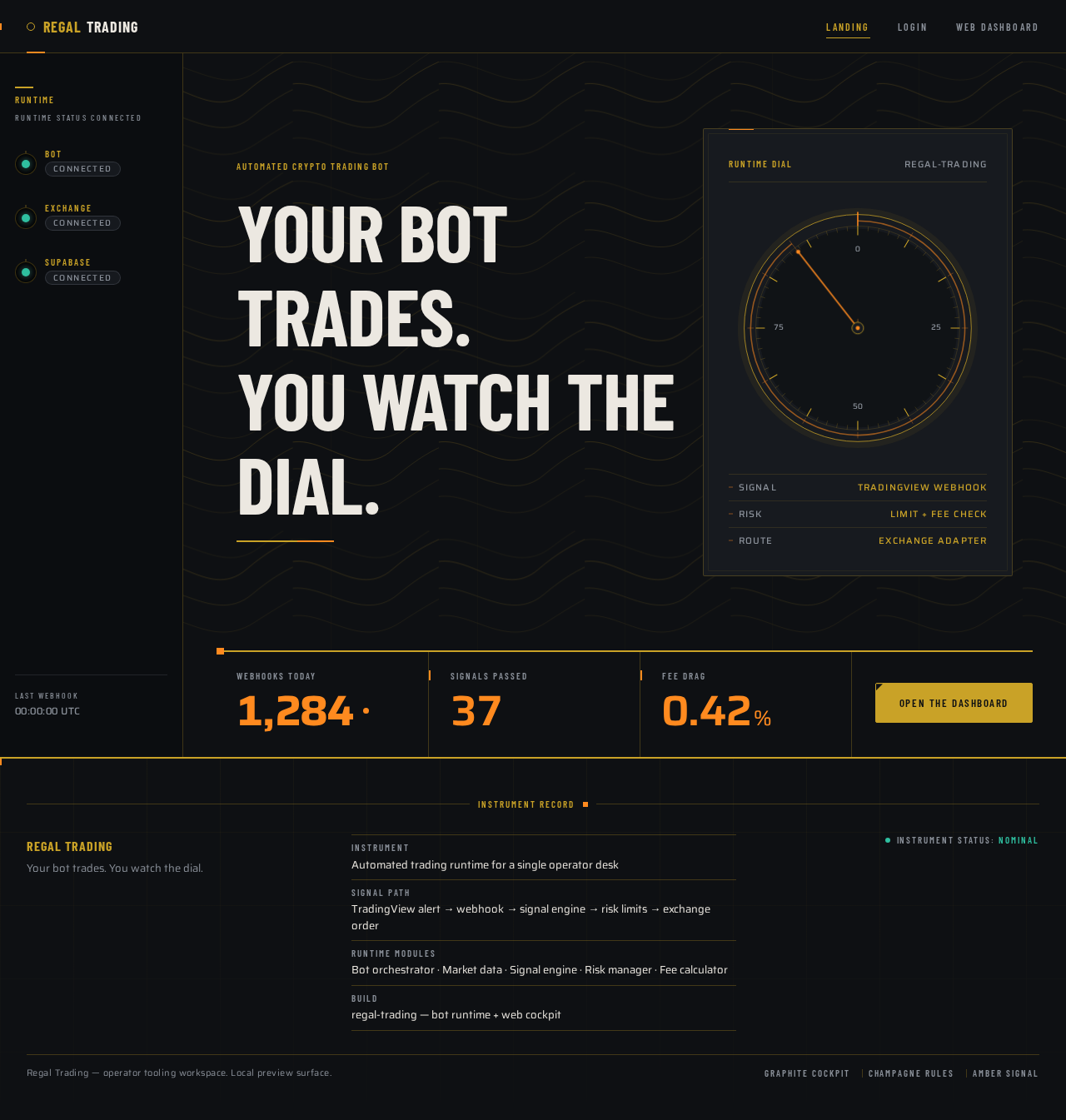
- Information and state: the product's identity as an automated crypto trading bot; a plain statement that the bot trades and the Operator watches; the three live readouts that frame the product's operating reality — webhooks received today, signals passed, and fee drag.
- Primary action: proceed to the dashboard access flow (Login).
- Supporting actions: none beyond navigation to Login.
- Domain entities: webhook count, signal pass count, fee drag percentage.
- Component responsibilities:
- Instrument rail — persistent left rail showing three live status lamps (Bot / Exchange / Supabase) that change colour as their states change.
- Hero headline block — oversized condensed headline spanning the majority of the grid, flush-left.
- Instrument dial — a circular CSS/SVG dial with a champagne bezel ring and an amber needle that sweeps on load; the dominant visual of the page.
- Ruled readout strip — three readouts in tabular numerals with amber values, separated by hairline champagne rules.
- Primary CTA — a sharp-cornered champagne-filled button cut into the ruled strip, leading to Login.
- States:
- Loading: readout values render as muted placeholders until the first values are available.
- Empty: if no webhook or signal data is available, readouts show a zero state with muted labels rather than blank space.
- Success: readouts populate with current values; the dial needle completes its sweep.
- Error: if readouts cannot be resolved, the strip shows a muted unavailable state and the CTA remains usable.
- Recovery: readouts retry on the next available update; the page never blocks on readout availability.
Login
- Information and state: the returning-verification form for the Operator; the product identity; a clear indication that the dashboard behind it holds live trading state.
- Primary action: submit credentials to verify identity and proceed to the Web dashboard.
- Supporting actions: return to Landing; establish a new Operator identity when the Operator has none.
- Domain entities: Operator identity, session.
- Component responsibilities:
- Instrument rail — same persistent rail as Landing, showing the three status lamps.
- Verification form — email and password fields with ruled champagne separators and tabular input styling.
- Submit control — sharp-cornered champagne button.
- First-use path — a distinct control that establishes a new Operator identity for a first-time Operator.
- Error region — inline, ruled, amber-accented message area for verification failures.
- States:
- Loading: submit control shows a restrained in-progress state; fields remain readable.
- Empty: fields render empty with muted labels; no error shown until submission.
- Success: identity verified; the Operator is taken to the Web dashboard.
- Error: invalid credentials produce an inline ruled error message; the form remains filled and resubmittable.
- Recovery: the Operator can correct credentials and resubmit, or switch to the first-use path.
Web dashboard
- Information and state: the live instrument cluster for the running bot — equity, open positions, today's PnL, fee drag, the positions table, risk gauges, and the webhook log.
- Primary action: read and monitor live trade and position state.
- Supporting actions: inspect an individual position row; inspect the webhook log; observe risk gauge values; sign out.
- Domain entities: trades, positions, orders, fees, signals, webhooks, risk limits, bot status, exchange connection status, Supabase subscription status.
- Component responsibilities:
- Instrument rail — persistent left rail (56px collapsed to icons on mobile, 220px on desktop) showing bot status, exchange connection, and last webhook, with three status lamps that animate colour over 200ms.
- Readout tile strip — four tiles across the top: equity, open positions, today's PnL, fee drag. All values right-aligned in tabular numerals.
- Positions table — ruled rows separated by 1px champagne hairlines with a small amber index notch at each row's left edge; right-aligned tabular numerals; hover reveals a 1px champagne underline and a small amber close control.
- Risk gauge column — circular SVG gauge rings for risk exposure and win-rate, with the limit arc drawn in amber and the breach zone in red; needles sweep to new values over 600ms with a physical ease-out.
- Webhook log — rows stamp in from the left with a 120ms translate and a brief amber flash on the timestamp as TradingView signals arrive.
- Live-tick element — a single inner-glow element that pulses amber at 2s intervals when a Supabase subscription event arrives.
- Sign-out control — ends the Operator's session.
- States:
- Loading: tiles and table render as ruled skeletons with muted placeholders; the rail shows lamps in an indeterminate state.
- Empty: with no open positions, the positions table shows a ruled empty state with a muted label; tiles show zero values rather than blank space.
- Success: tiles, table, gauges, and webhook log populate; the Supabase lamp reads connected; live updates arrive and animate.
- Error: if the Supabase subscription drops, the Supabase lamp turns amber then red, the live-tick element stops pulsing, and a ruled banner states that live updates are interrupted while the last known values remain visible.
- Recovery: the dashboard re-establishes the Supabase subscription and resumes live updates; the lamp returns to teal and the banner clears.
3. Functional Requirements
FR-1 — Bot orchestration. As the Operator, I should have the bot orchestrator act as the main orchestration engine so that the trading runtime runs end to end without manual intervention. (explicit)
- Trigger: an inbound webhook forwarded by the webhook worker, or the bot's own runtime loop.
- Observable result: the orchestrator drives candle retrieval, signal evaluation, risk checking, order placement or closing, position updates, state persistence, and notification dispatch.
- Failure/recovery: a failure in any downstream module surfaces through the orchestrator's error handling and is reported through the Telegram notifier.
- Continuation: the orchestrator returns to awaiting the next trigger.
FR-2 — Webhook intake. As the Operator, I should have the bot orchestrator handle webhook intake and trigger the trading runtime so that TradingView signals start a trading flow. (explicit)
- Trigger: TradingView posts a signal to the webhook worker; the worker forwards the webhook to the bot.
- Observable result: the orchestrator begins a trading flow for the received signal.
- Failure/recovery: a malformed or unforwardable webhook does not start a flow; the failure is handled by the orchestrator's error handling.
- Continuation: the orchestrator proceeds to candle retrieval.
FR-3 — Candle request. As the Operator, I should have the bot orchestrator request candle data from the market data module so that market evaluation uses current market data. (explicit)
- Trigger: the orchestrator begins a trading flow.
- Observable result: the market data module receives the candle request.
- Failure/recovery: a failed candle request is handled by the orchestrator's error handling.
- Continuation: the market data module fetches market data from the exchange adapter.
FR-4 — Market data retrieval. As the Operator, I should have the market data module fetch market data from the exchange adapter so that the bot receives parsed candles. (explicit)
- Trigger: the orchestrator requests candles.
- Observable result: the market data module processes the request, calls the exchange adapter to fetch data, and returns parsed candles to the bot.
- Failure/recovery: exchange-side retrieval failures are handled through the exchange adapter's error handling.
- Continuation: the parsed candles return to the orchestrator.
FR-5 — Market data abstraction. As the Operator, I should have the market data module manage data retrieval logic — caching, timeframes, and symbol normalization — and abstract exchange-specific details through the exchange adapter so that the bot's evaluation logic is independent of exchange specifics. (explicit)
- Trigger: each candle request.
- Observable result: the orchestrator receives normalized, parsed candles regardless of exchange-specific detail.
- Failure/recovery: normalization or caching failures surface as retrieval failures handled by the orchestrator.
- Continuation: the orchestrator proceeds to signal evaluation.
FR-6 — Market evaluation. As the Operator, I should have the bot orchestrator evaluate the market through the signal engine so that trading decisions are based on computed signals. (explicit)
- Trigger: parsed candles are available.
- Observable result: the signal engine returns evaluated signals to the orchestrator.
- Failure/recovery: evaluation failures are handled by the orchestrator's error handling.
- Continuation: the orchestrator proceeds to risk checking.
FR-7 — Indicator calculation. As the Operator, I should have the signal engine calculate indicators through the indicators module so that signals are derived from computed indicator values. (explicit)
- Trigger: the signal engine evaluates the market.
- Observable result: indicator values are computed and returned to the signal engine.
- Failure/recovery: insufficient or malformed candle data produces no indicator values and no signal.
- Continuation: the signal engine proceeds to filter validation.
FR-8 — Signal validation. As the Operator, I should have the signal engine validate signals through the signal filters so that only signals passing the filters proceed. (explicit)
- Trigger: indicators have been calculated.
- Observable result: signals are either validated or rejected by the filters.
- Failure/recovery: a rejected signal does not proceed to risk checking or order placement.
- Continuation: validated signals proceed to risk checking.
FR-9 — Explosion strategy. As the Operator, I should have the signal engine use the explosion strategy so that explosion-strategy setups are evaluated. (explicit)
- Trigger: the signal engine evaluates the market.
- Observable result: the explosion strategy contributes to the evaluated signal set.
- Failure/recovery: strategy evaluation failures are handled by the signal engine.
- Continuation: the resulting signals proceed to filter validation.
FR-10 — Scalping strategy. As the Operator, I should have the signal engine use the scalping strategy so that scalping setups are evaluated. (explicit)
- Trigger: the signal engine evaluates the market.
- Observable result: the scalping strategy contributes to the evaluated signal set.
- Failure/recovery: strategy evaluation failures are handled by the signal engine.
- Continuation: the resulting signals proceed to filter validation.
FR-11 — Risk limit checking. As the Operator, I should have the bot orchestrator check limits through the risk manager before order placement so that orders are only placed within accepted risk limits. (explicit)
- Trigger: a validated signal is available.
- Observable result: the risk manager either permits or blocks the order.
- Failure/recovery: a blocked order is not placed; the block is reported through the Telegram notifier.
- Continuation: permitted orders proceed to exchange placement.
FR-12 — Fee calculation in risk checking. As the Operator, I should have the risk manager use the fee calculator so that risk decisions account for trading fees. (explicit)
- Trigger: the risk manager checks limits.
- Observable result: fee values are incorporated into the risk decision.
- Failure/recovery: a fee calculation failure is handled by the risk manager.
- Continuation: the risk decision is returned to the orchestrator.
FR-13 — Order placement and closing. As the Operator, I should have the bot orchestrator place and close orders through the exchange adapter so that trades execute on the exchange. (explicit)
- Trigger: the risk manager permits an order, or an existing position must be closed.
- Observable result: the exchange adapter submits or cancels orders on the exchange.
- Failure/recovery: exchange API failures are handled by the exchange adapter's retries, rate limiting, and error handling.
- Continuation: the orchestrator proceeds to position update.
FR-14 — Exchange adapter integration. As the Operator, I should have the exchange adapter implement exchange-specific logic for data retrieval and order execution, including API integration, authentication, retries, rate limiting, and error handling, so that the bot's higher-level modules are insulated from exchange specifics. (explicit)
- Trigger: the market data module requests candles, or the orchestrator submits or cancels orders.
- Observable result: the exchange adapter serves as the bridge between higher-level modules and external exchange APIs.
- Failure/recovery: retries, rate limiting, and error handling absorb transient exchange failures.
- Continuation: successful calls return to the calling module.
FR-15 — Position updates. As the Operator, I should have the bot orchestrator update positions through the position manager so that open positions reflect the bot's executed trades. (explicit)
- Trigger: an order is placed or closed.
- Observable result: the position manager updates the position state.
- Failure/recovery: position update failures are handled by the orchestrator's error handling.
- Continuation: the orchestrator proceeds to state persistence.
FR-16 — Trade state persistence. As the Operator, I should have the bot orchestrator load and save trades through the state manager, which reads and writes to Supabase, so that trade state survives across bot runs. (explicit)
- Trigger: the orchestrator loads or saves trades.
- Observable result: the state manager reads from and writes to Supabase.
- Failure/recovery: Supabase read or write failures are handled by the state manager.
- Continuation: the orchestrator proceeds to notification.
FR-17 — Trade schema. As the Operator, I should have the trade schema (database/schema.sql) define the Supabase tables so that trade and position state has a defined structure. (explicit)
- Trigger: Supabase tables are provisioned.
- Observable result: the tables backing trade and position state exist as defined by the schema.
- Failure/recovery: schema mismatches surface as state manager read or write failures.
- Continuation: the state manager operates against the defined tables.
FR-18 — Telegram notification. As the Operator, I should have the bot send notifications through the Telegram notifier so that I am informed of bot activity without watching the dashboard. (explicit)
- Trigger: the orchestrator completes a trading flow or encounters a reportable condition.
- Observable result: a notification is delivered through the Telegram notifier.
- Failure/recovery: notification delivery failures do not block the trading flow.
- Continuation: the orchestrator returns to awaiting the next trigger.
FR-19 — TradingView signal posting. As the Operator, I should have TradingView post signals to the webhook worker so that external signal sources drive the bot. (explicit)
- Trigger: TradingView generates a signal.
- Observable result: the signal is posted to the webhook worker.
- Failure/recovery: TradingView does not interact with the dashboard; delivery failures are TradingView-side.
- Continuation: the webhook worker forwards the webhook to the bot.
FR-20 — Webhook forwarding. As the Operator, I should have the webhook worker forward the webhook to the bot so that the orchestrator receives the signal. (explicit)
- Trigger: TradingView posts a signal to the worker.
- Observable result: the webhook is forwarded to the bot orchestrator.
- Failure/recovery: forwarding failures are handled by the worker.
- Continuation: the orchestrator begins a trading flow.
FR-21 — Dashboard rendering. As the Operator, I should have the web entry (web/src/main.jsx) render the web dashboard (web/src/App.jsx) so that the dashboard is available in the browser. (explicit)
- Trigger: the Operator opens the dashboard.
- Observable result: the dashboard renders.
- Failure/recovery: render failures surface as a browser-level error state.
- Continuation: the dashboard proceeds to authenticate against Supabase.
FR-22 — Dashboard authentication against Supabase. As the Operator, I should have the web dashboard read and authenticate against Supabase so that I see trade and position state. (explicit)
- Trigger: the Operator reaches the dashboard with a verified identity.
- Observable result: the dashboard reads trade and position state from Supabase.
- Failure/recovery: authentication or read failures surface as an error state in the dashboard.
- Continuation: the dashboard proceeds to subscribe to Supabase.
FR-23 — Dashboard live subscription. As the Operator, I should have the web dashboard subscribe to Supabase so that trade and position state updates appear live. (explicit)
- Trigger: the dashboard has authenticated against Supabase.
- Observable result: the dashboard receives live updates as trade and position state changes.
- Failure/recovery: a dropped subscription surfaces as an interrupted-live-updates state with the last known values still visible.
- Continuation: the dashboard resumes live updates when the subscription is re-established.
FR-24 — Operator monitoring. As the Operator, I should use the web dashboard to monitor the bot's activity so that I stay informed about what the bot is doing without touching the bot's internal modules. (explicit)
- Trigger: the Operator opens the dashboard.
- Observable result: the Operator sees equity, open positions, today's PnL, fee drag, the positions table, risk gauges, and the webhook log.
- Failure/recovery: when live updates are interrupted, the Operator still sees the last known values and a clear interruption notice.
- Continuation: the Operator continues monitoring as live updates resume.
FR-25 — Self-service enrollment. As the Operator, I should be able to establish my own identity from the Login page when I have none, so that I can reach the protected dashboard without an invitation, provisioning step, or pre-existing account. (required_inference)
- Trigger: a first-time Operator reaches the Login page.
- Observable result: a new Operator identity is established and the Operator proceeds to the Web dashboard.
- Failure/recovery: an enrollment failure produces an inline ruled error message and the form remains resubmittable.
- Continuation: the Operator reaches the Web dashboard.
FR-26 — Returning verification. As the Operator, I should verify my identity on the Login page before reaching the protected dashboard, so that my Supabase-backed trading state remains bound to me. (required_inference)
- Trigger: a returning Operator reaches the Login page.
- Observable result: identity is verified and the Operator proceeds to the Web dashboard.
- Failure/recovery: invalid credentials produce an inline ruled error message; the form remains filled and resubmittable.
- Continuation: the Operator reaches the Web dashboard.
FR-27 — Supabase-backed persistence and live continuity. As the Operator, I should have trade and position state persisted in Supabase and streamed to the dashboard through a live subscription, so that the dashboard reflects the bot's current state without manual refresh. (required_inference)
- Trigger: the bot writes trade or position state; the dashboard holds an active subscription.
- Observable result: the dashboard reflects the change as it happens.
- Failure/recovery: a dropped subscription is surfaced and recovered as described in FR-23.
- Continuation: the dashboard continues to reflect state as further changes arrive.
4. User Personas
Operator
Product context. The Operator runs regal-trading's automated crypto trading bot. The bot trades on its own: it receives signals from TradingView through the webhook worker, evaluates the market, checks risk limits, places and closes orders on the exchange, tracks positions, persists trades to Supabase, and sends Telegram notifications. The Operator's relationship to the product is one of watchfulness, not execution. They do not place orders through the web surface, and the web surface gives them no way to do so.
Primary goal. Stay accurately informed about what the running bot is doing — which positions are open, what today's PnL and fee drag are, which signals passed and which were rejected, and whether the bot, the exchange connection, and the Supabase subscription are healthy — without touching the bot's internal modules.
Distinct accepted responsibilities.
- Reach the protected dashboard through returning verification, or establish a first identity when none exists.
- Read the four top-strip readouts: equity, open positions, today's PnL, fee drag.
- Read the positions table with its ruled rows and right-aligned tabular numerals.
- Read the risk gauges for risk exposure and win-rate, including the limit arc and breach zone.
- Watch the webhook log as TradingView signals arrive in real time.
- Observe the three status lamps (Bot / Exchange / Supabase) on the persistent instrument rail.
- Recognize when live updates are interrupted and continue working from the last known values until they resume.
Relevant inputs and decisions. The Operator's inputs are limited to identity verification and navigation. Their decisions are observational: whether the bot's current behavior matches their expectations, whether risk exposure is approaching a limit, and whether fee drag is acceptable. The Operator does not decide individual trades through the web surface.
Interactions with other accepted participants. The Operator is the sole human participant. They interact with the dashboard, which reads from and subscribes to Supabase. They receive Telegram notifications from the bot. They do not interact with TradingView, the exchange, or the bot's internal modules directly.
Observable success. The Operator can open the dashboard, see current equity, open positions, today's PnL, and fee drag; see the positions table populated with ruled rows; see risk gauges at their current values; see webhook log rows stamp in as signals arrive; and see the three status lamps reflecting the true state of the bot, the exchange connection, and the Supabase subscription. When live updates are interrupted, the Operator sees a clear interruption notice and the last known values rather than a blank or stale-looking screen.
What makes this role different. The Operator is a watcher of an autonomous system, not an actor within it. Every other participant in regal-trading — TradingView, the exchange, Supabase, Telegram — either produces inputs for the bot or receives outputs from it. The Operator is the only participant whose responsibility is to observe the whole machine and judge whether it is behaving as engineered.
5. Core User Flows
Flow 1 — First-time Operator establishes identity and reaches the dashboard
- The Operator opens regal-trading and lands on the Landing page. The page presents the product as an automated crypto trading bot, with the instrument dial, the ruled readout strip, and the three status lamps on the instrument rail.
- The Operator reads the headline and the three readouts (webhooks today, signals passed, fee drag) and understands that the bot trades and they watch.
- The Operator selects the primary CTA cut into the ruled strip. The browser navigates to Login.
- On Login, the Operator has no existing identity. They choose the first-use path to establish a new Operator identity.
- The Operator submits their chosen credentials. The submit control shows a restrained in-progress state.
- On success, the Operator is taken to the Web dashboard. The dashboard renders the instrument cluster: the four readout tiles, the positions table, the risk gauges, and the webhook log.
- The dashboard authenticates against Supabase and establishes its live subscription. The Supabase lamp on the instrument rail turns teal.
- Failure path: if enrollment fails, an inline ruled error message appears in the error region, the form remains filled, and the Operator can correct and resubmit.
- Continuation: the Operator proceeds to Flow 3.
Flow 2 — Returning Operator verifies identity and reaches the dashboard
- The Operator opens regal-trading and lands on the Landing page.
- The Operator selects the primary CTA and navigates to Login.
- On Login, the Operator enters their existing credentials and submits. The submit control shows a restrained in-progress state.
- On success, the Operator is taken to the Web dashboard.
- The dashboard authenticates against Supabase and establishes its live subscription. The Supabase lamp turns teal.
- Failure path: if the credentials are invalid, an inline ruled error message appears, the form remains filled, and the Operator can correct and resubmit or switch to the first-use path.
- Continuation: the Operator proceeds to Flow 3.
Flow 3 — Operator monitors the running bot
- The Operator is on the Web dashboard with a verified identity and an active Supabase subscription.
- The Operator reads the four top-strip readout tiles: equity, open positions, today's PnL, and fee drag. All values are right-aligned in tabular numerals.
- The Operator reads the positions table. Each row is separated by a 1px champagne hairline with a small amber index notch at the row's left edge. Numbers are right-aligned tabular Saira.
- The Operator reads the risk gauge column. The risk-exposure and win-rate gauge rings show current values, with the limit arc drawn in amber and the breach zone in red.
- The Operator watches the webhook log. As TradingView posts signals to the webhook worker and the worker forwards them to the bot, new log rows stamp in from the left with a 120ms translate and a brief amber flash on the timestamp.
- When a Supabase subscription event arrives, the live-tick element pulses amber at 2s intervals.
- The Operator checks the instrument rail's three status lamps (Bot / Exchange / Supabase) to confirm the runtime is healthy. Lamps animate colour over 200ms as states change.
- Failure path: if the Supabase subscription drops, the Supabase lamp turns amber then red, the live-tick element stops pulsing, and a ruled banner states that live updates are interrupted. The last known values remain visible.
- Recovery: the dashboard re-establishes the Supabase subscription, the lamp returns to teal, the banner clears, and live updates resume.
- Continuation: the Operator continues monitoring. When the bot places or closes an order, updates positions, and persists trades through the state manager to Supabase, the dashboard reflects the change through the live subscription.
Flow 4 — Operator inspects a position row
- The Operator is on the Web dashboard with the positions table populated.
- The Operator hovers over a position row. A 1px champagne underline appears and a small amber close control is revealed at the row's right edge.
- The Operator reads the row's values in tabular numerals.
- Note: the close control is a dashboard affordance for the row; the dashboard does not place or close orders. Orders are placed and closed only by the bot orchestrator through the exchange adapter.
- Continuation: the Operator moves on to another row or returns to monitoring.
Flow 5 — Operator receives a Telegram notification
- The bot orchestrator completes a trading flow or encounters a reportable condition.
- The orchestrator sends a notification through the Telegram notifier.
- The Operator receives the notification in their Telegram client.
- Continuation: the Operator may open the Web dashboard to see the corresponding state change reflected in the readout tiles, positions table, or webhook log.
Flow 6 — Operator signs out
- The Operator is on the Web dashboard.
- The Operator selects the sign-out control.
- The Operator's session ends and the dashboard's protected state is no longer available.
- Continuation: the Operator can return to Login to verify identity again.
6. Visuals, Colors and Theme
Muse: MARQ by Garmin — luxury instrument aesthetic. The register is instrument trust, not friendly SaaS: a dark cockpit where numbers read instantly and the surface feels like a titanium tool-watch.
Headline: "YOUR BOT TRADES. YOU WATCH THE DIAL."
Color tokens (dark mode)
| Role | Hex | Usage |
|---|---|---|
| Background | #0E1013 | Graphite-black ground for every page |
| Surface | #171A1F | Titanium panel surfaces |
| Text | #ECE8E1 | Warm off-white for all body and data |
| Primary | #C9A227 | Champagne gold — rules, bezel rings, active nav |
| Accent | #FF8A1F | Amber — live ticks, PnL deltas, risk-limit warnings, the one glowing element per screen |
| Muted | #8A9099 | Steel grey — labels, units, secondary metadata |
| State: connected | #2FBFA0 | Teal — Supabase subscription live, exchange adapter online |
| Data: positive | #35C08A | Green — trade outcomes, on data only |
| Data: negative | #FF5A5F | Red — trade outcomes and breach zones, on data only |
Proportion: 70% graphite, 18% titanium panel, 6% text, 4% champagne, 2% amber.
Typography
- Headings: Barlow Condensed, 600–700 weight, uppercase, tight tracking (-0.01em). No italic, no rounded terminals.
- Body: Saira.
- Numerals: Saira with
tabular-numson for all readouts and data rows. - Section eyebrows: uppercase 11px, 0.18em tracking, champagne.
- Type scale (1.25 modular, mobile-first): display 44/64/96px (clamp), h2 28/36/44px, h3 20/24/28px, body 15/16/17px, data-label 11/12/12px, numeral-readout 32/44/56px.
- Line-height: 1.05 for display, 1.5 for body, 1.15 for data rows.
Shape language
- Instrument bezels and ruled panels.
- Sharp 2px corners on data panels; 999px pill only for status chips.
- Hairline 1px champagne rules separate every data row, like a watch dial's minute track.
- Circular gauge rings for risk exposure and win-rate.
- Chunky 2px top-rule on section headers with a small amber notch at the left edge, like a bezel index.
- No rounded-card softness. No drop shadows except a single inner glow on the live-tick element.
Layout
- 12-column ruled grid with a persistent left instrument rail: 56px on mobile collapsed to icons, 220px on desktop, showing bot status, exchange connection, and last webhook.
- Landing: asymmetric split — 7 columns of oversized condensed headline over a graphite field, 5 columns holding the instrument dial panel.
- Dashboard: dense instrument cluster — top strip of four readout tiles (equity, open positions, today's PnL, fee drag); middle positions table with ruled rows and right-aligned tabular numerals; right column of risk gauges and webhook log.
- Everything aligns to the grid's vertical rules; nothing floats.
Imagery
Macro material photography and engineered textures: brushed titanium plates, sapphire-glass reflections, topographic contour lines, a single product-like hero object (an abstract machined dial or a dark instrument bezel) lit from one side. Diagrams over photography in the dashboard — candle charts, gauge rings, ruled fee breakdowns. No stock people, no illustrations, no 3D blobs, no glassmorphism.
Readable-text rule
Headlines, wordmarks, labels, numbers, item images, cards and controls stay entirely inside the viewport and their container at 375px, 768px and 1280px, wrapping or scaling (for example font-size: clamp(...) with its mobile size) to fit. No other element covers any part of them. Crops, bleeds and off-edge placement are for decoration only: shapes, textures, rules and background art. Moving and scrollable content (marquees, tickers, carousels, horizontally scrollable rows) may cross the viewport or container edge by design; judge it by whether it actually moves or scrolls and whether every item becomes fully readable as it passes. With prefers-reduced-motion it stops and shows whole items: they wrap into rows, or sit in a horizontally scrollable row (overflow-x: auto) whose further items are reached by scrolling.
7. Signature Design Concept
The Instrument Dial Hero.
The Landing page is a full-viewport graphite field (#0E1013). An oversized condensed headline — Barlow Condensed 700, 44px on mobile to 96px on desktop — spans 9 of 12 columns, flush-left, reading "YOUR BOT TRADES. YOU WATCH THE DIAL."
To the right, occupying the remaining 5 columns, sits a large circular instrument dial rendered in CSS/SVG (not WebGL). Its champagne bezel ring (#C9A227) is drawn as a hairline circle with a small amber index notch at the top, echoing a watch bezel. Its amber needle (#FF8A1F) sweeps on load from the zero position to its resting position, then holds.
Below the headline, a ruled strip of three live readouts sits flush to the grid's vertical rules:
- WEBHOOKS TODAY — 1,284
- SIGNALS PASSED — 37
- FEE DRAG — 0.42%
Each readout is set in tabular Saira numerals with amber values and muted steel-grey labels, separated by 1px champagne hairlines. The primary CTA — a sharp-cornered champagne-filled button — is cut into the ruled strip rather than floating above it.
The persistent left instrument rail runs the full height of the page, showing the three status lamps (Bot / Exchange / Supabase) as small circular indicators that animate colour over 200ms as their states change.
No gradient blob. No centred stack. No subtext paragraph above the fold. The dial is the dominant visual, not an illustration.
8. Interaction Model & Motion Direction
Interaction Model: Animated Motion Tempo: restrained Hero Dimensionality: layered_2d
Landing Hero Motion Brief
Focal subject. The circular instrument dial occupying the right 5 columns of the Landing hero — a CSS/SVG construction with a champagne bezel ring, a hairline minute track, and an amber needle.
Input → transformation → outcome thesis. On page load, the dial's amber needle sweeps from the zero position to its resting position over a restrained interval with a physical ease-out, while the three ruled readouts below the headline populate from muted placeholders to their current values. The outcome is a first frame that reads as a calibrated instrument coming to rest, not a decorative animation.
Motion vocabulary. Restrained, mechanical, instrument-grade. One purposeful loop: the live-tick readout pulses amber at 2s intervals when a Supabase subscription event arrives. Risk gauge needles sweep to new values over 600ms with a physical ease-out. Webhook log rows stamp in from the left with a 120ms translate. No bounce, no particles, no gradient drift. Hover on a position row reveals a 1px champagne underline and a small amber close control.
Composed first frame. Graphite field, flush-left condensed headline spanning 9 columns, dial at rest in the right 5 columns with its needle at the resting position, ruled readout strip below the headline with values populated, champagne CTA cut into the strip, instrument rail on the left with three status lamps lit.
Reduced-motion state. With prefers-reduced-motion, the live-tick pulse becomes a static amber dot, needle sweeps snap instantly to their values, and webhook log rows appear without the translate. The composed first frame is identical; only the transitions are removed.
9. Non-Functional Requirements
NFR-1 — Dark-mode default. The operator cockpit is dark and the Landing page matches it. Light mode is not the default surface. (explicit — creative direction)
NFR-2 — Tabular numerals. All readouts and data rows use tabular numerals so that values align vertically across rows and update without reflow. (explicit — creative direction)
NFR-3 — Readable text at every viewport. Headlines, wordmarks, labels, numbers, item images, cards and controls stay entirely inside the viewport and their container at 375px, 768px and 1280px, wrapping or scaling to fit. No other element covers any part of them. (explicit — creative direction)
NFR-4 — Reduced-motion support. With prefers-reduced-motion, the live-tick pulse becomes a static amber dot, needle sweeps snap instantly, and webhook log rows appear without the translate. (explicit — creative direction)
NFR-5 — Exchange adapter resilience. The exchange adapter handles exchange API integrations, authentication, retries, rate limiting, and error handling so that transient exchange failures do not break the trading runtime. (explicit)
NFR-6 — Live subscription continuity. The dashboard maintains a Supabase subscription so that trade and position state updates appear live; a dropped subscription is surfaced to the Operator and recovered. (explicit + required_inference)
NFR-7 — State durability. Trade state is persisted to Supabase through the state manager so that it survives across bot runs. (explicit)
NFR-8 — Notification non-blocking. Telegram notification delivery failures do not block the trading flow. (required_inference — derived from the notifier's role as an outbound channel)
NFR-9 — No order placement from the web surface. The web dashboard reads and authenticates against Supabase and subscribes to Supabase; it does not place or close orders. Orders are placed and closed only by the bot orchestrator through the exchange adapter. (explicit)
NFR-10 — TradingView isolation. TradingView posts signals to the webhook worker, which forwards the webhook to the bot; TradingView does not interact with the dashboard. (explicit)
10. Tech Stack
- Trading runtime: Python. The bot orchestrator (
bot/main.py), market data module (bot/data/market_data.py), exchange adapter (bot/core/exchange.py), position manager (bot/core/position_manager.py), signal engine (bot/signals/signal_engine.py), indicators (bot/signals/indicators.py), signal filters (bot/signals/filters.py), explosion strategy (bot/strategies/explosion.py), scalping strategy (bot/strategies/scalping.py), risk manager (bot/core/risk_manager.py), fee calculator (bot/core/fee_calculator.py), state manager (bot/data/state_manager.py), and Telegram notifier (bot/notifications/telegram_notifier.py). - Web surface: React. Web entry (
web/src/main.jsx) renders the web dashboard (web/src/App.jsx). - Webhook worker: JavaScript (
src/worker.js). - Database and realtime: Supabase, with tables defined by the trade schema (
database/schema.sql). - Notifications: Telegram, through the Telegram notifier.
- Exchange integration: through the exchange adapter, which bridges higher-level modules to external exchange APIs.
11. Assumptions and Constraints
Assumptions:
- A-1. The Operator is the sole human user of regal-trading. (explicit — persona catalog)
- A-2. The Operator reaches the dashboard through a browser. (required_inference)
- A-3. The bot runs continuously and is triggered by inbound webhooks. (explicit)
- A-4. Supabase is the authoritative store for trade and position state. (explicit)
- A-5. The exchange adapter is the only path from the bot to the exchange. (explicit)
Constraints:
- C-1. The web dashboard reads/authenticates against Supabase and subscribes to Supabase; it does not place or close orders. (explicit)
- C-2. Orders are placed and closed only by the bot orchestrator through the exchange adapter. (explicit)
- C-3. TradingView posts signals to the webhook worker, which forwards the webhook to the bot; TradingView does not interact with the dashboard. (explicit)
- C-4. The Telegram notifier is the bot's outbound notification channel. (explicit)
- C-5. The web dashboard requires login; the Landing and Login pages are anonymously reachable. (explicit — page contract)
- C-6. The palette, typography, shape language, layout, and motion direction in Sections 6–8 are binding. (explicit — creative direction)
- C-7. The generic indigo/blue-on-white SaaS template is forbidden for this project. (explicit — creative direction)
12. Glossary
- Bot orchestrator — the main orchestration engine (
bot/main.py) that drives the trading runtime end to end. - Candle — a market data unit (open, high, low, close over a timeframe) requested by the orchestrator and fetched through the market data module.
- Exchange adapter — the module (
bot/core/exchange.py) that bridges higher-level modules to external exchange APIs, handling data retrieval, order execution, authentication, retries, rate limiting, and error handling. - Explosion strategy — a trading strategy module (
bot/strategies/explosion.py) used by the signal engine. - Fee calculator — the module (
bot/core/fee_calculator.py) used by the risk manager to account for trading fees in risk decisions. - Fee drag — the cumulative cost of trading fees, shown as a readout on the dashboard.
- Instrument rail — the persistent left rail on every page showing bot status, exchange connection, and last webhook, with three status lamps.
- Market data module — the module (
bot/data/market_data.py) that fetches candle data on request, manages retrieval logic (caching, timeframes, symbol normalization), and abstracts exchange-specific details through the exchange adapter. - Operator — the human user of regal-trading who monitors the bot through the web dashboard.
- Position manager — the module (
bot/core/position_manager.py) that updates positions when the bot places or closes orders. - Risk manager — the module (
bot/core/risk_manager.py) that checks limits before order placement, using the fee calculator. - Scalping strategy — a trading strategy module (
bot/strategies/scalping.py) used by the signal engine. - Signal engine — the module (
bot/signals/signal_engine.py) that evaluates the market, calculates indicators, validates signals through filters, and uses the explosion and scalping strategies. - Signal filters — the module (
bot/signals/filters.py) that validates signals before they proceed. - State manager — the module (
bot/data/state_manager.py) that loads and saves trades, reading from and writing to Supabase. - Supabase — the provider-owned database and realtime service that stores trade and position state and streams live updates to the dashboard.
- Telegram notifier — the module (
bot/notifications/telegram_notifier.py) that sends the bot's outbound notifications. - Trade schema — the SQL file (
database/schema.sql) that defines the Supabase tables. - TradingView — the external signal source that posts signals to the webhook worker.
- Web dashboard — the React component (
web/src/App.jsx) that the Operator uses to monitor the bot. - Web entry — the React entry module (
web/src/main.jsx) that renders the web dashboard. - Webhook worker — the module (
src/worker.js) that receives signals from TradingView and forwards them to the bot.
Automated crypto trading bot
Your bot trades.You watch the dial.
- SIGNAL
- TradingView webhook
- RISK
- Limit + fee check
- ROUTE
- Exchange adapter
Live readouts
WEBHOOKS TODAY
1,284
WEBHOOKS TODAY 1,284SIGNALS PASSED
37
SIGNALS PASSED 37FEE DRAG
0.42%
FEE DRAG 0.42%Automated crypto trading bot
Your bot trades.You watch the dial.
- SIGNAL
- TradingView webhook
- RISK
- Limit + fee check
- ROUTE
- Exchange adapter
Live readouts
WEBHOOKS TODAY
1,284
WEBHOOKS TODAY 1,284SIGNALS PASSED
37
SIGNALS PASSED 37FEE DRAG
0.42%
FEE DRAG 0.42%
No comments yet. Be the first!