regal-skills
 teluguwayne
can you build me an portfolio website Yashwanth Booram LinkedIn: linkedin.com/in/yashwanthbooram GitHub: github.com/yashwanthbooram Email: booramyashwanth@gmail.com Mobile: +91-9440970270 SKILLS • Languages: Python, Java, MERN Stack • Frameworks/Tools: Scikit-learn, PyTorch, Keras, TensorFlow, Pandas, NumPy, Matplotlib, OpenCV • Data & Cloud: MySQL, MongoDB, Power BI, Google Colab, AWS (basic) • Soft Skills: Problem-Solving Skills, Team Player, Project Management, Adaptability INTERNSHIP Outlier – Generative AI Training Company December’24 – June’25 ~Generative AI Trainer-Freelance • Evaluated and optimized large language model outputs for sensitive content detection, improving consistency and contextual accuracy across multiple programming languages. • Utilized Python, Java, C++, and JavaScript for prompt creation, testing, and analysis. PROJECTS Movify: AI-Powered Full-Stack Movie Platform| React, Node.js, Express.js, MongoDB, LLM APIs June’25 – August’25 • Engineered a scalable RESTful API using Node.js and Express.js to manage user authentication, movie data, and CRUD operations for reviews. • Integrated a Large Language Model (LLM) to deliver intelligent features, including a personalized recommendation engine and automatic review summarization. • Developed a dynamic and responsive user interface with React, implementing component-based architecture and state management for a seamless user experience. • GitHub Repository: Movify Project Ship Detection in Satellite Imagery Using Deep Learning| YOLOv3, OpenCV March’25 – April’25 • Pre-processed maritime satellite images, followed by image normalization and bounding box extraction processes. • Developed a YOLOv3 Convolutional Neural Network (CNN) model for high-accuracy ship localization in satellite imagery. • Achieved ~95% Training Accuracy and ~92% Validation Accuracy • GitHub Repository: Ship Detection Project Customer Behavior Analytics – For Retail Stores | K-Means Clustering, RFM Analysis June’24 – July’24 • Applied RFM (Recency, Frequency, Monetary) analysis, K-Means clustering to segment customers into five distinct groups • Determined optimal K using elbow method (WCSS) and visualized segments via scatter plots. • Generated actionable business insights to target high-value customers and improve marketing ROI • GitHub Repository: Customer Behavior Analytics Project CERTIFICATES • Machine Learning Specialization by Stanford| Online and DeepLearning.AI-Coursera • Generative AI with Large Language Models by Coursera. • Dynamic Programming, Greedy Algorithms by University of Colorado Boulder • Google Cybersecurity (Google) EDUCATION • Lovely Professional University Bachelor of Technology - Computer Science and Engineering; CGPA: 7 • Narayana Junior College Intermediate; Percentage: 78.9% • Sri Chaitanya Techno School Matriculation; Percentage: 100% July 2025 October 2023 October 2023 August 2022 Punjab, India October 2022 - Present Hyderabad, Telangana April 2020 - March 2022 Hyderabad, Telangana April 2019 - March 2020
Comments (0)
Sign in to leave a comment
Project Tasks19
Implement Global Theme Structure
Set up the global theme configuration in React using the SRD color palette: Background #F9F9F9, Surface #FFFFFF, Text #333333, Accent #0077B6, Muted #B0BEC5. Create a centralized theme file, CSS variables, and base layout wrappers (AppShell, PageContainer) that all pages will inherit. Establish typography scale, spacing tokens, and shadow definitions consistent across all mock designs.
Align Components to Color Palette
Audit and align all shared/reusable components (buttons, cards, nav, footer, badges, inputs) to the finalized color palette and theme tokens from T01. Ensure consistent hover states, focus rings, and disabled states using Accent #0077B6 and Muted #B0BEC5. Produce a shared component library (Button, Card, Tag, Avatar, InputField, SectionHeader) that all page tasks will consume.
Build Contact Form API
As a Visitor, I want to use the backend API for contact form submission: POST /api/contact/submit (validate payload, verify reCAPTCHA server-side, persist to MySQL contact_submissions table, send email via SMTP). GET /api/contact/submissions (admin only, paginated). PATCH /api/contact/submissions/{id}/read (mark read). Include input sanitization and IP rate limiting.
Build Projects CRUD API
As an Admin, I want to use the backend API for Projects management: POST /api/projects (create with image upload), GET /api/projects (paginated, filterable), GET /api/projects/{id} (detail), PATCH /api/projects/{id} (update), DELETE /api/projects/{id} (soft delete). Admin write endpoints protected by JWT auth middleware.
Build Experience CRUD API
As an Admin, I want to use the backend API for Experience management: POST /api/experience (create entry), GET /api/experience (ordered list by date), GET /api/experience/{id}, PATCH /api/experience/{id}, DELETE /api/experience/{id}. Admin write endpoints protected by JWT. Schema: id, company, role, description, start_date, end_date, is_current, location, highlights (JSON array).
Build Skills and Certificates API
As an Admin, I want to use the backend API for Skills management: POST /api/skills (create with certificate file upload), GET /api/skills (grouped by category), GET /api/skills/{id}, PATCH /api/skills/{id} (update proficiency/metadata), DELETE /api/skills/{id}, POST /api/skills/{id}/certificate (upload certificate PDF/image). Admin write endpoints protected by JWT.
Build GitHub Integration Service
As a Visitor, I want to use the backend API to view live GitHub repository stats: GET /api/github/repo/{owner}/{repo} returning stars, forks, open issues, last commit date, and language breakdown. Cache responses (TTL 30 min) to avoid rate limiting. GET /api/github/repos lists configured showcase repositories. Admin can update showcase repo list via PATCH /api/admin/github/repos. Used by Project Detail page (T06).
Build Landing Page UI
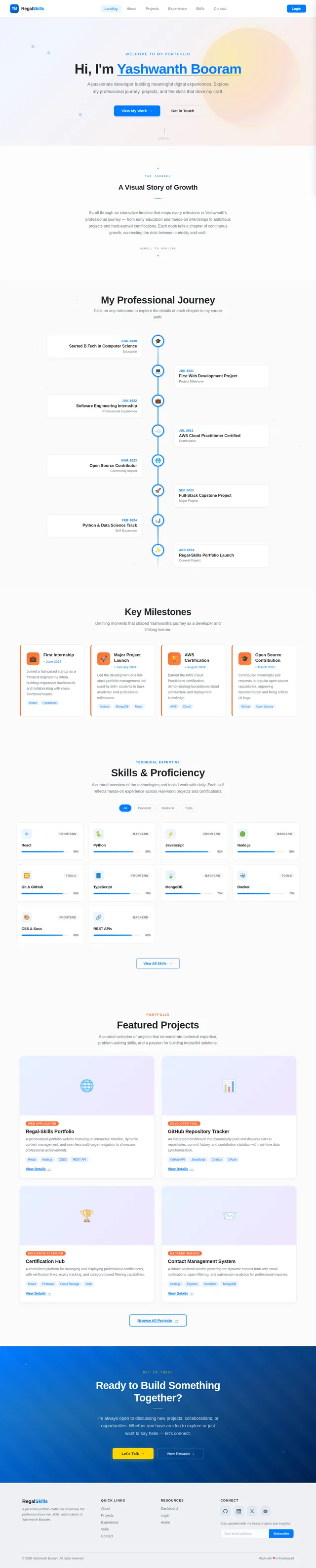
As a Visitor, I want to use the frontend to experience the Landing Page (v2 design) as the dynamic timeline entry point. Include scroll-triggered animations: avatar movement along a vertical timeline, card pop-in effects for milestone cards, and a hero section with animated headline. Wire up navigation to About, Projects, Experience, and Contact. Sections: Hero, Timeline Teaser, Skills Snapshot, Featured Projects, CTA. Use theme tokens from T01/T02.
Build About Page UI
As a Visitor, I want to use the frontend to view the About Page (v1 design) showing Yashwanth Booram's personal narrative, profile photo, short bio, education history, and core values/interests. Include animated section reveals on scroll. Consume shared Card and Avatar components from T02. Ensure responsive layout for mobile, tablet, and desktop breakpoints.
Build Projects Browse Page UI
As a Visitor, I want to use the frontend to browse Projects (v1 design) via a filterable/searchable grid of project cards showing title, tech stack tags, thumbnail, and GitHub link. Implement filter by category/tech. Each card navigates to the Project Detail view. Consume shared Card and Tag components. Data fetched from Projects API (T14) once available; use mock data initially.
Build Experience Timeline Page UI
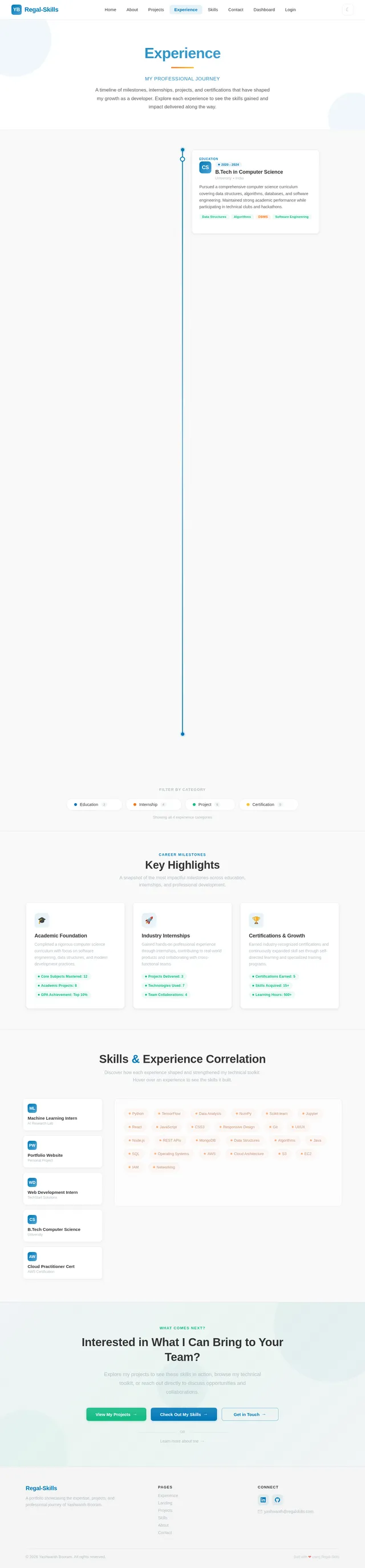
As a Visitor, I want to use the frontend to explore the Experience Page (v2 design) as a vertical interactive timeline with milestone cards for each role/position. Include scroll-triggered animations (slide-in from alternating sides), expandable milestone detail panels, and date range badges. Visitor flow shows read-only timeline. Data sourced from Experience API (T15); use mock data initially.
Build Skills View Page UI
As a Visitor, I want to use the frontend to view the Skills Page (v1 design) with categorized skill cards, proficiency indicators, certificate thumbnails/links, and a visual skills matrix. Include hover effects revealing detail tooltips. Support certificate preview modal. Data sourced from Skills API (T16); use mock data initially.
Build Contact Form Page UI
As a Visitor, I want to use the frontend to send a message via the Contact Page (v1 design) with Name, Email, Subject, Message fields with inline validation. Integrate Google reCAPTCHA v2 widget. Show success/error toast feedback on submission. Include social links panel alongside the form. Wire form submission to Contact API (T13). Use shared InputField and Button components from T02.
Build Login Page UI
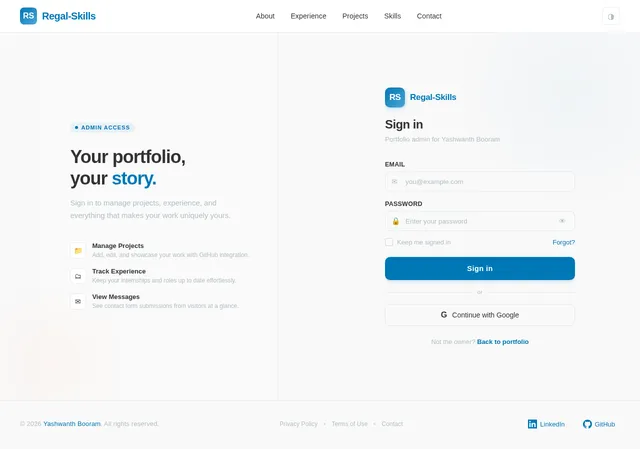
As an Admin, I want to use the frontend to authenticate via the Login Page (v3 design): centered card with email/password fields, show/hide password toggle, form validation with error states, and a loading spinner on submit. On successful auth, redirect to Dashboard. Style with Accent #0077B6 for the submit button and Surface #FFFFFF card background per theme tokens.
Integrate CAPTCHA Verification Backend
As a Visitor, I want to use the backend API to have my contact form verified via reCAPTCHA: implement server-side reCAPTCHA v2 token verification service in FastAPI as a reusable CaptchaService. Calls Google's siteverify API, validates response, raises HTTPException on failure. Injected as dependency into POST /api/contact/submit (T13). Store secret key in environment variables.
Build Project Detail Page UI
As a Visitor, I want to use the frontend to view a Project Detail page showing full description, screenshots/media, tech stack, live demo link, and an embedded GitHub repository stats panel (stars, forks, last commit). Include back-to-projects navigation. Integrates GitHub showcase component (T18). Data sourced from Projects API (T14).
Build Admin Dashboard Page UI
As an Admin, I want to use the frontend Dashboard Page (v1 design) to see summary stat cards (total projects, messages, skills, experience entries), recent contact submissions table, quick-action buttons (Add Project, Add Experience, Upload Skills), and a navigation sidebar linking to all admin management sections. Use mock data initially; protected route requiring auth.
Build Admin Content Management UI
As an Admin, I want to use the frontend to manage all content via CRUD interfaces: Projects (Add/Edit/Delete forms with image upload), Experience (Add/Edit forms with date pickers and rich text), Skills (upload certificates, proficiency sliders, category management), and Contact (view submissions list with read/unread status). All forms use shared components. Protected routes. Wire to APIs T13–T16.
Wire Frontend Data to APIs
As a User, I want to use the frontend with live data from all backend APIs. Replace mock/static data across all pages (Landing, About, Projects, Experience, Skills, Contact, Dashboard, Admin Management) with live API calls using Axios or React Query. Implement a centralized API client with base URL config, JWT auth header injection for admin routes, and global error boundary handling.
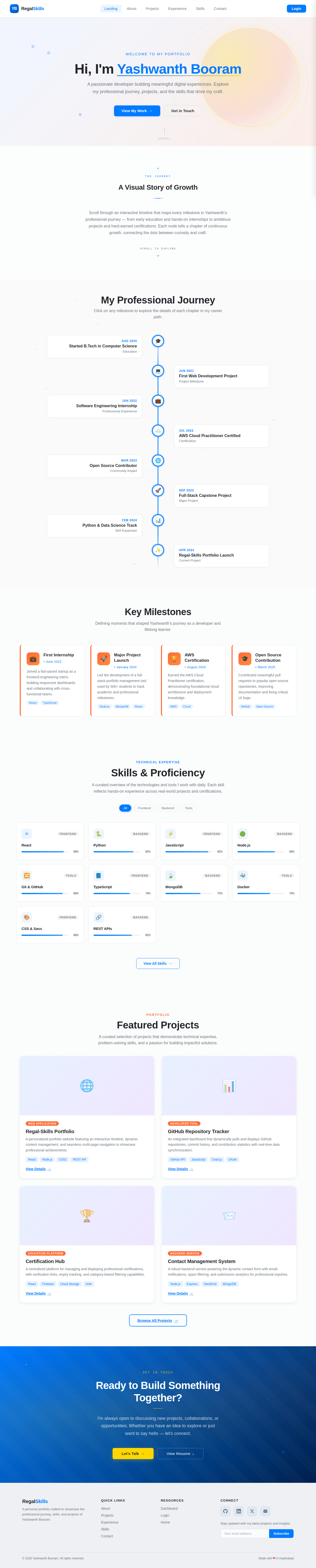
Welcome to my portfolio
Hi, I'm Yashwanth Booram
A passionate developer building meaningful digital experiences. Explore my professional journey, projects, and the skills that drive my craft.
A Visual Story of Growth
Scroll through an interactive timeline that maps every milestone in Yashwanth’s professional journey — from early education and hands-on internships to ambitious projects and hard-earned certifications. Each node tells a chapter of continuous growth, connecting the dots between curiosity and craft.
My Professional Journey
Click on any milestone to explore the details of each chapter in my career path.
Key Milestones
Defining moments that shaped Yashwanth's journey as a developer and lifelong learner.
First Internship
June 2023
Joined a fast-paced startup as a frontend engineering intern, building responsive dashboards and collaborating with cross-functional teams.
Major Project Launch
January 2024
Led the development of a full-stack portfolio management tool used by 500+ students to track academic and professional milestones.
AWS Certification
August 2024
Earned the AWS Cloud Practitioner certification, demonstrating foundational cloud architecture and deployment knowledge.
Open Source Contribution
March 2025
Contributed meaningful pull requests to popular open-source repositories, improving documentation and fixing critical UI bugs.
Skills & Proficiency
A curated overview of the technologies and tools I work with daily. Each skill reflects hands-on experience across real-world projects and certifications.
Featured Projects
A curated selection of projects that demonstrate technical expertise, problem-solving skills, and a passion for building impactful solutions.
Regal-Skills Portfolio
A personalized portfolio website featuring an interactive timeline, dynamic content management, and seamless multi-page navigation to showcase professional achievements.
View Details→GitHub Repository Tracker
An integrated dashboard that dynamically pulls and displays GitHub repositories, commit history, and contribution statistics with real-time data synchronization.
View Details→Certification Hub
A centralized platform for managing and displaying professional certifications, with verification links, expiry tracking, and category-based filtering capabilities.
View Details→Contact Management System
A robust backend service powering the dynamic contact form with email notifications, spam filtering, and submission analytics for professional inquiries.
View Details→Ready to Build Something Together?
I'm always open to discussing new projects, collaborations, or opportunities. Whether you have an idea to explore or just want to say hello — let's connect.
No comments yet. Be the first!