regal-idea
 Hansvi Bedi
: 🌐 💼 WEBSITE PROMPT (Client attracting business website) Prompt: “Create a modern, professional and clean business website for a freelancer who provides logo design, website creation, and digital services. The website should look attractive to small business owners like salons, bakeries, coaching centers, and local shops. Include the following pages: Home page with a strong headline like ‘Grow Your Business Online’ About section introducing a young freelancer offering affordable digital services Services section including Logo Design, Website Design, and Branding Portfolio section to showcase sample work Testimonials section (can be sample reviews) Contact page with WhatsApp button, email, and inquiry form Design style: Modern, minimal, and professional Blue and white color theme (trust and business feel) Mobile friendly and responsive Easy navigation Add call-to-action buttons like ‘Hire Me’, ‘Get a Website’, and ‘Contact Now’ on every page. Make the website suitable for selling freelance services and attracting clients.”


Comments (0)
Sign in to leave a comment
Project Tasks24
Implement Header for Services
As a frontend developer, implement the Header section for the Services page. This component (imported from '../styles/Header.css') uses useState for `scrolled` and `menuOpen` state, with a useEffect scroll listener (passive, cleaned up on unmount) that toggles the `hdr-scrolled` class at 12px scroll. Renders a logo mark with 'r' glyph and 'regal.idea' brand text linking to /Portfolio. Desktop nav maps `navLinks` array (Portfolio, Services, Contact) as `hdr-link` anchors. A CTA button 'Hire Me' with lucide ArrowRight (size 16) links to /Contact. A hamburger `hdr-burger` button toggles `hdr-open` class with aria-expanded. Mobile drawer `hdr-mobile` toggles `hdr-mobile-open` class and renders same navLinks plus a 'Get a Website' CTA — all links call `closeMenu` on click. Note: this component likely already exists from Portfolio and Contact pages; reuse or verify consistency.
Implement Navbar for Portfolio
As a frontend developer, implement the Navbar section for the Portfolio page. This component may already exist from a previous page. It uses `useState` (scrolled, menuOpen) and `useEffect` to attach a passive scroll listener that toggles the `nv-scrolled` class on the `<header className='nv-root'>` beyond 12px scroll depth. Renders a desktop nav with `NAV_LINKS` array (Home, Portfolio, Services, Contact) mapped to `<a className='nv-link'>` elements, an `nv-logo` with a styled 'R' mark and 'regalidea' wordmark, an `nv-cta` 'Get a Quote' button linking to /Contact, and a hamburger toggle `<button className='nv-toggle'>` with three `<span>` children that adds `nv-open` when menuOpen is true. A mobile drawer `<div className='nv-mobile'>` gains `nv-mobile-open` class when open, rendering `nv-mobile-link` anchors and an `nv-mobile-cta`. All links call `closeMenu()` on click. Imports Navbar.css for all `nv-*` class styling.
Implement ContactHero for Contact
As a frontend developer, implement the ContactHero section for the Contact page. Build the `ContactHero` functional component using Framer Motion's `useAnimation` hook with `controls.start('visible')` triggered in a `useEffect`. Implement two animation variants: `staggerContainer` (staggerChildren: 0.18, delayChildren: 0.1) and `fadeUp` (opacity 0→1, y 28→0, cubic-bezier [0.22, 0.61, 0.36, 1], 0.7s). Add an `accentReveal` variant for the teal accent line (scaleX 0→1, 0.8s). Render the `co-hero` section with two decorative background circles (`co-hero__deco-circle--1`, `co-hero__deco-circle--2`), the animated accent line (`co-hero__accent-line`), the `h1` headline 'Get In Touch', a subheading paragraph with the 24-hour reply promise, and a value proposition paragraph. All inner elements use `motion.div`/`motion.h1`/`motion.p` with the `fadeUp` variant inside the stagger container. Apply ContactHero.css styles.
Implement ContactForm for Contact
As a frontend developer, implement the ContactForm section for the Contact page. Build the `ContactForm` functional component with full controlled form state using `useState` for `form` (initialForm with name, email, phone, service, message, honeypot fields), `errors`, `touched`, `status` ('idle'|'submitting'|'success'|'error'), and `bannerError`. Implement the `validate` function with regex checks for email (`/^[^\s@]+@[^\s@]+\.[^\s@]+$/`) and phone (`/^[+\d][\d\s\-().]{6,}$/`). Wire `handleChange` for real-time validation on touched fields, `handleBlur` for field-level error setting on touch, and `handleSubmit` with honeypot guard, full validation pass, and async simulated API submission (setTimeout with 15% random rejection). Render SERVICE_OPTIONS as a `<select>` with options: Logo Design, Website Design, Branding, Other. Use `AnimatePresence` from Framer Motion for error message animations and success/error banner transitions. Implement field error display with inline messages and banner-level error (`bannerError`). Apply ContactForm.css styles.
Implement ContactInfo for Contact
As a frontend developer, implement the ContactInfo section for the Contact page. Build the `ContactInfo` functional component rendering three contact cards from the `contactCards` array: WhatsApp (href: 'https://wa.me/15550427788', `ci-card--whatsapp`, includes CTA flag), Email (href: 'mailto:hello@regal-idea.com', `ci-card--email`), and Response Time (no href, `ci-card--response` with clock icon). Each card uses an inline SVG icon with classNames `ci-icon`, `ci-icon--whatsapp`, or `ci-icon--response`. Implement Framer Motion `containerVariants` (staggerChildren: 0.15, delayChildren: 0.08) and `cardVariants` with brushstroke-style clipPath reveal (`inset(0 100% 0 0)` → `inset(0 0% 0 0)`) combined with x: -12→0 over 0.65s using `whileInView` with `viewport={{ once: true, margin: '-40px' }}`. Add `headingReveal` variant for the 'Ways to Reach Me' `ci-section-label` paragraph with the same clipPath wipe animation (0.7s). Wrap cards in a `motion.div` with `containerVariants`. Apply ContactInfo.css styles.
Implement ContactCTA for Contact
As a frontend developer, implement the ContactCTA section for the Contact page. Build the `ContactCTA` functional component using Framer Motion with three animation variants: `brushReveal` (clipPath `inset(0 100% 0 0)`→`inset(0 0% 0 0)`, opacity 0→1, 0.85s), `cardReveal` (same clipPath wipe, 0.7s), and `fadeSlideUp` (opacity 0→1, y 24→0, 0.5s, custom index `i` with `delay: 0.55 + i * 0.12`). Render a `cta-section` with a `cta-container` containing a `motion.div cta-card` with `cardReveal`. Inside: animated `h2.cta-headline` with text 'Still Deciding' and `span.cta-headline-accent` for '?', `motion.p.cta-supporting` (custom={0}), `motion.div.cta-buttons` (custom={1}) with two `<a>` tags — 'Browse Portfolio' (`/Portfolio`, `cta-btn-secondary`) and 'View Services' (`/Services`, `cta-btn-primary`) each containing `ArrowRight` (size=18) from lucide-react inside `span.cta-btn-arrow`, `motion.div.cta-divider` (custom={2}), and a testimonial block. All `whileInView` animations use `viewport={{ once: true }}` or `viewport={{ once: true, margin: '-60px' }}`. Apply ContactCTA.css styles.
Database Schema and Migrations
As a backend developer, create MySQL database schema and migration scripts for the regal-idea application. Tables required: (1) `contact_inquiries` with columns: id (PK auto-increment), name (VARCHAR 100), email (VARCHAR 150), phone (VARCHAR 30, nullable), service (VARCHAR 50), message (TEXT), honeypot (VARCHAR 100, nullable), created_at (TIMESTAMP DEFAULT NOW()), ip_address (VARCHAR 45, nullable), status (ENUM 'new','read','replied' DEFAULT 'new'). (2) `portfolio_projects` with columns: id, title, category, description, image_url, color, sort_order, is_active, created_at. (3) `case_studies` with columns: id, client_name, headline, challenge, solution, results (JSON), tags (JSON), icon_name, sort_order, is_active. Use Alembic for migrations. Provide seed data scripts for the 9 portfolio projects and 3 case studies matching frontend static data.
Global Theme and Design System
As a frontend developer, set up the global design system and theme configuration for the regal-idea React application. Create a CSS variables file (e.g., src/styles/variables.css or index.css) defining all SRD-specified tokens: --primary: #2D6CDF, --primary_light: #5A8DE0, --secondary: #F4A261, --accent: #2A9D8F, --highlight: #E76F51, --bg: #F1FAEE, --surface: rgba(255,255,255,0.9), --text: #264653, --text_muted: #A8DADC, --border: rgba(38,70,83,0.2). Configure Poppins/Roboto font imports via Google Fonts. Set up global reset CSS, base typography, and responsive breakpoints (mobile-first). Install and configure framer-motion and lucide-react as shared dependencies. Create a shared utility file for reusable animation variants (brushReveal, fadeUp, staggerContainer, etc.) used across multiple sections. Ensure all pages import from this central theme.
Implement ServicesHero for Services
As a frontend developer, implement the ServicesHero section for the Services page. Uses framer-motion with two animation variants: `stagger` (staggerChildren 0.14, delayChildren 0.2) wrapping `fadeUpScale` (opacity 0→1, y 32→0, scale 0.96→1, cubic-ease 0.6s) for the text block, and `brushReveal` custom variant (opacity + scale + clipPath 'inset(0 100% 0 0)'→'inset(0 0% 0 0)', spring ease [0.34,1.56,0.64,1]) for icon cards. Three decorative blobs rendered as `sh-bg-blob` divs. Text block contains: `sh-badge` span with `sh-badge-dot` pulse indicator and 'Our Services' label, h1 headline with `<em>Your Business</em>`, and a subhead paragraph. Icon row maps `servicesIcons` array of 4 items (Palette/Logo Design/blue, Globe/Websites/coral, PenTool/Branding/teal, Megaphone/Marketing/purple) — each card has `sh-icon-circle` with gradient class, icon at size 24 strokeWidth 1.8, label, and `sh-brush-line` span with dynamic width from `brushWidth` property.
Implement ServicesGrid for Services
As a frontend developer, implement the ServicesGrid section for the Services page. Renders a 6-card grid from a static `services` array: Logo Design (Palette), Website Creation (Globe), Branding (PenTool), Digital Marketing (TrendingUp), Content Writing (FileText), Mobile Optimization (Smartphone) — each with title, description, and category badge. Uses `cardVariants` framer-motion variant with `whileInView` trigger: hidden state has opacity 0, y 48, scale 0.94, and clipPath 'inset(0 100% 0 0)'; visible state animates all to natural values with staggered delay (i * 0.12) and separate clipPath transition (0.65s, [0.65,0,0.35,1] ease). Section header has three separate `whileInView` motion elements (sg-label, sg-title, sg-subtitle) with viewport margin '-60px' and `once: true`. All icons imported from lucide-react with ArrowRight also imported for potential card CTAs.
Implement ServicesFeatures for Services
As a frontend developer, implement the ServicesFeatures section for the Services page. Defines a `features` array of 3 objects (Custom Design/Palette, Fast Turnaround/Zap, Unlimited Revisions/RefreshCw) each with num ('01','02','03'), title, icon, desc, and points array (3 bullet points each). Uses a `FeatureBlock` sub-component that accepts feature, index, reverse, and inViewRef props — internally calls `useInView(inViewRef, { once: true, margin: '-80px 0px' })` and drives `blockVariants` animation (opacity 0→1, y 48→0, 0.55s ease). Each block has `sf-reverse` class for alternating layout. Visual side contains `sf-icon-wrap` with `sf-icon-glow` div and dynamic Icon component (strokeWidth 1.8). Content side has sf-feature-num, sf-feature-title, sf-feature-desc, and `sf-feature-points` ul where each li has a CheckCircle icon (strokeWidth 2) and span text. Parent `ServicesFeatures` creates a `listRef` via useRef passed to FeatureBlocks. Section has `sf-header` with sf-badge, sf-title, sf-subtitle.
Implement ServicesPricing for Services
As a frontend developer, implement the ServicesPricing section for the Services page. Renders 3 pricing tiers from `pricingTiers` array: Logo Design (₹2,499, 5 features, popular: false, delay 0), Website Creation (₹8,999, 6 features, popular: true, delay 0.12), Full Branding Package (₹16,499, 6 features, popular: false, delay 0.24). Popular card receives `spp-popular` CSS class. Uses `cardVariants` framer-motion variant (hidden: opacity 0, y 40; visible: opacity 1, y 0 with custom delay prop via `custom={tier.delay}`). Features list uses `featureVariants` with x: -10→0 stagger (delay: 0.35 + i * 0.06) and Check icon from lucide-react. Section has two decorative blobs (`spp-decor-blob`, `spp-decor-blob-right`). Header block uses `whileInView` with viewport margin '-60px' and once: true, containing `spp-section-label`, h2 `spp-title`, and `spp-subtitle`. Cards use `whileInView` with `viewport={{ once: true, margin: '-80px' }}`.
Implement ServicesCTA for Services
As a frontend developer, implement the ServicesCTA section for the Services page. Uses useRef + useInView (once: true, margin: '-80px') to drive all animations from a single `inView` boolean. Animation variants: `brushReveal` (opacity + clipPath 'inset(0 100% 0 0)'→'inset(0 0% 0 0)', 0.7s ease); `fadeUp` (opacity 0→1, y 28→0, 0.6s); `stagger` (staggerChildren 0.16, delayChildren 0.2). Three decorative `scta-decor` divs (top, bottom, stroke). Motion div `scta-inner` uses stagger variant with `animate={inView ? 'visible' : 'hidden'}`. h2 headline 'Ready to Elevate Your Brand?' wrapped in brushReveal motion div with `overflow: hidden`. `scta-accent-line` span separator. Subhead paragraph with fadeUp variant. Actions div contains two motion.a elements with `whileHover={{ scale: 1.03 }}` and `whileTap={{ scale: 0.97 }}`: WhatsApp button (MessageCircle size 20, external link to wa.me/919876543210, `scta-btn--whatsapp` class) and Send Inquiry button (Send size 18, href='/Contact', `scta-btn--inquiry` class).
Implement Footer for Services
As a frontend developer, implement the Footer section for the Services page. Uses a `ftr-decor` decorative div. Four-column layout: Brand column (`ftr-brand-col`) with Palette icon (size 20, strokeWidth 2.2) logo mark, 'regal-idea' text, tagline paragraph, and social icons row mapping 4 socials (Instagram, LinkedIn, Dribbble, Twitter from lucide-react) as `ftr-social` anchors with external target and aria-label. Nav column (`ftr-nav-col`) with 'Explore' h4 title and ul of navLinks (Portfolio, Services, Contact) as `ftr-link` anchors. Contact column (`ftr-contact-col`) with 'Get in Touch' h4, email link (hello@regalidea.studio with Mail icon), and WhatsApp link (+1 555 042-7788 with MessageCircle icon, external to wa.me/15550427788). CTA column (`ftr-cta-col`) with 'Start a...' h4 (truncated in source). Dynamic `year` via `new Date().getFullYear()`. Note: this component likely already exists from Portfolio/Contact pages; reuse or verify consistency.
Implement PortfolioHero for Portfolio
As a frontend developer, implement the PortfolioHero section for the Portfolio page. Uses `useRef` (sectionRef), `useInView` from framer-motion with `{ once: true, margin: '-80px' }`, `useAnimation`, and `useState` (headlineRevealed) to trigger reveal animations on scroll entry. Renders decorative background layers: `ph-bg-glow`, `ph-bg-accent`, `ph-bg-dots`, four `ph-paint-splatter` divs (s1–s4), and two `ph-brush-mark` SVG elements (top-right and bottom-left) with quadratic bezier `<path>` strokes using `var(--accent)` and `var(--primary_light)`. Headline words ['My', 'Portfolio'] are each wrapped in `<motion.span>` using `wordVariants` with staggered delay (`0.15 + i * 0.10`), opacity/y/blur transitions. Subheadline uses `subheadlineVariants` (delay 0.6). Breadcrumb uses `breadcrumbVariants` (x: -12 → 0, delay 0.05). An SVG brushstroke overlay uses `brushVariants` animating `pathLength` from 0 to 1 along `brushstrokePath` (a long multi-point quadratic bezier Q path). Overline uses `overlineVariants` with scaleX animation. Imports PortfolioHero.css for all `ph-*` class styling. framer-motion and lucide-react are dependencies.
Implement PortfolioGalleryGrid for Portfolio
As a frontend developer, implement the PortfolioGalleryGrid section for the Portfolio page. Uses `useState` for active category filter and `useMemo` to derive filtered projects from the `PROJECTS` array (9 entries: Serenity Spa, Bloom Bakery, Apex Coaching, Willow & Sage, Brew & Barrel, Elevate Fitness, Golden Hour Photography, Hearth & Home Interiors, CodeCraft Academy). Each project has title, category, desc, img (null — uses placeholder SVG), and color. Filter tabs use `ALL_CATEGORIES` array ['All', 'Logo Design', 'Branding', 'Website Design']. `AnimatePresence` from framer-motion wraps the grid for enter/exit animations on filter change. A `CardPlaceholder` sub-component renders category-specific inline SVGs: Logo Design shows a dashed-circle star path, Branding and Website Design have their own SVG variants, all using the project's `color` prop. Each card shows an `<Eye>` icon from lucide-react on hover. Imports PortfolioGalleryGrid.css for all grid and card styling.
Implement PortfolioCaseStudies for Portfolio
As a frontend developer, implement the PortfolioCaseStudies section for the Portfolio page. Uses `useState` (visibleSet as a Set), `useRef` (cardRefs array), `useEffect`, and `useCallback` for IntersectionObserver-based scroll reveal of 3 case study cards. The `CASE_STUDIES` array contains: Blissful Beauty Salon (Palette icon, results: 214% bookings increase, 4.7× ROI), Golden Crust Bakery (ShoppingBag icon, results: 58% revenue increase, 3.2× AOV lift), Horizon Coaching Center (Globe icon, results: 89% organic traffic growth, 140+ new inquiries). Each card uses `motion` from framer-motion and displays client name, headline, tags array, challenge/solution text blocks, and a results grid with `val` and `label` fields. Icons (ArrowRight, Palette, Globe, ShoppingBag) are imported from lucide-react. The `handleIntersection` callback adds card index to `visibleSet` to trigger per-card entrance animations. Imports PortfolioCaseStudies.css for all `pcs-*` class styling.
Implement PortfolioCTA for Portfolio
As a frontend developer, implement the PortfolioCTA section for the Portfolio page. Uses `useRef` (sectionRef), `useInView` with `{ once: true, margin: '-80px' }`, `useMotionValue`, `useSpring`, and `useTransform` from framer-motion. Renders a `stats` array of 4 animated counters: Projects (50+), Happy Clients (30+), Industries (12+), Years XP (5). The `AnimatedNumber` sub-component uses `useMotionValue(0)`, `useSpring` with `{ stiffness: 60, damping: 20 }`, and `useTransform` to display a rounded integer, triggered when the element enters the viewport via `useInView`. The `MagneticButton` sub-component tracks mouse position relative to element center via `getBoundingClientRect()`, applies `useMotionValue` x/y offsets scaled by `magneticStrength = 0.35`, and resets on `onMouseLeave`. The main section uses `containerVariants` (staggerChildren: 0.14, delayChildren: 0.1) and `itemVariants` (y: 28 → 0 spring) for staggered reveal. Background uses `pcta-bg`, `pcta-bg-layer`, `pcta-bg-brush`, `pcta-bg-brush2` divs. Includes `pcta-accent-line`, `pcta-headline`, ArrowRight and MessageCircle lucide icons. Imports PortfolioCTA.css for all `pcta-*` class styling.
Contact Inquiry API Endpoint
As a backend developer, implement the POST /api/v1/contact endpoint using FastAPI to receive contact form submissions. Accept JSON body with fields: name (str), email (str), phone (str, optional), service (str), message (str), honeypot (str). Validate inputs server-side (email regex, phone regex if provided), reject honeypot-filled requests silently, persist submissions to the MySQL `contact_inquiries` table, and return 201 on success or 422 on validation failure. Also implement GET /api/v1/health for service health checks. Include CORS middleware configured for the frontend origin. Note: Frontend task d3b2bc58-9549-42e3-9263-5e0a54f6e017 (ContactForm) depends on this endpoint.
Portfolio Projects API Endpoint
As a backend developer, implement GET /api/v1/portfolio/projects endpoint using FastAPI to serve portfolio project data. Returns a list of project objects with fields: id, title, category, description, image_url, color, sort_order. Implement GET /api/v1/portfolio/projects/{id} for a single project. Support optional query param ?category= for filtering. Data is seeded from the 9 static projects defined in the frontend (Serenity Spa, Bloom Bakery, Apex Coaching, etc.). Also provide GET /api/v1/portfolio/case-studies to serve the 3 case study objects (Blissful Beauty Salon, Golden Crust Bakery, Horizon Coaching Center) with all fields. Note: Frontend tasks b27dbe6b (PortfolioGalleryGrid) and 11b3a9e5 (PortfolioCaseStudies) depend on this endpoint.
React Router and App Shell
As a frontend developer, set up React Router v6 for the regal-idea application and implement the App shell. Configure routes: / → Home, /Services → Services page, /Portfolio → Portfolio page, /Contact → Contact page. Implement lazy loading (React.lazy + Suspense) for each page component to meet the 3-second load requirement. Set up the main App.jsx with the router, scroll-to-top on route change, and a shared page wrapper. Ensure the Navbar/Header component from existing tasks (c762d41a, 5594d5e3) is rendered as a shared layout element. Configure the WhatsApp floating button as a global persistent element visible on all pages (mobile). Verify all CTA navigation links (/Portfolio, /Services, /Contact) resolve correctly across all section components.
Frontend API Client Setup
As a frontend developer, set up the API client layer for the regal-idea React application. Create src/api/client.js (or .ts) using axios or fetch with the FastAPI base URL configured via environment variable (REACT_APP_API_URL). Implement: (1) contactApi.submitInquiry(formData) — POST /api/v1/contact, returns promise. (2) portfolioApi.getProjects(category?) — GET /api/v1/portfolio/projects with optional category filter. (3) portfolioApi.getCaseStudies() — GET /api/v1/portfolio/case-studies. Handle request/response interceptors for error normalization. Export typed response interfaces. The ContactForm component (task d3b2bc58) must replace its simulated setTimeout API call with contactApi.submitInquiry(). PortfolioGalleryGrid (task b27dbe6b) should optionally fetch from portfolioApi if data is not static.
Integrate Contact Form Backend
As a Tech Lead, verify the end-to-end integration between the Contact page frontend implementation and the Contact Inquiry backend API. Ensure the ContactForm component (task d3b2bc58) correctly calls the POST /api/v1/contact endpoint via the API client (task frontend-api-client), form validation errors are handled both client-side and from API 422 responses, success/error banners display correctly based on real API responses, the honeypot field is submitted but filtered server-side, and submitted inquiries are persisted to the contact_inquiries MySQL table. Verify CORS headers allow the React frontend origin. Test on both desktop and mobile.
Integrate Portfolio Data API
As a Tech Lead, verify the end-to-end integration between the Portfolio page frontend sections and the Portfolio backend API. Ensure PortfolioGalleryGrid (task b27dbe6b) and PortfolioCaseStudies (task 11b3a9e5) correctly fetch data from GET /api/v1/portfolio/projects and GET /api/v1/portfolio/case-studies respectively via the API client (task frontend-api-client). Verify category filtering works correctly end-to-end, loading states are shown while fetching, error states are handled gracefully if the API is unavailable, and seed data matches the static data defined in frontend components. Confirm animated entrance effects still trigger correctly after async data load.
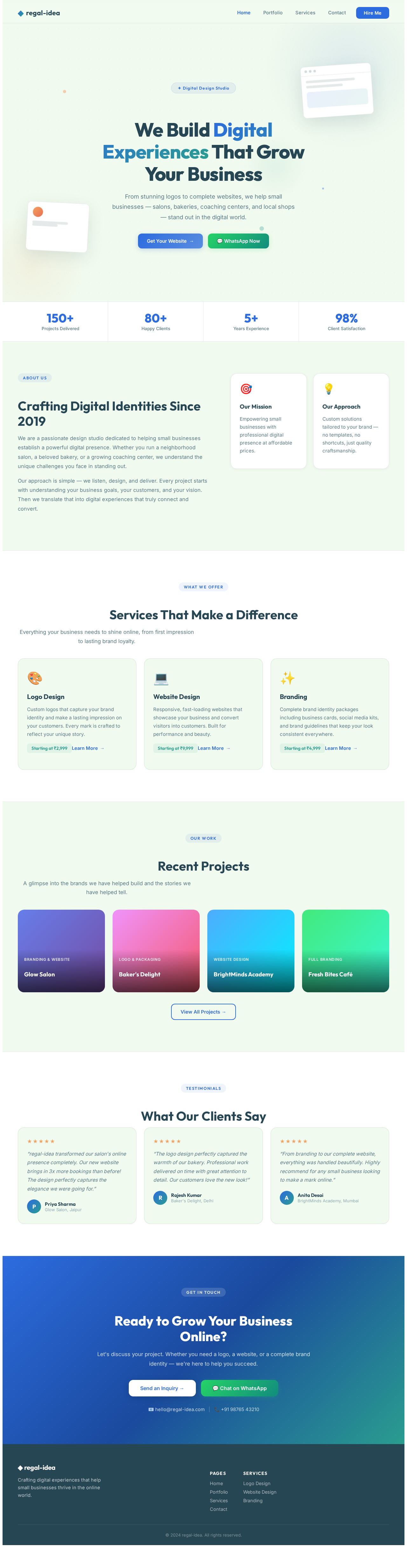
We Build Digital Experiences That Grow Your Business
From stunning logos to complete websites, we help small businesses — salons, bakeries, coaching centers, and local shops — stand out in the digital world.
Crafting Digital Identities Since 2019
We are a passionate design studio dedicated to helping small businesses establish a powerful digital presence. Whether you run a neighborhood salon, a beloved bakery, or a growing coaching center, we understand the unique challenges you face in standing out.
Our approach is simple — we listen, design, and deliver. Every project starts with understanding your business goals, your customers, and your vision. Then we translate that into digital experiences that truly connect and convert.
Our Mission
Empowering small businesses with professional digital presence at affordable prices.
Our Approach
Custom solutions tailored to your brand — no templates, no shortcuts, just quality craftsmanship.
Services That Make a Difference
Everything your business needs to shine online, from first impression to lasting brand loyalty.
Logo Design
Custom logos that capture your brand identity and make a lasting impression on your customers. Every mark is crafted to reflect your unique story.
Starting at ₹2,999Learn More →Website Design
Responsive, fast-loading websites that showcase your business and convert visitors into customers. Built for performance and beauty.
Starting at ₹9,999Learn More →Branding
Complete brand identity packages including business cards, social media kits, and brand guidelines that keep your look consistent everywhere.
Starting at ₹4,999Learn More →Recent Projects
A glimpse into the brands we have helped build and the stories we have helped tell.
What Our Clients Say
“regal-idea transformed our salon's online presence completely. Our new website brings in 3x more bookings than before! The design perfectly captures the elegance we were going for.”
“The logo design perfectly captured the warmth of our bakery. Professional work delivered on time with great attention to detail. Our customers love the new look!”
“From branding to our complete website, everything was handled beautifully. Highly recommend for any small business looking to make a mark online.”
Ready to Grow Your Business Online?
Let's discuss your project. Whether you need a logo, a website, or a complete brand identity — we're here to help you succeed.
No comments yet. Be the first!