regal-apps
 DEMOX
DEMOXSo basically i want u to make 2 seperate apps 1 admin and 1 normal in normal app add a webviewer section and on hotbar below name is Play and in second section add a deposit section where there are 3 choices in hotbar above Easypaisa - jazzcash - bank and when u click on them it gives a name and number below completely changeable my admin app and third section to be withdrawl when u enter ur amount above and below enter ur name below ur number and below click if its easypaisa - jazzcash or bank and if bank input bank name In normal there is webviewer deposit withdrawl while in admin u can control the webviewer link easypaisa name/number and jazzcash name/number helplime number and all u can edit it in admin app give normal app cool animations and all Yes everything is from admin and yea i also forgot when u login give it login/signup where when they sign up ask them their number and password its in pk so +92 automatically and when they enter user and password i receive it on admin app where i give them username and password on home screen/tab on top in green layout type clean they see their username and password below a play button when they click opens play one webviewer while Ok so for home pagw make it normal make it like look this a bit of this pics and add the rules/things written in deposit section and below bottom bar gives button likes play deposit withdraw while in right botton gives like and icon type thats whatsapp and when clixked goes to our helpline whatsapp that can be changed feom admin app Ok so after login there is home page where u see ur username and password also make it so when u signup a blank screen is shown where like in good style elegant style on top is written welcome then below please wait 30-40 mins for your account to be approved you will be known by receiving a notification it asks them for notification im start then when i approve and give them username and pssword they are automaticlly signed in also set the webviewer website to bpexch.live also make the deposit/play/withdrawl all three buttons work and by default ure on home page and also when withdrawing if u select bank account remove the +92 In other terms
Comments (0)
Sign in to leave a comment
System Requirements
System Requirements Document (SRD)
Project Name: regal-apps
1. Introduction
The regal-apps project is a dual-app platform designed to provide a seamless and efficient experience for users in Pakistan (PK). The platform consists of two applications:
- Normal User App: A user-facing app for managing deposits, withdrawals, and accessing dynamic content via a web viewer.
- Admin App: A control panel for administrators to manage user accounts, financial configurations, and app content dynamically.
This document outlines the functional and non-functional requirements, user personas, design concepts, and technical specifications for the regal-apps project.
2. System Overview
The regal-apps platform is designed to address the following objectives:
- Provide users with a simple and intuitive interface for financial transactions (deposits and withdrawals) using popular payment methods in Pakistan, such as Easypaisa, JazzCash, and Bank transfers.
- Enable administrators to dynamically manage app content, approve user accounts, and oversee financial operations.
- Ensure a modern, visually appealing design with smooth animations and a clean user experience.
- Support scalability for up to 10,000 concurrent users while maintaining fast performance and reliability.
The system will leverage a robust tech stack, including React Native for mobile development, FastAPI for backend services, and MySQL for structured data storage.
3. Functional Requirements
Normal App
- As a User, I should be able to sign up using my phone number (+92-prefixed) and password.
- As a User, I should see a welcome screen after signup with the message: "Please wait 30–40 minutes for your account to be approved. You’ll be notified once approved."
- As a User, I should be prompted to enable notifications during signup.
- As a User, I should be automatically logged in once my account is approved by the admin.
- As a User, I should see my username and password on the home screen in a clean green layout.
- As a User, I should see a "Play" button on the home screen that opens a web viewer set to
bpexch.live. - As a User, I should be able to access a deposit section with tabs for Easypaisa, JazzCash, and Bank.
- As a User, I should see a name and number below each deposit tab, which is configurable by the admin.
- As a User, I should be able to access a withdrawal section where I can:
- Enter the amount I want to withdraw.
- Enter my name and phone number.
- Select Easypaisa, JazzCash, or Bank (with an additional input for the bank name if "Bank" is selected, and no +92 prefix for the phone number).
- As a User, I should see a WhatsApp icon in the bottom-right corner that redirects to the helpline WhatsApp number (configurable by the admin).
Admin App
- As an Admin, I should be able to receive user credentials (phone number and password) from the signup process.
- As an Admin, I should be able to assign usernames and passwords to users.
- As an Admin, I should be able to update the URL for the web viewer in the normal app.
- As an Admin, I should be able to edit the names and numbers displayed under Easypaisa and JazzCash in the deposit section.
- As an Admin, I should be able to view and approve withdrawal requests, including details like amount, name, phone number, and bank details (if applicable).
- As an Admin, I should be able to add or edit the helpline number displayed in the normal app.
- As an Admin, I should be able to track user activity, including deposit and withdrawal histories.
4. User Personas
Normal User
- Description: A general user who interacts with the app for deposits, withdrawals, and accessing the web viewer.
- Goals: Easy access to financial services and dynamic content.
- Pain Points: Complicated interfaces, lack of transparency in financial transactions.
Admin
- Description: An administrator responsible for managing user credentials, financial configurations, and web viewer content.
- Goals: Efficient management of user data and financial operations.
- Pain Points: Lack of control over user activity and difficulty in updating app content.
5. Visuals Colors and Theme
Color Palette
- Background:
#F8F9FA(soft white with a hint of gray) - Surface:
#FFFFFF(pure white) - Text:
#343A40(dark gray for primary text) - Accent:
#6C63FF(vibrant purple for buttons and highlights) - Muted Tones:
#ADB5BD(light gray for secondary elements)
Theme
The theme is modern and clean, inspired by the reference images provided. The purple accent color is used to highlight actionable elements, while the soft white background provides a calming and professional feel.
6. Signature Design Concept
Elegant Home Page with Interactive Features
The home screen of the normal app will feature a clean and interactive layout with the following standout elements:
- Header Section: Displays the username and password prominently in a green card layout inspired by the shared reference images.
- Rules Section: Includes deposit instructions and rules, styled for easy readability.
- Bottom Navigation Bar:
- Buttons for Play, Deposit, and Withdraw with smooth animations for transitions.
- A WhatsApp icon in the bottom-right corner that redirects to the helpline WhatsApp number (configurable via the admin app).
- Animations:
- Buttons will have a hover effect and ripple animation when clicked.
- Smooth transitions between sections with a fade-in effect.
- Input fields will expand slightly when tapped, with a soft shadow effect to emphasize interactivity.
The admin app will have a minimalist design with clean forms and real-time updates. Animations will be subtle, focusing on efficiency rather than flair.
7. Non-Functional Requirements
- The system must support at least 10,000 concurrent users.
- The apps must load within 2 seconds on a 4G connection.
- The system must comply with local data protection regulations in Pakistan.
- The apps must be compatible with Android and iOS devices.
- The admin app must provide real-time updates for user activity and financial transactions.
8. Tech Stack
Frontend
- React Native for mobile apps (Normal and Admin).
Backend
- Python with FastAPI for API development.
Database
- MySQL for structured data (user credentials, transactions).
- Alembic for database migrations.
AI Tools
- GPT 5.4 for user-friendly responses in the admin app.
Orchestration
- Docker for local development.
- Kubernetes for server-side orchestration.
9. Assumptions and Constraints
- Users will have access to a stable internet connection.
- The system will primarily serve users in Pakistan.
- All financial transactions will be handled outside the app (via Easypaisa, JazzCash, or Bank).
10. Glossary
- Web Viewer: A section of the app that displays dynamic content via a URL.
- Easypaisa/JazzCash: Popular mobile payment services in Pakistan.
- Hotbar: A navigation bar at the bottom of the app.
- Admin App: The application used by administrators to manage the normal app.
This SRD is ready for implementation! Let me know if you’d like further refinements or additional features.
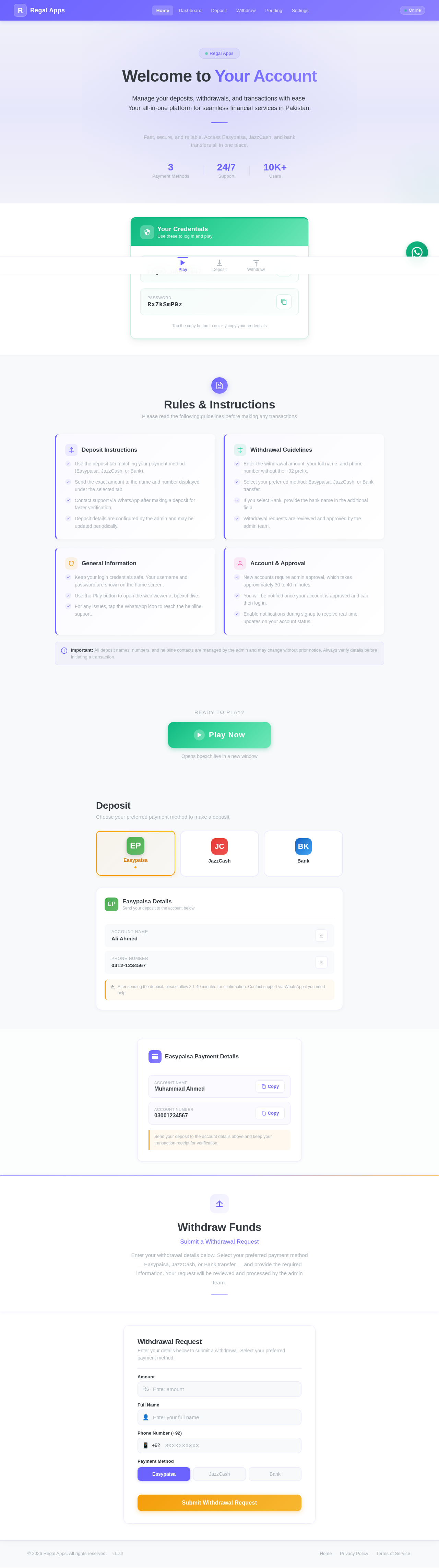
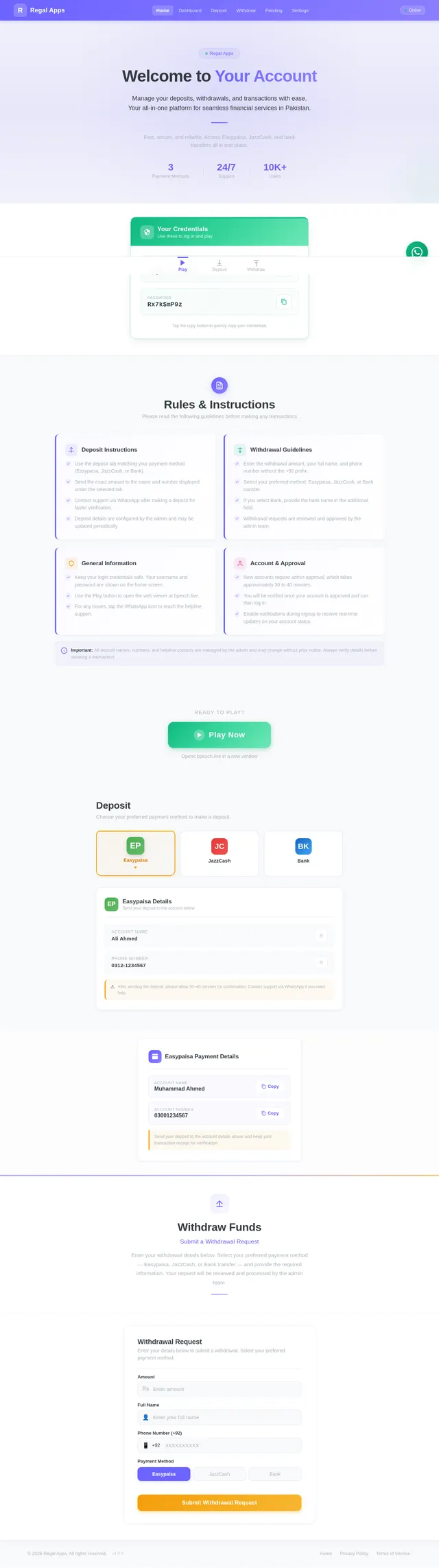
Welcome to Your Account
Manage your deposits, withdrawals, and transactions with ease. Your all-in-one platform for seamless financial services in Pakistan.
Fast, secure, and reliable. Access Easypaisa, JazzCash, and bank transfers all in one place.
Your Credentials
Use these to log in and play
Username
regal_user2847
Password
Rx7k$mP9z
Rules & Instructions
Please read the following guidelines before making any transactions
Deposit Instructions
- Use the deposit tab matching your payment method (Easypaisa, JazzCash, or Bank).
- Send the exact amount to the name and number displayed under the selected tab.
- Contact support via WhatsApp after making a deposit for faster verification.
- Deposit details are configured by the admin and may be updated periodically.
Withdrawal Guidelines
- Enter the withdrawal amount, your full name, and phone number without the +92 prefix.
- Select your preferred method: Easypaisa, JazzCash, or Bank transfer.
- If you select Bank, provide the bank name in the additional field.
- Withdrawal requests are reviewed and approved by the admin team.
General Information
- Keep your login credentials safe. Your username and password are shown on the home screen.
- Use the Play button to open the web viewer at bpexch.live.
- For any issues, tap the WhatsApp icon to reach the helpline support.
Account & Approval
- New accounts require admin approval, which takes approximately 30 to 40 minutes.
- You will be notified once your account is approved and can then log in.
- Enable notifications during signup to receive real-time updates on your account status.
Important: All deposit names, numbers, and helpline contacts are managed by the admin and may change without prior notice. Always verify details before initiating a transaction.
Deposit
Choose your preferred payment method to make a deposit.
Easypaisa Details
Send your deposit to the account below
Account Name
Ali Ahmed
Phone Number
0312-1234567
After sending the deposit, please allow 30–40 minutes for confirmation. Contact support via WhatsApp if you need help.
Withdraw Funds
Submit a Withdrawal Request
Enter your withdrawal details below. Select your preferred payment method — Easypaisa, JazzCash, or Bank transfer — and provide the required information. Your request will be reviewed and processed by the admin team.
Withdrawal Request
Enter your details below to submit a withdrawal. Select your preferred payment method.
No comments yet. Be the first!