regal-apk
 Samir Samir
انشئ تطبيقapkبسيط الة حاسبة بي رابط مباشر

Comments (0)
Sign in to leave a comment
System Requirements
System Requirements Document for regal-apk
1. Introduction
regal-apk is a small, free, Arabic-language Android utility: a plain arithmetic calculator delivered as a direct APK download. The product intent is a tool that gives an ordinary phone user a number, fast, one-handed, with no account, no onboarding, and no ads in the way. The application is deliberately simple — it does one job and does it immediately.
The audience is the ordinary Arabic-speaking phone user who wants a quick arithmetic result and a trustworthy, directly downloadable Android package. The product speaks Arabic in RTL reading direction, uses large touch targets, and is designed for dark, thumb-distance use in any light.
The product is delivered in two parts that are both current commitments:
- A simple calculator application packaged as an APK.
- A direct link through which that APK is downloaded/accessed.
2. System Overview
regal-apk is a two-page first-party experience plus a distributable Android package:
- Landing — the public entry surface. It explains the simple calculator application and its purpose, presents the direct-download panel for the APK, and provides the way into the calculation experience.
- Calculator — the primary working surface. It accepts digits and operators, executes operations, displays results, and clears state to begin a new calculation.
The single accepted active human actor is مستخدم الآلة الحاسبة (the calculator user). There is no second human role, no administrator, and no operator console. The APK itself is a non-human deliverable produced by the project and handed to the user through the direct link.
Current delivery is a custom first-party UI with no access requirement on either page: the user reaches the Landing page and the Calculator page without registration, sign-in, or permission prompts. The calculator must be usable before any setup step.
Narrow exclusions carried from the authoritative source and the creative direction:
- No onboarding, sign-up, or permission prompts before the first calculation.
- No ads placed in the way of the calculation.
- No account requirement for performing arithmetic.
- No photography, stock people, emoji, or cartoon illustration.
- No blue/indigo-on-white SaaS template treatment.
2a. Product Interpretation and Delivery Boundary
Delivery ownership. The project owns both the calculator experience and the direct APK link. The Landing page is the first-party surface that carries the direct-download panel; the Calculator page is the first-party surface that carries the arithmetic work. The APK is a first-party build artifact of this project, not a third-party store listing.
Access ownership. Both pages are openly reachable. The Planning Scope records access_requirement: none for the Landing surface and for the Calculator surface, and the creative direction explicitly forbids onboarding, sign-up, or permission prompts before the first calculation. No application-owned identity, session continuity, or account establishment is introduced, because no accepted journey requires durable actor-specific state, a commitment bound to a participant, or a value transfer that must remain tied to a person. The calculator's state is ephemeral working state on the device, not an account.
Current vs. future boundary. Everything in this document is current. The only future-facing item recorded is the possibility of additional calculator functions beyond the basic arithmetic set; it is explicitly out of current scope and appears only in Section 11.
What this product is not. It is not a scientific calculator, not a graphing tool, not a unit converter, not a currency converter, not a note-taking or history-syncing service, and not a store-distributed application. None of those are accepted requirements.
2b. Source Content Inventory
Not applicable. No reference directive in this project declares content_source; no uploaded content source supplies verified factual entities, collections, fields, values, dates, contacts, links, or media references to preserve.
2c. Page Content and Component Coverage
Landing
Information and state
- Product identity: the instrument name and the Arabic headline آلة حاسبة بسيطة, stacked in three flush-right lines.
- Purpose statement: a short Arabic explanation of what the simple calculator does and why it is useful.
- Direct-download panel: a ruled spec sheet carrying the APK facts — version, file size, Android version, offline capability, and no-permissions status.
- The direct APK download affordance: تحميل APK مباشر, with the file size shown in tabular numerals.
- Three circular spec dials presented as a horizontal band below the hero.
- Entry point into the calculation experience.
Primary actions
- Download the APK directly from the ruled download row.
- Enter the Calculator page to perform arithmetic.
Supporting actions
- Read the spec sheet rows to confirm version, size, Android version, offline behavior, and permission status before downloading.
Domain entities
- APK package (version, size, minimum Android version, offline capability, permission status).
- Calculator application (name, purpose, basic arithmetic capability).
- Spec dial (a landing-page presentation of a product fact).
Component responsibilities
- Hero slab — full-bleed graphite ground with a faint topographic contour pattern at 6% opacity; hosts the stacked Arabic headline seated on full-width 1px rules that bleed off the left edge.
- Headline rule stack — three flush-right Saira Condensed lines, each separated by a 1px
#2C3236rule running the full viewport width. - Tilted keypad plate — a CSS-3D graphite slab floating at 12° with its amber equals key as the only lit element, casting an amber glow onto the slab; it is a presentation of the calculator, not an interactive control.
- Direct-download panel — the ruled spec sheet with the amber APK button cut into its bottom rule rather than floating on it.
- Spec dials band — three conic-gradient gauge bezels with tick marks, rotating one revolution every 12 seconds; the page's only continuous motion.
- Technical pictograms — 2px-stroke icons on a 24px grid for offline, no-ads, no-permissions, and APK size.
States
- Loading — the hero slab, headline rules, and spec-sheet frame render immediately; the spec dials begin their 12s rotation once painted.
- Empty — not applicable; the Landing page has no user-generated collection to be empty.
- Success — the spec sheet is fully legible, the download row is present and actionable, and the entry point into the Calculator is available.
- Error — if the direct download cannot be initiated, the download row states the failure in Arabic and keeps the row actionable so the user can retry; the Calculator entry point remains available so the user can still perform arithmetic.
- Recovery — the user retries the download from the same ruled row; no state is lost and no re-entry of information is required.
Calculator
Information and state
- The display well: the current result, right-aligned for RTL numerals, with the live expression shown in muted text above the result.
- The history rail: a thin top rail holding the last five results as tick marks, with an amber needle sweep that fires once per calculation.
- The keypad plate: a ruled 4×5 matrix of pads divided by 1px hairlines rather than gaps and shadows.
- The active operator state, shown in amber.
- The cleared state, ready for a new calculation.
Primary actions
- Enter digits.
- Select an operator.
- Execute the operation via the equals key.
- Clear the current state to begin a new calculation.
Supporting actions
- Read the live expression above the result to confirm what is being computed.
- Read the history rail to see the last five results.
Domain entities
- Digit input.
- Operator (the basic arithmetic operators).
- Expression (the pending sequence of operands and operators).
- Result (the computed value).
- History entry (one of the last five results, held as a tick mark on the rail).
Component responsibilities
- Display well — a recessed well on
#1A1E21with a 1px top highlight implying a sapphire crystal; renders the result in Saira Condensed 300 at 72–120px with tabular figures and tight −0.01em leading so a 12-digit result fits a 360px viewport; renders the live expression in muted#8B8F93above the result. - Result readout — counts up digit-by-digit over 180ms when a new value lands, so the display never reflows.
- History rail — the thin top rail above the display; holds the last five results as tick marks and fires a single 240ms amber needle sweep per calculation.
- Keypad plate — one milled plate of 4×5 pads separated by 1px
#2C3236hairlines; each pad depresses 1px with a 90mscubic-bezier(0.2,0.8,0.2,1)and no bounce. - Equals key — the single amber signal element on the keypad; fires the needle sweep on activation.
- Operator keys — show the active operator in amber.
- Clear control — resets the expression, the result, and the active operator to begin a new calculation.
States
- Loading — the display well and keypad plate render immediately; no data fetch is required before the first key press.
- Empty — the display well shows a zero/blank ready state with no pending expression; the history rail shows no tick marks.
- Success — the result lands in the display well, the live expression remains visible above it in muted text, the needle sweep has fired once, and the result is appended as a tick mark on the history rail.
- Error — an invalid or incomplete expression (for example, an operator with no following operand, or a division by zero) does not produce a silent wrong answer; the display well states the condition in Arabic and the keypad remains fully usable so the user can correct the expression.
- Recovery — the user clears the state with the clear control or corrects the expression by entering the missing operand; the display well returns to a ready state and the next calculation proceeds normally.
3. Functional Requirements
FR-1 — Simple APK application (explicit) As مستخدم الآلة الحاسبة, I should receive the calculator as a simple Android application packaged as an APK, so that I can install and run it on my phone.
- Trigger/input: the user obtains the APK from the direct link.
- Observable result: an installable APK package for the calculator application exists and installs on Android.
- Access state: no account, no sign-in, no permission prompt.
- Failure/recovery: if the package cannot be installed, the user re-obtains it from the direct link.
- Continuation: the installed application opens directly into the calculator experience.
- Constraint: the application must be simple.
FR-2 — Calculator application (explicit) As مستخدم الآلة الحاسبة, I should use the application as an arithmetic calculator, so that I can compute a number quickly.
- Trigger/input: the user opens the application and enters digits and operators.
- Observable result: the application computes and displays an arithmetic result.
- Access state: no account, no sign-in, no permission prompt before the first calculation.
- Failure/recovery: an invalid or incomplete expression is stated in the display well and the keypad remains usable for correction.
- Continuation: the user clears the state and begins a new calculation.
FR-3 — Direct link to the application (explicit) As مستخدم الآلة الحاسبة, I should reach the application through a direct link, so that I can download/access it without an intermediary store or search step.
- Trigger/input: the user opens the direct link.
- Observable result: the direct-download panel is presented with the APK facts and the تحميل APK مباشر affordance.
- Access state: openly reachable; no account required.
- Failure/recovery: if the download cannot be initiated, the row states the failure in Arabic and remains actionable for retry.
- Continuation: the user downloads the APK and proceeds to the calculator experience.
- Constraint: a direct link to the application must be provided.
FR-4 — Public entry and product explanation (required_inference) As مستخدم الآلة الحاسبة, I should land on a public entry surface that explains the simple calculator and its purpose, so that I understand what I am downloading before I download it.
- Trigger/input: the user opens the direct link.
- Observable result: the Landing page presents the Arabic headline آلة حاسبة بسيطة, the purpose statement, the ruled spec sheet, and the direct-download row.
- Access state:
access_requirement: none; no identity is established or required. - Failure/recovery: if the spec sheet cannot be populated, the download row remains present and the page states the condition in Arabic.
- Continuation: the user downloads the APK or enters the Calculator page.
FR-5 — Digit and operator entry (required_inference) As مستخدم الآلة الحاسبة, I should enter digits and select operators on a keypad, so that I can build the expression I want to compute.
- Trigger/input: the user presses digit pads and operator pads on the 4×5 keypad plate.
- Observable result: the entered digits appear in the display well and the live expression is shown in muted text above the result; the active operator is shown in amber.
- Access state: no account, no sign-in, no permission prompt.
- Failure/recovery: an incomplete expression is stated in the display well rather than silently producing a wrong answer.
- Continuation: the user presses the equals key to execute the operation.
FR-6 — Execute the operation and read the result (required_inference) As مستخدم الآلة الحاسبة, I should execute the operation and read the result, so that I get the number I came for.
- Trigger/input: the user presses the amber equals key.
- Observable result: the result lands in the display well, right-aligned for RTL numerals, counting up digit-by-digit over 180ms; the live expression remains visible above it in muted text; a single 240ms amber needle sweep fires across the history rail.
- Access state: no account, no sign-in, no permission prompt.
- Failure/recovery: a division by zero or an invalid expression is stated in the display well in Arabic; the keypad remains fully usable.
- Continuation: the user reads the result, or continues computing from it.
FR-7 — Clear state and begin a new calculation (required_inference) As مستخدم الآلة الحاسبة, I should clear the current state, so that I can start a fresh calculation without leftover input.
- Trigger/input: the user presses the clear control.
- Observable result: the expression, the result, and the active operator reset to a ready state; the display well returns to its empty state.
- Access state: no account, no sign-in, no permission prompt.
- Failure/recovery: not applicable; clearing is always available and cannot fail.
- Continuation: the user enters a new expression.
FR-8 — Recent results on the history rail (required_inference) As مستخدم الآلة الحاسبة, I should see my last five results held on the history rail, so that I can refer back to a recent value without recomputing it.
- Trigger/input: each completed calculation.
- Observable result: the result is appended as a tick mark on the thin top rail; the rail holds the last five results and drops older ones.
- Access state: no account, no sign-in, no permission prompt.
- Failure/recovery: not applicable; the rail is a presentation of results already computed.
- Continuation: the user reads a recent result or continues with a new calculation.
FR-9 — Direct APK download from the ruled row (required_inference) As مستخدم الآلة الحاسبة, I should download the APK from the ruled download row on the Landing page, so that I obtain the application in one step from the direct link.
- Trigger/input: the user activates تحميل APK مباشر.
- Observable result: the APK download is initiated; the file size is shown in tabular numerals in the same row.
- Access state: openly reachable; no account required.
- Failure/recovery: if the download cannot be initiated, the row states the failure in Arabic and remains actionable for retry.
- Continuation: the user installs the APK and opens the calculator.
4. User Personas
مستخدم الآلة الحاسبة
Product context. An ordinary Arabic-speaking phone user holding the device one-handed, often in low light, who wants a number quickly. They arrive through a direct link, not through a store search, and they have no patience for setup. Their relationship with the product is momentary and repeated: open, compute, read, close.
Primary goal. Get a correct arithmetic result immediately, with no account, no onboarding, and no ads in the way.
Distinct accepted responsibilities.
- Enter digits and select operators on the keypad plate.
- Execute the operation and read the result from the display well.
- Clear the state to begin a new calculation.
- Read the live expression above the result to confirm what is being computed.
- Refer back to one of the last five results held on the history rail.
- Download the APK directly from the ruled download row on the Landing page.
Relevant inputs and decisions.
- Which digits and which operator to enter.
- When the expression is complete enough to execute.
- Whether to continue computing from the current result or clear and start fresh.
- Whether to download the APK now, after reading the spec sheet rows (version, size, Android version, offline, no permissions).
Interactions with other accepted participants. There are none. The calculator user is the only accepted active human actor in this product; no second human role, counterparty, approver, or recipient exists. The APK is a non-human deliverable, and the direct link is a first-party surface, not a separate participant.
Observable success. A correct result appears in the display well, right-aligned, with the live expression still visible above it and a tick mark added to the history rail. On the Landing page, success is a completed APK download initiated from the ruled row.
What makes this role's work different. This is not an administrative or collaborative role. There is no shared state, no approval, no handoff, and no record to maintain. The entire responsibility is a fast, private, single-person loop between the thumb and the display, and the product's design — large touch targets, dark ground, one amber signal colour, tabular numerals that never reflow — exists to serve exactly that loop.
5. Core User Flows
Flow 1 — Arrive through the direct link and understand the product
- Starting context: the user has the direct link and opens it on an Android phone.
- Owner: Landing page.
- Actor action: the user reads the full-bleed graphite slab with its faint topographic contour pattern, the stacked Arabic headline آلة حاسبة بسيطة seated on full-width 1px rules, and the tilted CSS-3D keypad plate with its amber equals key as the only lit element.
- Observable result: the user understands that this is a simple Arabic calculator delivered as a direct APK.
- Next step: the user reads the ruled spec sheet rows — version, file size, Android version, offline capability, no permissions — and the three spec dials rotating one revolution every 12 seconds.
- Failure/recovery: if the spec sheet cannot be populated, the page states the condition in Arabic and the download row remains present.
- Continuation: the user either downloads the APK (Flow 2) or enters the Calculator page (Flow 3).
Flow 2 — Download the APK directly
- Starting context: the user is on the Landing page and has read the spec sheet.
- Owner: Landing page, direct-download panel.
- Actor action: the user activates تحميل APK مباشر, the amber button cut into the bottom rule of the ruled row, with the file size shown in tabular numerals beside it.
- Observable result: the APK download is initiated directly, with no store, no account, and no permission prompt.
- Next step: the user installs the APK and opens the application.
- Failure/recovery: if the download cannot be initiated, the row states the failure in Arabic and remains actionable; the user retries from the same row. The Calculator entry point stays available so the user can still perform arithmetic.
- Continuation: the installed application opens directly into the calculator experience (Flow 3).
Flow 3 — Perform a basic calculation
- Starting context: the user is on the Calculator page — either arrived from the Landing page entry point or opened the installed application. The display well shows its empty ready state and the history rail shows no tick marks.
- Owner: Calculator page.
- Actor action: the user presses digit pads on the milled 4×5 keypad plate. Each pad depresses 1px with a 90ms
cubic-bezier(0.2,0.8,0.2,1)and no bounce. - Observable result: the entered digits appear in the display well, right-aligned for RTL numerals, with the live expression shown in muted
#8B8F93above the result. - Actor decision: the user selects an operator. The active operator is shown in amber.
- Actor action: the user enters the remaining operand.
- Actor action: the user presses the amber equals key.
- Observable result: the result lands in the display well, counting up digit-by-digit over 180ms in Saira Condensed 300 with tabular figures so the display never reflows; a single 240ms amber needle sweep fires across the history rail; the result is appended as a tick mark on the rail, which holds the last five results.
- Failure/recovery: if the expression is incomplete or a division by zero occurs, the display well states the condition in Arabic instead of showing a silent wrong answer, and the keypad remains fully usable. The user corrects the expression by entering the missing operand, or clears the state.
- Continuation: the user reads the result, continues computing from it, or clears the state (Flow 4).
Flow 4 — Clear the state and begin a new calculation
- Starting context: the user is on the Calculator page with a completed or partially entered expression.
- Owner: Calculator page, clear control.
- Actor action: the user presses the clear control.
- Observable result: the expression, the result, and the active operator reset to a ready state; the display well returns to its empty state.
- Next step: the user enters a new expression.
- Failure/recovery: not applicable; clearing is always available.
- Continuation: the user proceeds with a fresh calculation (Flow 3).
Flow 5 — Refer back to a recent result
- Starting context: the user is on the Calculator page and has completed at least one calculation.
- Owner: Calculator page, history rail.
- Actor action: the user reads the thin top rail above the display.
- Observable result: the last five results are held as tick marks on the rail, with the most recent marked by the amber needle sweep.
- Next step: the user reuses the value in a new expression or continues with a fresh calculation.
- Failure/recovery: not applicable; the rail presents results already computed.
- Continuation: the user continues computing (Flow 3) or clears the state (Flow 4).
6. Visuals Colors and Theme
Muse and headline. MARQ by Garmin — precision instrument luxury for a calculator you can trust with your thumb. The register is the quiet confidence of good hardware: a tool that feels machined, legible at arm's length, and instantly obedient. Arabic RTL reading direction, large touch targets, dark-for-thumb-use in any light.
Mode. Dark mode only.
Colour tokens by role
| Role | Hex | Use |
|---|---|---|
| Background | #0E1113 | Graphite titanium ground; fills ~70% of the frame |
| Surface | #1A1E21 | Raised key pads and the display well |
| Hairline | #2C3236 | 1px rules, keypad pad dividers, headline rules, spec-sheet rules |
| Text | #EDEAE4 | Warm off-white body text |
| Primary | #C9A227 | Champagne amber — the single signal colour: equals key, active operator, result readout, download CTA |
| Accent | #E8B33C | Brighter amber reserved for hover/press glow and the needle sweep |
| Muted | #8B8F93 | Labels, units, secondary metadata, the live expression above the result |
Colour rules. Amber on graphite is used only at display/heading size or for short labels so contrast stays readable; amber is never used for body copy or long paragraphs. Raised surfaces sit on #1A1E21 with a 1px #2C3236 hairline, never a shadow.
Typography
- Headings: Saira Condensed — condensed technical caps at 600–700 weight, tracking +0.06em, used for section labels and the instrument name.
- Numeric readout: Saira Condensed 300 at 72–120px with tabular figures and tight −0.01em leading, so a 12-digit result still fits a 360px viewport.
- Arabic copy: Saira's Arabic companion at 500 weight, same condensed rhythm.
- Body: Saira.
- Type scale: 1.25 modular — display 96 / h1 48 / h2 30 / label 13 (all-caps, +0.08em) / body 16 / data 20 (tabular numerals).
- Line height: 1.55 body, 0.95 display.
Shape language. Machined rectangles with 10–14px radii, never pills. The calculator keypad is a ruled matrix of 4×5 pads separated by 1px #2C3236 hairlines rather than gaps and shadows, so the whole keypad reads as one milled plate. The display sits in a recessed well with an inner 1px top highlight to imply a sapphire crystal. Circular gauge rings (conic-gradient bezels) appear only for the Landing page's three spec dials. No blobs, no soft offset shadows, no floating glass.
Spacing rhythm. Everything flush-left/flush-right to a visible 8-pt baseline; no centred marketing copy inside the tool. Landing uses an asymmetric 12-column grid — left 7 columns for the oversized stacked Arabic headline over a graphite slab, right 5 columns for the direct-download panel. Calculator uses a single centred column, max-width 420px.
Imagery style. No photography and no stock people. The imagery is the instrument itself: CSS/SVG-drawn gauge bezels with tick marks, a topographic contour line pattern at 6% opacity behind the Landing hero, and a macro-tilted 3D render of the keypad plate in CSS 3D (a graphite slab with amber-lit key legends) as the only
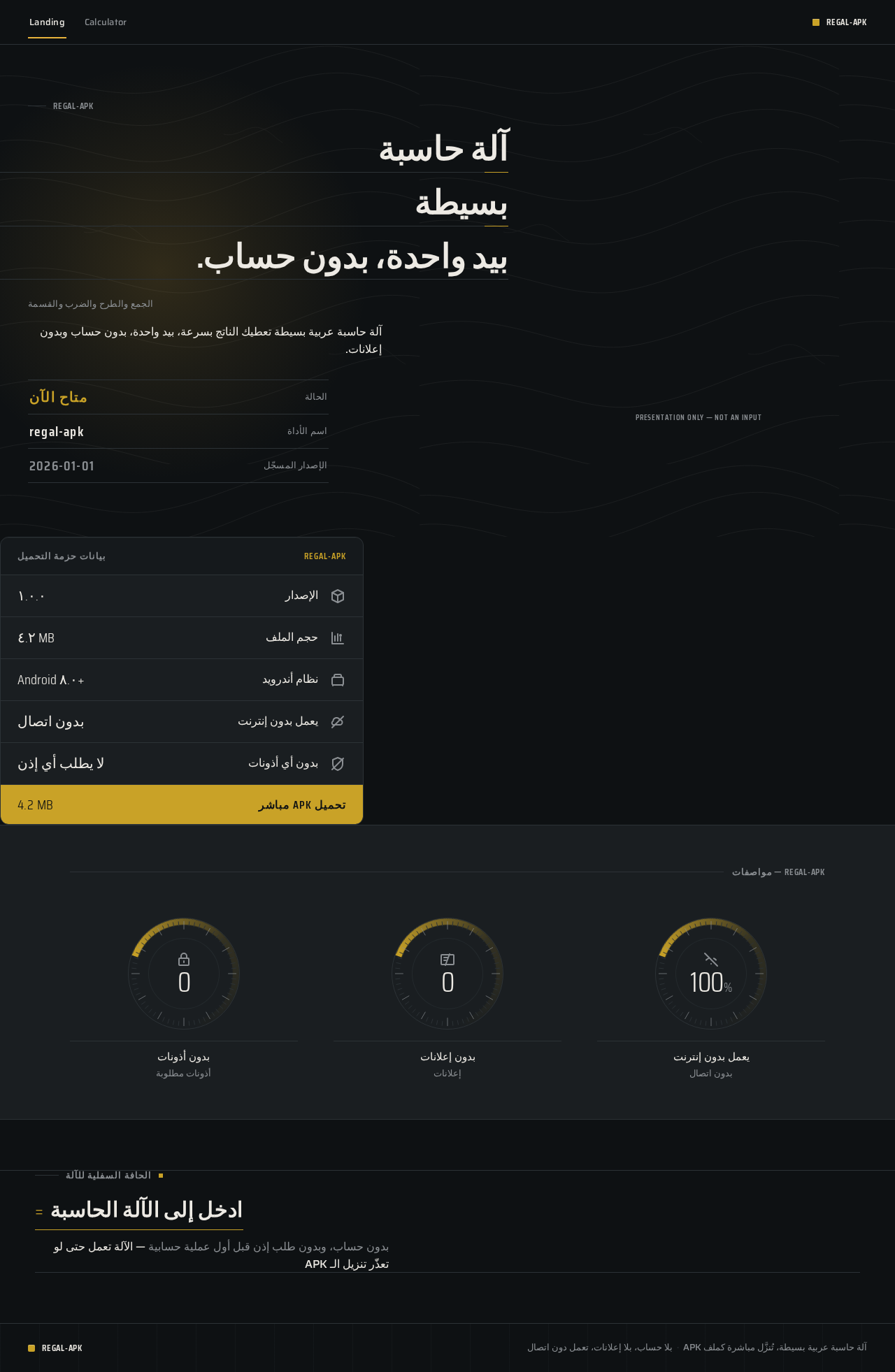
آلة حاسبةبسيطةبيد واحدة، بدون حساب.
الجمع والطرح والضرب والقسمة
آلة حاسبة عربية بسيطة تعطيك الناتج بسرعة، بيد واحدة، بدون حساب وبدون إعلانات.
presentation only — not an input
- الإصدار١.٠.٠
- حجم الملف٤.٢ MB
- نظام أندرويدAndroid ٨.٠+
- يعمل بدون إنترنتبدون اتصال
- بدون أي أذوناتلا يطلب أي إذن
بدون حساب، وبدون طلب إذن قبل أول عملية حسابية — الآلة تعمل حتى لو تعذّر تنزيل الـ APK
آلة حاسبةبسيطةبيد واحدة، بدون حساب.
الجمع والطرح والضرب والقسمة
آلة حاسبة عربية بسيطة تعطيك الناتج بسرعة، بيد واحدة، بدون حساب وبدون إعلانات.
presentation only — not an input
- الإصدار١.٠.٠
- حجم الملف٤.٢ MB
- نظام أندرويدAndroid ٨.٠+
- يعمل بدون إنترنتبدون اتصال
- بدون أي أذوناتلا يطلب أي إذن
بدون حساب، وبدون طلب إذن قبل أول عملية حسابية — الآلة تعمل حتى لو تعذّر تنزيل الـ APK
No comments yet. Be the first!