red-space


Comments (0)
Sign in to leave a comment
System Requirements
System Requirements Document for red-space
1. Introduction
1.1 Project: Interactive Solar System & Space Explorer / Project Vision
Build a visually stunning, highly interactive, educational website called COSMOS EXPLORER – Journey Through Our Solar System.
The experience should combine a modern 3D space simulation, interactive planetary exploration, scientific information and educational storytelling.
It must be suitable for students, teachers, astronomy enthusiasts and the general public.
The project name is red-space.
2. System Overview
2.1 Project: Interactive Solar System & Space Explorer / Final Expected Experience
Most importantly, every major planet, moon, satellite and scientific topic should be interactive and have its own detailed information page.
Build this as a complete, professional, scalable educational platform rather than a simple static astronomy website.
Start by building the homepage and the interactive 3D solar system. Then develop the individual sections in a modular architecture without compromising scientific accuracy, design consistency or performance.
3. Functional Requirements
3.1 Project: Interactive Solar System & Space Explorer / Project Vision
The website should provide complete scientific and educational information about:
-
The Sun
-
All eight planets
-
Dwarf planets
-
Earth's structure, geography, atmosphere, rotation and revolution
-
Natural satellites (moons) of planets
-
Artificial satellites orbiting Earth
-
Asteroids, comets, meteors and the asteroid belt
-
Planetary motion, orbital paths, gravitational forces and the formation of the solar system
-
Space exploration, spacecraft, space missions and discoveries
3.2 Project: Interactive Solar System & Space Explorer / Homepage – Interactive 3D Solar System
The homepage should open with a full-screen interactive 3D solar system.
Display:
-
Sun at the center.
-
Mercury
-
Venus
-
Earth
-
Mars
-
Jupiter
-
Saturn
-
Uranus
-
Neptune
Each planet must move around the Sun along its orbital path.
Important interactive features:
- Users can rotate the complete solar system view.
Important interactive features:
- Zoom in and zoom out.
Important interactive features:
- Pause and resume planetary motion.
Important interactive features:
- Increase or decrease simulation speed.
Important interactive features:
- View the solar system from different angles.
Important interactive features:
- Click any planet to explore it.
Important interactive features:
- Display planet names beside the planets.
Important interactive features:
- Show orbital paths.
Important interactive features:
-
Display the Sun's position and information.
-
Show the distance of each planet from the Sun.
-
Provide a reset camera button.
- Reset view
Include a control panel with:
-
Play / Pause
-
Simulation speed
-
Show / Hide orbital paths
-
Show / Hide labels
-
Zoom controls
-
Planet selection
3.3 Project: Interactive Solar System & Space Explorer / Planet Exploration – Individual Planet Details
When a user clicks a planet, open a dedicated planet exploration experience.
Display a large, detailed 3D rotating model of the selected planet.
Every planet should have the following information:
3.4 Project: Interactive Solar System & Space Explorer / Planet Exploration – Individual Planet Details / Basic Information
-
Planet name
-
Planet type
-
Position from the Sun
-
Discovery history
-
Name origin
-
Age
-
Diameter
-
Radius
-
Mass
-
Density
-
Surface gravity
-
Escape velocity
3.5 Project: Interactive Solar System & Space Explorer / Planet Exploration – Individual Planet Details / Orbital Information
-
Distance from the Sun
-
Average orbital speed
-
Orbital period (length of year)
-
Rotation period (length of day)
-
Axial tilt
-
Orbital eccentricity
-
Orbital inclination
-
Direction of rotation
-
Retrograde or prograde rotation
-
Closest and farthest distance from the Sun
3.6 Project: Interactive Solar System & Space Explorer / Planet Exploration – Individual Planet Details / Physical Characteristics
-
Surface temperature
-
Core composition
-
Surface composition
-
Atmosphere composition
-
Atmospheric pressure
-
Weather conditions
-
Magnetic field
-
Geological characteristics
-
Presence of water or ice
-
Possibility of life (scientifically verified information only)
3.7 Project: Interactive Solar System & Space Explorer / Planet Exploration – Individual Planet Details / Moons and Natural Satellites
-
Total known moons
-
Names of important moons
-
Moon sizes
-
Orbital periods
-
Surface characteristics
-
Interesting discoveries
-
Individual clickable moon exploration
3.8 Project: Interactive Solar System & Space Explorer / Planet Exploration – Individual Planet Details / Exploration History
-
Spacecraft that visited the planet
-
Important space missions
-
Important discoveries
-
Images from space missions
-
Future planned missions
3.9 Project: Interactive Solar System & Space Explorer / Planet Exploration – Individual Planet Details / Interesting Facts
Display at least 10 interesting and scientifically verified facts for each planet.
Include a comparison section showing how the selected planet differs from Earth.
3.10 Project: Interactive Solar System & Space Explorer / Earth – Detailed Interactive Exploration
Earth deserves its own dedicated section with extensive information.
Display a highly detailed 3D rotating Earth.
Allow users to:
-
Rotate Earth manually.
-
Zoom into continents and oceans.
-
View day and night regions.
-
Observe Earth's rotation.
-
Observe Earth's revolution around the Sun.
-
View the Moon orbiting Earth.
-
Switch between different Earth visualization layers.
Earth visualization layers:
-
Political map
-
Physical map
-
Satellite imagery
-
Terrain and elevation
-
Oceans and seas
-
Mountains and mountain ranges
-
Deserts
-
Rivers and lakes
-
Climate zones
-
Vegetation zones
-
Tectonic plates
-
Earthquake zones
-
Volcanic regions
-
Atmospheric layers
-
Day and night boundaries
3.11 Project: Interactive Solar System & Space Explorer / Earth – Detailed Interactive Exploration / Earth's Complete Scientific Information
Include:
-
Earth's formation and age
-
Shape and dimensions
-
Equatorial and polar diameters
-
Mass and density
-
Gravity
-
Internal structure
-
Inner core
-
Outer core
-
Mantle
-
Crust
-
Lithosphere
-
Hydrosphere
-
Atmosphere
-
Ozone layer
-
Magnetic field
-
Climate and seasons
-
Water cycle
- Carbon cycle
3.12 Project: Interactive Solar System & Space Explorer / Earth – Detailed Interactive Exploration / Earth's Rotation and Revolution Animation
Provide an interactive educational simulation explaining:
Rotation:
-
Earth spins around its own axis.
-
Why day and night occur.
-
Why the Sun appears to rise in the east and set in the west.
-
How long one rotation takes.
Revolution:
-
Earth travels around the Sun.
-
Why a year has approximately 365.25 days.
-
Why seasons occur.
-
How Earth's axial tilt affects seasons.
Allow users to control animation speed and pause the simulation.
3.13 Project: Interactive Solar System & Space Explorer / Earth's Moon – Complete Exploration
Create a separate interactive Moon section.
Include:
-
Moon's formation
-
Size and mass
-
Distance from Earth
-
Orbital period
-
Rotation period
-
Surface temperature
-
Surface composition
-
Craters
-
Mountains
-
Lunar maria
-
Water ice discoveries
-
Phases of the Moon
-
Lunar eclipses
-
Solar eclipses
-
Tides
-
Moon's synchronous rotation
-
Apollo missions
-
Future lunar missions
Provide an animation showing the Moon orbiting Earth.
Allow users to explore the near side and far side of the Moon.
3.14 Project: Interactive Solar System & Space Explorer / Natural Satellites – Moons of All Planets
Create a complete moon directory.
Show the known natural satellites of all eight planets.
Organize them by their parent planet.
For each moon display:
-
Name
-
Parent planet
-
Diameter
-
Mass
-
Distance from parent planet
-
Orbital period
-
Surface temperature
-
Composition
-
Atmosphere
-
Discovery information
-
Interesting facts
-
Images
-
Exploration missions
Give special attention to scientifically important moons such as:
-
Earth's Moon
-
Phobos and Deimos
-
Io
-
Europa
-
Ganymede
-
Callisto
-
Titan
-
Enceladus
-
Triton
-
Titania
-
Oberon
Each moon should be clickable and open its own detailed information page.
3.15 Project: Interactive Solar System & Space Explorer / Artificial Satellites Around Earth
Create a dedicated section explaining artificial satellites.
Include:
-
What artificial satellites are.
-
Why humans launch satellites.
-
How satellites stay in orbit.
-
How satellites communicate with Earth.
-
Different types of satellite orbits.
Satellite categories:
-
Communication satellites
-
Navigation satellites
-
Weather satellites
-
Earth observation satellites
-
Scientific research satellites
-
Military satellites (general educational information)
-
Space telescopes
-
Space stations
3.16 Project: Interactive Solar System & Space Explorer / Artificial Satellites Around Earth / Interactive Satellite Visualization
Show Earth as a 3D rotating globe.
Display representative satellites orbiting Earth.
Allow users to:
-
Select a satellite.
-
View its orbit.
-
See its purpose.
-
View its orbital altitude.
-
Understand its orbital period.
-
Learn which country or organization operates it.
-
View its launch date.
-
Understand its applications.
Include famous examples:
-
International Space Station (ISS)
-
Hubble Space Telescope
-
James Webb Space Telescope
-
GPS satellites
-
India's NavIC satellites
-
India's INSAT and IRS satellite systems
-
NOAA weather satellites
-
Landsat satellites
-
Sentinel satellites
Use current, verified satellite information where available. Clearly distinguish actual live tracking from illustrative orbital simulations.
3.17 Project: Interactive Solar System & Space Explorer / How Planets Move – Orbital Mechanics
Create a dedicated educational section explaining planetary motion.
Topics:
-
Heliocentric model
-
Geocentric model and its historical significance
-
Kepler's three laws of planetary motion
-
Newton's law of universal gravitation
-
Elliptical orbits
-
Orbital eccentricity
-
Orbital inclination
-
Orbital velocity
-
Gravitational force
-
Angular momentum
-
Axial rotation
-
Revolution
-
Retrograde motion
-
Planetary alignment
-
Conjunction
-
Opposition
- Solar and lunar eclipses
3.18 Project: Interactive Solar System & Space Explorer / How Planets Move – Orbital Mechanics / Interactive Simulations
Build visual simulations explaining:
-
Why planets orbit the Sun.
-
Why planets do not fall into the Sun.
-
Why inner planets orbit faster than outer planets.
-
Why orbital paths are elliptical.
-
How gravity affects orbital motion.
-
How Earth's seasons occur.
-
How eclipses happen.
-
How the Moon orbits Earth.
Include adjustable simulation controls and educational explanations.
3.19 Project: Interactive Solar System & Space Explorer / Other Solar System Objects
Create dedicated sections for:
3.20 Project: Interactive Solar System & Space Explorer / Other Solar System Objects / Asteroid Belt
-
Location
-
Composition
-
Major asteroids
-
Ceres
-
Asteroid missions
3.21 Project: Interactive Solar System & Space Explorer / Other Solar System Objects / Kuiper Belt
-
Location
-
Composition
-
Pluto
-
Other dwarf planets
3.22 Project: Interactive Solar System & Space Explorer / Other Solar System Objects / Dwarf Planets
Include:
-
Pluto
-
Ceres
-
Eris
-
Haumea
-
Makemake
3.23 Project: Interactive Solar System & Space Explorer / Other Solar System Objects / Comets
-
Structure
-
Composition
-
Orbits
-
Famous comets
-
Tail formation
3.24 Project: Interactive Solar System & Space Explorer / Other Solar System Objects / Meteors and Meteorites
-
Differences
-
Meteor showers
-
Famous meteorites
-
Impact craters
3.25 Project: Interactive Solar System & Space Explorer / Space Exploration and Missions
Create a space exploration timeline.
Include:
-
First artificial satellite: Sputnik 1
-
First human in space
-
First Moon landing
-
Voyager missions
-
Pioneer missions
-
Mars exploration missions
-
Cassini-Huygens
-
New Horizons
-
Hubble Space Telescope
-
James Webb Space Telescope
-
International Space Station
-
Chandrayaan missions
-
Mangalyaan
-
Aditya-L1
-
Gaganyaan programme
Include mission images, launch dates, destinations, objectives, achievements and discoveries.
Provide a special section dedicated to India's achievements in space exploration and ISRO.
3.26 Project: Interactive Solar System & Space Explorer / Planet Comparison Tool
Create an interactive comparison feature.
Allow users to select any two or more planets.
Compare:
-
Diameter
-
Mass
-
Gravity
-
Temperature
-
Distance from Sun
-
Length of day
-
Length of year
-
Number of moons
-
Atmospheric composition
-
Orbital speed
Display comparison using:
-
Tables
-
Graphs
-
Relative-size visualizations
-
Animated planetary models
3.27 Project: Interactive Solar System & Space Explorer / Educational Features
Include:
-
Beginner-friendly explanations.
-
Advanced scientific explanations.
-
Glossary of astronomy terms.
-
Frequently asked questions.
-
Interactive quizzes.
-
Multiple-choice questions.
-
Space facts of the day.
-
Educational videos.
-
Downloadable educational resources.
-
Search functionality.
-
Bookmark/favourite planets.
-
Recently explored objects.
Users should be able to choose Beginner, Intermediate or Advanced learning levels.
3.28 Project: Interactive Solar System & Space Explorer / Search and Navigation
Create a modern navigation menu:
-
Home
-
Solar System
-
Sun
-
Planets
-
Earth
-
Moon
-
Natural Satellites
-
Artificial Satellites
-
Orbital Mechanics
-
Asteroids & Comets
-
Dwarf Planets
-
Space Missions
-
ISRO & India
-
Compare Planets
-
Learn & Quiz
-
About
Add a powerful global search that searches planets, moons, satellites, space missions and scientific topics.
3.29 Project: Interactive Solar System & Space Explorer / Data Accuracy Requirements
-
Show units for all measurements.
-
Distinguish confirmed facts from scientific hypotheses.
-
Display the last updated date for changing data.
-
Distinguish between confirmed and provisional moon discoveries.
-
Provide source references for important scientific information.
-
Explain when values are approximate.
-
Clearly distinguish real-time data from pre-recorded or simulated data.
3.30 Project: Interactive Solar System & Space Explorer / Final Expected Experience
The finished website should feel like a complete digital space museum.
A visitor should be able to:
- Open the website and see the solar system moving in 3D.
Build this as a complete, professional, scalable educational platform rather than a simple static astronomy website.
Start by building the homepage and the interactive 3D solar system. Then develop the individual sections in a modular architecture without compromising scientific accuracy, design consistency or performance.
A visitor should be able to:
-
Click Earth and explore its continents, atmosphere and internal structure.
-
Watch Earth rotate and revolve around the Sun.
-
Click the Moon and understand its orbit and phases.
Most importantly, every major planet, moon, satellite and scientific topic should be interactive and have its own detailed information page.
A visitor should be able to:
- Watch Earth rotate and revolve around the Sun.
Most importantly, every major planet, moon, satellite and scientific topic should be interactive and have its own detailed information page.
A visitor should be able to:
- Click the Moon and understand its orbit and phases.
Most importantly, every major planet, moon, satellite and scientific topic should be interactive and have its own detailed information page.
A visitor should be able to:
- Understand why planets move around the Sun.
Most importantly, every major planet, moon, satellite and scientific topic should be interactive and have its own detailed information page.
A visitor should be able to:
- Click Jupiter and explore its moons.
Most importantly, every major planet, moon, satellite and scientific topic should be interactive and have its own detailed information page.
A visitor should be able to:
- Click Saturn and explore its rings and satellites.
Most importantly, every major planet, moon, satellite and scientific topic should be interactive and have its own detailed information page.
A visitor should be able to:
- Explore artificial satellites orbiting Earth.
Most importantly, every major planet, moon, satellite and scientific topic should be interactive and have its own detailed information page.
-
Compare the size of planets.
-
Discover the history of space exploration.
4. User Personas
COSMOS EXPLORER – Journey Through Our Solar System (project name: red-space) is built for students, teachers, astronomy enthusiasts and the general public. These audiences are named in the source; the responsibilities below are limited to what the accepted capabilities establish, and this is not a closed persona catalog.
| Role | Responsibilities and goals | Inputs and decisions | Access and observable success |
|---|---|---|---|
| Learner (student) | Explore the solar system and Earth's artificial satellites; build understanding at a chosen depth | Selects Beginner, Intermediate or Advanced learning level; selects a satellite to inspect | Can rotate, zoom, pause/resume and change simulation speed; can read a satellite's orbit, purpose, altitude, orbital period, operator country/organization, launch date and applications |
| Educator (teacher) | Guide exploration of the 3D solar system and satellite data as teaching material | Chooses learning level appropriate to the class; sets simulation speed and viewing angle | Can pause motion to hold a view and resume; can present orbital and satellite facts |
| Astronomy enthusiast | Examine the solar system and satellite orbits in detail | Adjusts zoom, viewing angle and simulation speed | Can view the system from different angles and inspect individual satellite orbits |
| General public visitor | Browse the interactive space experience and pick up scientific and educational content | Chooses a learning level; selects objects of interest | Can navigate the 3D view and read planetary and satellite information |
All roles share the same interactive surface: the 3D solar system view and the Earth satellite visualization. No role-specific permissions or restrictions are established by the source; access differences are limited to the learning level each user selects. Systems and simulation components are supporting actors, not personas.
5. Core User Flows
5.1 Explore the Solar System from the Homepage
Actor: Visitor. Trigger: Opening the site.
- The homepage loads a full-screen interactive 3D solar system with the Sun at the center and the planets in motion.
- The visitor rotates the whole view, zooms in and out, and views the system from different angles.
- The visitor pauses and resumes planetary motion, and increases or decreases simulation speed.
- The visitor clicks any planet to open its dedicated exploration experience (Journey 2).
Result: The visitor has freely inspected the system and can enter any planet. Pause and speed controls remain available, so motion can be resumed at any time.
5.2 Explore an Individual Planet
Actor: Visitor. Trigger: Clicking a planet on the homepage.
- A dedicated planet exploration experience opens for the selected planet.
- The visitor reviews the planet's details, including its moons and natural satellites: moon sizes, orbital periods, surface characteristics and interesting discoveries.
- The visitor clicks an individual moon to open its own exploration page (Journey 5).
Result: The visitor has explored the planet and can continue to any of its moons. Earth and the Moon lead to their own richer experiences (Journeys 3 and 4).
5.3 Explore Earth in Detail
Actor: Visitor. Trigger: Selecting Earth.
- A highly detailed 3D rotating Earth opens.
- The visitor rotates Earth manually, zooms into continents and oceans, and observes day and night regions and Earth's rotation.
- The visitor switches among the 15 visualization layers (political, physical, satellite imagery, terrain and elevation, oceans and seas, mountains, deserts, rivers and lakes, climate zones, vegetation zones, tectonic plates, earthquake zones, volcanic regions, atmospheric layers, day/night boundaries).
- The visitor observes Earth's revolution around the Sun and the Moon orbiting Earth.
- In the rotation and revolution simulation, the visitor controls animation speed and pauses the simulation to study why day and night occur, why the Sun appears to rise in the east and set in the west, how long one rotation takes, why a year is approximately 365.25 days, and how axial tilt causes seasons.
Result: The visitor has examined Earth's surface, layers and motions, and can move on to the Moon (Journey 4).
5.4 Explore Earth's Moon
Actor: Visitor. Trigger: Selecting the Moon from Earth, the homepage or the moon directory.
- An animation shows the Moon orbiting Earth.
- The visitor explores the near side and the far side of the Moon.
Result: The visitor understands the Moon's orbit and both faces, and can return to Earth or open other moons.
5.5 Browse the Moon Directory
Actor: Visitor. Trigger: Opening Natural Satellites.
- The complete moon directory lists the known natural satellites of all eight planets, organized by parent planet.
- The visitor clicks any moon (for example, Oberon) to open its detailed information page.
Result: The visitor has reached a specific moon's page and can continue browsing the directory.
5.6 Inspect an Artificial Satellite
Actor: Visitor. Trigger: Opening Artificial Satellites Around Earth.
- The visitor selects a satellite.
- The visitor views its orbit and reads its purpose, orbital altitude, orbital period, operating country or organization, launch date and applications.
Result: The visitor has understood the satellite's orbit and role, and can select another satellite.
5.7 Run Orbital Mechanics Simulations
Actor: Visitor. Trigger: Opening Orbital Mechanics.
- The visitor chooses one of the visual simulations: why planets orbit the Sun, why they do not fall into the Sun, why inner planets orbit faster than outer planets, why orbits are elliptical, how gravity affects orbital motion, how Earth's seasons occur, how eclipses happen, or how the Moon orbits Earth.
- The visitor adjusts the simulation controls and reads the educational explanations.
Result: The visitor has tested a concept interactively and can switch to another simulation.
5.8 Follow the Space Exploration Timeline
Actor: Visitor. Trigger: Opening Space Missions.
- The visitor moves through the timeline, which includes Sputnik 1, the first human in space, the first Moon landing, the Voyager and Pioneer missions, Mars exploration missions, Cassini-Huygens and New Horizons.
Result: The visitor has reviewed mission milestones in sequence and can continue to other missions or sections.
5.9 Compare Planets
Actor: Visitor. Trigger: Opening Compare Planets.
- The visitor selects two or more planets.
- The tool compares their diameter, mass, gravity and temperature, including relative size.
Result: The visitor sees the comparison and can change the selection to compare again.
5.10 Learn, Search and Save
Actor: Visitor. Trigger: Opening Learn & Quiz, the global search or a bookmark action.
- The visitor takes interactive multiple-choice quizzes.
- The visitor chooses a Beginner, Intermediate or Advanced learning level.
- The visitor uses global search across planets, moons, satellites, space missions and scientific topics, or navigates via the menu (Home, Solar System, Sun, Planets, Earth, Moon, Natural Satellites, Artificial Satellites, Orbital Mechanics, Asteroids & Comets, Dwarf Planets, Space Missions, ISRO & India, Compare Planets, Learn & Quiz, About).
- The visitor bookmarks or favourites planets and reviews recently explored objects to return to them.
Result: The visitor has tested knowledge, found content and kept shortcuts to objects for later visits.
6. Visuals Colors and Theme
[Design proposal; unspecified choices are defaults.]
red-space — COSMOS EXPLORER – Journey Through Our Solar System. The muse is Gleb Kuznetsov: a premium NASA mission display — dark, precise, alive with orbital motion — sitting between a modern scientific observatory and an interactive space-exploration platform. Realistic planetary appearances only; no cartoon or flat-colour planets.
Palette (dark mode, authoritative)
| Role | Token |
|---|---|
| Background (deep space black/navy, ~80% share) | #05070E |
| Surface / glass panel | #0C1220 |
| Text | #EAF2FF |
| Primary (Sun, active planet, main button) | #FF4D3D |
| Accent (orbits, labels, focus rings) | #38E8FF |
| Muted | #7C8BA6 |
Cyan #38E8FF is the hairline language: orbital paths, leader lines, label chips, focus rings. Red #FF4D3D is the single hot accent — the Sun's red-white glow, the active planet's rim, the primary CTA. Everything else stays a 1px cyan hairline on near-black.
Typography — Headings Space Grotesk (wide geometric caps for section titles, light weight for large planet names, uppercase micro-labels at 11px / 0.18em tracking). Body IBM Plex Mono. Modular scale 1.25: 16 / 20 / 25 / 31 / 39 / 49 / 61 / 76 / 96. Display planet names clamp(48px, 9vw, 128px).
Shape and surface — Thin 1px luminous strokes, circular orbit rings, radial layouts around the Sun. Glass panels at 12px radius with 6% white fill. No gradient-blob hero, no white ground, no blue-indigo button on white, no grid of identical hover-lift cards.
Imagery — Real planetary texture maps with terminator lighting; procedural star field and faint nebula dust; animated stars and subtle cosmic particles. Default (labelled): texture maps come from public planetary datasets with attribution verified, consistent with the data-accuracy requirement.
Readability — Headlines, wordmarks, labels, numbers, card text and controls stay whole inside the viewport and their container at 375px, 768px and 1280px, wrapping or scaling via clamp(...); no element covers them. Imagery and decoration may bleed, crop or overlap freely.
6.1 Project: Interactive Solar System & Space Explorer / Website Design & Visual Experience
Create a premium, immersive space-themed design.
Design characteristics:
-
Deep space black and navy background.
-
Realistic star fields, galaxies and nebula backgrounds.
-
Beautiful planetary textures and lighting.
-
Realistic 3D planets with rotation.
-
Smooth camera movements and zoom effects.
-
Glowing orbital paths.
-
Animated stars and subtle cosmic particles.
-
Modern typography and premium UI elements.
Use realistic planetary appearances rather than cartoon illustrations.
The website should look like a combination of a modern scientific observatory and an interactive NASA-style space exploration platform.
7. Signature Design Concept
[Design proposal; unspecified choices are defaults.]
Signature concept: the live orrery as the page. The public entry is not a hero image above content — the full viewport is the running 3D solar system on #05070E. The Sun sits off-centre right as a red-white glow; the dark left third carries a cyan rule, a 96px Space Grotesk headline and the CTA; a glass control panel floats at the lower left; planet label chips ride thin cyan leader lines that track each moving body.
Entry hero copy — headline "Travel the solar system in real time"; subline "Rotate, zoom and follow every planet on its true orbit around the Sun."; call to action "Start exploring".
Composition — Full-bleed 3D scene as the ground; floating glass control panel lower left with play/pause, simulation speed, show/hide orbital paths, show/hide labels, zoom controls, planet selection and reset view; label chips follow their planets; active elements glow with a red rim while every other stroke stays a 1px cyan hairline.
Detail pages — Each planet page opens on a full-height rotating globe (large, detailed 3D model) with a ruled data column at the right; Earth adds manual rotation, zoom into continents and oceans, and the Moon orbiting it. Comparison views use tables, graphs, relative-size visualizations and animated planetary models in the same ruled, hairline language.
Motion vocabulary — Slow continuous orbit and star drift; scroll turns the camera to a new angle; numbers count up in data rows. Orbital parameters are scientifically grounded, not arbitrary.
8. Interaction Model & Motion Direction
[Design proposal; unspecified choices are defaults.]
Interaction Model: Parallax Motion Tempo: cinematic Hero Dimensionality: webgl
Landing Hero 3D Scene Brief — DIRECTION-DERIVED
Focal subject: the live 3D orrery — Sun off-centre right as a red-white glow, planets on glowing cyan orbital paths, procedural star field and faint nebula dust behind.
Thesis: the visitor rotates, zooms, pauses, resumes, changes simulation speed, switches viewing angle, toggles paths and labels, selects a planet or resets the camera → the orrery responds in real time on true orbital parameters → the visitor reads the system as a working instrument and enters any body's own page.
Motion vocabulary: slow continuous orbit and star drift; scroll-linked camera turn to a new angle; count-up numbers in data rows; red rim on the active element, cyan hairlines elsewhere.
Composed first frame: dark left third with cyan rule, 96px Space Grotesk headline, subline and "Start exploring"; Sun glowing right; glass control panel lower left; label chips on cyan leader lines.
Reduced-motion state: prefers-reduced-motion stops orbit drift, star drift, camera scroll-turn and count-ups; the orrery holds a composed static frame with all controls (play/pause, speed, paths, labels, zoom, planet selection, reset) fully usable, and labels wrap or scroll so each is fully readable.
9. Non-Functional Requirements
9.1 Project: Interactive Solar System & Space Explorer / Website Design & Visual Experience
- Responsive design for desktop, tablets and mobile devices.
9.2 Project: Interactive Solar System & Space Explorer / Performance and Responsiveness
The website must:
-
Work on desktop, tablets and mobile devices.
-
Load 3D scenes efficiently.
-
Use optimized planetary textures.
-
Support lazy loading.
-
Provide a 2D fallback for devices that cannot handle 3D.
-
Include accessible controls.
-
Support keyboard navigation.
-
Maintain good performance on ordinary computers.
-
Use responsive navigation and layouts.
10. Tech Stack
10.1 Project: Interactive Solar System & Space Explorer / Technology Requirements
Use a modern, maintainable technology stack.
Frontend:
-
React
-
TypeScript
-
Next.js
-
Tailwind CSS
-
Three.js
-
React Three Fiber
-
Drei for 3D helpers
-
Framer Motion for animations
Backend:
-
Next.js API routes or a dedicated backend API.
-
PostgreSQL or SQL Server database.
-
Structured APIs for planets, moons, satellites and missions.
3D and scientific visualization:
-
Three.js
-
WebGL
-
NASA planetary textures and public scientific datasets.
-
Real astronomical orbital parameters.
-
Scientifically appropriate calculations.
Data sources:
-
NASA
-
NASA Solar System Exploration
-
NASA JPL
-
NASA Eyes
-
NASA Planetary Data System
-
ESA
-
ISRO
-
USGS
-
Other credible scientific institutions.
Use APIs and publicly available datasets where appropriate. Verify licensing and attribution requirements.
11. Assumptions and Constraints
11.1 Project: Interactive Solar System & Space Explorer / Homepage – Interactive 3D Solar System
Include a clear disclaimer that visual distances, planet sizes and orbital speeds may be adjusted for visibility. Provide a separate scientifically scaled mode where practical.
11.2 Project: Interactive Solar System & Space Explorer / Data Accuracy Requirements
This is an educational and scientific project.
Therefore:
-
Do not invent scientific values.
-
Use verified scientific sources.
The orbital simulation should use scientifically grounded orbital parameters rather than arbitrary animations.
12. Glossary
12.1 Project: Interactive Solar System & Space Explorer / Earth – Detailed Interactive Exploration / Earth's Complete Scientific Information
-
Plate tectonics
-
Earth's rotation
-
Earth's revolution
-
Solstices and equinoxes
-
Day and night
-
Time zones
-
Natural resources
-
Biodiversity
-
Origin and evolution of life
12.2 Project: Interactive Solar System & Space Explorer / Artificial Satellites Around Earth
Explain different orbits:
-
Low Earth Orbit (LEO)
-
Medium Earth Orbit (MEO)
-
Geostationary Orbit (GEO)
-
Geosynchronous Orbit
-
Polar Orbit
-
Sun-synchronous Orbit
-
Highly elliptical orbit
Live simulationSpeed 1×
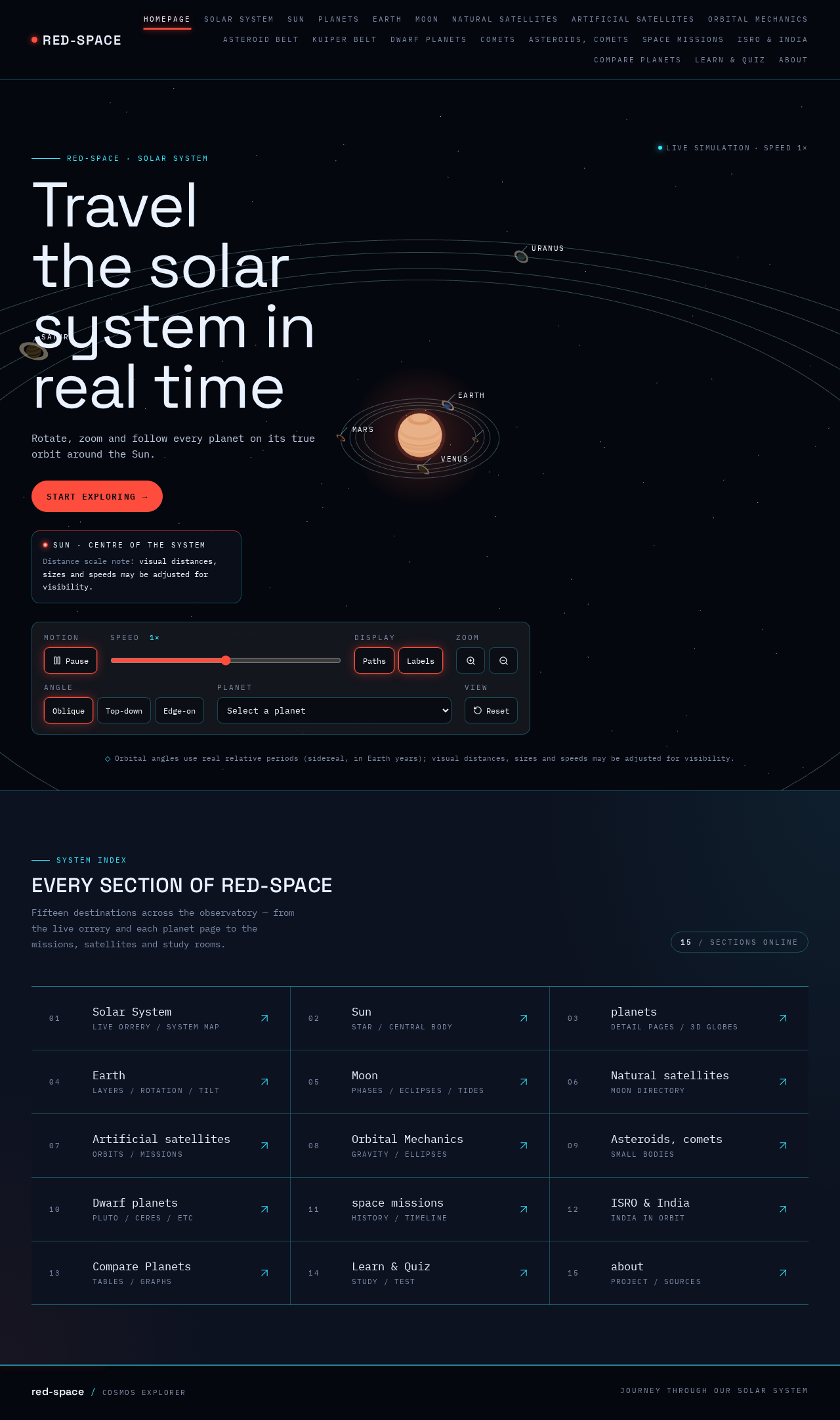
red-space · Solar system
Travel the solar system in real time
Rotate, zoom and follow every planet on its true orbit around the Sun.
Sun · centre of the system
Distance scale note: visual distances, sizes and speeds may be adjusted for visibility.
Orbital angles use real relative periods (sidereal, in Earth years); visual distances, sizes and speeds may be adjusted for visibility.
System index
Every section of red-space
Fifteen destinations across the observatory — from the live orrery and each planet page to the missions, satellites and study rooms.
15 / sections online
Live simulationSpeed 1×
red-space · Solar system
Travel the solar system in real time
Rotate, zoom and follow every planet on its true orbit around the Sun.
Sun · centre of the system
Distance scale note: visual distances, sizes and speeds may be adjusted for visibility.
Orbital angles use real relative periods (sidereal, in Earth years); visual distances, sizes and speeds may be adjusted for visibility.
System index
Every section of red-space
Fifteen destinations across the observatory — from the live orrery and each planet page to the missions, satellites and study rooms.
15 / sections online
No comments yet. Be the first!