red-npc

byKevin Wang

Game of war fire age clone but with npc

Landing
Landing

Comments (0)

No comments yet. Be the first!

System Requirements

System Requirements Document for red-npc

1. Introduction

red-npc is a single-player, mobile-style MMO strategy game in the lineage of Game of War: Fire Age, reimagined as a solo power fantasy against computer-controlled NPC opponents. One human commander runs a kingdom: building and upgrading a city, producing resources, training troops into armies, and launching attacks and raids against NPC kingdoms on a world map. There are no real players, no alliances, and no social pressure — the entire opposition is NPC.

The product intent is a big, loud, satisfying war fantasy that feels like a glossy toy you own rather than a grim medieval chronicle. Progress — city, resources, army, and battle history — persists across sessions so the commander can return and continue growing their power.

The audience is solo strategy players on phones and desktops who want city-building and troop-combat depth without live-service PvP obligations.

Page 1 of 22

2. System Overview

red-npc is delivered as a first-party web application with application-owned identity. A single human actor — the Solo Commander — establishes a game identity, builds a city, trains troops, and wages war against NPC kingdoms. All opposition is simulated by the system; no other human participant exists in the product.

Current delivery comprises six first-party pages:

  • Landing — anonymous public entry explaining the single-player kingdom strategy game.
  • Sign Up — self-service first-use enrollment creating a new solo game identity.
  • Login — returning verification to resume a saved kingdom.
  • City — the home kingdom view: resources, building levels, construction and upgrades over time, and resumed saved progress.
  • Barracks — training troops into armies, with training progress completing over time.
  • World Map — selecting NPC kingdoms, launching attacks and raids, and viewing battle outcomes with rewards or losses.

Durable state (city, resources, army, battle outcomes) is persisted server-side and bound to the commander's identity so progress survives across sessions.

Removed from scope

  • Multiplayer and real-player opponents (also: PvP, alliances, live-service arena)
  • Social features between human players
Page 2 of 22

2a. Product Interpretation and Delivery Boundary

red-npc is a single-player game. The only human participant is the Solo Commander; every opponent is an NPC kingdom simulated by the application. The application owns identity: a new commander enrolls through Sign Up, and a returning commander verifies through Login to resume their saved kingdom. Landing is anonymously reachable and explains the game before play begins; City, Barracks, and World Map require a logged-in commander because they operate on that commander's durable, private kingdom state.

All current gameplay — city building, resource production, troop training, and NPC combat — is delivered first-party. There are no provider-owned or external surfaces in the current product. Future ideas are not part of current delivery and are not represented in any current page.

2c. Page Content and Component Coverage

Page 3 of 22

Landing

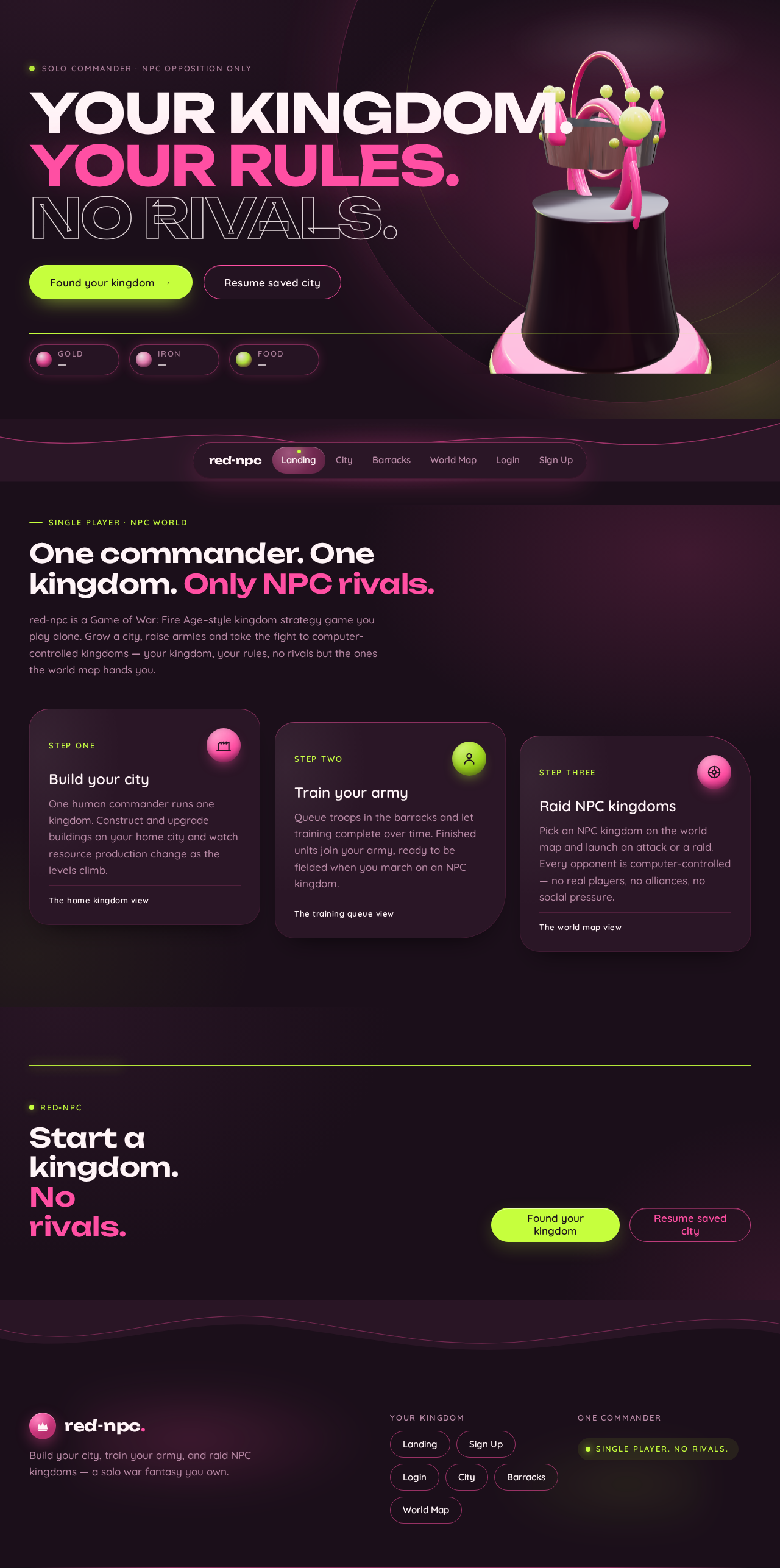
  • Information/state: Anonymous public entry. Explains the single-player Game of War: Fire Age–style kingdom strategy game against NPC opponents. Presents the headline "YOUR KINGDOM. YOUR RULES. NO RIVALS." and a resource-lozenge strip (Gold / Iron / Food) as thematic anchors.
  • Primary actions: "Found your kingdom" (lime pill) → Sign Up. "Resume saved city" (pink-outlined ghost pill) → Login.
  • Supporting actions: None beyond entry navigation.
  • Domain entities: None persisted; thematic resource lozenges only.
  • Component responsibilities: Full-bleed hero with bled 3D crown-and-keep object (right edge), stacked left headline, CTA pair, thin lime rule and resource lozenges at bottom edge.
  • States: Loading (hero object initializing — static lit still fallback under reduced motion); empty/success/error not applicable (no data operations); recovery — if the 3D object fails, render the lit still.

Sign Up

  • Information/state: Anonymous first-use enrollment form for a new solo game identity.
  • Primary actions: Submit enrollment to create a new game identity and begin a new kingdom.
  • Supporting actions: Navigate to Login for an existing commander.
  • Domain entities: Commander identity; new kingdom (city, resources, army) initialized on enrollment.
  • Component responsibilities: Enrollment form fields, validation messaging, submit control.
  • States: Loading (submitting); empty (blank form); success (identity created → City); error (invalid or incomplete input, or enrollment failure with retry); recovery (preserve entered values on failure).
Page 4 of 22

Login

  • Information/state: Returning verification for an existing commander resuming saved kingdom, resources, and army state.
  • Primary actions: Submit credentials to verify identity and resume saved kingdom.
  • Supporting actions: Navigate to Sign Up for a new commander.
  • Domain entities: Commander identity; saved kingdom state.
  • Component responsibilities: Credential fields, validation messaging, submit control.
  • States: Loading (verifying); empty (blank form); success (verified → City with saved state restored); error (invalid credentials or verification failure with retry); recovery (preserve entered values, allow re-attempt).
Page 5 of 22

City

  • Information/state: The commander's home kingdom: current resource totals (Gold / Iron / Food), building levels, and in-progress construction/upgrade timers. Saved progress is resumed here on return.
  • Primary actions: Construct a building; upgrade a building (with a lime progress ring while upgrading).
  • Supporting actions: View resource totals; navigate to Barracks and World Map via the capsule dock.
  • Domain entities: Kingdom, buildings (levels, upgrade state), resources (Gold, Iron, Food).
  • Component responsibilities: Curved-terrace building capsules around a central keep plinth; resource lozenges with tabular numerals and spring-bounce on gain; upgrade progress rings; capsule navigation dock.
  • States: Loading (fetching kingdom state); empty (new kingdom with base buildings); success (construction/upgrade started, resource totals updated); error (insufficient resources or action failure with retry); recovery (state re-fetched, timers preserved).
Page 6 of 22

Barracks

  • Information/state: Troop training view: available troop types, training queue with progress completing over time, current army composition.
  • Primary actions: Queue troop training; observe training progress complete into the army.
  • Supporting actions: Navigate to City and World Map via the capsule dock.
  • Domain entities: Troops, training queue entries, army composition, resources consumed.
  • Component responsibilities: Horizontal training queue of pill cards; per-entry progress; army summary.
  • States: Loading (fetching queue and army); empty (no troops training, empty queue); success (training queued, progress advancing, troops added on completion); error (insufficient resources or queue failure with retry); recovery (queue state re-fetched, progress preserved).
Page 7 of 22

World Map

  • Information/state: Curved grid of NPC kingdom lozenges with the player's keep pinned at center; selectable NPC kingdoms with their visible state.
  • Primary actions: Select an NPC kingdom; launch an attack or raid with the trained army; view battle outcome with rewards or losses.
  • Supporting actions: Navigate to City and Barracks via the capsule dock.
  • Domain entities: NPC kingdoms, army dispatched, battle outcome (rewards, losses).
  • Component responsibilities: Curved NPC kingdom grid; player keep pin; attack/raid launch controls; battle resolution and reward/loss presentation (lime victory flood, glossy pink reward capsules).
  • States: Loading (fetching map and NPC state); empty (no NPC targets available — not expected in current scope); success (battle resolved, rewards or losses shown, army/resources updated); error (launch failure or insufficient army with retry); recovery (map state re-fetched, army state preserved).
Page 8 of 22

3. Functional Requirements

FR-1 — Single-player kingdom strategy game (explicit) As a Solo Commander, I should play a Game of War: Fire Age–style strategy game so that I experience city-building and troop-combat depth.

  • Trigger: Commander enters the game.
  • Observable result: A kingdom strategy game with city building, resource production, troop training, and NPC combat.
  • Access: Anonymous entry via Landing; protected play via City/Barracks/World Map.
  • Failure/recovery: N/A (game availability).
  • Continuation: Commander proceeds to build, train, and fight.

FR-2 — Single-player against NPC opponents (explicit) As a Solo Commander, I should face only computer-controlled NPC opponents so that the world is populated by NPCs rather than real players.

  • Trigger: Commander engages the world.
  • Observable result: All opposition is NPC; no real-player interaction exists.
  • Access: Logged-in commander.
  • Failure/recovery: N/A.
  • Continuation: Commander selects NPC targets on World Map.
Page 9 of 22

FR-3 — Build and upgrade city (explicit) As a Solo Commander, I should build and upgrade my own city/base with buildings and resource production so that my kingdom grows.

  • Trigger: Commander selects a building on City.
  • Observable result: Construction/upgrade begins; building level and resource production change over time.
  • Access: Logged-in commander.
  • Failure/recovery: Insufficient resources or action failure → error with retry; state preserved.
  • Continuation: Commander observes progress and continues building.

FR-4 — Train troops and form armies (explicit) As a Solo Commander, I should train troops and form armies so that I can field forces for battle.

  • Trigger: Commander queues training on Barracks.
  • Observable result: Training progresses over time; completed troops join the army.
  • Access: Logged-in commander.
  • Failure/recovery: Insufficient resources or queue failure → error with retry; queue preserved.
  • Continuation: Commander views army and proceeds to World Map.
Page 10 of 22

FR-5 — Attack and raid NPC kingdoms (explicit) As a Solo Commander, I should attack and raid NPC kingdoms/enemies in battles so that I can win rewards and grow power.

  • Trigger: Commander selects an NPC kingdom on World Map and launches an attack or raid.
  • Observable result: Battle resolves; rewards or losses are shown; army and resources update.
  • Access: Logged-in commander.
  • Failure/recovery: Launch failure or insufficient army → error with retry; army state preserved.
  • Continuation: Commander returns to City/Barracks to rebuild and repeat.

FR-6 — Persistent progress across sessions (explicit) As a Solo Commander, I should have my progress persist across sessions so that I can resume my kingdom later.

  • Trigger: Commander returns and logs in.
  • Observable result: Saved city, resources, and army state are restored.
  • Access: Logged-in commander.
  • Failure/recovery: Verification failure → error with retry.
  • Continuation: Commander resumes play from saved state.
Page 11 of 22

FR-7 — Self-service enrollment (required_inference) As a Solo Commander, I should create a new solo game identity through self-service enrollment so that I can start a new game with durable saved progress.

  • Trigger: Commander selects "Found your kingdom" on Landing.
  • Observable result: New identity and new kingdom created; commander enters City.
  • Access: Anonymous (Sign Up).
  • Failure/recovery: Invalid input or enrollment failure → error with retry; entered values preserved.
  • Continuation: Commander begins building.

FR-8 — Returning verification (required_inference) As a Solo Commander, I should verify my identity on return so that I can resume my saved city, resources, and army state.

  • Trigger: Commander selects "Resume saved city" on Landing.
  • Observable result: Identity verified; saved kingdom restored on City.
  • Access: Anonymous (Login).
  • Failure/recovery: Invalid credentials → error with retry.
  • Continuation: Commander resumes play.

FR-9 — Durable persistence of kingdom progress (required_inference) As a Solo Commander, I should have my kingdom progress durably persisted so that city, resources, and army state survive across sessions.

  • Trigger: Any state-changing action (build, train, battle).
  • Observable result: State persisted server-side and bound to the commander's identity.
  • Access: Logged-in commander.
  • Failure/recovery: Persistence failure surfaces as an action error with retry.
  • Continuation: State restored on next login.
Page 12 of 22

4. User Personas

Solo Commander

  • Product context: The single human player of red-npc. They run a kingdom in a Game of War: Fire Age–style strategy game where all opposition is computer-controlled. They play on phones and desktops and want a big, loud, satisfying war fantasy with zero social pressure.
  • Primary goal: Grow their kingdom's power — build and upgrade the city, train troops, and win battles against NPC kingdoms — returning across sessions to continue.
  • Distinct accepted responsibilities: Establishing a game identity (Sign Up) or resuming one (Login); constructing and upgrading buildings and managing resource production (City); training troops into armies (Barracks); selecting NPC kingdoms and launching attacks and raids, then reading battle outcomes (World Map).
  • Relevant inputs or decisions: Which building to construct or upgrade; which troops to train; which NPC kingdom to attack or raid; whether to continue or return later.
  • Interactions with other accepted participants: None — the Solo Commander is the only human participant. All opponents are NPC kingdoms simulated by the system.
  • Observable success: A growing city with higher building levels and resource production, a larger trained army, won battles with rewards, and a kingdom that is faithfully restored on return.

5. Core User Flows

Page 13 of 22

Flow A — First-time enrollment and first build

  1. Commander opens Landing (anonymous) and reads the single-player kingdom pitch.
  2. Commander selects "Found your kingdom" → Sign Up.
  3. Commander enters enrollment details and submits.
  4. System creates a new game identity and initializes a new kingdom (base city, starting resources, empty army).
  5. Commander lands on City, sees resource lozenges (Gold / Iron / Food) and base building capsules.
  6. Commander selects a building and starts construction/upgrade; a lime progress ring appears and resources are deducted.
  7. Failure/recovery: If resources are insufficient or the action fails, an error is shown with retry; kingdom state is preserved.
  8. Commander continues building or navigates via the capsule dock.

Flow B — Returning commander resumes saved kingdom

  1. Commander opens Landing and selects "Resume saved city" → Login.
  2. Commander enters credentials and submits.
  3. System verifies identity and restores saved city, resources, and army state.
  4. Commander lands on City with prior progress intact.
  5. Failure/recovery: Invalid credentials → error with retry; entered values preserved.
  6. Commander resumes play.
Page 14 of 22

Flow C — Train troops

  1. From City, commander opens Barracks via the capsule dock.
  2. Commander selects a troop type and queues training; resources are consumed.
  3. Training progresses over time in the horizontal pill-card queue.
  4. On completion, troops join the army and the army summary updates.
  5. Failure/recovery: Insufficient resources or queue failure → error with retry; queue preserved.
  6. Commander returns to City or proceeds to World Map.

Flow D — Attack or raid an NPC kingdom

  1. From City or Barracks, commander opens World Map via the capsule dock.
  2. Commander sees the curved grid of NPC kingdom lozenges with their keep pinned at center.
  3. Commander selects an NPC kingdom and launches an attack or raid with the trained army.
  4. System resolves the battle against the NPC.
  5. On victory, the screen floods lime for 400ms and reward cards snap in as glossy pink capsules; on losses, losses are shown.
  6. Army and resources update to reflect the outcome.
  7. Failure/recovery: Launch failure or insufficient army → error with retry; army state preserved.
  8. Commander returns to City/Barracks to rebuild and repeat.
Page 15 of 22

Flow E — Progress persists across sessions

  1. Commander performs state-changing actions (build, train, battle) during a session.
  2. System durably persists kingdom state bound to the commander's identity.
  3. Commander leaves and later returns via Login.
  4. Saved city, resources, and army state are restored on City.
  5. Commander continues from where they left off.
Page 16 of 22

6. Visuals Colors and Theme

Muse: Karim Rashid — sensual war-room pop: candy-gloss command.

Headline: "YOUR KINGDOM. YOUR RULES. NO RIVALS."

Palette (dark mode):

  • Background: #1B0F1A (plum-black ground, ~60% of every screen)
  • Surface: #2A1626 (glossy plum panels, ~25%)
  • Text: #FFF4F7 (warm near-white, AA contrast on both grounds)
  • Primary: #FF4FA3 (bubblegum pink — primary action and hot accent)
  • Accent: #C6FF3D (lime — secondary signal reserved for victory, rewards, NPC-kill confirmations)
  • Muted: #B98AA6 (muted mauve — labels and metadata at 14px+ only)
  • No blue anywhere. Pink and lime never share a button — pink acts, lime celebrates.

Typography:

  • Headings: Unbounded at 600–700, sentence case with occasional all-caps micro-labels at 0.14em tracking.
  • Body/UI: Quicksand 500/600, 1.6 line-height, never condensed.
  • Scale (1.5 modular): display clamp(44px, 7vw, 112px); h2 clamp(28px, 3.4vw, 52px); h3 24px; body 17px; label 13px caps 0.14em; numerals tabular Quicksand 600 for resources.

Shape language: Capsules, blobs, glossy continuous curves. Buttons are full pills; panels have 28–40px radii with a 1px inner highlight (#FF4FA3 at 40% on top edge) to fake gloss; section dividers are liquid SVG waves; resource chips are pill lozenges with a soft pink glow. No sharp corners except hazard-thin 1px data rules inside the map.

Page 17 of 22

Layout: Asymmetric and curved. Landing hero is full-bleed glossy with type stacked left over a bled 3D crown. City is a curved-terrace layout with building capsules arcing around a central keep plinth. Barracks is a horizontal training queue of pill cards. World Map is a curved grid of NPC kingdom lozenges with the player's keep pinned at center. 12-col grid on desktop, single column on mobile, 24px gutters, 96px section padding.

Imagery: Glossy 3D renders — candy-pink and chrome crown, resin-like keep, low-poly lime-and-pink plastic troop units, liquid blobs, soft-lit capsules. No photography of people, no gritty medieval texture, no dark bronze. NPC kingdoms render as glossy toy citadels on floating pink plinths.

7. Signature Design Concept

The public entry is a full-bleed plum-black scene carrying a single oversized glossy 3D crown-and-keep object bled off the right edge at 70% viewport height, lit with a pink key and lime rim. The headline "YOUR KINGDOM. YOUR RULES. NO RIVALS." is set in Unbounded at clamp(44px, 7vw, 112px), stacked flush-left in three ragged lines occupying the left 9 columns and overlapping the plinth. A lime pill CTA "Found your kingdom" sits pinned beneath the type at 1/3 width, with a small pink-outlined "Resume saved city" ghost pill beside it. A thin lime rule and a row of three resource lozenges (Gold / Iron / Food) anchor the bottom edge. No centred stack, no gradient blob, no blue. Readable text and controls stay whole at 375px, 768px, and 1280px; the crown-and-keep object may bleed and crop as decoration.

Page 18 of 22

8. Interaction Model & Motion Direction

Interaction Model: Animated Motion Tempo: expressive Hero Dimensionality: webgl

Landing Hero Motion Brief

  • Focal subject: A single glossy candy-pink-and-chrome crown-and-keep object, bled off the right edge, lit with a pink key and lime rim.
  • Input → transformation → outcome thesis: As the commander arrives, the crown-and-keep slowly rotates under a drifting specular highlight; the headline and CTA pair settle into place; the resource lozenges tick with a soft spring bounce. The outcome is a confident, glossy invitation to found or resume a kingdom.
  • Motion vocabulary: Expressive and liquid — glossy highlights drift across surfaces on hover; pill buttons squash-and-settle with 320ms spring easing; resource counters tick up with a soft bounce; scroll reveals curve in from 24px at 0.9 opacity.
  • Composed first frame: Plum-black ground; crown-and-keep bled right at 70% viewport height; headline stacked flush-left in three ragged lines; lime CTA and pink ghost pill beneath; thin lime rule and three resource lozenges at bottom edge.
  • Reduced-motion state: All springs become 120ms fades; the 3D object freezes to a lit still; marquees stop and wrap.

Landing Hero 3D Scene Brief — DIRECTION-DERIVED A real-time WebGL/R3F scene of one crafted glossy crown-and-keep object (candy-pink and chrome, resin-like keep) rotating slowly under a moving pink key light and lime rim light, bled off the right edge. It shows the product's defining state — a kingdom you own — without introducing new behavior.

Page 19 of 22

9. Non-Functional Requirements

  • Single-player only (explicit): The world is populated by NPC opponents rather than real players. No multiplayer, PvP, or social features.
  • Durable persistence (required_inference): Kingdom state (city, resources, army, battle outcomes) persists server-side across sessions, bound to the commander's identity.
  • Application-owned identity (required_inference): Self-service enrollment and returning verification gate access to City, Barracks, and World Map; Landing, Sign Up, and Login are anonymously reachable.
  • Readable text and controls (explicit design constraint): Headlines, labels, numbers, cards' text, and controls stay entirely inside the viewport and their container at 375px, 768px, and 1280px, wrapping or scaling to fit; no other element covers them. Decoration and motion may crop, bleed, or overlap as the direction asks, provided they cover no readable text or control.
  • Reduced-motion support (explicit design constraint): With prefers-reduced-motion, provide a usable static arrangement — springs become 120ms fades, the 3D object freezes to a lit still, marquees stop and wrap.
  • No blue/indigo (explicit design constraint): Blue or indigo is forbidden anywhere in the palette; the generic indigo/blue-on-white SaaS template is forbidden.
Page 20 of 22

10. Tech Stack

  • Frontend: React (web), with React Three Fiber for the WebGL hero object.
  • Backend: Python / FastAPI, extended with routes and modules for game state, identity, and battle resolution.
  • Storage: Durable persistence for commander identity and kingdom state.
  • Deployment: Docker / docker-compose for the frontend and backend services.

11. Assumptions and Constraints

  • A-1 (explicit): The game is single-player only; all opponents are NPCs.
  • A-2 (required_inference): Application-owned identity is used; Landing, Sign Up, and Login are anonymous; City, Barracks, and World Map require login.
  • A-3 (required_inference): Durable state is persisted server-side and bound to the commander's identity.
  • A-4 (explicit design constraint): The Karim Rashid candy-gloss direction is authoritative for visuals, motion, and layout; no blue/indigo.
  • A-5 (default — not specified by user): Specific troop types, building types, resource rates, and battle formulas are not specified and are left to implementation within the accepted capabilities.
Page 21 of 22

12. Glossary

  • Solo Commander: The single human player; the only human participant in red-npc.
  • NPC kingdom: A computer-controlled opponent on the World Map.
  • Kingdom: The commander's persistent game state — city, resources, and army.
  • City: The home kingdom view where buildings are constructed and upgraded.
  • Barracks: The troop-training view where troops are queued and trained into armies.
  • World Map: The view of NPC kingdoms where attacks and raids are launched and outcomes shown.
  • Resource lozenge: A pill-shaped resource chip (Gold / Iron / Food) with tabular numerals.
  • Capsule dock: The floating bottom-center pill navigation (City / Barracks / Map).
Page 22 of 22
Landing design preview
Landing: Read single-player pitch
Sign Up: Found your kingdom
Sign Up: 1. Submit enrollment
Sign Up: 2. Fix invalid input and retry
City: View starting resources
City: 1. Start building construction
City: Upgrade a building
City: 2. Retry failed build action
Barracks: 1. Open via capsule dock
Barracks: 2. Queue troop training
Barracks: 3. Retry failed queue
Barracks: 4. Observe troops join army
World Map: 5. Open via capsule dock
World Map: 6. Select NPC kingdom
World Map: 7. Launch attack or raid
World Map: 8. Retry failed launch
World Map: 9. View victory rewards
World Map: 10. View battle losses
City: 11. Rebuild after battle
Landing: Resume saved city
Login: 1. Submit credentials
Login: 2. Retry invalid credentials
City: Resume saved kingdom state
Landing design preview
Landing: Read single-player pitch
Sign Up: Found your kingdom
Sign Up: 1. Submit enrollment
Sign Up: 2. Fix invalid input and retry
City: View starting resources
City: 1. Start building construction
City: Upgrade a building
City: 2. Retry failed build action
Barracks: 1. Open via capsule dock
Barracks: 2. Queue troop training
Barracks: 3. Retry failed queue
Barracks: 4. Observe troops join army
World Map: 5. Open via capsule dock
World Map: 6. Select NPC kingdom
World Map: 7. Launch attack or raid
World Map: 8. Retry failed launch
World Map: 9. View victory rewards
World Map: 10. View battle losses
City: 11. Rebuild after battle
Landing: Resume saved city
Login: 1. Submit credentials
Login: 2. Retry invalid credentials
City: Resume saved kingdom state