red-a

byDiya Trivedi

build a simple design for todo application

Todo List
Todo List

Comments (0)

No comments yet. Be the first!

System Requirements

System Requirement Document
Page 1 of 6

System Requirements Document for Project red-a

1. Introduction

This document outlines the system requirements for Project red-a, a personal task management application designed to help individual users organize and track their tasks effectively.

2. System Overview

Project red-a is a standalone personal task manager with a first-party interface. It is designed for individual users to manage their personal tasks without the need for team collaboration or enterprise-level integrations.

2a. Product Interpretation and Delivery Boundary

  • Domain Descriptor: Personal Task Management

    • Source Evidence: The application is designed for personal use to manage individual tasks effectively.
    • Confidence: 0.9
  • What is being built: A personal task management application for individual users.

  • Excluded Assumptions: Team collaboration features, Enterprise-level integrations.

  • First-party Custom Pages: Todo List (Main interface for managing tasks).

  • Access: Public access without authentication requirements.

Page 2 of 6

Behavior Contracts

  1. Create Task

    • Actor: Personal User
    • Trigger: User adds a new task
    • Inputs: Task title, Task description, Due date
    • Outcomes: Task is added to the task list
    • State Changes: New task entry
    • State Lifetime: Durable
    • Identity Continuity: None
    • Audience Entry: Public
    • Human Touchpoints: Task creation interface
    • Failure Outcome: Task not added
  2. View Tasks

    • Actor: Personal User
    • Trigger: User opens the task list
    • Inputs: None
    • Outcomes: Display list of tasks
    • State Changes: None
    • State Lifetime: None
    • Identity Continuity: None
    • Audience Entry: Public
    • Human Touchpoints: Task list interface
    • Failure Outcome: Tasks not displayed
  3. Complete Task

    • Actor: Personal User
    • Trigger: User marks a task as complete
    • Inputs: Task identifier
    • Outcomes: Task is marked as completed
    • State Changes: Task status update
    • State Lifetime: Durable
    • Identity Continuity: None
    • Audience Entry: Public
    • Human Touchpoints: Task completion interface
    • Failure Outcome: Task not marked as complete
Page 3 of 6

2c. Page Content and Component Coverage

Todo List

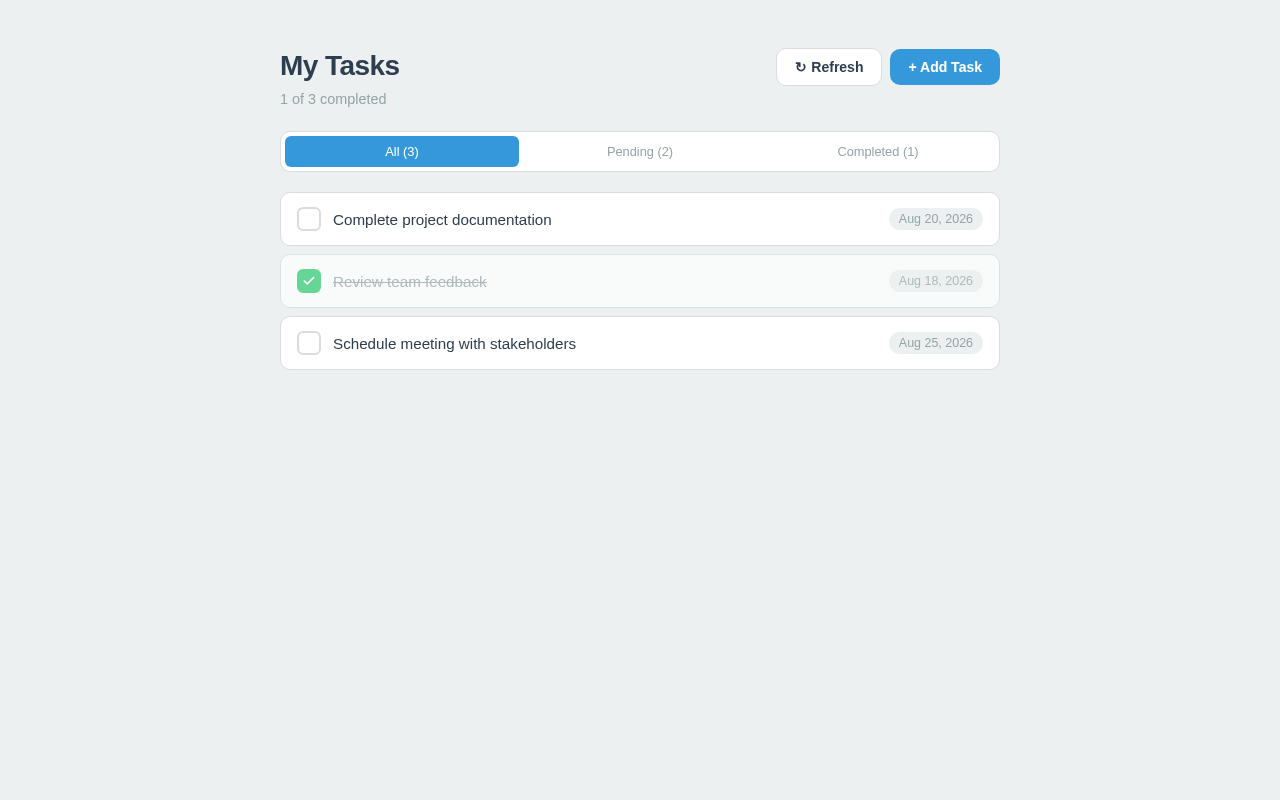
  • Information: Displays a list of tasks with titles, descriptions, and due dates.
  • Actions:
    • Add a new task
    • View existing tasks
    • Mark tasks as complete
  • Domain Entities: Task (title, description, due date, status)
  • Component Responsibilities:
    • Task creation form
    • Task list display
    • Task completion toggle
  • States:
    • Empty state when no tasks are present
    • Loading state when fetching tasks
    • Success state when tasks are displayed
    • Error state if tasks cannot be loaded

3. Functional Requirements as Story Points

  • As a Personal User, I should be able to add a new task with a title, description, and due date to the task list. required_inference
  • As a Personal User, I should be able to view a list of all my tasks. required_inference
  • As a Personal User, I should be able to mark a task as complete. required_inference

4. User Personas

  • Personal User: The primary user managing personal tasks. This persona is focused on organizing and tracking individual tasks without collaboration features.
Page 4 of 6

5. Core User Flows

  1. Task Creation Flow

    • User accesses the Todo List page.
    • User fills in the task title, description, and due date.
    • User submits the form to add the task.
    • System confirms the task is added to the list.
  2. Task Viewing Flow

    • User accesses the Todo List page.
    • System displays the list of tasks.
  3. Task Completion Flow

    • User accesses the Todo List page.
    • User marks a task as complete.
    • System updates the task status to completed.

6. Visuals Colors and Theme

  • Primary: #3498db
  • Primary Light: #5dade2
  • Secondary: #2ecc71
  • Accent: #e74c3c
  • Highlight: #f1c40f
  • Background: #ecf0f1
  • Surface: #ffffff
  • Text: #2c3e50
  • Text Muted: #95a5a6
  • Border: #dcdcdc
Page 5 of 6

7. Signature Design Concept

The Todo List page will feature a clean and minimalistic design, focusing on ease of use and clarity. The task list will be prominently displayed with clear typography and sufficient spacing to ensure readability. The color scheme will be light and airy, with the primary color used for action buttons and highlights. The task creation form will be simple and intuitive, allowing users to quickly add new tasks without distraction.

8. Interaction Model & Motion Direction

  • Interaction Model: Static
  • Motion Direction: Minimal motion with subtle hover effects and transitions to enhance user experience without overwhelming the interface.

9. Non-Functional Requirements

No additional non-functional requirements were inferred.
10. Tech Stack

  • Frontend: React for Web
  • Backend: Python with FastAPI
  • Database: MySQL

11. Assumptions and Constraints

  • The application is intended for personal use and does not include team collaboration features.
  • The system does not require user authentication or authorization.
Page 6 of 6

12. Glossary

  • Task: An item in the task list that includes a title, description, due date, and status.
  • Personal User: The individual using the application to manage their personal tasks.
Todo List design preview
Todo List: Request task list
Todo List: Task list load result
Todo List: 1. View task list
Todo List: Tasks not displayed
Todo List: 2. Fill new task details
Todo List: 3. Task creation result
Todo List: 4. Task added to list
Todo List: Task not added
Todo List: 5. Mark task complete
Todo List: 6. Task completion result
Todo List: 7. Task status updated to completed
Todo List: Task not marked complete
Todo List design preview
Todo List: Request task list
Todo List: Task list load result
Todo List: 1. View task list
Todo List: Tasks not displayed
Todo List: 2. Fill new task details
Todo List: 3. Task creation result
Todo List: 4. Task added to list
Todo List: Task not added
Todo List: 5. Mark task complete
Todo List: 6. Task completion result
Todo List: 7. Task status updated to completed
Todo List: Task not marked complete
