recetas-desayuno

bygabriel

crea una aplicacion web de creacion de recetas, espara por ejemplo cada persona de cada ciudad de colombia tengan sus propias recetas para hcer por ejemplo: nose que hacer de desayuno en la app muestra ideas de desayuno(almuerzos y cenas etc..) de otros usuarios donde compro los ingredientes, en cuanto le salio todo y los pasos para hacerlo, esto ayudara a las personas a que saber que hacer sin tener que pensar a cada rato en la tienda que hacer de comida cada vez.

LandingIniciar sesiónRegistro
Landing

Comments (0)

No comments yet. Be the first!

System Requirements

System Requirements Document for Creación de Recetas

1. Introduction

Creación de Recetas (project name: recetas-desayuno) is a web application for creating and sharing home-cooking recipes across Colombia. Its intent is simple and daily: when someone in any Colombian city does not know what to cook for breakfast, lunch, or dinner, the app shows them ideas from other users — with the ingredients, where the author bought them, how much the whole thing cost, and the steps to make it. That way people can decide what to cook without standing in the store every time wondering what to buy.

The audience is two overlapping groups of everyday cooks in Colombia: people who publish their own recipes for their city, and people who are looking for something to cook today. Every recipe belongs to the Colombian city of its author, so the ideas a person sees are grounded in the ingredients and stores available where they live.

This document is the System Requirements Document for the product as requested by gabriel.

2. System Overview

Page 1 of 21

2a. Product Interpretation and Delivery Boundary

Creación de Recetas is delivered as a first-party web application with a React frontend, a shared FastAPI backend, and a MariaDB database for application-owned persistent data. The application owns user identity: a person registers once, and on return signs in to reach their recipes and the recipe feed. The public entry (Landing) and the two identity surfaces (Registro, Iniciar sesión) are reachable without being signed in; the recipe feed, recipe detail, and recipe creation require a signed-in session.

The product's core loop is: a Creador de recetas publishes a recipe tied to their Colombian city with meal type, ingredients, where they bought them, total cost, and steps; a Persona que busca qué cocinar browses ideas by meal type and city, opens a recipe, and gets everything needed to cook it and shop for it. All current behavior is in scope now; there is no separate future phase defined by the source.

2b. Source Content Inventory

Not applicable — no reference directive with content_source was supplied.

2c. Page Content and Component Coverage

Page 2 of 21

Landing

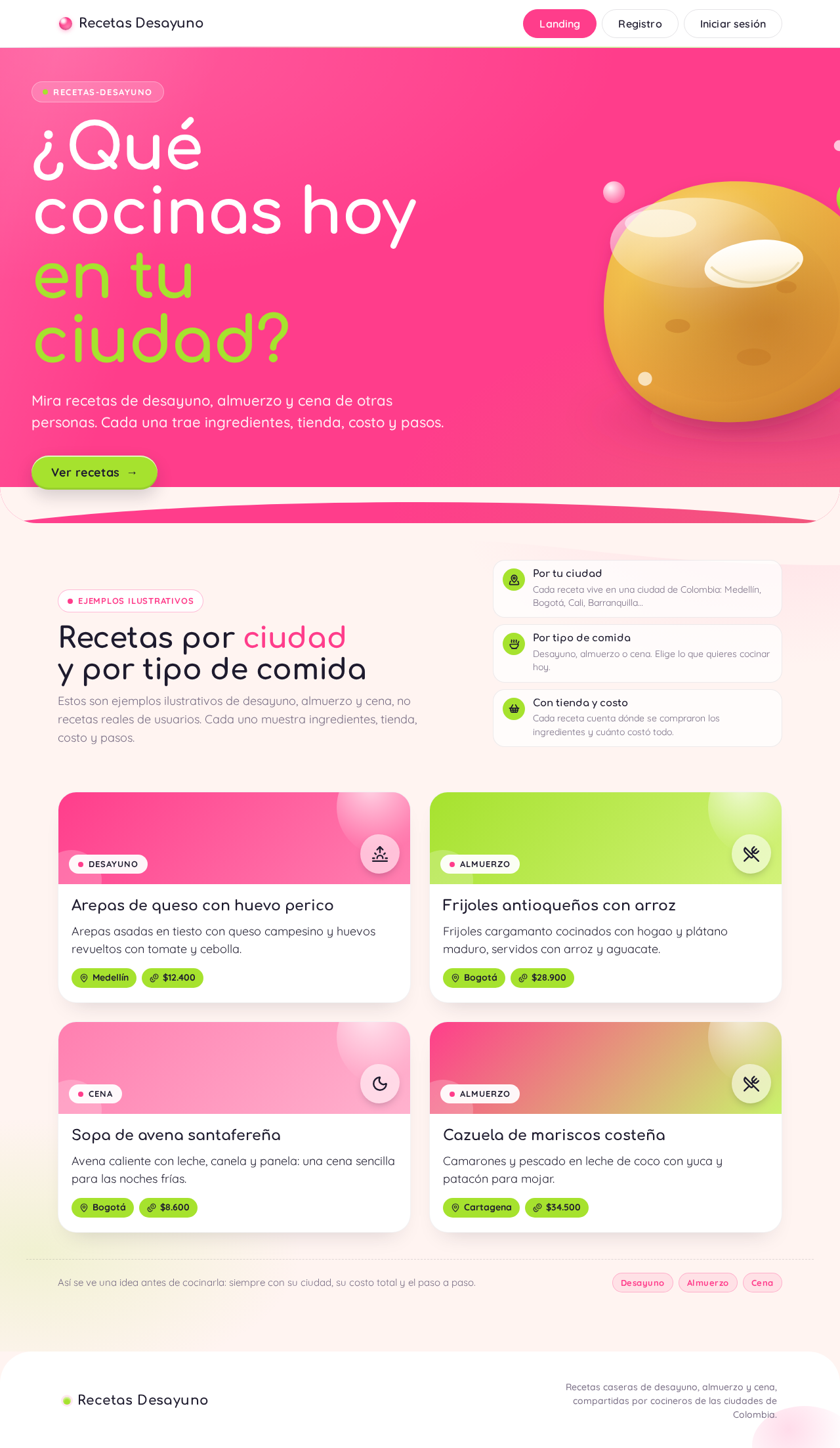
  • Information/state: Anonymous public entry. Explains the app: recipes by Colombian city and by meal type (desayuno, almuerzo, cena), each carrying ingredients, store, cost, and steps. Hero copy: headline "¿Qué cocinas hoy en tu ciudad?"; subline "Mira recetas de desayuno, almuerzo y cena de otras personas. Cada una trae ingredientes, tienda, costo y pasos."; call to action "Ver recetas".
  • Primary actions: "Ver recetas" (lime capsule CTA) leads toward the recipe feed; links to Registro and Iniciar sesión.
  • Supporting actions: Navigate to sign-in or registration from the header.
  • Domain entities: None persisted; presents the concept of recipes, cities, and meal types.
  • Component responsibilities: Hero field (hot pink, stacked rounded headline 44–96px, glossy 3D arepa blob cut by the right frame edge, lime capsule CTA); curved section edge into a preview of recipe cards; header with wordmark and access links.
  • States: Loading — not applicable (static content). Empty — not applicable. Success — hero and CTA render fully at 375/768/1280px. Error — not applicable. Recovery — if a signed-in user lands here, access links reflect their session and route them to Recetas.
Page 3 of 21

Registro

  • Information/state: Anonymous identity-establishment surface. Collects the information needed to create an account (name, email, password) and the person's Colombian city, which anchors their recipes.
  • Primary actions: Submit registration to create the account and start a session.
  • Supporting actions: Link to Iniciar sesión for people who already have an account.
  • Domain entities: User account (identity, city).
  • Component responsibilities: Registration form with validation; city selector for Colombian cities; submit control; inline error messaging.
  • States: Loading — submit disabled with progress while the account is created. Empty — blank form with field hints. Success — account created, session started, routed to Recetas. Error — duplicate email, missing/invalid fields, or city not selected shown inline; recovery is to correct and resubmit. Recovery — a failed submission preserves entered values.

Iniciar sesión

  • Information/state: Anonymous returning-identity surface. Verifies an existing account so the person can reach their recipes and the feed.
  • Primary actions: Submit credentials to sign in.
  • Supporting actions: Link to Registro for people without an account.
  • Domain entities: User account.
  • Component responsibilities: Sign-in form (email, password); submit control; inline error messaging.
  • States: Loading — submit disabled with progress. Empty — blank form. Success — session started, routed to Recetas. Error — invalid credentials shown inline without revealing which field is wrong; recovery is to retry or go to Registro. Recovery — entered email preserved on failure.
Page 4 of 21

Recetas

  • Information/state: Signed-in recipe feed showing ideas from other users. Each card shows meal type, the author's Colombian city, and total cost as lime capsule tags, plus a short recipe summary. Filters by meal type (desayuno, almuerzo, cena) and by city.
  • Primary actions: Browse and filter recipes; open a recipe to view Detalle de receta.
  • Supporting actions: Navigate to Nueva receta to publish; sign out.
  • Domain entities: Recipe (meal type, city, total cost, summary), User (author, city).
  • Component responsibilities: Filter controls (meal type, city); curved white recipe cards in a two-column grid at 1280px and one column at 375px; lime capsule tags for city and total cost; empty-state messaging; pagination or progressive loading of results.
  • States: Loading — card placeholders while recipes load. Empty — message when no recipes match the selected meal type and city, with a prompt to change filters. Success — matching cards render fully within the viewport. Error — load failure shown with a retry control. Recovery — retry reloads the feed; filters remain as set.
Page 5 of 21

Detalle de receta

  • Information/state: Signed-in full view of one recipe: meal type, author's city, ingredient list, where the author bought the ingredients, total cost, and the preparation steps in order.
  • Primary actions: Read the recipe and its steps; use the ingredient/store/cost information to shop and cook.
  • Supporting actions: Return to Recetas; adjust filters context on return.
  • Domain entities: Recipe, ingredients, store/purchase location, total cost, steps, author, city.
  • Component responsibilities: Recipe header with meal type and city capsule tags; ingredients section; purchase-location section; total-cost display; ordered steps list; back navigation.
  • States: Loading — skeleton while the recipe loads. Empty — not applicable for a valid recipe. Success — all sections render fully. Error — recipe not found or load failure with a return-to-Recetas control. Recovery — return to the feed and reopen.
Page 6 of 21

Nueva receta

  • Information/state: Signed-in creation surface for a Creador de recetas. Captures meal type (desayuno, almuerzo, cena), ingredients, where the ingredients were bought, total cost, and preparation steps; the recipe is associated with the author's Colombian city.
  • Primary actions: Submit the recipe to publish it to the feed.
  • Supporting actions: Add/remove ingredient rows and step rows; cancel and return to Recetas.
  • Domain entities: Recipe, ingredient entries, purchase location, total cost, ordered steps, author, city.
  • Component responsibilities: Meal-type selector; dynamic ingredient list; purchase-location field(s); total-cost input; ordered step editor; validation; submit control.
  • States: Loading — submit disabled with progress while saving. Empty — blank form with field hints. Success — recipe saved and visible in Recetas, routed to the new recipe's detail or the feed. Error — missing required fields, invalid cost, or no steps shown inline; recovery is to correct and resubmit. Recovery — entered content preserved on failure.
Page 7 of 21

3. Functional Requirements

FR-1 — Web recipe application (explicit) As a visitor, I should reach a web application for creating recipes so that I can use it in a browser.

  • Trigger/input: Opening the app URL.
  • Observable result: The Landing page renders with the product's hero and access links.
  • Access state: Anonymous.
  • Failure/recovery: If the app fails to load, the browser's standard retry applies.
  • Continuation: Proceed to Registro, Iniciar sesión, or "Ver recetas".

FR-2 — Recipes belong to each person's Colombian city (explicit) As a Creador de recetas, I should have my recipes associated with my Colombian city so that people in my city see recipes grounded in local ingredients and stores.

  • Trigger/input: The city captured at registration and applied to each recipe I publish.
  • Observable result: Each published recipe carries its author's Colombian city and displays it as a city tag.
  • Access state: Signed in.
  • Failure/recovery: If city is missing, registration cannot complete (see FR-8).
  • Continuation: The city appears on the recipe card and detail.
Page 8 of 21

FR-3 — Show breakfast, lunch, and dinner ideas from other users (explicit) As a Persona que busca qué cocinar, I should see ideas for desayuno, almuerzo, and cena from other users so that I know what to cook without deciding from scratch.

  • Trigger/input: Opening Recetas and selecting a meal type.
  • Observable result: A feed of recipe cards from other users, filterable by meal type (desayuno, almuerzo, cena) and city.
  • Access state: Signed in.
  • Failure/recovery: If no recipes match, an empty state prompts changing filters; if loading fails, a retry control reloads.
  • Continuation: Open a card to Detalle de receta.

FR-4 — Each recipe shows where the author bought the ingredients (explicit) As a Persona que busca qué cocinar, I should see where the author bought the ingredients so that I know where to shop.

  • Trigger/input: Opening Detalle de receta.
  • Observable result: The purchase location(s) the author recorded are displayed.
  • Access state: Signed in.
  • Failure/recovery: If the recipe fails to load, a return-to-Recetas control is shown.
  • Continuation: Use the location to shop, then follow the steps.
Page 9 of 21

FR-5 — Each recipe shows how much the whole thing cost (explicit) As a Persona que busca qué cocinar, I should see the total cost of the recipe so that I can judge whether it fits my budget.

  • Trigger/input: Viewing a recipe card or Detalle de receta.
  • Observable result: The total cost is displayed (as a lime capsule tag on cards; in the detail view).
  • Access state: Signed in.
  • Failure/recovery: If cost is missing on a recipe, the field is shown as not provided rather than fabricated.
  • Continuation: Decide to cook the recipe.

FR-6 — Each recipe shows the steps to make it (explicit) As a Persona que busca qué cocinar, I should see the ordered steps so that I can actually cook the recipe.

  • Trigger/input: Opening Detalle de receta.
  • Observable result: The preparation steps are shown in order.
  • Access state: Signed in.
  • Failure/recovery: If the recipe fails to load, return to Recetas and reopen.
  • Continuation: Cook the dish.
Page 10 of 21

FR-7 — Help people decide what to cook without thinking in the store (explicit) As a Persona que busca qué cocinar, I should get enough information (ingredients, store, cost, steps) in one place so that I don't have to figure out what to buy while standing in the store.

  • Trigger/input: Browsing Recetas and opening a recipe.
  • Observable result: A single recipe view contains ingredients, purchase location, total cost, and steps.
  • Access state: Signed in.
  • Failure/recovery: As in FR-4/FR-6.
  • Continuation: Shop and cook with confidence.

FR-8 — Register to create recipes (required_inference) As a new Creador de recetas, I should register an account with my name, email, password, and Colombian city so that I can publish recipes tied to my city.

  • Trigger/input: Submitting the Registro form.
  • Observable result: An account is created, a session starts, and the person is routed to Recetas.
  • Access state: Anonymous entry; protected state unavailable until identity is established.
  • Failure/recovery: Duplicate email, missing fields, or missing city shown inline; entered values preserved; correct and resubmit.
  • Continuation: Publish via Nueva receta.
Page 11 of 21

FR-9 — Sign in to return to your recipes (required_inference) As a returning user, I should sign in so that I can reach my recipes and the feed again.

  • Trigger/input: Submitting the Iniciar sesión form.
  • Observable result: A session starts and the person is routed to Recetas.
  • Access state: Anonymous entry; protected destinations require the session.
  • Failure/recovery: Invalid credentials shown inline without revealing which field is wrong; retry or go to Registro.
  • Continuation: Browse or publish recipes.

FR-10 — Publish a recipe with meal type, ingredients, store, cost, and steps (required_inference, grounded in explicit recipe content) As a Creador de recetas, I should record meal type, ingredients, where I bought them, total cost, and steps so that others in my city can cook my recipe.

  • Trigger/input: Filling and submitting Nueva receta.
  • Observable result: The recipe is saved with the author's city and appears in Recetas.
  • Access state: Signed in.
  • Failure/recovery: Missing required fields, invalid cost, or no steps shown inline; content preserved; correct and resubmit.
  • Continuation: The recipe is visible to other users in the feed and detail.

4. User Personas

Page 12 of 21

Creador de recetas

  • Product context: An everyday cook in a Colombian city who already has recipes they make at home and wants to share them so neighbors can cook them too.
  • Primary goal: Publish a recipe — breakfast, lunch, or dinner — with its ingredients, where they bought them, total cost, and steps, associated with their city.
  • Distinct responsibilities: Registers with their city; authors recipes through Nueva receta; ensures each recipe carries meal type, ingredients, purchase location, total cost, and ordered steps.
  • Inputs/decisions: What meal type the recipe is; which ingredients and quantities; which store(s) they bought from; the total cost; the ordered steps.
  • Interactions with other participants: Their published recipes appear to the Persona que busca qué cocinar in the same city via Recetas and Detalle de receta.
  • Observable success: The recipe is saved, shows their city, and is visible in the feed with its cost and store information.
Page 13 of 21

Persona que busca qué cocinar

  • Product context: Someone in a Colombian city who does not know what to make today and wants a concrete idea without wandering the store.
  • Primary goal: Find a recipe for desayuno, almuerzo, or cena from other users in their city and get everything needed to shop and cook it.
  • Distinct responsibilities: Registers or signs in; browses and filters Recetas by meal type and city; opens Detalle de receta to read ingredients, store, cost, and steps.
  • Inputs/decisions: Which meal type they want; which city to view; which recipe to cook.
  • Interactions with other participants: Consumes recipes published by Creadores de recetas; the store and cost information comes from the author.
  • Observable success: They leave with a chosen recipe and a clear shopping list (ingredients + store) and cooking steps.

5. Core User Flows

Page 14 of 21

Flow A — A new creator registers and publishes a recipe

  1. The visitor opens the app and lands on Landing (anonymous), reading the hero and subline.
  2. They choose Registro and enter name, email, password, and their Colombian city.
  3. On submit, the account is created and a session starts; they are routed to Recetas.
  4. They choose Nueva receta and select a meal type (desayuno, almuerzo, cena).
  5. They add ingredients, record where they bought them, enter the total cost, and write the ordered steps.
  6. On submit, the recipe is saved with their city and appears in Recetas; they can open Detalle de receta to confirm.
  7. Failure/recovery: If required fields are missing or cost is invalid, inline errors appear and entered content is preserved; they correct and resubmit.

Flow B — A returning creator signs in and adds another recipe

  1. The user opens Iniciar sesión and enters email and password.
  2. On success, a session starts and they are routed to Recetas.
  3. They choose Nueva receta, fill the fields, and submit; the new recipe appears in the feed.
  4. Failure/recovery: Invalid credentials show an inline error; they retry or go to Registro.
Page 15 of 21

Flow C — A person looking for what to cook finds a recipe

  1. The user signs in via Iniciar sesión (or registers via Registro if new) and reaches Recetas.
  2. They filter by meal type (e.g., desayuno) and by their city.
  3. They scan recipe cards showing city and total cost as lime capsule tags.
  4. They open a card to Detalle de receta and read ingredients, where the author bought them, total cost, and steps.
  5. They use the store and ingredient information to shop and the steps to cook.
  6. Failure/recovery: If no recipes match, an empty state prompts changing filters; if loading fails, a retry control reloads the feed.
  7. Continuation: They return to Recetas to find another idea.
Page 16 of 21

6. Visuals Colors and Theme

Muse: Karim Rashid — sensual pop minimalism for Colombian home cooking. Warm, optimistic, quick to use.

Headline: "¿Qué cocinas hoy en tu ciudad?"

Color tokens (light mode):

  • Background: #FFF4F1 (soft pink ground)
  • Surface: #FFFFFF (white cards)
  • Text: #1E1B2E
  • Primary: #FF3D8B (hot pink — primary actions, hero field)
  • Accent: #A6E22E (lime — cost and city tags, hero CTA)
  • Muted: #7A6F86

Typography:

  • Headings: Comfortaa, bold, rounded geometric, title case, soft tracking, large sizes.
  • Body: Quicksand.
  • Scale: 1.25 modular; display 44/64/96; body 28/22/18; mobile display starts at 44px.

Shape language: Capsules, blobs, and curved section edges; glossy buttons with a soft inner highlight.

Layout: One wide capsule hero over a pink field; curved white cards in a two-column grid at 1280px and one column at 375px.

Imagery: Glossy 3D food blobs and bright ingredient renders on candy colour fields; no stock people.

Page 17 of 21

Accessibility: Readable text and controls stay whole at 375/768/1280px, wrapping or scaling (e.g., clamp()) to fit; no element covers them. Decoration and imagery may bleed and crop freely.

7. Signature Design Concept

The public entry is a full-width hot pink (#FF3D8B) field holding a stacked rounded headline in Comfortaa at 44px–96px: "¿Qué cocinas hoy en tu ciudad?" Beneath it, a lime (#A6E22E) capsule CTA "Ver recetas". At the right edge, a glossy 3D arepa blob is half cut by the frame — a warm, appetizing gesture that signals Colombian home cooking. A curved section edge transitions from the pink hero into a preview of white recipe cards, each carrying lime capsule tags for city and total cost. The composition recomposes only accepted content (headline, subline, CTA, recipe preview) and introduces no new behavior.

Page 18 of 21

8. Interaction Model & Motion Direction

Interaction Model: Animated Motion Tempo: restrained Hero Dimensionality: layered_2d

Landing Hero Motion Brief

  • Focal subject: The glossy 3D arepa blob at the right edge, half cut by the frame.
  • Input → transformation → outcome thesis: On load, the headline and CTA settle into place with a short 200ms ease; on hover, the lime CTA and recipe cards perform a liquid morph and a slow glossy highlight sweep, signaling interactivity without delaying the user.
  • Motion vocabulary: Liquid morphs on hover; slow glossy highlight sweep; short 200ms transitions.
  • Composed first frame: Pink field, stacked rounded headline, lime capsule CTA, arepa blob at right edge, curved edge into white recipe cards.
  • Reduced-motion state: All motion removed; static arrangement with the same content, fully readable at every viewport.
Page 19 of 21

9. Non-Functional Requirements

  • NFR-1 — Responsive readability (explicit, from design constraints): Headlines, labels, numbers, cards' text, and controls stay entirely inside the viewport and their container at 375px, 768px, and 1280px, wrapping or scaling to fit; no element covers them.
  • NFR-2 — Reduced motion (explicit): With prefers-reduced-motion, provide a usable static arrangement; scrollable rows wrap or scroll so each item can be brought fully into view.
  • NFR-3 — Identity continuity (required_inference): Application-owned identity with registration and sign-in; protected destinations (Recetas, Detalle de receta, Nueva receta) require a session; Landing, Registro, and Iniciar sesión are anonymous.
  • NFR-4 — Durable state (required_inference): Recipes, users, cities, ingredients, purchase locations, costs, and steps persist in MariaDB so returning users find their recipes.
  • NFR-5 — No stock people imagery (explicit): Imagery uses glossy 3D food blobs and ingredient renders only.

10. Tech Stack

  • Frontend: React application UI.
  • Backend: Shared FastAPI process for application APIs and domain modules (recipes, users, cities, meal types).
  • Database: MariaDB for application-owned persistent data.
  • Deployment: docker-compose with backend, database, and frontend services.
Page 20 of 21

11. Assumptions and Constraints

  • A-1: The app is a web application (explicit).
  • A-2: Recipes are associated with the author's Colombian city (explicit hard constraint).
  • A-3: Identity is application-owned; registration captures the person's Colombian city (required_inference).
  • A-4: Meal types are desayuno, almuerzo, and cena (explicit).
  • A-5: Total cost is a single total per recipe as stated ("en cuánto le salió todo") (explicit).
  • A-6: No future-phase features are defined by the source.

12. Glossary

  • Receta: A recipe with meal type, ingredients, purchase location, total cost, and ordered steps, tied to its author's Colombian city.
  • Creador de recetas: A registered user who publishes recipes.
  • Persona que busca qué cocinar: A registered user who browses recipes to decide what to cook.
  • Tipo de comida: Meal type — desayuno, almuerzo, or cena.
  • Ciudad: The Colombian city associated with a user and their recipes.
  • Costo total: The total amount the author spent on all ingredients for a recipe.
  • Lugar de compra: Where the author bought the ingredients.
Page 21 of 21
Live
Landing design preview
Landing: Read hero and subline
Registro: Enter name, email, password, city
Registro: 1. Submit registration
Registro: 2. Correct inline errors and resubmit
Recetas: View feed after account creation
Nueva receta: Select meal type
Nueva receta: Add ingredients and purchase location
Nueva receta: Enter total cost and ordered steps
Nueva receta: 1. Submit recipe
Nueva receta: 2. Correct inline errors and resubmit
Recetas: See published recipe in feed
Detalle de receta: Confirm recipe details
Iniciar sesión: 1. Enter email and password
Iniciar sesión: 2. Submit credentials
Iniciar sesión: 3. Retry or go to Registro after error
Recetas: View feed after sign-in
Nueva receta: Fill fields and submit another recipe
Live
Landing design preview
Landing: Read hero and subline
Registro: Enter name, email, password, city
Registro: 1. Submit registration
Registro: 2. Correct inline errors and resubmit
Recetas: View feed after account creation
Nueva receta: Select meal type
Nueva receta: Add ingredients and purchase location
Nueva receta: Enter total cost and ordered steps
Nueva receta: 1. Submit recipe
Nueva receta: 2. Correct inline errors and resubmit
Recetas: See published recipe in feed
Detalle de receta: Confirm recipe details
Iniciar sesión: 1. Enter email and password
Iniciar sesión: 2. Submit credentials
Iniciar sesión: 3. Retry or go to Registro after error
Recetas: View feed after sign-in
Nueva receta: Fill fields and submit another recipe