raven-photo
 Harshita
> **"Act as an AI Product Architect and generate a complete technical and business blueprint for a Startup where users upload a photo for AI-based body structure and skin tone analysis to receive personalized clothing color recommendations, integrated with a 'Virtual Try-On' feature that allows them to see clothes on their own body photo using GANs and Image Warping; provide a full tech stack (Python, OpenCV, Flutter), the step-by-step AI workflow for skin tone detection and garment overlay, a premium minimalist UI/UX journey, a monetization strategy targeting B2B e-commerce APIs and B2C affiliate commissions, and a basic React Native code snippet for the photo analysis screen."**
Comments (0)
Sign in to leave a comment
System Requirements
System Requirements Document (SRD)
Project Name: raven-photo
1. Introduction
The raven-photo project is an innovative platform designed to revolutionize the online shopping experience by combining AI-based body structure and skin tone analysis with a virtual try-on feature. Users can upload their photos to receive personalized clothing color recommendations and visualize garments on their own body using advanced AI techniques like GANs and image warping.
This document outlines the system requirements for developing both a mobile application and a website to deliver this functionality. The goal is to create a seamless, premium experience for users across platforms while also enabling integration with e-commerce businesses.
2. System Overview
The raven-photo system will consist of two primary components:
- Mobile Application: A cross-platform app (iOS and Android) built using Flutter to provide users with an intuitive and interactive experience for photo analysis, recommendations, and virtual try-on.
- Website: A responsive web application built using ReactJS to offer similar functionality for users who prefer desktop or browser-based interactions.
Both platforms will leverage a shared backend powered by Python and FastAPI, with AI models for skin tone detection, body structure analysis, and garment overlay. The system will also include APIs for integration with e-commerce platforms and cloud storage for secure handling of user-uploaded images.
3. Functional Requirements
Mobile Application
- As a User, I should be able to upload a photo for analysis.
- As a User, I should receive personalized clothing color recommendations based on my skin tone and body structure.
- As a User, I should be able to select garments and see how they look on my uploaded photo using the virtual try-on feature.
- As a User, I should be able to browse a catalog of recommended garments.
- As a User, I should be able to save my analysis results and try-on images for future reference.
- As a User, I should be able to share my try-on images on social media.
- As a User, I should be able to purchase recommended garments directly through affiliate links.
Website
- As a User, I should be able to upload a photo for analysis via the website.
- As a User, I should receive personalized clothing color recommendations on the website.
- As a User, I should be able to use the virtual try-on feature on the website.
- As a User, I should be able to browse and filter garments by categories and recommendations.
- As a User, I should be able to log in and access my saved analysis and try-on results.
- As a User, I should be able to access a help section or FAQs for guidance.
4. User Personas
1. End User (B2C)
- Description: Individual shoppers looking for personalized clothing recommendations and virtual try-on experiences.
- Goals: Find clothing that suits their skin tone and body structure, visualize garments before purchase, and shop confidently online.
2. E-commerce Partner (B2B)
- Description: Online retailers and fashion brands integrating raven-photo’s API for enhanced user experiences on their platforms.
- Goals: Increase customer engagement and sales by offering personalized recommendations and virtual try-on features.
3. Admin
- Description: Internal team managing the platform, monitoring performance, and handling user queries.
- Goals: Ensure smooth operation of the system, manage user data securely, and resolve technical issues.
5. Visuals Colors and Theme
Unique Color Palette for raven-photo
- Background: #F7F8FA (Soft Mist White)
- Surface: #FFFFFF (Pure White)
- Text: #2C2C2C (Charcoal Black)
- Accent: #FF6F61 (Coral Red)
- Muted Tones: #A3A3A3 (Soft Gray)
This palette reflects a premium, minimalist aesthetic with a focus on clarity and elegance, aligning with the high-end fashion-tech identity of raven-photo.
6. Signature Design Concept
Interactive Virtual Dressing Room
The homepage of both the app and website will feature an Interactive Virtual Dressing Room.
- Visuals: A 3D-rendered dressing room with a mirror at the center. The mirror will display the user’s uploaded photo, dynamically updated with their selected garments.
- Animations: Smooth transitions as users swipe through clothing options, with garments appearing to "float" onto their body in the mirror.
- Interactions: Users can drag and drop garments onto their photo, rotate the view to see different angles, and zoom in for details.
- Micro-interactions: Subtle haptic feedback on mobile when selecting garments, and hover effects on the website for interactive elements.
- Color Shifts: The background lighting of the dressing room will subtly change based on the user’s skin tone, creating a personalized ambiance.
This bold and immersive concept will make the raven-photo experience unforgettable and set it apart from competitors.
7. Non-Functional Requirements
- Performance: The system should process photo uploads and analyses within 5 seconds.
- Scalability: The backend must handle up to 10,000 concurrent users during peak times.
- Security: User photos and data must be encrypted in transit and at rest.
- Accessibility: The app and website must comply with WCAG 2.1 AA standards.
- Localization: Support for multiple languages, starting with English and Hindi.
8. Tech Stack
Frontend
- Mobile App: Flutter
- Website: ReactJS
Backend
- Language: Python
- Framework: FastAPI
Database
- RDBMS: MySQL (for structured data)
- NoSQL: MongoDB (for unstructured data)
AI Models
- Skin Tone Detection: Pretrained CNN with OpenCV
- Virtual Try-On: Pix2Pix GAN and DensePose
DevOps
- Containerization: Docker
- Orchestration: Kubernetes
9. Assumptions and Constraints
- Users will upload high-quality images for accurate analysis.
- The system will initially target users in India (IN) and support INR for transactions.
- The virtual try-on feature will work best with front-facing body images.
10. Glossary
- GAN: Generative Adversarial Network, used for generating realistic garment overlays.
- DensePose: A tool for mapping 2D images to 3D body models.
- WCAG: Web Content Accessibility Guidelines, ensuring accessibility for users with disabilities.
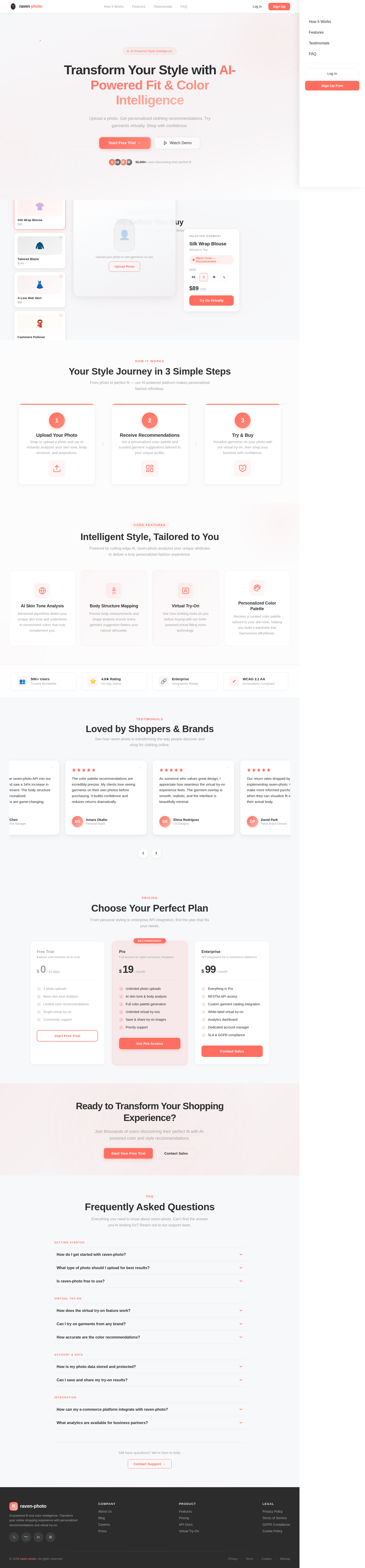
Transform Your Style with AI-Powered Fit & Color Intelligence
Upload a photo. Get personalized clothing recommendations. Try garments virtually. Shop with confidence.
Try Before You Buy
Select a garment and see it on your photo instantly
Silk Wrap Blouse
$89
Tailored Blazer
$149
A-Line Midi Skirt
$68
Cashmere Pullover
$120
Upload your photo to see garments on you
Selected Garment
Silk Wrap Blouse
Women's Top
Size
Your Style Journey in 3 Simple Steps
From photo to perfect fit — our AI-powered platform makes personalized fashion effortless.
Upload Your Photo
Snap or upload a photo and our AI instantly analyzes your skin tone, body structure, and proportions.
Receive Recommendations
Get a personalized color palette and curated garment suggestions tailored to your unique profile.
Try & Buy
Visualize garments on your photo with our virtual try-on, then shop your favorites with confidence.
Intelligent Style, Tailored to You
Powered by cutting-edge AI, raven-photo analyzes your unique attributes to deliver a truly personalized fashion experience.
AI Skin Tone Analysis
Advanced algorithms detect your unique skin tone and undertones to recommend colors that truly complement you.
Body Structure Mapping
Precise body measurements and shape analysis ensure every garment suggestion flatters your natural silhouette.
Virtual Try-On
See how clothing looks on you before buying with our GAN-powered virtual fitting room technology.
Personalized Color Palette
Receive a curated color palette tailored to your skin tone, helping you build a wardrobe that harmonizes effortlessly.
Loved by Shoppers & Brands
See how raven-photo is transforming the way people discover and shop for clothing online.
raven-photo completely changed how I shop online. The AI skin tone analysis matched me with colors I never would have considered, and the virtual try-on is shockingly accurate.
We integrated the raven-photo API into our retail platform and saw a 34% increase in customer engagement. The body structure mapping and personalized recommendations are game-changing.
The color palette recommendations are incredibly precise. My clients love seeing garments on their own photos before purchasing. It builds confidence and reduces returns dramatically.
As someone who values great design, I appreciate how seamless the virtual try-on experience feels. The garment overlay is smooth, realistic, and the interface is beautifully minimal.
Our return rates dropped by 28% after implementing raven-photo. Customers make more informed purchasing decisions when they can visualize fit and color on their actual body.
I used to hesitate buying clothes online because nothing ever looked right on me. raven-photo showed me my ideal color palette and now every purchase feels like a perfect match.
Choose Your Perfect Plan
From personal styling to enterprise API integration, find the plan that fits your needs.
Free Trial
Explore core features at no cost
- ✓3 photo uploads
- ✓Basic skin tone analysis
- ✓Limited color recommendations
- ✓Single virtual try-on
- ✓Community support
Pro
Full access for style-conscious shoppers
- ✓Unlimited photo uploads
- ✓AI skin tone & body analysis
- ✓Full color palette generation
- ✓Unlimited virtual try-ons
- ✓Save & share try-on images
- ✓Priority support
Enterprise
API integration for e-commerce platforms
- ✓Everything in Pro
- ✓RESTful API access
- ✓Custom garment catalog integration
- ✓White-label virtual try-on
- ✓Analytics dashboard
- ✓Dedicated account manager
- ✓SLA & GDPR compliance
Ready to Transform Your Shopping Experience?
Join thousands of users discovering their perfect fit with AI-powered color and style recommendations.
Frequently Asked Questions
Everything you need to know about raven-photo. Can't find the answer you're looking for? Reach out to our support team.
Getting Started
Virtual Try-On
Account & Data
Integration
Still have questions? We're here to help.
Contact Support →
No comments yet. Be the first!