raven-login
 Rohit Ghosh (iclassyking)
Hi I am trying to create a replica for the login page of citi bank with a area for username and password and after the login page there needs to be a form that the customer fills providing their date of birth and first name and late name for additional verification then it proceeds to this pop up that I want to be integrated it is in zip format the code how to upload here


Comments (0)
Sign in to leave a comment
System Requirements
raven-login System Requirements Document
Introduction
The purpose of this document is to outline the system requirements for the "raven-login" project. This project aims to create a replica of the Citibank login page, including a username and password area, followed by an additional verification form.
System Overview
The "raven-login" project is designed to replicate the login experience of the Citibank website. The system will include a login page for user authentication and a subsequent form for additional user verification. The project will focus on replicating the visual elements of the Citibank login page while ensuring a seamless user experience.
Functional Requirements
- As a User, I should be able to enter my username and password on the login page.
- As a User, I should be able to submit my login credentials for authentication.
- As a User, I should be redirected to a form page after successful login.
- As a User, I should be able to enter my date of birth, first name, and last name for additional verification on the form page.
- As a User, I should receive feedback if my login or verification details are incorrect.
User Personas
- User: A person who needs to log in using their username and password and complete additional verification by providing personal details.
Core User Flows
- User navigates to the login page -> enters username and password -> submits credentials -> if successful, redirected to verification form -> enters date of birth, first name, and last name -> submits form for additional verification.
Visuals Colors and Theme
- primary: #004B87 (Deep Blue)
- primary_light: #5A9BD4 (Light Blue)
- secondary: #FF6F61 (Coral)
- accent: #FFD700 (Gold)
- highlight: #FFA500 (Orange)
- bg: #F0F0F0 (Light Grey)
- surface: rgba(255, 255, 255, 0.9) (White)
- text: #333333 (Dark Grey)
- text_muted: #777777 (Muted Grey)
- border: rgba(0, 75, 135, 0.2) (Light Blue)
Signature Design Concept
The homepage will feature an interactive "Digital Vault" concept. Upon landing, users will see a 3D vault door that rotates open as they scroll down, revealing the login form inside. This vault animation will be created using @react-three/fiber and @react-three/drei for a realistic 3D effect. As users hover over the login fields, subtle light reflections will animate across the vault's surface, enhancing the secure and premium feel of the site.
Interaction Model & Motion Direction
The landing page will use a "parallax" interaction model. The vault door will create a layered depth effect as users scroll, with the login form appearing naturally within the vault. This approach will provide a visually rich first impression, emphasizing security and sophistication.
Non-Functional Requirements
- The system should ensure secure handling of user credentials and personal information.
- The login and verification processes must be completed within 5 seconds to ensure a smooth user experience.
- The system should be compatible with major web browsers and responsive on mobile devices.
Tech Stack
- Frontend: React for Web
- Backend: Python, FastAPI
- Database: MySQL or MariaDB, using alembic for migrations
- Local orchestration: Docker, docker-compose
Assumptions and Constraints
- The project will replicate only the first two pages of the Citibank login process.
- The visual elements will be closely aligned with the Citibank login page for consistency.
- The system will not include the final pop-up integration as per the user's request.
Glossary
- User: An individual accessing the login system.
- Verification Form: A form requiring additional personal information for user verification.
- Parallax: A design technique where background images move slower than foreground images, creating a sense of depth.
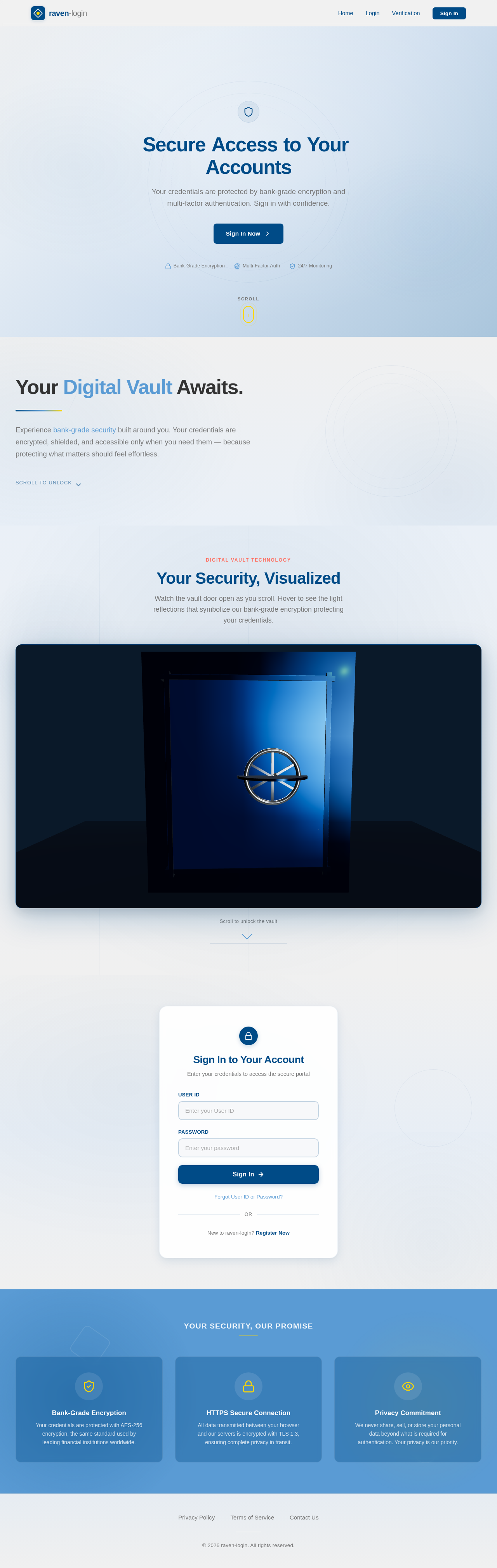
SecureAccesstoYourAccounts
Your credentials are protected by bank-grade encryption and multi-factor authentication. Sign in with confidence.
Sign In NowYour Digital Vault Awaits.
Experience bank-grade security built around you. Your credentials are encrypted, shielded, and accessible only when you need them — because protecting what matters should feel effortless.
Your Security, Visualized
Watch the vault door open as you scroll. Hover to see the light reflections that symbolize our bank-grade encryption protecting your credentials.
Sign In to Your Account
Enter your credentials to access the secure portal
Your Security, Our Promise
Bank-Grade Encryption
Your credentials are protected with AES-256 encryption, the same standard used by leading financial institutions worldwide.
HTTPS Secure Connection
All data transmitted between your browser and our servers is encrypted with TLS 1.3, ensuring complete privacy in transit.
Privacy Commitment
We never share, sell, or store your personal data beyond what is required for authentication. Your privacy is our priority.
SecureAccesstoYourAccounts
Your credentials are protected by bank-grade encryption and multi-factor authentication. Sign in with confidence.
Sign In NowYour Digital Vault Awaits.
Experience bank-grade security built around you. Your credentials are encrypted, shielded, and accessible only when you need them — because protecting what matters should feel effortless.
Your Security, Visualized
Watch the vault door open as you scroll. Hover to see the light reflections that symbolize our bank-grade encryption protecting your credentials.
Sign In to Your Account
Enter your credentials to access the secure portal
Your Security, Our Promise
Bank-Grade Encryption
Your credentials are protected with AES-256 encryption, the same standard used by leading financial institutions worldwide.
HTTPS Secure Connection
All data transmitted between your browser and our servers is encrypted with TLS 1.3, ensuring complete privacy in transit.
Privacy Commitment
We never share, sell, or store your personal data beyond what is required for authentication. Your privacy is our priority.
No comments yet. Be the first!