raven-calculator
 Diya Trivedi
create a simple single page design of calculator

Comments (0)
Sign in to leave a comment
System Requirements
System Requirements Document for raven-calculator
1. Introduction
raven-calculator is a simple, single-page calculator. A visitor opens one page and finds a working calculator: a display showing the running value, a keypad for digits and arithmetic operations, and a computed result. The product intent is deliberately narrow — one page, one tool, no accounts, no navigation, no surrounding application. The design must be simple, and the calculator must be contained entirely in a single page.
The audience is anyone who needs quick arithmetic and wants a calm, legible, unhurried tool rather than a clinical gadget or enterprise interface. The page is anonymous and public: no sign-in, no saved history, no personalization.
2. System Overview
raven-calculator is delivered as a single custom web page titled Calculator. It is the anonymous public entry surface and the only destination in the product. The page presents an editorial header (a small "raven" wordmark, a hairline rule, a one-line caption), an oversized serif headline, and the calculator panel itself — a serif display plus a 4×5 keypad with a rust equals key — followed by a short footnote line.
The only human actor is the Calculator User, who enters numbers and operations and reads the computed result. There are no other personas, no system-to-human handoffs, and no external or provider-owned surfaces. All computation happens in the page itself; there is no backend dependency for the accepted behavior.
2a. Product Interpretation and Delivery Boundary
The accepted product is a single anonymous page. Access is public and requires no identity: there is no account, no session continuity, no saved state, and no differentiated permissions. The calculator's working state (the current entry, the pending operation, the displayed result) lives only for the duration of the visit and is not persisted.
Everything described in this document is current. There are no accepted future requirements. The page does not include history, memory keys, scientific functions, unit conversion, currency, sharing, or any adjacent calculator capability, because none was requested. The design constraint of simplicity and the single-page constraint are binding: no additional pages, routes, or navigation may be introduced.
2b. Source Content Inventory
Not applicable — no reference directive supplies a content_source.
2c. Page Content and Component Coverage
Calculator
The single page, anonymously reachable, hosting the entire product.
- Information and state
- The running value, shown in a large Literata serif display in ink (#221E1A) on the paper panel (#FBF7EF). Initial state shows
0. - The pending operation, if any, indicated by the active operator key's rust ink underline.
- The current entry being typed, replacing the display once the user begins entering digits after an operation or a result.
- No history, no memory indicator, no secondary panels.
- The running value, shown in a large Literata serif display in ink (#221E1A) on the paper panel (#FBF7EF). Initial state shows
- Primary actions
- Enter digits
0–9and a decimal point. - Choose an arithmetic operator:
+,−,×,÷. - Press
=to compute and display the result. - Clear the calculator with
C(orAC) to return to0.
- Enter digits
- Supporting actions
- Toggle the sign of the current entry (
±) if present in the keypad layout. - Delete the last entered digit (backspace) if present in the keypad layout.
- Focus and keyboard interaction: the panel and keys are focusable, with a rust focus ring; physical keyboard digits and operators map to the same actions.
- Toggle the sign of the current entry (
- Domain entities
- Entry: the number currently being typed.
- Operand: a stored number awaiting an operation.
- Operator: the pending arithmetic operation.
- Result: the computed value shown in the display.
- Component responsibilities
- Header strip: "raven" wordmark in Literata, full-width hairline rule beneath, one-line caption in muted warm grey.
- Headline block: "A small, well-made calculator." in Literata at
clamp(34px, 6vw, 61px), ragged two-line setting, with the hand-drawn ink-and-rust feather-plus spot mark tucked into the second line. - Calculator panel: paper surface, 1px warm rule, 10–14px radii, single soft warm offset shadow; contains the display and the keypad.
- Display: Literata serif running value at
clamp(32px, 7vw, 56px), right-aligned, ink; separated from the keypad by a hairline rule. - Keypad: 4×5 grid of equal keys with Work Sans tabular numerals at 20–22px; the equals key spans two rows and is the only rust (#C4512B) element besides the spot mark and focus ring; operator keys show a rust ink underline when active.
- Footnote line: a short caption in muted warm grey beneath the panel.
- States
- Loading: the page renders immediately; the title and panel fade-and-rise 240ms ease-out, staggered 80ms. Under
prefers-reduced-motion, both resolve instantly to their final state. - Empty / initial: display shows
0; no operator active. - Success: after
=, the display shows the computed result; the operator underline clears; the next digit begins a new entry. - Error: division by zero or an unparseable expression shows a clear, non-blocking message in the display (for example
Cannot divide by zero) and leaves the calculator usable; pressingCor entering a digit recovers to a normal state. - Recovery:
Calways returns the calculator to0with no pending operation; the page never becomes stuck.
- Loading: the page renders immediately; the title and panel fade-and-rise 240ms ease-out, staggered 80ms. Under
3. Functional Requirements
FR-1 — Open the calculator page (explicit) As a Calculator User, I should open a single page that presents a working calculator, so that I can perform quick arithmetic without navigating anywhere else.
- Trigger: the visitor loads the page.
- Observable result: the page renders the header, headline, calculator panel with display showing
0, and footnote. - Access: anonymous, public, no identity required.
- Failure/recovery: if the page fails to render, reloading restores the same initial state; no data is lost because none is stored.
- Continuation: the user may begin entering digits.
FR-2 — Enter digits and a decimal point (explicit)
As a Calculator User, I should press digit keys 0–9 and a decimal point, so that I can build the number I want to calculate with.
- Trigger: pressing a digit or decimal key, or typing the corresponding physical key.
- Observable result: the display updates to show the entry, replacing
0on first digit and appending thereafter; a second decimal point in the same entry is ignored. - Access: anonymous.
- Failure/recovery: none material; the display always reflects the current entry.
- Continuation: the user may choose an operator or press
=.
FR-3 — Choose an arithmetic operator (explicit)
As a Calculator User, I should press +, −, ×, or ÷, so that I can specify the operation to perform.
- Trigger: pressing an operator key.
- Observable result: the chosen operator key shows a rust ink underline that draws in beneath the symbol; the current entry is stored as the first operand; the next digit begins a new entry.
- Access: anonymous.
- Failure/recovery: pressing a different operator before entering a second operand replaces the pending operator; the underline moves accordingly.
- Continuation: the user enters the second operand.
FR-4 — Compute and display the result (explicit)
As a Calculator User, I should press = to compute the pending operation, so that I can read the result.
- Trigger: pressing the equals key.
- Observable result: the display shows the computed result in the serif display; the operator underline clears; the result becomes the starting value for a subsequent operation.
- Access: anonymous.
- Failure/recovery: if no operation is pending,
=leaves the display unchanged; if the operation is invalid (for example division by zero), the display shows a clear message and the calculator remains usable. - Continuation: the user may chain another operation, enter a new number, or clear.
FR-5 — Clear the calculator (explicit)
As a Calculator User, I should press C to reset the calculator, so that I can start a fresh calculation.
- Trigger: pressing the clear key.
- Observable result: the display returns to
0; any pending operator underline clears; any stored operand is discarded. - Access: anonymous.
- Failure/recovery:
Calways succeeds and is available in every state, including after an error. - Continuation: the user begins a new entry.
FR-6 — Keyboard operation and focus feedback (required_inference) As a Calculator User, I should be able to operate the calculator with the physical keyboard and see a clear focus indicator, so that the tool is usable and accessible without a pointer.
- Trigger: focusing a key or pressing a mapped physical key.
- Observable result: the focused key shows a rust focus ring; digits, operators,
=, and clear respond to their physical-key equivalents. - Access: anonymous.
- Failure/recovery: unmapped keys are ignored without changing state.
- Continuation: the user continues entering or computing.
FR-7 — Readable, responsive presentation (explicit) As a Calculator User, I should see the headline, wordmark, labels, display value, and every key fully inside the viewport and their containers at 375px, 768px, and 1280px, so that nothing I need to read or press is cropped or covered.
- Trigger: viewing the page at any supported width.
- Observable result: text wraps or scales (using
clamp(...)with mobile sizes) to fit; at 1280px the calculator occupies columns 3–10 of a 12-column grid with the headline asymmetrically to its left; at 768px the layout stacks to a single centred column; at 375px everything is one full-width column with 20px gutters. - Access: anonymous.
- Failure/recovery: decoration and the spot mark may be repositioned or cropped, but never over readable text or controls.
- Continuation: the user operates the calculator normally at any width.
4. User Personas
Calculator User
Product context. A visitor who arrives at the single raven-calculator page needing quick arithmetic — a sum, a difference, a product, a quotient — and wants a calm, legible tool rather than a gadget. The page is anonymous and public; the user has no account, no saved history, and no expectation that their calculation persists after they leave.
Primary goal. Enter numbers and an operation, press =, and read a correct result without friction or distraction.
Distinct accepted responsibilities.
- Enter digits and a decimal point to build numbers.
- Choose an arithmetic operator and see which one is active.
- Press
=to compute and read the result. - Press
Cto reset and start over. - Operate the calculator by keyboard as well as pointer, with visible focus feedback.
- Read the page comfortably at any viewport width.
Relevant inputs and decisions. Which digits to enter, which operator to apply, when to compute, and when to clear. The user decides when a calculation is finished and whether to chain another operation from the result.
Interactions with other accepted participants. None. The Calculator User is the sole human actor; there are no counterparties, recipients, or approvers. The page itself is the only surface.
Observable success. The display shows the correct result after =; the active operator is clearly indicated; C reliably returns the calculator to 0; the page remains readable and operable at 375px, 768px, and 1280px.
5. Core User Flows
Flow 1 — Perform a basic calculation
- The Calculator User opens the raven-calculator page. The header, headline, and calculator panel fade-and-rise into place (instantly under reduced motion). The display shows
0. - The user presses digit keys to enter the first number. The display updates with each key press.
- The user presses an operator key (for example
+). A rust ink underline draws in beneath the symbol, and the first number is stored as the operand. - The user enters the second number. The display shows the new entry.
- The user presses
=. The display shows the computed result in the serif display, and the operator underline clears. - Continuation: the user may chain another operation from the result, enter a new number, or press
Cto reset to0.
Flow 2 — Recover from an invalid operation
- The user enters a number, chooses
÷, and enters0as the second operand. - The user presses
=. The display shows a clear message such asCannot divide by zero; the calculator remains responsive. - Recovery: the user presses
C(or begins a new digit entry), and the display returns to a normal state —0afterC, or the new entry. - The user continues with a valid calculation.
Flow 3 — Operate by keyboard
- The user tabs to the calculator panel. The focused key shows a rust focus ring.
- The user types digits and an operator on the physical keyboard; the display and operator underline respond exactly as with pointer presses.
- The user presses the physical
=key (or its mapped equivalent) to compute, and reads the result. - Continuation: the user continues typing or clears with the mapped clear key.
Flow 4 — Read and use the page at any width
- The user opens the page at 1280px: the headline sits asymmetrically to the left of the calculator panel, which occupies columns 3–10.
- At 768px, the layout stacks to a single centred column with the headline above the panel.
- At 375px, everything is one full-width column with 20px gutters; the headline, display value, and every key remain fully visible and pressable.
- The user performs a calculation normally at any of these widths.
6. Visuals, Colors and Theme
Muse and headline. Warm editorial arithmetic after Frank Chimero. The page is a small, well-made calculator that feels like a well-set page of a thoughtful book — calm, humane, legible — not clinical gadgetry or enterprise software.
Mode. Light mode only.
Color tokens (exact hex by role).
| Role | Hex | Usage |
|---|---|---|
| Background (cream paper) | #F4EDE1 | Dominant page ground (~70%) |
| Surface (paper) | #FBF7EF | Calculator panel and key surfaces (~20%) |
| Text (ink) | #221E1A | All reading text and the display (~7%) |
| Primary (dusty navy) | #1F3A5F | Secondary ink for labels, rules, operator key text |
| Accent (rust) | #C4512B | Equals key, focus ring, spot mark accent, active operator underline (~3%) |
| Muted (warm grey) | #8A7E6E | Captions, secondary labels, hairline rules |
Body text on cream and on paper both exceed 4.5:1 contrast.
Typography.
- Headings: Literata at 500–600 weight — page title and section openers; generous size, tight-ish leading (1.05–1.15), sentence case, no all-caps.
- UI copy and key labels: Work Sans at 400/500 with slightly open tracking (+0.01em); tabular numerals on the keypad.
- Calculator display: Literata at large size for the running value — the signature typographic gesture.
- Body: Work Sans.
- Scale: 1.25 modular on a 16px base — 14 / 16 / 20 / 25 / 31 / 39 / 49 / 61. Display headline
clamp(34px, 6vw, 61px); calculator valueclamp(32px, 7vw, 56px); key labels 20–22px; body 16px; captions 14px.
Shape language. Soft, hand-considered rectangles: panel and keys use 10–14px radii, never pills. Hairline 1px rules in muted warm grey separate the display from the keypad and the header from the tool. One hand-drawn-feeling illustrated spot mark (a small ink-and-rust sketch of a plus/raven feather motif) sits beside the title. No blobs, no glossy gradients, no sticker shadows — depth comes from a single soft, warm offset shadow under the calculator panel only.
Layout. A single centred column on cream paper with an editorial measure: header strip (small "raven" wordmark in Literata, a hairline rule, a one-line caption), then the calculator panel as the hero object, then a short footnote line. On desktop, a 12-column grid with the calculator occupying columns 3–10 and the title block sitting asymmetrically to its left; at 768px it stacks to a single centred column; at 375px everything is one full-width column with 20px gutters. The keypad is a 4×5 grid of equal keys with the equals key spanning two rows in rust. All labels and values wrap or scale to stay inside their containers.
Imagery. No photography. Warm flat illustration only: a small hand-drawn ink-and-rust spot mark (a stylised raven feather crossed with a plus sign) beside the title, and a faint ruled-paper texture at very low opacity on the page ground. The interface itself — the serif display and the tidy keypad — is the main visual.
Avoid. Blue-indigo accent on white or near-white; Inter, Roboto, Arial, Helvetica, Open Sans, Lato, Poppins, or system-ui for headings or body; gradient-blob heroes, glossy 3D keys, neon glows, or dark-mode gadget styling; grids of identical hover-lift cards or sticker shadows; pill-shaped buttons or fully rounded keys; photography or stock people; bouncy, springy, or looping decorative motion; crowding the page.
7. Signature Design Concept
The first screen is an editorial page spread, not a SaaS hero. Top-left, a small "raven" wordmark in Literata with a hairline rule running the full width beneath it. Left of centre at desktop, an oversized serif headline — "A small, well-made calculator." — set in Literata at clamp(34px, 6vw, 61px) with a two-line ragged setting and a rust hand-drawn feather-plus mark tucked into the second line. To its right, the calculator panel: cream paper surface with a 1px warm rule, a large Literata display showing 0 in ink, and the 4×5 keypad with one rust equals key spanning two rows. The panel casts a single soft warm shadow onto the cream ground. On mobile the headline sits above the full-width panel.
The signature moves are: the serif calculator display, so the running value reads like a line of set type rather than a digital readout; the equals key as the only rust element, spanning two keypad rows as one deliberate asymmetric block; the edge-to-edge hairline rule under the wordmark with the headline sitting asymmetrically left of the panel like a book's title page facing its content; the hand-drawn ink-and-rust feather-plus spot mark as the only illustration; and operator keys that show a rust ink underline drawing in beneath the symbol when active, instead of a filled highlight.
This concept recomposes only accepted content, states, and controls — the display, the keypad, the operator state, and the result — and introduces no new behavior or destination.
8. Interaction Model & Motion Direction
Interaction Model: Animated Motion Tempo: restrained Hero Dimensionality: flat
Landing Hero Motion Brief
- Focal subject. The calculator panel itself — the serif display and the 4×5 keypad with its single rust equals key — set against the cream paper ground, with the headline and feather-plus mark to its left.
- Input → transformation → outcome thesis. A key press (input) produces a 120ms colour/opacity transition on the key and, for operators, a soft rust ink-underline that draws in beneath the symbol (transformation); the display updates to show the entry or the computed result (outcome). On load, the title and panel fade-and-rise 240ms ease-out, staggered 80ms, settling into the composed editorial spread.
- Motion vocabulary. Gentle and mostly none, per Chimero: a 240ms ease-out fade-and-rise on page load for the title and panel (staggered 80ms), a 120ms colour/opacity transition on key press and focus, and a soft ink-underline that draws in under the active operator. No bounce, no particles, no looping animation.
- Composed first frame. Cream ground; top-left "raven" wordmark with a full-width hairline rule beneath; the oversized serif headline set ragged across two lines with the rust feather-plus mark tucked into the second line; the calculator panel to the right with the display showing
0and the keypad at rest; a short footnote line below. - Reduced-motion state. With
prefers-reduced-motion, all entrances resolve instantly to the final state and key feedback becomes an instant colour change; the page remains fully usable and readable.
9. Non-Functional Requirements
- NFR-1 — Simplicity (explicit). The design must be simple: one tool, one page, no surrounding application chrome, no navigation, no secondary panels.
- NFR-2 — Single page (explicit). The calculator must be contained in a single page. No additional routes, pages, or destinations may be introduced.
- NFR-3 — Anonymous public access (explicit via planning scope). The page requires no account, sign-in, or identity; there is no session continuity, saved state, or differentiated permission.
- NFR-4 — Responsive readability (explicit). Headlines, wordmarks, labels, numbers, and controls stay entirely inside the viewport and their containers at 375px, 768px, and 1280px, wrapping or scaling to fit; no other element covers any part of them.
- NFR-5 — Accessibility (required_inference). Body text on cream and on paper exceeds 4.5:1 contrast; keys are focusable with a visible rust focus ring; the calculator is operable by keyboard; reduced-motion preferences are honored.
- NFR-6 — Performance (required_inference). The page renders immediately with no backend dependency for the accepted behavior; computation is instantaneous and local to the page.
- NFR-7 — Visual constraints (explicit). The palette is cream, ink, navy, and rust only; the forbidden fonts and the generic indigo/blue-on-white SaaS template are excluded; radii stay 10–14px; no photography, glossy 3D keys, neon glows, or dark-mode gadget styling.
10. Tech Stack
- Frontend. React single-page application rendering the one Calculator page. Styling with CSS using the exact tokens in Section 6 (custom properties for the palette,
clamp(...)for type, CSS Grid for the 12-column desktop layout and the 4×5 keypad). Fonts: Literata and Work Sans loaded as web fonts. - Computation. Client-side only; no backend service is required for the accepted behavior.
- Storage. None. The calculator holds no persisted state.
- Deployment. Static hosting of the built single-page application. No Docker, docker-compose, or Kubernetes is required for the accepted scope.
11. Assumptions and Constraints
- A-1 (assumption). The keypad's 4×5 grid accommodates digits
0–9, a decimal point, the four operators,=, andC;±and backspace are included only if they fit the grid without crowding, and their absence does not violate any accepted requirement. - A-2 (assumption). Division by zero and unparseable expressions are surfaced as a clear, non-blocking display message; the exact wording is not specified by the user.
- A-3 (constraint). The page is anonymous and public; no identity, account, or persistence capability may be added.
- A-4 (constraint). The single-page constraint is binding: no additional pages, routes, or navigation.
- A-5 (constraint). The creative direction is authoritative for visuals, typography, layout, and motion; the forbidden palette and fonts in Section 6 are excluded.
- A-6 (assumption). No future requirements have been accepted; anything not described here is out of current scope.
12. Glossary
- Calculator User — the sole human actor: a visitor who enters numbers and operations and reads the computed result.
- Display — the large Literata serif area showing the running value or result.
- Entry — the number currently being typed.
- Operand — a stored number awaiting an operation.
- Operator — the pending arithmetic operation (
+,−,×,÷), indicated by a rust ink underline when active. - Result — the computed value shown after
=. - Keypad — the 4×5 grid of equal keys with the rust equals key spanning two rows.
- Spot mark — the hand-drawn ink-and-rust feather-plus illustration beside the title.
- Paper panel — the
#FBF7EFsurface holding the display and keypad, with a single soft warm shadow.
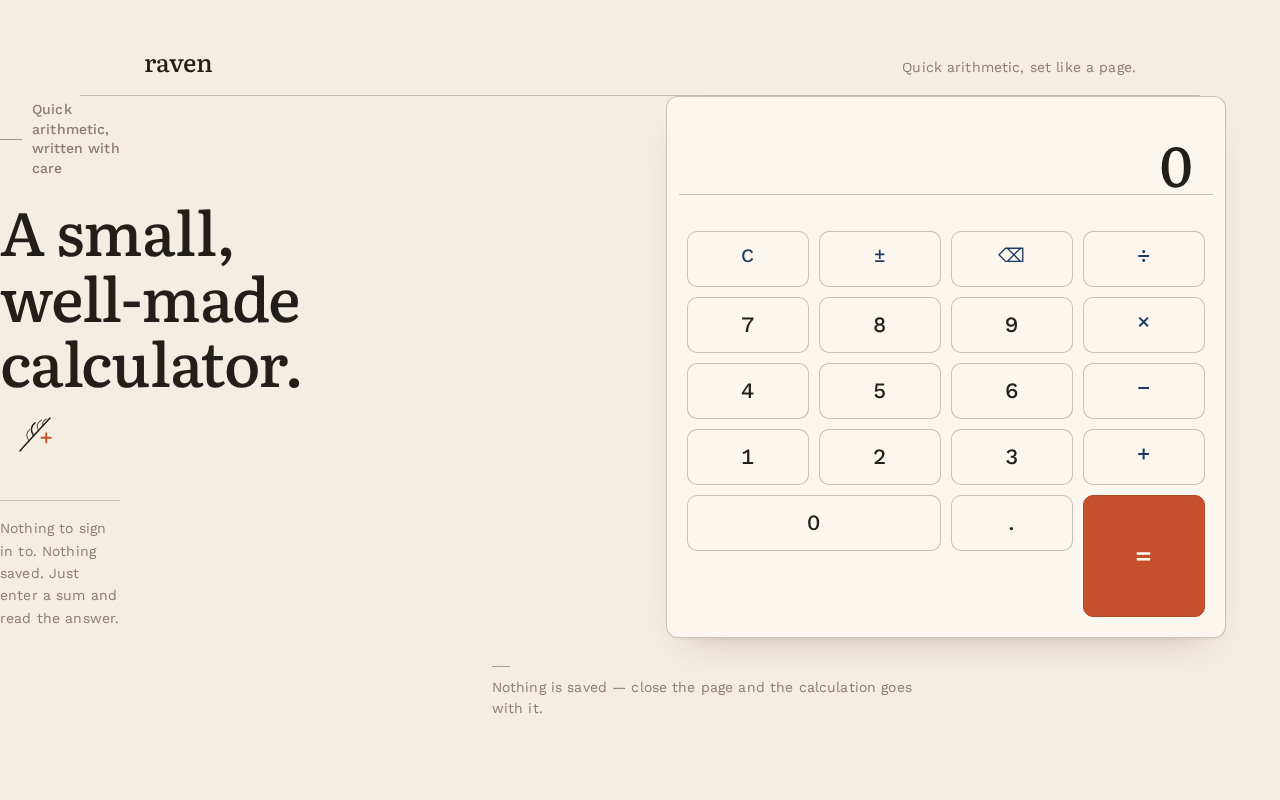
raven
Quick arithmetic, set like a page.
Quick arithmetic, written with care
A small,well-made calculator.
Nothing to sign in to. Nothing saved. Just enter a sum and read the answer.
0
Nothing is saved — close the page and the calculation goes with it.
raven
Quick arithmetic, set like a page.
Quick arithmetic, written with care
A small,well-made calculator.
Nothing to sign in to. Nothing saved. Just enter a sum and read the answer.
0
Nothing is saved — close the page and the calculation goes with it.
No comments yet. Be the first!