rapid-prompts
 Hussain Bekhushi
Portfolio prompts Prompt for type of website: A personal portfolio site for a freelance graphic/UI designer to showcase projects and attract clients. Prompt for which website pages to include: Create the following pages for the portfolio website: Home, Portfolio pages with Categories, Services, About Me page, Client Testimonials, Blog, Contact Page. Prompts for portfolio websites design and branding: Clean, minimalist, lots of white space, monochrome base with one accent color (e.g., electric blue). Use bold typography, grid-based project layouts and subtle animations. Learn more: How does and AI website builder work? portfolio website prompts Pro expert tip to apply to your portfolio prompting, from Hani Safe, product lead (Showcase) at Wix: "An outstanding portfolio is all about storytelling. It’s not just a showcase of work but a narrative that weaves together a professional’s skills, creativity and personality. Features like dynamic presets, AI setup and beautiful templates let creators bring their stories to life, ensuring that every portfolio not only stands out for its aesthetic appeal but also tells a compelling story about the creator behind it." Prompts for website navigation and hierarchy: Include top navigation with: Home | Portfolio | Services | About | Blog | Contact. Highlight Work with me as a persistent button in the header. Prompts for website functionality: Create a fliterable portfolio gallery Include project detail pages with images, descriptions and results Add a simple contact form with project brief fields (budget, timeline, type of work) Create a newsletter signup Include social links (Dribbble, Behance, LinkedIn, Instagram) in the footer Create your own portfolio with our AI portfolio generator.


Comments (0)
Sign in to leave a comment
System Requirements
System Requirements Document for rapid-prompts
1. Introduction
rapid-prompts is the personal portfolio website of a freelance graphic/UI designer. Its purpose is to showcase the designer's projects and attract clients: a prospective client should be able to understand the designer's taste and judgement within seconds, browse and filter real project work, read the story behind the designer, review services and social proof, and then start a working relationship through a project inquiry or newsletter signup.
The site is a public, anonymous-access marketing and portfolio surface. It is authored and maintained by the designer (the site owner) and read by prospective clients — marketing leads, founders, and creative directors — who are scanning for craft and editorial judgement. The design brief is explicit: clean and minimalist, generous white space, a monochrome base with a single accent colour, bold typography, grid-based project layouts, and subtle animations. Storytelling is the organising principle: the portfolio is not a gallery of artefacts but a narrative that weaves together the designer's skills, creativity, and personality.
2. System Overview
rapid-prompts is a first-party, application-owned website delivered as custom UI. All pages are publicly reachable without an account; there is no sign-in, no dashboard, and no differentiated permission model. The site owner's authoring work (adding projects, project images, descriptions, results, services, testimonials, and blog posts) is content maintenance of the published site rather than a separate authenticated product surface within this scope.
Current actors:
- Freelance Graphic/UI Designer (Site Owner) — the author of the portfolio; owns the published project work, service descriptions, personal story, testimonials, and blog content.
- Prospective Client — the anonymous visitor who browses and filters projects, reads project detail pages, services, testimonials, and blog posts, and either submits a project inquiry through the contact form or signs up for the newsletter.
Current accepted behaviour: a filterable portfolio gallery organised by category; project detail pages carrying images, descriptions, and results; a services page; an About Me page; a client testimonials page; a blog; a contact page owning a simple inquiry form with project brief fields (budget, timeline, type of work); a newsletter signup with its own confirmation destination; persistent top navigation (Home | Portfolio | Services | About | Blog | Contact) with a persistent "Work with me" button in the header; and footer social links limited to Dribbble, Behance, LinkedIn, and Instagram.
Narrow exclusions: no e-commerce, no client accounts, no project management tooling, no comment system, no multi-author publishing, and no social network beyond the four named footer links. The site is a portfolio and inquiry surface, not a business operations platform.
2a. Product Interpretation and Delivery Boundary
Everything in this document is current and in scope. The site is delivered as a public, first-party website owned by the application; the prospective client never needs an account to read work or to make contact, and the designer's authoring of portfolio content is treated as maintenance of the published site rather than a separate authenticated product.
The delivery boundary is deliberately narrow. The site presents work, tells the designer's story, and captures two kinds of intent: a project inquiry (with budget, timeline, and type of work) and a newsletter subscription. It does not process payments, does not run a client portal, and does not host a community. Social presence is outbound only — the four named footer links hand the visitor off to Dribbble, Behance, LinkedIn, and Instagram, which remain external destinations owned by those providers.
No future-horizon requirements were stated by the user; nothing in this document is deferred.
2b. Source Content Inventory
Not applicable. No reference directive declares content_source; the Hani Safe (Wix Showcase) expert tip is supplied as domain_context and feature_reference guidance only and contributes no factual entities, collections, or media references.
2c. Page Content and Component Coverage
Home
- Information and state: The public entry surface. A full-viewport editorial masthead carrying the designer's discipline or name at display scale, a one-sentence positioning line, and a tall full-bleed project image plate as decoration. Below the masthead: a numbered section index ("01 — Selected work") on a full-width hairline, a selection of featured projects, a short services summary, a testimonial excerpt, and a closing invitation to work together. No loading state is required for static content; the featured project selection renders from the published project set.
- Primary actions: Enter the portfolio ("Selected work"), open a featured project, follow the persistent "Work with me" button to the Contact Page, and use the top navigation.
- Supporting actions: Read the services summary, read the testimonial excerpt, follow footer social links, and reach the newsletter signup.
- Domain entities: Project (title, category, cover image, caption), Service (name, short description), Testimonial (quote, client attribution), Site Owner profile (name, discipline, positioning line).
- Component responsibilities: Persistent header (six nav links, "Work with me" pill, hairline that appears on scroll); masthead (display headline, positioning line with one accent word, decorative image plate, baseline rule with section index); featured work grid (asymmetric, breaking its own grid once per screen); services summary block; testimonial excerpt block; closing call-to-action block; footer (social links, newsletter entry point).
- States: Empty — if no projects are published, the featured work section shows a short editorial placeholder line rather than an empty grid. Success — featured projects render as sharp-cornered white plates with caption blocks. Error/recovery — if a project image fails to load, the plate holds its aspect ratio and shows the project title and caption so the section remains readable and navigable.
Portfolio
- Information and state: The filterable gallery of all published projects, organised by category. A filter chip row sits above the grid with an underlined count beside it (for example, "Identity · 6"). The grid is a strict 12-column layout that deliberately breaks its rhythm — one project spanning wide with a tall image, the next narrow with a short one — so no two rows read as identical tiles.
- Primary actions: Select a category filter chip; open a project detail page; clear the active filter back to all work.
- Supporting actions: Read the per-category count, follow the persistent "Work with me" button, and use the top navigation.
- Domain entities: Project (title, category, cover image, caption, detail-page link), Category (name, project count), active filter state.
- Component responsibilities: Filter chip row (0px-radius ink rectangles with white all-caps labels; the active chip fills with the accent colour); category count label; project grid (asymmetric, sharp-cornered white plates, caption block below each plate); persistent header; footer.
- States: Loading — the grid holds its layout with plate-shaped placeholders while project data resolves. Empty (no projects at all) — an editorial line stating that work is being prepared, with a link to the Contact Page. Empty (filtered) — the selected chip stays visibly active and the grid area states that no projects match the selected category, with a one-click way to clear the filter. Success — the grid re-flows with a 120ms stagger as the filter changes. Error/recovery — if project data fails to load, the page shows a retry action and keeps the filter row usable.
Project Details
- Information and state: A single project presented as an editorial case study: a title block, a metadata line (category, and any client or year detail the designer publishes), a sequence of full-bleed image plates, a written description of the work, and a results section stating the outcome. The storytelling emphasis applies here most strongly — the page reads as a narrative of the project, not a caption under a picture.
- Primary actions: Read the project narrative and results; move to the next or previous project; follow the persistent "Work with me" button to start an inquiry.
- Supporting actions: Return to the Portfolio with the category context preserved; follow footer social links.
- Domain entities: Project (title, category, images, description, results), adjacent project references (previous/next).
- Component responsibilities: Project title and metadata block; image plate sequence; description block; results block; previous/next project navigation; persistent header; footer.
- States: Loading — title and metadata render first, with image plates holding their aspect ratios. Empty — if a project has no results recorded, the results block is omitted rather than shown empty. Success — images, description, and results all render in reading order. Error/recovery — an unknown or removed project slug shows a clear not-found state with a direct route back to the Portfolio; a failed image holds its plate and shows the project title so the narrative remains readable.
Services
- Information and state: The designer's offered services, each with a name and a description of what the engagement covers, set as an editorial list rather than a pricing table. One service name carries the accent colour as the section's single word-level highlight.
- Primary actions: Read the service descriptions; follow the persistent "Work with me" button to the Contact Page to inquire about a specific service.
- Supporting actions: Cross-reference the portfolio for examples of the work; read testimonials.
- Domain entities: Service (name, description), Site Owner profile.
- Component responsibilities: Numbered section index; service list blocks; inquiry call-to-action; persistent header; footer.
- States: Empty — if no services are published, the page shows a short editorial statement and routes the visitor to the Contact Page. Success — each service renders with its name and description. Error/recovery — a failed load shows a retry action without losing the page's navigation.
About Me
- Information and state: The designer's professional story and identity: a high-contrast black-and-white portrait against the off-white ground, a narrative of skills, creativity, and personality, and the working approach. This page carries the storytelling mandate in its most personal form.
- Primary actions: Read the designer's story; follow the persistent "Work with me" button to the Contact Page.
- Supporting actions: Move from the story into the portfolio or services; follow footer social links.
- Domain entities: Site Owner profile (portrait, narrative, skills, approach).
- Component responsibilities: Portrait plate; narrative blocks; skills or approach list; inquiry call-to-action; persistent header; footer.
- States: Empty — if the narrative is not yet published, the page shows the portrait and a short holding statement with a route to the portfolio. Success — portrait and narrative render in reading order. Error/recovery — a failed portrait load holds the plate dimensions so the layout does not collapse.
Client Testimonials
- Information and state: Social proof from past clients: quotes with client attribution, set as editorial pull-quotes. One word in a featured quote carries the accent colour.
- Primary actions: Read testimonials; follow the persistent "Work with me" button to the Contact Page.
- Supporting actions: Cross-reference the projects a testimonial refers to; read services.
- Domain entities: Testimonial (quote, client name, client role or company, optional related project).
- Component responsibilities: Numbered section index; testimonial quote blocks; optional related-project links; inquiry call-to-action; persistent header; footer.
- States: Empty — if no testimonials are published, the page shows a short editorial statement and routes the visitor to the portfolio and contact page. Success — quotes render with attribution. Error/recovery — a failed load shows a retry action while keeping navigation intact.
Blog
- Information and state: The designer's blog posts, listed with title, date, and a short excerpt, presented as an editorial index.
- Primary actions: Open a blog post to read it; scan the post index.
- Supporting actions: Follow the persistent "Work with me" button; move from a post into the portfolio.
- Domain entities: Blog post (title, date, excerpt, body).
- Component responsibilities: Numbered section index; post index list; post reading view; persistent header; footer.
- States: Loading — the index holds its layout while posts resolve. Empty — if no posts are published, the page shows a short editorial statement with a route to the portfolio. Success — posts render in reverse-chronological order. Error/recovery — an unknown post slug shows a not-found state with a route back to the Blog index; a failed index load shows a retry action.
Contact Page
- Information and state: The project inquiry surface. A simple contact form with project brief fields — budget, timeline, and type of work — alongside the designer's direct contact details. The form is the primary conversion point of the site.
- Primary actions: Complete and submit the project inquiry form; follow the persistent "Work with me" button (which lands here).
- Supporting actions: Read the services list to inform the type-of-work selection; follow footer social links.
- Domain entities: Inquiry (name, email, budget, timeline, type of work, message), Service (as the type-of-work reference set).
- Component responsibilities: Inquiry form (name, email, budget, timeline, type of work, message, submit); field labels and validation messaging; submission confirmation state; direct contact details block; persistent header; footer.
- States: Idle — the form renders with all project brief fields visible and labelled. Validation error — missing or malformed required fields are marked inline with a clear message and the entered values are preserved. Submitting — the submit control shows an in-progress state and prevents duplicate submission. Success — a confirmation state replaces or accompanies the form, stating that the inquiry was received and what happens next. Error/recovery — a failed submission shows a clear failure message, preserves every entered value, and offers a retry plus the direct contact details as a fallback.
Newsletter
- Information and state: The newsletter signup destination, owning the subscription interaction and its confirmation. It states what the subscriber will receive and how often.
- Primary actions: Enter an email address and subscribe; confirm the subscription.
- Supporting actions: Return to the portfolio or blog; follow footer social links.
- Domain entities: Subscription (email address, subscription status).
- Component responsibilities: Signup form (email field, subscribe control); confirmation state; description of the newsletter; persistent header; footer.
- States: Idle — the email field and subscribe control render with a clear label. Validation error — an invalid or missing email is marked inline with the entered value preserved. Submitting — the subscribe control shows an in-progress state and prevents duplicate submission. Success — a confirmation state states that the subscription was recorded and what to expect next. Error/recovery — a failed subscription shows a clear failure message, preserves the entered address, and offers a retry.
3. Functional Requirements
FR-1 — Portfolio showcase and client attraction (explicit) As a Freelance Graphic/UI Designer (Site Owner), I should have a personal portfolio website that showcases my projects and attracts clients, so that prospective clients can evaluate my work and reach out.
- Trigger: a prospective client arrives at the site.
- Observable result: the site presents my projects, services, story, testimonials, and blog, and offers clear routes to inquire or subscribe.
- Continuation: the visitor moves into the portfolio or directly to the Contact Page.
- Acceptance: every accepted page is reachable from the persistent top navigation, and the "Work with me" button is present in the header on every page.
FR-2 — Filterable portfolio gallery (explicit) As a Prospective Client, I should be able to filter the portfolio gallery by category, so that I can quickly find work relevant to my needs.
- Trigger: I open the Portfolio page.
- Input: selection of a category filter chip.
- Observable result: the grid re-flows to show only projects in the selected category, the active chip is visibly filled with the accent colour, and a count is shown beside the chip row.
- Failure/recovery: if no projects match the selected category, the grid area states this and offers a one-click way to clear the filter; if project data fails to load, a retry action is offered and the filter row stays usable.
- Continuation: I open a project detail page from the filtered grid.
- Acceptance: filtering never loses the visitor's place, and clearing the filter restores the full gallery.
FR-3 — Project detail pages with images, descriptions, and results (explicit) As a Prospective Client, I should be able to open a project detail page that shows images, a description, and the results of the work, so that I can judge the quality and outcome of the designer's work.
- Trigger: I select a project from the portfolio gallery or a featured project on the Home page.
- Observable result: the project renders as an editorial case study with a title block, image plates, a written description, and a results section.
- Failure/recovery: an unknown or removed project shows a not-found state with a route back to the Portfolio; a failed image holds its plate and shows the project title so the narrative stays readable.
- Continuation: I move to the next or previous project, or follow "Work with me" to start an inquiry.
- Acceptance: images, description, and results all appear on the page; if no results are recorded, the results block is omitted rather than shown empty.
FR-4 — Services presentation (explicit) As a Prospective Client, I should be able to read the designer's offered services, so that I understand what engagements are available before I inquire.
- Trigger: I open the Services page.
- Observable result: each service renders with its name and a description of what the engagement covers.
- Failure/recovery: if no services are published, the page shows a short editorial statement and routes me to the Contact Page.
- Continuation: I follow "Work with me" to the Contact Page to inquire about a specific service.
- Acceptance: the services list is readable as an editorial list, not a pricing table.
FR-5 — About Me story (explicit) As a Prospective Client, I should be able to read the designer's professional story and identity, so that I can assess fit and personality before making contact.
- Trigger: I open the About Me page.
- Observable result: a high-contrast portrait and a narrative covering skills, creativity, and personality render in reading order.
- Failure/recovery: if the narrative is not yet published, the page shows the portrait and a short holding statement with a route to the portfolio; a failed portrait load holds the plate dimensions so the layout does not collapse.
- Continuation: I move into the portfolio or services, or follow "Work with me".
- Acceptance: the page reads as a personal narrative, not a résumé list.
FR-6 — Client testimonials (explicit) As a Prospective Client, I should be able to read testimonials from past clients, so that I have social proof of the designer's work.
- Trigger: I open the Client Testimonials page.
- Observable result: quotes render with client attribution, and where a testimonial relates to a project, a link to that project is available.
- Failure/recovery: if no testimonials are published, the page shows a short editorial statement and routes me to the portfolio and contact page.
- Continuation: I follow "Work with me" to the Contact Page.
- Acceptance: every displayed quote carries an attribution.
FR-7 — Blog (explicit) As a Prospective Client, I should be able to read the designer's blog posts, so that I can see how the designer thinks about the craft.
- Trigger: I open the Blog page.
- Observable result: posts are listed with title, date, and excerpt, and open into a readable post view.
- Failure/recovery: an unknown post slug shows a not-found state with a route back to the Blog index; a failed index load shows a retry action.
- Continuation: I move from a post into the portfolio or follow "Work with me".
- Acceptance: the index renders in reverse-chronological order.
FR-8 — Contact form with project brief fields (explicit) As a Prospective Client, I should be able to submit a simple contact form with project brief fields — budget, timeline, and type of work — so that I can start a working relationship with a clear brief.
- Trigger: I open the Contact Page, typically via the persistent "Work with me" button.
- Input: name, email, budget, timeline, type of work, and message.
- Observable result: on success, a confirmation state states that the inquiry was received and what happens next.
- Failure/recovery: missing or malformed required fields are marked inline with entered values preserved; a failed submission shows a clear failure message, preserves every entered value, and offers a retry plus the designer's direct contact details as a fallback.
- Continuation: the designer receives the inquiry and can respond to the prospective client.
- Acceptance: budget, timeline, and type of work are all present as fields on the form.
FR-9 — Newsletter signup (explicit) As a Prospective Client, I should be able to sign up for the newsletter, so that I can stay in touch with the designer's work.
- Trigger: I reach the newsletter signup from the footer or the Newsletter page.
- Input: my email address.
- Observable result: a confirmation state states that the subscription was recorded and what to expect next.
- Failure/recovery: an invalid or missing email is marked inline with the value preserved; a failed subscription shows a clear failure message, preserves the entered address, and offers a retry.
- Continuation: I return to the portfolio or blog.
- Acceptance: the signup states what the subscriber will receive and how often.
FR-10 — Footer social links (explicit) As a Prospective Client, I should find the designer's social links in the footer, so that I can follow the designer's work on the platforms I already use.
- Trigger: I reach the footer on any page.
- Observable result: links to Dribbble, Behance, LinkedIn, and Instagram are present in the footer.
- Continuation: I leave the site for the selected external platform.
- Acceptance: exactly these four platforms are linked, and they appear in the footer.
FR-11 — Persistent top navigation (explicit) As a Prospective Client, I should have a persistent top navigation with Home | Portfolio | Services | About | Blog | Contact, so that I can move between the site's sections from anywhere.
- Trigger: any page load.
- Observable result: the six named links are present in the header on every page, and the current section is identifiable.
- Continuation: I select a destination and land on it.
- Acceptance: the navigation contains exactly these six destinations in this order.
FR-12 — Persistent "Work with me" button (explicit) As a Prospective Client, I should see a persistent "Work with me" button in the header, so that I can start an inquiry from any point in the site.
- Trigger: any page load.
- Observable result: the "Work with me" button is present in the header on every page and routes to the Contact Page.
- Continuation: I land on the Contact Page with the inquiry form ready.
- Acceptance: the button remains visible in the header while scrolling.
FR-13 — Editorial storytelling presentation (explicit, from the Hani Safe domain guidance) As a Freelance Graphic/UI Designer (Site Owner), I should present my portfolio as a narrative that weaves together my skills, creativity, and personality, so that the site itself stands as the strongest case study in the room.
- Trigger: a visitor reads any page.
- Observable result: project detail pages read as case-study narratives with a description and results, the About Me page carries a personal story, and testimonials read as editorial pull-quotes.
- Continuation: the visitor moves from story into inquiry.
- Acceptance: storytelling is expressed through the presentation of accepted content only; it introduces no additional capability.
FR-14 — Designer publishes and maintains portfolio content (required_inference) As a Freelance Graphic/UI Designer (Site Owner), I should be able to publish and maintain my projects, project images, descriptions, results, services, testimonials, and blog posts, so that the portfolio the prospective client reads stays accurate and current.
- Trigger: I have new or updated work to present.
- Observable result: the published project set, services list, testimonials, and blog posts reflect my current work, and the portfolio gallery's categories and counts update accordingly.
- Failure/recovery: if a project image or asset is unavailable, the affected plate holds its dimensions and shows the project title so the page remains readable.
- Continuation: prospective clients see the updated work on the Portfolio, Project Details, Services, Client Testimonials, and Blog pages.
- Acceptance: this is content maintenance of the published site; it introduces no separate authenticated product surface, no client accounts, and no multi-author workflow.
4. User Personas
Freelance Graphic/UI Designer (Site Owner)
Product context. The designer is a solo practitioner whose portfolio is their primary business development asset. The site is not a side project — it is the room where the designer's taste is judged. Prospective clients arrive from referrals, social platforms, and search, and they decide within seconds whether the work is worth a conversation.
Primary goal. Showcase projects and attract clients: convert a scanning visitor into a project inquiry with a usable brief.
Distinct accepted responsibilities. The designer owns the published body of work — projects with images, descriptions, and results — and the categories those projects are organised under, which drive the filterable gallery and its counts. The designer owns the services list that tells a prospective client what engagements are available. The designer owns the About Me narrative that carries skills, creativity, and personality. The designer owns the testimonials that provide social proof, and the blog posts that show how the designer thinks about the craft. The designer also owns the framing of the inquiry: the contact form's project brief fields (budget, timeline, type of work) exist so that incoming inquiries arrive with enough context to be answered well.
Relevant inputs and decisions. Which projects to publish and how to categorise them; which images represent each project; what results to state for each project; which services to list and how to describe them; what personal narrative to tell; which testimonials to feature; what to write about on the blog; and how the newsletter is described to prospective subscribers.
Interactions with other accepted participants. The designer's published work is what the Prospective Client reads, filters, and evaluates. The designer receives the project inquiry the prospective client submits through the contact form, and the newsletter subscription the prospective client records. The designer's footer social links hand the prospective client off to Dribbble, Behance, LinkedIn, and Instagram, which remain external platforms.
Observable success. A prospective client can filter to relevant work, read a project as a case study with a stated result, understand the services and the designer's story, and submit an inquiry with budget, timeline, and type of work — without ever needing an account.
Prospective Client
Product context. The prospective client is a marketing lead, founder, or creative director evaluating a freelance designer. They are scanning for taste and judgement under time pressure, often on a phone, often comparing several designers in the same sitting. They have a real project in mind and a rough sense of budget and timing.
Primary goal. Decide quickly whether this designer is worth a conversation, and if so, start that conversation with a clear brief.
Distinct accepted responsibilities. The prospective client browses and filters the portfolio gallery by category to find work relevant to their own project. They open project detail pages and read the images, description, and results to judge outcome quality, not just aesthetics. They read the services page to understand what engagements are available, the About Me page to assess fit and personality, the testimonials for social proof, and the blog to see how the designer thinks. They then either submit a project inquiry with budget, timeline, and type of work, or sign up for the newsletter to stay in touch.
Relevant inputs and decisions. Which category to filter by; which projects to open; whether the stated results are convincing; whether the services match the work they need; whether the designer's story and testimonials build enough trust; what budget, timeline, and type of work to state in the brief; and whether to inquire now or subscribe and wait.
Interactions with other accepted participants. The prospective client reads the designer's published work and story, and their inquiry and subscription are received by the designer. Their footer social links take them out to Dribbble, Behance, LinkedIn, and Instagram, which are external destinations owned by those providers.
Observable success. They find relevant work through filtering, read at least one project as a complete case study with a stated result, and either see a confirmation that their inquiry was received with a clear statement of what happens next, or see a confirmation that their newsletter subscription was recorded.
5. Core User Flows
Flow 1 — Prospective Client: scan the site and judge the work (Home → Portfolio)
- The prospective client lands on the Home page. The masthead presents the designer's discipline at display scale with a one-sentence positioning line, and a tall full-bleed project image plate sits to the right as decoration.
- They scroll past the baseline hairline carrying the numbered section index "01 — Selected work" and see a selection of featured projects laid out in an asymmetric grid that breaks its own rhythm.
- They select Portfolio from the persistent top navigation.
- The Portfolio page shows the full filterable gallery with a filter chip row and an underlined count beside it (for example, "Identity · 6").
- Result: the prospective client has seen the designer's positioning and a representative slice of the work. Next step: filter the gallery to the category relevant to their project.
Flow 2 — Prospective Client: filter the gallery to relevant work
- On the Portfolio page, the prospective client selects a category filter chip.
- The active chip fills with the accent colour, the grid re-flows with a 120ms stagger, and the count beside the chip row updates to the selected category.
- If no projects match the selected category, the grid area states this and offers a one-click way to clear the filter; the active chip remains visibly selected so the state is never ambiguous.
- If project data fails to load, the page shows a retry action and the filter row stays usable.
- Result: the gallery shows only projects in the chosen category. Next step: open a project.
Flow 3 — Prospective Client: read a project as a case study
- From the filtered Portfolio grid, the prospective client opens a project.
- The Project Details page renders the title block and metadata first, then the image plates, then the written description, then the results section.
- The prospective client reads the narrative of the work and the stated outcome. If the project has no results recorded, the results block is simply absent rather than shown empty.
- If an image fails to load, its plate holds its dimensions and shows the project title, so the narrative remains readable.
- If the project slug is unknown or the project has been removed, a not-found state appears with a direct route back to the Portfolio.
- Result: the prospective client has judged the work on both craft and outcome. Next step: move to the next or previous project, or start an inquiry.
Flow 4 — Prospective Client: understand services, story, and proof
- The prospective client selects Services from the top navigation and reads each service with its name and description of what the engagement covers. One service name carries the accent colour as the section's single word-level highlight.
- They select About Me and read the designer's narrative alongside a high-contrast portrait, assessing skills, creativity, and personality.
- They select Client Testimonials and read quotes with client attribution, following a related-project link where one is offered.
- They select Blog and scan the post index, opening a post to read it.
- Result: the prospective client has enough context to decide whether to make contact. Next step: start an inquiry or subscribe.
Flow 5 — Prospective Client: submit a project inquiry
- From any page, the prospective client selects the persistent "Work with me" button in the header, which routes to the Contact Page.
- The Contact Page presents the inquiry form with its project brief fields: name, email, budget, timeline, type of work, and message.
- The prospective client completes the fields. If a required field is missing or malformed, it is marked inline with a clear message and every entered value is preserved.
- They submit. The submit control shows an in-progress state and prevents duplicate submission.
- On success, a confirmation state states that the inquiry was received and what happens next.
- If the submission fails, a clear failure message appears, every entered value is preserved, and a retry is offered alongside the designer's direct contact details as a fallback.
- Result: the designer receives the inquiry with budget, timeline, and type of work attached. Next step: the designer responds to the prospective client.
Flow 6 — Prospective Client: sign up for the newsletter
- The prospective client reaches the newsletter signup from the footer or the Newsletter page, which states what the subscriber will receive and how often.
- They enter their email address and subscribe. If the address is invalid or missing, it is marked inline with the value preserved.
- The subscribe control shows an in-progress state and prevents duplicate submission.
- On success, a confirmation state states that the subscription was recorded and what to expect next.
- If the subscription fails, a clear failure message appears, the entered address is preserved, and a retry is offered.
- Result: the prospective client is subscribed. Next step: they return to the portfolio or blog.
Flow 7 — Prospective Client: follow the designer on an external platform
- The prospective client reaches the footer on any page.
- The footer presents links to Dribbble, Behance, LinkedIn, and Instagram.
- They select one and leave the site for that external platform, which is owned and operated by that provider.
- Result: the prospective client continues following the designer's work off-site.
Flow 8 — Freelance Graphic/UI Designer (Site Owner): publish and maintain the portfolio
- The designer has new or updated work to present.
- They publish the project with its category, images, description, and results. The project appears in the Portfolio gallery under its category, and the category count beside the filter chip row updates.
- They update the Services list, the About Me narrative, the Client Testimonials, and the Blog posts as their practice evolves.
- If a project image or asset becomes unavailable, the affected plate holds its dimensions and shows the project title so the page remains readable rather than collapsing.
- Result: the published site reflects the designer's current work. Next step: prospective clients see the updated work on the Portfolio, Project Details, Services, Client Testimonials, and Blog pages, and can inquire through the Contact Page.
6. Visuals Colors and Theme
The creative direction is authoritative for this section. The muse is Tobias van Schneider: editorial minimalism with swagger — enormous display type, black-and-white discipline, one hot accent, full-bleed imagery, sparse chrome, sharp corners. The headline idea is that the site itself must be the strongest case study in the room: a portfolio that reads like a magazine spread signals editorial judgement, where a neutral template would bury the work under style.
Colour tokens — light mode
| Role | Token | Value |
|---|---|---|
| Background (paper ground) | --bg | #FAF8F5 |
| Surface (project cards, image plates) | --surface | #FFFFFF |
| Text / primary (ink) | --ink | #0B0B0C |
| Accent (sole accent) | --accent | #E1341E |
| Muted (metadata, captions, field labels) | --muted | #8C8880 |
| Hairline rule | --rule | rgba(11, 11, 12, 0.12) |
Warm off-white paper ground carries roughly 70% of every screen; pure white is reserved for project cards and image plates so they read as pasted-in artefacts. Near-black ink is the only type colour and doubles as the primary for buttons, rules, and the header bar. Vermilion is the sole accent — used for the "Work with me" pill, the active filter chip, link underlines, section index numbers, and exactly one word per section. Muted warm grey is for metadata, captions, and field labels only. No second hue anywhere; no gradients; no shadows beyond a 1px hairline. Contrast: ink on background is approximately 18:1; muted on background is approximately 4.7:1, so muted is reserved for 14px and larger labels.
Typography
- Headings: Fraunces, weight 700–900 with the optical-size axis pushed high and softness low, tight leading (0.92) and negative tracking (−0.02em) for viewport-spanning display lines. Secondary headings switch to the light 300 weight at large sizes for editorial contrast.
- Body and UI: Archivo at 400/500, with slight positive tracking (0.12em) on 12px all-caps labels.
- Scale: 1.333 modular with a display tier — hero display
clamp(2.75rem, 9vw, 8.25rem)(44px mobile → 132px desktop); section display 34px → 72px; subhead 24px → 32px; body 16px → 18px; label 12px → 13px; caption 14px. - Line-height: 0.92 for display, 1.15 for subheads, 1.6 for body.
- Headlines are sentence case, never all-caps; labels are always all-caps.
Shape language. Sharp corners everywhere — 0px radius on cards, images, inputs, and buttons. The only rounded object on the site is the pill-shaped "Work with me" button (999px), which becomes the single soft gesture in a hard-edged composition. Structure is carried by 1px hairlines in ink at 12% opacity, full-bleed image plates that run to the viewport edge, and a visible 12-column rule that occasionally shows as a thin vertical tick in section gutters. No drop shadows, no blurs, no glass. Buttons are ink blocks with white type; the accent appears as a fill only for the active filter chip and the persistent CTA.
Spacing rhythm. Generous vertical gaps: 96–160px between sections on desktop, 24px on mobile. Mobile gutters are 20px. The asymmetric grid leaves an intentionally empty first column so whitespace reads as a decision rather than a default.
Imagery style. Large-scale project photography and UI mockups treated as editorial plates: full-bleed, generous cropping, occasionally monochrome-duotone in ink with the accent used as a single overlay element. Project cards pair a tall image plate with a short caption block. The designer's portrait on About Me is a high-contrast black-and-white photograph against the off-white ground. No stock people, no 3D blobs, no gradient meshes, no illustration. Diagrams and process shots are welcome where they show real work.
Explicitly avoided. Any second hue beyond ink, warm off-white, and vermilion — no blue, indigo, violet, or teal anywhere, including focus rings and links. Rounded cards, soft shadows, glassmorphism, or gradient blobs. Inter, Roboto, Arial, Helvetica, Open Sans, Lato, Poppins, or system-ui for any heading or body text. Centred headline-plus-subtext-plus-button hero stacks and identical hover-lift card grids. Full-colour illustration, cartoon characters, or emoji-style iconography. Animations that bounce, float, loop in the background, or run longer than 600ms. All-caps display headlines — caps are reserved for 12px labels only. Cropping or clipping readable headlines, captions, filter labels, form fields, or project titles at any viewport; images may bleed, text may not. The generic indigo/blue-on-white SaaS template look is forbidden for this project.
7. Signature Design Concept
The masthead as the designer's own case study.
The Home page opens as a full-viewport editorial masthead, not a centred SaaS hero. The designer's discipline — "Graphic & UI designer" — or their name is set as a single line of Fraunces 800 at clamp(2.75rem, 9vw, 8.25rem), flush left, ink on #FAF8F5, spanning the viewport width and breaking to three or four stacked lines on mobile without ever clipping. Directly beneath it, offset to column 4, a one-sentence positioning line in Archivo 18px carries exactly one word in vermilion. The right third of the viewport holds a tall full-bleed project image bleeding off the top and right edges — decoration only, with nothing readable inside it. A thin ink hairline runs horizontally across the full width at the baseline of the headline, and the numbered section index "01 — Selected work" sits on that rule.
Above it all, the persistent header: six nav links in 13px all-caps Archivo separated by thin ink slashes, a 1px bottom hairline that appears only after scroll, and the vermilion "Work with me" pill at the far right — the single rounded, single coloured object in the entire interface.
The concept recomposes only accepted content and controls: the headline states the designer's discipline, the positioning line states their offer, the image plate is a published project image, the section index labels the featured work below, and the header carries the accepted navigation and CTA. It introduces no new behaviour, page, or destination.
8. Interaction Model & Motion Direction
Interaction Model: Animated Motion Tempo: restrained Hero Dimensionality: flat
Landing Hero Motion Brief
- Focal subject: the viewport-spanning masthead headline set in Fraunces 800, with the tall full-bleed project image plate bleeding off the top and right edges as its counterweight.
- Input → transformation → outcome thesis: on load, the display headline rises 24px and fades in over 600ms on a slow
cubic-bezier(0.16, 1, 0.3, 1); the baseline hairline draws across the full width at the headline's baseline; the numbered section index "01 — Selected work" settles onto that rule. The outcome is a composed editorial first frame in which the designer's discipline is the loudest object on screen and the work is already visible beside it. - Motion vocabulary: scroll-triggered type reveals (rise 24px, fade, 600ms,
cubic-bezier(0.16, 1, 0.3, 1)); project images crossfade to a second frame on hover over 400ms rather than lifting or scaling; filter chips animate their ink fill left-to-right in 240ms as the grid re-flows with a 120ms stagger; the persistent CTA pill inverts to ink on hover with a 180ms wipe. Nothing bounces, nothing floats, nothing loops in the background. - Composed first frame: ink headline flush left on warm off-white, one vermilion word in the positioning line at column 4, the image plate bleeding off the top and right edges, the hairline rule at the headline baseline carrying the section index, and the vermilion "Work with me" pill at the far right of the header.
- Reduced-motion state: with
prefers-reduced-motion, all reveals resolve instantly and hover crossfades become simple opacity swaps. The composed first frame is identical; only the transitions are removed.
9. Non-Functional Requirements
NFR-1 — Minimalist visual discipline (explicit) The design must be clean and minimalist with lots of white space. Rationale: stated directly in the design brief. Acceptance: the warm off-white ground carries roughly 70% of every screen, and no decorative element competes with the work.
NFR-2 — Monochrome base with one accent colour (explicit) The palette is a monochrome base with exactly one accent colour. Rationale: stated directly in the design brief. Acceptance: ink, warm off-white, and white are the only base colours; vermilion is the sole accent, and no second hue appears anywhere, including focus rings and links.
NFR-3 — Bold typography (explicit) Typography must be bold and editorial. Rationale: stated directly in the design brief. Acceptance: display headlines use Fraunces at weight 700–900 with tight leading and negative tracking, and the hero display scales from 44px on mobile to 132px on desktop.
NFR-4 — Grid-based project layouts (explicit) Project layouts must be grid-based. Rationale: stated directly in the design brief. Acceptance: the portfolio gallery uses a strict 12-column grid that deliberately breaks its own rhythm so no two rows read as identical tiles.
NFR-5 — Subtle animations (explicit)
Animations must be subtle. Rationale: stated directly in the design brief. Acceptance: no animation exceeds 600ms, nothing bounces, floats, or loops in the background, and all motion resolves instantly under prefers-reduced-motion.
NFR-6 — Readable text stays whole at every viewport (explicit, from the creative direction) Headlines, wordmarks, labels, numbers, item images, cards, and controls must stay entirely inside the viewport and their container at 375px, 768px, and 1280px, wrapping or scaling to fit, with no other element covering any part of them. Crops and bleeds are for decoration only. Rationale: the direction's readability rule takes precedence over any crop or bleed gesture. Acceptance: display type wraps to three or four lines on mobile and is never clipped.
NFR-7 — Public anonymous access (explicit) Every page is reachable without an account. Rationale: the site is a public portfolio whose purpose is to attract clients; no sign-in, dashboard, or permission model is stated or required. Acceptance: no page in the current scope gates content behind authentication.
NFR-8 — Footer social links limited to four platforms (explicit) Social links are limited to Dribbble, Behance, LinkedIn, and Instagram, and are placed in the footer. Rationale: stated directly in the functionality brief. Acceptance: exactly these four links appear, in the footer, on every page.
NFR-9 — Persistent header navigation and CTA (explicit) The top navigation contains Home | Portfolio | Services | About | Blog | Contact, and "Work with me" is a persistent button in the header. Rationale: stated directly in the navigation brief. Acceptance: the six links and the CTA remain available on every page, including while scrolling.
NFR-10 — Inquiry and subscription data handling (required_inference) Submitted inquiries and newsletter subscriptions must be delivered to the designer and must not be lost on a failed submission. Rationale: the contact form and newsletter signup are the site's conversion points; a lost inquiry defeats the stated purpose of attracting clients. Acceptance: a failed submission preserves every entered value and offers a retry plus a direct-contact fallback.
10. Tech Stack
- Frontend: React, delivered as a custom first-party website. Rationale: the delivery shape is custom UI with a filterable gallery, project detail routing, and form states.
- Styling: CSS with custom properties for the colour, type, and spacing tokens defined in Section 6, so the monochrome-plus-one-accent discipline is enforced from a single source.
- Fonts: Fraunces (headings) and Archivo (body and UI), self-hosted or served from a font provider. Rationale: named explicitly in the creative direction.
- Backend: Python with FastAPI, serving the published project, service, testimonial, and blog content and receiving contact-form inquiries and newsletter subscriptions. Rationale: the site needs a content source and two write endpoints.
- Storage: A relational database for projects, categories, services, testimonials, blog posts, inquiries, and subscriptions. Rationale: projects carry categories that drive the filter counts, and inquiries and subscriptions are durable records.
- Media: Object storage for project images and the designer's portrait. Rationale: project detail pages carry multiple full-bleed image plates.
- Deployment: Docker and docker-compose for local and single-host deployment. Kubernetes is not required at this scope.
11. Assumptions and Constraints
Assumptions
- The site owner is a single designer; there is no multi-author workflow and no editorial approval chain. (Assumption — narrow, consistent with the solo-practitioner framing.)
- Project categories are defined by the designer and drive the filter chips and their counts. (Assumption — the brief requires a filterable gallery organised by category but does not enumerate the categories.)
- The newsletter is described to prospective subscribers in terms of what they will receive and how often; the specific cadence is set by the designer. (Assumption — the brief requires a newsletter signup but does not specify its content.)
- The four footer social links point to the designer's own profiles on Dribbble, Behance, LinkedIn, and Instagram, which are external destinations owned by those providers. (Assumption — the brief names the platforms but not the profile URLs.)
- The designer's authoring of portfolio content is content maintenance of the published site rather than a separate authenticated product surface within this scope. (Required inference — the brief describes a portfolio site, not an admin product.)
Constraints
- The design must be clean and minimalist with lots of white space. (Explicit.)
- The palette is a monochrome base with one accent colour. (Explicit.)
- Typography must be bold, project layouts grid-based, and animations subtle. (Explicit.)
- Top navigation must include Home | Portfolio | Services | About | Blog | Contact. (Explicit.)
- "Work with me" must be a persistent button in the header. (Explicit.)
- Social links are limited to Dribbble, Behance, LinkedIn, and Instagram and must be placed in the footer. (Explicit.)
- The contact form must include project brief fields for budget, timeline, and type of work. (Explicit.)
- Project detail pages must include images, descriptions, and results. (Explicit.)
- Readable text and needed content must stay whole at every viewport; crops and bleeds are for decoration only. (Explicit, from the creative direction.)
- The generic indigo/blue-on-white SaaS template look is forbidden for this project. (Explicit, from the creative direction.)
Out of scope: e-commerce and payment processing; client accounts or a client portal; project management tooling; comments or community features; multi-author publishing; social networks beyond the four named footer links; and any authenticated product surface.
12. Glossary
- Site Owner — the freelance graphic/UI designer who authors and maintains the portfolio; the persona "Freelance Graphic/UI Designer (Site Owner)".
- Prospective Client — the anonymous visitor evaluating the designer's work and potentially starting a working relationship; the persona "Prospective Client".
- Project — a published piece of the designer's work, carrying a title, a category, images, a description, and results.
- Category — the classification that organises projects in the filterable gallery and drives the count shown beside the filter chip row.
- Results — the stated outcome of a project, presented on its detail page as part of the case-study narrative.
- Project brief fields — the budget, timeline, and type of work inputs on the contact form that give an incoming inquiry enough context to be answered well.
- Inquiry — a submitted contact form entry containing the prospective client's name, email, budget, timeline, type of work, and message.
- Subscription — a recorded newsletter signup consisting of an email address and its subscription status.
- Filter chip — a 0px-radius ink rectangle with a white all-caps label that selects a portfolio category; the active chip fills with the accent colour.
- Masthead — the full-viewport editorial hero on the Home page carrying the designer's discipline at display scale, a positioning line, and a decorative full-bleed image plate.
- Section index — the small numbered label (for example, "01 — Selected work") set flush left on a full-width hairline at the top of a section.
- Hairline — a 1px rule in ink at 12% opacity, the site's only structural depth device.
- Accent — the single saturated vermilion (
#E1341E) used for the "Work with me" pill, the active filter chip, link underlines, section index numbers, and exactly one word per section.
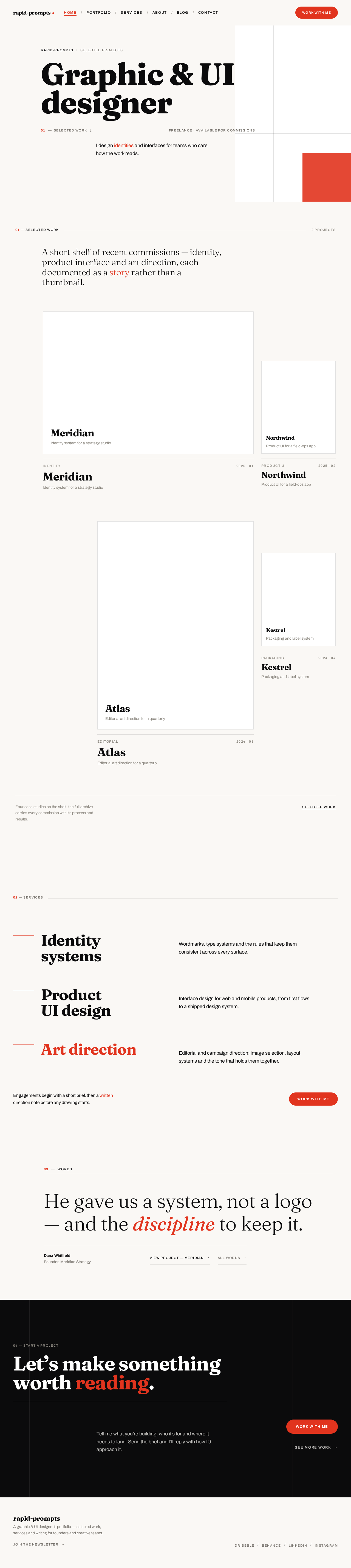
rapid-promptsSelected projects
Graphic & UI designer
I design identities and interfaces for teams who care how the work reads.
A short shelf of recent commissions — identity, product interface and art direction, each documented as a story rather than a thumbnail.
Meridian
Identity system for a strategy studio
Northwind
Product UI for a field-ops app
Atlas
Editorial art direction for a quarterly
Kestrel
Packaging and label system
Identity systems
Wordmarks, type systems and the rules that keep them consistent across every surface.
Product UI design
Interface design for web and mobile products, from first flows to a shipped design system.
Art direction
Editorial and campaign direction: image selection, layout systems and the tone that holds them together.
Engagements begin with a short brief, then a written direction note before any drawing starts.
Work with me03Words
He gave us a system, not a logo — and the discipline to keep it.
Let’s make something
worth reading.
Tell me what you’re building, who it’s for and where it needs to land. Send the brief and I’ll reply with how I’d approach it.
rapid-promptsSelected projects
Graphic & UI designer
I design identities and interfaces for teams who care how the work reads.
A short shelf of recent commissions — identity, product interface and art direction, each documented as a story rather than a thumbnail.
Meridian
Identity system for a strategy studio
Northwind
Product UI for a field-ops app
Atlas
Editorial art direction for a quarterly
Kestrel
Packaging and label system
Identity systems
Wordmarks, type systems and the rules that keep them consistent across every surface.
Product UI design
Interface design for web and mobile products, from first flows to a shipped design system.
Art direction
Editorial and campaign direction: image selection, layout systems and the tone that holds them together.
Engagements begin with a short brief, then a written direction note before any drawing starts.
Work with me03Words
He gave us a system, not a logo — and the discipline to keep it.
Let’s make something
worth reading.
Tell me what you’re building, who it’s for and where it needs to land. Send the brief and I’ll reply with how I’d approach it.
No comments yet. Be the first!