rapid-documents
# Document Chat Assistant — Product Requirements (Prompt for Tool Evaluation) ## Goal Build a production-ready **Chat with Documents assistant** that allows users to upload a large collection of files and ask natural language questions to retrieve accurate information from them. The system should understand document content, identify relevant information, and generate clear answers based on the available documents. This document describes the **expected capabilities and behaviors** of the system so that it can be tested using existing production-ready tools in the market. --- # Core Capabilities ## 1. Document Understanding The system should be able to process different types of documents and understand the content inside them. Examples of supported content include: - Text paragraphs - Structured tables - Lists and bullet points - Headings and sections - Multi-page documents - Spreadsheet-style data The assistant should treat the documents as a knowledge base and use them to answer questions. --- ## 2. Question Answering Users should be able to ask questions in natural language such as: - Product related questions - Information lookup - Comparison questions - Summary requests - Clarification questions - Follow‑up questions based on previous answers The system should respond with **clear and accurate answers based only on the available documents**. --- ## 3. Table Understanding Many documents contain structured data in tables. The assistant should be able to: - Understand table structure - Read rows and columns - Extract values from tables - Compare numbers - Identify patterns or differences in rows If a question is related to numerical or tabular information, the system should return answers based on that data. --- ## 4. Multi‑Document Reasoning Some questions may require information from **multiple documents**. The assistant should be able to: - Combine information from different sources - Compare data between files - Provide consolidated answers - Mention the relevant sources used for the answer --- ## 5. Document Discovery Users may also want to discover documents themselves. The assistant should support queries such as: - Finding documents related to a topic - Identifying which document contains certain information - Listing available documents - Suggesting relevant files for further reading --- ## 6. Conversation Context The assistant should support **multi‑turn conversations**. Example behavior: User question → assistant answers User follow‑up → assistant understands context and continues the conversation. The system should remember recent conversation context so follow‑up questions make sense. --- ## 7. Answer Quality Generated answers should: - Be concise and easy to read - Be factually grounded in the documents - Avoid hallucinating information not present in documents - Clearly present structured information when necessary Responses may include: - Text explanations - Bullet points - Short summaries - Tables when relevant --- ## 8. Source Awareness Whenever possible, the assistant should indicate **which document or section the information came from**. This helps users verify answers and explore the original source. --- ## 9. Large Knowledge Base Support The system should be able to operate with a **large document repository**, potentially containing thousands of files. Expected capabilities include: - Fast search across many documents - Accurate retrieval of relevant information - Stable performance as the dataset grows --- ## 10. User Experience Expectations The assistant interface should allow users to: - Ask questions easily - View clear answers - See referenced sources - Continue conversation naturally The experience should feel similar to interacting with a knowledgeable assistant that has read all the uploaded documents. --- # Evaluation Objective This requirement document is intended to test and evaluate **existing AI document assistant tools available in the market**. The goal is to observe: - How accurately the tool retrieves information - How well it understands structured data - Whether it handles multi‑document queries - How natural and helpful the generated responses are The system should behave like a **reliable knowledge assistant for document collections**.

Comments (0)
Sign in to leave a comment
Project Tasks25
Implement Global Theme System
As a Frontend Developer, I want a unified theme and color system aligned with all mock-design pages so that every component and page shares consistent visual language.
Implement Document Upload API
As a backend developer, I want a FastAPI endpoint that accepts PDF, DOCX, and XLSX files up to 100MB, validates formats, stores files, and triggers ingestion so that uploaded documents are reliably processed.
Implement Chat Q&A API
As a backend developer, I want a FastAPI endpoint that receives user questions, maintains conversation context, and returns document-grounded answers with cited sources so that the chat feature is fully functional.
Implement Document Search API
As a backend developer, I want a FastAPI endpoint that performs semantic and keyword document discovery across the repository so that users can find relevant documents by topic or content.
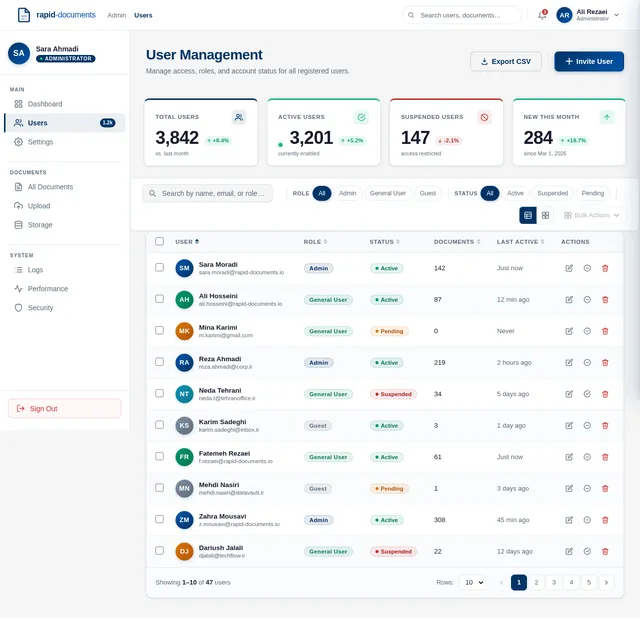
Implement User Management API
As a backend developer, I want FastAPI endpoints for listing, creating, updating, and deactivating users with role-based access control so that admins can manage the user base programmatically.
Implement Admin Settings API
As a backend developer, I want FastAPI endpoints to read and update system configuration including localization, timezone, and LLM routing settings so that admins can control platform behavior at runtime.
Implement Performance Monitoring API
As a backend developer, I want FastAPI endpoints that expose system metrics such as query latency, document counts, and error rates so that admins can monitor platform health in real time.
Define Design Token Library
As a UI/UX Designer, I want all spacing, typography, color, and elevation tokens extracted from mock designs into a shared token file so that developers can reference a single source of truth.
Build Landing Page
As a guest user, I want to see a compelling landing page that introduces the product and directs me to login or try the demo so that I understand the value proposition immediately. Implement based on the existing Landing (v2) JSX design.
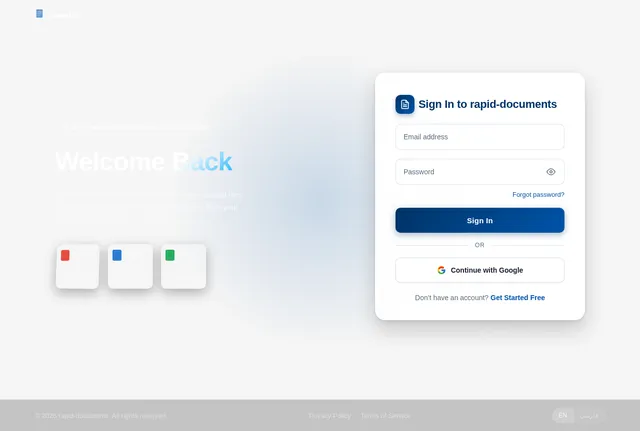
Build Login Page
As a registered user, I want a secure and accessible login page that authenticates me and redirects me to my dashboard so that I can access my documents and conversations. Implement based on the existing Login (v2) JSX design.
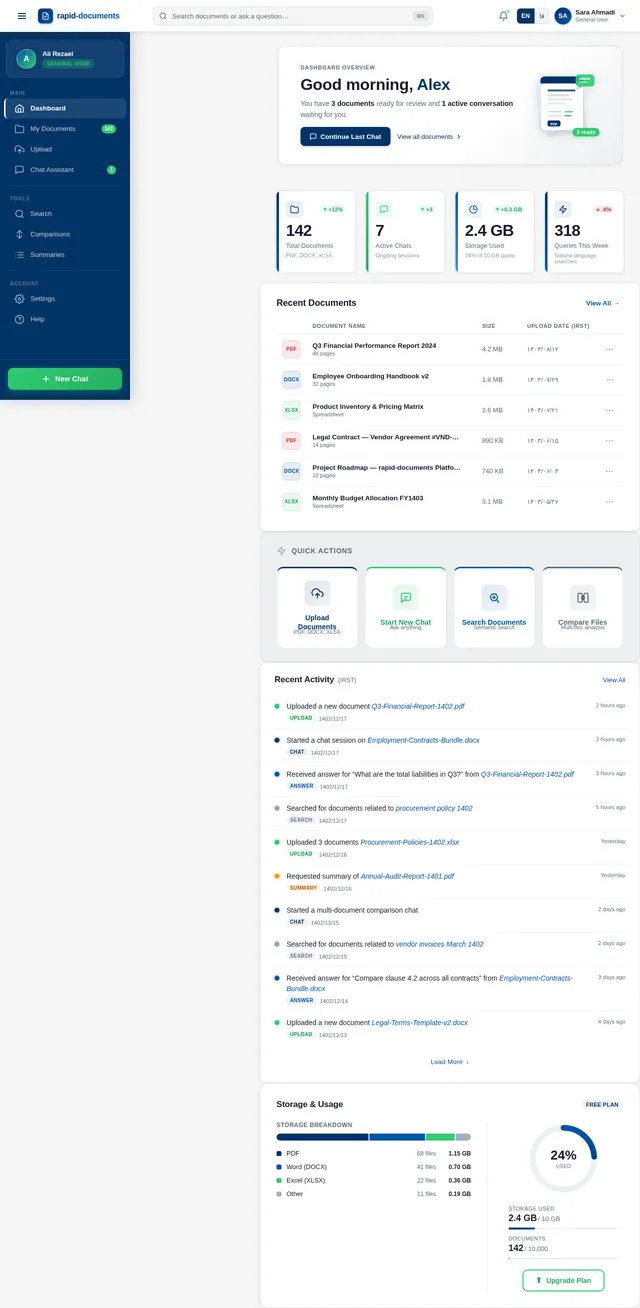
Build Dashboard Page
As a general user, I want a dashboard that shows my uploaded documents, recent activity, stat cards, and quick-access actions so that I can efficiently navigate my workspace. Implement based on the existing Dashboard (v2) JSX design.
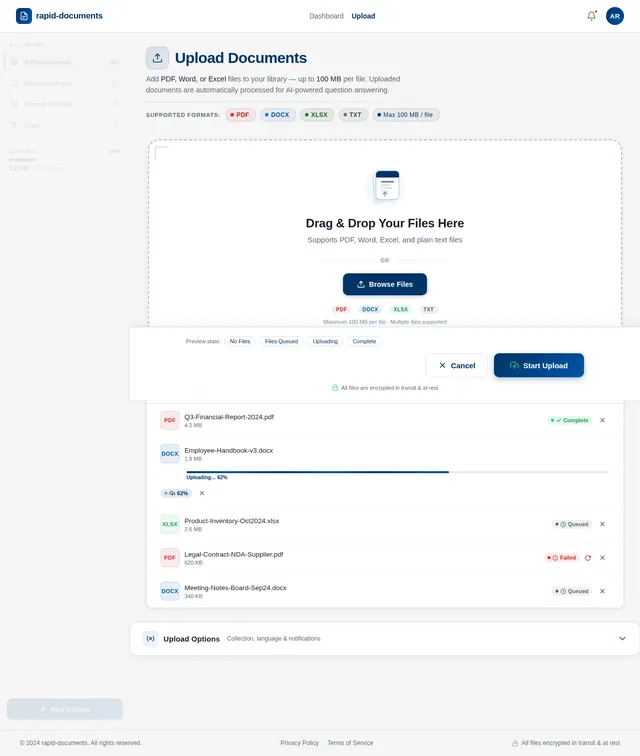
Build Upload Page
As a general user, I want an upload page that accepts PDF, DOCX, and XLSX files up to 100MB with a drag-and-drop zone, file queue list, and clear progress feedback so that I can add documents to my knowledge base. Implement based on the existing Upload (v2) JSX design.
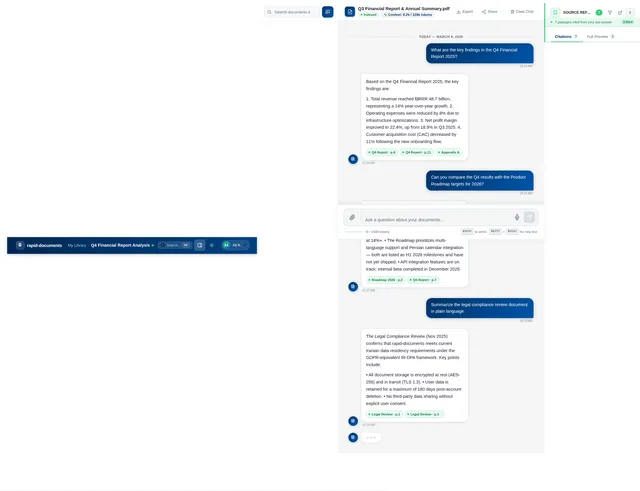
Build Chat Page
As a general user, I want a conversational chat interface where I can ask questions, receive document-grounded answers, and continue multi-turn dialogues so that I can extract insights from my documents naturally. Implement based on the existing Chat (v2) JSX design.
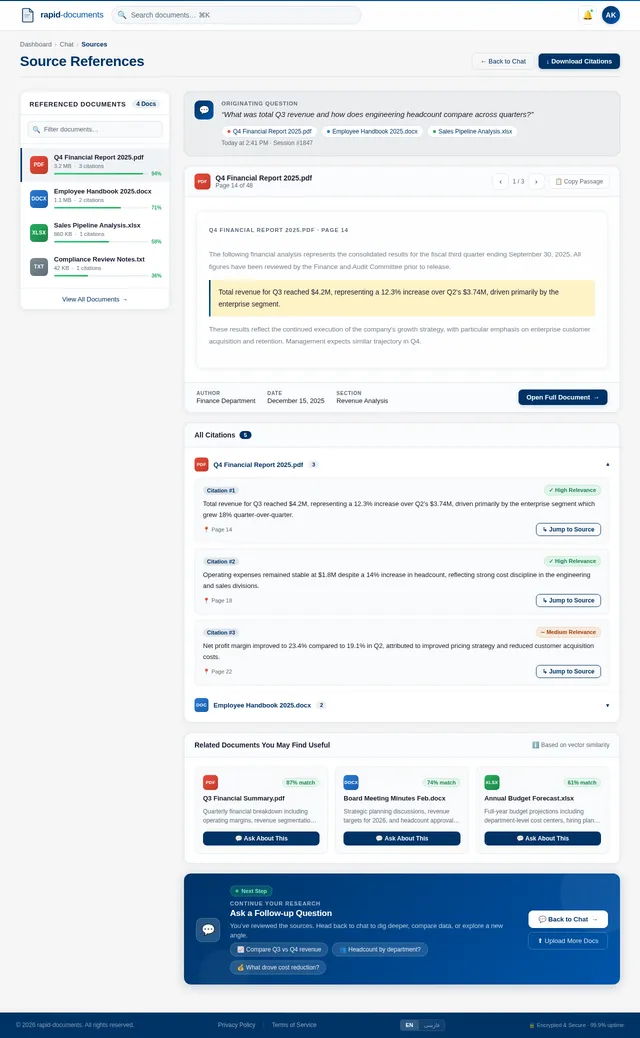
Build Sources Page
As a general user, I want a sources page that lists document references cited per answer so that I can verify and trace the origin of every piece of information. Implement based on the existing Sources (v1) JSX design.
Build Users Management Page
As an admin, I want a users management page where I can view, edit, and control access for all registered users so that I can maintain system security and proper permissions. Implement based on the existing Users (v2) JSX design.
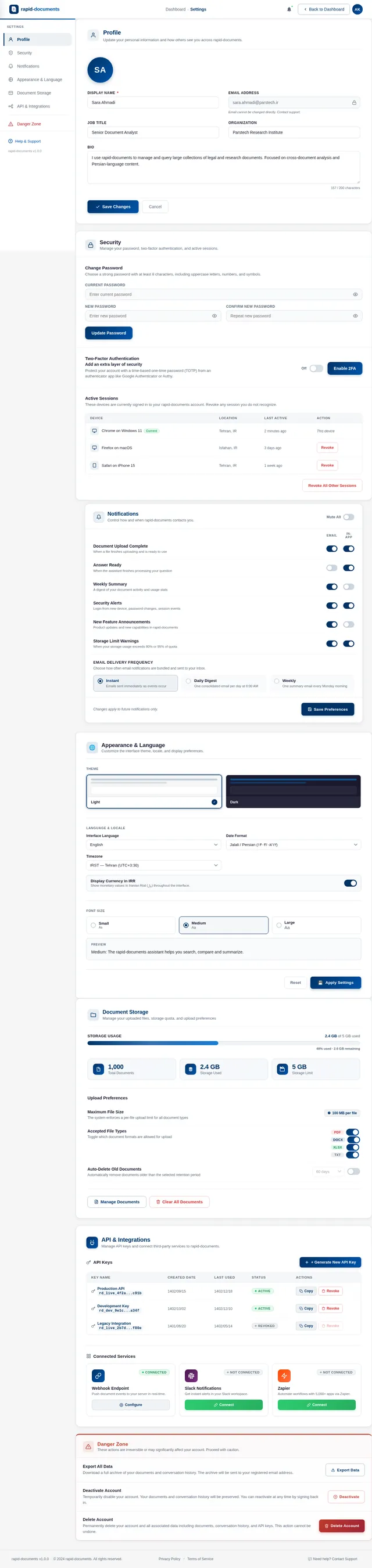
Build Settings Page
As an admin, I want a settings page to configure system-level options including localization, timezone, and performance parameters so that the platform behaves according to organizational requirements. Implement based on the existing Settings (v2) JSX design.
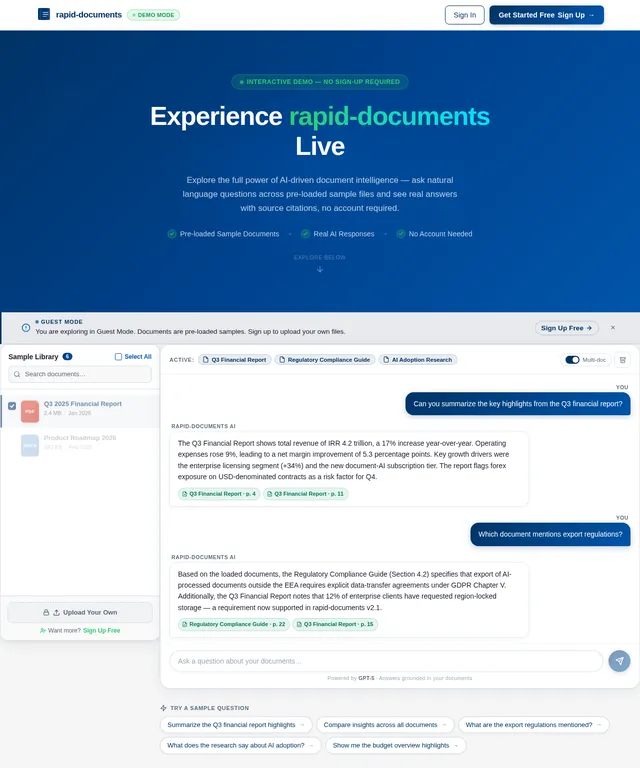
Build Demo Page
As a guest user, I want a demo page where I can ask a sample question and view an AI-generated answer without registering so that I can evaluate the product before committing. Implement based on the existing Demo (v2) JSX design.
Implement Sources Reference API
As a backend developer, I want a FastAPI endpoint that returns structured source citations linked to each answer including document name, page, and excerpt so that the frontend can render verifiable references.
Configure LiteLLM Routing Layer
As an AI Engineer, I want to configure LiteLLM to route prompts to the appropriate language models (GPT, Claude) based on task type and load so that the system uses models efficiently and cost-effectively.
Build Vector Embedding Pipeline
As a Data Engineer, I want an embedding pipeline that converts document chunks into vector representations and stores them in WeaviateDB so that semantic search and retrieval are accurate and fast at scale.
Build LangChain Conversational Workflow
As an AI Engineer, I want to implement a LangChain conversational chain with memory and retrieval-augmented generation so that multi-turn chats remain context-aware and fully grounded in uploaded documents.
Implement Document Ingestion Pipeline
As a Data Engineer, I want a pipeline that parses PDF, DOCX, and XLSX files, extracts text and table content, chunks the content intelligently, and feeds it into the embedding pipeline so that all uploaded formats are fully indexed.
Implement Persian/English Localization
As a Frontend Developer, I want i18n support for Persian and English including RTL layout, Jalali calendar rendering, and IRST timezone formatting so that the application is fully usable for Persian-speaking users.
Integrate Document Summarization Feature
As an AI Engineer, I want to integrate an LLM-powered summarization step into the ingestion and query workflow so that users can request concise summaries of long documents or selected sections.
Implement Guest Demo Mode Backend
As a guest user, I want to interact with a sandboxed demo mode that uses preloaded sample documents and returns answers without exposing sensitive data so that I can safely evaluate the product before registering.

Ask Anything. Find It Instantly.
Upload your documents and get accurate, cited answers in seconds — powered by AI that truly understands your files.
Everything You Need to Work With Documents
From uploading and querying to comparing and extracting — rapid-documents gives you a powerful AI assistant that understands your entire document library.
Multi-Format Upload
Upload PDFs, Word documents, Excel spreadsheets, and text files — all processed and indexed automatically for instant access.
Natural Language Q&A
Ask questions in plain English or Persian and receive clear, accurate answers drawn directly from your document content.
Multi-Turn Conversations
Ask follow-up questions naturally. The assistant remembers context from previous exchanges for coherent, in-depth exploration.
Source Referencing
Every answer cites its source document, page, and passage — so you can verify facts and trace information back instantly.
Cross-Document Comparison
Compare data, clauses, and figures across multiple documents simultaneously to find differences and common patterns.
Structured Data & Tables
Extract and display tables, charts, and structured data in a clean, readable format — ready for analysis and export.
Your Document Library, Reimagined
Experience a new way to browse, search, and interact with your documents — powered by intelligent AI that understands your files inside and out.
Get Answers in 3 Simple Steps
From document upload to verified answers — rapid-documents makes it effortless.
Upload Documents
Drag and drop your PDFs, Word docs, spreadsheets, and text files into your secure library.
Ask Your Question
Type any natural language question and our AI searches across all your documents instantly.
Get Cited Answers
Receive clear, accurate answers with direct source citations you can verify and explore.
Supported File Types
See It In Action
Experience how rapid-documents turns your files into an intelligent knowledge base you can chat with naturally.
Documents
What Our Users Say
Trusted by legal teams, researchers, and finance professionals to unlock insights from thousands of documents.
We uploaded over 200 legal contracts and rapid-documents instantly finds the exact clause we need. What used to take our team hours of manual review now takes seconds with cited source references.
Cross-document comparison changed our research workflow entirely. We can now compare findings across 50+ published papers simultaneously and get structured, cited answers in real time.
Uploading Excel spreadsheets and asking natural language questions about quarterly figures is incredible. The table extraction is flawless and our financial reporting turnaround dropped by 60%.
The multi-turn conversation feature lets me drill down into regulatory documents step by step. It remembers context perfectly, so I can ask follow-ups without re-explaining the question.
I can upload my entire thesis library in PDF and Word formats and ask complex questions spanning multiple sources. The source referencing gives me confidence every answer is grounded in real data.
Our team processes hundreds of vendor documents weekly. rapid-documents summarizes each one accurately and flags discrepancies across contracts. It has become our essential knowledge assistant.
Start For Free. Scale As You Grow.
Choose the plan that fits your document workflow. Upgrade anytime as your knowledge base expands.
Free
Perfect for individuals exploring document intelligence.
Free forever
- Up to 50 document uploads
- Natural language Q&A
- Basic source referencing
- PDF & Word support
Pro
For professionals who need advanced document analysis.
- Up to 5,000 document uploads
- Multi-document reasoning
- Advanced table understanding
- Excel & spreadsheet support
- Multi-turn conversations
Enterprise
For teams requiring full control and unlimited scale.
Tailored to your organization
- Unlimited document uploads
- Custom AI model selection
- SSO & role-based access
- Dedicated support & SLA
- On-premise deployment option
Frequently Asked Questions
Everything you need to know about rapid-documents. Can’t find an answer? Reach out to our support team.
rapid-documents supports a wide range of file formats including PDF, Microsoft Word (DOCX), Excel spreadsheets (XLSX), and plain text (TXT) files. Our system processes both structured data like tables and spreadsheets, as well as unstructured text from reports, contracts, and other documents.
Ready to Unlock Your Documents?
Upload any document, ask questions in plain language, and get accurate, cited answers in seconds.
🔒 Encrypted & Secure·No credit card required·99.9% uptime
No comments yet. Be the first!