quick-solutions
 hamed ali khan
https://ignitevisibility.com page as a mobile UI design with 1:1 fidelity — replicate every element, including page layout, reach colors, icons, avatars, component styles, typography, CTAs, and image assets. Replace name Comapny Name Quick Solutions Pvt Ltd. logo Quick Solutions AI voice Agent, Bulk Sms, Bulk Whatsapp massage, Digital Marketing

Comments (0)
Sign in to leave a comment
System Requirements
System Requirements Document for quick-solutions
1. Introduction
This document specifies the system requirements for quick-solutions, a mobile-first marketing site for Quick Solutions Pvt Ltd. The product is a single mobile UI design that replicates the page at https://ignitevisibility.com with 1:1 fidelity — every element, including page layout, colors, icons, avatars, component styles, typography, CTAs, and image assets — while replacing the company name with Quick Solutions Pvt Ltd, the logo with Quick Solutions, and the presented services with AI voice Agent, Bulk Sms, Bulk Whatsapp massage, and Digital Marketing.
The audience is the prospective client: a practical, price-aware small or mid-sized business owner evaluating Quick Solutions Pvt Ltd's communications and marketing services on a phone. The site must read as dependable infrastructure — competent, reachable, fast, workmanlike — rather than agency gloss, and must make it easy for a non-technical owner to tap a call to action and reach the company.
The reference page supplies structure, visual language, content, and interactive patterns. Its branding and service taxonomy are replaced by the Quick Solutions identity and the four named services. No other product capability is in scope.
2. System Overview
quick-solutions is delivered as a mobile UI design — a single-column, phone-width marketing page. It is a public, anonymous entry surface: a visitor arrives, reads the replicated page, reviews the four Quick Solutions services, sees the award badges, value propositions, and client logos, and converts by tapping a call to action to request a free audit or speak with an expert.
The page is composed of the reference page's mobile hierarchy, restyled into the Quick Solutions identity and re-populated with the four Quick Solutions services. All interactive elements of the reference are preserved: the collapsed MENU toggle that expands navigation, the Learn More links under service groups, the clickable Get a free audit and Speak with an expert CTAs, the horizontally aligned award badges, and the client logo showcase.
Actors:
- Prospective Client — the anonymous visitor who browses the page on mobile, reviews services and proof, and converts by contacting the company or requesting a consultation.
- Marketing Site Administrator — the person who maintains the Quick Solutions branded page content (company name, logo, service listings, imagery) so the mobile page stays accurate and on-brand.
Narrow exclusions: the product is a mobile UI design of the reference page only. It does not add service-delivery tooling, campaign management, messaging dispatch, analytics dashboards, or any capability beyond the replicated page and its four named services. The reference page's own service taxonomy (Earned Media, Paid Media, Owned Media and their sub-services) is not carried over; it is replaced by the four Quick Solutions services.
2a. Product Interpretation and Delivery Boundary
Delivery ownership. The page is a first-party, application-owned mobile surface. It is publicly reachable and anonymous: no account, sign-in, or identity establishment is required to view the page, its services, its proof elements, or its CTAs. This matches the accepted access requirement of the Landing surface (none) and the reference page's own public nature.
Current boundary. Current scope is the mobile UI design of the replicated page: layout, colors, icons, avatars, component styles, typography, CTAs, and image assets, with the Quick Solutions name, logo, and four services substituted. The page's interactive elements — menu expand, Learn More rows, CTAs, award badge strip, client logo showcase — are current.
Future boundary. Nothing beyond the replicated mobile page is committed. Any additional page, service detail view, form backend, or account capability is out of current scope and is not specified here.
External and provider responsibilities. The reference URL is a source of structure, visual language, content, and interactive patterns only. It is not a runtime dependency of the delivered page, and no provider-owned surface is part of the product.
2b. Source Content Inventory
The reference directive declares content_source authority for https://ignitevisibility.com. The following verified factual content is preserved item-by-item, with the user-mandated substitutions applied (company name → Quick Solutions Pvt Ltd; logo → Quick Solutions; services → AI voice Agent, Bulk Sms, Bulk Whatsapp massage, Digital Marketing).
Hero text (source): "Your Trusted Digital Marketing Agency for More Traffic, Leads & Revenue"
CTA text (source): "Get a free audit" … "SPEAK WITH AN EXPERT"
Service categories (source, replaced by the four Quick Solutions services):
- Earned Media: Search Engine Optimization (SEO), Generative Engine Optimization, Local SEO, Digital PR, Influencer Marketing, Organic Social Media Management
- Paid Media: Pay-Per-Click Advertising (PPC), Display Advertising, Paid Social Media Advertising, Retargeting/Remarketing, Affiliate Marketing, Programmatic Advertising, Media Buys
- Owned Media: Media Design & Creation, Video Production, Content Marketing, Website Design, Website Development, Email Marketing, SMS Marketing, Lifecycle Marketing, Conversion Rate Optimization (CRO), Advanced Data Analytics & Reporting Dashboards
Quick Solutions services (replacement, exact names):
- AI voice Agent
- Bulk Sms
- Bulk Whatsapp massage
- Digital Marketing
Award badges (source):
- #1 Digital Marketing Agency in USA
- Best SEO Campaign
- Most Innovative AI Marketing Campaign
Value propositions (source):
- Transparent
- Industry Leader
- Personalized Support
- ROI Driven
- Elite Partnerships
- Flexible
Navigation (source): mobile collapsed "MENU" toggle; primary sections listed under the menu, with "Who We Serve" appearing expanded.
Homepage hierarchy (source): hero section (headline, subheadline, primary CTA); awards/promotional badges; service categories grouped with "Learn More" links; "Who We Serve" section headline with explanatory copy; "The Ignite Difference" section with value propositions; footer-level sections with client logos, case studies, and industry mentions.
Interactive elements (source): mobile "MENU" toggle to expand navigation; "Learn More" links under service category groups; clickable CTAs "Get a free audit" and "Speak with an expert"; award and partner badges highlighting credentials; horizontal carousel or grid of client logos.
Visual language (source): single-column mobile layout with sequential stacked sections; bold large headings and clean sans-serif body; deep blue primary (#07607e or #01354F), light blue (#2A85B8) and burnt sienna (#e37b44) accents, white background with dark text; prominent CTA buttons, badge-style award visuals horizontally aligned, icon + text bullet/value blocks.
2c. Page Content and Component Coverage
Landing
The Landing page is the single mobile surface of the product. It is anonymous and publicly reachable, rendered as a single-column mobile canvas at a 390px reference width with 20px gutters, and it carries the full replicated page hierarchy in order.
Information and state
- Company identity: wordmark Quick Solutions in the sticky top bar; company name Quick Solutions Pvt Ltd in the hero index label and footer.
- Hero: index label, headline, subheadline, two stacked CTAs.
- Award badge strip: three credential badges.
- Service groups: three numbered groups containing the four Quick Solutions services.
- "Who We Serve" band: headline with explanatory copy.
- "The Quick Solutions Difference": six value propositions as icon + label rows.
- Client logo showcase: horizontally scrolling logo strip.
- Footer: contact, address, and legal.
Primary actions
- Expand/collapse the mobile MENU navigation.
- Tap Get a free audit (primary CTA).
- Tap Speak with an expert (secondary CTA).
- Expand a service group and follow its Learn More row.
- Scroll the award badge strip and the client logo marquee.
Supporting actions
- Scroll the page to move between sections; the sticky top bar keeps the wordmark and MENU toggle available.
- Read the value proposition rows and the "Who We Serve" copy.
Domain entities
- Company: Quick Solutions Pvt Ltd (name, wordmark "Quick Solutions").
- Service: one of the four named services — AI voice Agent, Bulk Sms, Bulk Whatsapp massage, Digital Marketing.
- Service group: a numbered grouping of services with a label and a Learn More row.
- Award badge: a credential seal with credential text.
- Value proposition: a labeled icon + text row.
- Client logo: a client mark in the showcase strip.
- CTA: a labeled action control (Get a free audit; Speak with an expert).
Component responsibilities
- Sticky top bar — holds the "Quick Solutions" wordmark on the left and the MENU toggle on the right; carries a sienna underline on the active section.
- MENU toggle and expanded navigation — collapsed by default; expands to list the primary sections, with "Who We Serve" appearing expanded.
- Hero panel — full-bleed deep-navy panel holding the index label, the headline, the subheadline, and the two stacked CTAs.
- CTA buttons — full-width stacked buttons: a sienna primary "GET A FREE AUDIT" and a hairline-outlined "SPEAK WITH AN EXPERT".
- Award badge strip — horizontally scrollable ruled strip of three flat vector seals in condensed caps, half-overlapping the hero's bottom edge.
- Service group list — three numbered groups rendered as ruled accordion rows; the open row carries a 2px sienna left-edge rule; each group ends with a caps "Learn More" link with a 2px underline.
- "Who We Serve" band — section headline with explanatory copy.
- "The Quick Solutions Difference" grid — six icon + label value rows on a two-column grid.
- Client logo marquee — horizontally scrolling strip of client logos that pauses on touch.
- Footer — contact details, address, and legal text.
- Section index labels — a 13px ALL CAPS index label preceding every section, reading as a wayfinding system.
States
- Loading — the page renders its sections in sequence; the client logo marquee and award badge strip are the only deferred visual elements, and they appear in place without shifting the surrounding layout.
- Empty — if a service group, value row, award badge, or client logo has no content, its row or slot is omitted rather than rendered as an empty placeholder; the remaining sections keep their order and spacing.
- Success — the page is fully rendered: wordmark, hero, both CTAs, three award badges, three numbered service groups with their services and Learn More rows, "Who We Serve" copy, six value rows, the client logo strip, and the footer.
- Error — if an image asset fails to load, its slot holds its reserved space and the surrounding text and controls remain readable and tappable.
- Recovery — a failed image asset is retried on the next page load; a collapsed menu or accordion row can be re-expanded at any time; the page remains fully usable without any single image asset.
3. Functional Requirements
FR-1 — Mobile UI design of the reference page with 1:1 fidelity (explicit)
As a Prospective Client, I should see the https://ignitevisibility.com page reproduced as a mobile UI design with 1:1 fidelity, so that every element of the reference page is present on my phone.
- Trigger/input: the visitor opens the Landing page on a mobile viewport.
- Observable result: the page renders the reference page's mobile hierarchy in order — sticky top bar with MENU toggle, hero section with headline, subheadline and primary CTA, awards/promotional badges, grouped service categories with Learn More links, "Who We Serve" section headline with explanatory copy, a difference section with value propositions, and footer-level sections with client logos, case studies, and industry mentions.
- Fidelity scope: page layout, colors, icons, avatars, component styles, typography, CTAs, and image assets are all replicated.
- Access state: anonymous; no account required.
- Failure/recovery: if an image asset fails to load, its slot holds its reserved space and the surrounding content stays readable; the asset is retried on the next load.
- Continuation: the visitor scrolls through the full page and reaches the CTAs and footer.
FR-2 — Company name replacement (explicit) As a Prospective Client, I should see the company name presented as Quick Solutions Pvt Ltd everywhere the reference page names its company, so that the page identifies the correct business.
- Trigger/input: the page renders any location where the reference page displays its company name.
- Observable result: the name reads "Quick Solutions Pvt Ltd".
- Access state: anonymous.
- Failure/recovery: not applicable; the name is static page content.
- Continuation: the visitor continues reading the page under the Quick Solutions Pvt Ltd identity.
FR-3 — Logo replacement (explicit) As a Prospective Client, I should see the logo replaced with Quick Solutions, so that the page carries the correct brand mark.
- Trigger/input: the page renders the logo position in the top bar and any other logo placement replicated from the reference.
- Observable result: the logo reads "Quick Solutions".
- Access state: anonymous.
- Failure/recovery: if the logo asset fails to load, the wordmark text remains legible in its reserved space.
- Continuation: the visitor continues through the page with the Quick Solutions wordmark present.
FR-4 — Service presentation (explicit) As a Prospective Client, I should see the services presented as AI voice Agent, Bulk Sms, Bulk Whatsapp massage, and Digital Marketing, so that I understand what Quick Solutions Pvt Ltd offers.
- Trigger/input: the visitor reaches the service categories section, or expands the menu and selects a service section.
- Observable result: the four services appear with exactly these names, in the service categories area that the reference page uses for its grouped service listings.
- Access state: anonymous.
- Failure/recovery: if a service entry has no content, its row is omitted rather than shown empty; the remaining services keep their order.
- Continuation: the visitor follows a Learn More row or taps a CTA.
FR-5 — Mobile MENU toggle and expanded navigation (explicit) As a Prospective Client, I should be able to tap the collapsed MENU toggle to expand the navigation, so that I can move between the page's primary sections on a phone.
- Trigger/input: the visitor taps the MENU toggle in the sticky top bar.
- Observable result: the navigation expands to list the primary sections, with "Who We Serve" appearing expanded; the active section carries a sienna underline.
- Access state: anonymous.
- Failure/recovery: tapping the toggle again collapses the navigation; the page remains scrollable in either state.
- Continuation: the visitor selects a section and the page moves to it.
FR-6 — Learn More links under service groups (explicit) As a Prospective Client, I should be able to follow a Learn More link under a service category group, so that I can go deeper on the services that interest me.
- Trigger/input: the visitor taps a Learn More link in a service group.
- Observable result: the link responds as a caps link with a 2px underline and opens the destination associated with that service group.
- Access state: anonymous.
- Failure/recovery: if the destination is unavailable, the visitor remains on the Landing page and can choose another link or CTA.
- Continuation: the visitor returns to the page and continues to the next group or to a CTA.
FR-7 — Clickable CTAs: Get a free audit and Speak with an expert (explicit) As a Prospective Client, I should be able to tap Get a free audit and Speak with an expert, so that I can convert by requesting an audit or contacting the company.
- Trigger/input: the visitor taps either CTA in the hero panel.
- Observable result: the tapped CTA responds and initiates the corresponding contact action for Quick Solutions Pvt Ltd.
- Access state: anonymous.
- Failure/recovery: if the contact action cannot be completed, the visitor remains on the Landing page with both CTAs still available and can retry or choose the other CTA.
- Continuation: the visitor completes the contact action or returns to browsing the page.
FR-8 — Award and partner badges (explicit) As a Prospective Client, I should see award and partner badges that highlight credentials, so that I can judge the company's standing.
- Trigger/input: the visitor scrolls to the award badge strip.
- Observable result: three flat vector seals in condensed caps appear in a horizontally scrollable ruled strip that half-overlaps the hero's bottom edge, carrying the credential text "#1 Digital Marketing Agency in USA", "Best SEO Campaign", and "Most Innovative AI Marketing Campaign".
- Access state: anonymous.
- Failure/recovery: if a badge asset fails to load, its slot holds its reserved space and the remaining badges stay readable and scrollable.
- Continuation: the visitor continues scrolling into the service groups.
FR-9 — Client logo showcase (explicit) As a Prospective Client, I should see a horizontal carousel or grid of client logos, so that I can see who the company works with.
- Trigger/input: the visitor scrolls to the client showcase.
- Observable result: a horizontally scrolling strip of client logos renders and pauses on touch.
- Access state: anonymous.
- Failure/recovery: if a client logo asset fails to load, its slot holds its reserved space and the strip continues to scroll.
- Continuation: the visitor continues to the footer.
FR-10 — Value propositions in the difference section (explicit) As a Prospective Client, I should see the value propositions Transparent, Industry Leader, Personalized Support, ROI Driven, Elite Partnerships, and Flexible presented as icon + text blocks, so that I can assess how the company works.
- Trigger/input: the visitor scrolls to the difference section.
- Observable result: six icon + label value rows render on a two-column grid under the section headline.
- Access state: anonymous.
- Failure/recovery: if a value row has no content, its row is omitted rather than shown empty; the remaining rows keep their order.
- Continuation: the visitor continues to the client showcase and footer.
FR-11 — "Who We Serve" section (explicit) As a Prospective Client, I should see a "Who We Serve" section headline with explanatory copy, so that I can tell whether the company serves a business like mine.
- Trigger/input: the visitor scrolls to the "Who We Serve" band, or expands the menu where "Who We Serve" appears expanded.
- Observable result: the section headline and its explanatory copy render in the page's section order.
- Access state: anonymous.
- Failure/recovery: if the copy is unavailable, the section headline still renders and the page order is preserved.
- Continuation: the visitor continues to the difference section.
FR-12 — Footer-level sections (explicit) As a Prospective Client, I should see footer-level sections with client logos, case studies, and industry mentions, so that I can find proof and company information at the end of the page.
- Trigger/input: the visitor scrolls to the footer.
- Observable result: the footer renders contact details, address, and legal text, together with the footer-level client logos, case studies, and industry mentions replicated from the reference.
- Access state: anonymous.
- Failure/recovery: if a footer item is unavailable, the remaining footer content still renders and the page ends cleanly.
- Continuation: the visitor can return to the top bar or re-open the menu.
FR-13 — Marketing page content maintenance (required_inference) As a Marketing Site Administrator, I should be able to maintain the Quick Solutions branded page content — company name, logo, service listings, and imagery — so that the mobile page stays accurate and on-brand for prospective clients.
- Trigger/input: the administrator updates a page content item (company name, logo, a service listing, or an image asset).
- Observable result: the updated item is reflected on the Landing page the next time it is rendered, with the Quick Solutions Pvt Ltd name, the Quick Solutions wordmark, and the four named services intact.
- Access state: this is the maintenance responsibility over the page's own content; it does not create a visitor-facing account or any visitor-visible capability.
- Failure/recovery: if an update cannot be applied, the previously published content remains in place so the page never renders broken.
- Continuation: the administrator continues maintaining the remaining content items.
4. User Personas
Prospective Client
Product context. A small or mid-sized business owner or decision-maker who finds Quick Solutions Pvt Ltd on a phone and evaluates it in a few minutes of scrolling. They are practical and price-aware, and they are skeptical of agency gloss. They are not looking for a lifestyle brand; they are looking for infrastructure they can rely on.
Primary goal. Decide quickly whether Quick Solutions Pvt Ltd offers what they need — AI voice Agent, Bulk Sms, Bulk Whatsapp massage, Digital Marketing — and reach the company without friction.
Distinct accepted responsibilities. The Prospective Client is the only actor who reads the replicated page end to end: the hero headline and subheadline, the award badges, the grouped service listings, the "Who We Serve" copy, the value propositions, and the client logos. They are the actor who expands the MENU to navigate, expands a service group and follows a Learn More row, and taps Get a free audit or Speak with an expert. Their work is evaluation and conversion, not configuration.
Relevant inputs or decisions. They decide whether the four named services match their need, whether the award badges and client logos establish enough credibility, and which of the two CTAs to tap. They choose whether to go deeper via a Learn More row or convert immediately.
Interactions with other accepted participants. They interact with the page content the Marketing Site Administrator maintains. They do not interact with the administrator directly; the administrator's work is what makes the page accurate and on-brand when the visitor arrives.
Observable success. The visitor reaches the end of the page having seen all four services, the proof elements, and the value propositions, and has tapped a CTA to request a free audit or speak with an expert.
Marketing Site Administrator
Product context. The person responsible for keeping the Quick Solutions branded mobile page accurate and on-brand. They work on the page's content rather than on the visitor's journey, and they are the reason the page can be trusted when a prospective client arrives.
Primary goal. Keep the company name, logo, service listings, and imagery correct on the mobile page so that prospective clients always see the current Quick Solutions Pvt Ltd offering.
Distinct accepted responsibilities. The administrator maintains the page content items that the visitor reads: the company name "Quick Solutions Pvt Ltd", the "Quick Solutions" wordmark, the four service listings (AI voice Agent, Bulk Sms, Bulk Whatsapp massage, Digital Marketing), and the page's image assets. Their work is content upkeep, not visitor interaction, and it does not extend to service delivery, campaign management, or messaging dispatch.
Relevant inputs or decisions. They decide when a content item is out of date and needs updating, and they confirm that an update preserves the Quick Solutions identity and the exact service names.
Interactions with other accepted participants. Their work is what the Prospective Client sees. They do not interact with the visitor directly, and the visitor cannot see or affect the administrator's work.
Observable success. The Landing page renders with the correct company name, the correct wordmark, the four correctly named services, and intact imagery, with no broken or empty content slots.
5. Core User Flows
Flow 1 — Prospective Client evaluates the page and converts
- The Prospective Client opens the Landing page on a phone. The page is anonymous and publicly reachable; no account or sign-in is involved.
- The sticky top bar renders with the Quick Solutions wordmark on the left and the collapsed MENU toggle on the right.
- The full-bleed deep-navy hero panel renders with the index label, the headline, the subheadline, and the two stacked CTAs — a sienna GET A FREE AUDIT and a hairline-outlined SPEAK WITH AN EXPERT.
- The visitor scrolls. The award badge strip appears as a horizontally scrollable ruled strip of three flat vector seals — "#1 Digital Marketing Agency in USA", "Best SEO Campaign", "Most Innovative AI Marketing Campaign" — half-overlapping the hero's bottom edge.
- The visitor reaches the numbered service groups. Group 01 presents AI voice Agent, group 02 presents Bulk Sms and Bulk Whatsapp massage, and group 03 presents Digital Marketing, each as a ruled accordion row with a caps Learn More link.
- The visitor taps a service group to expand it. The open row takes a 2px sienna left-edge rule and the group's services and Learn More row become visible.
- The visitor taps a Learn More link. The link responds and opens the destination associated with that service group. If the destination is unavailable, the visitor stays on the Landing page and can choose another link or CTA.
- The visitor returns to the page and continues to the "Who We Serve" band, reading the section headline and its explanatory copy.
- The visitor continues to "The Quick Solutions Difference", where six icon + label value rows render on a two-column grid: Transparent, Industry Leader, Personalized Support, ROI Driven, Elite Partnerships, Flexible.
- The visitor scrolls through the client logo marquee, which pauses on touch, and reaches the footer with its contact details, address, legal text, client logos, case studies, and industry mentions.
- The visitor decides to convert and taps GET A FREE AUDIT in the hero panel (or SPEAK WITH AN EXPERT). The CTA responds and initiates the corresponding contact action for Quick Solutions Pvt Ltd.
- If the contact action cannot be completed, the visitor remains on the Landing page with both CTAs still available and can retry or choose the other CTA.
- The visitor completes the contact action, or returns to browsing the page.
Flow 2 — Prospective Client navigates by menu
- The Prospective Client opens the Landing page on a phone and sees the collapsed MENU toggle in the sticky top bar.
- The visitor taps the MENU toggle. The navigation expands to list the primary sections, with "Who We Serve" appearing expanded.
- The visitor selects a section. The page moves to that section, and the active section carries a sienna underline in the top bar.
- The visitor taps the MENU toggle again to collapse the navigation and continues scrolling the page.
- The visitor reaches a CTA and converts as in Flow 1, steps 11–13.
Flow 3 — Marketing Site Administrator maintains the page content
- The Marketing Site Administrator reviews the Landing page and identifies a content item that is out of date — the company name, the "Quick Solutions" wordmark, a service listing, or an image asset.
- The administrator updates that content item, confirming that the company name reads "Quick Solutions Pvt Ltd", the wordmark reads "Quick Solutions", and the service names remain exactly AI voice Agent, Bulk Sms, Bulk Whatsapp massage, and Digital Marketing.
- The updated item is reflected on the Landing page the next time it is rendered.
- If the update cannot be applied, the previously published content remains
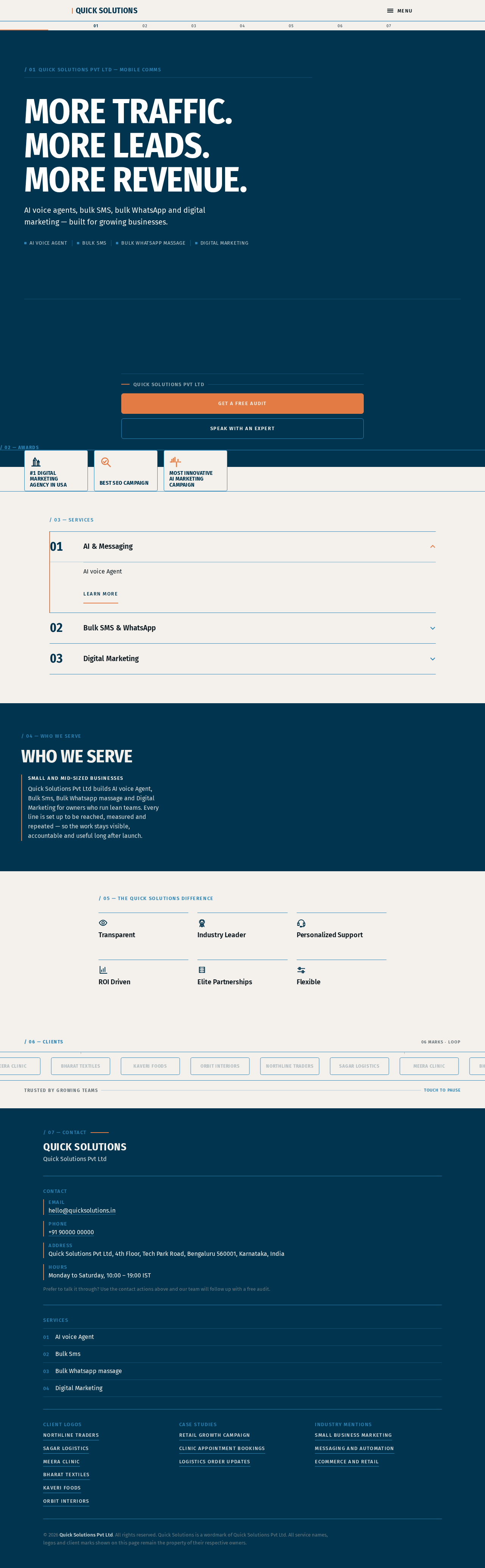
QUICK SOLUTIONS PVT LTD — MOBILE COMMS
MORE TRAFFIC.MORE LEADS.MORE REVENUE.
AI voice agents, bulk SMS, bulk WhatsApp and digital marketing — built for growing businesses.
- AI voice Agent
- Bulk Sms
- Bulk Whatsapp massage
- Digital Marketing
/ 02 — AWARDS
#1 Digital Marketing Agency in USA
Best SEO Campaign
Most Innovative AI Marketing Campaign
/ 03 — SERVICES
/ 04 — WHO WE SERVE
Who We Serve
Small and mid-sized businessesQuick Solutions Pvt Ltd builds AI voice Agent, Bulk Sms, Bulk Whatsapp massage and Digital Marketing for owners who run lean teams. Every line is set up to be reached, measured and repeated — so the work stays visible, accountable and useful long after launch.
/ 05 — THE QUICK SOLUTIONS DIFFERENCE
Transparent
Industry Leader
Personalized Support
ROI Driven
Elite Partnerships
Flexible
QUICK SOLUTIONS PVT LTD — MOBILE COMMS
MORE TRAFFIC.MORE LEADS.MORE REVENUE.
AI voice agents, bulk SMS, bulk WhatsApp and digital marketing — built for growing businesses.
- AI voice Agent
- Bulk Sms
- Bulk Whatsapp massage
- Digital Marketing
/ 02 — AWARDS
#1 Digital Marketing Agency in USA
Best SEO Campaign
Most Innovative AI Marketing Campaign
/ 03 — SERVICES
/ 04 — WHO WE SERVE
Who We Serve
Small and mid-sized businessesQuick Solutions Pvt Ltd builds AI voice Agent, Bulk Sms, Bulk Whatsapp massage and Digital Marketing for owners who run lean teams. Every line is set up to be reached, measured and repeated — so the work stays visible, accountable and useful long after launch.
/ 05 — THE QUICK SOLUTIONS DIFFERENCE
Transparent
Industry Leader
Personalized Support
ROI Driven
Elite Partnerships
Flexible
No comments yet. Be the first!