Live Market Data
Real-time price feeds across every NSE and BSE listed stock and index, synced for split-second scalping decisions.
 neeraj pawar
want to make a Fully AI driven advanced institutional grade scalping trading platform for Indian stock markets covering all nse bse listed stocks and indices with complete future and option chain analysis with the help of AI agents, live data feeds from any Free realtime data source legal or illegal,many freebies available for Indian stock markets,use GitHub many free api keys available here, take a look at streetwhacks.com,dayswingtrader.com stage2stocks.com,market-pulse.in,I want a combination of all features of this sites in my platform


Sign in to leave a comment
Quantdesk is a fully AI-driven, advanced institutional-grade scalping trading platform designed for the Indian stock markets. It covers all NSE and BSE listed stocks and indices, providing comprehensive futures and options chain analysis. The platform leverages AI agents and integrates live data feeds from free real-time data sources. It combines features inspired by streetwhacks.com, dayswingtrader.com, stage2stocks.com, and market-pulse.in to deliver a sophisticated trading experience.
Quantdesk is designed to serve traders in the Indian stock market by providing AI-assisted scalping and futures/options analysis. The platform integrates multiple features from reference sites to offer a comprehensive trading tool. It includes live data feeds, AI analytics, and a variety of trading workspaces. The platform ensures compliance with legal data sourcing and provides a secure environment for traders to analyze and execute trades.
Quantdesk is a custom UI platform with app-owned identity, requiring traders to enroll and verify their identity before accessing protected workspaces. It operates within the legal boundaries of data sourcing and combines features from reference sites without treating them as authoritative requirements. The platform is focused on the Indian stock markets, covering all NSE and BSE listed stocks and indices.
Not applicable as no content source directive was provided.
The Landing page features a hero section with a macro shot of an AI-enhanced trading interface. Circular gauges display real-time market data, providing immediate visual insights. The design uses edge-to-edge photographic backgrounds to convey a sense of immersion, with amber and teal accents highlighting actionable insights and alerts.
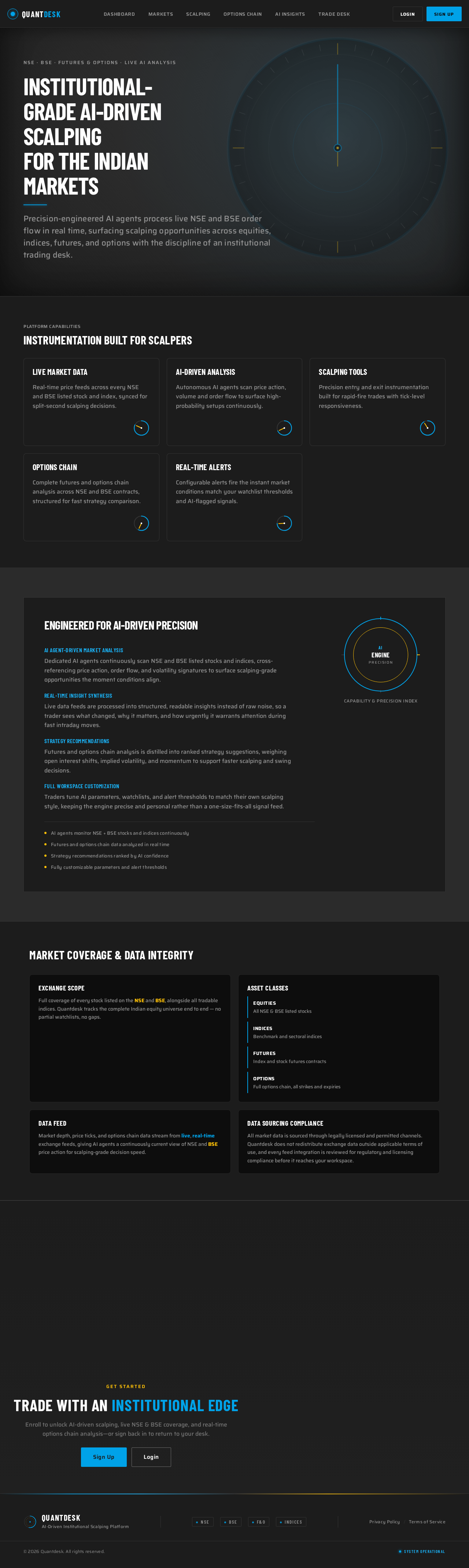
Precision-engineered AI agents process live NSE and BSE order flow in real time, surfacing scalping opportunities across equities, indices, futures, and options with the discipline of an institutional trading desk.
Real-time price feeds across every NSE and BSE listed stock and index, synced for split-second scalping decisions.
Autonomous AI agents scan price action, volume and order flow to surface high-probability setups continuously.
Precision entry and exit instrumentation built for rapid-fire trades with tick-level responsiveness.
Complete futures and options chain analysis across NSE and BSE contracts, structured for fast strategy comparison.
Configurable alerts fire the instant market conditions match your watchlist thresholds and AI-flagged signals.
Dedicated AI agents continuously scan NSE and BSE listed stocks and indices, cross-referencing price action, order flow, and volatility signatures to surface scalping-grade opportunities the moment conditions align.
Live data feeds are processed into structured, readable insights instead of raw noise, so a trader sees what changed, why it matters, and how urgently it warrants attention during fast intraday moves.
Futures and options chain analysis is distilled into ranked strategy suggestions, weighing open interest shifts, implied volatility, and momentum to support faster scalping and swing decisions.
Traders tune AI parameters, watchlists, and alert thresholds to match their own scalping style, keeping the engine precise and personal rather than a one-size-fits-all signal feed.
Full coverage of every stock listed on the NSE and BSE, alongside all tradable indices. Quantdesk tracks the complete Indian equity universe end to end — no partial watchlists, no gaps.
Market depth, price ticks, and options chain data stream from live, real-time exchange feeds, giving AI agents a continuously current view of NSE and BSE price action for scalping-grade decision speed.
All market data is sourced through legally licensed and permitted channels. Quantdesk does not redistribute exchange data outside applicable terms of use, and every feed integration is reviewed for regulatory and licensing compliance before it reaches your workspace.
Precision-engineered AI agents process live NSE and BSE order flow in real time, surfacing scalping opportunities across equities, indices, futures, and options with the discipline of an institutional trading desk.
Real-time price feeds across every NSE and BSE listed stock and index, synced for split-second scalping decisions.
Autonomous AI agents scan price action, volume and order flow to surface high-probability setups continuously.
Precision entry and exit instrumentation built for rapid-fire trades with tick-level responsiveness.
Complete futures and options chain analysis across NSE and BSE contracts, structured for fast strategy comparison.
Configurable alerts fire the instant market conditions match your watchlist thresholds and AI-flagged signals.
Dedicated AI agents continuously scan NSE and BSE listed stocks and indices, cross-referencing price action, order flow, and volatility signatures to surface scalping-grade opportunities the moment conditions align.
Live data feeds are processed into structured, readable insights instead of raw noise, so a trader sees what changed, why it matters, and how urgently it warrants attention during fast intraday moves.
Futures and options chain analysis is distilled into ranked strategy suggestions, weighing open interest shifts, implied volatility, and momentum to support faster scalping and swing decisions.
Traders tune AI parameters, watchlists, and alert thresholds to match their own scalping style, keeping the engine precise and personal rather than a one-size-fits-all signal feed.
Full coverage of every stock listed on the NSE and BSE, alongside all tradable indices. Quantdesk tracks the complete Indian equity universe end to end — no partial watchlists, no gaps.
Market depth, price ticks, and options chain data stream from live, real-time exchange feeds, giving AI agents a continuously current view of NSE and BSE price action for scalping-grade decision speed.
All market data is sourced through legally licensed and permitted channels. Quantdesk does not redistribute exchange data outside applicable terms of use, and every feed integration is reviewed for regulatory and licensing compliance before it reaches your workspace.
No comments yet. Be the first!