pushpa-restaurant

byNaitik Das

Hi

Home.jsx
Home.jsx

Comments (0)

No comments yet. Be the first!

System Requirements

System Requirement Document
Page 1 of 10

System Requirements Document for pushpa-restaurant

1. Introduction

The pushpa-restaurant project aims to create a vibrant and welcoming restaurant website using React for the frontend and FastAPI for the backend. The website is designed to attract and engage visitors by providing comprehensive information about the restaurant, including its menu, services, team, and events. The project will be delivered as a downloadable ZIP file, adhering to a specified file structure.

2. System Overview

The pushpa-restaurant website will serve as an online presence for the restaurant, offering visitors an engaging and informative experience. The system will include various pages to showcase the restaurant's offerings, facilitate online orders and reservations, and provide contact information. The website will be built using React for the frontend and FastAPI for the backend, following a strict file structure. The project will be packaged as a ZIP file for download.

2a. Product Interpretation and Delivery Boundary

The project will be delivered as a downloadable ZIP file, containing a React frontend and a FastAPI backend. The frontend will include pages for Home, About, Service, Team, Menu, Order, Location, Contact, Offer, Gallery, Reservation, Event, News, Reviews, Dashboard, and Login. The backend will include corresponding routers, models, and schemas. The system will support visitor self-service enrollment and role-based authorization for operations and dashboard access.

Page 2 of 10

2b. Source Content Inventory

Not applicable as no explicit content_source directive is provided.

2c. Page Content and Component Coverage

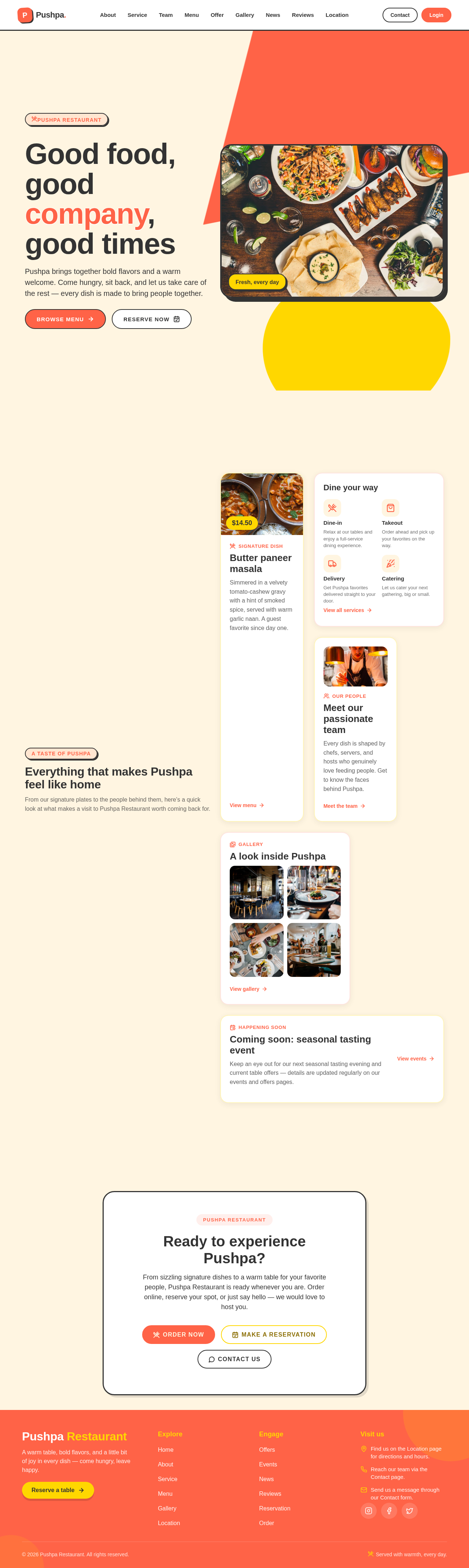
Home.jsx

  • Information/State: Introduction to the restaurant, navigation to other pages.
  • Primary Actions: Navigate to About, Menu, Contact, etc.
  • Components: Navbar, Footer.
  • States: Loading, success, error.

About.jsx

  • Information/State: Restaurant background and identity.
  • Primary Actions: None.
  • Components: Navbar, Footer.
  • States: Loading, success, error.

Service.jsx

  • Information/State: Details of restaurant services.
  • Primary Actions: None.
  • Components: Navbar, Footer.
  • States: Loading, success, error.
Page 3 of 10

Team.jsx

  • Information/State: Information about the restaurant team.
  • Primary Actions: None.
  • Components: Navbar, Footer.
  • States: Loading, success, error.

Menu.jsx

  • Information/State: Restaurant menu items.
  • Primary Actions: Browse menu.
  • Components: Navbar, Footer.
  • States: Loading, success, error.

Order.jsx

  • Information/State: Order initiation and submission.
  • Primary Actions: Place an order.
  • Components: Navbar, Footer.
  • States: Loading, success, error.

Location.jsx

  • Information/State: Restaurant location information.
  • Primary Actions: View location.
  • Components: Navbar, Footer.
  • States: Loading, success, error.
Page 4 of 10

Contact.jsx

  • Information/State: Contact form for visitors.
  • Primary Actions: Submit contact form.
  • Components: Navbar, Footer.
  • States: Loading, success, error.

Offer.jsx

  • Information/State: Current restaurant offers.
  • Primary Actions: View offers.
  • Components: Navbar, Footer.
  • States: Loading, success, error.

Gallery.jsx

  • Information/State: Restaurant gallery.
  • Primary Actions: View gallery.
  • Components: Navbar, Footer.
  • States: Loading, success, error.

Reservation.jsx

  • Information/State: Reservation submission.
  • Primary Actions: Make a reservation.
  • Components: Navbar, Footer.
  • States: Loading, success, error.
Page 5 of 10

Event.jsx

  • Information/State: Event information and engagement.
  • Primary Actions: View events.
  • Components: Navbar, Footer.
  • States: Loading, success, error.

News.jsx

  • Information/State: Restaurant news.
  • Primary Actions: View news.
  • Components: Navbar, Footer.
  • States: Loading, success, error.

Reviews.jsx

  • Information/State: Customer reviews.
  • Primary Actions: View and submit reviews.
  • Components: Navbar, Footer.
  • States: Loading, success, error.

Dashboard.jsx

  • Information/State: Administrator management hub.
  • Primary Actions: Manage content and operations.
  • Components: Navbar, Footer.
  • States: Loading, success, error.
Page 6 of 10

Login.jsx

  • Information/State: User authentication.
  • Primary Actions: Log in, register.
  • Components: Navbar, Footer.
  • States: Loading, success, error.

Operations

  • Information/State: Staff workspace for handling orders, reservations, etc.
  • Primary Actions: Manage operational tasks.
  • Components: Navbar, Footer.
  • States: Loading, success, error.

3. Functional Requirements

  • As a Restaurant Visitor, I should be able to browse the restaurant's menu, services, team, and location information. (explicit)
  • As a Restaurant Visitor, I should be able to place an order online. (explicit)
  • As a Restaurant Visitor, I should be able to make a reservation online. (explicit)
  • As a Restaurant Visitor, I should be able to contact the restaurant through a form. (explicit)
  • As a Restaurant Visitor, I should be able to view current offers, gallery, events, news, and reviews. (explicit)
  • As a Restaurant Visitor, I should be able to log in or register for an account. (required_inference)
  • As a Restaurant Staff, I should be able to manage orders, reservations, events, contacts, and reviews. (required_inference)
  • As a Restaurant Administrator, I should be able to manage restaurant content and operations through the dashboard. (required_inference)
Page 7 of 10

4. User Personas

  • Restaurant Visitor: Browses information, initiates orders and reservations, contacts the restaurant, and engages with events and reviews.
  • Restaurant Staff: Manages operational workflows for orders, reservations, events, contacts, and reviews.
  • Restaurant Administrator: Manages restaurant content and operational records through the dashboard.

5. Core User Flows

Restaurant Visitor

  1. Browse Information: Navigate to Home, About, Service, Team, Menu, Offer, Gallery, News, Reviews, and Location pages.
  2. Place Order: Navigate to Order page, select menu items, and submit order.
  3. Make Reservation: Navigate to Reservation page, fill in details, and submit reservation.
  4. Contact Restaurant: Navigate to Contact page, fill in contact form, and submit.
  5. Engage with Events: Navigate to Event page, view event details, and engage.
  6. Login/Register: Navigate to Login page, enter credentials, and log in or register.

Restaurant Staff

  1. Manage Operations: Access Operations page, view and manage orders, reservations, events, contacts, and reviews.

Restaurant Administrator

  1. Manage Content and Operations: Access Dashboard page, manage restaurant content and operational records.
Page 8 of 10

6. Visuals Colors and Theme

  • Muse: Haraldur Thorleifsson
  • Palette:
    • Background: #FFF5E1
    • Surface: #FFFFFF
    • Text: #333333
    • Primary: #FF6347
    • Accent: #FFD700
    • Muted: #B0C4DE
  • Typography:
    • Headings: Sora — Bold, sentence case
    • Body: Outfit
    • Scale: 1.5 modular, 64/32/24/18/16
  • Shape Language: Chunky, rounded cards with soft edges.
  • Layout: Color-blocked sections with full-width headers and footers.
  • Imagery: Custom illustrations, bold iconography, lifestyle photography.

7. Signature Design Concept

A color-blocked hero section on the Home page with oversized typography and vibrant red and gold accents. The hero section will feature a large illustrative or photographic element to draw focus and create an inviting atmosphere.
Page 9 of 10

8. Interaction Model & Motion Direction

  • Interaction Model: Animated
  • Motion Tempo: Expressive
  • Hero Dimensionality: Layered_2d
  • Landing Hero Motion Brief: The hero section will feature a lively entrance animation with oversized typography and vibrant color blocks. The motion will guide the user flow with smooth transitions and easing.

9. Non-Functional Requirements

  • The website must be responsive and accessible on various devices and screen sizes. (required_inference)
  • The system must ensure data security and privacy for user information. (required_inference)

10. Tech Stack

  • Frontend: React
  • Backend: FastAPI
  • Styling: Tailwind CSS
  • Build Tool: Vite
  • Package Management: npm

11. Assumptions and Constraints

  • The project must adhere to the specified file structure and naming conventions.
  • The project must be delivered as a downloadable ZIP file.
  • The frontend technology is limited to React, and the backend technology is limited to FastAPI.
Page 10 of 10

12. Glossary

  • React: A JavaScript library for building user interfaces.
  • FastAPI: A modern, fast (high-performance) web framework for building APIs with Python.
  • ZIP File: A compressed file format used to package and distribute files.
  • CRUD: Create, Read, Update, Delete operations typically used in database management.
Home.jsx design preview
Login.jsx: Log in
Dashboard.jsx: Manage content
Dashboard.jsx: Manage operations
Home.jsx design preview
Login.jsx: Log in
Dashboard.jsx: Manage content
Dashboard.jsx: Manage operations