purple-swift
 Nasr Aldeen
في شوارع موسكو ويلبس أرقى الملابس

Comments (0)
Sign in to leave a comment
System Requirements
System Requirements Document for purple-swift
1. Introduction
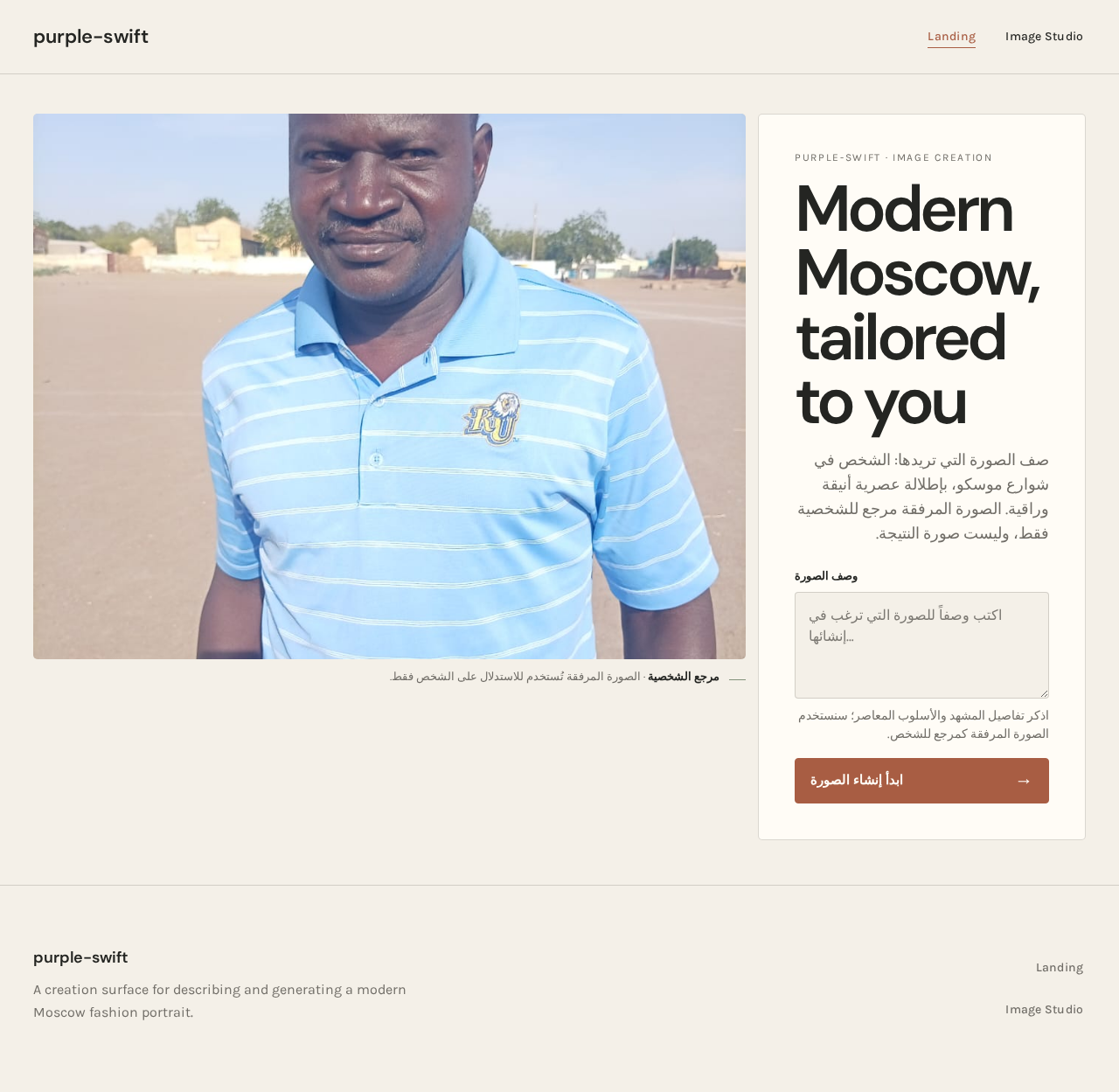
purple-swift is a modern image-generation experience for creating an image of a person in the streets of Moscow wearing elegant, premium contemporary clothing. The requested style is modern, not classical formal. The supplied portrait is the subject reference for the generated image; it informs the person depicted, not the interface layout or palette.
This document is the System Requirements Document for the requested product. Its audience is the person creating the image.
Product success
Success means the user can provide a description, request generation, and see an image that reflects the supplied subject reference, a recognizable Moscow street setting, and elegant contemporary clothing. The result must not default to classical formalwear.
2. System Overview
purple-swift provides a public entry where the user can enter an image description, and an Image Studio where the image is generated and displayed. The current product has one active human persona: مُنشئ الصور (Image Creator). No account or sign-in is required by the accepted page contract.
The application uses a React frontend and a shared FastAPI backend. The backend calls the model provider through the provisioned LiteLLM gateway. MariaDB is provisioned for application-owned persistent data; PostgreSQL supports LiteLLM and is separate from application-owned storage. The accepted workflow does not establish a need for application-owned user accounts, image history, or other persistent domain records.
Current scope is limited to describing and generating the requested image and showing its result. It does not add image editing, galleries, downloads, sharing, or account management.
2a. Product Interpretation and Delivery Boundary
The supplied page contract is the current information architecture: Landing is the public, anonymous entry and prompt-input surface; Image Studio is the generation and result surface. Both are application-owned custom pages and require no identity. The user’s description is passed to the image-generation service through the backend and LiteLLM gateway. The generated image and its generation status are shown in Image Studio.
The supplied portrait is a subject reference for image generation. It is not a request to reproduce the reference photograph’s layout, interface colors, or clothing. The current delivery boundary is the single image-generation journey described here; no future product capabilities are specified.
2c. Page Content and Component Coverage
Landing
- Information and state: A concise explanation of creating a contemporary Moscow fashion image; an anonymous prompt-entry state. The supplied portrait informs the subject reference, while the requested scene and clothing remain explicit.
- Primary action: Enter a description and start image generation.
- Supporting content: Prompt label and concise Arabic-aware guidance. The prompt is a multiline description field; no additional prompt controls are required by the source.
- Entities: User-provided image description; supplied portrait as subject reference.
- Components: Compact wordmark and a clear, restrained navigation/action row; oversized, wrapping-safe heading; prompt panel; multiline prompt field; terracotta generation button.
- States and recovery: Empty prompt remains an input state; generation begins only after a description is provided. If the request cannot proceed or generation fails, show a clear error and allow the user to correct or resubmit the description. On successful submission, continue to Image Studio with the request.
- Responsive behavior: At 375px, stack the prompt panel and portrait/result presentation without clipping readable text or controls. At 768px and 1280px, keep all text and controls within the viewport and their containers.
Image Studio
- Information and state: The submitted description, generation status, and resulting image. The image should depict the referenced person in a recognizable Moscow street setting, wearing elegant, premium contemporary clothing—not a classical formal look.
- Primary action: View the generation in progress and the resulting image.
- Supporting content: A compact status line beneath the portrait, such as “Generating” or “Ready,” with a thin sage marker.
- Entities: Submitted image description; generated image; generation status.
- Components: Large portrait/result area; image-status line; restrained loading and error presentation. Keep text and controls off the subject’s face and outfit.
- States and recovery: Show a generating state while the service works; show the image and ready state on success. If generation fails, show an understandable error and provide a way to retry the accepted generation using the description. If the service is unavailable, preserve the submitted description for that retry during the active journey.
- Responsive behavior: On wide screens, pair the large portrait/result area with the narrower prompt panel; on mobile, stack the prompt above the image. Image cropping may adapt while keeping the subject legible.
3. Functional Requirements
-
As a مُنشئ الصور, I should be able to enter a description for the requested image on Landing.
Provenance:required_inference— necessary to make the accepted image-generation journey executable.
Lifecycle and access: The user opens the public, anonymous Landing page and enters a multiline description. The description is the input to the generation request. No account is required.
Acceptance: The description can be submitted to begin generation. An empty description does not start generation; the user remains able to enter one. After submission, the request continues to Image Studio. -
As a مُنشئ الصور, I should be able to request an image of a person in Moscow streets wearing elegant, premium contemporary clothing.
Provenance: The Moscow street setting and elegant, premium clothing areexplicit; the modern, non-classical-formal style isexplicit. Sending the description to an image-generation service isrequired_inference.
Lifecycle and access: From Landing, the user submits the description. The application sends the request through the backend and LiteLLM gateway to the image-generation service. Image Studio shows a generating status while the request is in progress.
Acceptance: The request specifies a person in Moscow streets, elegant premium clothing, and a modern style—not classical formalwear. The supplied portrait informs the subject. On success, Image Studio displays the generated image and a ready status. On failure, it displays an error and allows retry using the submitted description; the user can continue the journey without re-entering the description during that active retry. No additional participant is involved.
- As a مُنشئ الصور, I should be able to see the generated image.
Provenance: Displaying the result isrequired_inference, necessary to complete the accepted image-generation outcome.
Lifecycle and access: After generation succeeds, the user sees the image in Image Studio, with a compact ready status.
Acceptance: The generated image is visibly presented, with no interface text or controls covering the subject’s face or outfit. If generation fails, the user sees the failure state and can retry; after a successful retry, the image and ready status are shown.
4. User Personas
مُنشئ الصور (Image Creator)
- Product context: The person using purple-swift to create the requested fashion image.
- Primary goal: See an image of the referenced person in Moscow streets wearing elegant, premium contemporary clothing.
- Accepted responsibilities: Enter the image description on Landing, initiate generation, and view the result in Image Studio.
- Relevant input and decisions: Supplies the description; the accepted style is modern rather than classical formal.
- Interaction with other participants: No other accepted human participant is involved. The application sends the request to the image-generation service and presents its result.
- Observable success: Image Studio displays the generated image and a ready status. If generation fails, the user can retry the submitted description.
- Provenance:
required_inferencepersona from the Planning Scope; the user’s image-generation goal and visual constraints are explicit.
5. Core User Flows
1. Create and view the requested Moscow fashion image
- The مُنشئ الصور opens Landing, which is available without an account.
- The user enters a description for the image in the multiline prompt field. The requested image is of the supplied subject in Moscow streets, wearing elegant, premium contemporary clothing in a modern—not classical formal—style.
- The user starts generation. An empty description does not start a request; the user can enter a description and continue.
- The application sends the description and subject reference through the shared backend and LiteLLM gateway to the image-generation service.
- The user continues to Image Studio and sees a generating status while the request is in progress.
- On success, Image Studio displays the generated image and a ready status. The user’s journey is complete.
- If generation fails or the service is unavailable, Image Studio shows an error. The submitted description remains available for retry during the active journey. The user retries; on success, the image and ready status appear.
6. Visuals Colors and Theme
The visual direction is “Modern Moscow, tailored to you”, with Yves Béhar as the named muse. The interface should feel humane, aspirational, and calm, keeping the generated fashion portrait as the dominant visual element. The supplied portrait informs the generated subject; its blue shirt does not define the interface palette.
Light-mode color tokens
- Background:
#F4F0E8— warm paper. - Surface:
#FFFCF6— warm, quiet panels. - Text:
#242522— readable charcoal. - Primary action:
#A85D43— restrained terracotta. - Accent and secondary status marker:
#82927A— sage. - Muted text:
#79766F. - Use warm-grey rules; do not add decorative gradients.
Typography
- Headings: DM Sans, medium-to-bold weights; sentence case, confident humanist character, comfortable close tracking.
- Body: Karla.
- Responsive scale: display 52px at 375px to 104px at 1280px; section headings 36/48px; subheads 24/30px; body 16/18px; labels 12/14px. Use responsive sizing and wrapping so text stays within its container.
Shape and layout
- Use gently rounded image and input corners, quiet oat surfaces, fine warm-grey rules, and restrained terracotta controls. Avoid pill-heavy or glossy styling.
- Use an image-led, asymmetric creation surface. On wide screens, place the large portrait/result area beside a narrower prompt panel; on mobile, stack the prompt above the image.
- Keep the portrait dominant, with a narrow warm-paper gutter rather than a floating card. Keep the prompt label, multiline field, and generation button grouped as one clear creation instrument.
- Place a compact image-status line beneath the portrait, with a thin sage marker and no dashboard-tile treatment.
- Keep the display heading aligned to the prompt panel, not centered across the page.
- At 375px, 768px, and 1280px, all readable text and controls must remain fully within the viewport and their containers. Image cropping may adapt while keeping the subject legible.
- Do not cover the subject’s face or outfit with interface text, controls, or overlays.
7. Signature Design Concept
Make the first screen a portrait-led creation surface: a large Moscow fashion image occupies roughly two-thirds of the desktop composition, with a narrow warm-paper gutter separating it from the prompt panel. Align a bold, wrapping-safe heading and concise Arabic-aware prompt guidance in the panel. Group the visible prompt label, multiline description field, and terracotta generate button as one creation instrument. Place the compact status line beneath the portrait. On mobile, stack the prompt panel above the portrait, preserving readable text and controls while adapting the image crop to keep the subject legible. The concept uses only the accepted description, generation, status, and result behavior.
8. Interaction Model & Motion Direction
Interaction Model: Animated
Motion Tempo: restrained
Hero Dimensionality: layered_2d
Landing Hero Motion Brief
- Focal subject: The generated fashion portrait, showing the referenced person in a recognizable Moscow street setting and contemporary elegant clothing.
- Input → transformation → outcome: The user enters an image description and starts generation; the image-generation service processes the request; the resulting portrait appears in Image Studio with a ready status.
- Motion vocabulary: Restrained, purposeful transitions; short, calm control-state changes; a soft image reveal when generation completes. No looping decoration.
- First frame: A composed, static-feeling portrait-led layout with the prompt panel beside the image on wide screens and above it on mobile. The portrait remains the focal point; no text or controls overlay the face or outfit.
- Reduced motion: Provide a fully usable static arrangement. Do not rely on animation to communicate generation status or success; show the status in text.
9. Non-Functional Requirements
-
Responsive readability and control access
Provenance: Explicit creative direction. At 375px, 768px, and 1280px, readable text and controls must remain fully within the viewport and their containers. Text may wrap or scale; imagery may crop as directed, provided the subject remains legible. -
Subject visibility
Provenance: Explicit creative direction. Interface text and controls must not cover the generated subject’s face or outfit. -
Reduced-motion usability
Provenance: Explicit creative direction. With reduced motion enabled, the interface remains fully usable in a static arrangement, and status remains understandable without animation. -
Generation service integration
Provenance:required_inference. The backend must be able to send the accepted image-generation request through the provisioned LiteLLM gateway and return the result or a failure state to the frontend.
10. Tech Stack
- Frontend: React application UI, as provisioned.
- Backend: Shared FastAPI process for application APIs and domain modules, as provisioned. Reuse it for image-generation API behavior.
- Model-provider gateway: LiteLLM, as provisioned, for backend model-provider calls.
- Application-owned storage: MariaDB, as provisioned. The accepted workflow does not require persistent user accounts, image history, or other application-owned domain records.
- LiteLLM storage/support: PostgreSQL, as provisioned, separate from application-owned storage.
- Additional services: None specified or required by the accepted workflow.
11. Assumptions and Constraints
- The supplied portrait is available to the image-generation workflow as the subject reference. The image-generation service must be configured to accept the request and reference; provider-specific implementation details are not specified.
- The image-generation service is reached through the provisioned LiteLLM gateway. The service’s provider, model, and operational limits are unspecified.
- The user can complete the accepted journey anonymously; no account or sign-in is required by the supplied access contract.
- The generated image is shown in Image Studio. Persistent image history, editing, download, and sharing are not part of the accepted requirements.
12. Glossary
- Image Creator (مُنشئ الصور): The accepted human persona who describes, initiates, and views the requested image generation.
- Subject reference: The supplied portrait used to inform the person depicted in the generated image.
- LiteLLM gateway: The provisioned gateway through which the backend makes model-provider calls.
purple-swift · image creation
Modern Moscow, tailored to you
صف الصورة التي تريدها: الشخص في شوارع موسكو، بإطلالة عصرية أنيقة وراقية. الصورة المرفقة مرجع للشخصية فقط، وليست صورة النتيجة.
اذكر تفاصيل المشهد والأسلوب المعاصر؛ سنستخدم الصورة المرفقة كمرجع للشخص.

purple-swift · image creation
Modern Moscow, tailored to you
صف الصورة التي تريدها: الشخص في شوارع موسكو، بإطلالة عصرية أنيقة وراقية. الصورة المرفقة مرجع للشخصية فقط، وليست صورة النتيجة.
اذكر تفاصيل المشهد والأسلوب المعاصر؛ سنستخدم الصورة المرفقة كمرجع للشخص.
No comments yet. Be the first!