Deal1Bundle deal
Rs.350
Separately Rs. 470
- 1 Zinger ShawarmaRs. 235
- 1 Tin PackRs. 235
Save Rs. 12026% off separately
Full breakdown
- 1 Zinger ShawarmaRs. 235
- 1 Tin PackRs. 235
Items separatelyRs. 470
You saveRs. 120
 Syed Eman Ali Shah
You are a senior full-stack web developer continuing the development of the **Unique Café** single-page restaurant website. A previous code generation was cut off mid-way through the Deals section. Your sole task is to **complete the Deals section in full** — delivering all 15 deal cards as production-ready HTML/CSS/JavaScript that integrates seamlessly with the existing page. --- ## Context: What Already Exists The page has an established dark premium theme with deep red, golden, and orange accent colors. Menu card components, PKR pricing display, sticky navbar, and interactive section patterns are already implemented. The Deals section was started but cut off before Deal 1 was completed. **Do not recreate anything already built.** --- ## Your Task: Complete the Full Deals Section (Deals 1–15) Deliver a **single self-contained HTML/CSS/JS block** that completes the Deals section from where it was cut off. Insert a clear comment marking the continuation point. All styles should be scoped to the deals section to avoid conflicts with existing CSS. --- ### Deal Data (All Prices in PKR) - **Deal 1** — Rs. 350: 1 Zinger Shawarma + 1 Tin Pack - **Deal 2** — Rs. 399: 1 Zinger Burger + 1 Tin Pack - **Deal 3** — Rs. 499: 1 Zinger Burger + Fries + 1 Tin Pack - **Deal 4** — Rs. 799: 2 Zinger Burgers + 2 Tin Packs - **Deal 5** — Rs. 999: 5 Shawarmas + 1.5 Ltr Drink - **Deal 6** — Rs. 1,099: 1 Medium Pizza + Fries + 1 Ltr Drink - **Deal 7** — Rs. 1,199: 1 Medium Pizza + 1 Zinger Shawarma + 1.5 Ltr Drink - **Deal 8** — Rs. 1,199: 2 Zinger Burgers + 1 Shawarma + 1.5 Ltr Drink - **Deal 9** — Rs. 1,699: 1 Large Pizza + 1 Zinger Burger + Fries + 1.5 Ltr Drink ⭐ **Popular** - **Deal 10** — Rs. 2,349: 2 Medium Pizzas + 1 Shawarma + 1 Zinger Shawarma + 1 Chicken Burger + 1.5 Ltr Drink - **Deal 11** — Rs. 2,650: 2 Large Pizzas + 1.5 Ltr Drink - **Deal 12** — Rs. 3,750: 3 Medium Pizzas + 1 Pound Cake + Wings + Nuggets + 1.5 Ltr Drink ⭐ **Best Value** - **Deal 13** — Rs. 4,199: 1 Large Pizza + 1 Medium Pizza + 1 Zinger Burger + 1 Chicken Burger + Pratha Roll + Shawarma + Fries + 1.5 Ltr Drink ⭐ **Best Value** - **Deal 14** — Rs. 4,549: 3 Large Pizzas + 4 Shawarmas + Fries + 1.5 Ltr Drink - **Deal 15** — Rs. 4,799: 3 Large Pizzas + 2 Pound Cakes + Fries + 1.5 Ltr Drink --- ## UI & Interaction Requirements **Deal Cards:** - Bold deal number badge (e.g., "DEAL 1") styled with golden/red accent matching the existing theme - Total PKR price displayed prominently — large, high-contrast, unmissable - Itemized list of included items with bullet or icon styling consistent with existing menu cards - Apply **"Popular"** badge on Deal 9 and **"Best Value"** badge on Deals 12 and 13 — visually distinct (e.g., glowing accent border or ribbon) - Calculate and display **savings vs. individual item pricing** on each card using realistic individual item prices derived from the menu data already established on the page **Expanded Detail Modal / Inline Expansion:** - Clicking a deal card expands it (inline accordion or modal) to show full deal breakdown, individual item prices crossed out, and total savings highlighted - Smooth open/close animation consistent with the dark premium aesthetic **Quantity Selector:** - Each deal card includes a `−` / `+` quantity control that updates a subtotal displayed on the card - Quantity minimum is 1 **Filtering:** - Filter bar above the deals grid with options: **All | Under Rs. 1,000 | Rs. 1,000–Rs. 2,500 | Rs. 2,500–Rs. 5,000 | Most Popular** - Filtering triggers a smooth fade/slide transition — non-matching cards hide gracefully, matching cards remain visible - Active filter state clearly highlighted using the existing golden/red accent **Animations:** - Cards animate into view on scroll (fade-up with slight delay stagger per card) - Hover state: subtle lift (translateY), golden border glow, slight background lightening — consistent with existing card hover patterns **Layout:** - Responsive CSS Grid: 3 columns on desktop, 2 on tablet, 1 on mobile - Section heading styled to match existing section headers (e.g., "OUR DEALS" with decorative underline accent) --- ## Code Standards - Vanilla HTML/CSS/JS only — no external libraries unless already present in the existing page - All CSS scoped with `.deals-section` parent class to prevent conflicts - JavaScript modular — use a `dealsData` array as the data source, render cards dynamically via JS - No inline styles; all styling via scoped CSS classes - Comment each major block (filter logic, card render function, modal/expand handler, quantity logic)

Sign in to leave a comment
purple-deals delivers the completed Deals section of the existing Unique Café single-page restaurant website. The Unique Café is a Pakistani fast-food café selling pizzas, zinger burgers, shawarmas, fries, wings, nuggets, pound cakes and drinks. A previous code generation was cut off mid-way through the Deals section, before Deal 1 was completed. This project's sole product intent is to finish that section in full — all 15 deal cards as production-ready HTML/CSS/JavaScript that integrates seamlessly with the already-built page.
The audience is the Café customer: families and students browsing the site who want to compare bundle deals by price, included items, and savings versus buying items individually, then set a quantity and see a subtotal before choosing a deal.
The work is scoped strictly to the Deals section. The existing dark premium theme (deep red, golden, orange accents), menu card components, PKR pricing display, sticky navbar, and interactive section patterns are already implemented and must not be recreated.
The product is a static, client-side single-page restaurant website. The Deals section is delivered as a single self-contained HTML/CSS/JS block that continues from the cut-off point, marked with a clear continuation comment, with all styles scoped under a .deals-section parent class so nothing conflicts with existing CSS.
Actors
dealsData array, runs filter, expand, quantity, and scroll-animation logic.Accepted behavior owned by the Deals section
dealsData, each with a stamped deal-number badge, a prominent PKR price, an itemized list of included items, a savings figure versus individual item pricing, and a −/+ quantity control with a subtotal.Narrow exclusions
The Deals section is a public, anonymous, client-side surface. There is no application-owned identity, no login, and no protected state: a Café customer opens the single-page site, scrolls to the Deals section, and interacts entirely in the browser. Quantity selections and subtotals are display-only state on each card; they are not persisted, transmitted, or turned into an order by this section. Savings are computed from realistic individual item prices derived from the menu data already established on the page.
The delivery boundary is the Deals section completion only. Everything already built on the page is out of scope for recreation. There is no future-horizon requirement in the authoritative thread; nothing beyond the completed Deals section is committed.
The authoritative source supplies the following verified deal data, all prices in PKR. This is the content the dealsData array must carry.
| Deal | Price (PKR) | Included items | Badge |
|---|---|---|---|
| Deal 1 | Rs. 350 | 1 Zinger Shawarma + 1 Tin Pack | — |
| Deal 2 | Rs. 399 | 1 Zinger Burger + 1 Tin Pack | — |
| Deal 3 | Rs. 499 | 1 Zinger Burger + Fries + 1 Tin Pack | — |
| Deal 4 | Rs. 799 | 2 Zinger Burgers + 2 Tin Packs | — |
| Deal 5 | Rs. 999 | 5 Shawarmas + 1.5 Ltr Drink | — |
| Deal 6 | Rs. 1,099 | 1 Medium Pizza + Fries + 1 Ltr Drink | — |
| Deal 7 | Rs. 1,199 | 1 Medium Pizza + 1 Zinger Shawarma + 1.5 Ltr Drink | — |
| Deal 8 | Rs. 1,199 | 2 Zinger Burgers + 1 Shawarma + 1.5 Ltr Drink | — |
| Deal 9 | Rs. 1,699 | 1 Large Pizza + 1 Zinger Burger + Fries + 1.5 Ltr Drink | Popular |
| Deal 10 | Rs. 2,349 | 2 Medium Pizzas + 1 Shawarma + 1 Zinger Shawarma + 1 Chicken Burger + 1.5 Ltr Drink | — |
| Deal 11 | Rs. 2,650 | 2 Large Pizzas + 1.5 Ltr Drink | — |
| Deal 12 | Rs. 3,750 | 3 Medium Pizzas + 1 Pound Cake + Wings + Nuggets + 1.5 Ltr Drink | Best Value |
| Deal 13 | Rs. 4,199 | 1 Large Pizza + 1 Medium Pizza + 1 Zinger Burger + 1 Chicken Burger + Pratha Roll + Shawarma + Fries + 1.5 Ltr Drink | Best Value |
| Deal 14 | Rs. 4,549 | 3 Large Pizzas + 4 Shawarmas + Fries + 1.5 Ltr Drink | — |
| Deal 15 | Rs. 4,799 | 3 Large Pizzas + 2 Pound Cakes + Fries + 1.5 Ltr Drink | — |
Individual item prices used for savings are derived from the menu data already established on the page (see Assumptions for the derivation rule).
The existing single-page Unique Café site. This project does not recreate it; it only receives the completed Deals section as one of its sections.
The completed Deals section, scoped under .deals-section, rendered from dealsData.
−/+ quantity control with subtotal; "Popular" ribbon on Deal 9 and "Best Value" ribbons on Deals 12 and 13, visually distinct.− or + to change quantity.dealsData array — single data source for all 15 deals.dealsData.dealsData on script execution.− at 1 is a no-op.FR-1 — Complete the Deals section without recreating existing parts (explicit) As a Café customer, I should see the Deals section completed in full on the existing Unique Café page, so that I can browse all deals without the page's already-built menu cards, PKR pricing display, sticky navbar, interactive section patterns, and dark premium theme being recreated or disturbed.
FR-2 — Single self-contained block with continuation marker and scoped styles (explicit)
As a developer maintaining the page, I should receive the Deals section as a single self-contained HTML/CSS/JS block with a clear comment marking the continuation point and all styles scoped under .deals-section, so that it integrates without conflicts.
.deals-section; no inline styles.FR-3 — Render all 15 deal cards from dealsData (explicit)
As a Café customer, I should see all 15 deal cards rendered dynamically from the dealsData array, each with a bold deal-number badge (e.g., "DEAL 1") in golden/red accent, a prominent large high-contrast total PKR price, and an itemized list of included items styled consistently with existing menu cards.
FR-4 — Deal data fidelity (explicit) As a Café customer, I should see each deal's exact price and included items as specified (Deals 1–15 per the Source Content Inventory), so that what I read is what the café offers.
FR-5 — Popular and Best Value badges (explicit) As a Café customer, I should see a visually distinct "Popular" badge on Deal 9 and "Best Value" badges on Deals 12 and 13 (e.g., glowing accent border or ribbon), so that I can spot recommended deals at a glance.
FR-6 — Savings versus individual item pricing (explicit) As a Café customer, I should see a savings figure on each card calculated against realistic individual item prices derived from the menu data already established on the page, so that I can judge the value of each bundle.
FR-7 — Expandable deal detail (explicit) As a Café customer, I should be able to click a deal card to expand it (inline accordion or modal) and see the full deal breakdown, individual item prices crossed out, and total savings highlighted, with a smooth open/close animation consistent with the dark premium aesthetic.
FR-8 — Quantity control with subtotal and minimum 1 (explicit)
As a Café customer, I should be able to use −/+ on each deal card to change quantity and see the subtotal update on the card, with quantity never going below 1.
+ increments quantity and updates subtotal = quantity × deal price; − decrements but stops at 1; subtotal is displayed on the card.FR-9 — Filter bar with smooth transitions and active state (explicit) As a Café customer, I should be able to filter the grid with All | Under Rs. 1,000 | Rs. 1,000–Rs. 2,500 | Rs. 2,500–Rs. 5,000 | Most Popular, with non-matching cards hiding gracefully via fade/slide, matching cards remaining visible, and the active filter clearly highlighted in the golden/red accent.
FR-10 — Scroll entrance and hover animation (explicit) As a Café customer, I should see cards animate into view on scroll with a fade-up and slight per-card delay stagger, and on hover see a subtle lift (translateY), golden border glow, and slight background lightening consistent with existing card hover patterns.
FR-11 — Responsive grid and section heading (explicit) As a Café customer, I should see the deals in a responsive CSS grid — 3 columns on desktop, 2 on tablet, 1 on mobile — under a section heading styled to match existing section headers (e.g., "OUR DEALS" with decorative underline accent).
FR-12 — Code standards (explicit)
As a developer, I should get vanilla HTML/CSS/JS only (no external libraries unless already present), all CSS scoped with .deals-section, modular JavaScript using dealsData as the data source with dynamically rendered cards, no inline styles, and comments on each major block (filter logic, card render function, modal/expand handler, quantity logic).
dealsData-driven rendering; no inline styles; the four named blocks are commented.Product context. A visitor to the Unique Café single-page site — a family or student in Pakistan deciding what to order from the café's pizzas, zinger burgers, shawarmas, fries, wings, nuggets, pound cakes and drinks. They arrive anonymously; there is no account, login, or protected state in this product.
Primary goal. Compare the 15 combo deals by price, included items, and savings versus buying items individually, then settle on a quantity and see the subtotal before choosing a deal.
Distinct accepted responsibilities.
Relevant inputs or decisions. Which filter to apply; which deal to expand; how many of a deal to consider. All prices are in PKR.
Interactions with other accepted participants. The Café customer is the only active human participant; the browser runtime renders cards and applies filter, expand, quantity, and animation logic on their behalf. No other human participant is affected by these interactions.
Observable success. The customer sees all 15 deals, can narrow them with a filter, can open any deal's detail with crossed-out individual prices and highlighted savings, and can set a quantity with a correct subtotal that never drops below 1.
Flow A — Browse the full deal board
dealsData, each with its deal-number badge, large PKR price, itemized list, savings figure, and quantity control.Flow B — Filter the deals
Flow C — Expand a deal for the full breakdown
Flow D — Set quantity and read the subtotal
+ to increase quantity; the subtotal on the card updates to quantity × deal price.− to decrease quantity; at quantity 1 the − control does not go lower.The creative direction is authoritative: thick-stroke deal badges after Aaron Draplin — a diner price board built like a Field Notes cover. The emotional register is hearty, honest, value-driven, and a little loud: a big number and a badge you can trust, not a luxury experience. Shape, type, and component language come from Draplin's thick-stroke badges, ruled panels, workwear colour blocking, and plain-spoken all-caps labels; the palette stays the brief's dark premium ground with deep red, golden, and orange accents.
Colour tokens (dark mode)
#14100D (espresso-black ground)#211A15 (warm kraft-dark card)#F4EAD8 (warm cream)#E8A317 (golden — deal badges, active filter pill, focus rings, large PKR prices)#C8341F (deep red — savings, ribbons, hover glow)#9C8B76 (itemized lines, crossed-out original prices)#3A2E24Typography
clamp(40px, 9vw, 96px); deal card price clamp(40px, 6.5vw, 64px); badge/label 12–14px caps; item lines 15–17px; savings line 13px caps. Line-height 1.0 on display, 1.5 on item lists.Shape language
4px 4px 0 instead of blur.Layout
Imagery
The Deals section opens as a full-width poster band: "OUR DEALS" set in Alfa Slab One at clamp(40px, 9vw, 96px) flush-left, with a solid golden #E8A317 block 32px tall running edge-to-edge beneath it and the numeral "15" knocked out of that block in espresso black. To the right on desktop (stacked below on mobile) sits a red #C8341F "BUNDLE & SAVE" stamp rotated -4° with a 3px cream border. Beneath the band, the square filter strip sits on its own ruled line, and Deal 1's card is already half-visible above the fold so the grid reads as a continuous board rather than a centred SaaS hero.
Signature moves carried through every card:
clamp(40px, 6.5vw, 64px) in golden, with "Rs." set small in Oswald caps superscripted to its left and the crossed-out individual total in muted 13px directly beneath.#3A2E24 hairline with the item name left and its individual price right-aligned in Oswald tabular caps.#C8341F with a 2px cream border and a hard 4px offset shadow — never a pill chip.Interaction Model: Animated Motion Tempo: restrained Hero Dimensionality: flat
Landing Hero Motion Brief
translateY(-4px) with a 3px golden border and a 4px → 8px hard-shadow growth. Filter changes fade non-matching cards to 0 over 160ms and slide matching cards up 8px.prefers-reduced-motion, cards appear in their final positions without fade-up or stagger, hover lift is suppressed, filter changes swap instantly, and the filter strip wraps or scrolls so every pill is fully reachable..deals-section parent class to prevent conflicts with existing CSS.dealsData is the single data source; cards render dynamically; filter logic, card render function, modal/expand handler, and quantity logic are each commented as major blocks.clamp(...) to fit; no element covers readable text or controls. Rationale: the direction's fixed type scale and 3/2/1 grid require the price and badge text to remain whole at every breakpoint.prefers-reduced-motion, provide a usable static arrangement: no fade-up/stagger, no hover lift, instant filter swaps, and the filter strip wraps or scrolls so every pill is fully reachable. Rationale: the accepted scroll and filter animations must not block access to content for motion-sensitive customers..deals-section; responsive CSS Grid (3/2/1 columns); hard shadows, thick borders, square badges; clamp() type scale; prefers-reduced-motion handling.dealsData array, dynamic card rendering, filter logic, modal/expand handler, quantity logic, scroll-triggered entrance animation.Constraints (binding)
.deals-section parent class.Assumptions (narrow, labeled)
.deals-section.dealsData — the JavaScript array that is the single data source for all 15 deal cards.−/+ control.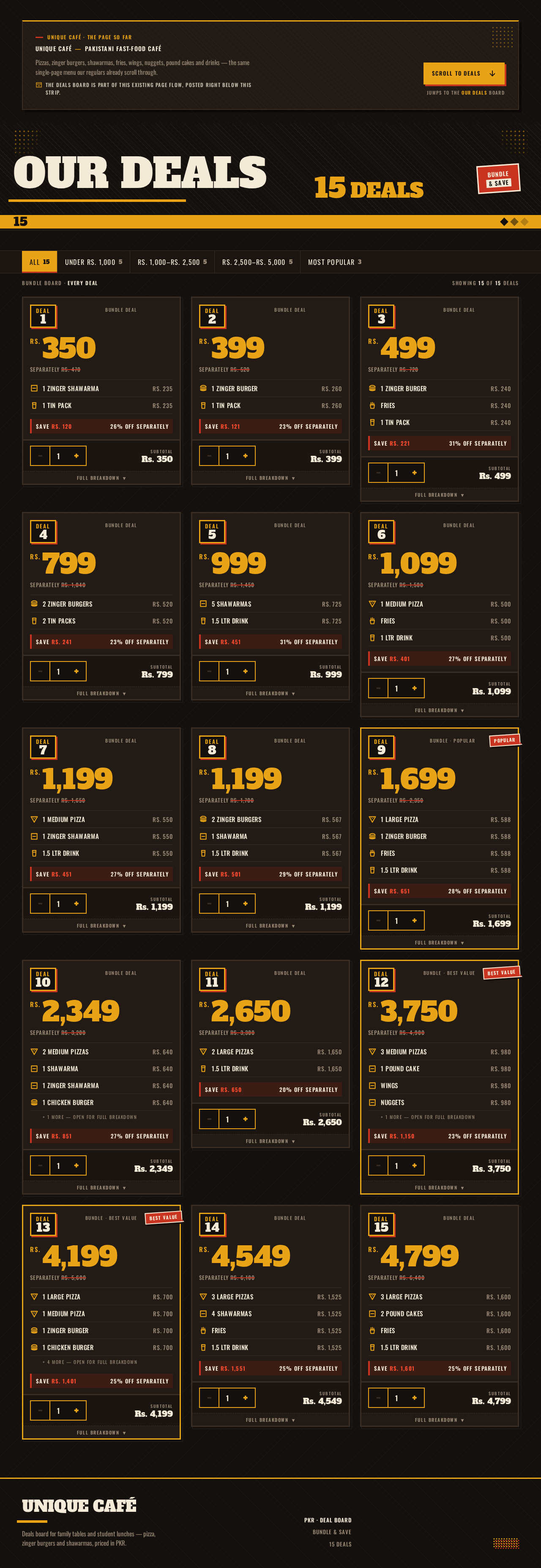
Unique Café — Pakistani fast-food café
Pizzas, zinger burgers, shawarmas, fries, wings, nuggets, pound cakes and drinks — the same single-page menu our regulars already scroll through.
The Deals board is part of this existing page flow, posted right below this strip.
15Deals
Rs.350
Separately Rs. 470
Rs.399
Separately Rs. 520
Rs.499
Separately Rs. 720
Rs.799
Separately Rs. 1,040
Rs.999
Separately Rs. 1,450
Rs.1,099
Separately Rs. 1,500
Rs.1,199
Separately Rs. 1,650
Rs.1,199
Separately Rs. 1,700
Rs.1,699
Separately Rs. 2,350
Rs.2,349
Separately Rs. 3,200
Rs.2,650
Separately Rs. 3,300
Rs.3,750
Separately Rs. 4,900
Rs.4,199
Separately Rs. 5,600
Rs.4,549
Separately Rs. 6,100
Rs.4,799
Separately Rs. 6,400
Unique Café — Pakistani fast-food café
Pizzas, zinger burgers, shawarmas, fries, wings, nuggets, pound cakes and drinks — the same single-page menu our regulars already scroll through.
The Deals board is part of this existing page flow, posted right below this strip.
15Deals
Rs.350
Separately Rs. 470
Rs.399
Separately Rs. 520
Rs.499
Separately Rs. 720
Rs.799
Separately Rs. 1,040
Rs.999
Separately Rs. 1,450
Rs.1,099
Separately Rs. 1,500
Rs.1,199
Separately Rs. 1,650
Rs.1,199
Separately Rs. 1,700
Rs.1,699
Separately Rs. 2,350
Rs.2,349
Separately Rs. 3,200
Rs.2,650
Separately Rs. 3,300
Rs.3,750
Separately Rs. 4,900
Rs.4,199
Separately Rs. 5,600
Rs.4,549
Separately Rs. 6,100
Rs.4,799
Separately Rs. 6,400
No comments yet. Be the first!