purple-calculator
 Diya Trivedi
start a project to build a simple single page design of calculator

Comments (0)
Sign in to leave a comment
System Requirements
System Requirements Document for purple-calculator
1. Introduction
purple-calculator is a simple calculator delivered as a single-page design. The product intent is narrow and explicit: a person opens one page, enters numbers and arithmetic operators, sees the computed result, and can clear the current calculation to start a new one. The audience is anyone who needs quick everyday arithmetic on phone or desktop, anonymously, in seconds — the product is a casual utility, not an instrument for professional or financial work.
The design brief is deliberately expressive: the project name signals that colour is part of the product, and the creative direction treats the calculator itself as a glossy, tactile object in violet. Simplicity of function and richness of surface are both requirements; neither may compromise the other, and legibility and speed of use take precedence over decoration.
Success Criteria
- A first-time visitor can complete an arithmetic calculation without instructions, sign-in, or setup.
- The displayed result is correct for the entered numbers and operators.
- The visitor can clear the calculation and immediately begin another one on the same page.
- The page remains a single page: no navigation to other destinations is required to calculate or to clear.
- Readable text and every control remain whole and fully visible at 375px, 768px, and 1280px viewports.
2. System Overview
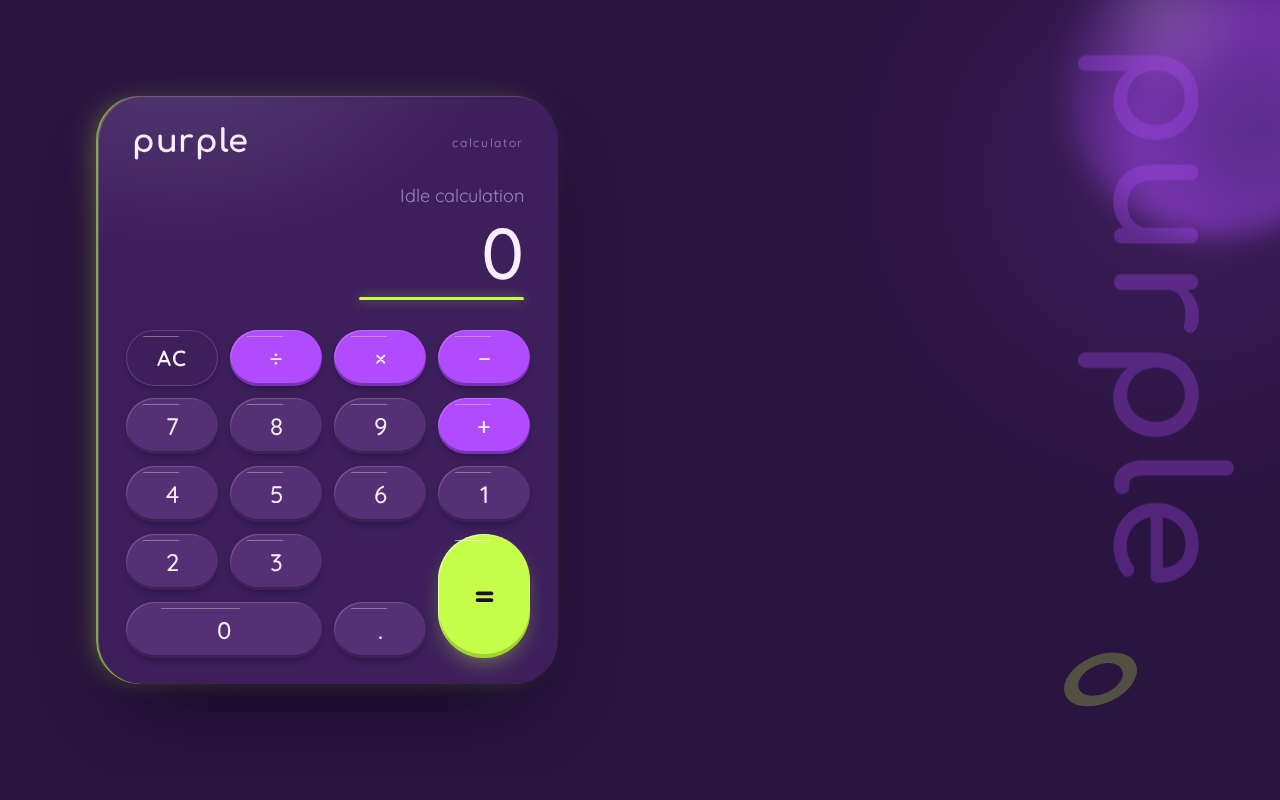
purple-calculator is a single-page, anonymous web calculator. The page presents a wordmark, a result readout, and a 4×5 keypad inside one capsule-shaped calculator body. The Calculator User enters digits and arithmetic operators; the readout shows the current entry and the computed result; a clear control resets the calculation so a new one can begin. All of this happens on the one page named Calculator.
The application is delivered as a React frontend served alongside a shared FastAPI backend process and a MariaDB database service. The calculator's arithmetic and its display state are a client-side interaction on the single page; the provisioned backend and database are available infrastructure and do not by themselves create stored calculations, accounts, or history. No identity, session, or persistence of calculations is required by the accepted requirements.
Actors: one active human persona, Calculator User, acting anonymously on the public Calculator page. No other human participants are affected by a calculation — the result is observed by the same person who entered it — so no handoff to a second participant exists. The backend and database are non-persona infrastructure actors.
Removed from scope
- None. No concept was explicitly removed by the user; the single-page calculator constraint stands as stated.
2a. Product Interpretation and Delivery Boundary
The product is a first-party, application-owned single page with no access requirement: it is reachable anonymously and immediately usable. There is no sign-in, no account, no saved history, and no sharing. Because a calculation produces no durable relationship, obligation, entitlement, or value transfer that must remain bound to a person, application-owned identity is neither required nor introduced.
The delivery boundary is the one page. Everything the Calculator User does — entering numbers, entering operators, reading the result, and clearing — occurs within the Calculator page's own working surface. The provisioned FastAPI backend and MariaDB service exist as the project's shared runtime infrastructure; they are not used to store calculations or user data under the current requirements, and no additional pages, routes, or services are introduced. Future ideas are kept out of the current scope (see Section 11).
2c. Page Content and Component Coverage
Calculator
The single page of the product, and its anonymous public entry surface. It explains the simple calculator, accepts numbers and operators, displays the result, and supports clearing to begin a new calculation.
Information and state
- Product wordmark: "purple" in Comfortaa 700, mixed case, with generous tracking; the calculator's identity line.
- Result readout: the current entry and/or computed result, right-aligned, in large tabular Quicksand numerals, with a thin lime underline that grows as digits are entered.
- Expression/entry state: the sequence of digits and operators currently being built, visible so the user can see what will be evaluated.
- Keypad state: 4×5 grid of keys — digits 0–9, decimal point, the four arithmetic operators (+, −, ×, ÷), an equals key spanning two rows as a lime capsule, and a clear control.
- Idle/initial state: readout shows a starting zero with no pending expression; the page is immediately usable.
- Error state: an invalid or non-computable expression (for example division by zero, or a malformed operator sequence) is surfaced in the readout area as a clear message rather than a silent wrong number.
Primary actions
- Press a digit key to append that digit to the current entry.
- Press a decimal point key to begin a fractional entry.
- Press an arithmetic operator key to record the operator and begin the next operand.
- Press the equals key to evaluate the current expression and display the computed result.
- Press the clear control to reset the current calculation to the idle state and start a new one.
Supporting actions and controls
- Every key is a full pill or squircle with a minimum 44px touch target and 12px gutters, operable by pointer and by keyboard focus.
- Keys provide a visible pressed state (2px depress with spring-back) so the user receives tactile confirmation of each press.
- The equals key carries the lime accent and a single lime ring pulse on evaluate, marking the result affordance.
Domain entities
- Calculation: the transient expression being built (operands and operators) and its evaluated result. It exists only in the page's working state for the current visit; it is not stored, listed, or retrieved.
- Key: a labelled control belonging to one of the key classes (digit, decimal, operator, equals, clear).
Component responsibilities
- Wordmark/header: presents the product identity; purely presentational, never overlaps the readout or keys.
- Readout: owns display of the current entry, the pending expression, and the result or error message; animates value changes by cross-fading with a small rise.
- Keypad: owns key layout, key press handling, and dispatch of digit, operator, equals, and clear actions to the calculation state.
- Calculation state holder: owns the transient expression, applies operator precedence for evaluation, and produces the result or error.
- Decorative layer: the oversized vertical "purple" wordmark, blurred violet sphere, and lime torus; decoration only, cropped by the viewport as directed, never covering readable text or controls.
States
- Loading: not applicable in a material sense; the page renders its static shell immediately, and no data fetch gates usability.
- Empty/initial: readout at zero, no pending expression, all keys enabled.
- Success: the evaluated result appears in the readout with the cross-fade and lime ring pulse; the user may continue calculating from the result or clear.
- Error: a non-computable expression shows a clear error message in the readout; the user recovers by pressing clear (or entering a new digit) to return to a usable state.
- Recovery: clear always returns the page to the idle state from any state, including error.
3. Functional Requirements
FR-1 — Single-page calculator delivery (explicit) As a Calculator User, I should reach the calculator as a single page, so that I can calculate without navigating anywhere else.
- Trigger/input: the user opens the product.
- Observable result: the Calculator page renders with wordmark, readout, and keypad; no other destination is required to calculate.
- Access state: anonymous, no sign-in.
- Failure/recovery: if the page fails to render, reloading the page restores the same single-page surface.
- Continuation: the user proceeds directly to entering a calculation.
FR-2 — Enter numbers (explicit) As a Calculator User, I should enter numbers using the digit keys, so that I can supply the operands of my calculation.
- Trigger/input: pressing digit keys 0–9 and the decimal point.
- Observable result: the entered digits appear in the readout as the current entry, and the lime underline extends as digits are entered.
- Access state: anonymous.
- Failure/recovery: a malformed entry (for example a second decimal point in one operand) is not accepted into the entry; the readout keeps the last valid entry.
- Continuation: the user may enter an operator or press equals.
FR-3 — Enter arithmetic operators (explicit) As a Calculator User, I should enter arithmetic operators, so that I can combine operands into an expression.
- Trigger/input: pressing +, −, ×, or ÷.
- Observable result: the operator is recorded in the pending expression and the readout is ready for the next operand.
- Access state: anonymous.
- Failure/recovery: pressing an operator with no operand available leaves the expression unchanged rather than producing an invalid state.
- Continuation: the user enters the next operand.
FR-4 — See the computed result (explicit) As a Calculator User, I should see the computed result after evaluating my expression, so that I learn the answer to my calculation.
- Trigger/input: pressing the equals key with a complete expression.
- Observable result: the readout displays the computed result in large tabular numerals, cross-fading from the previous value with a 6px rise, and the lime ring around the equals capsule pulses once.
- Access state: anonymous.
- Failure/recovery: a non-computable expression (such as division by zero) shows a clear error message in the readout instead of a wrong number; the user recovers by clearing or entering a new digit.
- Continuation: the user may continue calculating from the result or clear to start over.
FR-5 — Clear the current calculation (explicit) As a Calculator User, I should clear the current calculation, so that I can start a new one.
- Trigger/input: pressing the clear control.
- Observable result: the readout returns to the idle starting state and the pending expression is discarded.
- Access state: anonymous.
- Failure/recovery: clear works from any state, including after an error, and always yields a usable idle state.
- Continuation: the user begins a new calculation on the same page.
FR-6 — Tactile key feedback (required_inference) As a Calculator User, I should receive immediate visual confirmation when I press a key, so that I can trust that my input registered.
- Trigger/input: any key press.
- Observable result: the key depresses 2px over 90ms and springs back over 220ms with a slight overshoot; under reduced-motion preference the state change is instant.
- Access state: anonymous.
- Failure/recovery: not applicable; feedback is presentational and never blocks input.
- Continuation: the user continues entering the calculation.
FR-7 — Readable, whole controls at every viewport (explicit, from design constraints) As a Calculator User, I should see the wordmark, readout, key legends, and every key fully inside the viewport and their container at 375px, 768px, and 1280px, so that I can read and press everything without clipping.
- Trigger/input: viewing the page at any supported viewport.
- Observable result: text wraps or scales (for example with clamp) to fit; decoration may be cropped but never covers readable text or controls.
- Access state: anonymous.
- Failure/recovery: if a viewport is narrower than the mobile layout, the layout scales down while keeping 44px minimum touch targets.
- Continuation: the user calculates normally at any size.
4. User Personas
Calculator User
Product context. An anonymous visitor who needs quick everyday arithmetic — a sum, a percentage split, a running total — on a phone or desktop. They arrive with no account, no prior state, and no expectation of saved history; the visit lasts seconds. The project's expressive violet surface is part of what they encounter, but their purpose is the number.
Primary goal. Enter numbers and arithmetic operators, read the correct computed result, and be able to clear and reuse the calculator for the next calculation.
Distinct accepted responsibilities.
- Entering operands with the digit and decimal keys.
- Selecting arithmetic operators to build an expression.
- Committing the expression by pressing equals and reading the result.
- Clearing the calculation to start a new one.
Relevant inputs and decisions. Which numbers and operators to enter; when the expression is complete enough to evaluate; whether to continue from the result or clear.
Interactions with other participants. None. The result is observed by the same person who entered the calculation, so no second human participant is affected and no handoff occurs. The backend and database are infrastructure, not participants in the user's work.
Observable success. The readout shows the correct result for the entered expression, the page remains a single page throughout, and clear returns the calculator to a usable idle state for the next calculation.
5. Core User Flows
Flow 1 — Perform a calculation and read the result
- The Calculator User opens the product and lands on the Calculator page (anonymous; no sign-in).
- The page shows the wordmark, the readout at its idle zero, and the 4×5 keypad inside the capsule body.
- The user presses digit keys; each digit appears in the readout and the lime underline extends digit by digit. Each key gives its 2px depress and spring-back.
- The user presses an arithmetic operator (+, −, ×, ÷); the operator is recorded in the pending expression and the readout is ready for the next operand.
- The user enters the next operand with the digit keys.
- The user presses the equals key; the readout cross-fades the old value out and the new result in with a 6px rise, and the lime ring around the equals capsule pulses once.
- The user reads the computed result in large tabular numerals.
- Failure/recovery: if the expression is non-computable (for example division by zero), the readout shows a clear error message instead of a number; the user presses clear or enters a new digit to return to a usable state.
- Continuation: the user may continue calculating from the displayed result or proceed to Flow 2.
Flow 2 — Clear and start a new calculation
- From any state of the Calculator page — mid-entry, after a result, or after an error — the Calculator User presses the clear control.
- The readout returns to its idle starting state and the pending expression is discarded.
- The user begins a new calculation by repeating Flow 1 on the same page.
Flow 3 — Use the calculator at any viewport
- The Calculator User opens the Calculator page at 375px, 768px, or 1280px.
- At 375px the single centered column shows wordmark, readout, and keypad inside one capsule with 20px page margins.
- At 768px the capsule widens to a fixed 420px and a curved violet band of oversized "purple" type bleeds off the right edge behind it, without covering the readout or keys.
- At 1280px the capsule sits left-of-centre at 460px and the oversized vertical "purple" wordmark runs up the right third at 30% opacity, cropped by the viewport edge and never overlapping the calculator.
- The user calculates exactly as in Flow 1; all text and controls remain whole and fully visible.
6. Visuals Colors and Theme
The creative direction is authoritative for this section: Sensual pop minimalism, in violet — a calculator you want to press, after the muse Karim Rashid.
Mode. Dark mode only.
Colour tokens (exact hex, by role)
- Background (page ground):
#2A1440— deep aubergine-violet covering the whole page. - Surface (calculator body):
#3D1F5C— lifted violet capsule with a glossy top sheen. - Text (primary):
#F7EEFF— near-white on both grounds, body-size contrast well above 7:1. - Primary (action):
#B14BFF— violet for operator keys and the equals capsule. - Accent:
#C6FF4A— acid lime, used only for the equals/result affordance and the live result ring; never for body text. - Muted:
#9B86B5— secondary labels (key legends, operator hints) at 16px and above only.
No white or near-white page ground; no blue or indigo anywhere; no violet-on-white primary surface.
Typography
- Headings and wordmark: Comfortaa 700, mixed case, tracking +0.02em, never condensed, never uppercase.
- Body and key legends: Quicksand.
- Display numerals in the result readout: Quicksand 500, large, tabular figures, tight leading so long results stay on one line.
- Scale (1.25 modular): display 40px mobile → 88px desktop (clamp); result readout 36px → 72px; section labels 13px with +0.14em tracking; key legends 20px → 24px; body 16px → 18px; micro-label 12px.
Shape language. Capsules and blobs only: every key is a full pill or squircle (999px / 38% radius); the calculator body is a soft capsule with a 44px radius; section dividers are curved bands. Glossy highlight arcs sit on the top-left of keys and the body as a 1px white 18%-opacity stroke plus a soft inner sheen. No sharp corners, no hairline grids, no hard rules.
Spacing rhythm. 20px page margins at mobile; 12px gutters between keys; 44px minimum touch targets; generous internal padding inside the capsule so the readout breathes.
Imagery style. Glossy 3D primitives as decoration only — a blurred violet sphere and a small lime torus floating at low opacity behind the calculator at 1280px, cropped by the page edge, never overlapping keys or the readout. No photography, no stock people; gloss lives in highlights on solid colour, not in gradients used as the primary surface.
7. Signature Design Concept
The public entry is the calculator itself as the only object on the page: a single glossy aubergine capsule, 460px wide at desktop, floating against the deep violet ground with a soft lime rim-light on its left edge and a blurred violet sphere bleeding off the top-right corner.
The result readout occupies the capsule's top third at 72px in near-white Quicksand tabular numerals, right-aligned, with a thin lime underline that grows digit by digit as the user types. Below it, the keypad reads as candy pills — each key a full capsule with a top-left white gloss stroke — and the equals key is a tall lime capsule spanning two rows, the only lime element on the page.
Above and behind, an oversized vertical "purple" wordmark in Comfortaa 700 runs up the right third at 30% opacity, deliberately cropped by the viewport at 1280px and reduced to a curved band behind the calculator at 768px. It is decoration and never overlaps the calculator, the readout, or any key legend. There is no centred headline-plus-subtext-plus-button stack and no gradient-blob field; the calculator's own surface carries the drama.
8. Interaction Model & Motion Direction
Interaction Model: Animated Motion Tempo: expressive Hero Dimensionality: layered_2d
Landing Hero Motion Brief
- Focal subject. The glossy aubergine capsule calculator with its lime rim-light, the blurred violet sphere at the top-right, and the cropped vertical "purple" wordmark.
- Input → transformation → outcome thesis. Each key press is the input; the key depresses 2px over 90ms and springs back over 220ms on
cubic-bezier(0.34,1.56,0.64,1); the readout cross-fades the old value out and the new one in with a 140ms rise of 6px; on evaluate, a lime ring around the equals capsule pulses once. The outcome is a tactile, legible confirmation of every entry and of the final result. - Motion vocabulary. Liquid and soft: spring-back key presses, cross-fading readout values, a single lime ring pulse, and an 8px drift of the decorative background word on a 12s loop.
- Composed first frame. The capsule sits left-of-centre at 1280px against
#2A1440; the readout shows its idle zero with the lime underline at rest; the vertical "purple" wordmark is cropped at the right edge; the blurred sphere bleeds off the top-right; the lime equals capsule anchors the keypad. - Reduced-motion state. Under
prefers-reduced-motionevery transition becomes an instant state change and the background drift stops; the static arrangement keeps the same composition, with all text and controls whole and fully visible.
9. Non-Functional Requirements
- Single-page constraint (explicit): the design is limited to a single page; no additional routes or destinations are introduced for calculating or clearing.
- Simplicity (explicit): the product is "a simple single page design of calculator" — no features beyond entering numbers and operators, seeing the result, and clearing.
- Legibility and contrast (explicit, from design constraints): text
#F7EEFFon#2A1440and#3D1F5Ckeeps body-size contrast well above 7:1; muted#9B86B5is used only at 16px and above. - Responsive wholeness (explicit, from design constraints): at 375px, 768px, and 1280px, headlines, wordmarks, labels, numbers, and controls stay entirely inside the viewport and their container; decoration may be cropped but never covers readable text or controls.
- Touch accessibility (explicit, from design constraints): keys keep 44px minimum touch targets and 12px gutters.
- Reduced motion (explicit, from design constraints): under
prefers-reduced-motionall transitions become instant and the decorative drift stops, while the page remains fully usable. - Keyboard operability (required_inference): every key is reachable and operable by keyboard with a visible focus state, so the calculator is usable without a pointer.
- Performance (required_inference): the page renders its usable shell immediately; key presses and evaluation respond without perceptible delay, since the calculator's value is speed.
- Privacy (required_inference): calculations are transient and are not stored or transmitted as user data; no account or personal data is collected.
10. Tech Stack
- Frontend: React application UI, rendering the single Calculator page.
- Backend: shared FastAPI process for application APIs and domain modules (provisioned infrastructure; the current calculator interaction requires no server-side calculation endpoint).
- Database: MariaDB, provisioned as application-owned persistent storage (no calculation or user data is persisted under current requirements).
- Containerization: Docker with docker-compose, running the
frontend,backend, anddatabaseservices from the initial scaffold inventory. - Fonts: Comfortaa (700) for headings and wordmark; Quicksand (500 for display numerals, regular for body) — loaded as web fonts.
11. Assumptions and Constraints
- Assumption — anonymous use (required_inference): the calculator is publicly reachable with no sign-in, because no accepted requirement creates durable actor-specific state, commitment, or value transfer that would need identity.
- Assumption — transient calculations (required_inference): a calculation exists only for the current visit; there is no history, saved list, or retrieval, because none was requested.
- Assumption — client-side arithmetic (required_inference): evaluation happens in the page's working state; the provisioned backend and database remain available infrastructure but are not required to compute or store results.
- Constraint — one page (explicit): the design is limited to a single page.
- Constraint — simplicity (explicit): "a simple single page design of calculator"; no adjacent calculator features (scientific functions, memory, unit conversion, history) are in scope.
- Constraint — visual direction (explicit): the violet palette, Comfortaa/Quicksand typography, capsule shape language, and responsive layout described in Sections 6–8 are binding; the generic indigo/blue-on-white SaaS template is forbidden.
- Future (not current scope): any persistence of calculations, calculation history, accounts, sharing, or additional calculator modes are future ideas only and are excluded from current pages and acceptance.
12. Glossary
- Calculator page — the single page of the product; the anonymous entry and working surface containing the wordmark, readout, and keypad.
- Calculator User — the anonymous person who enters numbers and operators, reads the result, and clears the calculation.
- Readout — the display area in the capsule's top third showing the current entry, pending expression, result, or error in large tabular numerals.
- Pending expression — the transient sequence of operands and operators being built before evaluation.
- Equals capsule — the tall lime key spanning two rows that commits the expression for evaluation.
- Clear control — the key that resets the calculation to its idle state.
- Capsule body — the soft 44px-radius violet surface that contains the readout and keypad.
- Lime underline — the thin accent line under the readout that extends digit by digit as the user types.
- Reduced motion — the
prefers-reduced-motionstate in which all transitions become instant and decorative drift stops.
purple
calculator
No comments yet. Be the first!