pure-app
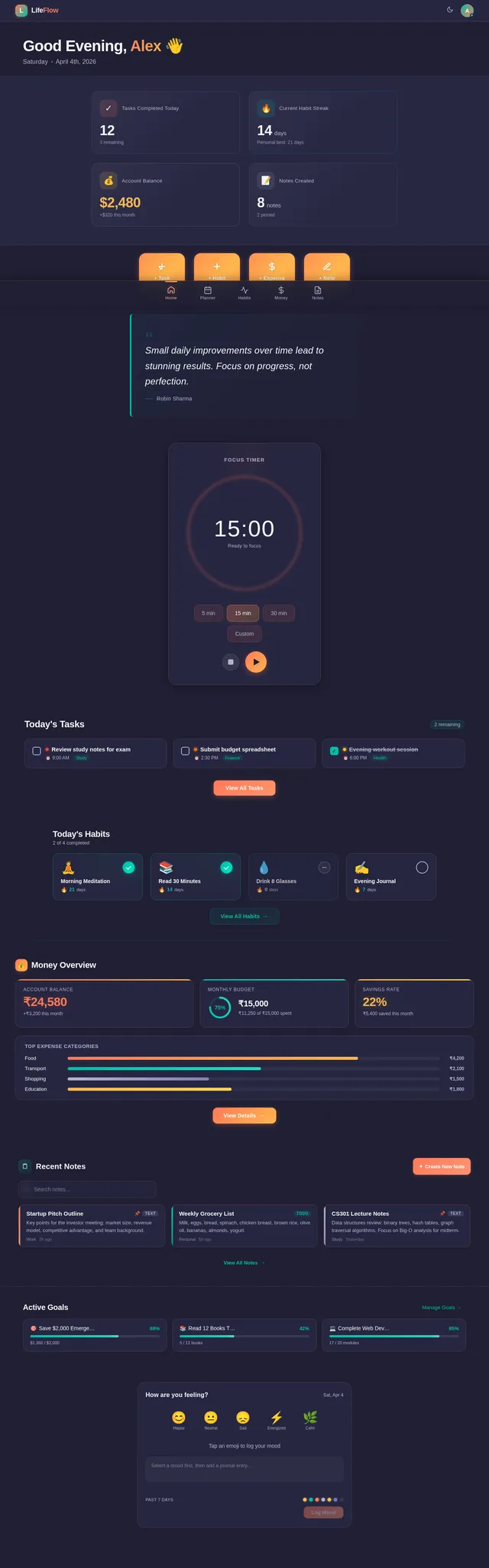
I already have an existing app version built with HTML, CSS, and JavaScript, but you cannot access those files here. So use this description as the source of truth and build a cleaner, more stable, more maintainable version of the same app. Build a premium mobile-first web app called: LifeFlow – Tasks, Habits & Money Manager This is an all-in-one life management app for students and young builders. It should feel like a polished premium product, not a basic CRUD app. Important: - Do NOT make a generic dashboard app - Do NOT oversimplify - Do NOT remove feature depth - Keep it mobile-first - Keep it premium - Use HTML, CSS, and vanilla JavaScript style logic if possible - Prioritize stability, clean structure, and maintainability ================================================== APP STRUCTURE ================================================== Bottom navigation screens: 1. Home 2. Planner 3. Habits 4. Money 5. Notes ================================================== HOME SCREEN ================================================== Include: - time-based greeting - current date - hero stats - quick add buttons - motivational quote - preview of today’s tasks - habits today - money today - debts overview - recent notes - goals preview - mood preview - focus timer card ================================================== PLANNER SCREEN ================================================== Task management system with: - add task - edit task - delete task - mark complete - filters: today, tomorrow, week, all - search - sort by time, priority, category - task cards with: - title - description - date - start/end time - priority - category ================================================== HABITS SCREEN ================================================== Habit tracker with: - add/edit/delete habit - daily tracking - streaks - date-based status - sections: - in progress - missed - skipped - completed - challenges: - 21 days - 30 days - 66 days - custom - analytics tab - weekly chart - monthly heatmap - habit performance view ================================================== MONEY SCREEN ================================================== This screen has 3 inner tabs: 1. Expenses 2. Shared 3. Debts ------------------------------------------ EXPENSES TAB ------------------------------------------ - add income/expense - edit/delete entry - monthly budget - net balance - income - expenses - savings rate - top category - weekly spend - pending dues - no-spend streak - selected range summary - smart insight - date filters: - all - today - 7 days - month - custom/more - expense categories including custom category support ------------------------------------------ SHARED TAB ------------------------------------------ Mini Splitwise-style feature: - add/edit/delete shared expense - manage members - manage shared categories/sections - fields: - amount - date - category - paid by - description - note - split among - equal split by default - expandable expense cards - per-expense split details - who pays whom logic - category filters - time filters - compact clean UI - avoid crowded layout ------------------------------------------ DEBTS TAB ------------------------------------------ - add/edit/delete debt - debt types: - you gave - you owe - status: - pending - paid - totals: - to receive - you owe ================================================== NOTES SCREEN ================================================== Notes system must be strong and polished: - add/edit/delete note - pin note - search notes - note detail view - two types: 1. text note 2. todo note - pinned notes section - note categories - smooth notes UX - notes should feel enhanced and premium ================================================== OTHER FEATURES ================================================== - mood logging with emoji and journal - goals system with progress - focus timer with presets and custom minutes - user profile panel with avatar/name/bio/stats - dark/light theme - local-first persistence ================================================== IMPORTANT FIX GOALS ================================================== Build this app in a cleaner and more stable way than a typical quick prototype. Focus on: - correct HTML structure - stable tab switching - stable bottom navigation - stable modals - no duplicate IDs - no broken wrappers - no fragile DOM logic - safe rendering - maintainable code structure - reliable local persistence - smooth mobile layout If rings/charts/canvas elements are used, only keep them if stable. Do not let decorative features break the app. ================================================== UI DIRECTION ================================================== - premium, cinematic, modern UI - glassmorphism - gradients - rounded cards - soft shadows - mobile app feel - clean spacing - elegant typography - strong hierarchy - polished empty states ================================================== OUTPUT ================================================== Provide: 1. short audit summary 2. implementation plan 3. full app code 4. changelog 5. test checklist Final goal: Create a premium, stable, production-style version of this app concept called: LifeFlow – Tasks, Habits & Money Manager
Comments (0)
Sign in to leave a comment
System Requirements
System Requirements Document (SRD)
Project Name: pure-app
1. Introduction
Welcome to the System Requirements Document (SRD) for pure-app, a premium mobile-first web application designed to provide students and young builders with an all-in-one life management solution. The app, named LifeFlow – Tasks, Habits & Money Manager, aims to deliver a polished, cinematic, and modern experience while maintaining deep functionality and stability.
This document outlines the system requirements, functional specifications, design concepts, and technical architecture necessary to build a cleaner, more stable, and maintainable version of the app.
2. System Overview
LifeFlow is a mobile-first application that combines task management, habit tracking, financial planning, and note-taking into a single cohesive platform. The app is designed with a focus on premium aesthetics, feature depth, and maintainability. It leverages modern UI principles such as glassmorphism, gradients, rounded cards, and soft shadows to create a cinematic user experience.
Key features include:
- Bottom navigation for seamless screen transitions.
- Local-first persistence for reliable offline functionality.
- Modular and scalable architecture for long-term maintainability.
- Premium design elements optimized for mobile devices.
3. Functional Requirements
Home Screen
- As User, I should see a time-based greeting and current date.
- As User, I should view hero stats and quick add buttons.
- As User, I should see a motivational quote.
- As User, I should preview today’s tasks, habits, money, debts, recent notes, goals, mood, and focus timer.
Planner Screen
- As User, I should add, edit, delete, and mark tasks complete.
- As User, I should filter tasks by today, tomorrow, week, and all.
- As User, I should search and sort tasks by time, priority, and category.
- As User, I should view task cards with title, description, date, start/end time, priority, and category.
Habits Screen
- As User, I should add, edit, delete, and track habits daily.
- As User, I should view streaks and date-based status.
- As User, I should organize habits into sections: in progress, missed, skipped, completed.
- As User, I should participate in habit challenges (21 days, 30 days, 66 days, custom).
- As User, I should access analytics, weekly charts, monthly heatmaps, and habit performance views.
Money Screen
Expenses Tab
- As User, I should add, edit, delete income/expense entries.
- As User, I should view monthly budget, net balance, income, expenses, savings rate, top category, weekly spend, pending dues, no-spend streak, and selected range summary.
- As User, I should filter expenses by date (all, today, 7 days, month, custom).
- As User, I should manage expense categories, including custom categories.
Shared Tab
- As User, I should add, edit, delete shared expenses.
- As User, I should manage members and shared categories/sections.
- As User, I should view per-expense split details and who pays whom logic.
- As User, I should filter shared expenses by category and time.
Debts Tab
- As User, I should add, edit, delete debts.
- As User, I should view debt types (you gave, you owe) and statuses (pending, paid).
- As User, I should view totals (to receive, you owe).
Notes Screen
- As User, I should add, edit, delete, and pin notes.
- As User, I should search notes and view note details.
- As User, I should organize notes into categories.
- As User, I should create two types of notes: text notes and todo notes.
Other Features
- As User, I should log moods with emoji and journal entries.
- As User, I should set and track goals with progress indicators.
- As User, I should use a focus timer with presets and custom minutes.
- As User, I should access a user profile panel with avatar, name, bio, and stats.
- As User, I should toggle between dark and light themes.
4. User Personas
Persona 1: Student
- Age: 18–25
- Needs: Task management, habit tracking, financial planning, and note-taking for academic and personal growth.
Persona 2: Young Builder
- Age: 25–35
- Needs: Advanced productivity tools, financial insights, and goal tracking for entrepreneurial projects.
5. Visuals Colors and Theme
Color Palette
- Background: #1F1F33 (Deep Indigo)
- Surface: #292946 (Charcoal Gray)
- Text: #F5F5F5 (Soft White)
- Accent: #FF7A59 (Sunset Orange)
- Muted Tones: #B3B3D1 (Muted Lavender)
Design Principles
- Glassmorphism with frosted surfaces.
- Gradients blending Sunset Orange and Muted Lavender.
- Rounded cards and soft shadows for a premium feel.
- Elegant typography with strong hierarchy.
6. Signature Design Concept
Concept: Dynamic Living Dashboard
The homepage will feature a dynamic living dashboard that adapts to the user’s day and mood.
Details:
- Animation: Subtle animations for hero stats, quick add buttons, and focus timer.
- Interaction: Users can swipe between sections (tasks, habits, money, notes) with smooth transitions.
- Mood Integration: The background color subtly shifts based on the user’s logged mood.
- Focus Timer: A central card with a glowing ring animation that visually counts down time.
- Empty States: Polished placeholders with motivational quotes and illustrations.
This concept ensures the app feels alive and responsive, creating a memorable and engaging experience.
7. Non-Functional Requirements
- Performance: Ensure smooth transitions and animations without lag.
- Accessibility: Adhere to WCAG 2.1 standards for color contrast and navigation.
- Security: Implement secure local persistence and data encryption.
- Scalability: Modular architecture for future feature additions.
- Reliability: Stable rendering and error handling.
8. Tech Stack
Frontend
- React for Web
- React Native for Mobile
Backend
- Python
- FastAPI
Database
- MySQL or MariaDB (with Alembic for migrations)
AI Models
- GPT 5.4 for user-friendly responses
- Claude 4.6 Opas for academic or coding work
AI Tools
- Litellm for LLM Routing
- Langchain
Local Orchestration
- Docker
- docker-compose
Server-Side Orchestration
- Kubernetes
9. Assumptions and Constraints
Assumptions
- Users primarily access the app via mobile devices.
- Local-first persistence is sufficient for offline functionality.
Constraints
- Must adhere to mobile-first design principles.
- Avoid fragile DOM logic and duplicate IDs.
10. Glossary
- Glassmorphism: A design style featuring frosted glass-like surfaces.
- Local-first persistence: Data storage strategy prioritizing offline access.
- Micro-interactions: Small animations or responses to user actions.
- WCAG 2.1: Web Content Accessibility Guidelines for inclusive design.
This document is now fully updated and ready for the next steps in the design and development process! Let me know if you'd like to proceed further.
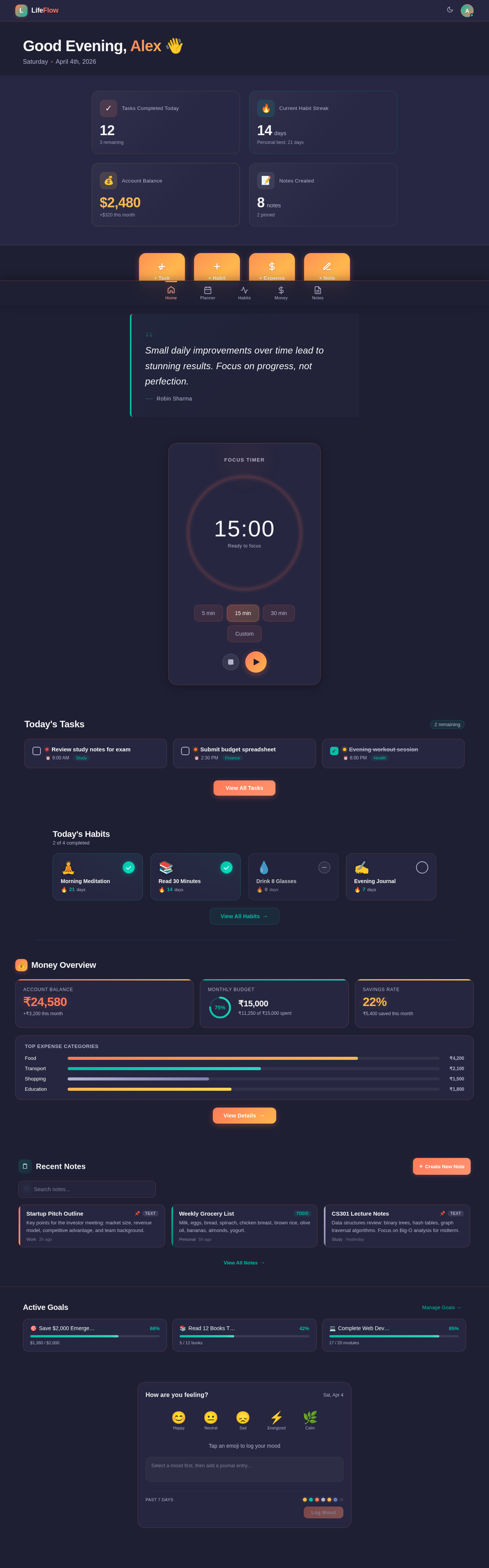
Good Afternoon, Alex
Saturday
July 11th, 2026
Small daily improvements over time lead to stunning results. Focus on progress, not perfection.
Robin Sharma
Today's Tasks
2 remainingReview study notes for exam
Submit budget spreadsheet
Evening workout session
Recent Notes
Startup Pitch Outline
Key points for the investor meeting: market size, revenue model, competitive advantage, and team background.
Weekly Grocery List
Milk, eggs, bread, spinach, chicken breast, brown rice, olive oil, bananas, almonds, yogurt.
CS301 Lecture Notes
Data structures review: binary trees, hash tables, graph traversal algorithms. Focus on Big-O analysis for midterm.
Active Goals
Manage Goals →Save $2,000 Emergency Fund
Read 12 Books This Year
Complete Web Dev Course
No comments yet. Be the first!