proud-project
 Ernestina
i want to build an app

Comments (0)
Sign in to leave a comment
System Requirements
System Requirements Document (SRD) for MOODSCAPE
1. Introduction
The MOODSCAPE project is a fashion-focused application designed to provide users with curated outfit suggestions based on their mood. The app emphasizes an editorial aesthetic, combining functionality with a premium design experience. This document outlines the system requirements for the development and enhancement of MOODSCAPE, ensuring alignment with Ernestina's vision and goals.
MOODSCAPE is tailored to Ernestina's target audience in Ghana (GH), with locale-specific considerations such as time zone (GMT) and cultural preferences in fashion aesthetics. The app aims to redefine how users interact with their wardrobe by making fashion both personal and intuitive.
2. System Overview
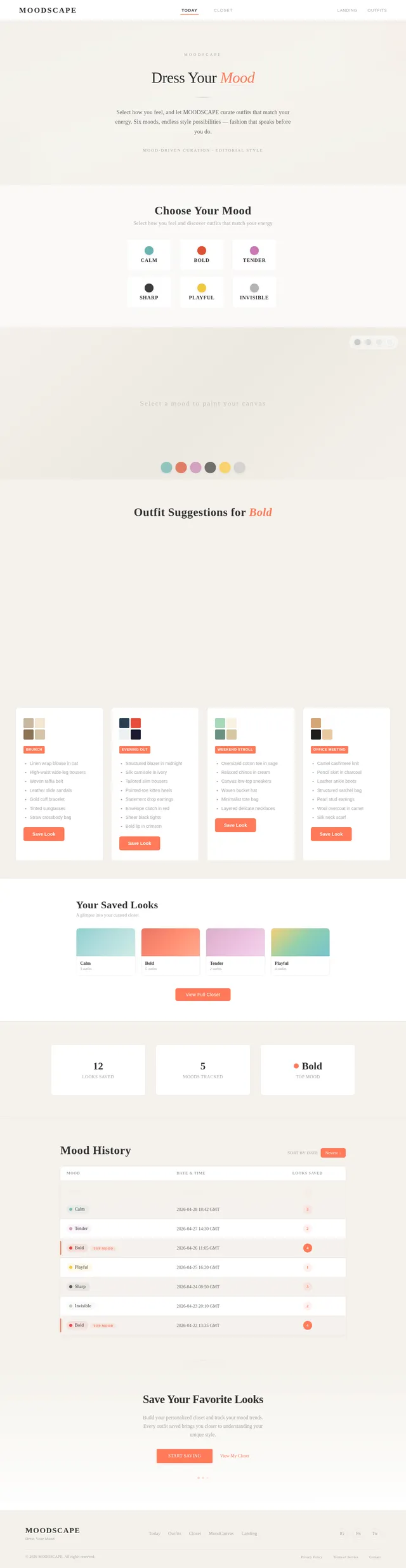
MOODSCAPE is a mood-driven outfit curation platform that allows users to select their mood from six predefined options and receive tailored outfit suggestions. Users can save their favorite looks to a personal Closet, track their mood history, and view key statistics about their fashion preferences. The app is designed to persist user data across sessions using localStorage and incorporates a high-end editorial design aesthetic.
Future enhancements may include AI-powered curation, real outfit swatches, and social sharing features. The system will initially focus on delivering a seamless user experience for the core functionalities while maintaining a visually striking and intuitive interface.
3. Functional Requirements
Core Features
- As a User, I should be able to pick a mood from six options (Calm, Bold, Tender, Sharp, Playful, Invisible) on the Today tab.
- As a User, I should receive four curated outfit suggestions for the selected mood, each with a color palette preview, piece list, and occasion tag.
- As a User, I should be able to save any outfit suggestion to my Closet by clicking "Save look."
- As a User, I should see my saved looks in the Closet tab, along with three stats: looks saved, moods tracked, and top mood.
- As a User, I should be able to view a full mood history log in the Closet tab.
- As a User, I should experience a design that leans into editorial fashion aesthetics, including the use of Cormorant Garamond font, generous whitespace, and mood colors.
Future Enhancements
- As a User, I should receive AI-curated outfit suggestions personalized to my Closet and mood history (using the Anthropic API).
- As a User, I should see real image swatches for outfit suggestions.
- As a User, I should be able to share my saved looks or mood history with others.
4. User Personas
1. Fashion Enthusiast
- Description: A user who loves exploring new styles and curating their wardrobe based on mood and occasion.
- Goals: Discover unique outfit ideas, track their fashion preferences, and save favorite looks.
- Pain Points: Overwhelmed by choices, difficulty in organizing outfits, and lack of personalized suggestions.
2. Casual User
- Description: A user who wants quick and easy outfit suggestions without spending too much time.
- Goals: Get reliable outfit ideas based on their mood and save them for future reference.
- Pain Points: Limited time to explore fashion options and a need for a simple, intuitive interface.
3. Aspiring Stylist
- Description: A user who uses the app as a tool for inspiration and professional styling.
- Goals: Access curated looks, analyze mood trends, and share ideas with clients or peers.
- Pain Points: Lack of advanced features like AI curation and sharing capabilities.
5. Visuals Colors and Theme
Unique Color Palette
- Background:
#F4F1EB(Warm Beige) - Surface:
#FFFFFF(Pure White) - Text:
#333333(Deep Charcoal) - Accent:
#FF7A59(Sunset Coral) - Muted Tones:
#A6A6A6(Soft Gray)
The color palette is designed to evoke a sense of elegance and sophistication, aligning with the editorial fashion aesthetic of MOODSCAPE. The warm beige background and sunset coral accents create a welcoming yet premium feel.
6. Signature Design Concept
Interactive Mood Canvas
The homepage of MOODSCAPE will feature an Interactive Mood Canvas—a dynamic, full-screen visual that reacts to the user's mood selection. Here's how it works:
-
Mood Selection Animation: When a user selects a mood (e.g., Calm, Bold, Tender, etc.), the canvas transforms into a living artwork that reflects the mood's essence. For example:
- Calm: A serene gradient of blues and greens with soft, flowing animations.
- Bold: Vibrant reds and oranges with sharp, angular transitions.
- Tender: Pastel pinks and purples with gentle, blooming effects.
- Sharp: Monochrome tones with crisp, geometric patterns.
- Playful: Bright yellows and teals with bouncing, playful shapes.
- Invisible: Subtle, almost transparent overlays with minimalistic textures.
-
Outfit Reveal: As the user scrolls down, the canvas splits into four sections, each revealing a curated outfit suggestion with a smooth fade-in effect. Each section includes:
- A color palette preview.
- A list of outfit pieces.
- An occasion tag (e.g., Casual, Formal, Evening).
-
Micro-Interactions: Hovering over an outfit suggestion highlights the color palette, and clicking on it expands the details in a modal view.
-
Editorial Typography: The use of Cormorant Garamond for headings and subheadings, paired with generous whitespace, reinforces the premium, magazine-like aesthetic.
This design concept ensures that MOODSCAPE makes a memorable first impression while providing an engaging and intuitive user experience.
7. Non-Functional Requirements
- The app must load within 3 seconds on a standard 4G connection.
- The app must persist user data across sessions using localStorage.
- The app must be responsive and accessible on both desktop and mobile devices.
- The app must adhere to WCAG 2.1 AA accessibility standards.
8. Tech Stack
Frontend
- React for Web
Backend
- Python
- FastAPI
Database
- MySQL (with Alembic for migrations)
AI Models
- Anthropic API for AI-powered curation (future enhancement)
Local Orchestration
- Docker
- docker-compose
9. Assumptions and Constraints
Assumptions
- Users will primarily access the app via modern web browsers.
- LocalStorage will be sufficient for initial data persistence needs.
- The editorial design aesthetic will appeal to the target audience.
Constraints
- Limited initial budget for AI and image-based features.
- The app must function seamlessly on low-bandwidth connections.
10. Glossary
- Mood Canvas: The interactive visual representation of the user's selected mood.
- Outfit Suggestion: A curated set of clothing items tailored to the user's mood.
- Closet: A feature where users can save and organize their favorite looks.
- LocalStorage: A web storage API used to persist data across user sessions.
- Anthropic API: An AI service used for personalized outfit curation (future feature).

Discover Your Style
Through Mood
An editorial fashion experience that curates personalized outfit suggestions based on how you feel. Select your mood, explore the canvas, and let your style speak.
Interactive Experience
The Mood Canvas
Select a mood and watch the canvas transform. Each emotion unlocks a curated world of style, color, and intention.
Choose Your Mood
How It Works
When you select a mood on the Today tab, the entire canvas responds with a dynamic color animation unique to that emotion. Four curated outfit suggestions then emerge, each with its own color palette, piece list, and occasion tag — all tailored to how you feel right now.
Style That Speaks to Your Mood
Three pillars that make discovering and curating your wardrobe effortless, personal, and beautifully organized.
Curated Outfit Suggestions
Receive four thoughtfully curated looks for every mood, each with color palettes, piece lists, and occasion tags tailored to your style.
Mood-Driven Personalization
Choose from six expressive moods — Calm, Bold, Tender, Sharp, Playful, or Invisible — and watch your wardrobe transform to match how you feel.
Save & Organize
Save your favorite looks to a personal Closet, track mood history, and build a visual library of outfits that reflects your evolving style.
Everything You Need to Dress Your Mood
A thoughtfully designed toolkit that transforms how you discover, curate, and remember your personal style.
Six Moods
Choose from Calm, Bold, Tender, Sharp, Playful, or Invisible to set the tone for your style journey.
Four Outfit Suggestions
Receive four expertly curated outfit ideas tailored to your selected mood, each with a unique personality.
Color Palettes
Every suggestion comes with a harmonious color palette preview so you can visualize the look instantly.
Occasion Tags
Each outfit is tagged for the right moment—brunch, office, evening out, or weekend wandering.
Save to Closet
Love a look? Save it to your personal Closet with one tap and revisit your favorites anytime.
Track Your Style
View your mood history, discover your top mood, and watch your personal style story unfold over time.
How It Works
Your Style Journey in Four Steps
From mood to wardrobe in moments. Discover how the proud-project turns your feelings into curated fashion.
Select Your Mood
Choose from six curated moods — Calm, Bold, Tender, Sharp, Playful, or Invisible — to express how you feel today.
Watch the Canvas Transform
The Mood Canvas animates to life, revealing a unique color palette and visual atmosphere tailored to your selection.
Browse Outfit Suggestions
Explore four curated outfit ideas, each with color swatches, piece lists, and occasion tags perfectly matched to your mood.
Save to Your Closet
Love a look? Save it to your personal Closet, track your style journey, and revisit your favorites anytime.
The Mood Canvas Experience
Select a mood and watch the canvas come alive. Rich color palettes bloom across the screen, revealing curated outfit suggestions that match exactly how you feel. Each interaction is a moment of discovery — where personal style meets intuitive design.
Who It’s For
Whether you live and breathe fashion or simply want to look great with minimal effort, the proud-project adapts to your style journey.
A style-forward individual who loves exploring new trends and curating their wardrobe based on mood and occasion.
Discover unique outfit ideas, track fashion preferences, and save favorite looks for future inspiration.
Overwhelmed by choices, difficulty organizing outfits, and a lack of personalized suggestions.
Someone who wants quick, reliable outfit suggestions without the time commitment of deep fashion exploration.
Get dependable outfit ideas based on their current mood and save them for easy future reference.
Limited time to explore fashion options and a need for a simple, intuitive interface.
A creative professional who uses the app as a tool for inspiration, trend analysis, and client styling.
Access curated looks, analyze mood trends over time, and share styling ideas with clients or peers.
Lack of advanced features like AI-driven curation and seamless sharing capabilities.
Ready to Discover Your Style?
Let your mood guide your wardrobe. Explore curated outfit suggestions, save your favorite looks, and build a closet that truly reflects you.
No comments yet. Be the first!