proud-loan
 Hello Mcdonald
create a website for my Bright Future Loan Assistance Company create classical professional a Loan website Bright Future Loan Assistance Apply for LOAN!! We are out to assist those in need of financial assistance. We have the license to lend money with and out side the company. We have been lend money oversea over 11 Years now. We offer this opportunity to people in need of a loan to start up a business and those in debts to pay off their debts. This loan has good duration period and a low interest rate. We lend money to companies and private individuals. Get your loan today to finance that dream business of your and make cash easily. So get back to us now so that we can start the processing of your loan. Contact EMAIL US NOW [email] WhatsApp Agent .... [phone] Signal Agent...... [phone]


Comments (0)
Sign in to leave a comment
System Requirements
System Requirements Document for proud-loan
1. Introduction
This document specifies the public website for Bright Future Loan Assistance, a licensed lending company that provides loan assistance to private individuals and companies. The site's product intent is to present the company's loan offering, credentials, and terms in a classical, professional manner, and to route every interested visitor to the company's published contact channels so that loan processing can begin.
The audience is two-fold:
- Loan Applicants — private individuals and company representatives who need financial assistance to start a business or to pay off existing debts, and who are evaluating whether Bright Future Loan Assistance is a credible lender to approach.
- Loan Company Representatives — the Bright Future Loan Assistance agents who receive inquiries through the published email, WhatsApp, and Signal channels and begin processing the loan.
The website is a public, informational, contact-routing surface. It does not collect or submit loan applications online; all loan inquiries are handled through the published contact channels.
2. System Overview
The product is a small, public, two-page website:
- Landing — the public entry surface presenting the loan offering, the audiences served, the company's credentials and experience, the loan benefits (good duration period, low interest rate), and a call to action to apply and contact the company.
- Contact — publishes the three contact channels (email, WhatsApp, Signal) so visitors can reach the company and start loan processing.
Both pages are publicly accessible with no account, login, or identity requirement. There is no online application submission workflow, no applicant account, and no back-office processing UI. The company's loan processing happens off-site through the published channels.
Actors:
- Loan Applicant (human persona) — reviews the offer and reaches out via a published channel.
- Loan Company Representative (human persona) — receives the inquiry through a published channel and starts processing.
- Email, WhatsApp, and Signal — external communication providers owned and operated by third parties; the site only publishes their handles as links/addresses.
Narrow exclusions (binding):
- No online loan application form or submission workflow.
- No applicant accounts, login, or identity system.
- No online loan decisioning, disbursement, or repayment tracking.
- No admin/back-office interface for the company.
2a. Product Interpretation and Delivery Boundary
The site is a first-party public marketing and contact surface. It is delivered as a custom web front end with no authenticated areas. All loan-related work beyond reading the site and initiating contact is owned by external providers (email, WhatsApp, Signal) and by the company's own off-site process. The current delivery horizon covers only the Landing and Contact pages and the content they present. Nothing in this document authorizes an online application, account system, or processing dashboard; those are outside the accepted scope.
2b. Source Content Inventory
The following factual content is authoritative and must appear verbatim or faithfully on the site:
Company identity and credentials
- Company name: Bright Future Loan Assistance
- Licensed to lend money within and outside the company.
- Has been lending money overseas for over 11 years.
Offering
- Assistance for people in need of financial assistance.
- Loans to start up a business.
- Loans to pay off debts.
- Lends money to companies and private individuals.
- Good duration period.
- Low interest rate.
Call to action
- "Apply for LOAN!!"
- "Get your loan today to finance that dream business of your and make cash easily."
- "So get back to us now so that we can start the processing of your loan."
Contact channels
- Email: brunswickhills1.1@gmail.com (presented as "EMAIL US NOW")
- WhatsApp Agent: +12153975213
- Signal Agent: +12154752463
2c. Page Content and Component Coverage
Landing
- Information / state presented
- Company wordmark "Bright Future Loan Assistance".
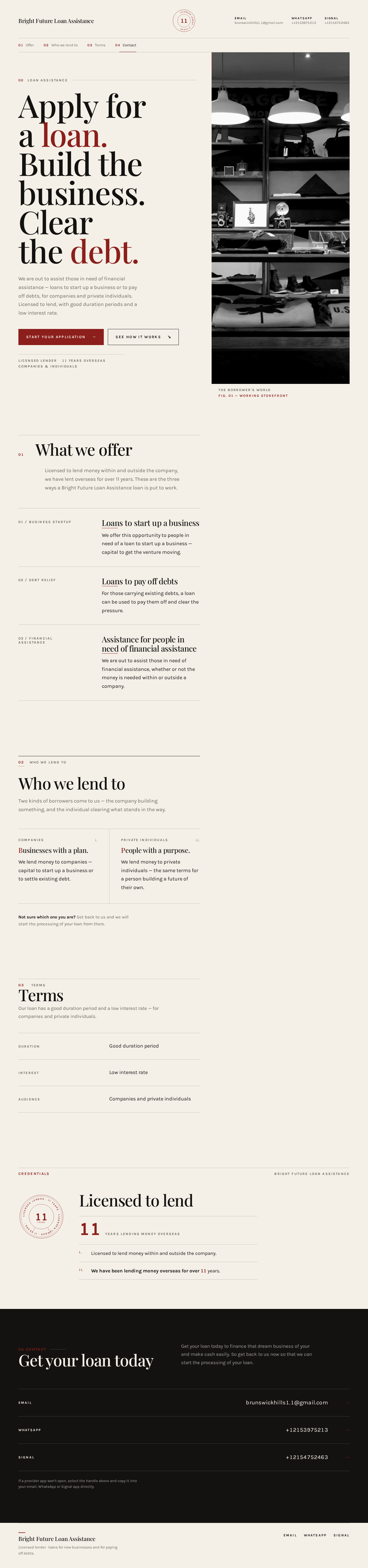
- Hero headline: "Apply for a loan." followed by "Build the business. Clear the debt."
- Hero supporting line drawn from the offering: assistance for those in need of financial assistance; loans to start a business or pay off debts; for companies and private individuals.
- Section 01 — Offer: the loan offering (business startup loans, debt payoff loans, financial assistance).
- Section 02 — Who we lend to: companies and private individuals.
- Section 03 — Terms: good duration period and low interest rate, presented as a ruled two-column table (duration / interest / audience).
- Credentials: licensed to lend within and outside the company; lending overseas for over 11 years; the "LICENSED LENDER · 11 YEARS" seal stamp.
- Section 04 — Contact band: the three channels (email, WhatsApp, Signal).
- Primary actions
- "Start your application" — primary CTA that routes the visitor to the Contact page (the accepted way to begin processing).
- "See how it works" — secondary CTA that scrolls to the Offer/Terms sections on the same page.
- Supporting actions
- Top-rule contact channels (email, WhatsApp, Signal) as direct links.
- Section navigation to 01–04.
- Domain entities
- Company profile (name, license scope, years of overseas lending).
- Loan offering (business startup, debt payoff, general financial assistance).
- Loan terms (duration, interest rate).
- Audience (companies, private individuals).
- Contact channel (type, handle).
- Component responsibilities
- Top hairline rule: wordmark left, seal stamp centre, three contact channels right.
- Split editorial hero: headline + CTAs left, monochrome storefront photograph right.
- Prospectus-numbered sections 01–04 with hairline rules and oxblood numerals.
- Terms table (ruled, no card chrome).
- Full-bleed ink contact band with three ruled label-value rows.
- States
- Loading: static content; no data fetch required. Fonts load with a paper-background fallback to avoid layout shift.
- Empty: not applicable (static content).
- Success: all sections render; contact links are live and open the correct provider.
- Error: if a contact link cannot open (e.g., no WhatsApp/Signal app), the raw handle remains visible and copyable as the recovery path.
- Recovery: visitor can copy the email address or phone number manually from the visible text.
Contact
- Information / state presented
- The three published channels with their exact handles:
- EMAIL — brunswickhills1.1@gmail.com
- WHATSAPP — +12153975213
- SIGNAL — +12154752463
- A short instruction that inquiries through these channels begin loan processing.
- The three published channels with their exact handles:
- Primary actions
- Open email client to the published address (
mailto:). - Open WhatsApp to the published number (
https://wa.me/12153975213). - Open Signal to the published number (Signal contact link / displayed number).
- Open email client to the published address (
- Supporting actions
- Copy handle to clipboard (or select-and-copy of visible text).
- Return to Landing.
- Domain entities
- Contact channel (type, handle, link target).
- Component responsibilities
- Full-bleed ink band with three ruled rows: small uppercase Karla label left, full handle in tabular numerals right; hover crossfades label to raw address.
- Instruction line above the rows.
- States
- Loading: static; no fetch.
- Empty: not applicable.
- Success: each row's link opens the correct provider with the correct handle pre-filled.
- Error: if a provider app is unavailable, the handle stays visible and copyable; the visitor can use another channel.
- Recovery: alternate channels remain available on the same page.
3. Functional Requirements
FR-1 — Present the loan offering (explicit) As a Loan Applicant, I should see the company's loan offering — assistance for people needing financial assistance, business startup loans, and debt payoff loans — so that I can judge whether my need fits.
- Trigger: visitor opens Landing.
- Observable result: the Offer section lists business startup loans, debt payoff loans, and general financial assistance.
- Access: public, no identity.
- Failure/recovery: not applicable (static content).
- Continuation: visitor proceeds to Terms or Contact.
FR-2 — Present the audiences served (explicit) As a Loan Applicant, I should see that the company lends to both companies and private individuals, so that I know I am eligible to inquire.
- Observable result: the "Who we lend to" section names companies and private individuals.
- Access: public.
- Continuation: visitor proceeds to Terms or Contact.
FR-3 — Present credentials and experience (explicit) As a Loan Applicant, I should see that the company is licensed to lend within and outside the company and has lent overseas for over 11 years, so that I can trust the lender.
- Observable result: credentials appear on Landing, reinforced by the "LICENSED LENDER · 11 YEARS" seal stamp.
- Access: public.
- Continuation: visitor proceeds to Terms or Contact.
FR-4 — Present loan benefits (explicit) As a Loan Applicant, I should see that the loan has a good duration period and a low interest rate, so that I can weigh the terms.
- Observable result: the Terms section presents duration and interest as a ruled table.
- Access: public.
- Continuation: visitor proceeds to Contact.
FR-5 — Call to action to apply and contact (explicit) As a Loan Applicant, I should see a clear call to action inviting me to apply for a loan and contact the company to start processing, so that I know the next step.
- Observable result: "Start your application" CTA routes to Contact; "See how it works" scrolls to Offer/Terms; the copy "Get your loan today…" and "get back to us now so that we can start the processing of your loan" is present.
- Access: public.
- Continuation: visitor reaches Contact.
FR-6 — Display contact channels (explicit) As a Loan Applicant, I should see the email, WhatsApp, and Signal handles so that I can reach the company.
- Observable result: brunswickhills1.1@gmail.com, +12153975213, and +12154752463 appear in the top rule and the contact band.
- Access: public.
- Failure/recovery: if a link cannot open, the raw handle remains visible and copyable.
- Continuation: visitor opens a channel.
FR-7 — Initiate contact through a published channel (explicit) As a Loan Applicant, I should be able to open my chosen channel (email, WhatsApp, or Signal) with the company's handle pre-filled, so that I can send my inquiry and start loan processing.
- Trigger: visitor selects a channel row or top-rule link.
- Observable result: the correct provider opens addressed to the correct handle.
- Access: public.
- Failure/recovery: if the provider app is unavailable, the handle stays visible and copyable; the visitor can choose another channel.
- Continuation: visitor sends the inquiry; the Loan Company Representative receives it.
FR-8 — Receive and route applicant inquiries (required_inference) As a Loan Company Representative, I should receive applicant inquiries through the published email, WhatsApp, and Signal channels so that I can start processing the loan.
- Trigger: an applicant sends an inquiry to one of the published handles.
- Observable result: the inquiry arrives at the correct channel and is routed to the representative for processing.
- Access: provider-owned (email, WhatsApp, Signal); no first-party UI.
- Failure/recovery: if a channel is unavailable, the applicant can use another published channel; the representative's outcome is a qualified inquiry routed to the correct channel.
- Continuation: the representative begins loan processing off-site.
4. User Personas
Loan Applicant
Product context. A private individual or a company representative who needs financial assistance — either to start up a business or to pay off existing debts. They arrive at the site in a stressful moment and are evaluating whether Bright Future Loan Assistance is a credible, established lender worth approaching.
Primary goal. Understand the loan offering, the terms (duration and interest), and the company's credentials, then reach out through a published channel to begin loan processing.
Distinct responsibilities.
- Review the offer, audiences served, terms, and credentials on Landing.
- Decide whether to proceed.
- Choose a contact channel (email, WhatsApp, or Signal) and send an inquiry.
Inputs / decisions. Which channel to use; what to say in the inquiry; whether the terms fit their need.
Interactions with other participants. Sends an inquiry to the Loan Company Representative via a published channel.
Observable success. The applicant has opened a channel addressed to the correct handle and sent an inquiry; the representative receives it.
Loan Company Representative
Product context. The Bright Future Loan Assistance agent who monitors the published email, WhatsApp, and Signal channels and begins processing incoming loan inquiries.
Primary goal. Receive qualified applicant inquiries through the correct channel and start loan processing.
Distinct responsibilities.
- Monitor the three published channels.
- Receive and qualify incoming inquiries.
- Begin loan processing off-site.
Inputs / decisions. Which inquiries to process; which channel the inquiry arrived on.
Interactions with other participants. Receives inquiries from Loan Applicants.
Observable success. A qualified applicant inquiry is routed to the correct contact channel and processing begins.
5. Core User Flows
Flow A — Loan Applicant reviews the offer and initiates contact
- The Loan Applicant opens the Landing page (public, no login).
- They read the hero headline "Apply for a loan. Build the business. Clear the debt." and the supporting line describing assistance for those in need, business startup loans, and debt payoff loans.
- They scroll to 01 Offer and confirm their need fits (business startup, debt payoff, or general financial assistance).
- They scroll to 02 Who we lend to and confirm they are eligible (company or private individual).
- They scroll to 03 Terms and read the ruled table showing the good duration period and low interest rate.
- They note the credentials — licensed to lend within and outside the company, over 11 years of overseas lending — reinforced by the "LICENSED LENDER · 11 YEARS" seal stamp.
- They select "Start your application", which routes them to the Contact page. (Alternatively, they select "See how it works" to review Offer/Terms again, or use a top-rule channel link directly.)
- On Contact, they see the three ruled rows: EMAIL — brunswickhills1.1@gmail.com, WHATSAPP — +12153975213, SIGNAL — +12154752463.
- They choose a channel and select it; the correct provider opens addressed to the correct handle.
- Failure/recovery: if the provider app is unavailable, the handle remains visible and copyable; they copy it manually or choose another channel.
- Continuation: they send their inquiry; the Loan Company Representative receives it.
Flow B — Loan Company Representative receives and routes an inquiry
- The Loan Company Representative monitors the published email, WhatsApp, and Signal channels.
- An inquiry from a Loan Applicant arrives on one of the channels, addressed to the correct handle.
- The representative reviews the inquiry and confirms it is a qualified applicant inquiry.
- Failure/recovery: if a channel is unavailable, the applicant can use another published channel; the representative's outcome is a qualified inquiry routed to the correct channel.
- Continuation: the representative begins loan processing off-site.
6. Visuals, Colors, and Theme
Muse and headline. Editorial swagger for a lending house — Tobias van Schneider's editorial minimalism, giving the requested classical-professional tone real weight: an oversized display serif reads as an established financial house, black-and-warm-off-white with one saturated accent avoids every fintech-blue cliché, and sparse chrome keeps the three contact channels as the loudest elements on the page.
Palette (light mode).
- Background:
#F4F0E8(warm paper, ~65% of the page) - Surface:
#FBF8F2 - Text:
#141210(ink) - Primary:
#141210 - Accent:
#8C1F1B(oxblood — the 11-year numeral, Apply CTA fill, link underlines, active section tick; never more than 5% of any viewport) - Muted:
#6E675C(captions and metadata) - No blue anywhere. Ink on paper ≈ 15:1; oxblood on paper ≈ 7:1.
Typography.
- Headings: Playfair Display, 500–600 weight, tight leading (0.92–1.0), slight negative tracking (-0.02em), sentence case.
- Eyebrow labels: Karla 700, uppercase, 0.18em tracking, 12–13px.
- Body: Karla 400 at 17–18px, 1.65 line-height.
- Numerals: Karla tabular for figures like 11 and the phone numbers.
- Scale (1.4 modular): display
clamp(44px, 9vw, 132px)/ h2clamp(32px, 4.4vw, 60px)/ h3 24px / body 18px / caption 13px. Mobile headline floor 44px; desktop ceiling 132px.
Shape language. Sharp corners everywhere — 0px radius on buttons, cards, inputs, and image frames. Separation comes from 1px hairline rules in ink at 20% opacity and from solid colour blocks, never from shadows or rounded chrome. Buttons are rectangles with a 1px ink border; the primary CTA is a solid oxblood rectangle with paper-white text.
Layout. Asymmetric editorial grid: 12 columns, text in columns 1–6 and imagery in columns 7–12, with deliberate ragged right edges. Generous vertical rhythm (96–140px between sections). One full-bleed dark contact band near the foot breaks the paper ground. Sections numbered like a prospectus (01 Offer, 02 Who we lend to, 03 Terms, 04 Contact) with the number set small in oxblood beside the heading rule.
Imagery. No stock handshakes or smiling advisors. Imagery is typographic and documentary: a large monochrome photograph of a working storefront or market stall (the borrower's world) bled off the right edge and cropped hard, one per page; plus schematic line rules and a small oxblood seal-style stamp reading "LICENSED LENDER · 11 YEARS" as the only illustrated element.
Avoid. Any blue, indigo, or gradient background; rounded cards, drop shadows, or hover-lift tiles; a centred hero stack with subtext and a pill button; stock photography of handshakes, suits, or smiling advisors; Inter, Roboto, Arial, Helvetica, Poppins, or system-ui for any text; decorative motion loops, marquees, or parallax in the hero; burying the email, WhatsApp, or Signal handles in a footer.
Readability rule. Readable text and controls stay whole at every viewport (375px, 768px, 1280px), wrapping or scaling to fit; no other element covers any part of them. Imagery and decoration may be cropped, bled, or overlapped as the direction asks, as long as they cover no readable text or control.
7. Signature Design Concept
The public entry is a split editorial hero on warm paper. The left seven columns hold the headline in Playfair Display at clamp(44px, 9vw, 132px) — "Apply for a loan." on one line, then "Build the business. Clear the debt." on the next two, ragged-right and overlapping the column edge by design. Directly beneath sits a single solid oxblood rectangle CTA "Start your application" with a hairline ink secondary "See how it works". The right five columns are a full-height monochrome photograph of a small shopfront, cropped to the viewport edge with no radius. Across the very top, a hairline rule carries the wordmark left, the "LICENSED LENDER · 11 YEARS" seal stamp centre, and the three contact channels right. No centred stack, no gradient, no floating cards.
The signature moves that carry the promise: the oversized Playfair headline spanning seven of twelve columns and running ragged past the grid line, with the oxblood CTA pinned flush beneath its last line; the small oxblood seal stamp with the numeral 11 at its centre, repeated as the section marker beside every heading rule; the contact section as a full-bleed ink band with three ruled label-value rows; prospectus numbering 01–04 in oxblood small caps on a full-width hairline rule; and the terms presented as a ruled two-column table with no card chrome, like a printed rate sheet.
8. Interaction Model & Motion Direction
Interaction Model: Animated Motion Tempo: restrained Hero Dimensionality: flat
Landing Hero Motion Brief
- Focal subject: the oversized Playfair headline "Apply for a loan. / Build the business. Clear the debt." against the monochrome storefront photograph.
- Input → transformation → outcome thesis: on page load, the hero headline words rise 16px into final position with a 600ms ease-out, staggered 60ms per word; the oxblood CTA and the top-rule contact channels settle into place. The outcome is a composed, confident first frame that reads as an established financial house.
- Motion vocabulary: a single slow type reveal on the hero headline; hover swaps on the contact rows where the channel name crossfades to its handle. No parallax, no bounce, no looping animation.
- Composed first frame: warm paper ground, hairline top rule with wordmark left, seal stamp centre, three contact channels right; headline left, CTA beneath; storefront photograph right, cropped to the edge.
- Reduced-motion state:
prefers-reduced-motionrenders everything in final position — no type reveal, no crossfade; all content and controls fully visible and usable.
9. Non-Functional Requirements
- NFR-1 — Classical, professional visual style (explicit). The site must read as classical and professional, using the palette, typography, shape language, and layout defined in Sections 6–7. No blue, indigo, or gradient backgrounds; no rounded cards or drop shadows.
- NFR-2 — Contact-channel routing only (explicit). Loan inquiries are handled through the published contact channels (email brunswickhills1.1@gmail.com, WhatsApp +12153975213, Signal +12154752463); no online application submission workflow is specified and none may be added.
- NFR-3 — Public access (explicit). Both pages are publicly accessible with no account, login, or identity requirement.
- NFR-4 — Readability and containment (explicit). Readable text and controls stay whole at 375px, 768px, and 1280px; no element covers any part of them.
- NFR-5 — Reduced motion (explicit).
prefers-reduced-motionrenders all content in final position with a usable static arrangement. - NFR-6 — Contact handle fidelity (explicit). The email address and both phone numbers must appear exactly as published and must be copyable as visible text even if a link cannot open.
- NFR-7 — Performance (required_inference). Fonts load with a paper-background fallback to avoid layout shift; the storefront photograph is served in an appropriately sized monochrome format.
10. Tech Stack
- Frontend: React (single-page site with two routes: Landing and Contact).
- Styling: CSS with the tokens defined in Section 6 (Playfair Display and Karla via a font provider; no Inter/Roboto/Arial/Helvetica/Poppins/system-ui).
- Backend: None required for current scope — the site is static content plus outbound provider links. If a minimal server is used for hosting, it serves the built front end only.
- Storage: None required for current scope.
- Deployment: Static hosting; Docker/docker-compose only if a containerized static server is used. Kubernetes is not required.
11. Assumptions and Constraints
- A-1 (explicit). Loan inquiries are handled through the published contact channels; no online application submission workflow is specified.
- A-2 (explicit). The visual style must be classical and professional.
- A-3 (required_inference). The "Start your application" CTA routes to the Contact page, since contact is the accepted way to begin processing.
- A-4 (required_inference). The WhatsApp link uses
https://wa.me/12153975213; the Signal link uses the Signal contact link for +12154752463; the email link usesmailto:brunswickhills1.1@gmail.com. - A-5 (required_inference). The Loan Company Representative's work happens off-site through the published channels; no first-party representative UI is in scope.
- A-6 (explicit). No applicant accounts, login, or identity system are in scope.
12. Glossary
- Bright Future Loan Assistance — the licensed lending company this site represents.
- Loan Applicant — a private individual or company representative seeking a loan.
- Loan Company Representative — the Bright Future Loan Assistance agent who receives inquiries and starts processing.
- Loan offering — business startup loans, debt payoff loans, and general financial assistance.
- Terms — the loan's good duration period and low interest rate.
- Contact channel — one of the three published handles: email, WhatsApp, or Signal.
- Seal stamp — the small oxblood circular stamp reading "LICENSED LENDER · 11 YEARS" with the numeral 11 at its centre.
- Prospectus numbering — the 01–04 section labels in oxblood small caps on a hairline rule.
00Loan assistance
Apply for a loan. Build the business. Clear the debt.
We are out to assist those in need of financial assistance — loans to start up a business or to pay off debts, for companies and private individuals. Licensed to lend, with good duration periods and a low interest rate.

Section 01 — What we offer
Licensed to lend money within and outside the company, we have lent overseas for over 11 years. These are the three ways a Bright Future Loan Assistance loan is put to work.
- 01 / Business startup
Loans to start up a business
We offer this opportunity to people in need of a loan to start up a business — capital to get the venture moving.
- 02 / Debt relief
Loans to pay off debts
For those carrying existing debts, a loan can be used to pay them off and clear the pressure.
- 03 / Financial assistance
Assistance for people in need of financial assistance
We are out to assist those in need of financial assistance, whether or not the money is needed within or outside a company.
Who we lend to
Two kinds of borrowers come to us — the company building something, and the individual clearing what stands in the way.
- Companies
Businesses with a plan.
We lend money to companies — capital to start up a business or to settle existing debt.
- Private individuals
People with a purpose.
We lend money to private individuals — the same terms for a person building a future of their own.
Not sure which one you are? Get back to us and we will start the processing of your loan from there.
Terms
Our loan has a good duration period and a low interest rate — for companies and private individuals.
| Duration | Good duration period |
|---|---|
| Interest | Low interest rate |
| Audience | Companies and private individuals |
Licensed to lend
Licensed to lend money within and outside the company.
We have been lending money overseas for over 11 years.
04 Contact
Get your loan today
Get your loan today to finance that dream business of your and make cash easily. So get back to us now so that we can start the processing of your loan.
If a provider app won’t open, select the handle above and copy it into your email, WhatsApp or Signal app directly.
00Loan assistance
Apply for a loan. Build the business. Clear the debt.
We are out to assist those in need of financial assistance — loans to start up a business or to pay off debts, for companies and private individuals. Licensed to lend, with good duration periods and a low interest rate.
Section 01 — What we offer
Licensed to lend money within and outside the company, we have lent overseas for over 11 years. These are the three ways a Bright Future Loan Assistance loan is put to work.
- 01 / Business startup
Loans to start up a business
We offer this opportunity to people in need of a loan to start up a business — capital to get the venture moving.
- 02 / Debt relief
Loans to pay off debts
For those carrying existing debts, a loan can be used to pay them off and clear the pressure.
- 03 / Financial assistance
Assistance for people in need of financial assistance
We are out to assist those in need of financial assistance, whether or not the money is needed within or outside a company.
Who we lend to
Two kinds of borrowers come to us — the company building something, and the individual clearing what stands in the way.
- Companies
Businesses with a plan.
We lend money to companies — capital to start up a business or to settle existing debt.
- Private individuals
People with a purpose.
We lend money to private individuals — the same terms for a person building a future of their own.
Not sure which one you are? Get back to us and we will start the processing of your loan from there.
Terms
Our loan has a good duration period and a low interest rate — for companies and private individuals.
| Duration | Good duration period |
|---|---|
| Interest | Low interest rate |
| Audience | Companies and private individuals |
Licensed to lend
Licensed to lend money within and outside the company.
We have been lending money overseas for over 11 years.
04 Contact
Get your loan today
Get your loan today to finance that dream business of your and make cash easily. So get back to us now so that we can start the processing of your loan.
If a provider app won’t open, select the handle above and copy it into your email, WhatsApp or Signal app directly.
No comments yet. Be the first!