protekretail
 Michael Adediran
I want build a retail store solution for sales of products and generating reports

Comments (0)
Sign in to leave a comment
System Requirements
System Requirements Document for protekretail
1. Introduction
The protekretail system is designed to provide a comprehensive retail store solution that facilitates the sales of products and the generation of sales reports. The primary audience for this system includes retail store operators who require a reliable and straightforward interface to manage their sales activities and reporting needs.
2. System Overview
The protekretail system delivers a custom user interface for retail store operators to conduct product sales and generate reports on sales activities. The system is designed to ensure that sales transactions are durably retained for reporting purposes. The system requires operators to self-enroll and verify their identity before accessing protected store functionalities. The system is built with a focus on bold, honest design, using a palette and typography that emphasize reliability and straightforwardness.
2a. Product Interpretation and Delivery Boundary
The protekretail system is a custom UI application that requires application-owned identity for access to protected functionalities. It includes a public entry point for anonymous users and protected pages for authenticated retail store operators. The system does not include adjacent capabilities such as inventory management or customer relationship management, focusing solely on product sales and report generation.
2b. Source Content Inventory
Not applicable as there is no explicit content_source directive.
2c. Page Content and Component Coverage
Landing
- Purpose: Introduce the retail store solution and its functionalities.
- Components:
- Overview of product-selling and sales-reporting capabilities.
- Call-to-action for operators to log in or enroll.
- Visual elements: Oversized headline, chunky borders, badge-style logo.
Login
- Purpose: Facilitate returning verification for retail store operators.
- Components:
- Username and password fields.
- Login button.
- Error messages for failed login attempts.
Dashboard
- Purpose: Provide a summary of store activities and navigation to other functionalities.
- Components:
- Overview of recent sales activities.
- Links to Products, Sales, and Reports pages.
- Visual elements: Ruled panels with bold borders.
Products
- Purpose: Manage the product catalog for sales.
- Components:
- List of products with details.
- Add, edit, and delete product functionalities.
- Search and filter options.
Sales
- Purpose: Conduct product sales and record transactions.
- Components:
- Product selection and checkout process.
- Transaction recording.
- Visual elements: Badge-like icons for key actions.
Reports
- Purpose: Generate and review sales reports.
- Components:
- Report generation tools.
- Options to view and export reports.
- Visual elements: Halftone imagery for texture.
3. Functional Requirements
- As a retail store operator, I should be able to sell products through the system. (Provenance: explicit)
- As a retail store operator, I should be able to generate reports from sales activity. (Provenance: explicit)
- As a retail store operator, I must self-enroll before first use. (Provenance: required_inference)
- As a retail store operator, I must complete returning verification before accessing protected store work. (Provenance: required_inference)
- Completed sales must be durably retained for later reporting. (Provenance: required_inference)
4. User Personas
- Retail Store Operator: Responsible for conducting product sales and generating sales reports. This persona is required to enroll and verify identity to access the system's protected functionalities.
5. Core User Flows
Retail Store Operator
-
Enrollment and Login:
- Navigate to the Landing page.
- Click on the call-to-action to enroll or log in.
- Complete the enrollment process if new or log in if returning.
- Upon successful login, access the Dashboard.
-
Product Sales:
- From the Dashboard, navigate to the Sales page.
- Select products and complete the checkout process.
- Record the transaction.
-
Report Generation:
- From the Dashboard, navigate to the Reports page.
- Use tools to generate and review sales reports.
- Export reports if needed.
6. Visuals Colors and Theme
- Muse: Aaron Draplin
- Palette:
- Background: #F5F5DC
- Surface: #FFFFFF
- Text: #000000
- Primary: #FF8C00
- Accent: #008080
- Muted: #A9A9A9
- Typography:
- Headings: Oswald, Bold, all-caps
- Body: Alfa Slab One
- Scale: 1.25 modular, 48/32/24/18/16
- Shape Language: Chunky borders and badge-like elements
- Layout: Ruled panels with asymmetric grid layouts
- Imagery: Thick-line vector icons and halftone photos
7. Signature Design Concept
The Landing page will feature an oversized headline in Oswald set against a warm beige block, with a bold orange CTA button. The design will include chunky borders and a badge-style logo, emphasizing the bold, honest Americana theme.
8. Interaction Model & Motion Direction
- Interaction Model: Static
- Motion Tempo: Restrained
- Hero Dimensionality: Flat
- Landing Hero Motion Brief: The hero section will feature an oversized headline with a bold orange CTA button. The design will use snap-in transitions with minimal animations to maintain a sturdy feel.
9. Non-Functional Requirements
- The system must ensure data durability for sales transactions to support accurate reporting.
- The interface should be responsive and accessible, adhering to WCAG 2.1 standards.
10. Tech Stack
- Frontend: React
- Backend: Python/FastAPI
- Database: PostgreSQL
- Containerization: Docker
- Deployment: Kubernetes (if required for scaling)
11. Assumptions and Constraints
- The system assumes that all retail store operators have access to the internet and a compatible device for accessing the application.
- The system is constrained to the functionalities of product sales and report generation, excluding inventory management and customer relationship management.
12. Glossary
- Retail Store Operator: A user responsible for managing sales and generating reports within the protekretail system.
- CTA: Call to Action, a prompt for the user to take a specific action, such as logging in or enrolling.
SELL PRODUCTS.
TRACK EVERY SALE.
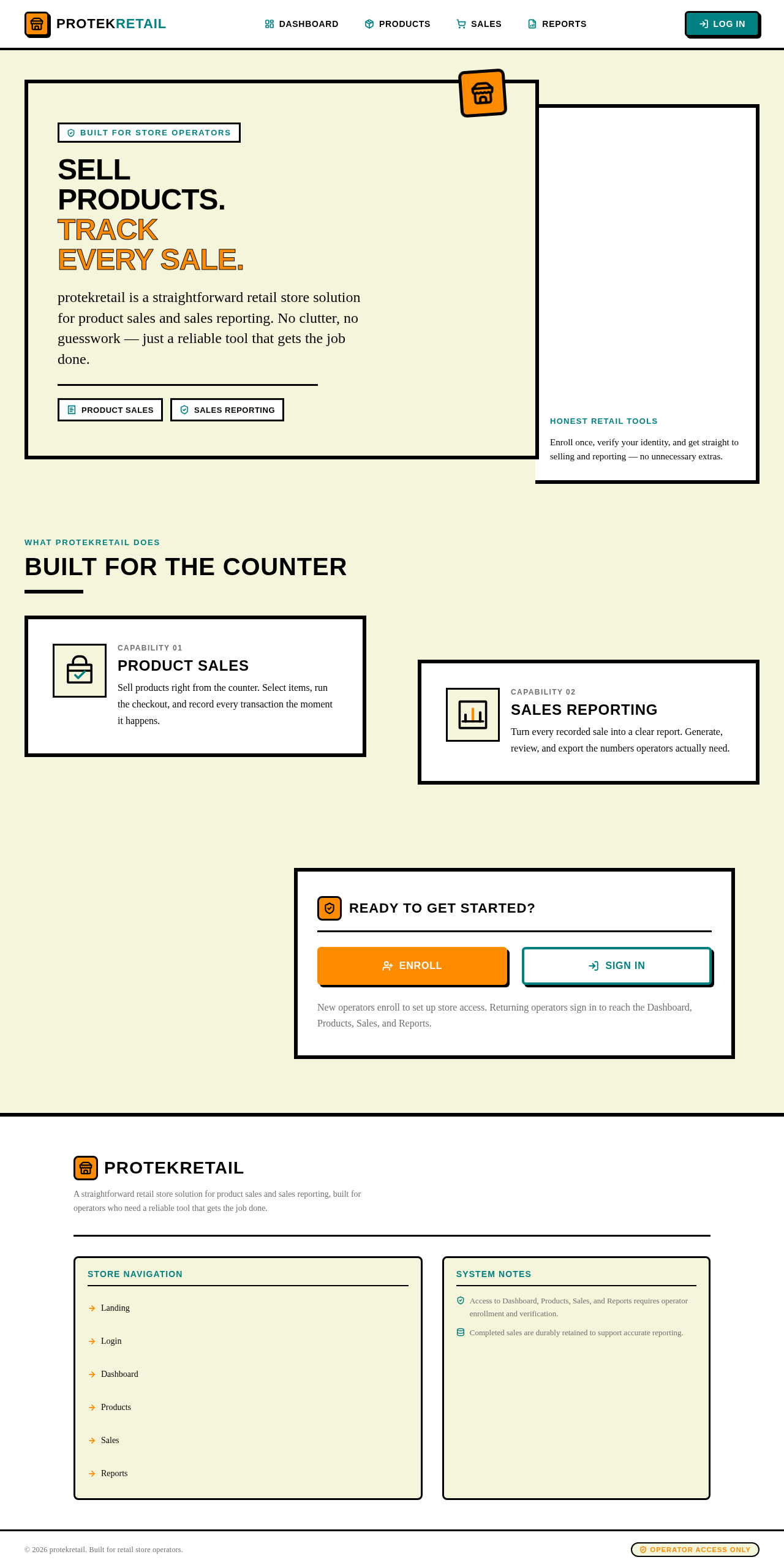
protekretail is a straightforward retail store solution for product sales and sales reporting. No clutter, no guesswork — just a reliable tool that gets the job done.
Built For The Counter
Product Sales
Sell products right from the counter. Select items, run the checkout, and record every transaction the moment it happens.
Sales Reporting
Turn every recorded sale into a clear report. Generate, review, and export the numbers operators actually need.
SELL PRODUCTS.
TRACK EVERY SALE.
protekretail is a straightforward retail store solution for product sales and sales reporting. No clutter, no guesswork — just a reliable tool that gets the job done.
Built For The Counter
Product Sales
Sell products right from the counter. Select items, run the checkout, and record every transaction the moment it happens.
Sales Reporting
Turn every recorded sale into a clear report. Generate, review, and export the numbers operators actually need.
No comments yet. Be the first!