
proposal-ai

byParitoshk Gangurde

You are an expert SaaS Product Designer, Senior Full Stack Engineer, and AI UX Designer. Build a production-quality MVP called "ProposalFlow AI." Purpose: ProposalFlow AI helps freelancers, agencies, consultants, architects, software companies, interior designers, marketing agencies, and service businesses create premium AI-generated proposals, quotations, contracts, and invoices in minutes. This is NOT a CRM. This is NOT project management software. This is NOT accounting software. It has one purpose: Generate beautiful client documents. ------------------------------------------------ Design Philosophy Create a premium UI inspired by: • Stripe • Linear • Notion • Vercel Lots of whitespace. Rounded cards. Elegant typography. Professional gradients. Responsive. Fast. ------------------------------------------------ Navigation Dashboard New Proposal Templates Recent Documents Settings ------------------------------------------------ Homepage Hero Card "Create Premium Business Proposals in Minutes" Button New Proposal Below Recent Documents ------------------------------------------------ Proposal Creation Wizard Step 1 Business Details Business Name Logo Upload Address GST Phone Email Website Step 2 Client Details Client Name Company Email Phone Address Step 3 Project Project Title Project Category Project Description Deliverables Timeline Step 4 Pricing Price GST Discount Payment Terms Step 5 Generate AI generates: Executive Summary Project Understanding Scope Deliverables Timeline Investment Terms Acceptance ------------------------------------------------ Document Types Proposal Quotation Invoice Contract Each should have its own premium template. ------------------------------------------------ PDF Generate a premium PDF. Corporate layout. Proper margins. Modern typography. Logo. Signature section. Download button. ------------------------------------------------ Dashboard Recent proposals Recent quotations Recent invoices Quick actions ------------------------------------------------ Technology Next.js React Tailwind Supabase Claude API PDF Export ------------------------------------------------ Do not build CRM features. Do not build accounting. Do not build inventory. Focus only on creating beautiful AI-generated business documents.

LandingTemplatesDocumentWizardLoginDashboardSettings
Landing

Comments (0)

No comments yet. Be the first!

System Requirements

System Requirement Document
Page 1 of 5

ProposalFlow AI System Requirements Document

1. Introduction

ProposalFlow AI is a specialized tool designed to help freelancers, agencies, consultants, architects, software companies, interior designers, marketing agencies, and service businesses create premium AI-generated proposals, quotations, contracts, and invoices in minutes. It is not a CRM, project management, or accounting software. Its sole purpose is to generate beautiful client documents efficiently.

2. System Overview

ProposalFlow AI is a web-based application that leverages AI to automate the creation of business documents. It provides a streamlined user interface inspired by leading design philosophies from Stripe, Linear, Notion, and Vercel, emphasizing whitespace, rounded cards, elegant typography, professional gradients, and responsive design. The application is built using Next.js, React, Tailwind, and Supabase, with AI capabilities powered by the Claude API.

Page 2 of 5

3. Functional Requirements as Story Points

  • As a User, I should be able to navigate through a dashboard to access recent proposals, quotations, invoices, and quick actions.
  • As a User, I should be able to create a new proposal using a step-by-step wizard.
  • As a User, I should be able to input business details including name, logo, address, GST, phone, email, and website.
  • As a User, I should be able to input client details including name, company, email, phone, and address.
  • As a User, I should be able to define project details such as title, category, description, deliverables, and timeline.
  • As a User, I should be able to specify pricing details including price, GST, discount, and payment terms.
  • As a User, I should be able to generate a proposal with AI-generated executive summary, project understanding, scope, deliverables, timeline, investment, terms, and acceptance.
  • As a User, I should be able to generate premium PDFs with corporate layout, proper margins, modern typography, logo, and signature section.
  • As a User, I should be able to download generated documents in PDF format.
  • As a User, I should be able to access and use templates for proposals, quotations, invoices, and contracts.

4. User Personas

  • Freelancer: An individual offering services and needing to create proposals and invoices quickly.
  • Agency: A business entity that requires streamlined document creation for multiple clients.
  • Consultant: A professional providing expert advice and needing to generate detailed proposals and contracts.
  • Architect/Designer: A creative professional needing to present project proposals and contracts.
  • Software Company: A tech business requiring efficient proposal and contract generation for clients.
  • Marketing Agency: A firm needing to produce polished proposals and quotations for campaigns.

5. Core User Flows

  • User logs in -> accesses dashboard -> selects "New Proposal" -> completes Proposal Creation Wizard -> generates and downloads PDF.
  • User logs in -> accesses dashboard -> views recent documents -> selects a document to view or download.
  • User logs in -> accesses templates -> selects a template -> customizes and generates a document.
Page 3 of 5

6. Visuals Colors and Theme

  • primary: #1A73E8 (deep blue)
  • primary_light: #E8F0FE (light blue)
  • secondary: #FF6F61 (coral)
  • accent: #FFD700 (gold)
  • highlight: #FFA500 (orange)
  • bg: #FFFFFF (white)
  • surface: rgba(250, 250, 250, 0.8)
  • text: #202124 (dark gray)
  • text_muted: #5F6368 (light gray)
  • border: rgba(218, 220, 224, 0.2)

7. Signature Design Concept

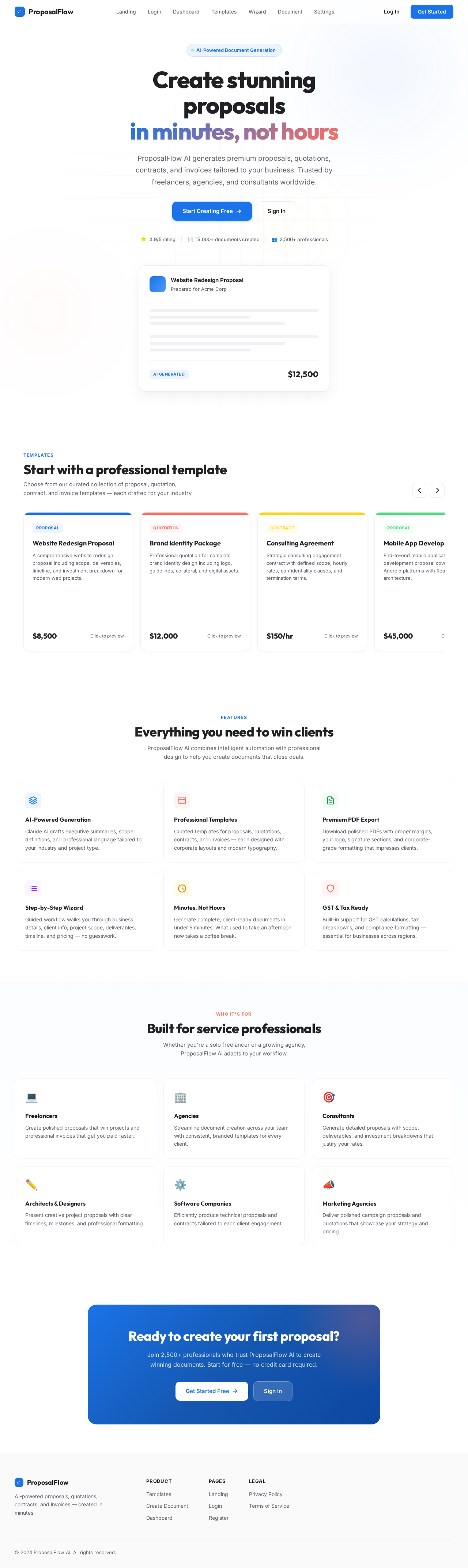
The homepage of ProposalFlow AI will feature an interactive "Proposal Carousel." Users can swipe through a 3D carousel of proposal templates, each card flipping to reveal a preview of the document. Hovering over a card will cause it to expand slightly, providing a more detailed view. Clicking a card will open the Proposal Creation Wizard. This dynamic interaction will be powered by @react-three/fiber and framer-motion, creating an engaging and memorable first impression.

8. Interaction Model & Motion Direction

The landing page will employ a "parallax" interaction model, with layered depth via scroll. Decorative layers such as atmospheric gradients and distant shapes will translate at different speeds, while the main content scrolls naturally. This approach will create a visually rich storytelling experience, ideal for capturing user interest.

Page 4 of 5

9. Non-Functional Requirements

  • The system must be responsive and perform optimally across various devices and screen sizes.
  • The application should load quickly, with minimal latency in generating documents.
  • Ensure data security and privacy, particularly for sensitive client and business information.
  • The system should be scalable to accommodate a growing user base.

10. Tech Stack

  • Frontend: Next.js, React, Tailwind
  • Backend: Supabase
  • AI Integration: Claude API
  • PDF Export: Custom PDF generation library

11. Assumptions and Constraints

  • The application will not include CRM, project management, or accounting features.
  • The focus is solely on creating and managing AI-generated business documents.
  • Users are expected to have basic knowledge of document creation and business terminology.
Page 5 of 5

12. Glossary

  • AI: Artificial Intelligence
  • CRM: Customer Relationship Management
  • GST: Goods and Services Tax
  • PDF: Portable Document Format
  • UI: User Interface
  • UX: User Experience
Landing design preview
Landing: View Info
Login: Sign In
Dashboard: View Recent Documents
Templates: Browse Templates
Templates: Customize Template
Wizard: Enter Client Details
Wizard: Define Project Details
Wizard: Set Pricing
Wizard: Generate Document
Document: Download PDF
Dashboard: Select New Proposal
Wizard: Enter Business Details
Settings: Update Profile