Reduced onboarding drop-off for a Lagos fintech
- Situation
- New users left the sign-up flow before first use.
- Decision
- Chose to test a shorter three-step flow.
- Action
- Ran a two-week test with 40 new users.
- Outcome
- Drop-off fell from 38% to 21%.
ProoveMe: Software Requirements Document (SRD)
1.Full Stack:
1.1Product summary
ProoveMe is an AI-first professional platform. Professionals show evidence of their real-world contributions, achievements
and impact ("Impacts"). Employers discover talent through these evidence-led profiles instead of job titles and CV keywords.
The platform launches in Nigeria first, with international employer access, and must be ready for internationa
Brief §9
5.Brand
Requirement
Source
Message: "Your experience tells. Your impact proves." Promise: "Make your impact visible."
07
07
Brief §1
0, A6
PRF-
08
Brief Add. B,
A22
09
E2, E3-B7
6.6Third-party verification (VER)
ID
03
Brief §6, A2
ORG-
04
Brief §6,
Add. B
05
E3-A4, E3-
A6
06
Brief Add. A
ORG-
07
E2
08
Brief §1
6.8Employer discovery (EMP)
ID
Requirement
Source
EMP-
Brief §7
MKP-
1 2
1 3
E3-A6, A1 0
1 4
AI Approach:
.
1.1 Background
ProoveMe is a Nigeria-first professional proof and talent platform, built to be ready for international expansion. It helps
professionals present credible examples of the work they have done, and helps organisations find relevant experience
beyond job titles and CV keywords. The brand message is: Your experience tells. Your impact proves. The brand promise is:
Make your impact visible.
1.2 Source documents
This SOW is based on the following, all dated October to November 2026:
● ProoveMe External Developer Enquiry and Indicative Quotation Brief, version 1.1 (2 November 2026), including
the addendum on growth, referrals and platform safeguards.
● The founder's enquiry message to the supplier.
● The supplier's AI feasibility assessment and AI clarification queries.
● The client's reply to the feasibility assessment, which answered most AI questions.
● The FS team's clarification questions, Part A (platform, scope and delivery), and the AI team's Part B (AI
functionality).
1.3 Scope position of the client
Section 1.3, platform SOW
Project name: proove-me-platform.
2.Scope summary
Module
State at production launch
Source
Marketing website
Live
Brief §4, E1
2.Scope summary
Module
State at production launch
Source
Professional accounts, onboarding, Impacts, evidence,
profiles, sharing
Live
Live
Brief §6, E2,
E3-B3
Partner and cohort foundation
E3-A4
Referrals, analytics and experiment readiness
Brief Add. A
Administration panel
Brief §1
Opportunity marketplace
Built and tested, disabled in
production
E2, E3-B8
4.Platform structure
The platform has two main applications and one admin panel, sharing one backend and database. (Brief §9)
1. Marketing website: the public pages.
2. Main web application: the professional, employer and partner areas, plus the marketplace and messaging modules
(disabled in production).
3. Admin panel: ProoveMe administration.
Requirement
Source
Clear separation of public pages, professional areas, employer areas, administration and marketplace
modules
Brief §9
6.11Marketplace messaging (MSG): built, tested and disabled in production
DES-
04
Screen families: Public (homepage, audience landing page, FAQ/trust), Professional
(onboarding, Impact editor, dashboard, profile, evidence controls), Employer
(registration, search, results, profile detail, shortlist), Partner (foundation screens),
Marketplace (discovery, role detail, application, employer posting, applicant review)
Brief §8, E3-A4
7.2 Logical components
Component
Responsibility
Brief §5,
§5A
Live
Brief §5A,
E2, E3-B
Third-party verification
E3-A3
AI integration: screens, workflows and backend integration
for the AI features (the AI itself is in the separate AI
document)
Organisation onboarding and verification
Live
Brief §6,
Add. B
Employer discovery, shortlists and contact requests
Marketplace messaging
Monetisation (plans, subscriptions, entitlements)
Architecture, entitlements and admin
Requirement
Source
Feature flags for the marketplace, messaging, partner and monetisation modules, enforced on the server and
in the UI
4.1How the frontend, backend and AI connect
The frontend never talks to the AI directly. Every AI request goes through the ProoveMe backend, which checks the user,
permissions and consent before calling the AI, and saves the result as a draft. (E2, E3-B7, E3-AI, A26)
API calls
1.The frontend sends the request to the backend, for example "analyse my CV".
2.The backend checks the user's identity, permissions, AI consent and usage limits.
3.The backend sends only the data needed to the AI service, through one integration layer.
4.The AI service returns its result to the backend.
5.The backend validates the result, saves it with "AI draft" status, and updates the job status.
6.The frontend shows the progress, then the draft for the user to approve, edit or reject.
The detailed requirements are in section 6.17.
Brief (Brand
direction)
6.Functional requirements
6.1Marketing website (MKT)
ID
Requirement
Source
MKT-
01
Responsive homepage that explains ProoveMe within the first screen, using a real product
Brief §4
Source
MKT-
01
preview instead of stock imagery
Brief §4
02
Clear routes for Professionals, Employers/Recruiters and Partners, with one primary sign-up
call to action
Source
MKT-
01
preview instead of stock imagery
Brief §4
02
Clear routes for Professionals, Employers/Recruiters and Partners, with one primary sign-up
call to action
03
Audience landing page for each audience
Brief §8
04
Pages: How it works, sample anonymised Impact, privacy and trust, FAQ, contact and legal
pages
Brief §4
MKT-
05
Contact page with a form that sends enquiries to a ProoveMe email address
Brief §4,
A23
MKT-
Consent banner for analytics and non-essential cookies
Brief §1 0
6.2Accounts and authentication (AUTH)
ID
Requirement
Source
AUTH-01
Email registration with email verification and minimal initial fields
Brief §5, E3-A1 1
Brief §1 0
6.2Accounts and authentication (AUTH)
ID
Requirement
Source
AUTH-02
Google sign-in
E3-A1 1
AUTH-03
Secure password recovery
Brief §9
AUTH-04
Rate limiting and bot controls on registration, sign-in and recovery
Brief §9, Add. B
AUTH-05
Separate permissions for professional, organisation, partner and admin accounts
E2
AUTH-06
Multi-factor authentication for ProoveMe admin accounts
Brief §9, A1 4
6.3Professional onboarding and Impacts (PRO)
ID
Requirement
Source
PRO-
01
Onboarding offers a choice of CV upload, free-text entry, guided questions or manual Impact
creation. Progress is saved.
Brief §5,
E3-B4
PRO-
02
CV upload supports PDF and Word, plus scanned and photographed CVs where technically
feasible. File-size and page limits to be recommended in the proposal.
E3-A1 2
PRO-
03
Supports employment, education, volunteering, freelance, informal and community
experience
E2, E3-B4
PRO-
04
Impact records follow the structure Situation → Decision → Action → Outcome → Evidence
Brief §5A
PRO-
05
Manual Impact creation and editing with guided prompts, for users who do not use AI
Brief §5, E2
PRO-
06
Each AI-proposed Impact is approved, edited or rejected individually. Nothing is published
automatically.
Brief §5A
PRO-
07
Each Impact stores and displays its status separately: AI draft, user-approved,
evidence-backed or independently verified
Brief §5A
PRO-
08
Approved Impacts can be saved, published and updated from the dashboard
09
evidence-backed or independently verified
Brief §5A
PRO-
08
Version history: when a professional approves a change to a published Impact, the previous
version stays auditable
E3-B2
1 0
evidence-backed or independently verified
Brief §5A
PRO-
08
E3-B2
A material change to an Impact triggers re-review of the affected evidence or verification
status. Unrelated verified claims keep their status.
E3-B2, A5
PRO-
1 1
E3-AI
1 2
Brief §5
1 3
Brief §5A,
E2
Follow-up questions can be skipped, saved and returned to later
Dashboard shows Impacts, evidence, profile visibility and pending actions (AI suggestions,
verification responses, contact requests)
When the professional adds new information or asks for suggestions, the AI suggests new or
updated Impacts. No change is applied without approval.
Profile headline and summary, with optional AI assistance subject to approval
E3-AI
PRO-
1 5
1 4
Location fields with Nigerian states and cities. Optional phone number with +234 support.
Brief §2
6.4Evidence (EVD)
ID
Requirement
Source
EVD-
01
Professionals can attach files or links to an Impact
Brief §5
02
Supported evidence types: certificates, letters, reports and relevant images, with file
type and size validation
E3-B1
EVD-
03
All uploaded files are malware-scanned before they become available
Brief §9, E2
EVD-
04
Evidence is private by default. The professional sets the visibility of each item.
Brief §5, A6
EVD-
05
Restricted evidence is shared through permissioned links with expiry, revocation and an
audit trail
6.5Profile, privacy and sharing (PRF)
ID
Requirement
Source
PRF-
01
Professionals can preview, edit and publish a profile with selected Impacts
Brief §5
PRF-
02
Stable, user-controlled profile URL. Only content the professional has published is public.
Brief §5,
Add. A
PRF-
03
Visibility settings per profile and per Impact: private, verified employers only, or public
Brief Add. A,
A6
PRF-
04
Professionals choose whether they appear in employer search
Brief §1
PRF-
05
Profiles and individual Impacts can be shared through Open Graph previews, the standard
share action (WhatsApp, LinkedIn), QR code and copy link
Brief Add. A
PRF-
Search engines index a public profile only if the professional opts in
Professionals can export their own data
Professionals can delete their account. Data is deleted in line with the documented retention
policy.
Requirement
Source
VER-
01
A professional can invite colleagues, managers or other appropriate people to confirm a
specific contribution or outcome
E3-A3, Brief
Add. A
VER-
02
Invitations are sent by email or link, with expiry and abuse limits
Brief Add. A
VER-
03
The verifier sees only the claim they have been asked to confirm
A4
VER-
04
Verifier identity check: email confirmation, plus the verifier's name, role and relationship to
the professional. A work-domain match is recorded. Mismatches are flagged for admin
review.
E3-A3, A3
VER-
05
The verifier can confirm, decline or add a comment
E3-A3, A3
VER-
06
Verification is linked to an individual claim. "Independently verified" status is given only
through this process and never by AI.
E3-A3, E3-
B5
VER-
07
An audit record is kept of who verified what and when, along with the identity check result
E3-A3
VER-
08
Admins review flagged verifications and can uphold or remove them
E3-A3
VER-
09
A material change to a verified claim triggers re-review (see PRO-1 0)
E3-B2
VER-
1 0
AI may help draft invitations and summarise responses (see 6.1 7)
E3-A3, E3-
B5
6.7Organisation onboarding and verification (ORG)
ID
Requirement
Source
ORG-
01
Employer entry page that explains the proposition and lets an organisation request an
account
Brief §6
B5
6.7Organisation onboarding and verification (ORG)
ID
Requirement
Source
ORG-
02
Onboarding captures work identity (work email) and organisation details (name, website,
country and registration number)
Brief §6
Work email verification. Free email domains are not accepted for organisation accounts.
Admin approval is required before an organisation can access restricted profiles or contact
professionals
Organisation types: employer, recruiter and partner
Organisation admins can invite team members. Organisation roles: admin and member.
Admins can suspend an organisation or revoke its verification
01
Search by experience, capabilities, professional outcomes and location
Brief §6
EMP-
02
Structured filters and keyword search
E3-B3
03
Natural-language or semantic search where practical. The full-stack build provides the
search screens and search index. The AI service provides the text processing (A27).
E3-B3
EMP-
EMP-
04
Each result explains why it matched, based on experience, capabilities and approved
Impacts
E2, E3-B3
EMP-
05
Ranking is based on relevance, not popularity. No suitability scores, no "best" labels and
no automated rejection.
Brief §6, Add.
B, E3-B3
06
E2, E3-B3
EMP-
05
B, E3-B3
06
Results include only approved content that the professional has made available to
employers, and respect privacy and evidence permissions
E2
07
E2, E3-B3
EMP-
05
B, E3-B3
06
07
Date of birth, marital status and state of origin do not influence matching and are not
available as filters
E3-AI
EMP-
08
Candidate view shows the permitted profile information and evidence status, with
evidence context and uncertainty
Brief §6, Add.
EMP-
08
B
09
Shortlists organised by recruitment project
Brief §6
EMP-
08
Brief §6
1 0
Saved searches
1 1
Employer workspace showing saved searches, shortlists and permitted activity
Brief §6
EMP-
1 2
Only verified organisations can search and view restricted profiles
Brief Add. B
EMP-
1 3
Profile views by organisations are logged
Brief §9
6.9Contact requests (CON)
ID
Requirement
Source
CON-
01
A verified organisation can send a contact request to a professional, with context
Brief §6, Add.
B
CON-
02
The professional accepts or declines. On acceptance, the contact details they choose
are shared.
Brief Add. B,
A7
03
Professionals can report spam and block organisations
Admin investigation tools for reported contact requests
Rate limits on contact requests
6.10Opportunity marketplace (MKP): built, tested and disabled in production
ID
Requirement
Source
MKP-
01
Opportunities can be created by verified employers, authorised recruiters and approved
E3-A6
partners
MKP-
02
Opportunity types: permanent, contract, internship, project and advisory
Brief §7
MKP-
03
Opportunity details include region, type, work arrangement, eligibility and expiry
Brief §7
MKP-
04
Organisations create and manage their opportunities. Admins approve opportunities before
publication.
Brief §7, A9
MKP-
05
Professionals search opportunities by region, type and work arrangement
Brief §7
MKP-
06
Role detail and eligibility page
Brief §7
MKP-
07
Professionals apply by selecting relevant profile content
Brief §7
MKP-
08
Professionals track their applications and receive status updates
09
Brief §7
MKP-
09
Organisations receive and review applications, shortlist applicants and manage application
statuses
1 0
Brief §7
MKP-
1 0
Organisations contact applicants through permitted channels (see 6.1 1 )
1 1
Users can report listings
Admins review organisations and reported listings, moderate suspicious or expired
opportunities, manage access, audit trails and retention, and monitor marketplace integrity
MKP-
1 5
1 6
Controlled by a feature flag on the server and in the UI. Enabled in staging for testing.
Disabled in production until ProoveMe gives written authorisation.
Brief §9, E2,
E3-B8
ID
Requirement
Source
MSG-
01
Secure, permission-controlled messaging between professionals and organisations,
limited to opportunity and application conversations
E3-A2
MSG-
02
Each conversation is linked to an opportunity or application
E3-A2, A8
MSG-
03
Text messages only, with no attachments
A8
MSG-
04
Users can report and block. Admins can moderate and investigate.
E3-A2, Brief
Add. B
MSG-
05
Rate limits and spam controls
Brief Add. B
E3-A2
6.12Partner and cohort foundation (PTN)
ID
Requirement
Source
PTN-
01
Partner organisation and programme records
E3-A4
E3-A2
6.12Partner and cohort foundation (PTN)
ID
Requirement
Source
PTN-
02
Partner user roles and permissions
E3-A4
E3-A2
6.12Partner and cohort foundation (PTN)
ID
Requirement
Source
PTN-
03
Partner approval, using the same process as organisation verification
E3-A4
PTN-
04
E3-A4, Brief Add.
A, A1 1
05
Invitation codes or links that associate professionals with a programme, with expiry
and abuse limits
Professionals consent before being linked to a programme
Brief §1
PTN-
06
A basic list of linked professionals who have consented to share. No public
participant lists.
Brief §1 , Add.
A, A1 1
PTN-
07
The data model and permissions allow advanced partner features to be added later
without major redevelopment
E3-A4
6.13Monetisation readiness (BIL)
ID
Requirement
Source
BIL-
01
Data model for plans, subscriptions and entitlements
E3-A5
02
E3-A5
03
Entitlement checks enforced on the server and controlled by feature flags
Admin settings to configure plans and entitlements
04
All users have free access at launch
BIL-
05
Brief Add. B,
E3-A5
6.14Referrals, analytics and experiments (ANL)
ID
Requirement
Source
ANL-
01
Funnel events: visit, sign-up, first Impact published, evidence added, first share, returning
use, organisation approved, search, profile viewed, shortlist and contact
Brief §1 1 ,
Add. A
6.14Referrals, analytics and experiments (ANL)
ID
Requirement
Source
ANL-
02
Campaign and referral tokens, with first-touch and invited-by fields
Brief Add. A
ANL-
Event tracking respects consent
Aggregate dashboard in the admin panel
Onboarding copy and referral prompts are configurable, with feature flags and privacy-safe
Brief Add. A
6.15Notifications (NOT)
ID
Requirement
Source
NOT-
01
Email notifications for account verification, password reset, verification invitations and
responses, organisation and partner invitations, approval decisions, and contact requests
and responses
Brief §5, §6,
Add. A
Brief Add. A
6.15Notifications (NOT)
ID
Requirement
Source
NOT-
02
Marketplace email notifications for application status updates and new messages (disabled
with the marketplace)
Statuses are also shown in the user's dashboard. No SMS or push notifications.
6.16Administration panel (ADM)
ID
Requirement
Source
ADM-
01
View, suspend and reinstate professionals and organisations
Brief §1
6.16Administration panel (ADM)
ID
Requirement
Source
ADM-
02
Admin roles: super admin and moderator
Brief §1 ,
A1 4
ADM-
03
Approval queue for organisations and partners
Brief §6,
E3-A4
ADM-
04
Review queue for flagged verifications
E3-A3
ADM-
05
Handling of reported profiles, contact requests, listings and messages
ADM-
06
Marketplace moderation (see MKP-1 2)
Brief §7
ADM-
07
Feature flag management, with every change logged
Brief §9,
A1 5
ADM-
08
Plan and entitlement settings
E3-A5
ADM-
09
Audit log viewer
Brief §9
ADM-
1 0
Product health and analytics aggregates
Brief §1 ,
Add. A
ADM-
1 0
1 1
Access to sensitive AI inputs, outputs and logs, and to private evidence, is restricted,
requires a recorded reason, and is logged
E3-AI
ADM-
1 2
Suspicious-access alerts
Brief Add. B
1 3
Configuration of countries, locations, onboarding copy and referral prompts
Brief §2,
Add. A
6.17AI integration (INT)
This section covers only the full-stack side of the AI features. How the AI works is covered in the separate AI document.
See section 4.1 for the flow.
Communication and security
ID
Requirement
Source
INT-
01
The frontend never calls the AI service or AI providers directly. All AI requests go from the
frontend to the ProoveMe backend.
E2, A26
INT-
02
Before calling the AI service, the backend checks the user's identity, permissions, AI consent
and usage limits
E2, E3-B7,
E3-AI
INT-
05
The backend sends only the data needed for each request, applying the data-minimisation
rules defined by the AI team
E2, E3-AI
INT-
06
AI output can never publish content, change verification status or change permissions. These
actions are only possible through user or admin actions checked by the backend.
Brief §5A,
E3-B5
Processing and status
ID
Requirement
Source
INT-
07
AI requests such as CV analysis run as background jobs. The frontend shows progress and
the job status.
E3-AI
INT-
08
The backend checks that the AI result has the expected structure before saving it. Invalid
results are treated as failures.
Brief §5A,
A26
INT-
09
AI results are saved with "AI draft" status and are shown to the user for approval, editing or
rejection (see PRO-06, PRO-07)
Brief §5A
1 0
When the AI fails or is unavailable, the user sees a clear message, can retry, and can continue
with the manual workflow
E3-AI
Consent, limits and records
ID
Requirement
Source
INT-
1 1
AI consent and preference settings, with an opt-out to the manual workflow. Users can change
their choice later. The wording is provided by ProoveMe (A1 7).
E2, E3-
B7
Consent, limits and records
ID
Requirement
Source
INT-
1 1
1 2
Per-user AI usage limits and rate limiting, configurable in the admin panel
E3-AI
INT-
1 3
User corrections and rejections of AI suggestions are recorded
E3-AI
INT-
1 4
AI requests and results are logged, with restricted, recorded access and retention controls (see
ADM-1 1 )
E3-AI
INT-
1 5
Stored AI inputs and outputs follow the same deletion rules as the user's other data
E3-B7
AI touchpoints in the platform
The full-stack build provides the screens and workflows for each AI feature. The AI logic is provided by the AI team.
Feature
Full-stack covers
CV analysis and Impact drafts
Upload, background job, draft review screen, approve, edit
and reject
PRO-01 , PRO-06,
PRO-07
Section
Follow-up questions
Question screens with skip, save and return later
PRO-1 1
Section
Update suggestions for
existing Impacts
Trigger when the user adds information, review screen,
version history
PRO-09, PRO-1 3
Profile headline and summary
Editing screen with approval
PRO-1 4
Evidence analysis
Display as a suggestion, kept private from employers
EVD-07
Verification invitations
Optional AI-drafted invitation text, editable before sending
Semantic employer search
Search screens and search index. The AI service provides
the text processing (A27).
SEC-
1 1
Feature flags enforced on the server, not only in the UI
Brief §9
PRV-
06
Consent is captured and recorded for AI processing, analytics, employer search visibility
and search-engine indexing
PERF-03
Long-running operations run in the background with progress shown
E3-AI
7.5SEO (SEO)
ID
Requirement
Source
SEO-
01
Crawlable public pages with server rendering, metadata, XML sitemaps, robots directives and
canonical URLs
Brief
§1 0
7.5SEO (SEO)
ID
Requirement
Source
SEO-
02
Structured data for Organisation, WebSite, BreadcrumbList and appropriate public content
Brief
02
Countries, locations, time zones, currencies and future language variants are configurable, not
hard-coded to Nigeria
Brief
§2
LOC-
03
Nigerian states and cities, +234 phone numbers and appropriate local formatting
Brief
§2
Malware scanning
Google sign-in
Authentication
Analytics
Funnel and referral tracking
Disclosed with costs (Brief §1 3)
A material change is any edit to the claim content of an Impact that has linked evidence or verified status.
Formatting-only edits do not count. The professional is warned before saving. The exact rule will be confirmed
during design.
A6
Visibility levels are private, verified employers only, and public. Evidence is private by default. Search-engine
indexing of a profile is off by default and enabled by the professional.
A7
In employer discovery, contact happens through contact requests. Once a request is accepted, the professional's
chosen contact details are shared. In-platform messaging exists only within the marketplace.
A8
Marketplace messaging is text only, and each conversation is linked to an opportunity or application.
A9
Opportunities require admin approval before publication.
A1 2
Monetisation covers the data model, entitlements and admin settings. All users have free access at launch. No
payment provider or invoices are built.
A1 3
Notifications are by email, with statuses shown in the dashboard. No SMS or push notifications.
A1 4
ProoveMe admin roles are super admin and moderator. Admin accounts use multi-factor authentication.
A1 5
Only super admins can change feature flags, and every change is logged. The production marketplace is
activated only after ProoveMe's written authorisation.
A22
Data export is provided in a machine-readable format (for example JSON).
A23
The marketing site contact form sends enquiries to a ProoveMe email address.
ID
Assumption
A27
For semantic search, the AI service turns profile and search text into a form the search index can use. The
full-stack build stores the index, runs the searches, applies permissions and shows the results.
The supplier will design, build, test and hand over the AI components of ProoveMe: AI-led Impact discovery, drafting and
user-triggered ongoing management, AI-assisted evidence analysis, AI support for explainable employer discovery, and the
safeguards around them. Every AI output is a proposal. Publication and claim status are controlled by the professional and
by deterministic server rules, never by a model.
The AI components must work inside the wider platform: professional, employer and admin roles, evidence storage,
verification workflows and feature flags are delivered under the platform scope.
professionals present credible examples of the work they have done, and helps organisations find relevant experience
The client wants the complete platform designed, built, tested and launched from scratch, including a full opportunity
marketplace that is developed and tested in the initial scope but disabled in production until ProoveMe gives written
authorisation. The client states this is not just architecture and database preparation. Delivery of the platform and the
marketplace sits with the FS team and is covered in the platform SOW. This document covers the AI components, and
2.1 Brief section 5A: AI-led Impact discovery, drafting and ongoing management
Brief requirement
How this SOW meets
it
Reference
Identify potential Impacts from a CV or entered
experience
Extraction and
candidate detection
over supplied
information only
AI-01, AI-02
Brief requirement
How this SOW meets
it
Reference
AI-03
Ask targeted follow-up questions only where
necessary
Gap-driven questions
Brief requirement
How this SOW meets
it
Reference
Generate proposed Impact drafts using
Situation, Decision, Action, Outcome, Evidence
Drafting with
provenance tags on
every statement
AI-03
Individual approval, editing or rejection; nothing
published automatically
Per-Impact review
flow; publishing
enforced server-side
Save, publish and update through the
dashboard
Integration with the
platform dashboard
AI-06, platform SOW
Suggest new Impacts or revisions when new
information is added, subject to approval
User-triggered
suggestion queue
AI-07
Keep AI drafts, user-approved, evidence-backed
and verified claims separate
Four-state claim
model
Reference
Support employment, education, volunteering, freelance,
informal and other legitimate work
AI-02, section 3.2
Intuitive process, no unnecessary questions, no metrics users
lack
AI-04, sections 9 and 11
All AI content subject to professional review and approval
Sections 4 and 5
Client requirement
Insufficient CV information: identify what is supported and
guide the user instead of fabricating
Section 5.1
Ongoing management is user-triggered; no change applied
without explicit approval
AI-07
Evidence analysis allowed under access controls, no
independent verified status
AI-08, section 4
Explainable, permission-controlled employer discovery in the
initial platform
Section 6.3
Manual alternative for users who do not want AI; no training
ID
Capability
What it does
Trigger
AI-01
CV and experience
ingestion
Validates files, extracts text (native parsing first, OCR
fallback), checks quality, structures roles, dates,
projects and stated outcomes with source
references
CV upload or
manual entry
ID
Capability
What it does
Trigger
AI-02
Impact candidate
detection
Identifies contributions, decisions, actions and
outcomes across employment, education,
volunteering, freelance and informal work
After ingestion
AI-03
SDAOE drafting
Generates Situation, Decision, Action, Outcome and
Evidence drafts, each statement tagged as stated in
source, inferred or needs confirmation
After detection
AI-04
Targeted follow-up
Asks questions only where a gap blocks a defensible
statement; does not require metrics the user lacks
During drafting
AI-05
Verification pass
Separate check comparing each drafted claim
against source text and user answers; flags
Before display
ID
Capability
What it does
Trigger
unsupported figures, names and outcomes before
the user sees them
ID
Capability
AI-06
Review and approval
support
Per-Impact approve, edit or reject; suggestion queue
with before and after comparison
User action
AI-07
Ongoing suggestions
Proposes new Impacts or revisions to existing or
published Impacts when the user adds experience or
evidence, or asks for a review
User-triggered
only
AI-08
Evidence analysis
Reads uploaded evidence under access controls and
suggests whether it supports a claim; never changes
verified status
User-triggered
AI-09
Explainable
discovery support
Retrieval and matching that show why a profile
matched (matched Impact text, skills, outcomes),
with no scores and no automatic rejection
Employer
search
AI-10
Duplicate detection
Flags overlapping Impacts across roles or uploads for
user resolution
During drafting
and review
AI-11
Manual alternative
Full manual path for users who opt out of AI; AI-free
Impact creation and editing
User choice
consent, and a manual path is always available.
5. For an upload, the platform validates and malware-scans the file before AI processing begins. Text is extracted,
and the quality of the extraction is checked.
6. The system shows the structured experience it found (roles, dates, projects) so the user can correct it before
anything is drafted.
7. The system lists candidate Impacts, each linked to the passage in the source that supports it.
8. For each candidate, a draft is generated using Situation, Decision, Action, Outcome and Evidence, with every
statement tagged as stated in source, inferred or needs confirmation.
9. Where a gap blocks a defensible statement, the system asks a short targeted question. The user can answer, skip
or say they do not know.
10.A verification pass checks each statement against the source and the user's answers, and flags anything
unsupported before the user sees it.
10.A verification pass checks each statement against the source and the user's answers, and flags anything
unsupported before the user sees it.
11.The user approves, edits or rejects each Impact individually. Possible duplicates are shown for the user to merge
or dismiss.
or dismiss.
12.Approved Impacts are saved. Publishing is a separate user action through the dashboard.
13.Later, when the user adds experience or evidence, or asks for a review, the system proposes new Impacts or
revisions in a suggestion queue. Nothing changes until the user approves it.
Review and approval (AI-06). Every Impact has an explicit approve, edit or reject action. Rejections are remembered so
the same suggestion is not repeated unprompted. The platform stores version history for edits.
3.2 Capability detail
Ingestion (AI-01). Native PDF and Word parsing first, OCR as a fallback for scanned or photographed documents.
Supported formats, size and page limits are set in the platform scope and enforced before processing. Low-quality or
unsupported files receive a clear message and a route to manual entry. Content is treated as untrusted input throughout.
Candidate detection (AI-02). Looks across employment, education, volunteering, freelance, informal and community
work. It separates responsibilities from outcomes, so a list of duties is not presented as an achievement. Internal
confidence is used to order and filter candidates; it is not shown to employers and is not a score of the person.
Drafting (AI-03). Drafts are in plain language and keep the user's own wording where possible. Each statement carries a
visible provenance label. Style options such as concise or detailed can be added later without changing the data model.
Follow-up questions (AI-04). Questions are asked only for gaps that block a defensible statement. Metrics are never
required. The proposed limit is three questions per Impact and ten per session, to be confirmed after testing.
Verification pass (AI-05). A separate step, not the drafting call, compares claims with source text. Figures and named
entities are checked by code, not by the model. Failures send the item back for rewriting or mark it as needs confirmation.
Ongoing suggestions (AI-07). Triggered by new information the user adds or by an explicit request. Suggestions show
what would change, why, and which new input prompted it, as a before and after comparison. Suggested changes to
published Impacts apply only after approval.
Evidence analysis (AI-08). Works on evidence the user has uploaded, under the same access controls as the evidence
itself. The output is a short summary and a suggested relationship to the claim: supports, partly supports, does not appear
to support, or unclear. It is shown to the professional first. It never changes the claim state, and evidence content is never
sent to employers by AI. Who may see the analysis result is an open item (section 20).
Duplicate detection (AI-10). Finds overlapping Impacts across roles or uploads, including the same project described
differently, and asks the user to merge or keep both.
Manual alternative (AI-11). Impacts can be created and edited without AI. Users who opt out lose no core functionality.
Consent can be changed later, and the effect on data already processed follows the retention rules in section 6.4.
The data model keeps four states separate, with an audit trail for each change:
16.AI draft: generated by the system, not yet reviewed.
17.User-approved: accepted or edited by the professional.
18.Evidence-backed: linked to supporting evidence by the professional.
19.Independently verified: confirmed through the verification workflow by a person or third party.
AI services have no write path to the evidence-backed or verified states. AI may suggest a link between a claim and
evidence, but the professional confirms it. Edits to a published Impact keep version history, and the effect of an edit on
evidence-backed or verified status is applied by platform rules agreed during design.
5.1 Preventing fabricated claims
•
Every claim in a draft references a source passage or a user answer; anything else is labelled as a suggestion.
Numbers, percentages, currency amounts and named entities in drafts are checked programmatically against
source and user input.
Generation and verification run as separate steps.
Publishing is blocked for anything the user has not approved; this is enforced server-side.
•
Where fewer than three defensible Impacts exist, the system shows what is supported, explains the gap and
guides the user through questions instead of inventing content.
5.3 Data protection in AI processing
•
Per-user scoping on every AI call, with no shared context between users, and permission filtering applied before
any retrieval or ranking.
Embeddings and derived data follow the same consent, deletion and export rules as the source data.
Consent recorded for AI processing, with a working manual alternative and handling of data already processed if a
user opts out.
Audit logging of AI actions that touch personal data, suggestions accepted or rejected, and administrator access to
AI inputs or outputs.
Uploaded CV file
Stored in platform storage under access control
Retention period; deletion
on request
Extracted text
Kept only as long as needed for the user's journey
Retention period
AI drafts and
suggestions
Kept with the user's account until the user deletes
them
Retention of rejected
suggestions
AI processing needs the user's informed consent, recorded with a timestamp and wording version. Users can use the
platform without AI, and can withdraw consent later. The granularity of consent (per account, per upload or per feature) is
decided in design. Professional data is not used to train or fine-tune any model without separate written authorisation.
6.6 Personal data fields
CVs often contain details that are not needed to draft an Impact, such as a photo, date of birth, marital status, state of
origin, national ID, phone number or address. The default is to remove these before content is sent to a model and to
exclude them from indexing. ProoveMe confirms the final list, including any field that must never reach an external model
(section 20).
Ingestion service
Receives a platform-approved file, extracts and structures text,
checks quality
Impact engine
Candidate detection, drafting, follow-up question generation,
duplicate detection
Verification service
Checks drafts against source and user answers, including
programmatic number and entity checks
Suggestion service
Handles user-triggered new and revised Impact proposals and
the review queue
Evidence analysis service
Access-controlled analysis of uploaded evidence
Search support service
Indexing of consented content, retrieval, match explanations
Provider gateway
Provider abstraction, configuration, region and retention
settings, usage limits
Evaluation harness
Test sets, regression runs, quality reports
The client expects explainable, permission-controlled discovery in the initial platform. The platform must not label
candidates as best or reject them through opaque scores. The AI team provides the retrieval and explanation components.
What is indexed: only content the professional has published and consented to share. Private evidence, contact
details, employer-only data and unlaunched marketplace data are never indexed.
Retrieval: keyword and semantic retrieval combined, so employers can search by experience, capabilities,
outcomes and location, including in natural language. Permission and visibility filters are applied before results are
ranked or shown.
Explanations: each result shows why it matched, for example the matching Impact text, skills and outcomes, and
the evidence status without exposing restricted files. No numeric fit score is shown.
Ordering: a default order based on matched content and recency, shown to employers as an ordinary sort, with
user-selectable sorting. The final default is agreed in design and tested for fairness.
Fairness: protected characteristics and obvious proxies are excluded from indexing. Fairness checks run on the
evaluation set. Results show evidence context and uncertainty. There is no automatic candidate rejection.
Consent-based contact: employers contact candidates only within the professional's permissions. The AI
components give no route around permissions, including through the API.
Deletion and hiding: embeddings and derived data are removed when content is hidden or deleted, and respond
to privacy setting changes.
Logging: search queries are logged in a minimised way, and abuse controls such as rate limits and bulk export
limits are applied with the platform.
Progress and waiting: clear progress while analysis runs. For slow networks and heavy documents, processing can
run in the background with a notification when it is ready, and the user can leave and return.
•
Resilience: progress is saved, failed uploads can be retried, and nothing is lost if a model call fails.
flow.
•
States: empty, loading, success, error, restricted-access and consent states are designed for every AI screen.
defect
Fabrication
Claims reaching publication
without user approval
Zero; verified by automated and
manual tests
Detection quality
Drafts proposed where source
material adequately supports at
least three Impacts
Met on the agreed test set;
behaviour defined where fewer exist
Follow-up questions
Questions asked per Impact and
per session
Proposed maximum of three per
Impact and ten per session
Duplicates
Duplicate Impacts surfaced for
resolution
Seeded duplicates detected on the
test set
Area
Measure
Proposed starting point
Search explainability
Results showing matched content
and reason
Every result shows why it matched;
no scores
Failure handling
Model error, timeout, low-quality
upload, unsupported file
Clear user message and manual path
in every case; no data loss
Manual path
Full Impact creation without AI
Complete journey works end to end
10.1 Evaluation data and method
Baseline: a first run before tuning, so targets are set against measured performance and not assumed.
10.1 Evaluation data and method
Regression: the full set runs on every change to a prompt, model or provider, and a failed threshold blocks
release.
•
10.1 Evaluation data and method
Human review: a sample of outputs is reviewed by people on each release.
•
•
Reporting: results are reported to ProoveMe at each phase gate, and form the AI acceptance report.
Privacy
Field removal before model calls, deletion and opt-out effects,
embedding removal
3.Users and roles
Role
Description
Source
Visitor
Anonymous user of the marketing site and public profiles
Brief §4
Professional
Creates Impacts, manages evidence, controls privacy and shares a profile
Brief §1
Verifier
Person invited by a professional to confirm a specific claim. Does not need a
ProoveMe account (A3).
E3-A3
Organisation admin
Manages an employer or recruiter organisation and invites team members
Brief §6,
Add. A
Organisation
member
Searches, shortlists and contacts professionals for their organisation
Brief §6
Partner admin
Manages an approved partner organisation or programme
E3-A4
ProoveMe super
admin
Full administrative access, including feature flags and sensitive data (with
justification)
Brief §1 , A1 4
ProoveMe
moderator
Handles approvals, reports and moderation, without access to sensitive data
Brief §1 , A1 4
Testing uses representative professionals at different career stages—graduates, early-career professionals, career changers and experienced professionals—on mid-range Android devices and throttled networks. Measures are task completion, time to first approved Impact, edit and rejection rates, and whether users understand the provenance labels. UX research is led by the platform design team, and the AI team provides prototypes, outputs and quality data; results feed back into prompts and question limits. A sample of outputs is reviewed by people on each release, and results are reported to ProoveMe at each phase gate as the AI acceptance report.
Brief §8, E3-A4
DES-
05
Prototype journeys: a professional sharing an Impact, a viewer arriving through a referral
link, and a verified employer requesting contact with the professional's consent
Brief Add. C
Section 10
Demonstrate the journey: CV upload, at least
three Impacts where supported, clarification,
review, approved publication; explain behaviour
with fewer than three
End-to-end
demonstration and
fallback behaviour
Sections 3.1, 5.1, 11
3.1 End-to-end journey
4. The professional chooses a start path: manual entry or CV upload. Progress is saved. AI use needs the user's
[Design proposal; unspecified choices are defaults.]
ProoveMe's visual direction is premium, approachable and professional: credible enough for verified employers, alive enough that a profile reads as active evidence rather than a CV record. The muse is Yugo Nakamura — interaction itself is the argument.
Palette (light mode, exact tokens by role)
| Role | Token | Use |
|---|---|---|
| Background | #FCFCFA warm white | Page ground, hero field |
| Surface / accent | #10213E navy | Full-bleed bands, product panel, text |
| Text | #10213E navy | Headings and body on warm white |
| Primary | #087F78 teal | Links, focus rings, active states, the single CTA pill |
| Muted | #5C6B7A | Labels, secondary metadata |
| Verified | green | Only on confirmed verification states |
Balance is 60% warm white, 30% navy, 10% teal. Green never appears outside a confirmed verification state, and verification is always green text plus the word "Verified" — never colour alone. Provenance labels use words as well as colour, in plain language.
Typography — headings Space Grotesk, medium weight, tracking -0.03em, sentence case; body Public Sans. Modular scale 1.25: display 44/64/96/128, section 28, body 18, label 14. Headline sizes use clamp() so the mobile size holds at 375px.
Shape and layout — hard-edged rectangles and thin 1px navy rules; exactly one rounded pill, reserved for the primary CTA. No soft cards, no drop shadows, no gradient blobs or glass panels, no blue/indigo accent. Asymmetric 12-column grid: headline block 7 columns, live product panel 5. Section boundaries are full-width navy bands cutting across the grid, each with a 2px teal rule on top.
Imagery — the product interface is the image: a real Impact record with provenance tags and a verification badge, rendered as live HTML, never a screenshot. No stock photography of people in the hero.
Accessibility — WCAG 2.2 AA: keyboard navigation, readable contrast, accessible forms, and designed empty, loading, success, error, restricted-access and consent states for every key screen. Headlines, wordmarks, labels, numbers and controls stay whole inside the viewport and their container at 375px, 768px and 1280px; imagery and decoration may bleed and overlap instead.
Brand assets (logo, fonts, guidelines) and visual references are supplied by ProoveMe; the design system, reusable components and screen states are delivered as responsive Figma (DES-02), with a 10–12 template brand and social asset pack including platform previews and founding-professional campaign graphics (DES-06).
Brief (Brand
direction)
Premium, approachable, professional visual direction
Colours: navy #1 021 3E, teal #087F78, warm white #FCFCFA. Green used only for confirmed
verification states.
8.Design deliverables (DES)
ID
Requirement
Source
DES-
02
Responsive Figma designs, an approved design system, reusable components and screen
states
Brief §8
DES-
06
Brand and social asset pack of 1 0–1 2 core templates, including platform previews and
founding-professional campaign graphics, in editable Figma and export-ready files
Brief §5A
(Design
deliverables)
[Design proposal; unspecified choices are defaults.]
The public entry is a full-viewport warm-white field. The headline "Your experience tells. Your impact proves." sets across 7 columns, 44px on mobile to 128px on desktop, each word shifting weight and tracking as the cursor crosses it. A teal underline draws under "proves". In the right 5 columns a navy panel holds one real Impact record — provenance tags, evidence status, a green Verified badge — drifting 12px with the pointer. The single teal pill "Create your profile" sits under the headline.
This recomposes accepted content only: the brand message and promise ("Make your impact visible"), the real record with its provenance and verification states, and the sign-up action. The homepage explains ProoveMe within the first screen (MKT-01), fast-loading with accessible typography and a prominent mobile sign-up (MKT-08).
On mobile the hero stacks headline, then product panel, then a full-width teal CTA. The same language carries into product surfaces: structured experience shown for correction before drafting, and match explanations that state the matching Impact text, skills and outcomes with evidence status — no numeric fit score, no restricted files exposed.
[Design proposal; unspecified choices are defaults.]
Interaction Model: Parallax Motion Tempo: expressive Hero Dimensionality: layered_2d
Landing Hero Motion Brief
prefers-reduced-motion freezes all movement into a static stacked layout — headline, panel, full-width CTA — with no decorative motion.Product motion — long-running analysis runs in the background with clear progress and a notification when ready; the user can leave and return (PERF-03). Every AI screen has designed empty, loading, success, error, restricted-access and consent states. Clickable prototypes (DES-03) demonstrate these flows.
DES-
03
Clickable prototypes
Brief §8
Requirement
Source
Responsive web application, designed mobile-first. No native apps.
Brief,
A1
06
Nigeria-relevant copy and examples, without limiting international users
Brief §4,
A1 6
MKT-
Fast-loading pages, accessible typography and a prominent sign-up on mobile
Brief §4
MKT-
08
Brief Add. B
EVD-
06
Public previews never expose source files. Direct file URLs are never exposed.
Brief Add. B,
Add. C
EVD-
07
Private evidence and AI-generated evidence analysis never become visible to employers
automatically
E3-B1
EVD-
08
Evidence files are encrypted at rest
E2
PRF-
06
Contact details are private by default and shared only with the professional's explicit
permission or chosen public visibility
Brief Add. B
Tenant isolation: an organisation's searches, shortlists, contact history and messages are
never visible to another organisation
Anti-enumeration controls, rate limits and limits on bulk export
Brief Add. B
EMP-
1 4
Permissions are enforced in the API so organisations cannot bypass them
Referral attribution never exposes private identities
Statuses are also shown in the user's dashboard. No SMS or push notifications.
INT-
03
AI credentials and keys are stored only on the backend and never sent to the browser
E2
INT-
04
All AI calls go through one backend integration layer, so the AI provider can be changed
without changing the rest of the platform
E2
7.Non-functional requirements
7.1Security (SEC)
Requirement
Source
SEC-
01
Encryption in transit and at rest
E2
SEC-
02
Role-based and object-level authorisation, enforced at the API and database layers
E2
SEC-
03
Separate professional, organisation, partner and admin permissions
E2
SEC-
04
Tenant isolation. No user can access another user's information through manipulated API
requests or object references.
E2
SEC-
05
Secure file storage with malware scanning and short-lived, permission-checked access
Brief §9
SEC-
06
Rate limiting, anti-enumeration, bot controls and limits on bulk export
Brief Add.
B
SEC-
07
Audit logging of sensitive actions
Brief §9,
E2
SEC-
08
Secure development practices and vulnerability management
E2
SEC-
09
Documented incident-response procedures
Brief §9,
E2
SEC-
1 0
Private email addresses, restricted evidence and direct file URLs cannot be extracted through
public pages, search responses, unauthorised API calls or exports
Brief Add.
C
7.2Privacy and data protection (PRV)
ID
Requirement
Source
PRV-
01
Data protection by design, supporting UK GDPR and the Nigeria Data Protection Act 2023
Brief §9, E2
7.2Privacy and data protection (PRV)
ID
Requirement
Source
PRV-
02
Documented retention, deletion and international data-transfer safeguards
E2
PRV-
03
Documented processing locations and subprocessors
E2
PRV-
04
Hosting in the UK or EU. Any other location is documented for ProoveMe's review.
E3-A9–1 0
PRV-
05
Personal data minimisation
E2
Brief §1 0,
E3-B7
PRV-
07
Technical input to ProoveMe's data protection impact assessment (DPIA)
E3-AI, A1 7
7.3Performance and connectivity (PERF)
ID
Requirement
Source
PERF-01
Performance budgets defined, with targets set in the proposal
Brief §9
7.3Performance and connectivity (PERF)
ID
Requirement
Source
PERF-02
Tested on mid-range Android devices and constrained networks
Brief §9
PERF-04
Public pages are server-rendered
Brief §1 0
7.4Accessibility and usability (ACC)
ID
Requirement
Source
ACC-
01
WCAG 2.2 AA, including keyboard navigation, readable contrast and accessible forms
Brief
§8
02
Suitable for users with varying digital literacy and connectivity
E2
ACC-
03
Suitable for all career stages and ages. No age-based assumptions and no mandatory
social-media behaviour.
Brief
§2
ACC-
04
Empty, loading, success, error, restricted-access and consent states for all key screens
Brief
§8
ACC-
05
Supported browsers as defined in A1 9
A1 9
§1 0
SEO-
03
Only public, consented profile and Impact content is indexed. Private evidence, employer-only
data, application details and unlaunched marketplace pages are never indexed.
Brief
§1 0
SEO-
04
Clean page hierarchy, internal links and accessible image text
Brief
§1 0
SEO-
05
No automatically generated location doorway pages
Brief
7.7Reliability and operations (OPS)
ID
Requirement
Source
OPS-01
Backup and restore
OPS-02
Observability: logging, monitoring and alerting
OPS-03
Documented incident procedures
OPS-04
7.8Architecture and scalability (ARC)
ID
Requirement
Source
ARC-
01
Brief §9
ARC-
02
Supports growth from about 1 00 to 1 0, 000 professional accounts without
redesign. Operating costs estimated for 1 00, 1 , 000 and 1 0, 000 accounts in the
proposal.
E3-A8
ARC-
03
Supports adding later, without major redevelopment: ATS integration, advanced
partner features, a payment provider and third-party listing feeds
E3-A4, E3-A5, E3-A6,
E3-A7
DES-
07
Usability testing with representative users, lower-end mobile devices and slower
connections
E2, A24
9.Testing, security assurance and acceptance (TST)
ID
Requirement
Source
TST-
01
Functional, integration and end-to-end testing across all modules
TST-
02
Accessibility testing against WCAG 2.2 AA
Brief §8, Add. C
Brief §1 2
TST-
03
Performance testing on mid-range Android devices and constrained networks
Brief §9
TST-
04
End-to-end testing of the AI workflows: low-quality or invalid uploads, AI errors and
timeouts, retry and manual fallback, user rejection, and duplicate Impacts. AI output
quality is tested by the AI team.
Brief §5A
TST-
05
TST-
05
Demonstration that private emails, restricted evidence and direct file URLs cannot be
extracted (see SEC-1 0)
Brief Add. C
TST-
06
Independent penetration test of the entire platform: professional and employer portals,
marketplace, AI integrations (including prompt injection and cross-user leakage), APIs,
authentication, authorisation, tenant isolation, private evidence storage, employer
access and admin permissions
E2, E3-B8
07
E3-B8
TST-
08
Critical and high-risk findings are fixed and independently retested before production
launch
E2, E3-B8
TST-
09
The complete marketplace and messaging are tested in staging before contractual
acceptance
E3-B8
TST-
1 0
User acceptance testing (UAT) and milestone-based acceptance criteria
Brief §5A
Monitoring and error tracking
Observability
Independent penetration
testing firm
Security assurance
Approved or appointed by ProoveMe (A1 8)
Supported browsers are the latest two versions of Chrome, Safari, Edge and Firefox, plus Chrome on Android and
Safari on iOS.
reusable. It must be clear, fast, trustworthy, mobile-first and accessible to users at different career stages, including
graduates, early-career professionals, career changers and experienced professionals of all ages.
Distinguish confirmed information from
assumptions; never invent achievements,
figures, evidence or verification
Provenance tags,
programmatic checks,
separate verification
pass
Test unsupported figures, ambiguous
achievements, incomplete CVs, low-quality
uploads, model errors, rejection and duplicates
Evaluation set and
test plan
Section 8
Provider-independent architecture, no-training and retention
protections, minimisation, documented locations and
subprocessors
Sections 6 and 7
Encryption, secure storage, role-based and object-level
authorisation, tenant isolation, audit logging, incident
response
AI-11, section 6
Independent penetration test covering AI integrations and
cross-user access
Section 11
UX research and usability testing with representative users,
low-end phones and slow networks
AI-13
Evaluation and
monitoring
Fixed evaluation set, regression tests on every
prompt or model change, quality and failure
Release and
runtime
5.2 Prompt injection
CVs and evidence are treated as untrusted input. Controls include separating instructions from document content,
structured outputs only, no tool or network access during extraction, output validation, and no model-driven actions with
side effects.
5.3 Data protection in AI processing
•
Personal-data minimisation before model calls, with exclusion rules for fields agreed with ProoveMe.
5.3 Data protection in AI processing
•
Providers used only under no-training and agreed retention terms, with processing locations and subprocessors
documented.
•
No use of professional data for model training or fine-tuning without separate written authorisation.
6.1 Principles
The AI components follow data protection by design: collect and send to models only what is needed, use data only for
the purpose the user agreed to, keep it no longer than agreed, and let users see, export and delete their data. Private
information stays private by default.
6.3 Security controls that apply to AI components
The client has listed the following. The AI components must meet each of them, and platform-wide delivery sits with the
FS team.
•
Encryption in transit and at rest, including extracted text, AI outputs, logs and embeddings.
•
Secure storage of CVs and evidence with malware scanning and controlled access; AI reads only through the same
controlled access path.
•
Role-based and object-level authorisation at API and database level on every AI endpoint, so one user cannot
reach another user's CV, drafts or evidence by changing an identifier.
•
Separation of professional, employer and administrative permissions, including for AI features and logs.
Tenant and user isolation: each AI call is scoped to one user, with no shared context between users.
Secure development practices, dependency and vulnerability management.
•
Incident response that includes AI-specific events such as leakage in an output, a provider incident, or a successful
injection.
Prompts and model
responses in logs
Minimised, no raw personal data where possible
Whether stored, and for
how long
Embeddings for
search
Created only from published, consented content;
removed when content is hidden or deleted
6.5 Consent and opt-out
Selection criteria:
•
Extraction and drafting quality on Nigerian-context CVs, and rate of unsupported statements.
•
Reliability of structured output.
•
Latency on mobile and constrained networks.
•
Data terms: no training on customer data, retention options, zero-retention availability.
Monitoring
Quality, error, latency and usage metrics with minimised
logging
The AI experience is a part of the professional journey and follows the platform's UX approach: mobile-first, English at
launch, suitable for different levels of digital literacy and connectivity, and accessible to WCAG 2.2 AA.
•
Plain language: questions, labels and explanations avoid jargon. Provenance labels use words as well as colour.
•
Light payloads: results are delivered in small steps, so a mid-range phone on a constrained network can use the
•
Accessible interaction: keyboard navigation, readable contrast, accessible forms, and approve, edit and reject
controls that work with assistive technology.
Usability testing of the AI journey
The client asked how journeys are validated before launch. For the AI journey we propose testing with representative
professionals at different career stages, on mid-range Android devices and throttled networks, and measuring task
completion, time to first approved Impact, edit and rejection rates, and whether users understand the provenance labels.
UX research is led by the platform design team, and the AI team provides prototypes, outputs and quality data. Results
feed back into prompts and question limits.
The criteria below are proposed starting points. Final targets are agreed after a baseline run on a representative set of
Nigerian-context CVs, as the client suggested.
Area
Measure
Proposed starting point
Fabrication
Unsupported figures or named
entities shown in drafts
Zero tolerance for figures not present
in source or user input; any case is a
Draft quality
Share of proposed Impacts
approved or edited rather than
rejected
Baseline measured, target agreed
after baseline
Injection resistance
Seeded hidden-instruction CVs and
evidence files causing any
unintended output or action
Zero successful attempts on the
agreed test suite
Isolation
Cross-user data appearing in AI
output, retrieval or search
Zero in tests, including manipulated
object references
Performance
Time to first Impact proposals for a
text-based CV
Proposed 95th percentile under 60
seconds, with progress shown;
asynchronous fallback with
notification
The evaluation set covers unsupported figures, ambiguous achievements, incomplete CVs, scanned and photographed
uploads, model errors, user rejection and duplicate Impacts, as required in the brief.
10.1 Evaluation data and method
Test set: anonymised CVs from the target Nigerian user base, covering different formats, career stages, informal
and non-employment experience, and scanned or photographed uploads. If real samples are not available early,
synthetic CVs are used to start and replaced as real samples arrive. Whether and when samples are shared is an
open item (section 20).
10.1 Evaluation data and method
Reference answers: domain reviewers label which Impacts are defensible, and which statements are supported,
using a rubric agreed with ProoveMe.
10.2 Test types
Test
What it covers
Functional
End-to-end journey from upload to approved publication, and each
capability in section 3
10.2 Test types
Test
What it covers
Fabrication
Unsupported figures, inflated wording, contradictory dates, thin source
material
10.2 Test types
Test
What it covers
Edge cases
Incomplete CVs, ambiguous achievements, career gaps, unusual titles,
duplicates, very short or very long documents
10.2 Test types
Test
What it covers
Document quality
Scanned, photographed, low-resolution and multi-column files,
unsupported formats
Failure handling
Model error, timeout, provider outage, partial results, retries, fallback
to manual
User behaviour
Rejection, repeated rejection, skipped questions, answers that
contradict the CV
Security
Prompt injection, cross-user leakage, manipulated object references,
permission bypass through the API
Test
What it covers
Fairness
Search results and drafts compared across the test set for unexplained
differences
Performance
Processing time on mid-range Android devices and throttled networks
Accessibility
Keyboard use, screen reader behaviour and contrast on AI screens
Requirement
Source
API-first modularity without microservices
Brief §9
Modern, maintainable stack. Choice and hosting model justified in the proposal.
11.Third-party services
All accounts are owned by ProoveMe. Running costs are paid by ProoveMe and estimated in the proposal. (Brief §13, A21 )
Service
Purpose
Notes
Cloud hosting (UK or EU)
Application, database and
file storage
PRV-04
Uploaded files
AI provider(s) and document
text extraction
AI features
Selected and costed in the AI document. Called only
from the backend (INT-01 ) .
Email delivery
Transactional emails
AI-12
Provider abstraction
Provider-independent layer so models can be
swapped without product changes; configuration of
provider, region and retention settings
Platform
7.1 Provider approach
The client prefers a provider-independent architecture. The supplier builds an abstraction layer so models can be changed
through configuration, with no change to product behaviour. At least two providers are compared on the same
Nigerian-context CV set before one is chosen. The options considered are managed model APIs under enterprise terms,
managed options with regional processing, and a self-hosted open-weight model as a fallback for any data class that
cannot leave a chosen region, accepting a possible trade-off in quality and in operations.
Built and tested, disabled in
production
settings only. No live payments.
Exclusions and optional items are listed in section 12.
Requirement
Source
Three environments: development, staging and production. The marketplace is enabled in staging for
testing.
E3-B8
Brand assets and visual references provided by ProoveMe
Brief Add. B
CON-
04
05
06
Note: the platform does not claim to prevent off-platform contact entirely. (Brief Add. C)
The data model supports licensed third-party listings, with source, attribution, authorisation,
source verification and expiry fields. No feed import is built.
No sponsored listings, paid candidate ranking or payment flows
MKP-
1 5
Marketplace pages are not indexed until launch. JobPosting structured data is used only for
genuine published jobs after launch.
Brief §1 0
1 6
MKP-
1 7
Uses the same professional and organisation accounts, so no rebuild is needed to activate it
Brief §7
MSG-
06
Disabled in production together with the marketplace
E3-A2
MSG-
07
Not a general messaging platform: no group chats, no messages between professionals
and no messaging outside an opportunity or application
A1 2
No checkout, payment collection, live subscriptions or paywall without ProoveMe's
written authorisation
Brief §7
NOT-
03
A1 3
Brief §1 ,
Add. B
E3-B7
AI touchpoints in the platform
The full-stack build provides the screens and workflows for each AI feature. The AI logic is provided by the AI team.
§1 0
SEO-
06
No guarantee of rankings, AI-answer inclusion or growth
Brief
7.6Localisation and configurability (LOC)
ID
Requirement
Source
LOC-
01
English user interface at launch. No other languages.
Brief
§2
Brief §9
Production deployment included
Brief §5A (New-build clarification)
04
New build. No existing code, data or design assets are reused.
Brief §5A (New-build
clarification)
8.Design deliverables (DES)
ID
Requirement
Source
DES-
01
Design phase completed before development
Brief §8
ProoveMe approves the testing provider and may appoint it directly
(Commercial
response)
10.Delivery, ownership and warranty (DEL)
ID
Requirement
Source
DEL-
01
Repositories, Figma files, cloud environments and third-party accounts are created under
ProoveMe ownership from the start
Brief §1 3,
E2
10.Delivery, ownership and warranty (DEL)
ID
Requirement
Source
DEL-
02
Documentation (see A20)
E2
DEL-
03
90-day post-launch defect warranty
Brief §5A,
E2
DEL-
04
Milestone-based delivery with deliverables and acceptance criteria
Brief §1 3
12.Out of scope and optional items
12.1Not included
● Native iOS or Android apps (A1 )
● Languages other than English (Brief §2)
● Live payment processing, checkout, invoices, live subscriptions, paywalls, sponsored listings and paid ranking (Brief §7,
E3-A5)
● Messaging outside an opportunity or application, and any general social features (E3-A2)
● Continuous background monitoring, automatic access to external accounts, autonomous publication and AI-awarded
verification (Brief §5A, E3-B5)
● Training or fine-tuning AI models on user data (E3-B6)
● Data migration, because this is a new build (Brief §5A)
● Drafting legal documents and owning the DPIA (A17)
● Scraping or importing third-party job listings (E3-A6, A10)
● SMS and push notifications (A13)
● Verifier identity checks using ID documents or external profiles (A3)
● The AI logic itself: prompts, models, provider selection, prompt-injection controls, AI evaluation, AI acceptance criteria and AI
running costs. These are covered in the separate AI document (section 1.2).
12.2Optional, quoted separately
● Payment provider integration and transaction handling (E3-A5)
● Partner landing pages, dashboards, analytics, reporting and advanced administration (E3-A4)
● ATS integration (E3-A7)
● Third-party listing feed import (E3-A6)
● Automated company registry lookups, for example CAC through a verification provider and the Companies House API (A2)
● Additional sign-in providers (E3-A11 )
● Ongoing security monitoring after launch (Brief Add. C)
● Support and maintenance after the 90-day warranty
13.Assumptions

Each assumption is TBC until confirmed by ProoveMe or by the Master Specification.
ID
Assumption
A1
The platform is a responsive web application. No native apps are included.
13.Assumptions
Each assumption is TBC until confirmed by ProoveMe or by the Master Specification.
A1
The platform is a responsive web application. No native apps are included.
13.Assumptions
Each assumption is TBC until confirmed by ProoveMe or by the Master Specification.
ID
Assumption
A2
Organisation verification at launch uses work email verification, organisation details and admin review. Admins
check registration details manually against public registries. Automated registry lookups are optional.
13.Assumptions
Each assumption is TBC until confirmed by ProoveMe or by the Master Specification.
ID
Assumption
A3
Verifier identity is checked through email confirmation and the verifier's stated name, role and relationship. A
work-domain match is recorded, and mismatches go to admin review. No ID documents or external profiles are
checked. Verifiers do not need a ProoveMe account.
13.Assumptions
Each assumption is TBC until confirmed by ProoveMe or by the Master Specification.
ID
Assumption
A4
A verifier sees only the claim they are asked to confirm, not the professional's private profile or evidence.
A5
A1 0
Third-party listings are supported in the data model and admin fields only. No feed import or ingestion is built.
A1 1
The partner foundation covers PTN-01 to PTN-07 only.
A1 6
ProoveMe provides the final marketing copy, FAQ content, sample anonymised Impacts and legal text. We
provide the page structure, in-app interface text and placeholder content.
A1 7
ProoveMe's legal or data protection adviser provides the privacy policy, terms and consent wording, and owns
the DPIA. We provide technical input.
A1 8
Penetration testing fees are a third-party cost. We fix the findings and support the retest. Commercial treatment
will be confirmed in the proposal.
A1 9
A20
Documentation covers the technical architecture, API documentation, a deployment and operations runbook, and
an admin guide.
A21
Third-party running costs are paid by ProoveMe through ProoveMe-owned accounts.
A24
ProoveMe helps recruit Nigerian professionals and employers for usability testing and the pilot.
ID
Assumption
A25
The final fixed price is set after the Master Specification has been reviewed, and this SRD is updated at that
point.
ID
Assumption
A26
The AI team delivers the AI logic as a service or module that the backend calls. The request and response format,
error handling and data-minimisation rules are agreed between the full-stack and AI teams before development.
14.Client dependencies and open items
Item
Status
NDA and Master Product & Technical Specification
Pending
Contracting entity and data-controller arrangements
ProoveMe to confirm before contract (E3-A9–1 0)
Brand assets (logo, fonts, guidelines)
Marketing copy, FAQs and sample anonymised Impacts
Pending (A1 6)
Privacy policy, terms and consent wording
Pending (A1 7)
Usability test and pilot participants
Pending (A24)
Approval or appointment of the penetration testing provider
Pending (TST-07)
The platform is a complete new build. No existing code, database, authentication, backend or design assets are assumed
where the platform needs AI-related behaviour it says so. Any AI use in the marketplace, for example matching or ranking,
is outside this SOW and needs separate written approval.
with agreed limits
AI-04
AI-03, AI-05, section 5
AI-06, section 4
Section 4
Phase 1 boundary: no background monitoring,
no external account access, no autonomous
publication, no AI verification
Fixed as out of scope
Section 11
Explain file formats, size limits, providers,
retention, consent, fallback, human review and
prompt-injection controls
Documented in the
architecture
document and this
SOW
Sections 5, 6, 7
Distinguish included user-triggered suggestions
from optional future automation
Stated explicitly
Section 10
2.2 Client follow-up message
Client requirement
on professional data without separate authorisation
Section 12
Recommendations on acceptance criteria, follow-up limits,
processing times, failure handling and Nigerian-context CV
evaluation
Section 9
Complete platform and marketplace built but disabled until
authorised
6.2 Legal framework
The obligations to be assessed are the Nigeria Data Protection Act 2023 and Nigeria Data Protection Commission
guidance, UK GDPR for UK users and employers, and other laws that apply to international users. The client has asked for
documented retention, deletion and international transfer safeguards consistent with UK and Nigerian requirements. The
supplier provides the technical data map, processing locations, provider terms summary and inputs to a data protection
impact assessment. Determining the data controller, legal bases and transfer mechanisms, and giving legal advice, remain
with ProoveMe and its legal advisers. The legal registration of ProoveMe and its controller entity are asked about in Part A.
6.4 Retention and deletion
Retention periods are agreed with ProoveMe and applied consistently, including on account deletion and opt-out. The
table lists what must be decided.
Data
Handling
Decision needed from
ProoveMe
Confirmation of scope
Evaluation sets
Anonymised or consented data only
Written authorisation
Provider-side
retention
No-training and the shortest retention available
under the provider's terms
Acceptable provider terms
•
Processing locations, subprocessors and data transfer position.
•
Availability, rate limits, deprecation policy and ability to switch.
AI service usage depends on the number of documents analysed, size per analysis, evidence analyses and search indexing.
These usage drivers are given to the BDE for the commercial response. Any use of AI services, analytics or third-party data
providers is disclosed, as the brief requires.
7.3 Ownership and control
AI code, prompts, configuration, evaluation sets and provider accounts are created under ProoveMe ownership and
administrative control, in line with the brief. Feature flags are enforced server-side so AI features can be switched by
configuration.
•
Inclusive design: no assumptions based on age, and no requirement for social media use. The flow works for
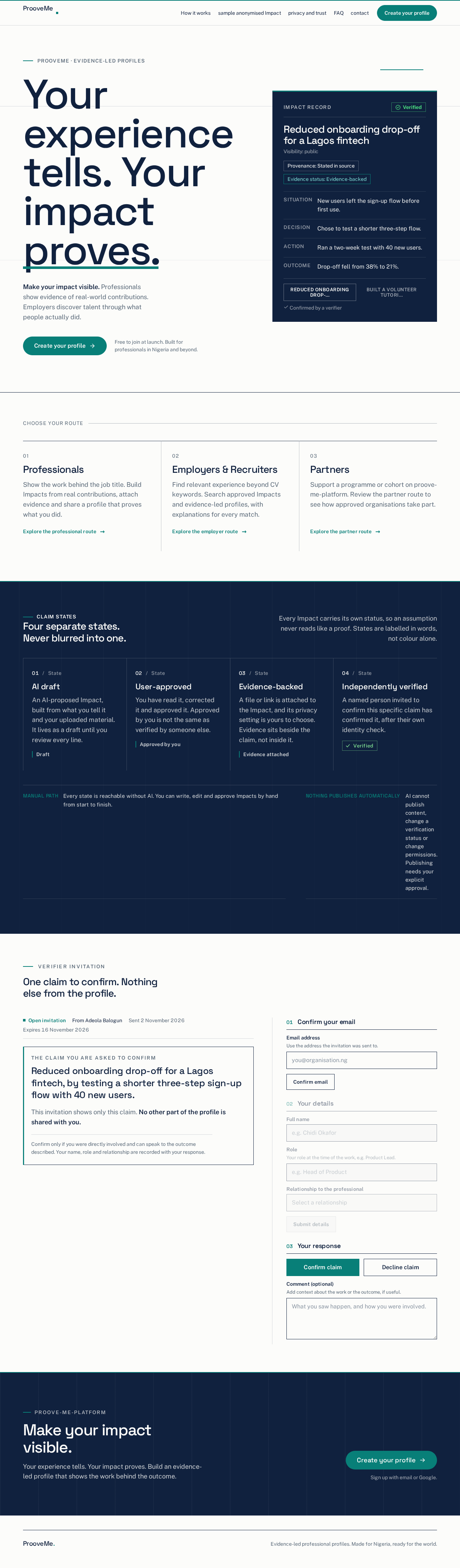
graduates, early-career professionals, career changers and experienced professionals.
•
synthetic CVs are used to start and replaced as real samples arrive. Whether and when samples are shared is an
open item (section 20).
E3-A2
E3-A5
BIL-
03
Brief §1 0,
Add. A
ANL-
04
Brief Add. A
05
measurement
06
VER-1 0
EMP-03
ID
15.Glossary
Term
Meaning
A structured record of a professional's contribution and outcome (Situation → Decision → Action →
Outcome → Evidence)
Impact
Evidence
A file or link supporting an Impact
Verifier
A person invited by a professional to confirm a specific claim
Organisation
An employer, recruiter or partner account with one or more users
Opportunity
A marketplace listing such as a job, contract, internship, project or advisory role
Feature flag
A setting that switches a module on or off, enforced on the server and in the UI
Tenant
isolation
Keeping each user's and organisation's data inaccessible to others
DPIA
Data protection impact assessment
UAT
User acceptance testing

ProoveMe · Evidence-led profiles
Make your impact visible. Professionals show evidence of real-world contributions. Employers discover talent through what people actually did.
Free to join at launch. Built for professionals in Nigeria and beyond.
Choose your route
Show the work behind the job title. Build Impacts from real contributions, attach evidence and share a profile that proves what you did.
Explore the professional routeFind relevant experience beyond CV keywords. Search approved Impacts and evidence-led profiles, with explanations for every match.
Explore the employer routeSupport a programme or cohort on proove-me-platform. Review the partner route to see how approved organisations take part.
Explore the partner routeClaim states
Every Impact carries its own status, so an assumption never reads like a proof. States are labelled in words, not colour alone.
An AI-proposed Impact, built from what you tell it and your uploaded material. It lives as a draft until you review every line.
DraftYou have read it, corrected it and approved it. Approved by you is not the same as verified by someone else.
Approved by youA file or link is attached to the Impact, and its privacy setting is yours to choose. Evidence sits beside the claim, not inside it.
Evidence attachedA named person invited to confirm this specific claim has confirmed it, after their own identity check.
VerifiedEvery state is reachable without AI. You can write, edit and approve Impacts by hand from start to finish.
AI cannot publish content, change a verification status or change permissions. Publishing needs your explicit approval.
Verifier invitation
The claim you are asked to confirm
Reduced onboarding drop-off for a Lagos fintech, by testing a shorter three-step sign-up flow with 40 new users.
This invitation shows only this claim. No other part of the profile is shared with you.
Confirm only if you were directly involved and can speak to the outcome described. Your name, role and relationship are recorded with your response.
Your experience tells. Your impact proves. Build an evidence-led profile that shows the work behind the outcome.

ProoveMe · Evidence-led profiles
Make your impact visible. Professionals show evidence of real-world contributions. Employers discover talent through what people actually did.
Free to join at launch. Built for professionals in Nigeria and beyond.
Choose your route
Show the work behind the job title. Build Impacts from real contributions, attach evidence and share a profile that proves what you did.
Explore the professional routeFind relevant experience beyond CV keywords. Search approved Impacts and evidence-led profiles, with explanations for every match.
Explore the employer routeSupport a programme or cohort on proove-me-platform. Review the partner route to see how approved organisations take part.
Explore the partner routeClaim states
Every Impact carries its own status, so an assumption never reads like a proof. States are labelled in words, not colour alone.
An AI-proposed Impact, built from what you tell it and your uploaded material. It lives as a draft until you review every line.
DraftYou have read it, corrected it and approved it. Approved by you is not the same as verified by someone else.
Approved by youA file or link is attached to the Impact, and its privacy setting is yours to choose. Evidence sits beside the claim, not inside it.
Evidence attachedA named person invited to confirm this specific claim has confirmed it, after their own identity check.
VerifiedEvery state is reachable without AI. You can write, edit and approve Impacts by hand from start to finish.
AI cannot publish content, change a verification status or change permissions. Publishing needs your explicit approval.
Verifier invitation
The claim you are asked to confirm
Reduced onboarding drop-off for a Lagos fintech, by testing a shorter three-step sign-up flow with 40 new users.
This invitation shows only this claim. No other part of the profile is shared with you.
Confirm only if you were directly involved and can speak to the outcome described. Your name, role and relationship are recorded with your response.
Your experience tells. Your impact proves. Build an evidence-led profile that shows the work behind the outcome.
No comments yet. Be the first!