project-dde3b4f9
 اكتفيت بك
كيف انىاصل مع الدعم الخاص بكم

Comments (0)
Sign in to leave a comment
System Requirements
System Requirements Document for project-dde3b4f9
1. Introduction
This document specifies the system requirements for 8080.ai, a platform whose referral program grants credit to users who refer others. The product intent derived from the authoritative requirement thread is narrow and concrete: a user who registered through a friend's referral link, and the friend who referred them, must be able to (a) understand how the referral route works, (b) register or sign in through Apple or Google, (c) inspect their own account for referral credit and referral-related notifications, (d) obtain their personal referral link for sharing, and (e) reach 8080.ai support — including obtaining the support email address — to have a missing referral credit investigated.
The audience is Arabic-speaking, mobile-first, largely non-technical users who signed up through a friend's link (frequently via Apple sign-in) and who are anxious about a reward that never arrived. The product's job is to answer one question clearly: what is the support email, and how do I get my credit investigated?
The originating case that defines the product's tone and priorities: a referring user shared https://8080.ai/refer/Y7MJ7GI2, referred more than one person, registered on the platform through Apple rather than Google, and received no credit. The affected account email supplied was Izz.joudah@gmail.com. The user's final request was for the support email address itself.
2. System Overview
8080.ai is delivered as a first-party web application with application-owned identity. Users enroll or authenticate through Apple or Google. Anonymous visitors can read the Landing page and reach the Support and Contact Us destinations without signing in; the referral workspace and the personal referral link are protected and require an authenticated session.
Current actors are the three accepted human personas — Referred User (Referral Participant), Referring User (Referrer), and Support Requester — plus the external identity providers (Apple, Google) and the 8080.ai support team, which is an outbound recipient rather than a persona in this product.
Accepted current behavior covers: registration through a referral link, referral of more than one person through one link, delivery of referral credit to the referring user's account, Apple/Google registration and sign-in, checking the account for referral credit and referral notifications, reaching 8080.ai support through the Support / Contact Us destination, and obtaining the support email address.
Narrow exclusions: the assistant/chat channel has no access to user accounts and cannot fix reward or referral technical issues; referral-credit problems are handled by the 8080.ai support team through the support page, where the affected user provides their email and problem details. No other support channels, account-management capabilities, or adjacent product modules are specified.
2a. Product Interpretation and Delivery Boundary
Delivery ownership. The referral program, the referral link, the credit ledger, the account, and the Support / Contact Us surfaces are all first-party 8080.ai responsibilities. Apple and Google own only the identity-provider leg of enrollment and sign-in; the product owns everything downstream of the returned identity. The 8080.ai support team owns investigation and resolution of referral-credit disputes; the product owns routing the case to them with the right facts attached.
Access ownership. Identity is application-owned and established through Apple or Google. Anonymous visitors may read the Landing page and use the Support and Contact Us destinations — this is deliberate, because a user whose credit is missing may not be able to sign in, or may be contacting support about an account they cannot access. The Referrals workspace and the Referral Link destination require an authenticated session, because they expose account-bound credit state and a personal sharing link.
Current boundary. Everything in this document is current: the referral route, enrollment, credit visibility, the personal referral link, the support email answer, the diagnostic checklist, and the support message form.
Future boundary. No future-horizon requirements were accepted in the authoritative thread. Nothing in this document should be read as committing to additional support channels, in-app ticketing, credit adjustment tooling, or account recovery.
2b. Source Content Inventory
No reference directive in this project declares content_source authority. Both supplied URLs (https://8080.ai/refer/Y7MJ7GI2 and https://8080.ai/support) are declared feature_reference with supplemental authority, and both rendered only a loading placeholder ("Loading workspace…") on static fetch. No verified factual entities, collections, contact details, or media references were extractable from them, so no content inventory is produced. The support email address is a product requirement to be surfaced by the Support destination, not a verified fact from a content source.
2c. Page Content and Component Coverage
Landing
- Information and state. Anonymous public entry. States the product's purpose (8080.ai and its referral-credit program), who it serves, and the four-step referral route. No account state is shown.
- Primary actions. "Get the support email" (routes to Support) and "Check my referral status" (routes to Login, or to Referrals when a session already exists).
- Supporting actions. Navigate to Sign Up, Login, Support, Contact Us.
- Domain entities. Referral route (four steps), referral link, identity provider (Apple / Google), referral credit.
- Component responsibilities.
- Route rail — permanent 96px left strip, numbered 01 Referral link → 02 Registration → 03 Credit check → 04 Support, active step in signal red, 2px connector line.
- Hero transit diagram — full-width 2px ink line with four labelled stations; station 01 solid red, station 02 amber, stations 03–04 open circles.
- Hero headline — 72px Fira Sans Condensed, flush-left, maximum two lines.
- Hero paragraph — single 66ch reading column at 20px.
- Hero action pair — solid red primary rectangle and white-with-ink-border secondary rectangle, side by side.
- Referral-flow diagram — schematic person → link → referred account → credit, 1.5px ink lines with red and amber route marks.
- Identity-provider comparison — Apple and Google drawn as two labelled track lines.
- Ruled footer — four numbered links styled as a departure board.
- States. Loading: skeleton of the hero line and headline block, no spinner. Empty: not applicable (static content). Success: full diagram rendered. Error: if the referral-route diagram asset fails, the four station labels render as a plain numbered list so the route remains readable. Recovery: the two hero buttons remain functional independently of the diagram.
Sign Up
- Information and state. Anonymous enrollment surface reached from a referral link. Displays the referring context when the visitor arrived through a referral link, and the identity-provider choice.
- Primary actions. Continue with Apple; Continue with Google.
- Supporting actions. Switch to Login; reach Support.
- Domain entities. Referral link, referrer, referred user, identity provider, account.
- Component responsibilities.
- Referral context panel — white panel with a 6px status bar showing the referral link the visitor arrived through.
- Identity-provider buttons — two rectangular buttons with 2px ink border, each paired with a text label and a 1.5px line pictogram (Apple mark, Google mark).
- Route rail — step 02 Registration active.
- Ruled footer — four numbered links.
- States. Loading: provider buttons disabled with a muted label while the provider handshake is in flight. Empty: no referral context available — the panel is omitted and enrollment proceeds without a recorded referrer. Success: identity returned, account created, session established, route rail advances to step 03. Error: provider handshake fails or is cancelled — an ink-bordered notice states the failure and the provider buttons remain available for retry. Recovery: retry the same provider, or choose the other provider; the referral context is preserved across retries.
Login
- Information and state. Anonymous returning-verification surface for existing users. Shows the identity-provider choice and, when the visitor arrived from a referral link, the referral context.
- Primary actions. Continue with Apple; Continue with Google.
- Supporting actions. Switch to Sign Up; reach Support.
- Domain entities. Account, identity provider, referral link.
- Component responsibilities.
- Identity-provider buttons — as on Sign Up, with the same pictogram-plus-label pairing.
- Referral context panel — shown only when a referral link is present in the entry context.
- Route rail — step 02 Registration active.
- Ruled footer — four numbered links.
- States. Loading: buttons disabled with a muted label during the provider handshake. Empty: not applicable. Success: session established, route rail advances to step 03 Credit check. Error: provider handshake fails or the returned identity matches no account — an ink-bordered notice states the failure without disclosing whether an account exists. Recovery: retry the same provider or choose the other provider; Support remains reachable from the same view.
Referrals
- Information and state. Protected referral workspace. Shows the authenticated user's referral credit balance, referral count, the list of referred users with their status, and referral-related notifications or messages. Read-only with respect to credit.
- Primary actions. Open the personal referral link destination; open Support.
- Supporting actions. Copy the referral link inline; open a referral-related notification.
- Domain entities. Referral credit, referral count, referred user, referral status (issued / pending), notification, referral link, sign-in method.
- Component responsibilities.
- Referral status board — white panel with a 6px status bar (red = action needed, amber = pending, ink = informational) carrying credit balance and referral count in Fira Sans tabular figures.
- Referral-flow diagram — 320px panel version of the same ink-line diagram used on Landing.
- Referred-user rows — 1px ink hairlines, label/value pairs, status chips in red, amber, or ink.
- Notifications list — referral-related messages with muted 12–13px timestamps.
- Route rail — step 03 Credit check active.
- Ruled footer — four numbered links.
- States. Loading: ruled skeleton rows in the status board, no spinner. Empty: no referrals recorded — the board states that no referred registrations are recorded yet and links to the personal referral link destination. Success: credit balance, referral count, referred-user rows, and notifications render. Error: the referral data cannot be loaded — an ink-bordered notice states the failure and offers a retry; Support remains reachable. Recovery: retry the load; if the balance is still wrong or missing, the user proceeds to Support with the diagnostic checklist.
Referral Link
- Information and state. Protected destination showing the authenticated referring user's personal referral link in the form
https://8080.ai/refer/<code>, with a copyable field and a short explanation of how referred users register through it. - Primary actions. Copy the referral link.
- Supporting actions. Open Referrals; open Support.
- Domain entities. Referral link, referral code, referring user.
- Component responsibilities.
- Referral link field — white panel with a 6px ink status bar, the link set in Fira Sans tabular spacing, and an inline Copy control.
- Copy control — flashes ink for 400ms and shows "Copied" in its label.
- Referral-flow diagram — 320px panel version.
- Route rail — step 01 Referral link active.
- Ruled footer — four numbered links.
- States. Loading: the link field shows a muted placeholder until the code resolves. Empty: no referral code has been issued for the account — the panel states this and routes to Support. Success: the link renders and copies. Error: the link cannot be resolved — an ink-bordered notice states the failure with a retry. Recovery: retry; if the code is still unavailable, proceed to Support.
Support
- Information and state. Public support destination. Its dominant object is the 8080.ai support email address, set at 40px Fira Sans Condensed with tabular spacing on a white panel with a 6px red top bar. Below it sits the diagnostic checklist and the message form. The page also states plainly that referral-credit problems are handled by the 8080.ai support team, and that the affected user must provide their email and problem details.
- Primary actions. Copy the support email; submit the diagnostic checklist to pre-fill the Contact Us form.
- Supporting actions. Open Contact Us; return to Landing.
- Domain entities. Support email address, diagnostic checklist (referral link, referred email, sign-in method, date), referral-credit issue, affected account email.
- Component responsibilities.
- Support email panel — the largest object on the page; 40px Fira Sans Condensed, tabular spacing, 6px red top bar, inline Copy control that flashes ink for 400ms and shows "Copied".
- Diagnostic checklist — ruled label/value rows with 1px hairlines for Referral link, Referred email, Sign-in method, and Date, each with a status chip in red, amber, or ink.
- Referral-flow diagram — 120px strip above the form.
- Message form — affected account email and problem details, submitting to the 8080.ai support team.
- Route rail — step 04 Support active.
- Ruled footer — four numbered links.
- States. Loading: the email panel renders immediately from static configuration; the checklist renders a ruled skeleton. Empty: the checklist is blank and the form is empty — the user fills both manually. Success: the email is displayed and copyable; the checklist submits and carries its values to Contact Us. Error: the support email cannot be resolved from configuration — the panel states that the address is temporarily unavailable and keeps the message form usable so the case can still be submitted. Recovery: retry the email lookup; the message form and Contact Us remain available regardless.
Contact Us
- Information and state. Public contact destination, identified in the source as the Support / Contact Us section. Reuses the Support board with the message form pre-filled from the diagnostic checklist when the user arrived from Support.
- Primary actions. Submit the referral-credit issue to the 8080.ai support team.
- Supporting actions. Return to Support; copy the support email.
- Domain entities. Affected account email, problem details, referral link, referred email, sign-in method, date, submission.
- Component responsibilities.
- Contact card — white panel with a 6px red top bar carrying the support email and its Copy control.
- Message form — affected account email and problem details, pre-filled from the checklist when available.
- Diagnostic checklist — same ruled component as on Support, editable here.
- Route rail — step 04 Support active.
- Ruled footer — four numbered links.
- States. Loading: form fields disabled with a muted label while a pre-fill is being applied. Empty: no pre-fill available — all fields start blank. Success: the submission is accepted and the page confirms that the 8080.ai support team has received the case, showing the affected email and the submitted details for the user's records. Error: validation failure (missing affected email or problem details) — the offending ruled row is marked with a red status chip and an inline message; submission failure — an ink-bordered notice states the failure and preserves every entered value. Recovery: correct the marked field and resubmit, or retry the submission without re-entering data; the support email remains copyable throughout.
3. Functional Requirements
FR-01 — Referral program and credit (explicit) As a Referring User, I should earn referral credit on my account when people I refer register through my referral link, so that referring others is rewarded.
- Trigger/input: a referred person completes registration through the referring user's referral link.
- Observable result: referral credit is delivered to the referring user's account and is visible in the Referrals workspace.
- Access state: authenticated session required to view the credit.
- Failure/recovery: if credit does not appear, the referring user proceeds to Support with the diagnostic checklist.
- Continuation: the referring user returns to Referrals to confirm the balance.
FR-02 — Registration through a referral link (explicit) As a Referred User, I should register in the app through a friend's referral link, so that my registration is attributed to that friend.
- Trigger/input: opening a referral link of the form
https://8080.ai/refer/Y7MJ7GI2. - Observable result: the referral context is shown on Sign Up and the registration is recorded against the referring user.
- Access state: anonymous entry; identity established through Apple or Google.
- Failure/recovery: if the referral context is missing, enrollment still completes but no referrer is recorded; the user can reach Support.
- Continuation: the route rail advances to step 03 Credit check.
FR-03 — Referring more than one person (explicit) As a Referring User, I should be able to refer more than one person through my single referral link, so that each successful referral is counted.
- Trigger/input: sharing the same personal referral link with multiple people.
- Observable result: each referred registration appears as its own row in the Referrals workspace and contributes to the referral count.
- Access state: authenticated session required to view the count.
- Failure/recovery: if a referred registration is missing from the list, the referring user proceeds to Support.
- Continuation: the referring user continues sharing the same link.
FR-04 — Apple or Google registration and sign-in (explicit) As a Referred User or Referring User, I should register or sign in using Apple or Google, so that I can access my account without a separate password.
- Trigger/input: choosing Continue with Apple or Continue with Google on Sign Up or Login.
- Observable result: an authenticated session is established and protected destinations become available.
- Access state: anonymous entry to Sign Up and Login; protected state after the provider returns an identity.
- Failure/recovery: a failed or cancelled provider handshake shows an ink-bordered notice and the provider buttons remain available for retry.
- Continuation: the user proceeds to Referrals.
FR-05 — Checking the account for referral credit and notifications (explicit) As a Referring User, I should check my account for referral credit and for notifications or messages related to referrals, so that I know whether my referrals were credited.
- Trigger/input: opening the Referrals workspace while authenticated.
- Observable result: the credit balance, referral count, referred-user rows with status chips, and referral-related notifications are displayed.
- Access state: authenticated session required.
- Failure/recovery: if the data cannot be loaded, an ink-bordered notice offers a retry and Support remains reachable.
- Continuation: if the balance is wrong or missing, the user proceeds to Support.
FR-06 — Personal referral link (required_inference) As a Referring User, I should view and copy my personal referral link, so that I can share it with people I want to refer.
- Trigger/input: opening the Referral Link destination while authenticated.
- Observable result: the link renders in the form
https://8080.ai/refer/<code>and the Copy control flashes ink and shows "Copied". - Access state: authenticated session required.
- Failure/recovery: if the code cannot be resolved, an ink-bordered notice offers a retry and routes to Support.
- Continuation: the user shares the link and returns to Referrals to watch for credit.
FR-07 — Reaching 8080.ai support (explicit)
As a Support Requester, I should contact 8080.ai support through the support page at https://8080.ai/support, so that a referral-credit problem can be investigated.
- Trigger/input: opening the Support destination, publicly reachable without signing in.
- Observable result: the Support board presents the support email, the diagnostic checklist, and the message form.
- Access state: anonymous access permitted.
- Failure/recovery: if the support email cannot be resolved, the panel states this and the message form remains usable.
- Continuation: the user submits the case through Contact Us.
FR-08 — Obtaining the support email address (explicit) As a Support Requester, I should be given the 8080.ai support email address, so that I can write to support directly about a missing referral credit.
- Trigger/input: opening the Support destination, or selecting "Get the support email" on Landing.
- Observable result: the support email address is displayed as the largest object on the Support page, set at 40px Fira Sans Condensed with tabular spacing on a white panel with a 6px red top bar, and is copyable via an inline Copy control that flashes ink for 400ms and shows "Copied".
- Access state: anonymous access permitted.
- Failure/recovery: if the address cannot be resolved from configuration, the panel states that it is temporarily unavailable and keeps the message form usable.
- Continuation: the user copies the address and writes to support, or submits the message form.
FR-09 — Recording the referral relationship (required_inference) As the system, I should record the referral relationship only when a referred user completes registration through the referrer's referral link, so that credit is attributed to the correct referring account.
- Trigger/input: a completed registration carrying a referral link context.
- Observable result: the referred user appears in the referring user's Referrals workspace with a status chip.
- Access state: system process; the resulting state is visible only to the authenticated referring user.
- Failure/recovery: an incomplete registration records no relationship; the referring user can raise the case through Support.
- Continuation: the relationship feeds FR-01 credit delivery.
FR-10 — Identity before protected referral information (required_inference) As a Referred User or Referring User, I should enroll or authenticate through Apple or Google before protected referral information is available, so that my credit and referral link stay bound to my own account.
- Trigger/input: attempting to open Referrals or Referral Link without a session.
- Observable result: the protected destination is not shown; the user is routed to Login (or Sign Up) and, after a successful provider handshake, reaches the requested destination.
- Access state: anonymous entry to Login and Sign Up; protected state afterwards.
- Failure/recovery: a failed handshake leaves the user on Login with a notice and a retry, and Support remains reachable.
- Continuation: the user proceeds to Referrals.
FR-11 — Returning to inspect credit and notifications (required_inference) As a Referring User, I should be able to return to my account at any time and inspect my referral credit and notifications, so that I can confirm whether a referral was credited after the fact.
- Trigger/input: signing in again through Apple or Google.
- Observable result: the Referrals workspace shows the current credit balance, referral count, referred-user rows, and notifications.
- Access state: authenticated session required.
- Failure/recovery: if the data cannot be loaded, a retry is offered and Support remains reachable.
- Continuation: the user either confirms the credit or escalates through Support.
FR-12 — Submitting a referral-credit issue to support (required_inference) As a Support Requester, I should submit a referral-credit issue to 8080.ai support through the Support / Contact Us destination with the affected user's email and problem details, so that the support team can investigate.
- Trigger/input: completing the diagnostic checklist (referral link, referred email, sign-in method, date) and the message form (affected account email, problem details) on Support or Contact Us.
- Observable result: the submission is accepted and the page confirms that the 8080.ai support team has received the case, showing the affected email and submitted details.
- Access state: anonymous access permitted.
- Failure/recovery: missing affected email or problem details marks the offending ruled row with a red status chip and an inline message; a submission failure shows an ink-bordered notice and preserves every entered value.
- Continuation: the user corrects the marked field and resubmits, or retries without re-entering data.
FR-13 — Diagnostic checklist pre-filling Contact Us (required_inference) As a Support Requester, I should have the diagnostic checklist pre-fill the Contact Us form when I submit it, so that I do not re-enter the same facts twice.
- Trigger/input: submitting the diagnostic checklist on Support.
- Observable result: Contact Us opens with Referral link, Referred email, Sign-in method, and Date carried into the form.
- Access state: anonymous access permitted.
- Failure/recovery: if no checklist values are available, Contact Us opens with blank fields and the checklist remains editable there.
- Continuation: the user completes the affected account email and problem details and submits.
FR-14 — Support channel boundary (explicit) As the product, I should route referral-credit problems to the 8080.ai support team through the support page, so that the affected user provides their email and problem details to the party that can investigate.
- Trigger/input: a referral-credit problem reported by any user.
- Observable result: the case is submitted to the 8080.ai support team with the affected email and problem details attached.
- Access state: anonymous access permitted to Support and Contact Us.
- Failure/recovery: if submission fails, the entered values are preserved and the submission can be retried.
- Continuation: the support team investigates; the product does not resolve the credit itself.
4. User Personas
Referred User (Referral Participant)
Product context. This person arrived at 8080.ai because a friend sent them a referral link of the form https://8080.ai/refer/Y7MJ7GI2. They are not shopping for a product; they are following a personal invitation, and they are frequently on a phone. They may sign up with Apple rather than Google, which matters later because the sign-in method becomes a diagnostic fact.
Primary goal. Complete registration through the friend's link and confirm that the referral is properly attributed, so the friend gets credit and nothing about the invitation is left dangling.
Distinct accepted responsibilities. Opening the referral link and seeing the referral context; choosing Apple or Google to establish identity; completing registration so the relationship is recorded; and, if the attribution appears not to have taken, reaching Support.
Relevant inputs or decisions. Which identity provider to use (Apple or Google); whether the referral context shown on Sign Up matches the friend who invited them; whether to escalate to Support.
Interactions with other accepted participants. Their registration is the event that triggers credit for the Referring User. Their sign-in method and referred email become the facts a Support Requester supplies to the 8080.ai support team.
Observable success. Registration completes, the route rail advances past step 02, and the referral is recorded against the referring user's account.
Referring User (Referrer)
Product context. This person is already registered and has been actively sharing their personal referral link. They have referred more than one person. Their defining experience in the source case is frustration: people registered through their link, they used Apple rather than
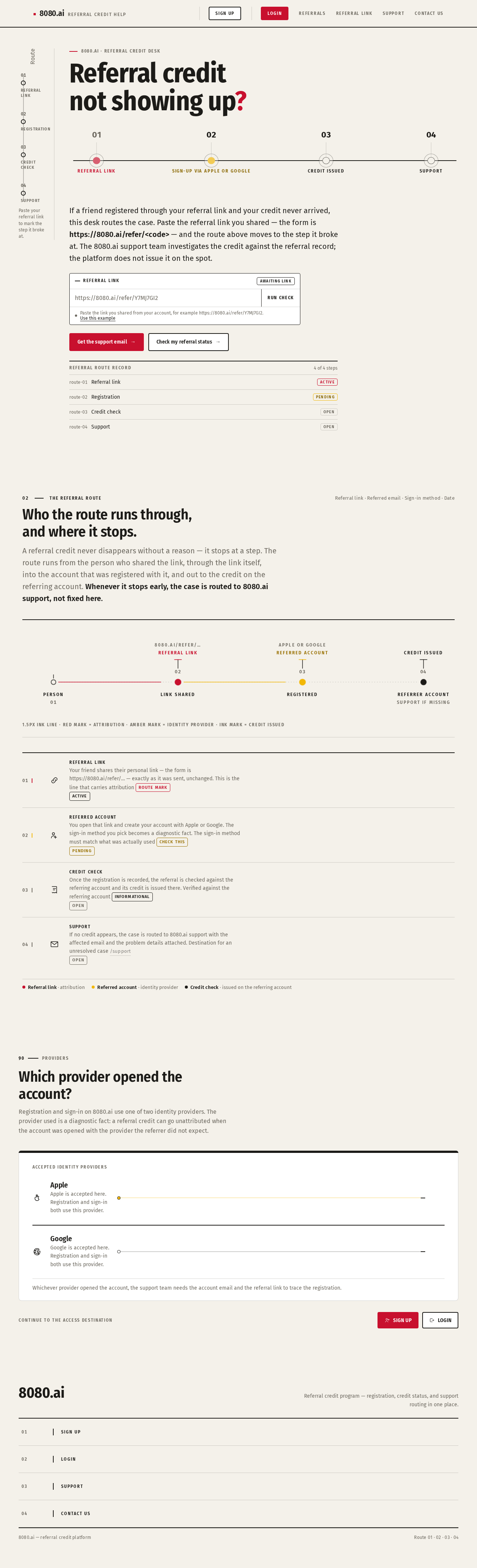
Referral credit not showing up? Reach Support or Contact Us for an investigation.
8080.ai · Referral credit desk
Referral creditnot showing up?
If a friend registered through your referral link and your credit never arrived, this desk routes the case. Paste the referral link you shared — the form is https://8080.ai/refer/<code> — and the route above moves to the step it broke at. The 8080.ai support team investigates the credit against the referral record; the platform does not issue it on the spot.
- route-01Referral linkactive
- route-02Registrationpending
- route-03Credit checkopen
- route-04Supportopen
Who the route runs through, and where it stops.
A referral credit never disappears without a reason — it stops at a step. The route runs from the person who shared the link, through the link itself, into the account that was registered with it, and out to the credit on the referring account. Whenever it stops early, the case is routed to 8080.ai support, not fixed here.
- 01Referral linkYour friend shares their personal link — the form is https://8080.ai/refer/… — exactly as it was sent, unchanged. This is the line that carries attribution Route mark Active
- 02Referred accountYou open that link and create your account with Apple or Google. The sign-in method you pick becomes a diagnostic fact. The sign-in method must match what was actually used Check this Pending
- 03Credit checkOnce the registration is recorded, the referral is checked against the referring account and its credit is issued there. Verified against the referring account Informational Open
- 04SupportIf no credit appears, the case is routed to 8080.ai support with the affected email and the problem details attached. Destination for an unresolved case /support Open
90Providers
Which provider opened the account?
Registration and sign-in on 8080.ai use one of two identity providers. The provider used is a diagnostic fact: a referral credit can go unattributed when the account was opened with the provider the referrer did not expect.
Apple
Apple is accepted here. Registration and sign-in both use this provider.
Google
Google is accepted here. Registration and sign-in both use this provider.
Whichever provider opened the account, the support team needs the account email and the referral link to trace the registration.
Referral credit not showing up? Reach Support or Contact Us for an investigation.
8080.ai · Referral credit desk
Referral creditnot showing up?
If a friend registered through your referral link and your credit never arrived, this desk routes the case. Paste the referral link you shared — the form is https://8080.ai/refer/<code> — and the route above moves to the step it broke at. The 8080.ai support team investigates the credit against the referral record; the platform does not issue it on the spot.
- route-01Referral linkactive
- route-02Registrationpending
- route-03Credit checkopen
- route-04Supportopen
Who the route runs through, and where it stops.
A referral credit never disappears without a reason — it stops at a step. The route runs from the person who shared the link, through the link itself, into the account that was registered with it, and out to the credit on the referring account. Whenever it stops early, the case is routed to 8080.ai support, not fixed here.
- 01Referral linkYour friend shares their personal link — the form is https://8080.ai/refer/… — exactly as it was sent, unchanged. This is the line that carries attribution Route mark Active
- 02Referred accountYou open that link and create your account with Apple or Google. The sign-in method you pick becomes a diagnostic fact. The sign-in method must match what was actually used Check this Pending
- 03Credit checkOnce the registration is recorded, the referral is checked against the referring account and its credit is issued there. Verified against the referring account Informational Open
- 04SupportIf no credit appears, the case is routed to 8080.ai support with the affected email and the problem details attached. Destination for an unresolved case /support Open
90Providers
Which provider opened the account?
Registration and sign-in on 8080.ai use one of two identity providers. The provider used is a diagnostic fact: a referral credit can go unattributed when the account was opened with the provider the referrer did not expect.
Apple
Apple is accepted here. Registration and sign-in both use this provider.
Google
Google is accepted here. Registration and sign-in both use this provider.
Whichever provider opened the account, the support team needs the account email and the referral link to trace the registration.
No comments yet. Be the first!