project-b3c14594
투석 환자의 식단과 수분 섭취를 관리하기 위한 웹앱을 만들어 주세요. 이 앱의 주요 목적은 투석 환자가 하루 나트륨, 칼륨, 인, 단백질, 수분 섭취량을 쉽게 기록하고, 의사가 정해준 하루 허용량과 비교하여 과다 섭취를 예방하도록 돕는 것입니다. 화면 구성은 다음 네 가지로 나눠 주세요. 홈(오늘 요약) 음식 기록 추가 화면 기록 목록(지난 기록 보기) 설정 화면(환자 정보 및 하루 허용량 설정) 각 화면의 상세 요구사항은 다음과 같습니다. [홈(오늘 요약) 화면] 오늘 날짜를 표시합니다. 오늘 섭취한 총 영양소를 한눈에 보여줍니다. 오늘 총 나트륨 섭취량 오늘 총 칼륨 섭취량 오늘 총 인 섭취량 오늘 총 단백질 섭취량 오늘 총 수분 섭취량 각 항목별로 “오늘 허용량 대비 몇 %를 섭취했는지”를 숫자 또는 간단한 막대그래프로 표시해 주세요. (예: 나트륨 65%) 경고 영역을 만들어서, 허용량의 80% 이상일 때는 “주의” 문구를, 100% 이상일 때는 “오늘은 더 조심해야 합니다”와 같은 경고 문구를 표시해 주세요. [음식 기록 추가 화면] 사용자가 먹은 내용을 새로 기록할 수 있는 화면입니다. 입력 항목: 먹은 날짜/시간(기본값은 현재 시각으로 설정) 음식 이름(예: 김치찌개, 바나나, 밥 등) 양: 숫자 + 단위(예: 1 그릇, 100 g, 1 개 등) 조리법/특이사항(선택, 예: 삶음, 튀김, 국물 많이 먹음 등) 음식 이름과 양을 기반으로, 아래 영양 성분의 추정치를 자동 계산해 화면에 표시해 주세요. (처음 버전에서는 자주 먹는 대표 음식 몇 개만 하드코딩하거나 간단한 예시 데이터로 처리해도 괜찮습니다.) 나트륨 칼륨 인 단백질 수분 “저장” 버튼을 눌렀을 때 해당 기록이 데이터베이스에 저장되도록 구현해 주세요. [기록 목록 화면] 사용자가 과거에 기록한 음식 섭취 내역을 날짜별로 조회할 수 있는 화면입니다. 기본적으로 최근 날짜부터 아래로 내려가는 형태로 보여 주세요. 날짜별로 접기/펼치기가 가능하면 좋습니다. 각 기록 줄에는 다음 정보를 간단히 표시합니다. 시간 음식 이름 양 필요하다면, 나트륨이나 칼륨이 높은 음식에 작은 아이콘이나 색상(예: 붉은 점)을 붙여 위험도를 직관적으로 보여 주세요. 특정 날짜를 눌렀을 때, 그날의 총 섭취량(나트륨, 칼륨, 인, 단백질, 수분 합계)을 볼 수 있도록 해 주세요. [설정 화면] 환자 또는 사용자의 기본 정보를 입력할 수 있는 화면입니다. 입력 항목: 이름 또는 닉네임 체중(선택 사항) 의사가 정해준 하루 허용량을 저장할 수 있는 입력칸을 만들어 주세요. 하루 최대 나트륨 섭취량(mg/일) 하루 최대 칼륨 섭취량(mg/일) 하루 최대 인 섭취량(mg/일) 하루 권장 단백질 섭취량(g/일) 하루 최대 수분 섭취량(ml/일) “경고 기준 설정” 항목을 만들어서, 허용량의 몇 %부터 주의를 표시할지 사용자가 정할 수 있게 해 주세요. (예: 80% 이상일 때 주의) 설정 화면에서 값을 변경한 후 “저장” 버튼을 누르면, 이후 홈 화면과 계산 로직에 즉시 반영되도록 해 주세요. [기술적 요구사항] 프론트엔드는 모바일 환경에서도 보기 편한 반응형 웹 형태로 만들어 주세요. (스마트폰 브라우저 기준으로 사용하기 쉬운 UI) 백엔드는 간단한 계정 로그인 기능과 사용자별 데이터 저장 기능을 포함해 주세요. 사용자는 로그인 후에만 자신의 음식 기록과 설정에 접근할 수 있도록 해 주세요. 처음 버전은 프로토타입(연습용 첫 버전)으로, 구조와 기본 기능 구현에 집중해 주세요. 코드는 추후 제가 직접 수정·확장할 수 있도록, 이해하기 쉬운 구조로 작성해 주세요. 이 요구사항을 바탕으로, 전체 설계(화면 설계, 데이터 구조, API 설계)와 프론트엔드/백엔드 코드를 생성하고, 로컬 또는 간단한 클라우드 환경에서 실행 가능한 형태로 만들어 주세요.
Comments (0)
Sign in to leave a comment
System Requirements
System Requirements Document (SRD) for project-b3c14594
1. Introduction
The purpose of project-b3c14594 is to develop a web application tailored for dialysis patients in South Korea (KR). This application will help users manage their daily intake of sodium, potassium, phosphorus, protein, and fluids. By providing an intuitive interface, the app will allow users to record their dietary intake, compare it against doctor-prescribed daily limits, and receive warnings to prevent overconsumption.
The project aims to improve the quality of life for dialysis patients by offering a user-friendly, responsive, and data-driven solution that can be accessed on both desktop and mobile devices.
2. System Overview
project-b3c14594 will consist of four primary screens:
- Home (Today’s Summary): Displays the user’s daily intake summary and progress against their prescribed limits.
- Add Food Record: Allows users to log their food and fluid intake, with automatic nutrient calculations.
- Record List: Provides a historical view of past food records, with detailed breakdowns for each day.
- Settings: Enables users to input personal information, set daily nutrient limits, and configure warning thresholds.
The system will include:
- A responsive front-end for mobile and desktop users.
- A secure back-end with user authentication and data storage.
- A simple, intuitive user interface designed for ease of use by patients and caregivers.
3. Functional Requirements
Home (Today’s Summary)
- As a User, I should see today’s date prominently displayed.
- As a User, I should see a summary of my total intake for sodium, potassium, phosphorus, protein, and fluids.
- As a User, I should see a percentage bar or number showing how much of my daily limit I’ve consumed for each nutrient.
- As a User, I should see a warning message when I’ve consumed 80% or more of my daily limit.
- As a User, I should see a stronger warning message when I’ve exceeded 100% of my daily limit.
Add Food Record
- As a User, I should be able to input the date and time of my food intake (default to the current time).
- As a User, I should be able to input the food name and quantity.
- As a User, I should be able to add optional notes about the preparation method or special details.
- As a User, I should see an automatic calculation of nutrients (sodium, potassium, phosphorus, protein, fluids) based on the food name and quantity.
- As a User, I should be able to save the record to the database by clicking a "Save" button.
Record List
- As a User, I should be able to view my past food records sorted by date, with the most recent at the top.
- As a User, I should be able to expand or collapse records for each date.
- As a User, I should see key details (time, food name, quantity) for each record.
- As a User, I should see visual indicators (e.g., red dots) for foods high in sodium or potassium.
- As a User, I should be able to click on a specific date to view the total nutrient intake for that day.
Settings
- As a User, I should be able to input my name or nickname.
- As a User, I should be able to input my weight (optional).
- As a User, I should be able to set my daily maximum limits for sodium, potassium, phosphorus, protein, and fluids.
- As a User, I should be able to configure the percentage threshold for warnings (e.g., 80%).
- As a User, I should be able to save my settings and see them reflected immediately in the app.
Authentication
- As a User, I should be able to log in to access my personal records and settings.
- As a User, I should not be able to access the app’s features without logging in.
4. User Personas
Primary User: Dialysis Patient
- Age Range: 30–70 years old
- Needs: Easy tracking of daily nutrient and fluid intake, clear warnings for overconsumption, and historical records for review.
- Technical Proficiency: Low to moderate; prefers simple and intuitive interfaces.
Secondary User: Caregiver or Family Member
- Age Range: 25–60 years old
- Needs: Ability to assist the patient in managing their diet and reviewing records.
- Technical Proficiency: Moderate; comfortable with mobile and web apps.
5. Visuals Colors and Theme
The visual identity of project-b3c14594 will be calming and health-focused, with a clean and modern aesthetic. Below is the custom color palette:
- Background: #F9F9F6 (soft beige for a neutral, calming effect)
- Surface: #FFFFFF (pure white for clarity and simplicity)
- Text: #333333 (dark gray for high readability)
- Accent: #4CAF50 (green for health and progress indicators)
- Muted: #BDBDBD (light gray for secondary information)
6. Signature Design Concept
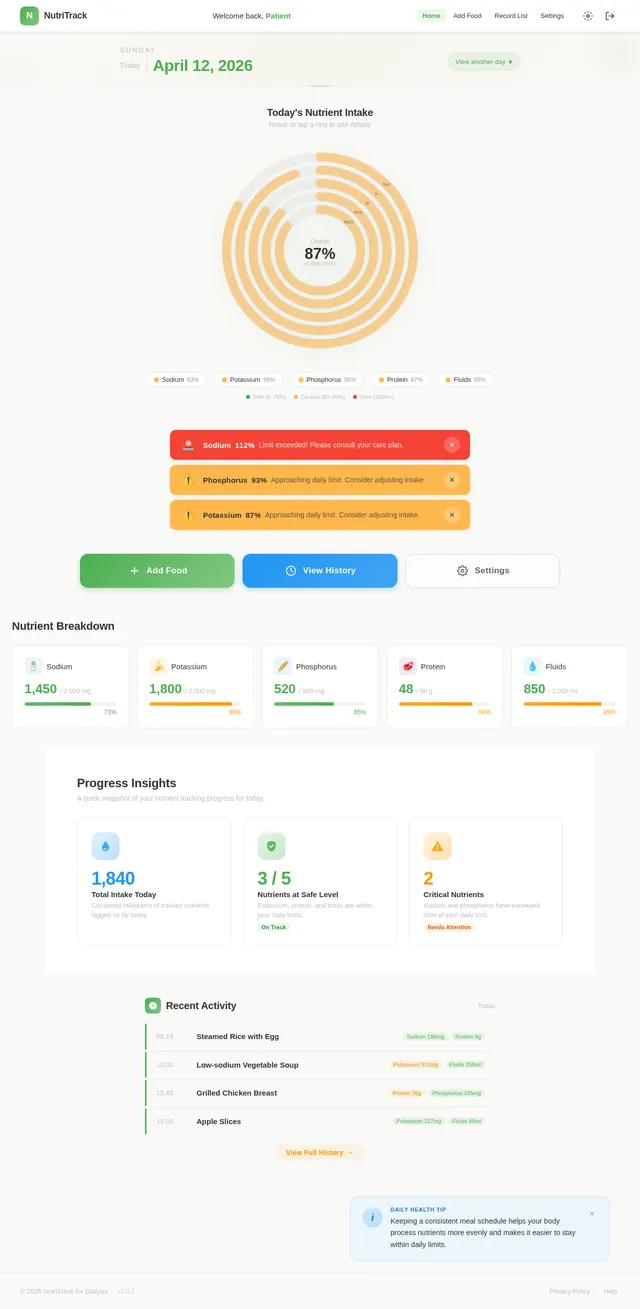
The Home (Today’s Summary) page will feature an interactive circular dashboard. This dashboard will display the user’s daily nutrient intake as concentric rings, with each ring representing a specific nutrient (e.g., sodium, potassium). The rings will fill dynamically as the user logs their intake, changing color based on thresholds:
- Green: Safe zone (below 80%)
- Yellow: Caution zone (80–99%)
- Red: Danger zone (100%+)
Hovering over a ring will display detailed information about the nutrient, including the exact percentage consumed and remaining allowance. The dashboard will also include subtle animations, such as a pulsing effect when a threshold is crossed, to draw attention to critical warnings.
This design will make the app visually engaging and provide users with an intuitive way to monitor their progress.
7. Non-Functional Requirements
- The app must be responsive and optimized for mobile devices.
- The system must support at least 1,000 concurrent users.
- The database must ensure data integrity and support secure user authentication.
- The app must load within 3 seconds on a 4G connection.
- All user data must be encrypted in transit and at rest.
8. Tech Stack
Frontend
- React for Web (responsive design)
Backend
- Python with FastAPI
Database
- MySQL with Alembic for migrations
AI Tools
- GPT 5.4 for user-friendly responses
Local Orchestration
- Docker and docker-compose
9. Assumptions and Constraints
- Nutrient data for foods will initially be hardcoded or based on a small sample dataset.
- The app will not include social login features in the prototype phase.
- Deployment will be limited to a local environment or simple cloud hosting for the prototype.
10. Glossary
- Dialysis Patient: A person undergoing treatment to remove waste products and excess fluid from the blood.
- Nutrient Threshold: The maximum daily intake limit prescribed by a doctor.
- Responsive Design: A design approach that ensures the app works well on devices of all sizes.
- Concentric Dashboard: A circular visualization with multiple layers representing different data points.
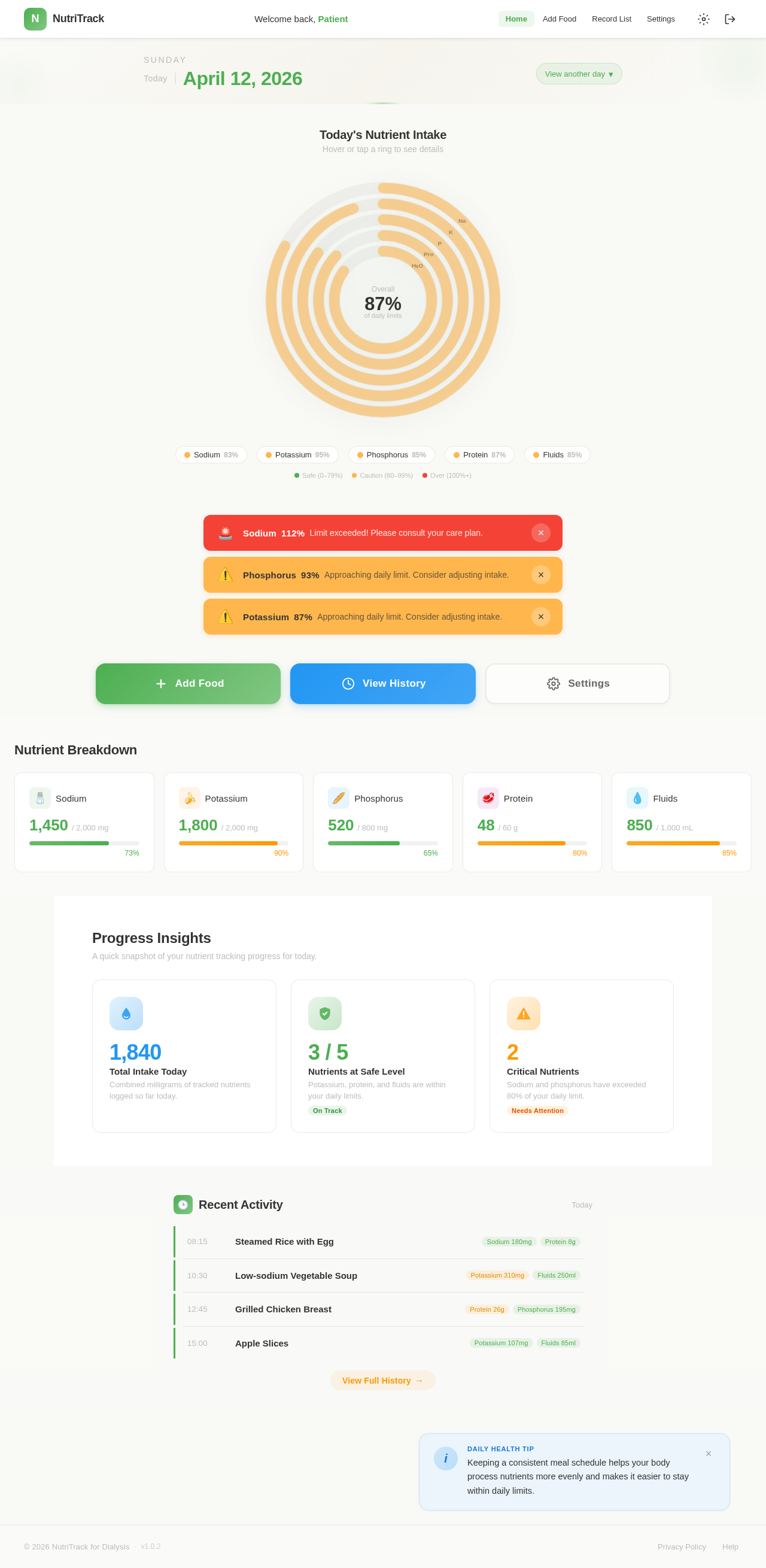
Today's Nutrient Intake
Hover or tap a ring to see details
Nutrient Breakdown
Progress Insights
A quick snapshot of your nutrient tracking progress for today.
Total Intake Today
Combined milligrams of tracked nutrients logged so far today.
Nutrients at Safe Level
Potassium, protein, and fluids are within your daily limits.
On TrackCritical Nutrients
Sodium and phosphorus have exceeded 80% of your daily limit.
Needs AttentionRecent Activity
Today- 08:15Steamed Rice with Egg
- 10:30Low-sodium Vegetable Soup
- 12:45Grilled Chicken Breast
- 15:00Apple Slices
Daily Health Tip
Cooking vegetables by boiling and discarding the water can reduce potassium content by up to 50%. Try double-boiling high-potassium foods like potatoes and spinach.
No comments yet. Be the first!