project-aee2edc0
 Ahmed Gamal
ابني تطبيق ويب احترافي عباره عن قارئ ملف pdf يسمح للمستخدم برفع ملفات pdf وفتحها هذا التطبيق مزود بكره عائمه عباره عن مساعد شخصي بالذكاء الاصطناعي عند الضغط عليها تظهر واجهه دردشه سفليه مع الذكاء الاصطناعي بما يسمح للمستخدم بان يسال الذكاء الاصطناعي اي سؤال عن محتوى الصفحه المعروضه حاليا المساعد الشخصي بالذكاء الاصطناعي لديه حق الوصول الى الصفحه المعروضه حاليا فقط ويستطيع التعامل مع الصور والنصوص والصفحات الممسوحة الضوئيا ويجيب على جميع اسئله المستخدم سواء كان شرح مواضيع معقده او ترجمه الصفحه ملاحظات: تأكد من أن التطبيق يعمل ويفتح صفحات ملف pdf من غير مشاكل وأنه يدعم المفات pdf الأحجام الكبيرة حتى ١٠٠ ميجا

Comments (0)
Sign in to leave a comment
System Requirements
System Requirements Document (SRD) for project-aee2edc0
1. Introduction
The purpose of this document is to outline the system requirements for project-aee2edc0, a professional web application designed to serve as a PDF reader integrated with an AI-powered personal assistant. This application will allow users to upload and view PDF files, interact with an AI assistant for various tasks, and ensure seamless handling of large files up to 100 MB. The project is tailored to meet the needs of users in Egypt (EG), with a focus on multilingual support, simplified explanations, and advanced text-and-image interaction capabilities.
2. System Overview
project-aee2edc0 is a web-based application that combines PDF reading functionality with an AI-powered personal assistant. The system will enable users to:
- Upload and view PDF files, including large files up to 100 MB.
- Interact with a floating AI assistant for real-time assistance.
- Ask questions about the currently displayed page, with the assistant having access only to the content of that page.
- Translate the page into multiple languages.
- Simplify complex text explanations.
- Interact with both text and images, including scanned pages.
The system will prioritize user privacy and security by limiting the AI assistant's access to the currently displayed page only. It will also ensure smooth performance for large files and provide a user-friendly interface.
3. Functional Requirements
- As a User, I should be able to upload PDF files up to 100 MB and view them without issues.
- As a User, I should be able to interact with a floating AI assistant by clicking on a floating ball icon.
- As a User, I should be able to ask the AI assistant to translate the currently displayed page into multiple languages.
- As a User, I should be able to ask the AI assistant to simplify complex text on the currently displayed page.
- As a User, I should be able to ask the AI assistant questions about both text and images on the currently displayed page, including scanned content.
- As a User, I should be able to receive accurate and context-aware responses from the AI assistant.
4. User Personas
-
General User:
- Description: Individuals who need to read, translate, or analyze PDF documents for personal or professional purposes.
- Goals: Seamless PDF viewing, multilingual translation, simplified explanations, and interaction with text and images.
- Pain Points: Difficulty handling large files, lack of tools for multilingual translation, and limited interaction with scanned content.
-
Professional User:
- Description: Professionals such as researchers, educators, and business users who work with complex or multilingual documents.
- Goals: Efficient handling of large files, accurate translations, and advanced AI assistance for text and image analysis.
- Pain Points: Time-consuming manual translations, difficulty understanding complex content, and limited tools for scanned documents.
5. Visuals Colors and Theme
Unique Color Palette for project-aee2edc0:
- Background: #F5F7FA (Soft Light Gray)
- Surface: #FFFFFF (Pure White)
- Text: #2C3E50 (Deep Navy Blue)
- Accent: #FF6F61 (Warm Coral Red)
- Muted Tones: #BDC3C7 (Muted Silver Gray)
This palette is designed to create a clean, professional, and approachable interface. The warm coral red accent adds a touch of vibrancy to the design.
6. Signature Design Concept
Floating AI Assistant with Dynamic Interaction
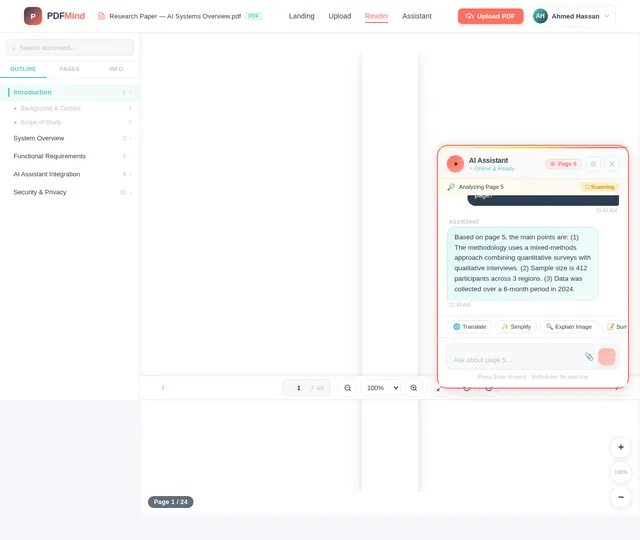
The homepage of project-aee2edc0 will feature a floating AI assistant ball that is both functional and visually captivating. The ball will have a subtle glowing animation to indicate its readiness for interaction. When clicked, the ball will expand into a sleek, semi-transparent chat interface that slides up from the bottom of the screen.
Key Features:
- Dynamic Glow Animation: The floating ball will emit a soft, pulsating glow in the accent color (#FF6F61), drawing attention without being intrusive.
- Interactive Expansion: Upon clicking, the ball will smoothly expand into a chat window with rounded corners and a gradient background blending the accent and muted tones.
- Micro-Interactions: The chat interface will include subtle animations, such as typing indicators, message bubbles that "pop" into view, and a progress bar for AI processing.
- Page-Specific Context: The assistant will display a small header indicating the current page being analyzed, reinforcing its page-specific functionality.
- Visual Feedback: When the assistant processes images or scanned content, a small "scanning" animation (e.g., a magnifying glass icon moving across the page) will appear.
This design concept ensures that the AI assistant is not only functional but also provides a delightful and memorable user experience.
7. Non-Functional Requirements
- The system must support PDF files up to 100 MB without performance degradation.
- The AI assistant must respond to user queries within 2 seconds on average.
- The application must support multilingual translation for at least 10 major languages.
- The system must ensure data privacy by restricting AI access to the currently displayed page only.
- The interface must be responsive and optimized for both desktop and mobile devices.
8. Tech Stack
Frontend:
- React for Web
Backend:
- Python
- FastAPI
Database:
- MySQL (with Alembic for migrations)
AI Models:
- GPT 5.4 for user-friendly responses
- Claude 4.6 Opas for academic or coding work
- Google Nano Banana for image generation
AI Tools:
- Litellm for LLM Routing
- Langchain
Orchestration:
- Docker
- docker-compose
9. Assumptions and Constraints
- Users will primarily access the application from Egypt (EG), so the default language and timezone settings will align with local preferences.
- The system will handle PDF files up to 100 MB, but performance may vary for files exceeding this size.
- The AI assistant will only access the content of the currently displayed page to ensure privacy and security.
- The application will require an active internet connection for AI functionalities.
10. Glossary
- PDF: Portable Document Format, a file format used to present documents.
- AI Assistant: An artificial intelligence-powered tool integrated into the application to assist users.
- OCR: Optical Character Recognition, a technology used to extract text from images or scanned documents.
- Multilingual Translation: The ability to translate text into multiple languages.
- Simplified Explanation: The process of breaking down complex text into easier-to-understand language.

Your PDFs, Powered by AI Intelligence
Upload any PDF up to 100 MB and let our AI assistant help you read, translate, simplify, and analyze every page — including scanned images and complex content.
Why Choose Us
Everything You Need in One Place
Our AI-powered PDF reader combines powerful document handling with intelligent assistance to transform how you work with documents.
Read Large PDFs
Upload and view PDF files up to 100 MB with lightning-fast load times. Enjoy smooth, responsive viewing for even the most complex documents.
Get AI Assistance
Ask questions about any page and get instant, context-aware answers. Simplify complex text and interact with both text and images seamlessly.
Translate Instantly
Translate entire pages into multiple languages in real time. Break language barriers and access content in the language you think in.
Everything You Need to Master Your PDFs
Powerful features designed to transform how you read, understand, and interact with PDF documents.
Seamless PDF Upload
Upload and view PDF files up to 100 MB with lightning-fast load times. Handle large documents effortlessly with our optimized reader.
Real-time AI Chat
Interact with a floating AI assistant that provides instant, context-aware answers about your document content as you read.
Multi-language Translation
Translate any page into multiple languages on the fly. Perfect for working with multilingual or foreign-language documents.
Text Simplification
Break down complex text into clear, easy-to-understand explanations. Ideal for technical papers, legal docs, and academic content.
Image & Text Analysis
Analyze both text and images on any page, including scanned content. Our AI reads and interprets visual elements with precision.
Page-Specific Context
The AI assistant focuses only on the currently displayed page, ensuring accurate and relevant responses while protecting your privacy.
Handle PDFs Like Never Before
Upload and view files up to 100 MB with blazing-fast load times and buttery-smooth scrolling. Our optimized rendering engine ensures every page looks crisp and responsive, whether you are reading a research paper or scanning through a 500-page manual.
Your Intelligent PDF Companion
A floating AI assistant that understands your documents. Ask questions, translate content, analyze images — all from a single, elegant interface.
PDF Assistant
Online
Meet Your AI-Powered Reading Assistant
Click the floating assistant to unlock powerful document analysis. It reads, translates, simplifies, and even interprets images and scanned content — all in real time, page by page.
Real-Time Responses
Get instant, context-aware answers as you read. The assistant processes each page on the fly for immediate help.
Page-Specific Context
The assistant accesses only the content of your current page, ensuring privacy while delivering accurate, focused responses.
Image & OCR Analysis
Analyze charts, figures, and scanned documents. The assistant extracts and interprets text from images with advanced OCR.
Who It’s For
Built for Every Reader
Whether you read PDFs casually or work with complex documents daily, our AI assistant adapts to your needs.
General User
Individuals who need to read, translate, or analyze PDF documents for personal or everyday professional purposes.
Goals
- Seamless PDF viewing for personal documents
- Multilingual translation at the click of a button
- Simplified explanations of complex content
- Interact with both text and images in PDFs
Pain Points Solved
- Difficulty handling large files supports up to 100 MB
- No tools for multilingual translation instant AI translation
- Limited interaction with scanned content full OCR support
Professional User
Researchers, educators, and business professionals who work with complex or multilingual documents on a daily basis.
Goals
- Efficient handling of large research documents
- Accurate translations for multilingual reports
- Advanced AI assistance for text and image analysis
- Page-specific context-aware responses
Pain Points Solved
- Time-consuming manual translations real-time AI translation
- Difficulty understanding complex content smart simplification
- Limited tools for scanned documents image + text AI analysis
Security & Privacy
Your Privacy is Our Priority
We built security into every layer of the platform. Your documents are protected with enterprise-grade safeguards so you can focus on what matters.
Page-Specific Access Only
The AI assistant only accesses the content of your currently displayed page. Your other documents and pages remain completely private and untouched.
End-to-End Encryption
All data transfers between your browser and our servers are encrypted with industry-standard protocols, ensuring your documents stay safe at every step.
GDPR Compliant
We fully comply with GDPR regulations. Your data is never sold or shared, and you maintain complete control over your information at all times.
Trusted by Thousands of Readers
See how professionals, students, and researchers across Egypt are transforming their PDF workflow with AI-powered assistance.
This tool has completely transformed how I work with academic papers. The AI assistant understands the context of each page perfectly and translates complex research into Arabic seamlessly.
Handling 80+ MB legal contracts was always a nightmare. Now I upload them instantly and the AI helps me analyze clauses and translate between English and Arabic effortlessly.
The ability to interact with scanned diagrams and equations is incredible. My students use it daily to simplify complex engineering textbooks and it saves hours of study time.
As a translator working with multilingual documents, the page-specific AI context is a game changer. I get accurate translations without the assistant mixing up content from other pages.
Our team shares large financial reports regularly. The PDF viewer handles them smoothly and the AI simplifies complex data for quick decision-making during meetings.
Reading dense medical textbooks became so much easier. I just ask the assistant to break down difficult sections and it explains them clearly with context from the images on the page.
Choose the Right Plan for You
Start for free and upgrade as your PDF workflow grows. All plans include our AI-powered assistant.
Basic
Starter
Perfect for occasional PDF reading and basic AI assistance.
- Upload PDFs up to 25 MB
- 10 AI queries per day
- Translation to 3 languages
- Text simplification
- Basic page navigation
Pro
Professional
For researchers, educators, and professionals working with complex documents.
- Upload PDFs up to 100 MB
- Unlimited AI queries
- Translation to 10+ languages
- Advanced text simplification
- Image & scanned page OCR
- Priority AI response time
Enterprise
Organization
For teams that need advanced PDF AI tools with dedicated support.
- Everything in Professional
- Unlimited file size
- Team workspace & sharing
- Custom AI model routing
- API access & integrations
- Dedicated account manager
Frequently Asked Questions
Everything you need to know about our PDF reader and AI assistant.
Still have questions? We are happy to help.
Chat with our AI Assistant →Ready to Transform Your PDF Experience?
Upload your first document and let our AI assistant help you read, translate, and understand any PDF — all in seconds. No credit card required.
No comments yet. Be the first!