project-aa8018bb
Real‑estate transaction coordination tools Property transactions involve many documents, signatures, and parties; solo agents and small agencies often juggle WhatsApp, email, and spreadsheets. Offer a workflow tool focused on one region (e.g., Indian states or a specific country) with checklists, auto reminders, and templated document flows. You can niche further: NRI transactions, rental agreements, or builder–buyer coordination, making it easier to sell and support. build me this micro saas

Comments (0)
Sign in to leave a comment
System Requirements
project-aa8018bb
Introduction
Project-aa8018bb aims to develop a micro SaaS solution tailored for real-estate transaction coordination. This tool will streamline the complex process of property transactions, which often involve numerous documents, signatures, and parties. The focus is on providing a regional-specific workflow tool with features such as checklists, auto reminders, and templated document flows, catering to niche markets like NRI transactions, rental agreements, or builder-buyer coordination.
System Overview
The system is designed to assist solo agents and small agencies in managing real-estate transactions more efficiently. By integrating communication and document management into a single platform, the tool will reduce the reliance on disparate systems like WhatsApp, email, and spreadsheets. The primary goal is to simplify the transaction process, making it easier to sell and support properties within a specific region.
Functional Requirements as Story Points
- As a real-estate agent, I should be able to create and manage checklists for property transactions.
- As a real-estate agent, I should be able to set up auto reminders for important transaction deadlines.
- As a real-estate agent, I should be able to use templated document flows to streamline document preparation.
- As a real-estate agent, I should be able to manage transactions specific to NRI clients.
- As a real-estate agent, I should be able to handle rental agreement transactions efficiently.
- As a real-estate agent, I should be able to coordinate builder-buyer transactions seamlessly.
User Personas
- Real-Estate Agent: A professional responsible for managing property transactions, often juggling multiple deals simultaneously.
- NRI Client: A non-resident Indian involved in property transactions, requiring specific legal and procedural considerations.
- Property Buyer: An individual or entity purchasing property, needing clear communication and document management.
- Property Seller: An individual or entity selling property, requiring efficient transaction coordination.
Core User Flows
- Real-Estate Agent creates a new transaction checklist -> Sets auto reminders for key dates -> Uses templated document flows to prepare necessary documents -> Manages communication with NRI clients -> Coordinates with buyers and sellers -> Completes transaction.
Visuals Colors and Theme
- primary: #2A9D8F (Teal)
- primary_light: #A8DADC (Light Teal)
- secondary: #E76F51 (Coral)
- accent: #F4A261 (Orange)
- highlight: #F4A261 (Amber)
- bg: #F1FAEE (Off White)
- surface: rgba(233, 233, 233, 0.8)
- text: #264653 (Dark Blue)
- text_muted: #6D6875 (Muted Gray)
- border: rgba(38, 70, 83, 0.2)
Signature Design Concept
The homepage will feature an interactive real-estate map that highlights different regions as users hover over them. Each region will display key transaction statistics and available properties. Users can click on a region to zoom in and explore detailed transaction workflows and document templates specific to that area. The map will be animated using motion/react to provide smooth transitions and interactions, creating an engaging and informative experience.
Landing Hero Motion Brief
The landing hero will depict a dynamic illustration of a property transaction journey. As users scroll, they will see documents being signed, checklists being ticked off, and reminders being set, all culminating in a successful property handover. The animation will loop every 10 seconds, providing a continuous narrative of the transaction process. The animation will be built using motion/react for seamless and responsive interactions.
Interaction Model & Motion Direction
- Intended Interaction Model: Animated
- The landing page will feature moderate scroll-triggered reveals and hover transitions, enhancing user engagement without overwhelming them. The focus will be on providing a polished, professional experience suitable for real-estate professionals.
Non-Functional Requirements
- The system must support secure access control to protect sensitive transaction data.
- The platform should be scalable to accommodate an increasing number of users and transactions.
- The tool should be responsive and accessible on both desktop and mobile devices.
Tech Stack
- Frontend: React for Web
- Backend: Python, FastAPI
- Database: MySQL or MariaDB, using Alembic for migrations
- AI Models: Not specified
- AI Tools: Not specified
- Local Orchestration: Docker, docker-compose
- Server-side Orchestration: Kubernetes
Assumptions and Constraints
- The tool will initially focus on a specific region, with potential for expansion.
- The system will integrate with existing communication tools like email but not replace them entirely.
- The platform will prioritize user-friendly design and ease of use for non-technical users.
Glossary
- NRI: Non-Resident Indian
- SaaS: Software as a Service
- Checklist: A list of items required, things to be done, or points to be considered, used as a reminder.
- Templated Document Flows: Predefined document formats that streamline the creation and management of transaction documents.
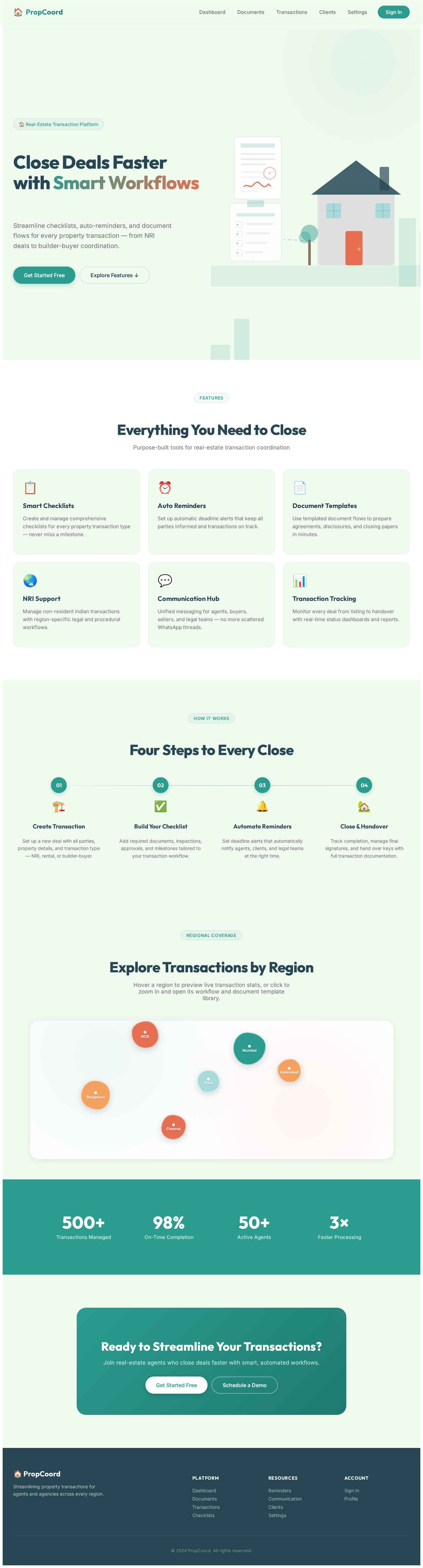
Close Deals Faster with Smart Workflows
Streamline checklists, auto-reminders, and document flows for every property transaction — from NRI deals to builder-buyer coordination.
Everything You Need to Close
Purpose-built tools for real-estate transaction coordination
Smart Checklists
Create and manage comprehensive checklists for every property transaction type — never miss a milestone.
Auto Reminders
Set up automatic deadline alerts that keep all parties informed and transactions on track.
Document Templates
Use templated document flows to prepare agreements, disclosures, and closing papers in minutes.
NRI Support
Manage non-resident Indian transactions with region-specific legal and procedural workflows.
Communication Hub
Unified messaging for agents, buyers, sellers, and legal teams — no more scattered WhatsApp threads.
Transaction Tracking
Monitor every deal from listing to handover with real-time status dashboards and reports.
Four Steps to Every Close
Create Transaction
Set up a new deal with all parties, property details, and transaction type — NRI, rental, or builder-buyer.
Build Your Checklist
Add required documents, inspections, approvals, and milestones tailored to your transaction workflow.
Automate Reminders
Set deadline alerts that automatically notify agents, clients, and legal teams at the right time.
Close & Handover
Track completion, manage final signatures, and hand over keys with full transaction documentation.
Explore Transactions by Region
Hover a region to preview live transaction stats, or click to zoom in and open its workflow and document template library.
Ready to Streamline Your Transactions?
Join real-estate agents who close deals faster with smart, automated workflows.
Close Deals Faster with Smart Workflows
Streamline checklists, auto-reminders, and document flows for every property transaction — from NRI deals to builder-buyer coordination.
Everything You Need to Close
Purpose-built tools for real-estate transaction coordination
Smart Checklists
Create and manage comprehensive checklists for every property transaction type — never miss a milestone.
Auto Reminders
Set up automatic deadline alerts that keep all parties informed and transactions on track.
Document Templates
Use templated document flows to prepare agreements, disclosures, and closing papers in minutes.
NRI Support
Manage non-resident Indian transactions with region-specific legal and procedural workflows.
Communication Hub
Unified messaging for agents, buyers, sellers, and legal teams — no more scattered WhatsApp threads.
Transaction Tracking
Monitor every deal from listing to handover with real-time status dashboards and reports.
Four Steps to Every Close
Create Transaction
Set up a new deal with all parties, property details, and transaction type — NRI, rental, or builder-buyer.
Build Your Checklist
Add required documents, inspections, approvals, and milestones tailored to your transaction workflow.
Automate Reminders
Set deadline alerts that automatically notify agents, clients, and legal teams at the right time.
Close & Handover
Track completion, manage final signatures, and hand over keys with full transaction documentation.
Explore Transactions by Region
Hover a region to preview live transaction stats, or click to zoom in and open its workflow and document template library.
Ready to Streamline Your Transactions?
Join real-estate agents who close deals faster with smart, automated workflows.
No comments yet. Be the first!