project-a7f9495e
 Diya Trivedi
start a project to build a simple single todo list

Comments (0)
Sign in to leave a comment
System Requirements
project-a7f9495e
Introduction
The purpose of this document is to outline the system requirements for "project-a7f9495e," a simple single-page application designed for personal use. The application will serve as a basic to-do list, allowing users to manage tasks efficiently.
System Overview
The project-a7f9495e is a single-page application aimed at providing users with a straightforward interface to manage their personal tasks. The application will focus on simplicity and ease of use, ensuring that users can quickly add, edit, and delete tasks without unnecessary complexity.
Functional Requirements as Story Points
- As a User, I should be able to add a new task to the to-do list.
- As a User, I should be able to edit an existing task.
- As a User, I should be able to delete a task from the list.
- As a User, I should be able to view all tasks in a single-page layout.
User Personas
- User: The primary persona is an individual seeking a simple tool to manage personal tasks. This user values ease of use and efficiency.
Core User Flows
- User opens the application -> User adds a new task -> User edits a task -> User deletes a task -> User views all tasks.
Visuals Colors and Theme
- primary: #4A90E2 (a calming blue for the main interface)
- primary_light: #A6C8F0 (a lighter blue for hover states)
- secondary: #F5A623 (a contrasting orange for emphasis)
- accent: #50E3C2 (a vibrant mint for call-to-action buttons)
- highlight: #F8E71C (a bright yellow for notifications)
- bg: #FFFFFF (a clean white background)
- surface: rgba(255, 255, 255, 0.9) (a subtle white for cards)
- text: #333333 (a dark grey for primary text)
- text_muted: #888888 (a softer grey for secondary text)
- border: rgba(0, 0, 0, 0.1) (a light grey for borders)
Signature Design Concept
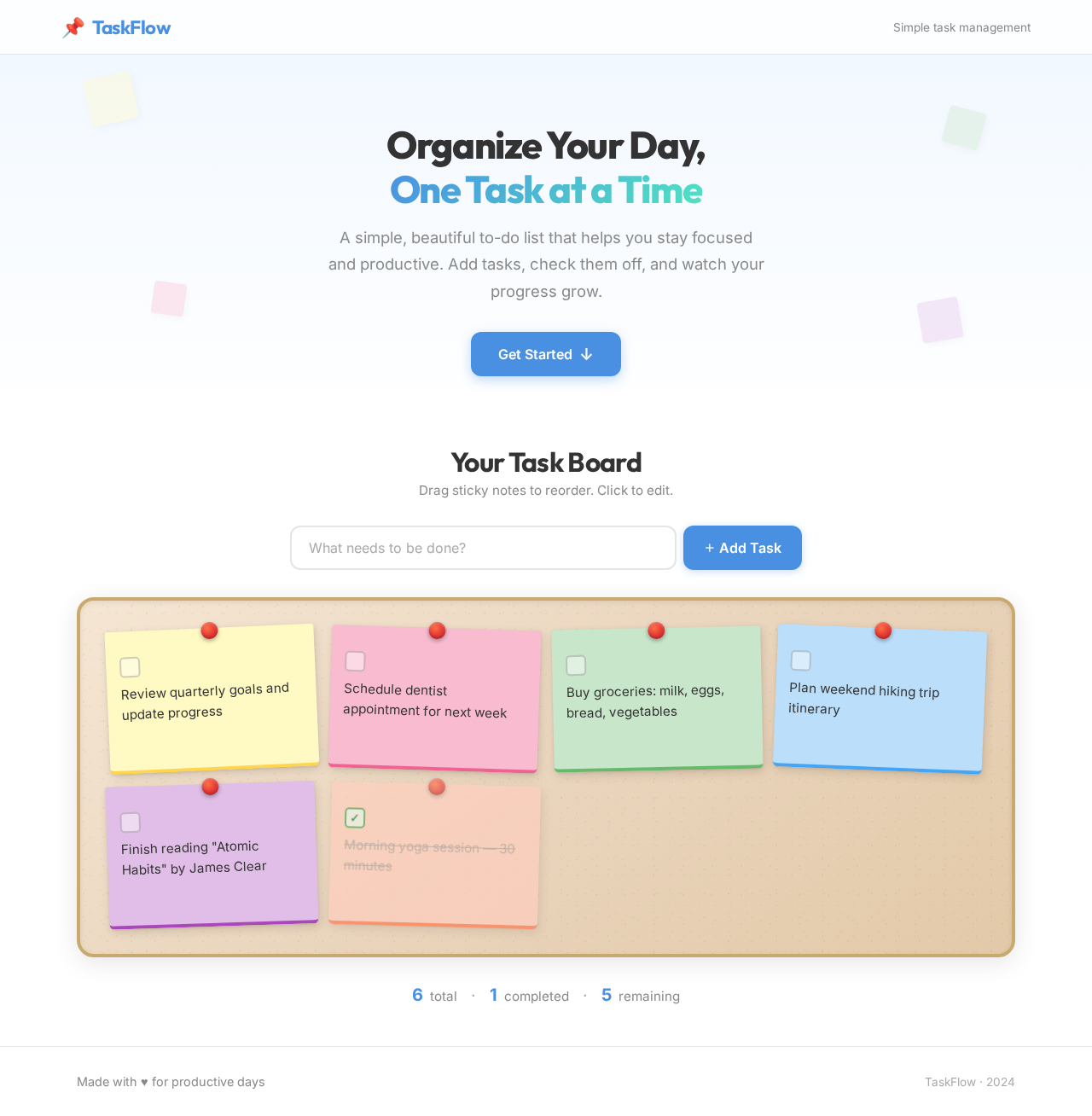
The homepage will feature an interactive "task board" where tasks appear as sticky notes on a virtual corkboard. Users can drag and drop tasks to reorder them, providing a tactile and engaging experience. The sticky notes will have a slight 3D effect, casting shadows on the board for depth. The interface will use framer-motion for smooth drag-and-drop animations and transitions.
Interaction Model & Motion Direction
The intended interaction model for the landing page is "animated." The application will feature moderate scroll-triggered reveals and hover transitions to enhance user interaction without overwhelming the simplicity of the design.
Non-Functional Requirements
- The application should load quickly and perform efficiently on modern web browsers.
- The user interface should be responsive and accessible on various devices, including desktops and tablets.
Tech Stack
- Frontend: React for Web
- Backend: Not applicable (client-side only)
- Database: Not applicable (local storage for task persistence)
Assumptions and Constraints
- The application is intended for personal use and does not require user authentication or multi-user support.
- The application will be a single-page application with no server-side components.
Glossary
- Task: An item on the to-do list that the user can manage.
- Single-page application (SPA): A web application that interacts with the user by dynamically rewriting the current page rather than loading entire new pages from the server.
This document outlines the requirements for project-a7f9495e, ensuring a clear understanding of the project's scope and objectives.
Organize Your Day,
One Task at a Time
A simple, beautiful to-do list that helps you stay focused and productive. Add tasks, check them off, and watch your progress grow.
Get Started↓Your Task Board
Drag sticky notes to reorder. Click to edit.
Organize Your Day,
One Task at a Time
A simple, beautiful to-do list that helps you stay focused and productive. Add tasks, check them off, and watch your progress grow.
Get Started↓Your Task Board
Drag sticky notes to reorder. Click to edit.
No comments yet. Be the first!