Today's Revenue
$0
12.4% Ahmed Al-Nashar
أنت senior full-stack engineer. ابنِ لي نظام POS وورشة صيانة كامل لمركز صيانة شاشات LED/LCD ورسيفرات، مع بيع أدوات كهربائية (لمبات، أسلاك، مفاتيح، مشتركات). التصميم: Apple Liquid Glass 2026 لكن بالهوية اللونية: - أساسي: أحمر #E10600، أزرق #0057B8، أبيض #FFFFFF - خلفية داكنة slate-950 مع تدرجات حمراء وزرقاء خفيفة جداً - كل الكروت زجاجية: bg-white/8 backdrop-blur-2xl border border-white/15 rounded-[28px] shadow-[0_8px_32px_rgba(0,0,0,0.4)] - كارت الصيانة: توهج أحمر خفيف shadow-red-500/20 - كارت المبيعات: توهج أزرق shadow-blue-500/20 - أزرار رئيسية: gradient من الأحمر للأزرق مع glass effect - خط عربي Cairo، RTL كامل التقنية: Next.js 14 + TypeScript + Tailwind + shadcn/ui + Prisma + SQLite (offline) + Supabase sync + PWA الوحدات المطلوبة: 1) استقبال صيانة: - تذكرة صيانة برقم تلقائي (مثلاً SR-2026-001) - بيانات العميل: اسم، تليفون، واتساب - نوع الجهاز: شاشة (الماركة، المقاس، العطل) أو رسيفر (الموديل، المشكلة) - صور للعطل قبل الاستلام (كاميرا) - تشخيص مبدئي + تكلفة متوقعة - حالة: قيد الفحص / انتظار قطعة غيار / جاهز للتسليم / تم التسليم 2) ورشة: - لوحة فنيين: كل فني يشوف الأجهزة المسندة له - إضافة قطع غيار مستخدمة من المخزون (تسحب تلقائي) - وقت بدء/انتهاء + ملاحظات فنية - ضمان بعد الصيانة (30/90 يوم) يطبع على الفاتورة 3) مبيعات أدوات كهربائية: - POS سريع بالباركود - أصناف: لمبات ليد، دوايات، أسلاك، مفاتيح، مشتركات، فيش - خصم فوري، فاتورة بيع منفصلة عن فاتورة الصيانة 4) مخزون موحد: - قطع غيار شاشات (ليدات، بوردات، كوفات) + أدوات كهربائية - تنبيه عند النقص، وحد أدنى لكل صنف - حركة مخزون: داخل من مشتريات، خارج للصيانة، خارج للبيع 5) تقارير خاصة بالصيانة: - أجهزة تحت الصيانة الآن - متوسط وقت الإصلاح - أكثر الأعطال تكراراً (شاشة سامسونج 32 بوصة مثلاً) - أرباح الصيانة vs أرباح المبيعات - عملاء متكررين 6) فواتير: - فاتورة استلام جهاز (بـ QR يتابع بيه العميل الحالة) - فاتورة صيانة نهائية بالعربي: تفاصيل العطل، القطع المستخدمة، المصنعية، الضمان - فاتورة بيع أدوات كهربائية - طباعة حرارية 80mm + PDF واجهات أساسية: /dashboard (ملخص: أجهزة في الورشة، مبيعات اليوم) /repair (استقبال جديد + قائمة تذاكر) /workshop (لوحة الفني) /pos (بيع أدوات) /inventory /customers /reports سلمني مشروع جاهز npm run dev مع seed data: - 15 جهاز صيانة وهمي (شاشات LG، سامسونج، رسيفرات سيناتور) - 30 صنف أدوات كهربائية بأسعار مصرية - 3 فنيين بأسماء عربية


Sign in to leave a comment
The project-POS Maintenance System is designed to manage the operations of a maintenance center specializing in LED/LCD screens and receivers, along with the sale of electrical tools such as bulbs, wires, switches, and sockets. The system will be expanded to include comprehensive modules for Clients, Suppliers, Products, Employees, and Reports.
The project-POS Maintenance System will streamline the maintenance and sales processes, providing a seamless experience for both the maintenance center staff and customers. The system will include modules for handling maintenance tickets, workshop management, sales, inventory, and reporting. Additionally, it will manage clients, suppliers, products, and employees to ensure efficient operations.
The homepage will feature an interactive "Liquid Glass" design inspired by Apple's aesthetic, with a unique twist. Users will navigate through a 3D environment where each module (Maintenance, Sales, Inventory, etc.) is represented as a floating glass card. These cards will have a subtle glass effect with dynamic shadows and highlights that respond to mouse movements, creating an immersive experience. The transitions between sections will be smooth, utilizing framer-motion for spring physics animations. The glass cards will flip and rotate to reveal detailed information, making the interaction both engaging and informative.
The landing page will employ a "parallax" interaction model, creating a layered depth effect as users scroll through the content. The glass cards will move at different speeds, providing a sense of depth and immersion. Internal pages will maintain a "static" interaction model for clarity and ease of use, focusing on functionality and data presentation.
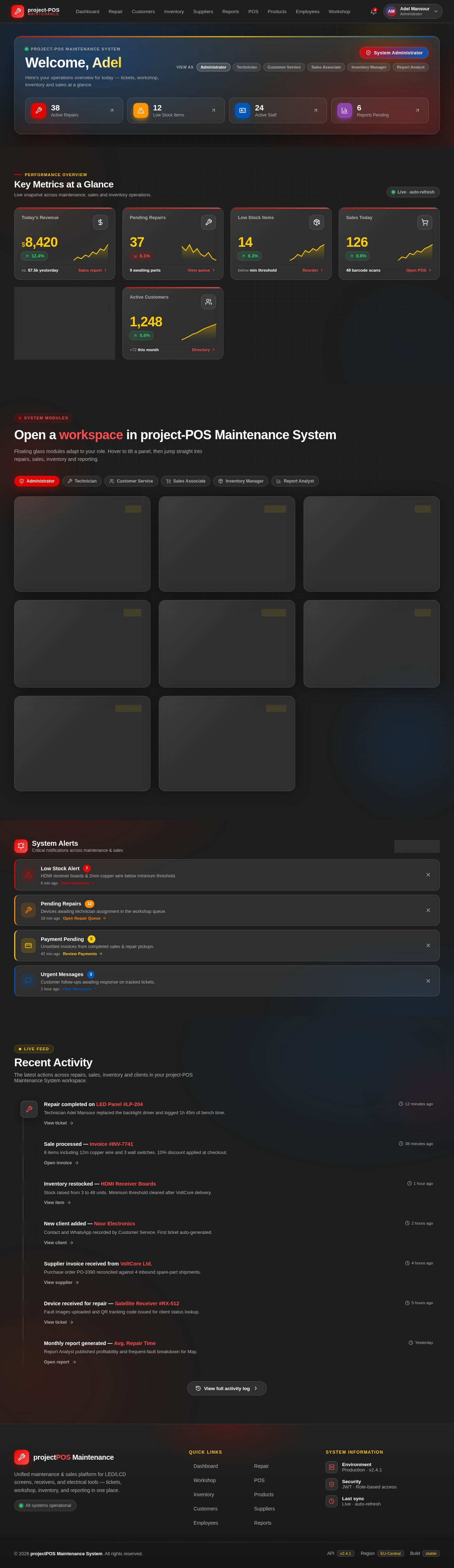
Live snapshot across maintenance, sales and inventory operations.
Today's Revenue
Pending Repairs
Low Stock Items
Sales Today
Avg. Repair Time
Active Customers
Floating glass modules adapt to your role. Hover to tilt a panel, then jump straight into repairs, sales, inventory and reporting.
Create and track maintenance tickets for LED/LCD screens and receivers with auto-generated numbers and QR tracking.
Assign devices to technicians, log repair start/end times, and auto-deduct spare parts from inventory.
Process fast barcode sales for bulbs, wires, switches and sockets, apply instant discounts and issue invoices.
Unified stock for spare parts and electrical tools with low-stock thresholds and automatic alerts.
Manage vendor records, purchase orders and incoming invoices to keep the maintenance center fully stocked.
Record client details with phone and WhatsApp, attach fault images and let customers track devices via QR.
Analyse repair times, frequent faults, sales and profitability across maintenance and POS operations.
Administer staff accounts, assign roles and permissions, and review activity across every system module.
Critical notifications across maintenance & sales
The latest actions across repairs, sales, inventory and clients in your project-POS Maintenance System workspace.
Repair completed on LED Panel #LP-204
12 minutes agoSale processed — Invoice #INV-7741
38 minutes agoInventory restocked — HDMI Receiver Boards
1 hour agoNew client added — Nour Electronics
2 hours agoSupplier invoice received from VoltCore Ltd.
4 hours agoDevice received for repair — Satellite Receiver #RX-512
5 hours agoMonthly report generated — Avg. Repair Time
Yesterday
No comments yet. Be the first!