project-ContractPILOT
build the app **Product name:** ContractPilot AMC **Category:** Vertical micro-SaaS for recurring maintenance and service businesses **Primary user:** Small and mid-sized service companies managing annual maintenance contracts, planned preventive maintenance, technician visits, renewals, and recurring billing, breakdown tracking and analysis ContractPilot AMC is a focused operating system for annual maintenance contracts and recurring service agreements. It is designed for service companies that currently manage contract schedules, renewal reminders, site visits, and billing through spreadsheets, WhatsApp, and disconnected field-service tools, even though the business risk sits in missed visits, late invoicing, weak documentation, and lost renewals


Comments (0)
Sign in to leave a comment
Project Tasks
94Database Schema & Migrations
Design and implement database schema, migrations, and indexes for user, contract, visit, and billing entities.
CI/CD Pipeline Setup
Set up CI/CD pipeline for automated testing, building, and deployment of the application.
Implement CTASection for Landing
As a frontend developer, implement the CTASection for the Landing page. This section includes a motion-enhanced card with a title, description, and two call-to-action buttons. The card uses the 'motion' library for animations, transitioning from opacity 0 and y-position 30 to opacity 1 and y-position 0 when in view. Ensure the links to '/Login' and '/Contracts' are conditionally shown based on persona access. Page access: shared by all personas (Administrative Staff, Service Company Manager, Technician).
Implement FeaturesSection for Landing
As a frontend developer, implement the FeaturesSection for the Landing page. This section displays a grid of feature cards, each with an icon, title, and description. The cards animate into view using the 'motion' library, with staggered delays for each card. Ensure the section is accessible to all personas as it provides an overview of the application's capabilities. Page access: shared by all personas (Administrative Staff, Service Company Manager, Technician).
Implement Footer for Landing
As a frontend developer, implement the Footer for the Landing page. This section includes multiple columns of links categorized under Product, Operations, and Resources. The links must be conditionally displayed based on persona access. Ensure the footer is consistent with the rest of the application and may already exist from previous pages. Page access: shared by all personas (Administrative Staff, Service Company Manager, Technician).
Implement HeroSection for Landing
As a frontend developer, implement the HeroSection for the Landing page. This section features a dynamic hero area with a title, subtitle, and call-to-action buttons. It includes interactive animations using 'motion' and 'useMotionValue' for mouse movement effects. The section cycles through stages with color-coded labels, and the animations should be responsive to user interactions. Page access: shared by all personas (Administrative Staff, Service Company Manager, Technician).
Implement HowItWorksSection for Landing
As a frontend developer, implement the HowItWorksSection for the Landing page. This section outlines the process in four steps, each with a number, title, and description. The steps animate into view using the 'motion' library with staggered delays. Ensure the section is accessible to all personas as it explains the application's workflow. Page access: shared by all personas (Administrative Staff, Service Company Manager, Technician).
Implement Navbar for Landing
As a frontend developer, implement the Navbar for the Landing page. This component includes a logo, navigation links, and a toggleable menu for smaller screens. The navbar changes style when scrolled. Ensure links are conditionally displayed based on persona access, and the component may already exist from previous pages. Page access: shared by all personas (Administrative Staff, Service Company Manager, Technician).
Implement StatsSection for Landing
As a frontend developer, implement the StatsSection for the Landing page. This section displays key statistics in a grid format, with each stat animating into view using the 'motion' library. Ensure the section is accessible to all personas as it highlights the application's impact. Page access: shared by all personas (Administrative Staff, Service Company Manager, Technician).
Implement ScheduleDateRangeFilter for Schedule
As a frontend developer, implement the ScheduleDateRangeFilter section which includes two date input fields for selecting a start and end date. This section uses useState hooks to manage the state of the selected dates. It is accessible by Service Company Manager and Technician personas. Page access: Service Company Manager, Technician only.
Implement ScheduleTechnicianFilter for Schedule
As a frontend developer, implement the ScheduleTechnicianFilter section which includes a dropdown for selecting technicians. It uses useState for managing the dropdown state and selected technicians, useRef for dropdown reference, and useEffect for handling clicks outside the dropdown. This section is accessible by Service Company Manager and Technician personas. Page access: Service Company Manager, Technician only.
Implement ScheduleStatusFilter for Schedule
As a frontend developer, implement the ScheduleStatusFilter section which includes buttons for filtering visits by status ('All', 'Scheduled', 'Completed', 'Cancelled'). It uses useState to manage the active status. This section is accessible by Service Company Manager and Technician personas. Page access: Service Company Manager, Technician only.
Implement ScheduleViewToggle for Schedule
As a frontend developer, implement the ScheduleViewToggle section which includes buttons to toggle between 'calendar' and 'list' views. It uses props to manage the viewMode state. This section is accessible by Service Company Manager and Technician personas. Page access: Service Company Manager, Technician only.
Implement ScheduleCalendarGrid for Schedule
As a frontend developer, implement the ScheduleCalendarGrid section which displays a calendar grid with days of the month. It uses useState to manage the current month and year, and functions to navigate between months. It highlights today, past, and upcoming days, and displays sample visits. This section is accessible by Service Company Manager and Technician personas. Page access: Service Company Manager, Technician only.
Implement ScheduleCalendarLegend for Schedule
As a frontend developer, implement the ScheduleCalendarLegend section which displays a legend for the calendar with color codes for 'Scheduled', 'Completed', 'Cancelled', and 'Upcoming' statuses. This section is accessible by Service Company Manager and Technician personas. Page access: Service Company Manager, Technician only.
Implement ScheduleVisitCardList for Schedule
As a frontend developer, implement the ScheduleVisitCardList section which displays a list of visit cards with details such as date, technician, customer, and location. It uses sample data and conditionally renders an empty state message if no visits match the filters. This section is accessible by Service Company Manager and Technician personas. Page access: Service Company Manager, Technician only.
Implement ScheduleVisitSortControls for Schedule
As a frontend developer, implement the ScheduleVisitSortControls section which includes buttons for sorting visits by 'Date', 'Technician', 'Status', and 'Customer Name'. It uses useState to manage the sort key and order. This section is accessible by Service Company Manager and Technician personas. Page access: Service Company Manager, Technician only.
Implement BreakdownsSearchBar for Breakdowns
As a frontend developer, implement the BreakdownsSearchBar section which includes a search input with a clear button. The search bar allows filtering by ID, site, or description. It uses a state hook to manage the query state and includes SVG icons for search and clear actions. This section is accessible by Service Company Manager and Technician personas. Page access: Service Company Manager, Technician only.
Implement BreakdownsFilters for Breakdowns
As a frontend developer, implement the BreakdownsFilters section which includes a toggleable filter panel with options for status, severity, date range, technician, and contract. It uses multiple state hooks to manage filter states and includes a clear filters function. This section is accessible by Service Company Manager and Technician personas. Page access: Service Company Manager, Technician only.
Implement BreakdownsMetrics for Breakdowns
As a frontend developer, implement the BreakdownsMetrics section which displays key metrics such as Total Breakdowns, Critical Issues, Resolution Rate, and Avg Resolution Time. Each metric is displayed in a card with dynamic styling based on the metric's importance. This section is accessible by Service Company Manager and Technician personas. Page access: Service Company Manager, Technician only.
Implement BreakdownsTrendChart for Breakdowns
As a frontend developer, implement the BreakdownsTrendChart section which includes an interactive bar chart displaying breakdown frequency over time. The chart allows toggling between 30, 60, and 90-day views and uses state hooks to manage data and tooltip visibility. This section is accessible by Service Company Manager and Technician personas. Page access: Service Company Manager, Technician only.
Implement BreakdownsResolutionChart for Breakdowns
As a frontend developer, implement the BreakdownsResolutionChart section which displays a bar chart of resolution time distribution. The chart uses state hooks for tooltip management and dynamically calculates bar widths based on resolution data. This section is accessible by Service Company Manager and Technician personas. Page access: Service Company Manager, Technician only.
Implement BreakdownsTable for Breakdowns
As a frontend developer, implement the BreakdownsTable section which includes a sortable and paginated table displaying breakdown details. The table uses state hooks for sorting and pagination, and memoization for performance optimization. This section is accessible by Service Company Manager and Technician personas. Page access: Service Company Manager, Technician only.
Deploy develop branch to stage
Deploy the current develop branch to the stage environment for this product. Do not implement code changes.
API Resources & Services
Develop API resources and services for managing contracts, visits, billing, and user authentication.
Implement Navbar for Login
As a frontend developer, implement the Navbar section for the Login page. This component includes navigation links to Dashboard, Contracts, Schedule, Renewals, and Billing, and a Sign In link. Ensure that links to restricted pages are conditionally shown based on persona access. This component may already exist from the Landing page and should be reused if possible. Page access: shared by all personas (Administrative Staff, Service Company Manager, Technician).
Create Contract API
As a Backend Developer, create API endpoints for managing contracts, including creation, updating, deletion, and retrieval of contract details. Ensure endpoints are secured with appropriate authorization checks.
Create Visit API
As a Backend Developer, create API endpoints for managing visits, including scheduling, updating status, and retrieving visit details. Ensure endpoints are secured with appropriate authorization checks.
Create Billing API
As a Backend Developer, create API endpoints for managing billing, including invoice generation, payment processing, and retrieval of billing details. Ensure endpoints are secured with appropriate authorization checks.
Create Renewal API
As a Backend Developer, create API endpoints for managing contract renewals, including sending reminders and updating renewal status. Ensure endpoints are secured with appropriate authorization checks.
Authentication & RBAC
Implement authentication and role-based access control for different personas: Service Company Manager, Technician, and Administrative Staff.
Background Jobs & Notifications
Set up background jobs for renewal reminders and notifications for scheduled visits.
API Client & Service Layer
Develop the API client and service layer for frontend to interact with backend services.
Implement LoginCard for Login
As a frontend developer, implement the LoginCard section for the Login page. This component displays a heading, subheading, and an error message if provided. It wraps child components such as LoginInputs and LoginActions. Page access: shared by all personas (Administrative Staff, Service Company Manager, Technician).
Implement Footer for Login
As a frontend developer, implement the Footer section for the Login page. This component includes columns for Product, Company, and Support links, and a footer bottom with copyright information. This component may already exist from the Landing page and should be reused if possible. Page access: shared by all personas (Administrative Staff, Service Company Manager, Technician).
Implement DashboardHeader for Dashboard
As a frontend developer, implement the DashboardHeader section which displays the current date, a welcome message for the Service Company Manager, and action buttons for creating a new contract, scheduling a visit, and viewing reports. Ensure the date is formatted correctly for the 'en-AE' locale. This section is accessible only by the Service Company Manager. Page access: Service Company Manager only.
Implement ContractsHeader for Contracts
As a frontend developer, implement the ContractsHeader section which includes breadcrumb navigation, a title, subtitle, and a 'Create New Contract' button with an SVG icon. This section is accessible by Administrative Staff and Service Company Manager. Ensure the breadcrumb reflects the current page context and the button is styled according to the design. This section depends on the Login page implementation. Page access: Administrative Staff, Service Company Manager only.
Integrate Contract Frontend and Backend
As a Tech Lead, verify the end-to-end integration between the Contract frontend implementation and the Contract backend API. Ensure data flows correctly, API responses are handled properly in the UI, and all interactions work as expected.
Integrate Visit Frontend and Backend
As a Tech Lead, verify the end-to-end integration between the Visit frontend implementation and the Visit backend API. Ensure data flows correctly, API responses are handled properly in the UI, and all interactions work as expected.
Integrate Billing Frontend and Backend
As a Tech Lead, verify the end-to-end integration between the Billing frontend implementation and the Billing backend API. Ensure data flows correctly, API responses are handled properly in the UI, and all interactions work as expected.
Integrate Renewal Frontend and Backend
As a Tech Lead, verify the end-to-end integration between the Renewal frontend implementation and the Renewal backend API. Ensure data flows correctly, API responses are handled properly in the UI, and all interactions work as expected.
API Authorization
Ensure API endpoints are secured with appropriate authorization checks based on user roles.
Frontend Routing Shell
Implement the routing shell for the application, ensuring protected routes based on user roles.
Implement LoginInputs for Login
As a frontend developer, implement the LoginInputs section for the Login page. This component includes input fields for email and password, a toggle button to show/hide the password, and a checkbox for 'Remember me'. It manages state for email, password, and remember using props. Page access: shared by all personas (Administrative Staff, Service Company Manager, Technician).
Implement LoginActions for Login
As a frontend developer, implement the LoginActions section for the Login page. This component includes a Sign In button that triggers the onSignIn function and displays a loading state. It also provides links for 'Forgot password?' and 'Sign up'. Page access: shared by all personas (Administrative Staff, Service Company Manager, Technician).
Implement LoginDivider for Login
As a frontend developer, implement the LoginDivider section for the Login page. This component visually separates the traditional login inputs from social login options with a line and text 'or continue with'. Page access: shared by all personas (Administrative Staff, Service Company Manager, Technician).
Implement QuickStats for Dashboard
As a frontend developer, implement the QuickStats section which displays key statistics such as Total Active Contracts, Pending Renewals, Upcoming Visits, and Monthly Billing Total. Each stat card should be clickable, navigating to the respective page. This section is accessible only by the Service Company Manager. Page access: Service Company Manager only.
Implement UpcomingVisits for Dashboard
As a frontend developer, implement the UpcomingVisits section which lists scheduled visits for the next 7 days. Each visit card should display customer details, location, date and time, technician, and status with appropriate color coding. This section is accessible only by the Service Company Manager. Page access: Service Company Manager only.
Implement RenewalAlerts for Dashboard
As a frontend developer, implement the RenewalAlerts section which displays a table of contracts expiring in the next 30 days. Each row should show contract ID, customer, expiry date, days remaining, and actions for renewal. Urgent renewals should be highlighted. This section is accessible only by the Service Company Manager. Page access: Service Company Manager only.
Implement BillingSummary for Dashboard
As a frontend developer, implement the BillingSummary section which displays metrics such as Pending Invoices, Outstanding Amount, and Average Days Overdue. Include a link to view all billing details. This section is accessible only by the Service Company Manager. Page access: Service Company Manager only.
Implement RecentInvoices for Dashboard
As a frontend developer, implement the RecentInvoices section which displays a table of recent invoices with details such as invoice number, customer, amount, date issued, and status. Status should be color-coded. This section is accessible only by the Service Company Manager. Page access: Service Company Manager only.
Implement QuickActions for Dashboard
As a frontend developer, implement the QuickActions section which provides buttons for primary actions like creating a new contract, scheduling a visit, sending renewal reminders, generating invoices, and reporting breakdowns. Include secondary actions for exporting data and accessing settings. This section is accessible only by the Service Company Manager. Page access: Service Company Manager only.
Implement ContractsSearchBar for Contracts
As a frontend developer, implement the ContractsSearchBar section which includes a search input field with a placeholder and an SVG search icon. The input should handle changes via the onChange prop. This section is accessible by Administrative Staff and Service Company Manager. Page access: Administrative Staff, Service Company Manager only.
Implement ContractsFilterPanel for Contracts
As a frontend developer, implement the ContractsFilterPanel section which includes multiple filter controls for status, customer, service type, and date range. It should support clearing filters and display active filters with removable chips. This section is accessible by Administrative Staff and Service Company Manager. Page access: Administrative Staff, Service Company Manager only.
Implement ContractsTableWrapper for Contracts
As a frontend developer, implement the ContractsTableWrapper section which includes a table with sortable columns, checkboxes for row selection, and formatted currency and date values. It should also integrate with the ContractsRowActions component for row-specific actions. This section is accessible by Administrative Staff and Service Company Manager. Page access: Administrative Staff, Service Company Manager only.
Implement ContractsPageSize for Contracts
As a frontend developer, implement the ContractsPageSize section which includes a dropdown to select the number of rows per page. The dropdown should update the page size via the onChange prop. This section is accessible by Administrative Staff and Service Company Manager. Page access: Administrative Staff, Service Company Manager only.
Implement ContractsNavigation for Contracts
As a frontend developer, implement the ContractsNavigation section which includes pagination controls to navigate through pages of contracts. It should display the current range of contracts being viewed and allow navigation between pages. This section is accessible by Administrative Staff and Service Company Manager. Page access: Administrative Staff, Service Company Manager only.
Implement SchedulePageHeader for Schedule
As a frontend developer, implement the SchedulePageHeader section which includes a breadcrumb navigation linking to the Dashboard, a page title 'Technician Schedule', a subtitle, and a 'Create New Visit' button. This section is accessible by Service Company Manager and Technician personas. Ensure breadcrumb links are conditionally shown based on persona access. This section depends on the DashboardHeader from the Dashboard page. Page access: Service Company Manager, Technician only.
Implement RenewalsHeader for Renewals
As a frontend developer, implement the RenewalsHeader section which includes a breadcrumb navigation and titles for the Renewals page. This section should display a breadcrumb trail with links to 'Dashboard' and the current page 'Renewals', a main title 'Renewal Reminders', and a subtitle 'View and manage upcoming contract renewals'. This section is accessible only by the Service Company Manager persona. Ensure that it integrates with the DashboardHeader from the Dashboard page. Page access: Service Company Manager only.
Implement BillingHeader for Billing
As a frontend developer, implement the BillingHeader section which includes a breadcrumb navigation, a title, and a description. This section is accessible by Administrative Staff and Service Company Manager. It should establish a page-level dependency on the Contracts page by including task IDs from the Contracts page. Page access: Administrative Staff, Service Company Manager only.
Implement BreakdownsHeader for Breakdowns
As a frontend developer, implement the BreakdownsHeader section which includes a header with a badge labeled 'Smart Tracking', a title 'Breakdown Analysis & Tracking', a descriptive paragraph, and an 'Export Report' button. This section is accessible by Service Company Manager and Technician personas. Ensure the export button is styled with the 'btn-accent' class. This section depends on the DashboardHeader from the Dashboard page. Page access: Service Company Manager, Technician only.
Implement DocHero for Documentation
As a frontend developer, implement the DocHero section for the Documentation page. This section includes a headline, subheadline, and description about the system documentation and SRD. It also features an SVG accent element for visual enhancement. Ensure the section is styled according to the provided CSS and is accessible to all personas: Administrative Staff, Service Company Manager, and Technician. Page access: Administrative Staff only.
Integration Tests for Workflows
Create integration tests for critical workflows such as contract management, visit scheduling, and billing.
Implement SocialLogin for Login
As a frontend developer, implement the SocialLogin section for the Login page. This component includes buttons for signing in with Google and Microsoft, each with respective icons. Page access: shared by all personas (Administrative Staff, Service Company Manager, Technician).
Implement ContractsRowActions for Contracts
As a frontend developer, implement the ContractsRowActions section which includes buttons for viewing, editing, renewing, and deleting contracts. Each button should have an SVG icon and trigger respective actions. This section is accessible by Administrative Staff and Service Company Manager. Page access: Administrative Staff, Service Company Manager only.
Implement RenewalsStatsPanel for Renewals
As a frontend developer, implement the RenewalsStatsPanel section which displays key statistics about renewals. This section includes cards showing 'Total Pending Renewals', 'Due This Month', 'Overdue Renewals', and 'Renewed This Month', each with a value and color-coded styling. This section is accessible only by the Service Company Manager persona. Page access: Service Company Manager only.
Implement RenewalsFilterBar for Renewals
As a frontend developer, implement the RenewalsFilterBar section which provides filtering options for renewals. This section includes dropdowns for filtering by 'Status', 'Priority', and 'Sort by', as well as date range inputs for 'Renewal Date'. This section is accessible only by the Service Company Manager persona. Page access: Service Company Manager only.
Implement RenewalsListCards for Renewals
As a frontend developer, implement the RenewalsListCards section which displays a list of renewal cards. Each card shows details such as status, contract name, customer, renewal date, and contract value. The cards are styled based on the renewal status. This section is accessible only by the Service Company Manager persona. Page access: Service Company Manager only.
Implement RenewalsNavigation for Renewals
As a frontend developer, implement the RenewalsNavigation section which provides pagination controls for the renewals list. This section includes information about the current page, total items, and controls for navigating between pages. This section is accessible only by the Service Company Manager persona. Page access: Service Company Manager only.
Implement BillingOverview for Billing
As a frontend developer, implement the BillingOverview section which displays financial statistics using a grid layout. Each card shows a label, value, and meta information. This section is accessible by Administrative Staff and Service Company Manager. Page access: Administrative Staff, Service Company Manager only.
Implement SubscriptionManagement for Billing
As a frontend developer, implement the SubscriptionManagement section which allows users to view and edit their subscription plan details. This section includes interactive elements such as buttons to toggle an edit panel and dropdowns for selecting plans and billing cycles. It is accessible by Administrative Staff and Service Company Manager. Page access: Administrative Staff, Service Company Manager only.
Implement PaymentMethods for Billing
As a frontend developer, implement the PaymentMethods section which allows users to manage their payment methods. This section includes functionality to add, delete, and set default payment methods. It is accessible by Administrative Staff and Service Company Manager. Page access: Administrative Staff, Service Company Manager only.
Implement InvoiceTable for Billing
As a frontend developer, implement the InvoiceTable section which displays a sortable table of invoices. Users can sort by date or amount and view invoice details. This section is accessible by Administrative Staff and Service Company Manager. Page access: Administrative Staff, Service Company Manager only.
Implement InvoiceFilters for Billing
As a frontend developer, implement the InvoiceFilters section which allows users to filter invoices by status and apply quick filters. It includes pagination controls. This section is accessible by Administrative Staff and Service Company Manager. Page access: Administrative Staff, Service Company Manager only.
Implement BillingCTA for Billing
As a frontend developer, implement the BillingCTA section which provides support contact information and a FAQ section. Users can toggle FAQ answers. This section is accessible by Administrative Staff and Service Company Manager. Page access: Administrative Staff, Service Company Manager only.
Implement DocTableOfContents for Documentation
As a frontend developer, implement the DocTableOfContents section for the Documentation page. This section includes a collapsible navigation menu with links to various document sections. It uses state hooks to manage the active section and collapse state, and a scroll event listener to update the active link based on the user's scroll position. Ensure the section is styled according to the provided CSS and is accessible to all personas. Page access: Administrative Staff only.
Implement DocIntroduction for Documentation
As a frontend developer, implement the DocIntroduction section for the Documentation page. This section provides an overview of the system requirements for ContractPilot AMC, including its purpose and scope. Ensure the section is styled according to the provided CSS and is accessible to all personas. Page access: Administrative Staff only.
Implement DocSystemOverview for Documentation
As a frontend developer, implement the DocSystemOverview section for the Documentation page. This section provides a detailed overview of the ContractPilot AMC system, highlighting its features and benefits for service companies. Ensure the section is styled according to the provided CSS and is accessible to all personas. Page access: Administrative Staff only.
Implement DocFunctionalRequirements for Documentation
As a frontend developer, implement the DocFunctionalRequirements section for the Documentation page. This section lists functional requirements as user stories, displayed in a grid format with icons. Ensure the section is styled according to the provided CSS and is accessible to all personas. Page access: Administrative Staff only.
Implement DocUserPersonas for Documentation
As a frontend developer, implement the DocUserPersonas section for the Documentation page. This section displays user personas with icons, descriptions, and responsibilities in a grid format. Ensure the section is styled according to the provided CSS and is accessible to all personas. Page access: Administrative Staff only.
Implement DocCoreFlows for Documentation
As a frontend developer, implement the DocCoreFlows section for the Documentation page. This section outlines core user flows for different personas, using a timeline format with steps and arrows. Ensure the section is styled according to the provided CSS and is accessible to all personas. Page access: Administrative Staff only.
Implement DocColorPalette for Documentation
As a frontend developer, implement the DocColorPalette section for the Documentation page. This section displays color swatches with names, hex codes, and usage descriptions. It includes functionality to copy hex codes to the clipboard. Ensure the section is styled according to the provided CSS and is accessible to all personas. Page access: Administrative Staff only.
Implement DocTypography for Documentation
As a frontend developer, implement the DocTypography section for the Documentation page. This section showcases typography samples for headings and body text, including font family, weight, and line-height details. It also covers accessibility considerations. Ensure the section is styled according to the provided CSS and is accessible to all personas. Page access: Administrative Staff only.
Implement VisitsHeader for Visits
As a frontend developer, implement the VisitsHeader section which includes breadcrumb navigation and a header displaying the technician's name and role. It also shows the sync status with a tooltip indicating the last sync time. This section is accessible by Technicians only and must include conditional navigation links based on persona access. Page access: Technician only.
Implement CustomersHeader for Customers
As a frontend developer, implement the CustomersHeader section which includes a header with a title, subtitle, and an 'Add Customer' button. It also features a search input with a search icon and a filter toggle button. This section is accessible only by Administrative Staff and should include conditional logic to ensure restricted access. This section depends on the Billing page tasks to ensure proper integration. Page access: Administrative Staff only.
Implement VisitsFilters for Visits
As a frontend developer, implement the VisitsFilters section which provides filtering options for visit status, date, and sorting. It includes interactive buttons and a dropdown for sorting, with state management for filter selections. This section is accessible by Technicians only. Page access: Technician only.
Implement VisitsList for Visits
As a frontend developer, implement the VisitsList section which displays a list of visits with status color coding and badges for visit type. It includes interactive elements for selecting visits and buttons for starting or viewing details of a visit. This section is accessible by Technicians only. Page access: Technician only.
Implement CustomersTable for Customers
As a frontend developer, implement the CustomersTable section which displays a list of customers with details such as name, contact person, phone, email, status, and last contact date. It includes functionality for selecting customers, sorting by columns, and displaying status labels. This section is accessible only by Administrative Staff. Page access: Administrative Staff only.
Implement CommunicationForm for Customers
As a frontend developer, implement the CommunicationForm section which allows sending communications via email, SMS, or in-app messages. It includes a channel selector, recipient selection, and fields for subject and message content. The form handles submission with a mock alert. This section is accessible only by Administrative Staff. Page access: Administrative Staff only.
Implement VisitDetailPanel for Visits
As a frontend developer, implement the VisitDetailPanel section which shows detailed information about a selected visit. It includes expandable sections for customer details, address, service scope, and equipment. This section is accessible by Technicians only. Page access: Technician only.
Implement VisitStatusUpdate for Visits
As a frontend developer, implement the VisitStatusUpdate section which allows technicians to start or complete a visit. It includes a modal form for submitting a completion summary. This section is accessible by Technicians only. Page access: Technician only.
Implement VisitReportIssue for Visits
As a frontend developer, implement the VisitReportIssue section which allows technicians to report issues during a visit. It includes a form for issue type, description, severity, and photo attachment. This section is accessible by Technicians only. Page access: Technician only.
Implement CustomersPagination for Customers
As a frontend developer, implement the CustomersPagination section which manages pagination for the customer list. It includes controls for navigating between pages, selecting the number of entries per page, and displaying the current range of entries. This section is accessible only by Administrative Staff. Page access: Administrative Staff only.
Implement CommunicationHistory for Customers
As a frontend developer, implement the CommunicationHistory section which displays a timeline of past communications. It includes message previews, status indicators, and the ability to expand messages for full details. This section is accessible only by Administrative Staff. Page access: Administrative Staff only.
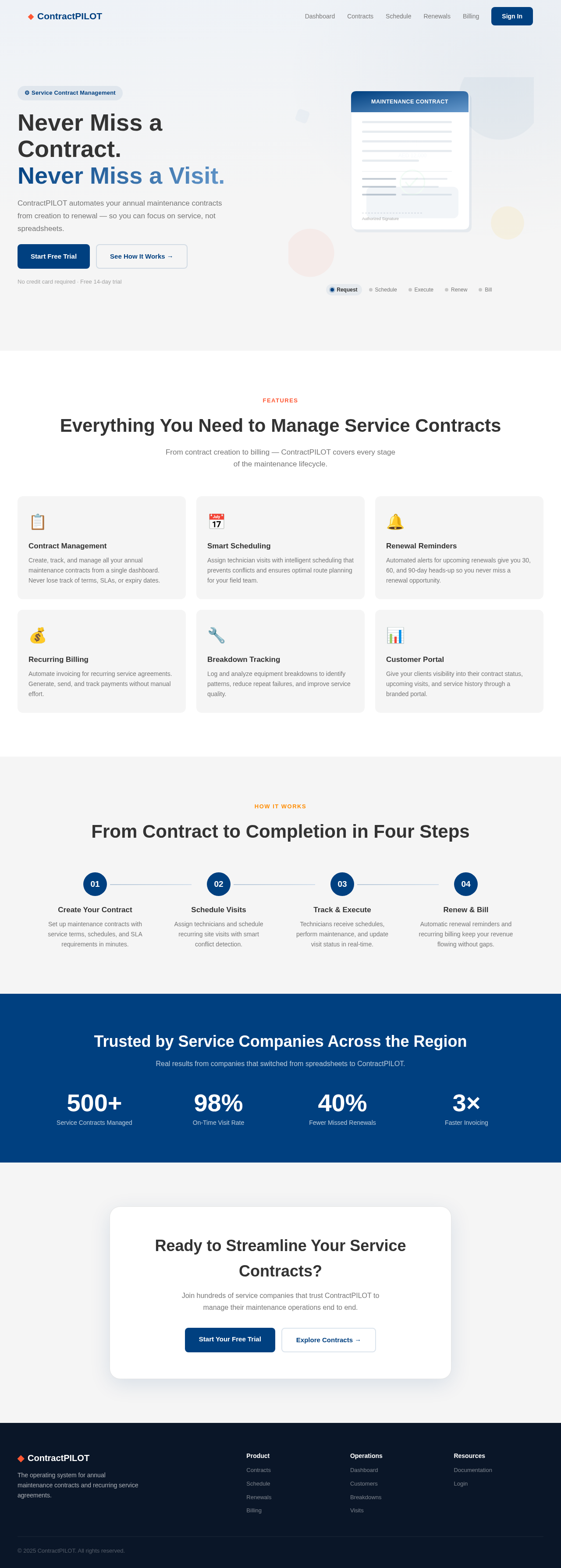
Never Miss a Contract.
Never Miss a Visit.
ContractPILOT automates your annual maintenance contracts from creation to renewal — so you can focus on service, not spreadsheets.
No credit card required · Free 14-day trial
Everything You Need to Manage Service Contracts
From contract creation to billing — ContractPILOT covers every stage of the maintenance lifecycle.
Contract Management
Create, track, and manage all your annual maintenance contracts from a single dashboard. Never lose track of terms, SLAs, or expiry dates.
Smart Scheduling
Assign technician visits with intelligent scheduling that prevents conflicts and ensures optimal route planning for your field team.
Renewal Reminders
Automated alerts for upcoming renewals give you 30, 60, and 90-day heads-up so you never miss a renewal opportunity.
Recurring Billing
Automate invoicing for recurring service agreements. Generate, send, and track payments without manual effort.
Breakdown Tracking
Log and analyze equipment breakdowns to identify patterns, reduce repeat failures, and improve service quality.
Customer Portal
Give your clients visibility into their contract status, upcoming visits, and service history through a branded portal.
From Contract to Completion in Four Steps
Create Your Contract
Set up maintenance contracts with service terms, schedules, and SLA requirements in minutes.
Schedule Visits
Assign technicians and schedule recurring site visits with smart conflict detection.
Track & Execute
Technicians receive schedules, perform maintenance, and update visit status in real-time.
Renew & Bill
Automatic renewal reminders and recurring billing keep your revenue flowing without gaps.
Trusted by Service Companies Across the Region
Real results from companies that switched from spreadsheets to ContractPILOT.
Ready to Streamline Your Service Contracts?
Join hundreds of service companies that trust ContractPILOT to manage their maintenance operations end to end.
Never Miss a Contract.
Never Miss a Visit.
ContractPILOT automates your annual maintenance contracts from creation to renewal — so you can focus on service, not spreadsheets.
No credit card required · Free 14-day trial
Everything You Need to Manage Service Contracts
From contract creation to billing — ContractPILOT covers every stage of the maintenance lifecycle.
Contract Management
Create, track, and manage all your annual maintenance contracts from a single dashboard. Never lose track of terms, SLAs, or expiry dates.
Smart Scheduling
Assign technician visits with intelligent scheduling that prevents conflicts and ensures optimal route planning for your field team.
Renewal Reminders
Automated alerts for upcoming renewals give you 30, 60, and 90-day heads-up so you never miss a renewal opportunity.
Recurring Billing
Automate invoicing for recurring service agreements. Generate, send, and track payments without manual effort.
Breakdown Tracking
Log and analyze equipment breakdowns to identify patterns, reduce repeat failures, and improve service quality.
Customer Portal
Give your clients visibility into their contract status, upcoming visits, and service history through a branded portal.
From Contract to Completion in Four Steps
Create Your Contract
Set up maintenance contracts with service terms, schedules, and SLA requirements in minutes.
Schedule Visits
Assign technicians and schedule recurring site visits with smart conflict detection.
Track & Execute
Technicians receive schedules, perform maintenance, and update visit status in real-time.
Renew & Bill
Automatic renewal reminders and recurring billing keep your revenue flowing without gaps.
Trusted by Service Companies Across the Region
Real results from companies that switched from spreadsheets to ContractPILOT.
Ready to Streamline Your Service Contracts?
Join hundreds of service companies that trust ContractPILOT to manage their maintenance operations end to end.
No comments yet. Be the first!