project-96d73171
 Diya Trivedi
start a project to build a simple single page design of todo

Comments (0)
Sign in to leave a comment
System Requirements
project-96d73171
Introduction
The purpose of this document is to outline the system requirements for project-96d73171, which involves the development of a single-page design for a to-do application. This document will provide a comprehensive overview of the system, including functional requirements, user personas, core user flows, visual design elements, and other relevant details.
System Overview
The project-96d73171 aims to create a simple, intuitive, and user-friendly single-page to-do application. The application will allow users to manage their tasks efficiently with minimal complexity. The design will focus on ease of use, accessibility, and a clean interface.
Functional Requirements as Story Points
- As a User, I should be able to add a new task to my to-do list.
- As a User, I should be able to edit an existing task.
- As a User, I should be able to delete a task from my to-do list.
- As a User, I should be able to mark a task as completed.
- As a User, I should be able to view all tasks in a single view.
User Personas
- User: The primary user of the application who wants to manage personal tasks efficiently.
Core User Flows
- User opens the application -> adds a new task -> edits the task if needed -> marks the task as completed -> deletes the task when no longer needed.
Visuals Colors and Theme
- primary: #4A90E2 (a calming blue for the main interface elements)
- primary_light: #B3D4FC (a lighter blue for hover states and secondary UI)
- secondary: #F5A623 (a warm orange for emphasis and links)
- accent: #50E3C2 (a vibrant teal for CTAs and active states)
- highlight: #F8E71C (a bright yellow for notifications and active indicators)
- bg: #FFFFFF (a clean white for the page background)
- surface: rgba(255, 255, 255, 0.8) (a soft white for card/panel backgrounds)
- text: #333333 (a dark gray for primary text)
- text_muted: #9B9B9B (a light gray for secondary text and labels)
- border: rgba(0, 0, 0, 0.1) (a subtle gray for borders)
Signature Design Concept
The homepage of the to-do application will feature an interactive task board that mimics a physical corkboard. Users can drag and drop tasks as if they were sticky notes, creating a tactile and engaging experience. The board will have subtle animations using motion/react to simulate the feel of paper being pinned and removed. The background will change based on the time of day, using a gradient that shifts from a morning sky to a night sky, providing a dynamic and immersive environment.
Landing Hero Motion Brief
The landing page will feature a continuous 2D animation loop where tasks appear as paper notes being written and pinned onto the board. As users interact, the notes will shuffle and rearrange, showcasing the application's ability to manage tasks dynamically. The animation will be built using motion/react, ensuring smooth transitions and interactions. The first frame will display a clean, organized board with a prominent "Add Task" button, inviting users to begin their task management journey.
Interaction Model & Motion Direction
The intended interaction model for the landing page is "animated". This will include moderate scroll-triggered reveals and hover transitions, providing a polished and engaging experience. The internal pages will maintain a "static" model to ensure clarity and focus on task management.
Non-Functional Requirements
- The application should load quickly and perform efficiently on all modern browsers.
- The design should be responsive and accessible on both desktop and mobile devices.
- The application should adhere to accessibility standards to ensure usability for all users.
Tech Stack
- Frontend: React for Web
- Backend: Not applicable for a single-page design
- Database: Not applicable for a single-page design
Assumptions and Constraints
- The application will be a single-page design with no backend integration.
- The focus will be on user interface and experience rather than data persistence.
Glossary
- Task: An item on the to-do list that a user can add, edit, delete, or mark as completed.
- User: The individual using the to-do application to manage personal tasks.
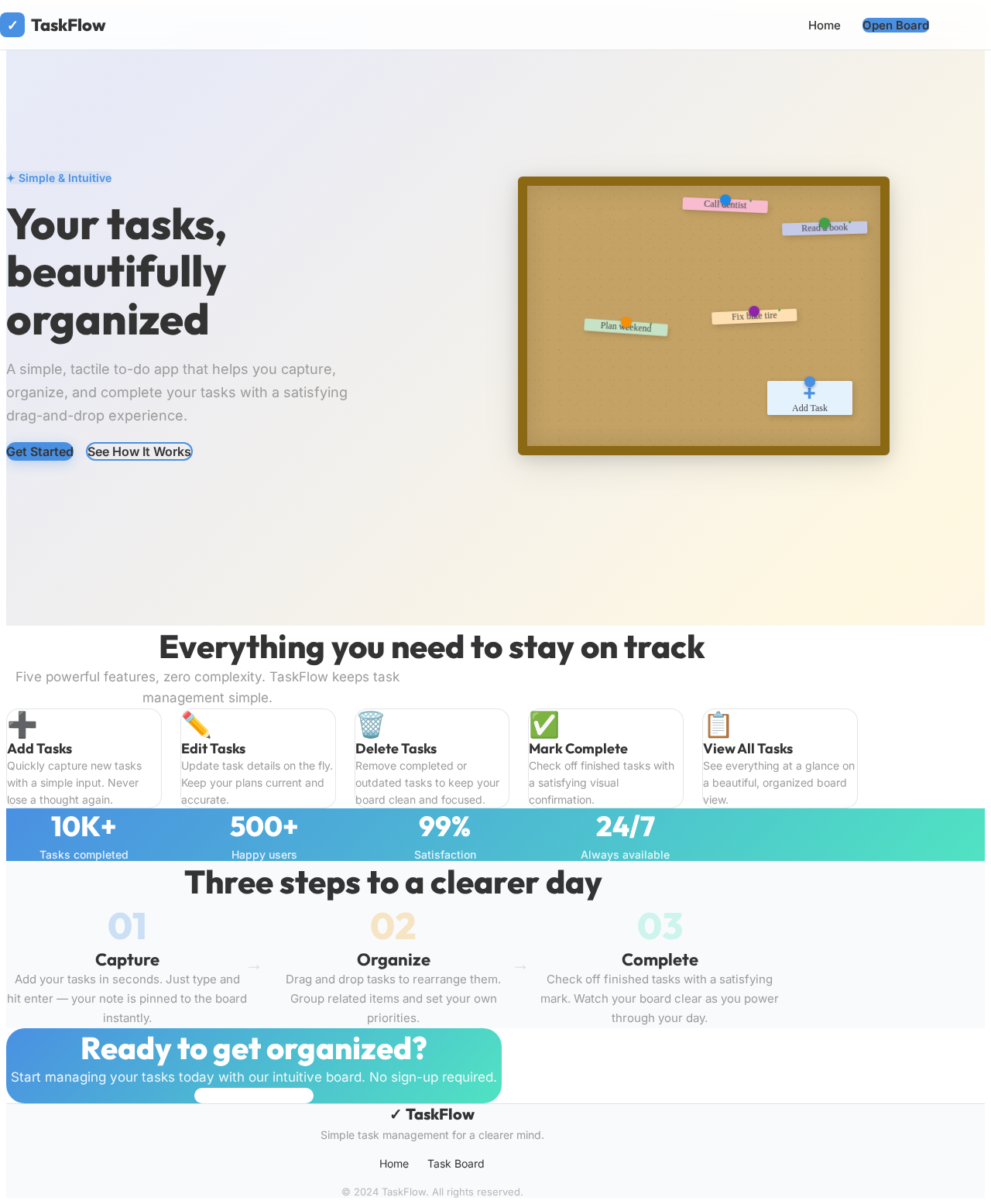
Your tasks,
beautifully organized
A simple, tactile to-do app that helps you capture, organize, and complete your tasks with a satisfying drag-and-drop experience.
Everything you need to stay on track
Five powerful features, zero complexity. TaskFlow keeps task management simple.
Add Tasks
Quickly capture new tasks with a simple input. Never lose a thought again.
Edit Tasks
Update task details on the fly. Keep your plans current and accurate.
Delete Tasks
Remove completed or outdated tasks to keep your board clean and focused.
Mark Complete
Check off finished tasks with a satisfying visual confirmation.
View All Tasks
See everything at a glance on a beautiful, organized board view.
Three steps to a clearer day
Capture
Add your tasks in seconds. Just type and hit enter — your note is pinned to the board instantly.
Organize
Drag and drop tasks to rearrange them. Group related items and set your own priorities.
Complete
Check off finished tasks with a satisfying mark. Watch your board clear as you power through your day.
Ready to get organized?
Start managing your tasks today with our intuitive board. No sign-up required.
Open Task Board →Your tasks,
beautifully organized
A simple, tactile to-do app that helps you capture, organize, and complete your tasks with a satisfying drag-and-drop experience.
Everything you need to stay on track
Five powerful features, zero complexity. TaskFlow keeps task management simple.
Add Tasks
Quickly capture new tasks with a simple input. Never lose a thought again.
Edit Tasks
Update task details on the fly. Keep your plans current and accurate.
Delete Tasks
Remove completed or outdated tasks to keep your board clean and focused.
Mark Complete
Check off finished tasks with a satisfying visual confirmation.
View All Tasks
See everything at a glance on a beautiful, organized board view.
Three steps to a clearer day
Capture
Add your tasks in seconds. Just type and hit enter — your note is pinned to the board instantly.
Organize
Drag and drop tasks to rearrange them. Group related items and set your own priorities.
Complete
Check off finished tasks with a satisfying mark. Watch your board clear as you power through your day.
Ready to get organized?
Start managing your tasks today with our intuitive board. No sign-up required.
Open Task Board →
No comments yet. Be the first!