
project-949bde76

bySri Kannan Vethamanickam

ai interview preparation students dashboard

LandingDashboardResourcesLogin
Landing

Comments (0)

No comments yet. Be the first!

System Requirements

System Requirement Document

project-949bde76

Introduction

The purpose of this System Requirements Document (SRD) is to outline the specifications for the project-949bde76, focusing on the development of an AI interview preparation feature for the students' dashboard. This feature aims to enhance the interview readiness of students by providing tailored AI-driven resources and practice opportunities.

System Overview

The project-949bde76 is designed to support students in preparing for interviews by integrating AI capabilities into their existing dashboard. This system will offer personalized interview questions, feedback, and resources to improve students' performance in interviews.

Page 1 of 6

Functional Requirements as Story Points

  • As a student, I should be able to access AI-generated interview questions tailored to my field of study.
  • As a student, I should be able to receive instant feedback on my interview responses.
  • As a student, I should be able to track my progress over time with a dashboard that displays my performance metrics.
  • As a student, I should be able to access resources and tips for improving my interview skills.
  • As an admin, I should be able to manage the AI content and update the question database as needed.
  • As an admin, I should be able to view analytics on student usage and performance to improve the system.

User Personas

  • Student: The primary user who will utilize the AI interview preparation feature to enhance their interview skills.
  • Admin: The user responsible for managing the content and overseeing the system's performance and analytics.

Core User Flows

  • Student logs into the dashboard -> selects AI interview preparation -> receives personalized questions -> submits responses -> receives feedback -> reviews performance metrics.
  • Admin logs into the dashboard -> updates question database -> reviews student performance analytics -> adjusts AI content based on analytics.
Page 2 of 6

Visuals Colors and Theme

  • primary: #1A73E8 (a deep blue for a professional and trustworthy feel)
  • primary_light: #4D90FE (a lighter blue for hover states and secondary UI elements)
  • secondary: #FF7043 (a coral hue for headlines and emphasis)
  • accent: #F4B400 (a vibrant yellow for call-to-action buttons and active states)
  • highlight: #FBBC05 (a warm amber for notifications and hover states)
  • bg: #FFFFFF (a clean white background for clarity)
  • surface: rgba(250, 250, 250, 0.8) (a light grey for card/panel backgrounds)
  • text: #202124 (a dark grey for primary text)
  • text_muted: #5F6368 (a softer grey for secondary text and labels)
  • border: rgba(218, 220, 224, 0.2) (a subtle grey for borders)
Page 3 of 6

Signature Design Concept

Interactive AI Interview Simulator

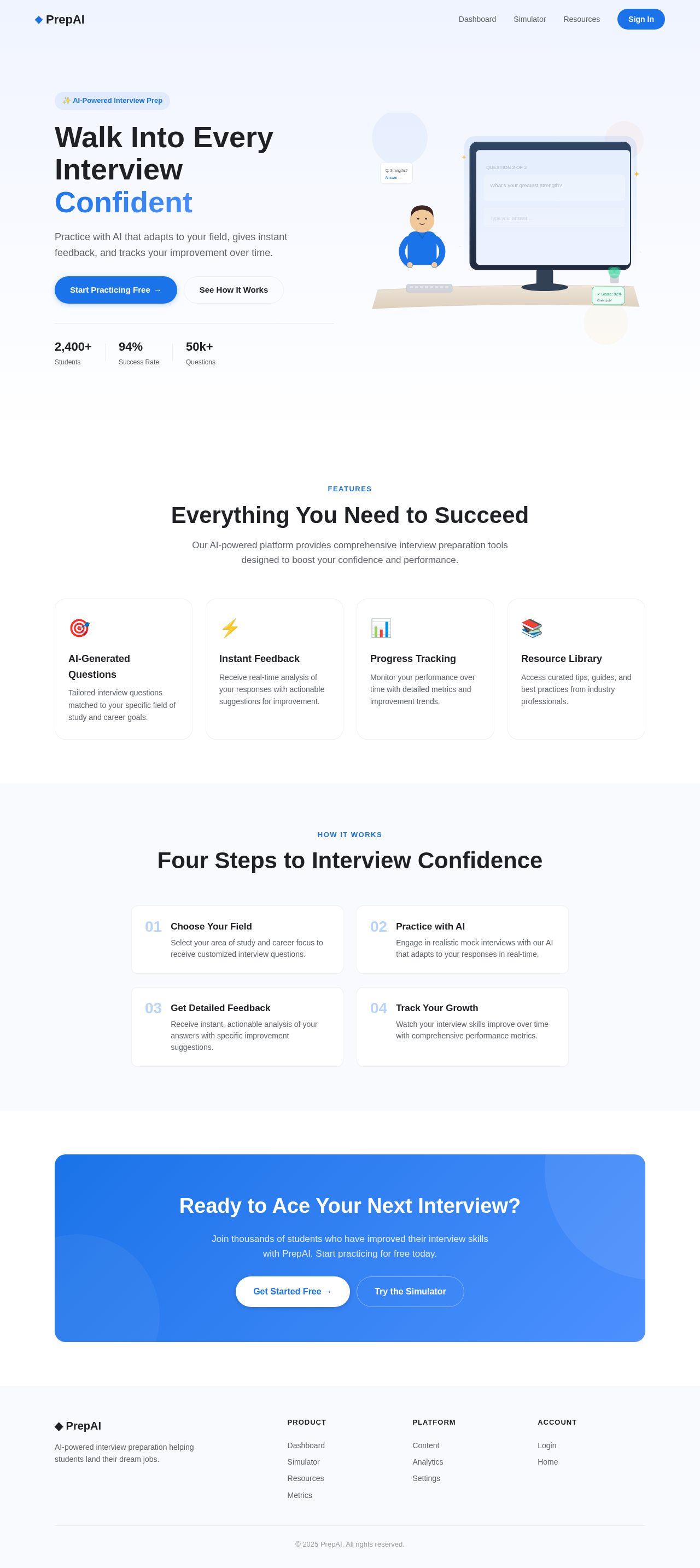
The homepage will feature an interactive AI interview simulator where students can engage in a mock interview. The simulator will present questions in a dynamic, conversational interface that mimics a real interview setting. As students respond, the system will provide real-time feedback through animated visual cues and text prompts. The interface will include a progress bar that visually represents the student's journey through the interview process.

Landing Hero Motion Brief

The landing page will feature a continuous 2D motion loop using motion/react. The animation will depict a student sitting at a desk, with AI-generated questions appearing on a virtual screen. As the student interacts with the questions, the screen will transform to show feedback and progress metrics, symbolizing the transformation from preparation to readiness. The animation will loop every 10 seconds, with interactive elements allowing students to click on questions for more detailed feedback.

Interaction Model & Motion Direction

  • Intended Interaction Model: Animated
  • The landing page will feature moderate scroll-triggered reveals and hover transitions, enhancing the interactive experience. The AI interview simulator will include spring physics on interactive elements for a polished feel.
Page 4 of 6

Non-Functional Requirements

  • The system should provide responses and feedback within 2 seconds to ensure a smooth user experience.
  • The AI model should be updated regularly to reflect the latest industry trends and interview practices.

Tech Stack

  • Frontend: React for Web
  • Backend: Python, FastAPI
  • Database: MySQL or MariaDB
  • AI Models: GPT 5.4 for user-friendly responses
  • AI Tools: Litellm for LLM Routing, Langchain
  • Local Orchestration: Docker, docker-compose
  • Server-side Orchestration: Kubernetes

Assumptions and Constraints

  • The system assumes students have basic familiarity with using a dashboard interface.
  • The AI interview preparation feature will be integrated into the existing dashboard infrastructure.
  • The system will comply with data privacy regulations and ensure secure handling of user data.
Page 5 of 6

Glossary

  • AI: Artificial Intelligence
  • LLM: Large Language Model
  • UI: User Interface
  • UX: User Experience
  • RDBMS: Relational Database Management System

This document outlines the requirements and design considerations for the project-949bde76, ensuring a comprehensive approach to developing an AI interview preparation feature for students.

Page 6 of 6
Landing design preview
Landing: View Info
Login: Sign In
Dashboard: View Overview
Content: Manage Questions
Content: Update Database
Analytics: View Usage
Analytics: Review Performance
Content: Adjust AI Content
Settings: Configure System
Landing design preview
Landing: View Info
Login: Sign In
Dashboard: View Overview
Content: Manage Questions
Content: Update Database
Analytics: View Usage
Analytics: Review Performance
Content: Adjust AI Content
Settings: Configure System