project-91cf926a
Niche report automation for agencies or consultants works by connecting client data sources, transforming raw numbers into a branded report, and delivering it on a recurring schedule with minimal manual effort. The best products in this space do not just make charts; they turn data into a clear narrative, action items, and client-ready delivery. [improvado](https://improvado.io/blog/agency-reporting-automation) ## How it works A typical workflow starts when an agency connects sources like Google Analytics, Google Search Console, ad platforms, CRM tools, or ecommerce data. The system pulls data on a schedule, standardizes it, calculates KPIs, detects changes, and then assembles a report dashboard or PDF for each client. [benly](https://benly.ai/learn/ai-marketing/best-automated-reporting-tools-2026) The report usually includes: - KPI summaries. - Trend charts. - Anomaly highlights. - Plain-English insights. - Recommended next steps. - Branded export or email delivery. [reportr](https://reportr.agency/seo-reporting-automation-tools) The value is not in the raw data itself, because agencies already have data access. The real value is compressing 60–90 minutes of report prep into a system that writes the first draft, explains what changed, and prepares talking points for the client call. [dev](https://dev.to/kesimo/the-next-generation-of-actually-useful-micro-saas-ideas-2026-edition-j23) ## Why agencies pay Agencies and consultants send recurring reports every month, so even small time savings compound across many clients. Current tools in the market focus heavily on multi-client workflows, branded reports, and automated delivery because those features directly reduce labor. [swydo](https://www.swydo.com/blog/best-report-automation-tools/) A strong buyer promise is: “Save one hour per client per month while making reports more consistent.” That is easy to price against because the agency can compare it to staff time or freelancer costs. [reddit](https://www.reddit.com/r/microsaas/comments/1qffirr/building_a_saas_for_agencies_what_would_you/) ## Best product structure The best micro SaaS version should be narrow, not an all-in-one BI platform. A focused product for one niche, such as SEO agencies, paid media consultants, or ecommerce growth consultants, can win by doing one report type extremely well. [clicdata](https://www.clicdata.com/sector/marketing-agencies/) A strong structure is: 1. Connect data sources. 2. Choose a report template. 3. Auto-generate a narrative summary. 4. Flag anomalies and likely reasons. 5. Deliver via PDF, link, or email on a schedule. [reportr](https://reportr.agency/seo-reporting-automation-tools) That structure is popular because the market already shows demand for branded PDFs, live dashboards, scheduled delivery, and agency-specific pricing models. [thedigitalprojectmanager](https://thedigitalprojectmanager.com/tools/best-agency-reporting-software/) ## How to improve it The biggest improvement is to move from “report builder” to “decision assistant.” Instead of just showing charts, the tool should explain what changed, why it probably changed, and what the agency should do next. [dev](https://dev.to/kesimo/the-next-generation-of-actually-useful-micro-saas-ideas-2026-edition-j23) High-value improvements include: - Anomaly detection with likely cause suggestions. - Auto-written executive summary in the agency’s tone. - “Prep my call” mode with talking points and likely client questions. - Goal-based reporting, where each KPI maps to a client objective. - White-label sharing and client-specific branding. - Commenting or approval workflow for account managers. [reddit](https://www.reddit.com/r/microsaas/comments/1qffirr/building_a_saas_for_agencies_what_would_you/) Another smart improvement is reducing setup time. If the tool can generate a useful report from a template in under 10 minutes, agencies are far more likely to adopt it than a heavier BI-style product. [swydo](https://www.swydo.com/blog/best-report-automation-tools/) ## Best niche angles SEO agencies are a strong starting point because they already rely on recurring reporting with GSC, GA4, and branded PDF outputs. The market also shows dedicated SEO reporting tools built around that exact workflow. [reportr](https://reportr.agency/seo-reporting-automation-tools) Other good angles are: - Paid ads consultants, where budget changes and ROAS narratives matter. - Ecommerce consultants, where sales, repeat rate, CAC, and AOV are key. - Local marketing agencies, where lead volume and calls matter. - Fractional CMOs, who need executive summaries for multiple clients. [improvado](https://improvado.io/blog/agency-reporting-automation) ## MVP features Start with the smallest useful set: - Multi-client account structure. - 3–5 integrations for one niche. - Template-based report creation. - Automated narrative summary. - PDF and email export. - Basic anomaly alerts. [improvado](https://improvado.io/blog/agency-reporting-automation) Do not begin with dozens of integrations or deep custom dashboards. The market already proves buyers want workflow automation more than raw visualization. [benly](https://benly.ai/learn/ai-marketing/best-automated-reporting-tools-2026) ## Pricing model A practical model is to charge per client account or per report pack, with higher pricing for white-labeling and premium integrations. Agency tools in this category commonly use recurring subscriptions because the reporting cycle repeats every month. [benly](https://benly.ai/learn/ai-marketing/best-automated-reporting-tools-2026) You can also create a tiered model: - Starter: single user, limited clients. - Agency: multiple clients and templates. - Pro: white-label, team collaboration, higher limits. [thedigitalprojectmanager](https://thedigitalprojectmanager.com/tools/best-agency-reporting-software/)


Comments (0)
Sign in to leave a comment
System Requirements
System Requirements Document for project-91cf926a
Introduction
Project-91cf926a is designed to automate the creation of niche reports for agencies or consultants by connecting client data sources, transforming raw numbers into branded reports, and delivering them on a recurring schedule with minimal manual effort. The project aims to enhance the reporting process by including automated narrative summaries, anomaly detection with likely causes, and a "decision assistant" feature to provide actionable insights and client-ready delivery.
System Overview
The system will connect to various data sources such as Google Analytics, Google Search Console, ad platforms, CRM tools, and ecommerce data. It will pull data on a schedule, standardize it, calculate KPIs, detect changes, and then assemble a report dashboard or PDF for each client. The system will also provide narrative summaries and actionable insights to assist agencies in decision-making.
Source Content Inventory
-
Improvado Blog:
- Identified elements: Data Extraction and Loading, Data Ownership, Data Transformation, Marketing Data Governance, Reporting & Insights, AI Agent.
- Structure: Blog page with sections including Product Platform overview.
- Audience: Marketing analytics professionals or agencies.
-
Benly Blog:
- Identified elements: Automated reporting tools, AI-generated insights, white-label client portals, report scheduling and delivery.
- Structure: Listicle/blog article with sections including a ranked list of tools and FAQs.
- Audience: Agencies or marketing teams evaluating automated reporting tools in 2026.
-
Reportr Agency:
- Identified elements: SEO reporting automation tools.
- Structure: Web page with sections including header and navigation menu.
- Audience: SEO agencies or professionals.
Functional Requirements as Story Points
- As an Agency User, I should be able to connect multiple data sources to the system.
- As an Agency User, I should be able to choose a report template for generating reports.
- As an Agency User, I should be able to receive automated narrative summaries in the agency's tone.
- As an Agency User, I should be able to view anomaly detection with likely cause suggestions.
- As an Agency User, I should be able to use a "decision assistant" feature for actionable insights.
- As an Agency User, I should be able to export reports as PDFs or via email.
- As an Agency User, I should be able to schedule report delivery.
- As an Agency User, I should be able to customize reports with white-label branding.
- As an Agency User, I should be able to use a commenting or approval workflow for account managers.
User Personas
- Agency User: Typically a marketing professional or consultant responsible for generating and delivering reports to clients. They require tools that streamline data analysis and report generation.
Core User Flows
-
Data Connection and Report Generation:
- Agency User connects data sources -> selects report template -> system pulls and processes data -> generates report with narrative summary and anomaly detection -> delivers report via PDF/email.
-
Decision Assistant Utilization:
- Agency User accesses decision assistant -> reviews actionable insights and recommendations -> prepares for client meeting with talking points.
Visuals Colors and Theme
- primary: #1A73E8 (Deep Blue)
- primary_light: #4D90FE (Light Blue)
- secondary: #FF7043 (Coral)
- accent: #FFD600 (Vibrant Yellow)
- highlight: #FFAB40 (Amber)
- bg: #F5F5F5 (Light Gray)
- surface: rgba(255, 255, 255, 0.9) (White)
- text: #212121 (Dark Gray)
- text_muted: #757575 (Muted Gray)
- border: rgba(0, 0, 0, 0.1) (Light Black)
Signature Design Concept
The homepage will feature an interactive "Data Journey" animation. Users will see a dynamic flow of data streams connecting to a central hub, representing the system's data integration capabilities. As users hover over each data stream, they will see real-time transformations into visual reports, highlighting the system's ability to turn raw data into actionable insights. This animation will be built using motion/react for smooth transitions and interactivity.
Landing Hero Motion Brief
The hero section will depict a continuous loop where data inputs (represented as colorful lines) converge into a central processing hub. The hub transforms these inputs into a vibrant, animated report that expands to show key insights and recommendations. The animation will loop every 10 seconds, with interactive elements allowing users to click on data streams to see specific transformations. The reduced-motion state will simplify the animation to a static image with key highlights.
Interaction Model & Motion Direction
- Intended Interaction Model: Animated
- The landing page will feature moderate scroll-triggered reveals and hover transitions to enhance user engagement.
- Each section will have a distinctive core mechanic, such as morphing SVGs or kinetic typography, to maintain user interest.
Non-Functional Requirements
- The system must ensure data security and privacy compliance.
- The system should support high availability and scalability to handle multiple client accounts.
- The system should provide a user-friendly interface with minimal learning curve.
Tech Stack
- Frontend: React for Web
- Backend: Python, FastAPI
- Database: MySQL or MariaDB
- AI Models: GPT 5.4 for user-friendly response
- AI Tools: Litellm for LLM Routing
- Local Orchestration: Docker, docker-compose
- Server-side Orchestration: Kubernetes
Assumptions and Constraints
- The system assumes that users have access to the necessary data sources and permissions to connect them.
- The system is constrained by the need to integrate with existing agency workflows and tools.
Glossary
- KPI: Key Performance Indicator
- SEO: Search Engine Optimization
- ROAS: Return on Advertising Spend
- CAC: Customer Acquisition Cost
- AOV: Average Order Value
- BI: Business Intelligence
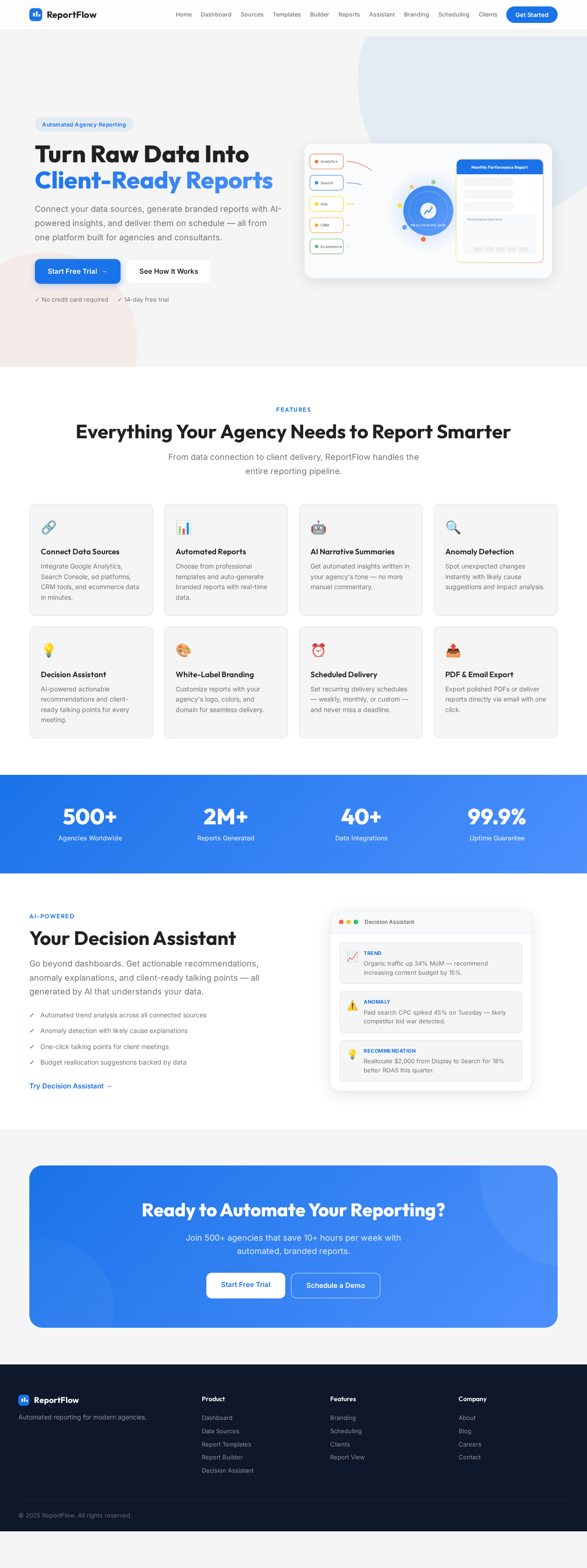
Turn Raw Data Into Client-Ready Reports
Connect your data sources, generate branded reports with AI-powered insights, and deliver them on schedule — all from one platform built for agencies and consultants.
Everything Your Agency Needs to Report Smarter
From data connection to client delivery, ReportFlow handles the entire reporting pipeline.
Connect Data Sources
Integrate Google Analytics, Search Console, ad platforms, CRM tools, and ecommerce data in minutes.
Automated Reports
Choose from professional templates and auto-generate branded reports with real-time data.
AI Narrative Summaries
Get automated insights written in your agency's tone — no more manual commentary.
Anomaly Detection
Spot unexpected changes instantly with likely cause suggestions and impact analysis.
Decision Assistant
AI-powered actionable recommendations and client-ready talking points for every meeting.
White-Label Branding
Customize reports with your agency's logo, colors, and domain for seamless delivery.
Scheduled Delivery
Set recurring delivery schedules — weekly, monthly, or custom — and never miss a deadline.
PDF & Email Export
Export polished PDFs or deliver reports directly via email with one click.
Your Decision Assistant
Go beyond dashboards. Get actionable recommendations, anomaly explanations, and client-ready talking points — all generated by AI that understands your data.
- Automated trend analysis across all connected sources
- Anomaly detection with likely cause explanations
- One-click talking points for client meetings
- Budget reallocation suggestions backed by data
Organic traffic up 34% MoM — recommend increasing content budget by 15%.
Paid search CPC spiked 45% on Tuesday — likely competitor bid war detected.
Reallocate $2,000 from Display to Search for 18% better ROAS this quarter.
Ready to Automate Your Reporting?
Join 500+ agencies that save 10+ hours per week with automated, branded reports.
Turn Raw Data Into Client-Ready Reports
Connect your data sources, generate branded reports with AI-powered insights, and deliver them on schedule — all from one platform built for agencies and consultants.
Everything Your Agency Needs to Report Smarter
From data connection to client delivery, ReportFlow handles the entire reporting pipeline.
Connect Data Sources
Integrate Google Analytics, Search Console, ad platforms, CRM tools, and ecommerce data in minutes.
Automated Reports
Choose from professional templates and auto-generate branded reports with real-time data.
AI Narrative Summaries
Get automated insights written in your agency's tone — no more manual commentary.
Anomaly Detection
Spot unexpected changes instantly with likely cause suggestions and impact analysis.
Decision Assistant
AI-powered actionable recommendations and client-ready talking points for every meeting.
White-Label Branding
Customize reports with your agency's logo, colors, and domain for seamless delivery.
Scheduled Delivery
Set recurring delivery schedules — weekly, monthly, or custom — and never miss a deadline.
PDF & Email Export
Export polished PDFs or deliver reports directly via email with one click.
Your Decision Assistant
Go beyond dashboards. Get actionable recommendations, anomaly explanations, and client-ready talking points — all generated by AI that understands your data.
- Automated trend analysis across all connected sources
- Anomaly detection with likely cause explanations
- One-click talking points for client meetings
- Budget reallocation suggestions backed by data
Organic traffic up 34% MoM — recommend increasing content budget by 15%.
Paid search CPC spiked 45% on Tuesday — likely competitor bid war detected.
Reallocate $2,000 from Display to Search for 18% better ROAS this quarter.
Ready to Automate Your Reporting?
Join 500+ agencies that save 10+ hours per week with automated, branded reports.
No comments yet. Be the first!