project-89067
 Deepak Kumar
"Failed payment recovery / dunning for e-commerce Subscription boxes and Shopify stores lose a shocking chunk of revenue to declined cards — most retry logic fails around 60% of the time. A narrow tool that does smarter SMS/email retry sequences with dynamic discount offers is a much smaller build than a full billing platform, but sells itself on "we recovered $X for you" math, which makes the ROI pitch trivial. Failed credit cards are described as a silent killer where standard retry logic fails roughly 60% of the time, creating demand for a dunning tool using personalized SMS and AI-driven discount incentives to recover failed payments for Shopify or Stripe users. " build me this micro Saas


Comments (0)
Sign in to leave a comment
Project Tasks
124Create DB Models & Migrations
As a developer, I want to create database models and migrations for users, admins, payment recovery, and discounts to ensure data is stored correctly.
Implement CTASection for Landing Page
As a frontend developer, implement the CTASection for the Landing page. This section includes a call-to-action with a title, description, and a button linking to the Signup page. The button includes an SVG arrow icon. Ensure the section is styled according to the provided CSS and is accessible to Admin, Shopify Store Owner, and Stripe User personas. Page access: shared by all personas (Admin, Shopify Store Owner, Stripe User).
Implement FeaturesSection for Landing Page
As a frontend developer, implement the FeaturesSection for the Landing page. This section displays a grid of features, each with an icon, title, and description. The icons are SVGs with different stroke colors, and the background colors are set dynamically. Ensure the section is styled according to the provided CSS and is accessible to Admin, Shopify Store Owner, and Stripe User personas. Page access: shared by all personas (Admin, Shopify Store Owner, Stripe User).
Implement Footer for Landing Page
As a frontend developer, implement the Footer for the Landing page. This section includes multiple link groups (Product, Tools, Account) and a brand logo. The links should be conditionally displayed based on persona access. Ensure the section is styled according to the provided CSS and is accessible to Admin, Shopify Store Owner, and Stripe User personas. Page access: shared by all personas (Admin, Shopify Store Owner, Stripe User).
Implement HeroSection for Landing Page
As a frontend developer, implement the HeroSection for the Landing page. This section includes animated elements using motion/react, such as parallax effects and spring animations. It features a title, subtitle, and action buttons linking to Signup and Dashboard pages. Ensure the section is styled according to the provided CSS and is accessible to Admin, Shopify Store Owner, and Stripe User personas. Page access: shared by all personas (Admin, Shopify Store Owner, Stripe User).
Implement HowItWorksSection for Landing Page
As a frontend developer, implement the HowItWorksSection for the Landing page. This section outlines the steps to start recovering revenue, with each step having a title and description. Ensure the section is styled according to the provided CSS and is accessible to Admin, Shopify Store Owner, and Stripe User personas. Page access: shared by all personas (Admin, Shopify Store Owner, Stripe User).
Implement Navbar for Landing Page
As a frontend developer, implement the Navbar for the Landing page. This section includes navigation links and a toggle button for mobile view. The links should be conditionally displayed based on persona access. Ensure the section is styled according to the provided CSS and is accessible to Admin, Shopify Store Owner, and Stripe User personas. Page access: shared by all personas (Admin, Shopify Store Owner, Stripe User).
Implement StatsSection for Landing Page
As a frontend developer, implement the StatsSection for the Landing page. This section displays statistics about failed payments and recovery rates. Ensure the section is styled according to the provided CSS and is accessible to Admin, Shopify Store Owner, and Stripe User personas. Page access: shared by all personas (Admin, Shopify Store Owner, Stripe User).
Implement ShopifyIntegrationDisplay for Integrations Page
As a frontend developer, implement the ShopifyIntegrationDisplay section which shows the connection status of the Shopify integration. This section includes a logo, a status badge indicating connection status, and a description of the integration's capabilities. It conditionally displays connected store information if the integration is active. This section is accessible by Shopify Store Owners. Page access: Shopify Store Owner, Stripe User only.
Implement ShopifyConnectionActions for Integrations Page
As a frontend developer, implement the ShopifyConnectionActions section which allows users to connect or manage their Shopify integration. This section includes buttons for connecting, managing, and disconnecting the integration, with state management for connection status and confirmation dialogs. This section is accessible by Shopify Store Owners. Page access: Shopify Store Owner, Stripe User only.
Implement StripeIntegrationDisplay for Integrations Page
As a frontend developer, implement the StripeIntegrationDisplay section which shows the connection status of the Stripe integration. This section includes a logo, a status badge indicating connection status, and a description of the integration's capabilities. It conditionally displays API key information if the integration is active. This section is accessible by Stripe Users. Page access: Shopify Store Owner, Stripe User only.
Implement StripeConnectionActions for Integrations Page
As a frontend developer, implement the StripeConnectionActions section which allows users to connect or manage their Stripe integration. This section includes buttons for connecting, managing, and disconnecting the integration, with state management for connection status and confirmation dialogs. This section is accessible by Stripe Users. Page access: Shopify Store Owner, Stripe User only.
Implement ConnectionStatus for Integrations Page
As a frontend developer, implement the ConnectionStatus section which displays the connection status of various platforms in a tabular format. This section includes platform logos, status indicators, and last sync information. This section is accessible by Shopify Store Owners and Stripe Users. Page access: Shopify Store Owner, Stripe User only.
Implement SetupGuidance for Integrations Page
As a frontend developer, implement the SetupGuidance section which provides step-by-step instructions for setting up integrations. This section includes an accordion interface with steps for connecting Shopify and Stripe, configuring permissions, and testing connections. This section is accessible by Shopify Store Owners and Stripe Users. Page access: Shopify Store Owner, Stripe User only.
Implement TestConnection for Integrations Page
As a frontend developer, implement the TestConnection section which allows users to test their Shopify and Stripe integrations. This section includes buttons to initiate tests and displays the results with status indicators and error messages. This section is accessible by Shopify Store Owners and Stripe Users. Page access: Shopify Store Owner, Stripe User only.
Implement NextSteps for Integrations Page
As a frontend developer, implement the NextSteps section which provides a checklist of tasks to complete after setting up integrations. This section includes a list of items with check icons and buttons for configuring retry settings and accessing the dashboard. This section is accessible by Shopify Store Owners and Stripe Users. Page access: Shopify Store Owner, Stripe User only.
Implement UsersSearch for Users Page
As a frontend developer, implement the UsersSearch section which includes a search input field with a search icon. The input allows searching by name, email, or ID and updates the searchTerm state via onSearchChange. This section is accessible by Admin ONLY. Page access: Admin only.
Implement UsersFilters for Users Page
As a frontend developer, implement the UsersFilters section which includes dropdowns for role and status filtering, and a 'Clear Filters' button. The dropdowns update selectedRole and selectedStatus states via onRoleChange and onStatusChange. This section is accessible by Admin ONLY. Page access: Admin only.
Implement UsersTableContainer for Users Page
As a frontend developer, implement the UsersTableContainer section which displays a table of users with selectable rows. It includes role and status color coding, and supports selecting all users or individual rows. This section is accessible by Admin ONLY. Page access: Admin only.
Implement UsersPagination for Users Page
As a frontend developer, implement the UsersPagination section which includes pagination controls and page size selection. It updates currentPage and pageSize states via onPageChange and onPageSizeChange. This section is accessible by Admin ONLY. Page access: Admin only.
Implement UserTableRowActions for Users Page
As a frontend developer, implement the UserTableRowActions section which provides a modal with actions like Edit, Reset Password, Toggle Active, and Delete for a user. This section is accessible by Admin ONLY. Page access: Admin only.
Implement UsersBulkDeactivate for Users Page
As a frontend developer, implement the UsersBulkDeactivate section which includes a button to deactivate selected users. It shows a confirmation dialog before deactivation. This section is accessible by Admin ONLY. Page access: Admin only.
Implement UsersBulkDelete for Users Page
As a frontend developer, implement the UsersBulkDelete section which includes a button to delete selected users. It shows a warning dialog before deletion. This section is accessible by Admin ONLY. Page access: Admin only.
Implement UsersExportActions for Users Page
As a frontend developer, implement the UsersExportActions section which includes buttons to export selected users or all users. The export actions trigger onExportSelected and onExportAll functions. This section is accessible by Admin ONLY. Page access: Admin only.
Develop Analytics API
As a Backend Developer, create API endpoints to provide analytics data on recovered payments, retry sequences, and discount effectiveness for the Admin to view.
Create Retry Logic API
As a Backend Developer, implement API endpoints for configuring and managing retry logic, including dynamic discount parameters and retry schedules.
Implement AI Discount Algorithm
As a Backend Developer, implement the AI-driven discount algorithm using GPT 5.4 to generate personalized discount offers based on customer behavior and transaction history.
Setup Notification Scheduler
As a Backend Developer, set up a scheduler for sending personalized SMS and email notifications as part of the retry sequences.
Develop Reports API
As a Backend Developer, create API endpoints to provide detailed reports on transaction recovery for Stripe users.
Implement Data Retention Policy
As a Data Engineer, implement data retention policies for user and transaction data to comply with data protection regulations.
Create End-to-End Tests
As a QA Engineer, develop end-to-end tests for critical user flows, including payment recovery and discount application, to ensure seamless integration and functionality.
Implement Auth Service
As a developer, I want to implement authentication services using JWT and bcrypt to secure user access.
Develop Payment Recovery API
As a developer, I want to create API endpoints for managing payment recovery processes, ensuring they are accessible by Shopify Store Owners and Stripe Users.
Implement Discount Service
As a developer, I want to implement a service for managing AI-driven discount incentives, ensuring they are correctly applied to payment recovery processes.
Implement Navbar for Login Page
As a frontend developer, implement the Navbar section for the Login page. This component includes a logo, navigation links, and authentication buttons. It uses a mobile toggle state managed by useState to show or hide links on smaller screens. The Navbar should conditionally display 'Sign In' and 'Sign Up' buttons when the user is not logged in, and a 'Dashboard' button when logged in. Ensure links to restricted pages are conditionally shown based on user persona access. Page access: shared by all personas (Admin, Shopify Store Owner, Stripe User).
Implement RBAC Middleware
As a developer, I want to implement role-based access control middleware to ensure that only authorized personas can access specific pages and API endpoints.
Create API Integration Tests
As a QA engineer, I want to create integration tests for the payment recovery and discount APIs to ensure they function correctly and securely.
Implement LoginHero for Login Page
As a frontend developer, implement the LoginHero section for the Login page. This section includes a headline, subheadline, and supporting text that welcomes users back and highlights the benefits of using the payment recovery dashboard. Ensure the design is responsive and visually appealing for all personas accessing the Login page. Page access: shared by all personas (Admin, Shopify Store Owner, Stripe User).
Implement LoginCredentials for Login Page
As a frontend developer, implement the LoginCredentials section for the Login page. This form includes fields for email and password, with validation and error handling. It uses useState to manage form inputs and errors, and includes a toggle to show/hide the password. The form simulates submission with a loading state. Ensure accessibility features like aria-invalid and aria-describedby are correctly implemented. Page access: shared by all personas (Admin, Shopify Store Owner, Stripe User).
Implement LoginSocialDivider for Login Page
As a frontend developer, implement the LoginSocialDivider section for the Login page. This component visually separates the traditional login form from social login options with a line and text. Ensure it is styled consistently with the rest of the page and is responsive. Page access: shared by all personas (Admin, Shopify Store Owner, Stripe User).
Implement LoginSocial for Login Page
As a frontend developer, implement the LoginSocial section for the Login page. This section includes a button for Google login, which redirects users to the Google authentication page. Ensure the button is styled with an icon and text, and that the redirect functionality is correctly implemented. Page access: shared by all personas (Admin, Shopify Store Owner, Stripe User).
Implement LoginSignupLink for Login Page
As a frontend developer, implement the LoginSignupLink section for the Login page. This component provides a link for users to navigate to the signup page if they don't have an account. Ensure the link is styled appropriately and is accessible to all personas accessing the Login page. Page access: shared by all personas (Admin, Shopify Store Owner, Stripe User).
Implement Footer for Login Page
As a frontend developer, implement the Footer section for the Login page. This component includes brand information, navigation links, and social media icons. Ensure it is consistent with the footer from the Landing page and is accessible to all personas accessing the Login page. Page access: shared by all personas (Admin, Shopify Store Owner, Stripe User).
Implement SignupHero for Signup Page
As a frontend developer, implement the SignupHero section for the Signup page. This section includes a headline 'Create Your Account', a subheadline, and a supporting text with a trust badge indicating 'No credit card required'. Ensure the layout is responsive and visually appealing for Shopify Store Owners and Stripe Users. Page access: Shopify Store Owner, Stripe User only.
Implement SignupFormFields for Signup Page
As a frontend developer, implement the SignupFormFields section for the Signup page. This component includes input fields for email, password, confirm password, company name, and account type. It features password strength validation with dynamic feedback and error handling for required fields. Ensure the form is accessible and provides real-time validation feedback. Page access: Shopify Store Owner, Stripe User only.
Implement SignupFormActions for Signup Page
As a frontend developer, implement the SignupFormActions section for the Signup page. This component includes a 'Create Account' button and a link to the login page. Ensure the button is styled consistently with the rest of the form and that the login link is accessible to Shopify Store Owners and Stripe Users. Page access: Shopify Store Owner, Stripe User only.
Implement SignupOAuth for Signup Page
As a frontend developer, implement the SignupOAuth section for the Signup page. This component includes OAuth buttons for Google and GitHub, with SVG icons and a divider text 'or continue with'. Ensure the OAuth buttons are styled and functional, providing an alternative signup method for Shopify Store Owners and Stripe Users. Page access: Shopify Store Owner, Stripe User only.
Implement SignupBenefits for Signup Page
As a frontend developer, implement the SignupBenefits section for the Signup page. This section displays a grid of benefit cards, each with an icon, title, and description. The benefits include 'Recover Failed Payments', 'Personalized SMS Campaigns', 'AI-Driven Discounts', and 'Real-Time Analytics'. Ensure the layout is responsive and visually appealing for Shopify Store Owners and Stripe Users. Page access: Shopify Store Owner, Stripe User only.
Implement AdminSidebar for Admin Dashboard
As a frontend developer, implement the AdminSidebar section for the Admin Dashboard. This component includes navigation items such as Dashboard, Retry Config, Discounts, Templates, Analytics, Users, and Settings. It uses a mobile toggle state to open/close the sidebar and handles navigation through the onNavigate callback. This section is accessible by Admin ONLY and should conditionally render links based on persona access. Ensure the sidebar is responsive and includes an overlay for mobile view. Page access: Admin only.
Implement DashboardHeader for Dashboard
As a frontend developer, implement the DashboardHeader section for the Dashboard page. This section includes a greeting with the business name, a date range selector with animation using motion/react, and buttons for refreshing data and exporting reports. The section uses state hooks to manage the selected date range, dropdown visibility, and button states for refreshing and exporting. This section is accessible by Shopify Store Owners and Stripe Users. Page access: Shopify Store Owner, Stripe User only.
Implement IntegrationsHeader for Integrations Page
As a frontend developer, implement the IntegrationsHeader section which includes breadcrumb navigation, a header title, and a description of the integrations available. This section also features a help icon with an SVG graphic. This section is accessible by Shopify Store Owners and Stripe Users. Ensure that the breadcrumb navigation correctly reflects the user's current location within the dashboard. Page access: Shopify Store Owner, Stripe User only.
Setup CI/CD Pipeline
As a DevOps engineer, I want to set up a CI/CD pipeline to automate testing and deployment processes, ensuring smooth and reliable releases.
Implement DashboardHeader for Admin Dashboard
As a frontend developer, implement the DashboardHeader section for the Admin Dashboard. This component includes a title, subtitle, and action buttons for refreshing stats and exporting reports. It also displays a system status badge. This section is accessible by Admin ONLY and should reflect the current system status accurately. Page access: Admin only.
Implement MetricsOverview for Admin Dashboard
As a frontend developer, implement the MetricsOverview section for the Admin Dashboard. This component displays various metric cards with sparklines, including Total Recovered Payments, Total SMS Sent, Avg Discount Offered, and Retry Success Rate. Each card shows a trend percentage and uses color coding for trends. This section is accessible by Admin ONLY and should dynamically update based on real-time data. Page access: Admin only.
Implement PaymentRecoveryChart for Admin Dashboard
As a frontend developer, implement the PaymentRecoveryChart section for the Admin Dashboard. This component includes a chart displaying payment recovery rates over a selectable range of days. It features interactive elements such as range selection buttons and a toggle for showing target baselines. This section is accessible by Admin ONLY and should accurately represent the recovery data. Page access: Admin only.
Implement RetrySequencesStats for Admin Dashboard
As a frontend developer, implement the RetrySequencesStats section for the Admin Dashboard. This component includes a sortable table displaying retry sequence effectiveness and a bar chart showing retry attempts by day. It allows sorting by sequence name, attempts, success rate, and average recovery time. This section is accessible by Admin ONLY and should provide insights into retry sequence performance. Page access: Admin only.
Implement DiscountPerformance for Admin Dashboard
As a frontend developer, implement the DiscountPerformance section for the Admin Dashboard. This component includes a scatter plot chart showing discount vs redemption rates, with interactive elements for hovering over data points. It also displays key metrics such as Avg Discount, Redemption Rate, Revenue Impact, and Fatigue Rate. This section is accessible by Admin ONLY and should provide insights into discount performance. Page access: Admin only.
Implement TransactionsHeader for Admin Dashboard
As a frontend developer, implement the TransactionsHeader section for the Admin Dashboard. This component includes a search input for filtering transactions by customer or transaction ID, and filter buttons for transaction status and method. This section is accessible by Admin ONLY and should allow for dynamic filtering of transaction data. Page access: Admin only.
Implement TransactionsTable for Admin Dashboard
As a frontend developer, implement the TransactionsTable section for the Admin Dashboard. This component includes a table displaying transaction details such as timestamp, customer ID, original amount, retry method, status, recovery amount, and time to recovery. It supports sorting by column and uses status badges for visual indication. This section is accessible by Admin ONLY and should accurately display transaction data. Page access: Admin only.
Implement TransactionsPagination for Admin Dashboard
As a frontend developer, implement the TransactionsPagination section for the Admin Dashboard. This component includes pagination controls for navigating through transaction pages, with options to change the number of rows per page. It features input for jumping to a specific page and buttons for navigating to previous and next pages. This section is accessible by Admin ONLY and should ensure smooth navigation through transaction data. Page access: Admin only.
Implement RecoveryMetrics for Dashboard
As a frontend developer, implement the RecoveryMetrics section for the Dashboard page. This section displays key metrics using 3D elements with @react-three/fiber and animated sparklines. It includes a rotating RecoveryOrb and dynamic data visualization for metrics like 'Total Failed Payments Recovered'. This section is accessible by Shopify Store Owners and Stripe Users. Page access: Shopify Store Owner, Stripe User only.
Implement RecoveryTrendChart for Dashboard
As a frontend developer, implement the RecoveryTrendChart section for the Dashboard page. This section uses react-chartjs-2 to display a line chart of recovery trends over time, with options to toggle between actual and target rates. It includes dynamic data generation and gradient fills for visual appeal. This section is accessible by Shopify Store Owners and Stripe Users. Page access: Shopify Store Owner, Stripe User only.
Implement TransactionStatus for Dashboard
As a frontend developer, implement the TransactionStatus section for the Dashboard page. This section uses a Doughnut chart from react-chartjs-2 to visualize the status of transactions (Recovered, Pending, Failed) with interactive hover effects. It includes dynamic data and tooltips for detailed insights. This section is accessible by Shopify Store Owners and Stripe Users. Page access: Shopify Store Owner, Stripe User only.
Implement RecentActivity for Dashboard
As a frontend developer, implement the RecentActivity section for the Dashboard page. This section lists recent transactions with details such as customer name, email, amount, and status. It uses motion/react for animations and supports filtering by status. This section is accessible by Shopify Store Owners and Stripe Users. Page access: Shopify Store Owner, Stripe User only.
Implement QuickActions for Dashboard
As a frontend developer, implement the QuickActions section for the Dashboard page. This section provides quick links to various settings and tools, such as Retry Settings and Templates, with motion/react animations for hover and tap interactions. This section is accessible by Shopify Store Owners and Stripe Users. Page access: Shopify Store Owner, Stripe User only.
Implement RetryConfigHeader for Retry Config
As a frontend developer, implement the RetryConfigHeader section for the Retry Config page. This section includes a breadcrumb navigation, a title, and a help icon with a tooltip. The tooltip provides information about setting up automated retry sequences. This page is accessible by Admin ONLY. Ensure the breadcrumb links conditionally show based on persona access. This section depends on the Admin Dashboard page tasks. Page access: Admin only.
Implement AnalyticsPageTitle for Analytics
As a frontend developer, implement the AnalyticsPageTitle section which includes a main heading and a subtitle to introduce the analytics page. This section is accessible only to Admins and should depend on the Admin Dashboard tasks for proper integration. Page access: Admin only.
Implement UsersHeader for Users Page
As a frontend developer, implement the UsersHeader section which includes a title, subtitle, and an 'Invite User' button. The button triggers the onInvite function when clicked. This section is accessible by Admin ONLY and should conditionally show navigation links based on persona access. Page access: Admin only.
Implement RetrySettingsHeader for Retry Settings
As a frontend developer, implement the RetrySettingsHeader section which includes a breadcrumb navigation and a header with a description. This section is accessible by Shopify Store Owners and Stripe Users. It should include links to Home and Settings, and display the current page as Retry Settings. Ensure the breadcrumb navigation is accessible and the description clearly outlines the purpose of the Retry Settings page. This section depends on the Integrations page task ID for page-level dependency. Page access: Shopify Store Owner, Stripe User only.
Implement SettingsNav for Settings
As a frontend developer, implement the SettingsNav section for the Settings page. This section includes a navigation menu with items such as Profile, Account Security, Notifications, Integrations, Billing, and Danger Zone. It uses React state hooks to manage the active navigation item and mobile menu toggle. The navigation buttons scroll to corresponding sections smoothly. This page is accessible by Admin and Shopify Store Owner personas. Page access: Admin, Shopify Store Owner only.
Implement RetryAttemptConfig for Retry Config
As a frontend developer, implement the RetryAttemptConfig section for the Retry Config page. This section allows admins to configure retry attempts, initial delay, and max retry period using sliders and input fields. It includes state management for attempts, initialDelay, and maxDays. This page is accessible by Admin ONLY. Page access: Admin only.
Implement BackoffStrategyConfig for Retry Config
As a frontend developer, implement the BackoffStrategyConfig section for the Retry Config page. This section allows admins to select a retry backoff strategy (linear, exponential, custom) and displays a visual representation of the selected strategy's pattern. It uses state management for the selected strategy. This page is accessible by Admin ONLY. Page access: Admin only.
Implement CommunicationChannelsConfig for Retry Config
As a frontend developer, implement the CommunicationChannelsConfig section for the Retry Config page. This section allows admins to configure communication channels (SMS, Email, In-App) and AI features (personalization, AI-driven incentives) using checkboxes and toggles. It includes state management for channels, personalization, and aiIncentive. This page is accessible by Admin ONLY. Page access: Admin only.
Implement RetryTimelineVisualization for Retry Config
As a frontend developer, implement the RetryTimelineVisualization section for the Retry Config page. This section provides a visual timeline of retry attempts, highlighting specific milestones. It uses a static array to render attempt cards with labels and times. This page is accessible by Admin ONLY. Page access: Admin only.
Implement TimingRestrictionsConfig for Retry Config
As a frontend developer, implement the TimingRestrictionsConfig section for the Retry Config page. This section allows admins to set timing restrictions for retries, including skipping weekends, business hours only, timezone selection, and active time window. It uses state management for skipWeekends, businessHoursOnly, timezone, startTime, and endTime. This page is accessible by Admin ONLY. Page access: Admin only.
Implement CostThresholdConfig for Retry Config
As a frontend developer, implement the CostThresholdConfig section for the Retry Config page. This section allows admins to set a cost threshold for retries, including the maximum retry cost and calculation method. It uses state management for open, threshold, and calcMethod. This page is accessible by Admin ONLY. Page access: Admin only.
Implement CustomerSegmentConfig for Retry Config
As a frontend developer, implement the CustomerSegmentConfig section for the Retry Config page. This section allows admins to configure customer segments for retries, including target segment selection and additional filter criteria. It uses state management for open, segment, and filter. This page is accessible by Admin ONLY. Page access: Admin only.
Implement FailureReasonMappingConfig for Retry Config
As a frontend developer, implement the FailureReasonMappingConfig section for the Retry Config page. This section allows admins to map failure reasons to retry strategies and discount caps. It includes a table with checkboxes, select inputs, and number inputs for configuration. It uses state management for open and reasons. This page is accessible by Admin ONLY. Page access: Admin only.
Implement AnalyticsFilters for Analytics
As a frontend developer, implement the AnalyticsFilters section which includes interactive buttons for selecting time periods and a date range picker. This section allows Admins to filter analytics data by time period and export or refresh the data. Page access: Admin only.
Implement AnalyticsKPIs for Analytics
As a frontend developer, implement the AnalyticsKPIs section which displays key performance indicators such as Recovered Payments, Recovery Rate, Avg Recovery Time, and Total Revenue Recovered. Each KPI includes an icon and a trend indicator. Page access: Admin only.
Implement RecoveryChart for Analytics
As a frontend developer, implement the RecoveryChart section which includes an inline SVG bar chart to display recovery trends over a week. The chart shows success and failure rates for each day, with a legend and axis lines. Page access: Admin only.
Implement RetryEffectivenessTable for Analytics
As a frontend developer, implement the RetryEffectivenessTable section which displays a sortable and paginated table of retry sequences. Admins can sort by attempts or success rate and view detailed performance metrics. Page access: Admin only.
Implement DiscountPerformanceCards for Analytics
As a frontend developer, implement the DiscountPerformanceCards section which displays cards for different discount strategies. Each card shows effectiveness, average discount, redemption rate, and revenue, with a badge for top performers. Page access: Admin only.
Implement TransactionList for Analytics
As a frontend developer, implement the TransactionList section which displays a paginated list of recent transactions. Each transaction shows ID, time, amount, status, and method, with pagination controls for navigation. Page access: Admin only.
Implement RetryScheduleConfig for Retry Settings
As a frontend developer, implement the RetryScheduleConfig section which allows users to select a preset interval or define a custom schedule for the first retry attempt. This section uses state hooks to manage the selected preset and custom values. It includes radio buttons for preset intervals and input fields for custom scheduling. Ensure the UI is intuitive and accessible for Shopify Store Owners and Stripe Users. Page access: Shopify Store Owner, Stripe User only.
Implement RetryAttemptSettings for Retry Settings
As a frontend developer, implement the RetryAttemptSettings section which allows users to configure the maximum number of retry attempts and their frequency. This section includes a toggle switch to enable or disable retry limits, a slider to set the maximum attempts, and a dropdown to select the frequency. Ensure the section is accessible and provides clear feedback to Shopify Store Owners and Stripe Users. Page access: Shopify Store Owner, Stripe User only.
Implement RetryDelayConfig for Retry Settings
As a frontend developer, implement the RetryDelayConfig section which allows users to configure the delay between retry attempts. This section includes a toggle for progressive delay strategy and input fields for setting delays. It uses state hooks to manage delay values and unit selection. Ensure the section is intuitive and accessible for Shopify Store Owners and Stripe Users. Page access: Shopify Store Owner, Stripe User only.
Implement RetryConditions for Retry Settings
As a frontend developer, implement the RetryConditions section which allows users to select failure reasons and customer segments for retry attempts. This section includes checkboxes for failure types and a dropdown for customer segments. It also features a toggle for exception rules. Ensure the section is accessible and provides clear feedback to Shopify Store Owners and Stripe Users. Page access: Shopify Store Owner, Stripe User only.
Implement RetrySettingsSave for Retry Settings
As a frontend developer, implement the RetrySettingsSave section which provides Save and Cancel buttons for the retry settings. The Save button triggers an alert confirming the settings have been saved, while the Cancel button prompts the user to confirm discarding changes. Ensure the buttons are accessible and provide clear feedback to Shopify Store Owners and Stripe Users. Page access: Shopify Store Owner, Stripe User only.
Implement RetrySettingsSecondary for Retry Settings
As a frontend developer, implement the RetrySettingsSecondary section which includes buttons for previewing the retry schedule and resetting settings to default. The Preview button opens a modal displaying a timeline of retry attempts, while the Reset button prompts the user to confirm resetting settings. Ensure the section is accessible and provides clear feedback to Shopify Store Owners and Stripe Users. Page access: Shopify Store Owner, Stripe User only.
Implement SettingsHeader for Settings
As a frontend developer, implement the SettingsHeader section for the Settings page. This section displays the title 'Account Settings' and a description about managing profile details, account security, and notification preferences. This page is accessible by Admin and Shopify Store Owner personas. Page access: Admin, Shopify Store Owner only.
Implement ProfileBasics for Settings
As a frontend developer, implement the ProfileBasics section for the Settings page. This section includes a form for updating personal and store information such as first name, last name, email, company name, and phone number. It uses React state hooks for form data and validation logic for input fields. This page is accessible by Admin and Shopify Store Owner personas. Page access: Admin, Shopify Store Owner only.
Implement ProfileAvatar for Settings
As a frontend developer, implement the ProfileAvatar section for the Settings page. This section allows users to upload a profile photo or logo. It includes drag-and-drop functionality and file input for image uploads, with a preview feature. This page is accessible by Admin and Shopify Store Owner personas. Page access: Admin, Shopify Store Owner only.
Implement PasswordChange for Settings
As a frontend developer, implement the PasswordChange section for the Settings page. This section includes a form for changing the user's password, with input fields for current, new, and confirmation passwords. It features password strength validation and feedback. This page is accessible by Admin and Shopify Store Owner personas. Page access: Admin, Shopify Store Owner only.
Implement TwoFactorAuth for Settings
As a frontend developer, implement the TwoFactorAuth section for the Settings page. This section allows users to enable or disable two-factor authentication, with options for QR code scanning and manual key entry. It includes a form for verifying a 6-digit code. This page is accessible by Admin and Shopify Store Owner personas. Page access: Admin, Shopify Store Owner only.
Implement ActiveSessions for Settings
As a frontend developer, implement the ActiveSessions section for the Settings page. This section displays a list of devices currently signed in to the user's account, with options to log out of specific sessions. This page is accessible by Admin and Shopify Store Owner personas. Page access: Admin, Shopify Store Owner only.
Implement NotificationChannels for Settings
As a frontend developer, implement the NotificationChannels section for the Settings page. This section allows users to toggle notification channels such as Email, SMS, and In-App notifications. It includes a save button to persist preferences. This page is accessible by Admin and Shopify Store Owner personas. Page access: Admin, Shopify Store Owner only.
Implement NotificationTypes for Settings
As a frontend developer, implement the NotificationTypes section for the Settings page. This section allows users to select notification types and set their frequencies. It includes checkboxes and dropdowns for customization. This page is accessible by Admin and Shopify Store Owner personas. Page access: Admin, Shopify Store Owner only.
Implement DiscountsHeader for Discounts Page
As a frontend developer, implement the DiscountsHeader section for the Discounts page. This section includes a title, subtitle, and a button to create a new discount. The button triggers the onCreate function. Ensure the layout and styles match the design specifications. This section is accessible by Admin, Shopify Store Owner, and Stripe User. Page access: shared by all personas (Admin, Shopify Store Owner, Stripe User).
Implement ReportsHeader for Reports Page
As a frontend developer, implement the ReportsHeader section for the Reports page. This section includes a header with a title 'Recovery Reports' and a subtitle describing the analytics available. It also features a button with an SVG icon for downloading the full report. This page is accessible by Stripe Users only. Page access: Stripe User only.
Implement DiscountsListTable for Discounts Page
As a frontend developer, implement the DiscountsListTable section for the Discounts page. This section displays a list of discount cards with details such as name, type, amount, status, expiry, and redemptions. It includes actions for editing, cloning, and deleting discounts, utilizing the DiscountsListActions component. Ensure pagination is implemented for lists longer than five items. This section is accessible by Admin, Shopify Store Owner, and Stripe User. Page access: shared by all personas (Admin, Shopify Store Owner, Stripe User).
Implement DiscountsListActions for Discounts Page
As a frontend developer, implement the DiscountsListActions component for the Discounts page. This component provides action buttons for editing, cloning, and deleting discount rules. It includes a confirmation modal for delete actions, managed by a local state hook. Ensure the component is styled according to the design and integrates seamlessly with the DiscountsListTable. This section is accessible by Admin, Shopify Store Owner, and Stripe User. Page access: shared by all personas (Admin, Shopify Store Owner, Stripe User).
Implement DiscountFormBasics for Discounts Page
As a frontend developer, implement the DiscountFormBasics section for the Discounts page. This form section allows users to input basic information about a discount, including rule name, discount type, and offer value. It uses controlled inputs to manage state changes via the onChange handler. Ensure the form is styled according to the design specifications. This section is accessible by Admin, Shopify Store Owner, and Stripe User. Page access: shared by all personas (Admin, Shopify Store Owner, Stripe User).
Implement DiscountFormConditions for Discounts Page
As a frontend developer, implement the DiscountFormConditions section for the Discounts page. This form section allows users to set trigger conditions and customer eligibility for discounts. It includes a select input for triggers and checkboxes for eligibility options, with state managed via the onChange handler. Ensure the form is styled according to the design specifications. This section is accessible by Admin, Shopify Store Owner, and Stripe User. Page access: shared by all personas (Admin, Shopify Store Owner, Stripe User).
Implement DiscountFormLimits for Discounts Page
As a frontend developer, implement the DiscountFormLimits section for the Discounts page. This form section allows users to set limits and schedules for discounts, including start and end dates, max uses, and max redemptions per customer. It uses controlled inputs to manage state changes via the onChange handler. Ensure the form is styled according to the design specifications. This section is accessible by Admin, Shopify Store Owner, and Stripe User. Page access: shared by all personas (Admin, Shopify Store Owner, Stripe User).
Implement DiscountFormSubmit for Discounts Page
As a frontend developer, implement the DiscountFormSubmit section for the Discounts page. This section includes buttons to save or cancel the discount form, and displays validation errors if present. Ensure the layout and styles match the design specifications. This section is accessible by Admin, Shopify Store Owner, and Stripe User. Page access: shared by all personas (Admin, Shopify Store Owner, Stripe User).
Implement PerformanceMetrics for Discounts Page
As a frontend developer, implement the PerformanceMetrics section for the Discounts page. This section displays various metrics related to discount performance, such as total discounts offered, redemption rate, average recovery value, and top-performing discount. Ensure the layout and styles match the design specifications. This section is accessible by Admin, Shopify Store Owner, and Stripe User. Page access: shared by all personas (Admin, Shopify Store Owner, Stripe User).
Implement PerformanceTrend for Discounts Page
As a frontend developer, implement the PerformanceTrend section for the Discounts page. This section displays a sparkline chart showing the redemption trend over the last 30 days. It includes a link to view detailed analytics. Ensure the layout and styles match the design specifications. This section is accessible by Admin, Shopify Store Owner, and Stripe User. Page access: shared by all personas (Admin, Shopify Store Owner, Stripe User).
Implement ReportsDateRangeInput for Reports Page
As a frontend developer, implement the ReportsDateRangeInput section for the Reports page. This section includes two date input fields for selecting a start and end date, and a button to apply the selected date range. It uses props for handling date changes and applying the range. This page is accessible by Stripe Users only. Page access: Stripe User only.
Implement ReportsDateRangePresets for Reports Page
As a frontend developer, implement the ReportsDateRangePresets section for the Reports page. This section provides preset date ranges such as 'Last 7 Days', 'Last 30 Days', and 'Last 90 Days'. It uses props to manage the active preset and handle changes. This page is accessible by Stripe Users only. Page access: Stripe User only.
Implement ReportsPlatformFilter for Reports Page
As a frontend developer, implement the ReportsPlatformFilter section for the Reports page. This section includes a dropdown to filter reports by platform, such as 'All', 'Shopify', and 'Stripe'. It uses props to manage the selected platform and handle changes. This page is accessible by Stripe Users only. Page access: Stripe User only.
Implement ReportsStatusFilter for Reports Page
As a frontend developer, implement the ReportsStatusFilter section for the Reports page. This section includes a dropdown to filter reports by recovery status, such as 'All', 'Recovered', 'Failed', and 'Pending'. It uses props to manage the selected status and handle changes. This page is accessible by Stripe Users only. Page access: Stripe User only.
Implement ReportsDiscountFilter for Reports Page
As a frontend developer, implement the ReportsDiscountFilter section for the Reports page. This section includes a dropdown to filter reports by discount usage and a button to clear all filters. It uses props to manage the selected discount filter and handle changes. This page is accessible by Stripe Users only. Page access: Stripe User only.
Implement ReportsMetricsCards for Reports Page
As a frontend developer, implement the ReportsMetricsCards section for the Reports page. This section displays various metrics such as 'Total Transactions', 'Recovery Rate', 'Amount Recovered', and 'Avg. Discount Used', each with an icon and trend indicator. This page is accessible by Stripe Users only. Page access: Stripe User only.
Implement ReportsRecoveryChart for Reports Page
As a frontend developer, implement the ReportsRecoveryChart section for the Reports page. This section includes a line chart showing the recovery rate trend over time, with interactive tooltips on hover. It uses state to manage tooltip visibility and position. This page is accessible by Stripe Users only. Page access: Stripe User only.
Implement ReportsTransactionTableHeader for Reports Page
As a frontend developer, implement the ReportsTransactionTableHeader section for the Reports page. This section includes a table header with sortable columns for transaction data such as 'Transaction ID', 'Customer Email', 'Platform', and more. It uses props to manage sorting configuration. This page is accessible by Stripe Users only. Page access: Stripe User only.
Implement TemplatesHeader for Templates
As a frontend developer, implement the TemplatesHeader section which includes a title, subtitle, and a button to create a new template. The button triggers the onCreateTemplate function. This section is accessible by Admin, Shopify Store Owner, and Stripe User. Ensure the header is styled according to the provided CSS. Page access: shared by all personas (Admin, Shopify Store Owner, Stripe User).
Implement TemplatesTabs for Templates
As a frontend developer, implement the TemplatesTabs section which allows switching between SMS and Email templates using buttons. The active tab is highlighted and changes based on the onTabChange function. This section is accessible by Admin, Shopify Store Owner, and Stripe User. Page access: shared by all personas (Admin, Shopify Store Owner, Stripe User).
Implement TemplatesList for Templates
As a frontend developer, implement the TemplatesList section which displays a list of templates with options to select, edit, duplicate, or delete each template. The list supports selection toggling and displays a message when no templates are available. This section is accessible by Admin, Shopify Store Owner, and Stripe User. Page access: shared by all personas (Admin, Shopify Store Owner, Stripe User).
Implement TemplatesForm for Templates
As a frontend developer, implement the TemplatesForm section which allows editing or creating a new template. It includes input fields for template name and body, supports tag insertion, and manages form state with useRef and useState hooks. This section is accessible by Admin, Shopify Store Owner, and Stripe User. Page access: shared by all personas (Admin, Shopify Store Owner, Stripe User).
Implement TemplatesPreview for Templates
As a frontend developer, implement the TemplatesPreview section which displays a live preview of the template with sample data. It includes a copy button to copy the preview text to the clipboard. This section is accessible by Admin, Shopify Store Owner, and Stripe User. Page access: shared by all personas (Admin, Shopify Store Owner, Stripe User).
Implement TemplatesBulkActions for Templates
As a frontend developer, implement the TemplatesBulkActions section which provides bulk actions for selecting all templates and deleting selected templates. It updates the UI based on the selection state. This section is accessible by Admin, Shopify Store Owner, and Stripe User. Page access: shared by all personas (Admin, Shopify Store Owner, Stripe User).
Implement TemplatesUtilityActions for Templates
As a frontend developer, implement the TemplatesUtilityActions section which includes buttons for exporting, importing, and resetting templates. It manages file input for import and displays a confirmation modal for reset. This section is accessible by Admin, Shopify Store Owner, and Stripe User. Page access: shared by all personas (Admin, Shopify Store Owner, Stripe User).
Integrate Frontend and Backend
As a Tech Lead, verify the end-to-end integration between the frontend implementation and the backend API for the Templates feature. Ensure data flows correctly, API responses are handled properly in the UI, and all interactions work as expected.
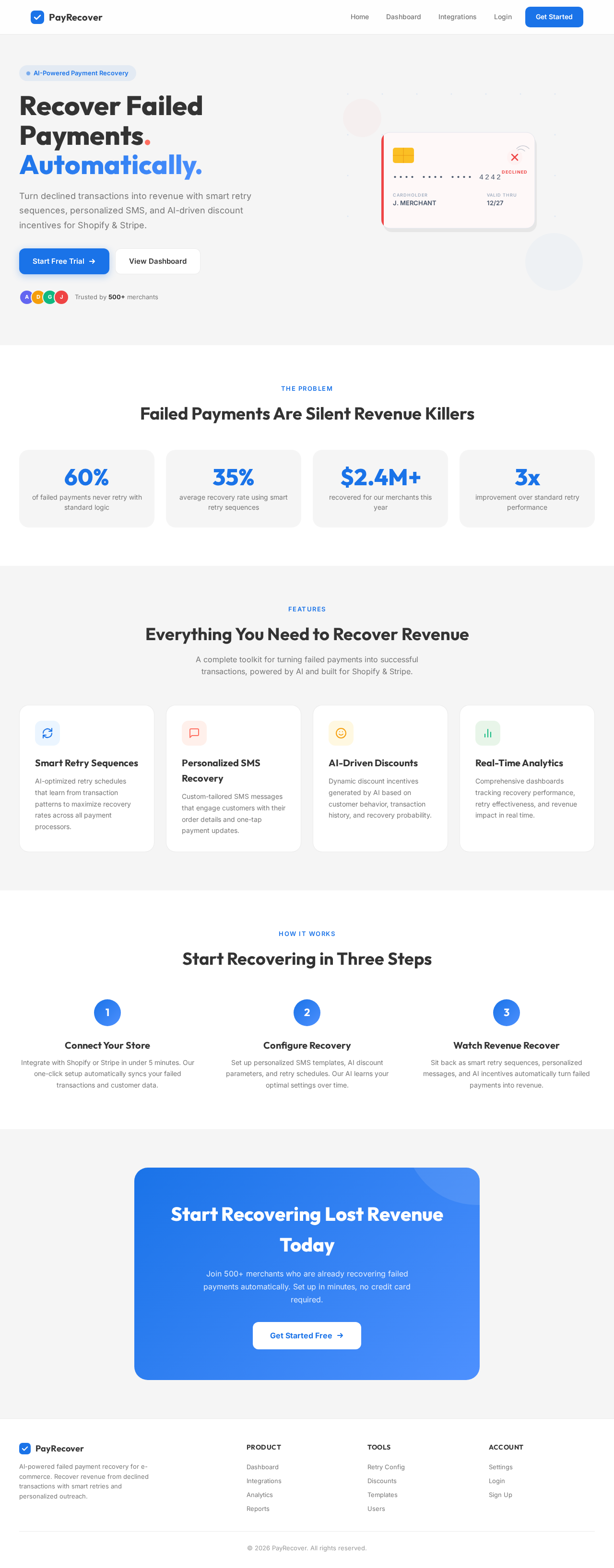
Recover Failed Payments.
Automatically.
Turn declined transactions into revenue with smart retry sequences, personalized SMS, and AI-driven discount incentives for Shopify & Stripe.
The Problem
Failed Payments Are Silent Revenue Killers
of failed payments never retry with standard logic
average recovery rate using smart retry sequences
recovered for our merchants this year
improvement over standard retry performance
Features
Everything You Need to Recover Revenue
A complete toolkit for turning failed payments into successful transactions, powered by AI and built for Shopify & Stripe.
Smart Retry Sequences
AI-optimized retry schedules that learn from transaction patterns to maximize recovery rates across all payment processors.
Personalized SMS Recovery
Custom-tailored SMS messages that engage customers with their order details and one-tap payment updates.
AI-Driven Discounts
Dynamic discount incentives generated by AI based on customer behavior, transaction history, and recovery probability.
Real-Time Analytics
Comprehensive dashboards tracking recovery performance, retry effectiveness, and revenue impact in real time.
How It Works
Start Recovering in Three Steps
Connect Your Store
Integrate with Shopify or Stripe in under 5 minutes. Our one-click setup automatically syncs your failed transactions and customer data.
Configure Recovery
Set up personalized SMS templates, AI discount parameters, and retry schedules. Our AI learns your optimal settings over time.
Watch Revenue Recover
Sit back as smart retry sequences, personalized messages, and AI incentives automatically turn failed payments into revenue.
Start Recovering Lost Revenue Today
Join 500+ merchants who are already recovering failed payments automatically. Set up in minutes, no credit card required.
Get Started FreeRecover Failed Payments.
Automatically.
Turn declined transactions into revenue with smart retry sequences, personalized SMS, and AI-driven discount incentives for Shopify & Stripe.
The Problem
Failed Payments Are Silent Revenue Killers
of failed payments never retry with standard logic
average recovery rate using smart retry sequences
recovered for our merchants this year
improvement over standard retry performance
Features
Everything You Need to Recover Revenue
A complete toolkit for turning failed payments into successful transactions, powered by AI and built for Shopify & Stripe.
Smart Retry Sequences
AI-optimized retry schedules that learn from transaction patterns to maximize recovery rates across all payment processors.
Personalized SMS Recovery
Custom-tailored SMS messages that engage customers with their order details and one-tap payment updates.
AI-Driven Discounts
Dynamic discount incentives generated by AI based on customer behavior, transaction history, and recovery probability.
Real-Time Analytics
Comprehensive dashboards tracking recovery performance, retry effectiveness, and revenue impact in real time.
How It Works
Start Recovering in Three Steps
Connect Your Store
Integrate with Shopify or Stripe in under 5 minutes. Our one-click setup automatically syncs your failed transactions and customer data.
Configure Recovery
Set up personalized SMS templates, AI discount parameters, and retry schedules. Our AI learns your optimal settings over time.
Watch Revenue Recover
Sit back as smart retry sequences, personalized messages, and AI incentives automatically turn failed payments into revenue.
Start Recovering Lost Revenue Today
Join 500+ merchants who are already recovering failed payments automatically. Set up in minutes, no credit card required.
Get Started Free
No comments yet. Be the first!