As a Data Engineer, I want to define database models for users, rooms, bookings, and complaints to ensure data integrity and support application features.
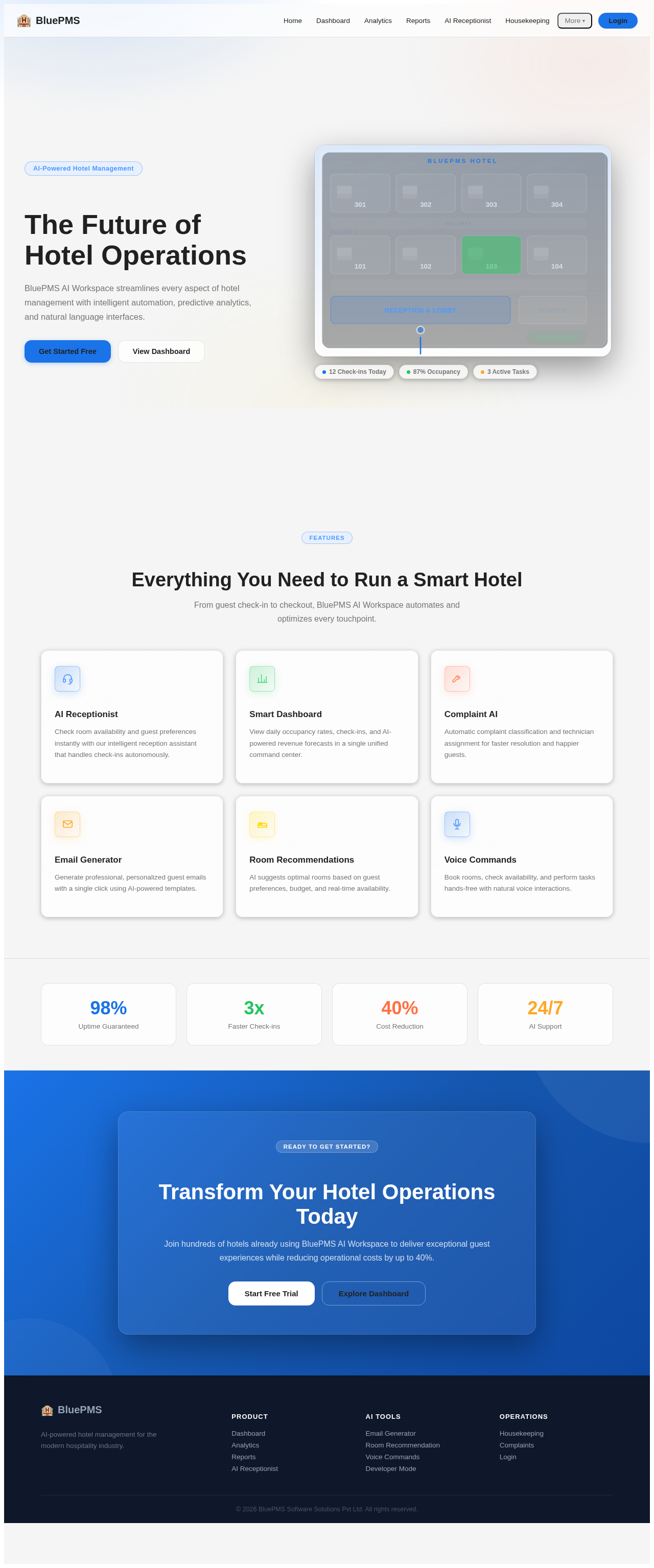
As a frontend developer, implement the CTASection for the Landing page. This section includes a call-to-action with a title, description, and two buttons linking to the Login and Dashboard pages. Ensure that the links to restricted pages like Dashboard are conditionally shown based on persona access. This section is accessible by all personas.
Page access: shared by all personas (Developer, Housekeeper, Maintenance Staff, Manager, Receptionist).
As a frontend developer, implement the FeaturesSection for the Landing page. This section displays various features of the BluePMS AI Workspace using icons and descriptions. Each feature is represented by a custom SVG icon and includes a title and description. Ensure the section is styled according to the design specifications.
Page access: shared by all personas (Developer, Housekeeper, Maintenance Staff, Manager, Receptionist).
As a frontend developer, implement the Footer for the Landing page. This section includes multiple columns with links to various pages, some of which are restricted based on persona access. Ensure that links to restricted pages are conditionally shown. The footer also includes branding and a tagline.
Page access: shared by all personas (Developer, Housekeeper, Maintenance Staff, Manager, Receptionist).
As a frontend developer, implement the HeroSection for the Landing page. This section features interactive elements with animations using motion/react, including room overlays and mouse tracking effects. It uses state hooks and motion values to create dynamic interactions. Ensure animations are smooth and responsive.
Page access: shared by all personas (Developer, Housekeeper, Maintenance Staff, Manager, Receptionist).
As a frontend developer, implement the Navbar for the Landing page. This component includes main navigation links, a dropdown for additional links, and a mobile menu toggle. Ensure that links to restricted pages are conditionally shown based on persona access. The Navbar should be responsive and accessible by all personas.
Page access: shared by all personas (Developer, Housekeeper, Maintenance Staff, Manager, Receptionist).
As a frontend developer, implement the StatsSection for the Landing page. This section displays key statistics using styled cards with values and labels. Each card is color-coded according to the design specifications. Ensure the section is visually appealing and aligns with the overall page design.
Page access: shared by all personas (Developer, Housekeeper, Maintenance Staff, Manager, Receptionist).
As a frontend developer, implement the DashboardSidebar section which includes navigation links to various dashboard sections. It uses framer-motion for animations and manages active section state. Links to restricted pages must be conditionally shown based on persona access. This section is accessible by Developer, Housekeeper, Maintenance Staff, Manager, and Receptionist.
Page access: shared by all personas (Developer, Housekeeper, Maintenance Staff, Manager, Receptionist).
As a frontend developer, implement the WelcomeBanner section which displays a welcome message with the current occupancy rate. It includes a dismiss button that hides the banner when clicked. This section is accessible by Developer, Housekeeper, Maintenance Staff, Manager, and Receptionist.
Page access: shared by all personas (Developer, Housekeeper, Maintenance Staff, Manager, Receptionist).
As a frontend developer, implement the KPICards section which displays key performance indicators such as occupancy rate, late check-ins, and expected revenue. Each card shows an icon, value, and trend with color-coded accents. This section is accessible by Developer, Housekeeper, Maintenance Staff, Manager, and Receptionist.
Page access: shared by all personas (Developer, Housekeeper, Maintenance Staff, Manager, Receptionist).
As a frontend developer, implement the OccupancyChartContainer section which includes a line chart displaying occupancy trends over selectable time ranges. It fetches data from an API based on the selected range and handles loading and error states. This section is accessible by Developer, Housekeeper, Maintenance Staff, Manager, and Receptionist.
Page access: shared by all personas (Developer, Housekeeper, Maintenance Staff, Manager, Receptionist).
As a frontend developer, implement the ActiveTasksPanel section which displays a list of active tasks with filtering options. It allows expanding task details and includes actions to update or close tasks. This section is accessible by Developer, Housekeeper, Maintenance Staff, Manager, and Receptionist.
Page access: shared by all personas (Developer, Housekeeper, Maintenance Staff, Manager, Receptionist).
As a frontend developer, implement the QuickActions section which provides quick access links to various tools and reports. Each action is represented by an icon and label, with links conditionally shown based on persona access. This section is accessible by Developer, Housekeeper, Maintenance Staff, Manager, and Receptionist.
Page access: shared by all personas (Developer, Housekeeper, Maintenance Staff, Manager, Receptionist).
As a frontend developer, implement the InputPanel section for the Developer Mode page. This section features a text input area with dynamic character count and validation, supporting multiple programming languages. It uses React hooks like useState and useMemo to manage state and optimize performance. The section is accessible only by the Developer persona.
Page access: Developer only.
As a frontend developer, implement the GenerationOptions section for the Developer Mode page. This section allows users to select generation modes like 'Generate API' and 'Generate SQL', and adjust parameters such as temperature and token limit. It uses React hooks like useState and useCallback for state management and performance optimization. The section is accessible only by the Developer persona.
Page access: Developer only.
As a frontend developer, implement the CodeDisplay section for the Developer Mode page. This section displays generated code snippets for various actions like 'API Endpoint' and 'SQL Query'. It uses React hooks like useState and useEffect to manage the display state and animations. The section is accessible only by the Developer persona.
Page access: Developer only.
As a frontend developer, implement the ExplanationPanel section for the Developer Mode page. This section provides detailed explanations of functions, including parameters and return values, using React hooks like useState and useCallback for state management. The section is accessible only by the Developer persona.
Page access: Developer only.
As a frontend developer, implement the GenerationHistory section for the Developer Mode page. This section displays a history of code generations with filters and search functionality, using React hooks like useState and useEffect for managing state and lifecycle. The section is accessible only by the Developer persona.
Page access: Developer only.
As a frontend developer, implement the QuickReferenceDocs section for the Developer Mode page. This section provides quick access to documentation and best practices, using D3.js for visualizing topic relationships. It uses React hooks like useState and useEffect for managing state and interactions. The section is accessible only by the Developer persona.
Page access: Developer only.
As a frontend developer, implement the ComplaintsStatusFilter section which allows filtering complaints by status, priority, and issue type. This section uses state hooks to manage active filters and includes interactive elements for toggling filters. The section is accessible by Maintenance Staff and Manager personas.
Page access: Maintenance Staff, Manager only.
As a frontend developer, implement the ComplaintsSearchBar section which includes search functionality, date range selection, assignee filtering, and sorting options. This section uses state hooks for managing search queries and filter states, and includes dropdowns with animations. The section is accessible by Maintenance Staff and Manager personas.
Page access: Maintenance Staff, Manager only.
As a frontend developer, implement the ComplaintsStats section which displays statistical cards with trend indicators and sparklines. This section uses D3 for rendering sparklines and includes motion animations for card transitions. The section is accessible by Maintenance Staff and Manager personas.
Page access: Maintenance Staff, Manager only.
As a frontend developer, implement the ComplaintsList section which displays a list of complaints with sorting and pagination features. This section uses state hooks for managing list data and includes animations for list item transitions. The section is accessible by Maintenance Staff and Manager personas.
Page access: Maintenance Staff, Manager only.
As a frontend developer, implement the ComplaintDetailsModal section which provides detailed information about a specific complaint. This section includes interactive elements for viewing complaint timelines and technician assignments, and uses D3 for rendering a confidence gauge. The section is accessible by Maintenance Staff and Manager personas.
Page access: Maintenance Staff, Manager only.
As a frontend developer, implement the ReportsTypeFilter section for the Reports page, which allows Managers to filter reports by type using interactive badges. The section includes a clear filter button to reset selections.
Page access: Manager only.
As a frontend developer, implement the ReportsSearchBar section for the Reports page, which includes search functionality by name or ID, date range filters, status filters, and sorting options. This section is accessible by Managers only.
Page access: Manager only.
As a frontend developer, implement the ReportsQuickStats section for the Reports page, which displays quick statistics about reports such as total reports, average generation time, pending reports, and storage used. This section uses memoization for performance optimization and is accessible by Managers only.
Page access: Manager only.
As a frontend developer, implement the ReportsList section for the Reports page, which displays a table of reports with sortable columns and pagination. The table should handle empty states and allow row selection for detailed view. This section is accessible by Managers only.
Page access: Manager only.
As a frontend developer, implement the ReportDownloadActions section for the Reports page, which provides options to download reports in PDF, Excel, and CSV formats, and share via link or email. This section is accessible by Managers only.
Page access: Manager only.
As a Backend Developer, create REST API endpoints to handle voice command processing, including endpoints for receiving voice input, processing commands, and returning results. Ensure integration with AI services for command interpretation.
As a Backend Developer, create REST API endpoints for the AI Receptionist to handle guest check-ins, room availability checks, and preference retrieval. Ensure integration with AI services for intelligent responses.
As a Backend Developer, create REST API endpoints for generating and retrieving AI-generated reports on occupancy and revenue. Ensure endpoints support PDF, Excel, and CSV formats.
As a Backend Developer, create REST API endpoints for the AI Email Generator to handle email creation, template selection, and sending. Ensure integration with AI services for content generation.
As a Backend Developer, create REST API endpoints for retrieving AI analytics insights on revenue, occupancy, and trends. Ensure endpoints provide data for visualization and decision-making.
As a Backend Developer, create REST API endpoints for providing AI room recommendations based on guest preferences and budget. Ensure integration with AI services for personalized suggestions.
As a Backend Developer, create REST API endpoints for smart housekeeping predictions and room assignments. Ensure integration with AI services for predictive insights.
As a Backend Developer, create REST API endpoints for AI-generated complaint classifications and technician assignments. Ensure integration with AI services for automated processing.
As a frontend developer, implement the Navbar for the Landing page. This component includes main navigation links and a dropdown for additional links. It features a mobile-responsive design with a hamburger menu toggle. Ensure that links to restricted pages are conditionally shown based on persona access, and the component is styled according to the provided CSS.
Page access: shared by all personas (Developer, Housekeeper, Maintenance Staff, Manager, Receptionist).
As a Backend Developer, implement rate limiting for authentication routes with stricter limits, moderate limits for public endpoints, and looser limits for authenticated user actions. Use a combination of per-IP and per-account limits with exponential backoff. Ensure all thresholds are configurable.
As a Backend Developer, validate every input against a strict schema (type, length, format) and reject non-matching inputs. Ensure robust input validation across all endpoints.
As a DevOps Engineer, scan the codebase for hardcoded API keys, tokens, or passwords. Replace them with environment variables and ensure nothing sensitive is exposed in the frontend or pushed to git.
As a DevOps Engineer, run a dependency audit to identify packages with known vulnerabilities. List their severity and update or replace them where safe.
As a Backend Developer, review error handling to ensure users never see stack traces, internal file paths, or raw database errors. Return generic messages while logging full error details server-side.
As a Backend Developer, review file upload functionality to confirm file type, size, and content are validated. Ensure uploads are stored outside the web root or in isolated storage, and cannot be executed as code.
As a Backend Developer, implement role-based access control (RBAC) to manage permissions for Customer, Admin, Receptionist, Manager, Housekeeper, Developer, and Maintenance Staff roles. Ensure each role has specific permissions tailored to their responsibilities.
As a Data Engineer, define a database model for storing AI analytics insights on revenue, occupancy, and trends to support the Analytics API.
As a Backend Developer, implement a scheduled job to send notifications to housekeepers about room readiness predictions and assignments.
As a Backend Developer, create REST API endpoints for the AI Developer Assistant to handle API generation, SQL generation, and documentation creation. Ensure integration with AI services for content generation.
As a Backend Developer, create REST API endpoints for retrieving AI-generated occupancy and revenue reports. Ensure endpoints support PDF, Excel, and CSV formats and integrate with AI services for data generation.
As a Backend Developer, create AI integration for processing voice commands, ensuring seamless interaction with AI services for command interpretation and execution.
As a Backend Developer, create AI integration for generating analytics insights on revenue, occupancy, and trends. Ensure seamless data flow and integration with AI services.
As a Data Engineer, I want to create database migrations for initial schema setup to ensure consistent database structure across environments.
Depends on:#1
Waiting for dependencies
As a frontend developer, implement the Navbar section for the Login page. This component includes main navigation links such as Home, Dashboard, Analytics, and more, with a dropdown for additional links. It uses state hooks to manage mobile and dropdown menu visibility. Ensure that links to restricted pages like 'AI Receptionist' and 'Developer Mode' are conditionally shown based on persona access. This component may already exist from the Landing page.
Page access: shared by all personas (Developer, Housekeeper, Maintenance Staff, Manager, Receptionist).
Depends on:#7
Waiting for dependencies
As a frontend developer, implement the OccupancyLineChart section which renders a responsive area chart using recharts library. It visualizes occupancy data with gradient fills and tooltips. This section is accessible by Developer, Housekeeper, Maintenance Staff, Manager, and Receptionist.
Page access: shared by all personas (Developer, Housekeeper, Maintenance Staff, Manager, Receptionist).
Depends on:#21
Waiting for dependencies
As a frontend developer, implement the ReportViewerModal section for the Reports page, which displays detailed information about a selected report in a modal view. It includes report metadata, summary statistics, and a placeholder for report visualization. This section is accessible by Managers only.
Page access: Manager only.
Depends on:#78
Waiting for dependencies
As a Tech Lead, verify the end-to-end integration between the AI Receptionist frontend implementation and the AI Receptionist backend API. Ensure data flows correctly, API responses are handled properly in the UI, and all interactions work as expected.
Depends on:#88
Waiting for dependencies
As a Tech Lead, verify the end-to-end integration between the Reports frontend implementation and the Reports backend API. Ensure data flows correctly, API responses are handled properly in the UI, and all interactions work as expected.
Depends on:#89#78
Waiting for dependencies
As a Tech Lead, verify the end-to-end integration between the Complaints frontend implementation and the Complaints backend API. Ensure data flows correctly, API responses are handled properly in the UI, and all interactions work as expected.
Depends on:#94#44
Waiting for dependencies
As a Data Engineer, define data retention policies for user, booking, and complaint data to ensure compliance with data privacy regulations.
Depends on:#1
Waiting for dependencies
As a Data Engineer, define a database model for guest preferences to support AI room recommendations and personalized services.
Depends on:#1
Waiting for dependencies
As a Data Engineer, define a database model for storing voice command data to support AI processing and analytics.
Depends on:#1
Waiting for dependencies
As a QA Engineer, develop test cases and perform testing for the AI Developer Assistant API to ensure it meets functional requirements and integrates correctly with AI services.
Depends on:#125
Waiting for dependencies
As a Data Engineer, define a database model for storing AI-generated complaint classifications and technician assignments to support the Complaints API.
Depends on:#1
Waiting for dependencies
As a Data Engineer, define a database model for storing AI-generated housekeeping predictions to support the Housekeeping API.
Depends on:#1
Waiting for dependencies
As a Tech Lead, verify the end-to-end integration between the Occupancy Revenue frontend implementation and the Occupancy Revenue backend API. Ensure data flows correctly, API responses are handled properly in the UI, and all interactions work as expected.
Depends on:#133
Waiting for dependencies
As a Tech Lead, verify the end-to-end integration between the Voice Command frontend implementation and the Voice Command backend API. Ensure data flows correctly, API responses are handled properly in the UI, and all interactions work as expected.
Depends on:#135
Waiting for dependencies
As a Tech Lead, verify the end-to-end integration between the Dashboard Analytics frontend implementation and the Dashboard Analytics backend API. Ensure data flows correctly, API responses are handled properly in the UI, and all interactions work as expected.
Depends on:#137
Waiting for dependencies
As a Backend Developer, I want to develop REST API endpoints for user authentication, room management, booking, and complaints to enable frontend integration.
Depends on:#2
Waiting for dependencies
As a frontend developer, implement the LoginFormCard section for the Login page. This component includes form fields for email and password, validation logic, and an API call to '/api/auth/login'. It manages state for form inputs, loading status, and error messages. Ensure the form handles successful login by storing the token and redirecting to the dashboard. This section is accessible by all personas.
Page access: shared by all personas (Developer, Housekeeper, Maintenance Staff, Manager, Receptionist).
Depends on:#13
Waiting for dependencies
As a frontend developer, implement the LoginSocialDivider section for the Login page. This component provides buttons for social login options like Google and Microsoft. It includes placeholder functions for OAuth flows, which should be replaced with actual redirects. This section is accessible by all personas.
Page access: shared by all personas (Developer, Housekeeper, Maintenance Staff, Manager, Receptionist).
Depends on:#13
Waiting for dependencies
As a frontend developer, implement the Footer section for the Login page. This component includes links organized into sections like Product, AI Tools, and Operations. Ensure that links to restricted pages are conditionally shown based on persona access. This component may already exist from the Landing page.
Page access: shared by all personas (Developer, Housekeeper, Maintenance Staff, Manager, Receptionist).
Depends on:#13
Waiting for dependencies
As a frontend developer, implement the DashboardHeader section which displays a dynamic greeting and the current date and time. It uses a state hook to update the time every second and formats it using toLocaleTimeString. This section is accessible by Developer, Housekeeper, Maintenance Staff, Manager, and Receptionist.
Page access: shared by all personas (Developer, Housekeeper, Maintenance Staff, Manager, Receptionist).
Depends on:#13
Waiting for dependencies
As a Backend Developer, create REST API endpoints for managing guest preferences, ensuring integration with AI services for personalized room recommendations. Accessible by Receptionist.
Depends on:#116
Waiting for dependencies
As a Backend Developer, create REST API endpoints for processing voice commands, ensuring integration with AI services for command interpretation. Accessible by Receptionist and Customer.
Depends on:#117
Waiting for dependencies
As a Backend Developer, create REST API endpoints for handling AI-generated complaint classifications and technician assignments. Accessible by Maintenance Staff and Manager.
Depends on:#127
Waiting for dependencies
As a Backend Developer, create REST API endpoints for managing AI-generated housekeeping predictions and room assignments. Accessible by Housekeeper.
Depends on:#128
Waiting for dependencies
As a Backend Developer, I want to implement JWT-based authentication and role-based access control to secure API endpoints and ensure proper access.
Depends on:#3
Waiting for dependencies
As a frontend developer, implement the DeveloperModeHero section for the Developer Mode page. This section includes a D3.js force-directed graph visualization of capabilities such as 'Generate API', 'Generate SQL', and 'Generate Docs'. It uses React hooks like useRef and useState to manage the SVG elements and simulation state. The section is accessible only by the Developer persona and must integrate with the existing Dashboard page.
Page access: Developer only.
Depends on:#17
Waiting for dependencies
As a frontend developer, implement the HousekeepingHeader section which includes a live clock using useState and useEffect hooks, a ProgressRing component using D3 for animated progress visualization, and a list of default room statuses. This section is accessible by Housekeeper and Manager personas.
Page access: Housekeeper, Manager only.
Depends on:#17
Waiting for dependencies
As a frontend developer, implement the ComplaintsHeader section which includes a D3-powered sparkline chart to visualize weekly complaint trends. This section uses animations for the line and area paths, and dynamically updates circle markers for data points. Ensure the header includes breadcrumb navigation with motion animations. This section is accessible by Maintenance Staff and Manager personas.
Page access: Maintenance Staff, Manager only.
Depends on:#17
Waiting for dependencies
As a frontend developer, implement the ReceptionistPageHeader section for the AI Receptionist page. This section displays the page header with the title 'AI Receptionist — Check Guest In Instantly' and a subtitle describing the features. It also shows the current occupancy percentage using a badge. This section is accessible only by the Receptionist persona.
Page access: Receptionist only.
Depends on:#17
Waiting for dependencies
As a frontend developer, implement the AnalyticsHeader section which includes animated text and filter buttons for selecting date ranges. The section uses motion animations for the header text and filter buttons, and includes a date range selection feature that updates based on user interaction. This section is accessible by Managers only and must include dependencies from the Dashboard page.
Page access: Manager only.
Depends on:#17
Waiting for dependencies
As a frontend developer, implement the EmailGeneratorHeader section which displays the title 'Email Generator AI' and a subtitle. It includes a badge indicating 'Powered by OpenAI GPT' and a link to recent drafts if available. This section is accessible by Managers only and should integrate with the Dashboard page. Ensure the header is styled according to the provided CSS.
Page access: Manager only.
Depends on:#17
Waiting for dependencies
As a QA Engineer, develop test cases and perform testing for the Guest Preferences API to ensure it meets functional requirements and integrates correctly with AI services.
Depends on:#118
Waiting for dependencies
As a QA Engineer, develop test cases and perform testing for the Voice Command API to ensure it meets functional requirements and integrates correctly with AI services.
Depends on:#119
Waiting for dependencies
As a Tech Lead, verify the end-to-end integration between the Dashboard frontend implementation and the Dashboard backend API. Ensure data flows correctly, API responses are handled properly in the UI, and all interactions work as expected.
Depends on:#17#91
Waiting for dependencies
As a QA Engineer, develop test cases and perform testing for the Complaint Classification API to ensure it meets functional requirements and integrates correctly with AI services.
Depends on:#129
Waiting for dependencies
As a QA Engineer, develop test cases and perform testing for the Housekeeping Prediction API to ensure it meets functional requirements and integrates correctly with AI services.
Depends on:#130
Waiting for dependencies
As a QA Engineer, I want to develop integration tests for critical workflows to ensure system reliability and correct API behavior.
Depends on:#3#4
Waiting for dependencies
As a frontend developer, implement the NotificationPanel section which displays notifications with urgency rings using D3, and allows for expanding and dismissing notifications. This section is accessible by Housekeeper and Manager personas.
Page access: Housekeeper, Manager only.
Depends on:#32
Waiting for dependencies
As a frontend developer, implement the PredictionCard section which includes a timeline chart using D3, a list of cleaning steps, and guest preferences. This section is accessible by Housekeeper and Manager personas.
Page access: Housekeeper, Manager only.
Depends on:#32
Waiting for dependencies
As a frontend developer, implement the RoomAssignmentGrid section which displays a grid of room assignments with status filters and dynamic updates. This section is accessible by Housekeeper and Manager personas.
Page access: Housekeeper, Manager only.
Depends on:#32
Waiting for dependencies
As a frontend developer, implement the RoomCardActions section which includes interactive room cards with progress rings and status updates using D3. This section is accessible by Housekeeper and Manager personas.
Page access: Housekeeper, Manager only.
Depends on:#32
Waiting for dependencies
As a frontend developer, implement the ProgressMetrics section which displays various metrics using animated numbers and D3 visualizations. This section is accessible by Housekeeper and Manager personas.
Page access: Housekeeper, Manager only.
Depends on:#32
Waiting for dependencies
As a frontend developer, implement the ActivityLog section which displays a log of housekeeping activities with a D3 sparkline for activity frequency. This section is accessible by Housekeeper and Manager personas.
Page access: Housekeeper, Manager only.
Depends on:#32
Waiting for dependencies
As a frontend developer, implement the QuickActions section which includes interactive elements for quick task management and synchronization status using D3. This section is accessible by Housekeeper and Manager personas.
Page access: Housekeeper, Manager only.
Depends on:#32
Waiting for dependencies
As a frontend developer, implement the GuestSearchInput section for the AI Receptionist page. This section includes a search input field with a clear button and status messages for searching, found, not found, and error states. It allows searching by guest name, email, or booking ID. This section is accessible only by the Receptionist persona.
Page access: Receptionist only.
Depends on:#46
Waiting for dependencies
As a frontend developer, implement the GuestDetailsCard section for the AI Receptionist page. This section displays detailed information about a guest, including name, contact details, booking ID, check-in and check-out dates, number of nights, and party size. It also shows the guest's booking status. This section is accessible only by the Receptionist persona.
Page access: Receptionist only.
Depends on:#46
Waiting for dependencies
As a frontend developer, implement the PreferencesSummary section for the AI Receptionist page. This section displays a summary of guest preferences, including room type, bed type, floor, and any special requests. It includes a toggle button to expand or edit preferences. This section is accessible only by the Receptionist persona.
Page access: Receptionist only.
Depends on:#46
Waiting for dependencies
As a frontend developer, implement the RoomRecommendationGrid section for the AI Receptionist page. This section displays AI-recommended rooms with details such as room number, type, floor, amenities, price per night, and confidence match percentage. It allows room selection and handles loading and error states. This section is accessible only by the Receptionist persona.
Page access: Receptionist only.
Depends on:#46
Waiting for dependencies
As a frontend developer, implement the VoiceMicInterface section for the AI Receptionist page. This section provides a microphone interface for voice commands, with states for idle, listening, processing, and confirmed. It includes error handling and is accessible only by the Receptionist persona.
Page access: Receptionist only.
Depends on:#46
Waiting for dependencies
As a frontend developer, implement the InvoiceDisplay section for the AI Receptionist page. This section displays a detailed guest invoice, including guest name, booking ID, check-in and check-out dates, room details, pricing breakdown, and payment method. It handles loading and error states. This section is accessible only by the Receptionist persona.
Page access: Receptionist only.
Depends on:#46
Waiting for dependencies
As a frontend developer, implement the AnalyticsMetricsGrid section which displays various metrics such as revenue, occupancy, and bookings. This section includes animated metric cards with icons, sparklines, and skeleton loaders for loading states. It is accessible by Managers only and should be implemented independently of other sections.
Page access: Manager only.
Depends on:#55
Waiting for dependencies
As a frontend developer, implement the AnalyticsCharts section which includes line and bar charts for visualizing revenue and occupancy data. The section uses Recharts for rendering charts and includes custom tooltips and skeleton loaders for loading states. This section is accessible by Managers only and should be implemented independently of other sections.
Page access: Manager only.
Depends on:#55
Waiting for dependencies
As a frontend developer, implement the AnalyticsTrends section which displays trend insights with animated cards. Each card includes an icon, title, and detail text, with skeleton loaders for loading states. This section is accessible by Managers only and should be implemented independently of other sections.
Page access: Manager only.
Depends on:#55
Waiting for dependencies
As a frontend developer, implement the EmailTemplateSelector section which allows Managers to select email templates. It includes a toggle for mobile view, displays loading and error states, and highlights the selected template. Ensure the component is interactive and styled according to the provided CSS.
Page access: Manager only.
Depends on:#59
Waiting for dependencies
As a frontend developer, implement the EmailComposerFields section which provides input fields for subject, recipient, and body of the email. Each field should be interactive, allowing Managers to input and modify email content. Ensure the component is styled according to the provided CSS.
Page access: Manager only.
Depends on:#59
Waiting for dependencies
As a frontend developer, implement the EmailAIControls section which allows Managers to manage AI-generated variables and regenerate email content. The section includes buttons for adding/removing variables and a regenerate button with loading states. Ensure the component is styled according to the provided CSS.
Page access: Manager only.
Depends on:#59
Waiting for dependencies
As a frontend developer, implement the EmailPreviewDisplay section which shows a preview of the email with recipient, subject, and body. It should replace variable placeholders with active variables and support both desktop and mobile views. Ensure the component is styled according to the provided CSS.
Page access: Manager only.
Depends on:#59
Waiting for dependencies
As a frontend developer, implement the EmailSubmitActions section which provides buttons for sending, saving as draft, sending a test, and clearing the email form. Ensure the buttons are interactive and styled according to the provided CSS. This section is accessible by Managers only.
Page access: Manager only.
Depends on:#59
Waiting for dependencies
As a frontend developer, implement the RoomRecommendationHeader section which includes a breadcrumb navigation linking to the Dashboard and a title 'Smart Room Recommendations'. This section is accessible by Receptionist ONLY and should integrate with the AI Receptionist page. Ensure the breadcrumb and title are styled according to the design specifications.
Page access: Receptionist only.
Depends on:#46
Waiting for dependencies
As a frontend developer, implement the ReportsHeader section for the Reports page, which includes a breadcrumb navigation, a title, and a button to request new reports. The button should be disabled when a report request is in progress. This section is accessible by Managers only and depends on the Analytics page implementation.
Page access: Manager only.
Depends on:#55
Waiting for dependencies
As a Tech Lead, verify the end-to-end integration between the Analytics frontend implementation and the Analytics backend API. Ensure data flows correctly, API responses are handled properly in the UI, and all interactions work as expected.
Depends on:#91#55
Waiting for dependencies
As a Tech Lead, verify the end-to-end integration between the Housekeeping frontend implementation and the Housekeeping backend API. Ensure data flows correctly, API responses are handled properly in the UI, and all interactions work as expected.
Depends on:#93#32
Waiting for dependencies
As a Backend Developer, implement middleware for role-based access control to manage permissions for Customer, Admin, Receptionist, Manager, Housekeeper, Developer, and Maintenance Staff roles.
Depends on:#4
Waiting for dependencies
As a DevOps Engineer, I want to set up a CI/CD pipeline for automated deployment to Vercel and Railway to ensure smooth and reliable releases.
Depends on:#5
Waiting for dependencies
As a frontend developer, implement the PreferencesModifyPanel section for the AI Receptionist page. This section allows modification of guest preferences, including room type, bed preference, floor preference, and special requests. It includes an override toggle and displays preference history. This section is accessible only by the Receptionist persona.
Page access: Receptionist only.
Depends on:#49
Waiting for dependencies
As a frontend developer, implement the VoiceTranscriptionDisplay section for the AI Receptionist page. This section displays the transcription of voice commands, confidence level, and interpreted command. It includes actions to confirm or cancel the command and a manual entry option. This section is accessible only by the Receptionist persona.
Page access: Receptionist only.
Depends on:#52
Waiting for dependencies
As a frontend developer, implement the EmailPreviewActions section which provides actions for copying, downloading, and toggling the device view of the email preview. Ensure the component is interactive and styled according to the provided CSS.
Page access: Manager only.
Depends on:#63
Waiting for dependencies
As a frontend developer, implement the GuestPreferenceForm section which allows users to input guest name, number of guests, budget, and special requirements. This form uses state hooks for managing form data and includes animations for form transitions. It is accessible by Receptionist ONLY.
Page access: Receptionist only.
Depends on:#66
Waiting for dependencies
As a frontend developer, implement the RecommendedRoomsGrid section which displays a grid of recommended rooms based on guest preferences. Each room card includes amenities, price, and match percentage with animations for hover effects. This section is accessible by Receptionist ONLY.
Page access: Receptionist only.
Depends on:#66
Waiting for dependencies
As a frontend developer, implement the VoiceCommandsHeader section which displays the current local time and a static microphone status. This section uses React hooks such as useState and useEffect to update the time every second. The status is displayed with a dot indicator that changes based on the status text. This section is accessible by Receptionist ONLY.
Page access: Receptionist only.
Depends on:#66
Waiting for dependencies
As a Tech Lead, verify the end-to-end integration between the Email Generator frontend implementation and the Email Generator backend API. Ensure data flows correctly, API responses are handled properly in the UI, and all interactions work as expected.
Depends on:#61#90
Waiting for dependencies
As a Tech Lead, verify the end-to-end integration between the Room Recommendation frontend implementation and the Room Recommendation backend API. Ensure data flows correctly, API responses are handled properly in the UI, and all interactions work as expected.
Depends on:#66#92
Waiting for dependencies
As a Full Stack Developer, develop a shared API client service for frontend to interact with backend APIs, ensuring consistent error handling and authentication.
Depends on:#103
Waiting for dependencies
As a frontend developer, implement the RoomDetailPanel section which displays detailed information about a selected room, including a photo carousel and room details. This section uses state hooks for image navigation and is accessible by Receptionist ONLY.
Page access: Receptionist only.
Depends on:#68
Waiting for dependencies
As a frontend developer, implement the VoiceInputWidget section which simulates a voice input system. It includes a microphone button that toggles recording and processing states, using useState and useRef hooks. The widget simulates speech-to-text results and updates the parent component with transcribed text. This section is accessible by Receptionist ONLY.
Page access: Receptionist only.
Depends on:#81
Waiting for dependencies
As a frontend developer, implement the CommandSuggestions section which displays a list of suggested voice commands. Each command can be copied to the clipboard, with a visual feedback mechanism using useState. This section is accessible by Receptionist ONLY.
Page access: Receptionist only.
Depends on:#81
Waiting for dependencies
As a frontend developer, implement the CommandHistory section which displays a list of previously executed commands with their status and execution time. It includes a re-execute button for each command. This section is accessible by Receptionist ONLY.
Page access: Receptionist only.
Depends on:#81
Waiting for dependencies
As a frontend developer, implement the QuickCommandChips section which provides quick access buttons for frequently used commands. Each chip triggers a command execution or opens a modal. This section is accessible by Receptionist ONLY.
Page access: Receptionist only.
Depends on:#81
Waiting for dependencies
As a QA Engineer, conduct a comprehensive security audit to ensure all endpoints are protected against common vulnerabilities and follow best practices.
Depends on:#103#105
Waiting for dependencies
As a frontend developer, implement the RoomAmenitiesSection which displays a list of room amenities with corresponding icons. This section is accessible by Receptionist ONLY.
Page access: Receptionist only.
Depends on:#69
Waiting for dependencies
As a frontend developer, implement the RoomPoliciesSection which displays house rules and policies for the room. This section is accessible by Receptionist ONLY.
Page access: Receptionist only.
Depends on:#69
Waiting for dependencies
As a frontend developer, implement the GuestReviewsSection which displays guest reviews with ratings and review text. This section is accessible by Receptionist ONLY.
Page access: Receptionist only.
Depends on:#69
Waiting for dependencies
As a frontend developer, implement the ConfirmationCTA section which provides a summary of the selected room and allows the user to confirm or modify their selection. This section is accessible by Receptionist ONLY.
Page access: Receptionist only.
Depends on:#69
Waiting for dependencies
As a frontend developer, implement the TranscriptionDisplay section which shows live and final transcriptions of voice input. It uses useState and useEffect to manage interim and final text states, and allows editing of the final text. This section is accessible by Receptionist ONLY.
Page access: Receptionist only.
Depends on:#82
Waiting for dependencies
As a Tech Lead, verify the end-to-end integration between the Voice Commands frontend implementation and the Voice Commands backend API. Ensure data flows correctly, API responses are handled properly in the UI, and all interactions work as expected.
Depends on:#83#87
Waiting for dependencies
As a DevOps Engineer, enhance the CI/CD pipeline to include automated security checks and deployment verification for both frontend and backend.
Depends on:#6#106
Waiting for dependencies



No comments yet. Be the first!